Introduction
Classroom Management Software helps teachers and institutions manage student behavior, engagement, assignments, communication, and classroom activities in a structured digital environment. In simple terms, it gives teachers better control, visibility, and interaction with students—whether the class is physical, virtual, or hybrid.
As education shifts toward digital and blended learning models, classroom management has become more complex. Teachers now handle distractions, device usage, remote learners, and performance tracking simultaneously. Modern tools solve this by offering real-time monitoring, collaboration features, and automation.
Real-world use cases:
- Monitoring student activity during online classes
- Managing assignments, quizzes, and grading
- Controlling devices in computer labs
- Improving student engagement with interactive tools
- Communicating with students and parents
What buyers should evaluate:
- Ease of use for teachers and students
- Real-time monitoring and control features
- Device compatibility (laptops, tablets, mobile)
- Integration with LMS/SIS platforms
- Reporting and analytics capabilities
- Security and privacy controls
- Scalability across classrooms or campuses
- Collaboration and communication tools
- Pricing model and total cost of ownership
Best for: Schools, colleges, coaching institutes, and training centers that want better control and engagement in classrooms—especially those using digital devices.
Not ideal for: Very small institutions with minimal digital usage or classrooms that rely entirely on traditional teaching methods.
Key Trends in Classroom Management Software
- AI-based student engagement tracking: Tools analyze attention levels and participation
- Real-time screen monitoring: Teachers can view and control student devices instantly
- Hybrid classroom support: Seamless management of both online and offline students
- Gamification features: Points, rewards, and badges to boost engagement
- Behavior analytics: Insights into student performance and discipline trends
- Cloud-first platforms: Increased adoption of SaaS-based classroom tools
- Privacy-first design: Strong focus on student data protection
- Mobile-first experience: Apps for teachers and students
- Integration with LMS and EdTech tools: Unified digital classroom ecosystem
- Automation of routine tasks: Attendance, grading, and communication workflows
How We Selected These Tools (Methodology)
- Considered global adoption and popularity in schools and colleges
- Evaluated core classroom management features (monitoring, control, engagement)
- Assessed ease of use for teachers with varying technical skills
- Reviewed performance in real-time classroom environments
- Looked at security and privacy capabilities
- Checked integration capabilities with LMS, SIS, and productivity tools
- Included tools suitable for different institution sizes
- Balanced cloud-based and device-control solutions
- Considered vendor support and product maturity
- Focused on tools that support modern hybrid learning environments
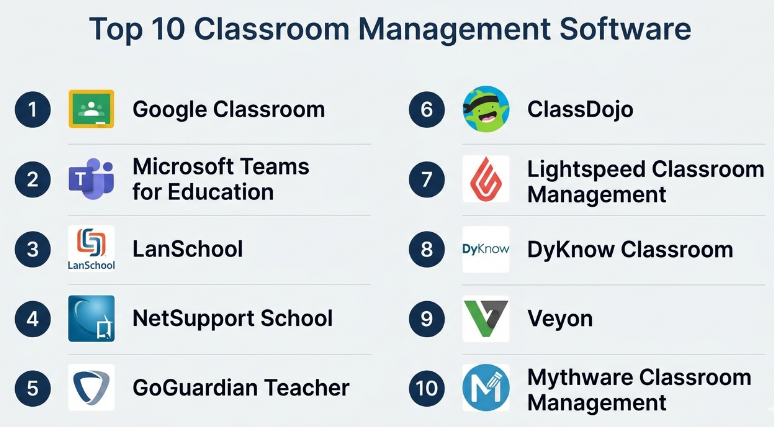
Top 10 Classroom Management Software
#1 — Google Classroom
Short description:
Google Classroom is a widely used classroom management platform that simplifies assignment distribution, grading, and communication. It integrates seamlessly with Google Workspace, making it ideal for schools already using Google tools. It focuses more on workflow and collaboration than device control.
Key Features
- Assignment and grading management
- Real-time collaboration tools
- Integration with Google Drive and Docs
- Classroom communication and announcements
- Mobile accessibility
Pros
- Easy to use and widely adopted
- Strong ecosystem integration
Cons
- Limited device monitoring features
- Basic behavior tracking
Platforms / Deployment
- Web / iOS / Android
- Cloud
Security & Compliance
- Authentication, access controls
- Not publicly stated certifications
Integrations & Ecosystem
Strong integration with Google ecosystem.
- Google Docs, Sheets, Drive
- Third-party EdTech tools
- API support
Support & Community
Extensive documentation and large global user base.
#2 — Microsoft Teams for Education
Short description:
Microsoft Teams for Education provides a unified platform for communication, assignments, and collaboration. It is ideal for institutions using Microsoft 365 and supports both classroom management and virtual learning.
Key Features
- Virtual classrooms and meetings
- Assignment management
- File sharing and collaboration
- Chat and communication tools
- Integration with Microsoft apps
Pros
- Strong collaboration features
- Enterprise-grade scalability
Cons
- Can be complex for beginners
- Requires Microsoft ecosystem
Platforms / Deployment
- Web / Windows / macOS / Mobile
- Cloud
Security & Compliance
- RBAC, MFA, encryption
- Not publicly stated certifications
Integrations & Ecosystem
Deep Microsoft ecosystem integration.
- Office tools
- LMS integrations
- APIs
Support & Community
Strong enterprise support and documentation.
#3 — LanSchool
Short description:
LanSchool is a classroom management solution focused on real-time device monitoring and control. It is widely used in computer labs and schools with strong IT infrastructure.
Key Features
- Screen monitoring
- Remote device control
- Application blocking
- Classroom collaboration tools
- Activity tracking
Pros
- Strong device control capabilities
- Ideal for computer labs
Cons
- Limited LMS features
- Requires setup
Platforms / Deployment
- Windows / macOS
- On-premise / Hybrid
Security & Compliance
- Access controls
- Not publicly stated
Integrations & Ecosystem
Works with school IT systems.
- Device management tools
- Limited APIs
Support & Community
Vendor support with training resources.
#4 — NetSupport School
Short description:
NetSupport School offers comprehensive classroom management with strong monitoring and control features. It is suitable for both physical and virtual classrooms.
Key Features
- Real-time monitoring
- Device control
- Lesson planning tools
- Student engagement features
- Reporting
Pros
- Feature-rich
- Works in hybrid environments
Cons
- Interface complexity
- Requires training
Platforms / Deployment
- Windows / macOS
- On-premise / Hybrid
Security & Compliance
- Not publicly stated
Integrations & Ecosystem
Supports integration with IT systems.
- Device management
- Basic APIs
Support & Community
Strong vendor support.
#5 — GoGuardian Teacher
Short description:
GoGuardian Teacher is a cloud-based classroom management tool focused on student device monitoring and safety. It is widely used in schools with Chromebook environments.
Key Features
- Screen monitoring
- Website filtering
- Student activity tracking
- Classroom engagement tools
- Reporting
Pros
- Easy to deploy
- Strong monitoring features
Cons
- Works best with Chromebooks
- Limited offline features
Platforms / Deployment
- Web
- Cloud
Security & Compliance
- Access controls
- Not publicly stated
Integrations & Ecosystem
Works with Google ecosystem.
- Chrome OS integration
- Basic APIs
Support & Community
Good support and growing community.
#6 — ClassDojo
Short description:
ClassDojo focuses on behavior management and communication between teachers, students, and parents. It is widely used in primary education.
Key Features
- Behavior tracking
- Parent communication
- Student portfolios
- Rewards system
- Messaging
Pros
- Strong engagement features
- Easy to use
Cons
- Limited academic tools
- Not ideal for higher education
Platforms / Deployment
- Web / Mobile
- Cloud
Security & Compliance
- Not publicly stated
Integrations & Ecosystem
Limited integrations.
- Communication tools
- Basic APIs
Support & Community
Large user community.
#7 — Lightspeed Classroom Management
Short description:
Lightspeed offers real-time monitoring and control for classroom devices, focusing on safety and engagement.
Key Features
- Device monitoring
- Screen sharing
- Application control
- Alerts and analytics
- Reporting
Pros
- Strong monitoring
- Scalable
Cons
- Limited assignment features
- Requires device setup
Platforms / Deployment
- Web
- Cloud
Security & Compliance
- Not publicly stated
Integrations & Ecosystem
Works with school systems.
- Device integrations
- APIs
Support & Community
Vendor support available.
#8 — DyKnow Classroom
Short description:
DyKnow provides classroom management with a focus on engagement and analytics. It supports both in-class and remote learning.
Key Features
- Screen monitoring
- Engagement analytics
- Blocking tools
- Reporting
- Collaboration features
Pros
- Strong analytics
- Easy deployment
Cons
- Limited integrations
- UI improvements needed
Platforms / Deployment
- Web / Windows
- Cloud
Security & Compliance
- Not publicly stated
Integrations & Ecosystem
Basic integrations.
- Data exports
- APIs
Support & Community
Vendor support and documentation.
#9 — Veyon
Short description:
Veyon is an open-source classroom management tool designed for device monitoring and control in educational environments.
Key Features
- Screen monitoring
- Remote control
- Open-source flexibility
- Cross-platform support
- Network-based control
Pros
- Free and open-source
- Flexible deployment
Cons
- Requires technical setup
- Limited advanced features
Platforms / Deployment
- Windows / Linux
- Self-hosted
Security & Compliance
- Not publicly stated
Integrations & Ecosystem
Limited integrations.
- Custom configurations
Support & Community
Community-driven support.
#10 — Mythware Classroom Management
Short description:
Mythware provides classroom monitoring and control tools for schools with strong IT infrastructure. It is suitable for computer labs and training environments.
Key Features
- Screen monitoring
- Device control
- File distribution
- Quiz and testing tools
- Reporting
Pros
- Strong control features
- Reliable performance
Cons
- Interface outdated
- Limited cloud features
Platforms / Deployment
- Windows
- On-premise
Security & Compliance
- Not publicly stated
Integrations & Ecosystem
Works with IT systems.
- Device integration
- Limited APIs
Support & Community
Vendor support available.
Comparison Table (Top 10)
| Tool Name | Best For | Platform(s) Supported | Deployment | Standout Feature | Public Rating |
|---|---|---|---|---|---|
| Google Classroom | SMB/Schools | Web/Mobile | Cloud | Easy workflow | N/A |
| Microsoft Teams for Education | Enterprise | Web/Mobile | Cloud | Collaboration | N/A |
| LanSchool | Labs | Desktop | Hybrid | Device control | N/A |
| NetSupport School | Hybrid classrooms | Desktop | Hybrid | Monitoring | N/A |
| GoGuardian Teacher | Chromebook schools | Web | Cloud | Web filtering | N/A |
| ClassDojo | Primary schools | Web/Mobile | Cloud | Behavior tracking | N/A |
| Lightspeed Classroom Management | Large schools | Web | Cloud | Monitoring | N/A |
| DyKnow Classroom | Analytics-focused | Web/Desktop | Cloud | Engagement data | N/A |
| Veyon | Open-source users | Desktop | Self-hosted | Free | N/A |
| Mythware Classroom Management | Labs | Desktop | On-premise | Device control | N/A |
Evaluation & Classroom Management Software
| Tool Name | Core | Ease | Integrations | Security | Performance | Support | Value | Weighted Total |
|---|---|---|---|---|---|---|---|---|
| Google Classroom | 9 | 9 | 9 | 7 | 8 | 8 | 9 | 8.7 |
| Microsoft Teams for Education | 9 | 7 | 9 | 8 | 9 | 9 | 8 | 8.6 |
| LanSchool | 8 | 7 | 6 | 6 | 8 | 7 | 7 | 7.4 |
| NetSupport School | 9 | 6 | 7 | 6 | 8 | 7 | 7 | 7.6 |
| GoGuardian Teacher | 8 | 8 | 7 | 6 | 8 | 7 | 8 | 7.8 |
| ClassDojo | 7 | 9 | 6 | 6 | 7 | 8 | 9 | 7.8 |
| Lightspeed Classroom Management | 8 | 8 | 7 | 6 | 8 | 7 | 8 | 7.8 |
| DyKnow Classroom | 8 | 7 | 6 | 6 | 8 | 7 | 7 | 7.3 |
| Veyon | 7 | 6 | 5 | 5 | 7 | 6 | 9 | 6.8 |
| Mythware Classroom Management | 8 | 6 | 5 | 6 | 8 | 6 | 7 | 7.0 |
Interpretation:
These scores compare tools relative to each other. Higher scores indicate better balance across features, usability, and value. Choose based on your priorities rather than just the highest score.
Which Classroom Management Software
Solo / Freelancer
Use simple tools like ClassDojo or Google Classroom.
SMB
Google Classroom or GoGuardian Teacher works well.
Mid-Market
Lightspeed or DyKnow offers better control and analytics.
Enterprise
Microsoft Teams and NetSupport School are ideal.
Budget vs Premium
- Budget: Veyon, ClassDojo
- Premium: Microsoft Teams, NetSupport
Feature Depth vs Ease of Use
- Deep features: NetSupport, LanSchool
- Easy: ClassDojo, Google Classroom
Integrations & Scalability
- Strong: Microsoft Teams, Google Classroom
- Limited: Veyon
Security & Compliance Needs
- Enterprise needs: Microsoft Teams
- Basic needs: smaller tools
Frequently Asked Questions (FAQs)
1. What is classroom management software?
It helps teachers manage student behavior, engagement, assignments, and communication digitally.
2. How much does it cost?
Costs vary from free tools to enterprise subscriptions.
3. Is it easy to use?
Most tools are designed for teachers with minimal technical skills.
4. Can it work offline?
Some tools support offline features, but most are cloud-based.
5. Does it monitor students?
Yes, many tools provide real-time monitoring features.
6. Is student data safe?
Security varies; enterprise tools offer better protection.
7. Can it integrate with LMS?
Yes, most modern tools support integrations.
8. What are common mistakes?
Choosing overly complex tools or ignoring training.
9. Can it scale for large schools?
Yes, enterprise tools are designed for scalability.
10. What are alternatives?
Manual methods or basic LMS platforms.
Conclusion
Classroom management software has become essential in modern education, especially as classrooms evolve into digital and hybrid environments. These tools not only help teachers maintain discipline but also improve engagement, communication, and learning outcomes. While some platforms focus on collaboration and assignments, others specialize in real-time monitoring and control. The best choice depends on your institution’s size, teaching style, and technology adoption level. Instead of choosing based on popularity alone, shortlist two or three tools, test them in real classroom scenarios, and evaluate how well they handle engagement, control, and integration needs before making a final decision.