Introduction
B2B Customer Portals are secure online platforms where business customers can log in and manage their relationship with a company. In simple English, they help customers raise support tickets, view orders, access invoices, download documents, read knowledge base articles, track service requests, manage users, and communicate with support or account teams from one place.
For modern B2B companies, customer portals matter because buyers now expect self-service, faster answers, personalized experiences, and transparent account visibility. Instead of sending repeated emails or waiting for manual updates, customers want a single digital space where they can solve issues and manage work smoothly.
Common use cases include customer support portals, partner portals, order management portals, invoice and payment portals, product documentation hubs, onboarding portals, and account management dashboards. Buyers should evaluate ease of use, customization, CRM integration, security, automation, analytics, scalability, mobile experience, workflow flexibility, and total cost of ownership.
Best for: B2B SaaS companies, manufacturers, distributors, IT service providers, professional service firms, customer success teams, support teams, account managers, and enterprises that manage ongoing customer relationships.
Not ideal for: Very small businesses with limited repeat customer interaction, companies that only need a simple contact form, or teams that can manage customer service effectively through a basic helpdesk or email inbox.
Key Trends in B2B Customer Portals
- AI-powered self-service: Customer portals are adding AI assistants, suggested answers, automated ticket routing, and intelligent knowledge base search to reduce manual support workload.
- Personalized customer dashboards: B2B buyers expect portals to show account-specific orders, contracts, invoices, product usage, cases, renewals, and service status.
- Deeper CRM integration: Portals are becoming an extension of CRM systems, giving customers controlled access to relevant account and support data.
- Omnichannel support connection: Modern portals connect chat, email, ticketing, phone support, community forums, and knowledge base content into one customer experience.
- Security-first design: SSO, MFA, role-based access, audit logs, encryption, and data permission controls are now major buying factors.
- Low-code customization: Many platforms now allow business teams to configure pages, workflows, forms, and customer journeys without heavy developer dependency.
- Customer success automation: Portals are being used for onboarding tasks, renewal reminders, product adoption workflows, and proactive support alerts.
- Embedded commerce and account management: B2B portals increasingly support quotes, orders, reorders, invoices, payments, subscriptions, and contract visibility.
- API-driven ecosystems: Buyers prefer platforms with strong APIs, marketplace apps, webhooks, and integrations with ERP, CRM, billing, support, and identity systems.
- Usage analytics and customer behavior tracking: Companies want to know what customers search for, where they get stuck, which articles reduce tickets, and which accounts need attention.
How We Selected These Tools
- We prioritized tools that are widely recognized in customer service, CRM, customer experience, or B2B digital engagement.
- We included a balanced mix of enterprise-grade platforms, mid-market tools, SMB-friendly platforms, and modern conversational support tools.
- We looked for portal capabilities such as knowledge base, case tracking, user authentication, customer dashboards, workflow automation, and account-specific experiences.
- We considered integration strength with CRM, ERP, helpdesk, messaging, analytics, identity, and automation platforms.
- We gave importance to security features such as SSO, MFA, RBAC, audit logs, and enterprise access control.
- We considered usability for both internal teams and external customers.
- We evaluated flexibility for different industries, including SaaS, manufacturing, distribution, professional services, technology, finance, and support-heavy businesses.
- We avoided tools that are only simple website builders or basic ticketing forms without serious portal capabilities.
- We considered scalability for growing businesses that may need advanced workflows, multiple portals, global support, and enterprise governance.
- We used a practical buyer-focused view instead of treating one tool as the universal best option.
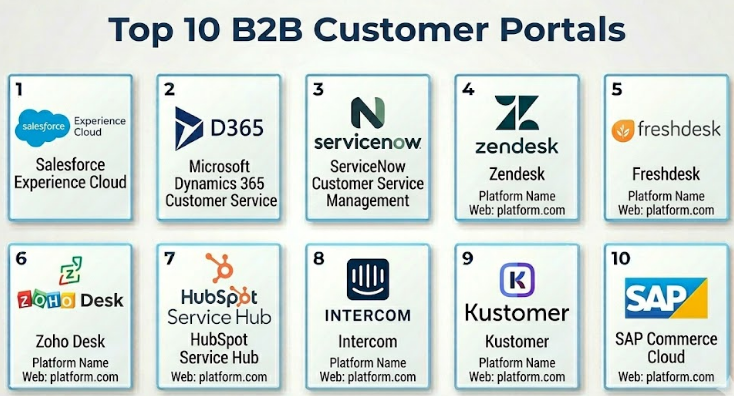
Top 10 B2B Customer Portals
#1 — Salesforce Experience Cloud
Short description:
Salesforce Experience Cloud is an enterprise-grade platform for building customer, partner, and employee portals connected to Salesforce CRM data. It is best suited for companies already using Salesforce or planning to build highly personalized customer experiences. Businesses can create secure portals where customers can view cases, access knowledge articles, manage account information, and collaborate with support or sales teams. It works well for large B2B organizations that need deep CRM-driven customer engagement. It is powerful, but it usually requires thoughtful planning, configuration, and skilled administration.
Key Features
- CRM-connected customer and partner portals
- Personalized dashboards and role-based access
- Case management and knowledge base integration
- Community and collaboration features
- Low-code page building and branding options
- Workflow automation through the Salesforce ecosystem
- Strong ecosystem of apps and implementation partners
Pros
- Excellent choice for companies already using Salesforce CRM.
- Highly customizable for complex B2B customer journeys.
- Strong enterprise ecosystem and partner network.
Cons
- Can become expensive for smaller teams.
- Setup may require Salesforce expertise.
- Heavy customization can increase implementation time.
Platforms / Deployment
Web / iOS / Android
Cloud
Security & Compliance
Supports enterprise security features such as SSO, MFA, role-based access, permissions, encryption options, and audit capabilities depending on plan and configuration. Compliance certifications vary by Salesforce product, region, and contract, so buyers should validate requirements directly during procurement.
Integrations & Ecosystem
Salesforce Experience Cloud integrates strongly with Salesforce Sales Cloud, Service Cloud, Marketing Cloud, Commerce Cloud, MuleSoft, Tableau, and many third-party apps. It is suitable for businesses that want customer portal data to remain connected with CRM and service workflows.
- Salesforce CRM
- Service Cloud
- Marketing automation tools
- ERP and commerce systems through APIs
- Identity providers
- Analytics and reporting tools
Support & Community
Salesforce has strong documentation, training resources, partner support, implementation consultants, and a large professional community. Support tiers vary by plan and enterprise agreement.
#2 — Microsoft Dynamics 365 Customer Service
Short description:
Microsoft Dynamics 365 Customer Service is a strong option for organizations using Microsoft business applications. It helps companies manage customer cases, knowledge bases, service workflows, and customer engagement through connected Microsoft tools. B2B teams can use it to create portal-style experiences when paired with Microsoft Power Pages and related Microsoft services. It is especially useful for companies that rely on Microsoft 365, Teams, Power Platform, and Azure. It fits mid-market and enterprise businesses that want service operations connected to a broader Microsoft ecosystem.
Key Features
- Case and ticket management
- Knowledge management
- Customer service automation
- Integration with Power Pages for portal experiences
- AI-assisted service insights
- Microsoft Teams and Microsoft 365 integration
- Strong reporting through Microsoft tools
Pros
- Strong fit for Microsoft-centered organizations.
- Good integration with productivity and collaboration tools.
- Flexible through Power Platform customization.
Cons
- Portal setup may require Power Platform knowledge.
- Licensing can be complex.
- Advanced configurations may need specialist support.
Platforms / Deployment
Web / Windows / iOS / Android
Cloud / Hybrid options through Microsoft ecosystem
Security & Compliance
Supports Microsoft enterprise identity, access control, MFA, RBAC, encryption, and audit-related capabilities depending on configuration. Compliance coverage varies by Microsoft cloud service, region, and licensing plan.
Integrations & Ecosystem
Dynamics 365 connects well with Microsoft 365, Teams, Outlook, Power BI, Power Automate, Power Apps, Azure, and third-party systems through connectors and APIs.
- Microsoft 365
- Power Platform
- Azure Active Directory / Microsoft Entra ID
- ERP systems
- BI and analytics platforms
- External applications through APIs
Support & Community
Microsoft provides extensive documentation, enterprise support options, partner implementation services, and a large global community. Support experience depends on licensing and partner engagement.
#3 — ServiceNow Customer Service Management
Short description:
ServiceNow Customer Service Management is designed for organizations that need structured customer service workflows, enterprise case management, and strong operational visibility. It is useful for B2B companies that handle complex support requests, field service coordination, SLA tracking, and cross-department resolution. The portal experience can connect customers with cases, knowledge, requests, and service updates. It is especially strong for large enterprises where customer issues often require coordination across multiple internal teams. It is not usually the simplest option for small teams, but it is powerful for complex service environments.
Key Features
- Enterprise case management
- Customer self-service portal
- Knowledge base and virtual agent support
- Workflow automation across departments
- SLA and escalation management
- Field service and operations connectivity
- Strong reporting and service visibility
Pros
- Strong for complex enterprise service workflows.
- Good fit for large organizations with multiple support teams.
- Helps connect front-office customer service with back-office operations.
Cons
- Can be costly and implementation-heavy.
- May be too advanced for simple support needs.
- Requires process maturity for best results.
Platforms / Deployment
Web / iOS / Android
Cloud
Security & Compliance
Supports enterprise-grade access control, SSO, MFA, RBAC, audit logs, and encryption options depending on implementation. Compliance certifications and controls should be validated based on contract, region, and ServiceNow environment.
Integrations & Ecosystem
ServiceNow integrates with ITSM, CRM, ERP, field service, identity, collaboration, and monitoring platforms. It is strong when customer service needs to connect with enterprise workflows.
- ITSM systems
- CRM platforms
- ERP tools
- Identity providers
- Collaboration tools
- Workflow and automation systems
Support & Community
ServiceNow has strong enterprise documentation, training programs, implementation partners, and customer community resources. Support quality depends on subscription level and implementation partner.
#4 — Zendesk
Short description:
Zendesk is a widely used customer service platform that supports customer portals, help centers, ticket tracking, knowledge bases, live chat, automation, and AI-assisted support. It works well for SMBs, mid-market companies, and larger support teams that want a fast, polished customer service experience. B2B companies can use Zendesk to create branded self-service portals where customers can search articles, submit tickets, check updates, and interact with support teams. It is easier to deploy than many enterprise CRM-heavy platforms. However, advanced customization and enterprise reporting may require higher plans or add-ons.
Key Features
- Branded help center and customer portal
- Ticketing and case management
- Knowledge base and article management
- AI-powered support features
- Live chat and messaging
- Automation and routing rules
- Large marketplace of apps and integrations
Pros
- User-friendly for support teams and customers.
- Strong self-service and knowledge base experience.
- Good balance of speed, features, and scalability.
Cons
- Costs can increase as teams add advanced features.
- Complex B2B workflows may require customization.
- Some enterprise controls may depend on higher plans.
Platforms / Deployment
Web / iOS / Android
Cloud
Security & Compliance
Supports security features such as SSO, MFA, role-based permissions, audit logs, and encryption depending on plan. Compliance details vary by product edition and customer agreement.
Integrations & Ecosystem
Zendesk has a large app marketplace and integrates with CRM, sales, messaging, analytics, collaboration, and automation platforms.
- CRM systems
- Slack and Microsoft Teams
- Ecommerce platforms
- Messaging channels
- Analytics tools
- APIs and marketplace apps
Support & Community
Zendesk offers strong documentation, onboarding resources, paid support options, training materials, and a large user community.
#5 — Freshdesk
Short description:
Freshdesk is a customer support and self-service platform from Freshworks. It is popular with SMBs and mid-market teams because it offers ticketing, automation, knowledge base, portal features, and multichannel support in a relatively easy-to-use package. B2B teams can create customer portals where users submit tickets, track status, and find answers through knowledge articles. It is a practical choice for teams that want a support portal without heavy enterprise complexity. It may not be as deeply customizable as some enterprise platforms, but it is strong for fast implementation.
Key Features
- Customer support portal
- Ticketing and automation
- Knowledge base and FAQs
- SLA management
- Multichannel support
- Team collaboration tools
- Reporting and analytics
Pros
- Easy to adopt for small and mid-sized teams.
- Good value for teams needing core support portal features.
- Simple interface for agents and customers.
Cons
- Advanced enterprise workflows may need upgrades.
- Customization depth may be limited compared with larger platforms.
- Some features vary by plan.
Platforms / Deployment
Web / iOS / Android
Cloud
Security & Compliance
Supports common business security features such as role-based access, authentication controls, and encryption depending on plan. Advanced compliance and audit needs should be confirmed during vendor evaluation.
Integrations & Ecosystem
Freshdesk connects with Freshworks products, CRM systems, communication tools, ecommerce platforms, and automation apps.
- Freshsales and Freshworks ecosystem
- CRM tools
- Collaboration platforms
- Ecommerce systems
- Marketplace apps
- APIs and webhooks
Support & Community
Freshdesk provides documentation, help resources, onboarding materials, and support options by plan. Community and marketplace support are fairly strong for SMB and mid-market buyers.
#6 — Zoho Desk
Short description:
Zoho Desk is a helpdesk and customer service platform that supports ticketing, customer portals, knowledge base, automation, and multichannel support. It is especially useful for businesses already using Zoho CRM or other Zoho applications. B2B companies can use Zoho Desk to give customers a self-service space for raising tickets, checking progress, and finding support content. It is often attractive for cost-conscious teams that still need meaningful functionality. It may require careful setup if the company wants advanced workflows across multiple teams or regions.
Key Features
- Customer self-service portal
- Ticketing and case management
- Knowledge base
- Workflow automation
- SLA management
- Multichannel support
- Integration with Zoho ecosystem
Pros
- Strong value for SMBs and growing teams.
- Works well with Zoho CRM and Zoho business apps.
- Good self-service features for the price range.
Cons
- Interface and customization may not suit every enterprise.
- Advanced reporting may require configuration.
- Best results often come when using the broader Zoho suite.
Platforms / Deployment
Web / iOS / Android
Cloud
Security & Compliance
Supports role-based access, authentication controls, and encryption features depending on plan and Zoho configuration. Compliance requirements should be confirmed for the selected Zoho edition and region.
Integrations & Ecosystem
Zoho Desk integrates naturally with Zoho CRM, Zoho Analytics, Zoho SalesIQ, Zoho Projects, and third-party applications.
- Zoho CRM
- Zoho Analytics
- Zoho SalesIQ
- Email and chat tools
- Marketplace extensions
- APIs
Support & Community
Zoho provides documentation, help resources, training content, and plan-based support. Community support is active, especially among Zoho ecosystem users.
#7 — HubSpot Service Hub
Short description:
HubSpot Service Hub helps companies manage customer support, knowledge bases, ticketing, feedback, automation, and customer service workflows. It is a strong fit for businesses already using HubSpot CRM, Marketing Hub, or Sales Hub. B2B companies can create customer service experiences that connect support data with sales and marketing context. It works well for SMB and mid-market teams that want a clean interface and integrated customer view. For very complex enterprise portals, it may not provide the same depth as heavier enterprise platforms.
Key Features
- Ticketing and helpdesk tools
- Knowledge base
- Customer portal capabilities
- Customer feedback surveys
- Automation workflows
- CRM-connected customer data
- Reporting dashboards
Pros
- Very strong CRM and customer data alignment.
- Easy for growing teams to adopt.
- Good option for companies using HubSpot already.
Cons
- Advanced features may require higher tiers.
- Less suitable for highly complex enterprise portal architecture.
- Some customization limits compared with developer-heavy platforms.
Platforms / Deployment
Web / iOS / Android
Cloud
Security & Compliance
Supports user permissions, SSO on selected plans, MFA, encryption, and account security features depending on edition. Compliance and audit requirements should be verified based on plan and region.
Integrations & Ecosystem
HubSpot integrates with sales, marketing, service, analytics, communication, and productivity tools. Its marketplace makes it practical for businesses that want one connected customer platform.
- HubSpot CRM
- Marketing and sales tools
- Email and communication apps
- Reporting platforms
- Customer feedback tools
- Marketplace integrations
Support & Community
HubSpot has strong documentation, academy-style learning resources, onboarding services, partner agencies, and a large community.
#8 — Intercom
Short description:
Intercom is a customer communication and support platform known for live chat, messaging, help center content, automation, and AI-assisted support. It is especially useful for SaaS companies and digital businesses that want conversational customer engagement inside apps and websites. B2B teams can use Intercom to provide self-service help, automated answers, ticketing, and customer communication in one experience. It is strong where real-time engagement and product-led support are important. Traditional enterprises with heavy case management requirements may need to evaluate fit carefully.
Key Features
- Live chat and business messaging
- AI-powered support automation
- Help center and knowledge base
- Ticketing and support workflows
- In-app customer communication
- Customer segmentation
- Product and website messaging
Pros
- Strong for SaaS and product-led support.
- Good customer experience for real-time conversations.
- Useful AI and automation capabilities.
Cons
- Pricing can become challenging as usage grows.
- Not always ideal for traditional enterprise case management.
- Requires strong content and workflow setup to reduce ticket load.
Platforms / Deployment
Web / iOS / Android
Cloud
Security & Compliance
Supports business security features such as SSO, identity controls, permissions, and encryption depending on plan. Compliance details should be validated for the selected plan and region.
Integrations & Ecosystem
Intercom connects with CRM, product analytics, data platforms, customer success tools, messaging apps, and automation systems.
- Salesforce and CRM tools
- Product analytics platforms
- Slack and collaboration tools
- Data warehouses and automation tools
- Help center integrations
- APIs and webhooks
Support & Community
Intercom offers documentation, onboarding resources, support options, and educational content. Community strength is good among SaaS and digital product teams.
#9 — Kustomer
Short description:
Kustomer is a customer service CRM platform focused on giving support teams a unified customer timeline and service experience. It is designed for businesses that need customer context, omnichannel support, automation, and self-service capabilities. B2B companies can use it to manage support interactions and provide customer-facing service experiences. It is especially useful where customer history and conversation context are important. It may be more suitable for teams that want a service CRM rather than a simple helpdesk.
Key Features
- Customer timeline and unified customer view
- Omnichannel support
- Knowledge base and self-service capabilities
- Automation and workflow routing
- AI-assisted service tools
- Reporting and analytics
- CRM-style customer service structure
Pros
- Strong customer context for support teams.
- Useful for teams handling complex customer conversations.
- Good fit for service teams that want CRM-style visibility.
Cons
- May feel advanced for small teams.
- Requires proper data setup for best results.
- Some portal-related capabilities may need configuration.
Platforms / Deployment
Web
Cloud
Security & Compliance
Supports enterprise security controls depending on plan and configuration. Specific compliance requirements should be confirmed during vendor review.
Integrations & Ecosystem
Kustomer integrates with communication tools, CRM systems, ecommerce platforms, messaging channels, and automation tools.
- CRM platforms
- Ecommerce systems
- Messaging channels
- Collaboration tools
- APIs
- Automation tools
Support & Community
Kustomer provides documentation and support resources. Community visibility is more focused than larger platforms, so buyers should evaluate onboarding and support tiers carefully.
#10 — SAP Commerce Cloud
Short description:
SAP Commerce Cloud is a strong B2B digital commerce and customer portal option for companies that need account-based buying, product catalogs, pricing, ordering, and customer self-service. It is especially useful for manufacturers, distributors, wholesalers, and enterprises that need B2B ecommerce connected with ERP and customer data. A customer portal built around SAP Commerce Cloud can support quotes, orders, invoices, product information, and customer-specific experiences. It is best suited for large or complex B2B commerce operations. It may be too heavy for companies that only need a basic support portal.
Key Features
- B2B ecommerce portal capabilities
- Account-specific catalogs and pricing
- Order and quote management
- Customer self-service features
- Integration with SAP ecosystem
- Personalization and commerce workflows
- Scalable enterprise commerce architecture
Pros
- Strong for B2B commerce-heavy customer portals.
- Good fit for manufacturers and distributors.
- Works well with SAP enterprise environments.
Cons
- Implementation can be complex.
- May require significant technical and consulting support.
- Not ideal for simple helpdesk-only portals.
Platforms / Deployment
Web
Cloud / Hybrid options depending on architecture
Security & Compliance
Supports enterprise access control, authentication, encryption, and governance features depending on implementation. Compliance requirements should be confirmed based on SAP environment, hosting model, region, and contract.
Integrations & Ecosystem
SAP Commerce Cloud connects deeply with SAP ERP, SAP S/4HANA, SAP Customer Experience tools, payment systems, product information tools, and enterprise integration layers.
- SAP ERP and SAP S/4HANA
- Product information management systems
- Payment gateways
- CRM and service tools
- Identity providers
- APIs and integration middleware
Support & Community
SAP has enterprise documentation, implementation partners, consulting support, and customer community resources. Support depends heavily on contract level and implementation partner quality.
Comparison Table
| Tool Name | Best For | Platform(s) Supported | Deployment | Standout Feature | Public Rating |
|---|---|---|---|---|---|
| Salesforce Experience Cloud | Enterprise CRM-connected customer and partner portals | Web / iOS / Android | Cloud | Deep Salesforce CRM integration | N/A |
| Microsoft Dynamics 365 Customer Service | Microsoft ecosystem-based customer service portals | Web / Windows / iOS / Android | Cloud / Hybrid | Strong Power Platform flexibility | N/A |
| ServiceNow Customer Service Management | Complex enterprise service workflows | Web / iOS / Android | Cloud | Cross-department workflow automation | N/A |
| Zendesk | Fast customer self-service and support portals | Web / iOS / Android | Cloud | Strong help center and ticketing experience | N/A |
| Freshdesk | SMB and mid-market support portals | Web / iOS / Android | Cloud | Easy setup and support automation | N/A |
| Zoho Desk | Cost-conscious teams using Zoho ecosystem | Web / iOS / Android | Cloud | Good value with Zoho CRM integration | N/A |
| HubSpot Service Hub | CRM-connected service for growing teams | Web / iOS / Android | Cloud | Unified sales, marketing, and service view | N/A |
| Intercom | SaaS and conversational customer support | Web / iOS / Android | Cloud | In-app messaging and AI support automation | N/A |
| Kustomer | Service CRM with unified customer timeline | Web | Cloud | Customer conversation timeline | N/A |
| SAP Commerce Cloud | B2B commerce and account self-service portals | Web | Cloud / Hybrid | Enterprise B2B ecommerce portal capability | N/A |
Evaluation & B2B Customer Portals
| Tool Name | Core (25%) | Ease (15%) | Integrations (15%) | Security (10%) | Performance (10%) | Support (10%) | Value (15%) | Weighted Total |
|---|---|---|---|---|---|---|---|---|
| Salesforce Experience Cloud | 9 | 7 | 10 | 9 | 9 | 9 | 7 | 8.55 |
| Microsoft Dynamics 365 Customer Service | 8 | 7 | 9 | 9 | 8 | 8 | 7 | 8.00 |
| ServiceNow Customer Service Management | 9 | 6 | 8 | 9 | 9 | 8 | 6 | 7.95 |
| Zendesk | 8 | 9 | 9 | 8 | 8 | 8 | 8 | 8.30 |
| Freshdesk | 7 | 9 | 8 | 7 | 8 | 7 | 9 | 7.85 |
| Zoho Desk | 7 | 8 | 8 | 7 | 7 | 7 | 9 | 7.55 |
| HubSpot Service Hub | 7 | 9 | 8 | 8 | 8 | 8 | 7 | 7.85 |
| Intercom | 8 | 8 | 8 | 8 | 8 | 7 | 7 | 7.70 |
| Kustomer | 7 | 7 | 7 | 7 | 7 | 6 | 7 | 6.95 |
| SAP Commerce Cloud | 9 | 6 | 9 | 9 | 9 | 8 | 6 | 8.00 |
These scores are comparative, not absolute. A lower score does not mean the tool is weak; it may simply fit a narrower use case. For example, SAP Commerce Cloud is very strong for B2B commerce portals but may not be the best choice for a simple support portal. Buyers should use the scoring table as a first filter, then validate real needs through demos, proof of concept, security review, and integration testing.
Which B2B Customer Portals Should You Choose?
Solo / Freelancer
Solo consultants and freelancers usually do not need a heavy enterprise customer portal. A simple helpdesk, shared inbox, knowledge base, or client workspace may be enough. If a portal is still required, Zoho Desk, Freshdesk, or HubSpot Service Hub can be practical because they are easier to start with and do not demand large implementation teams.
The key priority should be simplicity. Avoid platforms that require complex configuration unless you already have a strong reason, such as managing many clients, recurring service requests, or structured onboarding processes.
SMB
SMBs should focus on tools that offer fast deployment, clear pricing, easy customer experience, and strong support workflows. Freshdesk, Zoho Desk, Zendesk, and HubSpot Service Hub are good options for this segment.
For SMBs, the best portal is usually the one your team will actually use every day. Look for simple ticket forms, a clean customer portal, automation rules, knowledge base management, and basic CRM integration. Do not overbuy enterprise features if your current process is still simple.
Mid-Market
Mid-market businesses often need stronger workflow automation, account visibility, user permissions, analytics, and integration with CRM or ERP systems. Zendesk, HubSpot Service Hub, Microsoft Dynamics 365 Customer Service, Salesforce Experience Cloud, and Freshdesk can be strong choices depending on your existing stack.
If your company uses Salesforce heavily, Salesforce Experience Cloud becomes a natural option. If your company uses Microsoft tools deeply, Dynamics 365 with Power Pages may fit better. If your team wants faster support portal deployment, Zendesk or Freshdesk may be easier.
Enterprise
Enterprises should prioritize governance, scalability, security, integration depth, global support, role-based access, audit logs, and complex workflow capability. Salesforce Experience Cloud, ServiceNow Customer Service Management, Microsoft Dynamics 365 Customer Service, and SAP Commerce Cloud are strong enterprise options.
For customer support operations, ServiceNow and Salesforce are often strong candidates. For B2B commerce and account-specific buying experiences, SAP Commerce Cloud may be a better fit. For companies already invested in Microsoft, Dynamics 365 can be a practical enterprise path.
Budget vs Premium
Budget-conscious buyers should consider Zoho Desk, Freshdesk, and HubSpot Service Hub first. These platforms can provide strong portal value without immediately moving into expensive enterprise implementation.
Premium buyers with complex needs should evaluate Salesforce Experience Cloud, ServiceNow Customer Service Management, Microsoft Dynamics 365 Customer Service, and SAP Commerce Cloud. These tools can support advanced use cases but usually need more planning, implementation time, and governance.
Feature Depth vs Ease of Use
If ease of use matters most, Zendesk, Freshdesk, HubSpot Service Hub, and Zoho Desk are strong options. They are generally easier for support teams to understand and launch.
If feature depth matters more, Salesforce Experience Cloud, ServiceNow Customer Service Management, Microsoft Dynamics 365 Customer Service, and SAP Commerce Cloud deserve closer evaluation. They provide more flexibility for enterprise workflows, but they also require stronger administration and implementation discipline.
Integrations & Scalability
For integration-heavy environments, choose a portal that fits your core system of record. Salesforce-heavy companies should look at Salesforce Experience Cloud. Microsoft-heavy organizations should review Dynamics 365 and Power Platform. SAP-based manufacturers or distributors should consider SAP Commerce Cloud. Service-heavy enterprises with strong ITSM operations may find ServiceNow useful.
Scalability is not only about user volume. It also includes data permissions, workflow complexity, global support needs, API limits, reporting, content governance, and long-term maintenance.
Security & Compliance Needs
Companies in regulated industries should evaluate SSO, MFA, RBAC, audit logs, encryption, data residency, retention policies, user provisioning, and compliance documentation. Enterprise platforms usually provide stronger security governance, but buyers should never assume compliance.
Before choosing any tool, request a security review, check administrative controls, validate integration security, and confirm whether customer data access can be restricted by account, role, region, and business unit.
Frequently Asked Questions
1. What is a B2B customer portal?
A B2B customer portal is a secure online space where business customers can access support, documents, orders, invoices, tickets, knowledge articles, and account information. It reduces manual communication and gives customers more control over their service experience.
2. How is a B2B customer portal different from a helpdesk?
A helpdesk mainly helps internal support teams manage tickets and customer issues. A B2B customer portal gives customers a login-based self-service experience where they can view information, submit requests, track updates, and access resources.
3. What pricing models are common for B2B customer portals?
Pricing may be based on internal users, customer users, portal traffic, modules, support seats, usage volume, or enterprise contracts. Some platforms also charge separately for AI features, advanced automation, premium support, or additional integrations.
4. How long does implementation usually take?
Implementation depends on complexity. A basic support portal can be launched faster, while an enterprise portal connected to CRM, ERP, billing, identity, and custom workflows may require detailed planning, testing, migration, and training.
5. What are common mistakes when choosing a customer portal?
Common mistakes include buying based only on brand name, ignoring customer experience, underestimating integration work, skipping security review, and failing to plan content governance. A portal without useful content and clean workflows often fails to reduce support workload.
6. Are B2B customer portals secure?
They can be secure when configured properly. Buyers should look for SSO, MFA, RBAC, encryption, audit logs, data permissions, and strong admin controls. Security also depends on implementation quality and internal governance.
7. Can a B2B customer portal integrate with CRM and ERP systems?
Yes, many customer portals integrate with CRM, ERP, billing, ecommerce, identity, analytics, and support systems. The depth of integration varies, so buyers should validate APIs, connectors, data sync, permission rules, and workflow behavior before purchase.
8. Which portal is best for small businesses?
Small businesses often benefit from Freshdesk, Zoho Desk, HubSpot Service Hub, or Zendesk because they are easier to deploy and manage. The best choice depends on budget, existing tools, support volume, and how much automation is needed.
9. Which portal is best for large enterprises?
Large enterprises should evaluate Salesforce Experience Cloud, ServiceNow Customer Service Management, Microsoft Dynamics 365 Customer Service, and SAP Commerce Cloud. These platforms are better suited for complex workflows, governance, integrations, and scale.
10. Can AI improve a B2B customer portal?
Yes, AI can improve search, answer suggestions, ticket routing, article recommendations, chatbot responses, and agent productivity. However, AI works best when the knowledge base is accurate, workflows are clean, and escalation paths are well designed.
Conclusion
B2B Customer Portals are no longer only support add-ons. They are becoming important digital relationship hubs where customers can get answers, manage requests, track account activity, and interact with a business in a more transparent way. The best portal depends on your company size, customer expectations, existing technology stack, security requirements, and workflow complexity. Salesforce Experience Cloud, ServiceNow, Microsoft Dynamics 365, and SAP Commerce Cloud are strong for enterprise and complex environments, while Zendesk, Freshdesk, Zoho Desk, HubSpot Service Hub, Intercom, and Kustomer can be practical for teams that want faster adoption and focused customer service capabilities.
