Introduction
Customer Support Knowledge Management Platforms help organizations create, organize, manage, and deliver support information across teams and customer channels. In simple terms, these platforms act as centralized knowledge hubs where support agents, customers, and internal teams can quickly find accurate answers, troubleshooting guides, FAQs, documentation, workflows, and operational procedures.
In knowledge management has become increasingly important because support operations are now heavily distributed across AI chatbots, self-service portals, omnichannel ticketing systems, remote support teams, and global customer bases. Modern support organizations are expected to deliver instant, personalized, and accurate responses while controlling operational costs. Knowledge platforms now play a central role in powering AI agents, self-service automation, and consistent customer experiences.
Common real-world use cases include:
- Customer self-service portals and help centers
- AI chatbot knowledge sources
- Internal agent training and onboarding
- IT and technical troubleshooting documentation
- Product documentation and release communication
When evaluating Customer Support Knowledge Management Platforms, buyers should consider:
- AI-powered search and recommendations
- Ease of content creation and maintenance
- Omnichannel integration capabilities
- Security and compliance features
- Scalability for growing teams
- Workflow automation support
- Analytics and reporting
- Multi-language capabilities
- Collaboration and approval workflows
- API and developer ecosystem maturity
Best for: SaaS companies, IT service teams, enterprises, e-commerce businesses, telecom providers, healthcare support organizations, and fast-scaling customer support operations that require centralized knowledge delivery.
Not ideal for: Very small teams with minimal documentation needs, businesses relying only on email-based support, or organizations needing only lightweight note-taking tools instead of structured knowledge management systems.
Key Trends in Customer Support Knowledge Management Platforms
- AI-generated knowledge articles are becoming standard for faster documentation creation.
- Generative AI search experiences are replacing traditional keyword-only search systems.
- Unified customer and internal knowledge bases are increasingly common.
- Voice-of-customer analytics are being integrated into knowledge optimization workflows.
- Enterprise buyers now prioritize security controls such as RBAC, SSO, audit logs, and data governance.
- Omnichannel knowledge delivery across chat, email, apps, and social platforms is expanding rapidly.
- Workflow automation for content approvals and lifecycle management is becoming essential.
- Headless and API-first knowledge platforms are gaining traction among developer-focused organizations.
- Multi-language AI translation capabilities are improving global support operations.
- Hybrid support models combining human agents and AI copilots are driving demand for structured knowledge systems.
How We Selected These Tools (Methodology)
The tools in this list were selected using a balanced evaluation approach focused on real-world business usability and long-term platform viability.
Our evaluation criteria included:
- Market adoption and enterprise visibility
- Feature completeness for customer support knowledge management
- AI and automation capabilities
- Reliability and scalability indicators
- Security and compliance posture visibility
- Integration ecosystem maturity
- Suitability across SMB, mid-market, and enterprise segments
- Documentation quality and onboarding experience
- Flexibility for internal and external knowledge management
- Community reputation and ongoing product innovation
The final list includes a mix of enterprise-grade platforms, SMB-friendly solutions, developer-focused systems, and customer service ecosystem leaders.
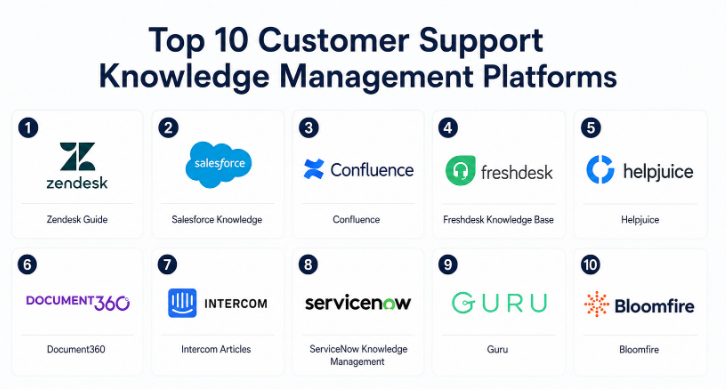
Customer Support Knowledge Management Platforms
#1 — Zendesk Guide
Short description :
Zendesk Guide is a widely adopted customer support knowledge management platform designed for businesses that want to combine ticketing, self-service, and AI-powered knowledge delivery. It integrates closely with the broader Zendesk ecosystem and supports both customer-facing and internal knowledge bases. The platform is commonly used by SaaS companies, e-commerce brands, and enterprise support organizations. Zendesk Guide focuses heavily on agent productivity and customer self-service optimization. Its AI-powered recommendations and automation tools make it suitable for scaling support operations efficiently.
Key Features
- AI-powered article recommendations
- Self-service help center creation
- Internal and external knowledge bases
- Content approval workflows
- Multilingual support
- Ticket deflection analytics
- Integrated chatbot knowledge delivery
Pros
- Strong integration with Zendesk support ecosystem
- User-friendly interface for support teams
- Good scalability for growing organizations
Cons
- Advanced customization may require technical expertise
- Pricing can increase significantly with scale
- Some AI capabilities depend on higher-tier plans
Platforms / Deployment
- Web / iOS / Android
- Cloud
Security & Compliance
- SSO/SAML
- MFA
- RBAC
- Encryption
- GDPR support
- SOC 2
- ISO 27001
Integrations & Ecosystem
Zendesk Guide integrates deeply with customer support, CRM, collaboration, and analytics tools. Its marketplace ecosystem is mature and enterprise-friendly.
- Slack
- Salesforce
- Jira
- Microsoft Teams
- Shopify
- REST APIs
Support & Community
Zendesk has extensive documentation, onboarding resources, partner ecosystems, and enterprise support options. Community adoption is strong globally.
#2 — Salesforce Knowledge
Short description :
Salesforce Knowledge is part of the Salesforce Service Cloud ecosystem and is designed for enterprise customer service operations. It enables organizations to create structured knowledge articles for both agents and customers. The platform is heavily integrated into CRM workflows and AI-powered service automation. Enterprises using Salesforce often adopt Salesforce Knowledge for centralized support operations. It is especially valuable for large organizations requiring advanced workflow management and deep CRM integration.
Key Features
- Native Salesforce ecosystem integration
- AI-powered service recommendations
- Case deflection workflows
- Advanced article versioning
- Multi-channel knowledge delivery
- Role-based content access
- Enterprise workflow automation
Pros
- Excellent CRM integration
- Strong enterprise scalability
- Advanced workflow capabilities
Cons
- Complex setup for smaller organizations
- Higher implementation costs
- Learning curve for administrators
Platforms / Deployment
- Web / iOS / Android
- Cloud
Security & Compliance
- SSO/SAML
- MFA
- Encryption
- Audit logs
- RBAC
- SOC 2
- ISO 27001
- GDPR
Integrations & Ecosystem
Salesforce Knowledge benefits from the extensive Salesforce ecosystem and AppExchange marketplace.
- Slack
- Tableau
- Jira
- MuleSoft
- Microsoft Teams
- Salesforce APIs
Support & Community
Large enterprise support ecosystem with extensive implementation partners, certifications, and training programs.
#3 — Confluence
Short description :
Confluence by Atlassian is a collaboration and knowledge management platform widely used for internal documentation and support knowledge sharing. While not exclusively built for customer support, many organizations use Confluence as a centralized support knowledge repository integrated with Jira Service Management. It is especially popular among technical teams and DevOps-driven organizations. Its flexibility, collaborative editing, and developer integrations make it a strong option for internal support documentation.
Key Features
- Collaborative document editing
- Knowledge base templates
- Jira Service Management integration
- Rich permissions management
- Workflow automation
- Developer-friendly APIs
- Extensive plugin marketplace
Pros
- Strong collaboration capabilities
- Flexible documentation structure
- Large plugin ecosystem
Cons
- Customer-facing experiences may need customization
- Search quality varies depending on implementation
- Complex permissions can become difficult to manage
Platforms / Deployment
- Web / Windows / macOS / iOS / Android
- Cloud / Self-hosted
Security & Compliance
- SSO/SAML
- MFA
- RBAC
- Audit logs
- SOC 2
- GDPR
- Encryption
Integrations & Ecosystem
Confluence integrates strongly with developer and IT service ecosystems.
- Jira
- Trello
- Slack
- Microsoft Teams
- GitHub
- Atlassian Marketplace apps
Support & Community
Very large global user community with strong documentation and active third-party developer support.
#4 — Freshdesk Knowledge Base
Short description :
Freshdesk Knowledge Base is part of the Freshworks customer support ecosystem and focuses on simplifying self-service support experiences. It enables organizations to build branded support portals, FAQ systems, and AI-assisted support workflows. Freshdesk is particularly popular among SMBs and mid-sized businesses seeking affordable yet capable customer support infrastructure. The platform balances usability with automation features and integrates well with omnichannel support operations.
Key Features
- AI-powered support suggestions
- Customer self-service portals
- Ticket deflection analytics
- Multilingual article management
- Gamified support workflows
- Omnichannel integration
- Automation rules
Pros
- Easy implementation
- Good value for SMBs
- User-friendly support interface
Cons
- Enterprise customization limitations
- Advanced reporting may require higher tiers
- Some integrations require premium plans
Platforms / Deployment
- Web / iOS / Android
- Cloud
Security & Compliance
- SSO/SAML
- MFA
- GDPR
- Encryption
- RBAC
- SOC 2
Integrations & Ecosystem
Freshdesk supports integrations across CRM, messaging, and e-commerce ecosystems.
- Slack
- Microsoft Teams
- Shopify
- Salesforce
- Zapier
- Freshworks Marketplace
Support & Community
Strong onboarding experience with good SMB-focused support resources and active customer communities.
#5 — Helpjuice
Short description :
Helpjuice is a dedicated knowledge base platform focused on customer support documentation and internal knowledge sharing. It is designed for organizations that want powerful search, analytics, and customization capabilities without adopting a full customer service suite. Helpjuice is especially useful for companies prioritizing documentation quality and discoverability. Its clean interface and search optimization features are key differentiators.
Key Features
- Advanced knowledge search
- Custom branding options
- Analytics dashboards
- Internal and external knowledge bases
- AI-assisted search optimization
- Collaboration workflows
- SEO-friendly documentation structures
Pros
- Strong search functionality
- Easy article organization
- Good customization flexibility
Cons
- Smaller ecosystem compared to enterprise suites
- Limited native ticketing features
- Fewer workflow automation capabilities
Platforms / Deployment
- Web
- Cloud
Security & Compliance
- SSO/SAML
- Encryption
- RBAC
- GDPR
- Not publicly stated for some certifications
Integrations & Ecosystem
Helpjuice focuses primarily on documentation integrations and API access.
- Slack
- Zapier
- Salesforce
- REST APIs
- Chrome extensions
Support & Community
Responsive support and onboarding assistance with smaller but focused community adoption.
#6 — Document360
Short description :
Document360 is a modern knowledge base platform designed for SaaS businesses, product companies, and customer support teams. It supports both public and private knowledge management use cases. The platform emphasizes documentation quality, category organization, analytics, and collaboration. Its modern interface and AI-assisted documentation tools make it attractive for growing digital businesses.
Key Features
- AI-powered content assistance
- Private and public knowledge bases
- Category management
- Markdown editor
- Analytics and search insights
- Workflow approvals
- Localization support
Pros
- Modern UI and usability
- Strong documentation organization
- Good support for technical documentation
Cons
- Some advanced enterprise features limited
- Pricing may scale with usage
- Custom workflow complexity varies
Platforms / Deployment
- Web
- Cloud
Security & Compliance
- SSO/SAML
- MFA
- Encryption
- GDPR
- SOC 2
Integrations & Ecosystem
Document360 supports integrations for productivity, customer service, and development workflows.
- Zendesk
- Intercom
- Slack
- Microsoft Teams
- Google Analytics
- API access
Support & Community
Good onboarding support with expanding community adoption among SaaS businesses.
#7 — Intercom Articles
Short description :
Intercom Articles is a knowledge management solution integrated into the Intercom customer messaging platform. It helps businesses deliver contextual support content directly within chat, bots, and customer messaging workflows. The platform is heavily AI-oriented and optimized for conversational customer support. It is commonly used by SaaS startups and fast-growing digital businesses.
Key Features
- Messenger-based knowledge delivery
- AI chatbot integration
- Article recommendations
- In-app support widgets
- Content performance analytics
- Multilingual support
- Automated support workflows
Pros
- Strong conversational support integration
- Good AI capabilities
- Fast deployment experience
Cons
- Best suited for Intercom ecosystem users
- Enterprise customization limitations
- Pricing can become expensive at scale
Platforms / Deployment
- Web / iOS / Android
- Cloud
Security & Compliance
- SSO/SAML
- MFA
- Encryption
- GDPR
- SOC 2
Integrations & Ecosystem
Intercom integrates strongly with SaaS and customer communication tools.
- Salesforce
- Slack
- HubSpot
- Stripe
- Zapier
- APIs
Support & Community
Strong onboarding resources and active SaaS-focused community ecosystem.
#8 — ServiceNow Knowledge Management
Short description :
ServiceNow Knowledge Management is an enterprise-grade platform designed for IT service management and large-scale support operations. It centralizes operational knowledge across departments and integrates tightly with ITSM workflows. Enterprises use it to standardize support delivery, reduce incident resolution times, and enable employee self-service. The platform is especially strong in regulated industries and large enterprises.
Key Features
- ITSM-native knowledge workflows
- AI-powered virtual agents
- Enterprise content governance
- Workflow automation
- Employee self-service portals
- Advanced analytics
- Role-based access management
Pros
- Excellent enterprise scalability
- Strong ITSM integration
- Advanced governance capabilities
Cons
- High implementation complexity
- Significant administrative overhead
- Higher total cost of ownership
Platforms / Deployment
- Web / iOS / Android
- Cloud / Hybrid
Security & Compliance
- SSO/SAML
- MFA
- RBAC
- Audit logs
- Encryption
- SOC 2
- ISO 27001
- GDPR
Integrations & Ecosystem
ServiceNow offers extensive enterprise integrations and workflow extensibility.
- Microsoft Teams
- Jira
- Salesforce
- Okta
- SAP
- ServiceNow APIs
Support & Community
Strong enterprise support ecosystem with certified implementation partners and extensive documentation.
#9 — Guru
Short description :
Guru is an AI-powered internal knowledge management platform focused on delivering contextual information to support agents and employees. It emphasizes real-time knowledge verification and workflow integration. Guru is especially popular among customer support teams, HR teams, and fast-growing startups that need lightweight but intelligent knowledge delivery.
Key Features
- AI-powered enterprise search
- Browser extension knowledge delivery
- Verification workflows
- Slack and Teams integrations
- Knowledge analytics
- Internal collaboration
- AI-assisted content recommendations
Pros
- Easy adoption experience
- Excellent workflow integration
- Fast search capabilities
Cons
- Limited external customer portal functionality
- Advanced enterprise governance may vary
- Less suitable for large public documentation systems
Platforms / Deployment
- Web / Windows / macOS / iOS / Android
- Cloud
Security & Compliance
- SSO/SAML
- MFA
- Encryption
- SOC 2
- GDPR
Integrations & Ecosystem
Guru focuses heavily on productivity and collaboration integrations.
- Slack
- Microsoft Teams
- Salesforce
- Zendesk
- Chrome extensions
- APIs
Support & Community
Good onboarding and customer success resources with strong adoption among modern SaaS teams.
#10 — Bloomfire
Short description :
Bloomfire is a knowledge engagement platform designed for customer support, sales enablement, and internal collaboration. It combines AI-powered search with multimedia knowledge sharing and analytics. Organizations use Bloomfire to centralize support expertise and improve knowledge accessibility. It is commonly adopted by mid-market and enterprise teams.
Key Features
- AI-powered search and indexing
- Multimedia knowledge support
- Collaboration workflows
- Content engagement analytics
- Automated tagging
- Q&A knowledge capture
- Enterprise permissions
Pros
- Strong multimedia support
- Good search and discovery capabilities
- Flexible collaboration workflows
Cons
- UI customization limitations
- Enterprise pricing may be higher
- Some advanced automation features vary
Platforms / Deployment
- Web / iOS / Android
- Cloud
Security & Compliance
- SSO/SAML
- MFA
- Encryption
- GDPR
- SOC 2
Integrations & Ecosystem
Bloomfire supports integrations across collaboration and CRM environments.
- Salesforce
- Slack
- Microsoft Teams
- Zendesk
- APIs
- Zapier
Support & Community
Provides enterprise onboarding assistance and structured customer support programs.
Comparison Table (Top 10)
| Tool Name | Best For | Platform(s) Supported | Deployment | Standout Feature | Public Rating |
|---|---|---|---|---|---|
| Zendesk Guide | Omnichannel support teams | Web, iOS, Android | Cloud | AI-powered self-service | N/A |
| Salesforce Knowledge | Enterprise CRM-driven support | Web, iOS, Android | Cloud | Native Salesforce integration | N/A |
| Confluence | Technical documentation teams | Web, Windows, macOS, Mobile | Cloud, Self-hosted | Collaboration ecosystem | N/A |
| Freshdesk Knowledge Base | SMB customer support | Web, iOS, Android | Cloud | Ease of use | N/A |
| Helpjuice | Dedicated documentation teams | Web | Cloud | Advanced search | N/A |
| Document360 | SaaS documentation | Web | Cloud | Modern documentation UX | N/A |
| Intercom Articles | Conversational support | Web, iOS, Android | Cloud | In-app knowledge delivery | N/A |
| ServiceNow Knowledge Management | Enterprise ITSM | Web, iOS, Android | Cloud, Hybrid | ITSM integration | N/A |
| Guru | Internal support knowledge | Web, Desktop, Mobile | Cloud | Contextual AI search | N/A |
| Bloomfire | Knowledge engagement | Web, iOS, Android | Cloud | Multimedia knowledge sharing | N/A |
Evaluation & Customer Support Knowledge Management Platforms
| Tool Name | Core (25%) | Ease (15%) | Integrations (15%) | Security (10%) | Performance (10%) | Support (10%) | Value (15%) | Weighted Total (0–10) |
|---|---|---|---|---|---|---|---|---|
| Zendesk Guide | 9 | 8 | 9 | 9 | 9 | 8 | 7 | 8.45 |
| Salesforce Knowledge | 9 | 6 | 10 | 10 | 9 | 9 | 6 | 8.30 |
| Confluence | 8 | 8 | 9 | 8 | 8 | 8 | 8 | 8.10 |
| Freshdesk Knowledge Base | 8 | 9 | 8 | 8 | 8 | 8 | 9 | 8.30 |
| Helpjuice | 7 | 8 | 6 | 7 | 8 | 7 | 8 | 7.35 |
| Document360 | 8 | 8 | 7 | 8 | 8 | 8 | 8 | 7.95 |
| Intercom Articles | 8 | 8 | 8 | 8 | 8 | 8 | 7 | 7.90 |
| ServiceNow Knowledge Management | 10 | 5 | 10 | 10 | 10 | 9 | 5 | 8.35 |
| Guru | 8 | 9 | 8 | 8 | 8 | 8 | 8 | 8.10 |
| Bloomfire | 8 | 8 | 7 | 8 | 8 | 8 | 7 | 7.75 |
The scoring above is comparative rather than absolute. A higher score does not necessarily mean a platform is universally better for every organization. Enterprise-focused tools may score lower on ease of use but higher on governance and scalability. SMB-focused platforms may deliver better value and usability despite fewer enterprise controls. Buyers should prioritize categories that align with operational needs, compliance requirements, and support maturity.
Which Customer Support Knowledge Management Platforms
Solo / Freelancer
Solo operators and freelancers usually benefit most from lightweight and affordable solutions. Platforms like Document360 and Helpjuice are easier to manage without dedicated administrators. Simpler onboarding and lower operational overhead are often more important than enterprise workflow depth.
SMB
Small and medium businesses typically need a balance between usability, automation, and affordability. Freshdesk Knowledge Base and Zendesk Guide are strong options for SMBs because they combine ticketing, self-service, and AI workflows without requiring heavy implementation resources.
Mid-Market
Mid-market companies often require stronger integrations, analytics, and multi-team collaboration. Confluence, Guru, and Intercom Articles work well in these environments because they support both internal operations and customer-facing support at scale.
Enterprise
Large enterprises generally prioritize governance, security, scalability, and workflow automation. Salesforce Knowledge and ServiceNow Knowledge Management are particularly strong for organizations with complex support operations, ITSM requirements, or regulatory obligations.
Budget vs Premium
Budget-conscious buyers should evaluate Freshdesk Knowledge Base, Confluence, and Document360 due to their balance of functionality and operational simplicity. Premium enterprise buyers may find more value in ServiceNow or Salesforce because of their advanced governance and ecosystem integrations.
Feature Depth vs Ease of Use
ServiceNow and Salesforce offer extensive enterprise capabilities but require more administrative effort. Freshdesk, Guru, and Intercom are easier to deploy and maintain but may not offer the same governance depth for very large organizations.
Integrations & Scalability
Organizations already using Salesforce, Atlassian, Zendesk, or ServiceNow ecosystems should strongly consider native solutions within those environments to reduce operational complexity and integration overhead.
Security & Compliance Needs
Highly regulated industries such as healthcare, finance, and government should prioritize platforms with visible enterprise-grade security controls, audit capabilities, and mature identity management support. ServiceNow, Salesforce, and Zendesk are particularly strong in this area.
Frequently Asked Questions (FAQs)
1. What is a Customer Support Knowledge Management Platform?
A Customer Support Knowledge Management Platform helps businesses organize and distribute support-related information. These systems store FAQs, troubleshooting guides, internal documentation, and self-service content to improve support efficiency and customer experience.
2. How do these platforms improve customer support operations?
They reduce repetitive tickets, improve agent productivity, and enable customers to find answers independently. AI-powered search and automation also help speed up issue resolution times.
3. Are these platforms only for large enterprises?
No. Many platforms offer SMB-friendly pricing and simplified deployment models. Smaller businesses can benefit significantly from centralized support documentation and self-service capabilities.
4. What are the most important features to evaluate?
Key considerations include AI search, integrations, security controls, analytics, multilingual support, workflow automation, scalability, and ease of use.
5. Can these platforms integrate with chatbots and AI assistants?
Yes. Modern knowledge management systems increasingly act as the knowledge source for AI chatbots, virtual agents, and conversational support systems.
6. How long does implementation usually take?
Implementation timelines vary significantly depending on platform complexity and organizational size. SMB deployments may take days or weeks, while enterprise rollouts can take several months.
7. What are common mistakes when choosing a platform?
Common mistakes include underestimating content governance needs, ignoring integration complexity, and focusing only on pricing instead of long-term scalability and usability.
8. Are self-hosted deployments still common?
Cloud deployments dominate the market in but some organizations still require self-hosted or hybrid environments for compliance, security, or operational control reasons.
9. How important is AI functionality in modern knowledge platforms?
AI is increasingly critical for automated article recommendations, intelligent search, chatbot support, and content generation. However, governance and content accuracy remain equally important.
10. What alternatives exist to dedicated knowledge management platforms?
Some businesses use collaboration tools, wiki software, document management systems, or intranet platforms as lightweight alternatives. However, these may lack advanced support-specific workflows and analytics.
11. How do pricing models usually work?
Most vendors use subscription-based pricing tied to agents, users, content volume, or feature tiers. Enterprise pricing often depends on customization and deployment requirements.
12. Is migration between platforms difficult?
Migration complexity depends on data structure, integrations, and content volume. Many vendors provide migration assistance, APIs, or import tools to simplify transitions.
Conclusion
Customer Support Knowledge Management Platforms have evolved from simple FAQ repositories into strategic operational systems that power AI support, customer self-service, agent productivity, and enterprise knowledge governance. In organizations increasingly depend on structured knowledge delivery to reduce support costs, improve customer experiences, and enable scalable omnichannel support operations. The right platform depends heavily on business size, technical maturity, regulatory requirements, integration priorities, and support workflows.
