Introduction
PLC Programming Tools are software platforms used to develop, configure, test, and maintain programs that run on Programmable Logic Controllers (PLCs). These controllers are the backbone of industrial automation—powering factories, energy systems, manufacturing lines, and critical infrastructure.
In today’s automation-driven environment, PLC tools are evolving rapidly. Modern tools now support simulation, digital twins, cloud connectivity, and even early-stage AI-assisted logic design. With Industry 4.0 and smart factories becoming standard, choosing the right PLC programming tool directly impacts productivity, uptime, and system reliability.
Real-world use cases:
- Automated assembly line programming in manufacturing plants
- SCADA system integration for energy and utilities
- Robotics and motion control systems in automotive industries
- Process automation in oil & gas and chemical plants
- Smart factory monitoring and predictive maintenance
What buyers should evaluate:
- Supported PLC brands and hardware compatibility
- Programming languages (IEC 61131-3 support)
- Ease of use and learning curve
- Simulation and debugging capabilities
- Integration with SCADA, HMI, and IoT systems
- Security features and access control
- Licensing model and cost
- Vendor support and ecosystem
- Scalability for enterprise deployments
Best for: Automation engineers, control system integrators, industrial developers, manufacturing companies, and large enterprises running production systems.
Not ideal for: Small non-industrial projects, basic automation needs, or users looking for general-purpose programming tools (Python, Java, etc.).
Key Trends in PLC Programming Tools
- AI-assisted programming: Early-stage tools offering code suggestions and diagnostics
- Cloud-enabled PLC management: Remote access, monitoring, and updates
- Digital twin simulation: Testing logic before deployment
- Vendor-neutral environments: Growing demand for cross-platform compatibility
- Cybersecurity integration: Role-based access, encryption, and audit logs
- Edge computing integration: Real-time data processing near machines
- Low-code/no-code features: Simplifying logic creation for non-experts
- Integration with IIoT platforms: Seamless connection to analytics systems
- Subscription-based pricing models: Moving away from perpetual licenses
- Standardization around IEC 61131-3 languages
How We Selected These Tools (Methodology)
- Strong market adoption and industrial usage
- Support for major PLC brands and protocols
- Feature completeness (programming, debugging, simulation)
- Performance and reliability in real-world deployments
- Security capabilities and enterprise readiness
- Integration with SCADA, HMI, and industrial systems
- Vendor ecosystem and community support
- Suitability across SMB, mid-market, and enterprise use cases
- Ease of onboarding and documentation quality
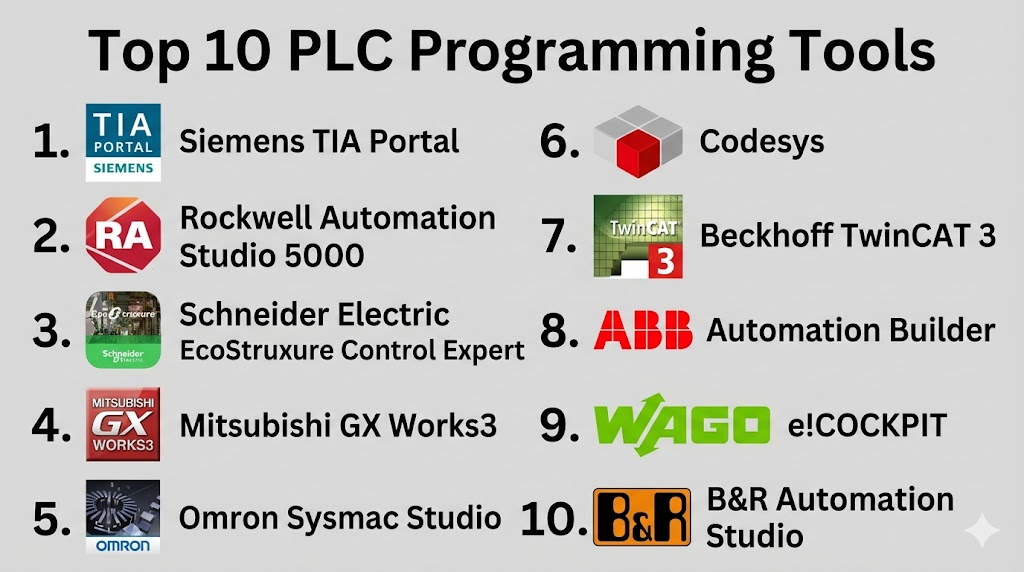
Top 10 PLC Programming Tools
#1 — Siemens TIA Portal
Short description (2–3 lines):
An integrated engineering framework for Siemens automation systems. Widely used in large-scale industrial environments for programming, simulation, and diagnostics.
Key Features
- Unified engineering environment
- IEC 61131-3 programming support
- Integrated simulation tools
- HMI and SCADA integration
- Advanced diagnostics and troubleshooting
- Motion control and robotics support
Pros
- Highly integrated ecosystem
- Strong enterprise capabilities
Cons
- Steep learning curve
- High licensing cost
Platforms / Deployment
Windows / Self-hosted
Security & Compliance
RBAC, encryption, audit capabilities (varies by configuration)
Integrations & Ecosystem
Works seamlessly with Siemens PLCs, SCADA systems, and industrial hardware.
- Industrial IoT platforms
- MES systems
- OPC UA integration
- Siemens ecosystem tools
Support & Community
Strong vendor support, large global community, extensive documentation
#2 — Rockwell Automation Studio 5000
Short description (2–3 lines):
A powerful development environment for Allen-Bradley PLCs, widely used in manufacturing and industrial automation.
Key Features
- Ladder logic and structured text support
- Integrated debugging tools
- Motion control capabilities
- Hardware configuration tools
- Real-time monitoring
Pros
- Industry-standard in North America
- Reliable and robust
Cons
- Expensive licensing
- Limited cross-vendor compatibility
Platforms / Deployment
Windows / Self-hosted
Security & Compliance
Not publicly stated
Integrations & Ecosystem
Strong integration with Rockwell ecosystem and industrial systems
- SCADA platforms
- FactoryTalk suite
- OPC integration
- Industrial networks
Support & Community
Strong enterprise support and well-established community
#3 — Schneider Electric EcoStruxure Control Expert
Short description (2–3 lines):
A scalable PLC programming platform designed for Schneider Electric automation systems.
Key Features
- IEC 61131-3 language support
- Modular programming approach
- Advanced diagnostics
- Simulation environment
- Process automation tools
Pros
- Scalable architecture
- Good process industry support
Cons
- Vendor-specific limitations
- Complex interface
Platforms / Deployment
Windows / Self-hosted
Security & Compliance
Not publicly stated
Integrations & Ecosystem
Designed for Schneider Electric systems with industrial integrations
- SCADA integration
- Energy management systems
- OPC UA
- IoT platforms
Support & Community
Enterprise support available; community moderate
#4 — Mitsubishi GX Works3
Short description (2–3 lines):
A modern PLC programming tool for Mitsubishi Electric controllers with enhanced usability and performance.
Key Features
- Structured programming support
- Improved UI/UX
- Integrated debugging
- Simulation tools
- Network configuration
Pros
- Efficient workflow
- Strong hardware compatibility
Cons
- Limited global ecosystem
- Requires Mitsubishi hardware
Platforms / Deployment
Windows / Self-hosted
Security & Compliance
Not publicly stated
Integrations & Ecosystem
Optimized for Mitsubishi hardware integration
- Industrial networks
- Motion systems
- SCADA connectivity
Support & Community
Moderate community; vendor support available
#5 — Omron Sysmac Studio
Short description (2–3 lines):
An integrated development environment for Omron automation systems, focusing on synchronization and motion control.
Key Features
- Unified programming environment
- Motion control integration
- Real-time simulation
- Debugging tools
- Safety control support
Pros
- High precision control
- Integrated system design
Cons
- Limited third-party integration
- Hardware dependency
Platforms / Deployment
Windows / Self-hosted
Security & Compliance
Not publicly stated
Integrations & Ecosystem
Focused on Omron ecosystem
- Robotics systems
- Industrial networks
- SCADA systems
Support & Community
Good documentation; smaller global community
#6 — Codesys
Short description (2–3 lines):
A vendor-independent PLC programming platform widely used across multiple hardware brands.
Key Features
- IEC 61131-3 compliance
- Multi-vendor support
- Integrated simulation
- Soft PLC capabilities
- Extensive libraries
Pros
- Vendor-neutral
- Flexible deployment
Cons
- Requires configuration expertise
- UI can feel outdated
Platforms / Deployment
Windows / Linux / Self-hosted
Security & Compliance
Not publicly stated
Integrations & Ecosystem
Strong ecosystem with multiple hardware vendors
- OPC UA
- IoT platforms
- Industrial protocols
- Custom extensions
Support & Community
Large global community; strong open ecosystem
#7 — Beckhoff TwinCAT 3
Short description (2–3 lines):
A powerful automation platform combining PLC programming with PC-based control systems.
Key Features
- Integration with Visual Studio
- Real-time control
- Advanced motion control
- Multi-core processing
- EtherCAT support
Pros
- High performance
- Developer-friendly
Cons
- Requires technical expertise
- Windows dependency
Platforms / Deployment
Windows / Self-hosted
Security & Compliance
Not publicly stated
Integrations & Ecosystem
Strong integration with PC-based systems
- Visual Studio
- Industrial protocols
- Robotics systems
Support & Community
Strong technical community and vendor support
#8 — ABB Automation Builder
Short description (2–3 lines):
A comprehensive software suite for programming ABB PLCs and automation systems.
Key Features
- IEC standard programming
- Integrated engineering tools
- Device configuration
- Diagnostics tools
- Multi-device support
Pros
- Strong industrial reliability
- Integrated environment
Cons
- Limited flexibility outside ABB ecosystem
- Complex setup
Platforms / Deployment
Windows / Self-hosted
Security & Compliance
Not publicly stated
Integrations & Ecosystem
ABB-focused integration ecosystem
- Robotics
- Energy systems
- Industrial automation
Support & Community
Enterprise-grade support; moderate community
#9 — WAGO e!COCKPIT
Short description (2–3 lines):
A modern PLC programming platform with an intuitive interface and strong visualization capabilities.
Key Features
- IEC 61131-3 support
- Modern UI
- Cloud-ready features
- Visualization tools
- Debugging tools
Pros
- User-friendly
- Modern design
Cons
- Smaller ecosystem
- Limited enterprise adoption
Platforms / Deployment
Windows / Cloud / Hybrid
Security & Compliance
Not publicly stated
Integrations & Ecosystem
Supports modern industrial integrations
- IoT systems
- OPC UA
- Cloud platforms
Support & Community
Growing community; vendor support available
#10 — B&R Automation Studio
Short description (2–3 lines):
An advanced engineering platform for B&R automation systems, focusing on scalability and performance.
Key Features
- Integrated development environment
- Simulation tools
- Motion control
- Hardware configuration
- Diagnostics
Pros
- High scalability
- Strong performance
Cons
- Vendor lock-in
- Learning curve
Platforms / Deployment
Windows / Self-hosted
Security & Compliance
Not publicly stated
Integrations & Ecosystem
Designed for B&R ecosystem
- Industrial automation
- Robotics
- SCADA systems
Support & Community
Good enterprise support; moderate community
Comparison Table (Top 10)
| Tool Name | Best For | Platform(s) Supported | Deployment | Standout Feature | Public Rating |
|---|---|---|---|---|---|
| Siemens TIA Portal | Enterprise automation | Windows | Self-hosted | Unified engineering | N/A |
| Studio 5000 | Manufacturing | Windows | Self-hosted | Rockwell ecosystem | N/A |
| EcoStruxure Control Expert | Process industries | Windows | Self-hosted | Modular programming | N/A |
| GX Works3 | Mitsubishi PLC users | Windows | Self-hosted | Improved UI | N/A |
| Sysmac Studio | Motion control | Windows | Self-hosted | Precision synchronization | N/A |
| Codesys | Multi-vendor environments | Windows/Linux | Self-hosted | Vendor-neutral | N/A |
| TwinCAT 3 | PC-based control | Windows | Self-hosted | Visual Studio integration | N/A |
| Automation Builder | ABB systems | Windows | Self-hosted | Integrated engineering | N/A |
| e!COCKPIT | Modern UI users | Windows | Hybrid | Cloud-ready | N/A |
| Automation Studio | High-performance systems | Windows | Self-hosted | Scalability | N/A |
Evaluation & Scoring of PLC Programming Tools
| Tool Name | Core | Ease | Integrations | Security | Performance | Support | Value | Weighted Total |
|---|---|---|---|---|---|---|---|---|
| Siemens TIA Portal | 9 | 7 | 9 | 7 | 9 | 9 | 6 | 8.2 |
| Studio 5000 | 9 | 7 | 8 | 7 | 9 | 9 | 6 | 8.0 |
| EcoStruxure | 8 | 7 | 8 | 7 | 8 | 8 | 7 | 7.8 |
| GX Works3 | 8 | 8 | 7 | 6 | 8 | 7 | 7 | 7.6 |
| Sysmac Studio | 8 | 7 | 7 | 6 | 8 | 7 | 7 | 7.5 |
| Codesys | 9 | 8 | 9 | 6 | 8 | 8 | 9 | 8.4 |
| TwinCAT 3 | 9 | 7 | 8 | 6 | 9 | 8 | 8 | 8.3 |
| Automation Builder | 8 | 6 | 7 | 6 | 8 | 7 | 7 | 7.4 |
| e!COCKPIT | 7 | 8 | 7 | 6 | 7 | 7 | 8 | 7.4 |
| Automation Studio | 8 | 6 | 7 | 6 | 9 | 7 | 7 | 7.5 |
How to interpret the scores:
- Scores are comparative across tools in this category
- Higher “Core” means stronger PLC capabilities
- “Ease” reflects learning curve and usability
- “Value” balances cost vs features
- No tool is universally best—fit depends on your use case
Which PLC Programming Tools
Solo / Freelancer
Codesys or TwinCAT 3 — flexible and cost-effective
SMB
GX Works3 or e!COCKPIT — easier to use with lower complexity
Mid-Market
EcoStruxure or Sysmac Studio — balanced scalability
Enterprise
TIA Portal or Studio 5000 — robust, scalable, industry-proven
Budget vs Premium
- Budget: Codesys
- Premium: Siemens, Rockwell
Feature Depth vs Ease of Use
- Deep features: TIA Portal, TwinCAT
- Easy use: e!COCKPIT, GX Works3
Integrations & Scalability
- Best: Codesys, TIA Portal
Security & Compliance Needs
- Enterprise-grade: Siemens, Rockwell
Frequently Asked Questions (FAQs)
What is a PLC programming tool?
Software used to create and manage programs for industrial controllers.
Are PLC tools expensive?
Costs vary; enterprise tools are expensive, while some are free or low-cost.
Do all tools support multiple PLC brands?
No, many are vendor-specific.
What languages are used?
IEC 61131-3 languages like Ladder Logic and Structured Text.
Can PLC tools run in the cloud?
Some modern tools support cloud or hybrid deployment.
Are PLC tools secure?
Security varies; enterprise tools offer better controls.
Is simulation important?
Yes, it helps test logic before deployment.
Can beginners learn PLC programming?
Yes, but tools vary in complexity.
What is vendor lock-in?
Using tools tied to a specific hardware vendor.
How to choose the best tool?
Evaluate compatibility, cost, features, and scalability.
Conclusion
PLC programming tools remain the backbone of industrial automation, but the landscape is evolving quickly. Modern tools are no longer just about writing ladder logic—they now integrate simulation, IoT connectivity, analytics, and early-stage AI capabilities. The right choice depends heavily on your environment, whether you are working with a specific vendor ecosystem or need flexibility across multiple systems. For most organizations, the smartest approach is to shortlist two or three tools that match your hardware and operational needs. Run a pilot project, evaluate ease of use, integration capability, and long-term scalability. Pay special attention to support and ecosystem maturity, as these factors directly impact maintenance and growth. There is no one-size-fits-all solution—only the best fit for your automation strategy.
