Introduction
AI Code Assistants are tools that use artificial intelligence to help developers write, review, and optimize code faster. Instead of manually writing every line, developers can rely on AI to suggest code, fix bugs, generate functions, and even explain complex logic.
In the current software landscape, these tools have moved from “nice-to-have” to essential. With increasing pressure to deliver faster, maintain quality, and manage complex systems, AI Code Assistants help teams reduce development time and improve productivity without compromising accuracy.
Real-world use cases include:
- Auto-generating boilerplate code and APIs
- Debugging and fixing errors quickly
- Writing unit tests and documentation
- Refactoring legacy code
- Learning new programming languages faster
What buyers should evaluate:
- Code accuracy and reliability
- Language and framework support
- IDE integration
- Security and data privacy
- Performance speed
- Collaboration features
- Customization and fine-tuning
- Pricing and licensing model
Best for: Developers, DevOps engineers, startups, enterprise engineering teams, and tech-driven organizations aiming to accelerate development cycles.
Not ideal for: Non-technical users, teams with strict offline-only environments, or projects requiring highly specialized or proprietary coding logic where human control is critical.
Key Trends in AI Code Assistants
- Context-aware coding: Tools now understand entire codebases, not just snippets
- Multi-language support: Growing support for niche and emerging programming languages
- AI pair programming: Real-time collaboration between human and AI
- Security-first development: Built-in scanning for vulnerabilities and secure coding suggestions
- Custom enterprise models: Fine-tuning AI models on private repositories
- Cloud-native integration: Deep integration with CI/CD pipelines and cloud platforms
- Natural language to code: Writing full programs using plain English prompts
- Pricing shifts: Move from per-seat to usage-based models
- IDE-first experience: Tight integrations with VS Code, JetBrains, and cloud IDEs
- Compliance awareness: Increasing focus on data privacy and enterprise governance
How We Selected These Tools (Methodology)
- Evaluated tools with strong developer adoption and industry recognition
- Assessed feature depth including code generation, debugging, and testing
- Reviewed performance reliability and response speed
- Considered security posture and enterprise readiness signals
- Examined integrations with IDEs, Git platforms, and cloud tools
- Ensured coverage across enterprise, SMB, and individual developer use cases
- Included both proprietary and open-source solutions
- Prioritized tools with active development and ecosystem support
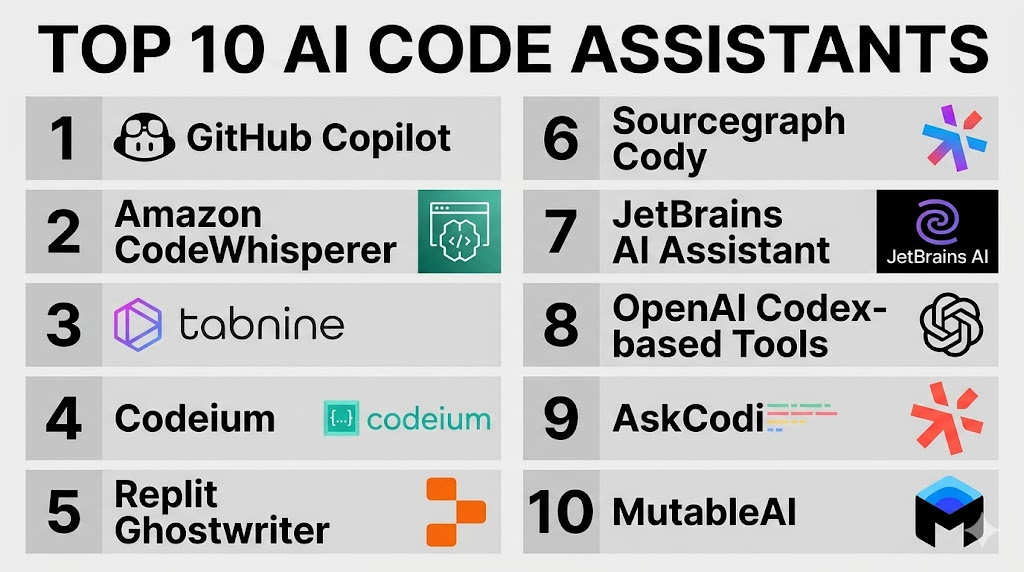
Top 10 AI Code Assistants
#1 — GitHub Copilot
Short description: A widely adopted AI coding assistant integrated into IDEs, designed for developers who want real-time code suggestions and faster development.
Key Features
- Real-time code completion
- Multi-language support
- Inline documentation generation
- Test case suggestions
- Integration with VS Code and JetBrains
- Context-aware suggestions
Pros
- Highly accurate suggestions
- Strong ecosystem integration
Cons
- Requires internet connection
- Limited customization
Platforms / Deployment
Windows / macOS / Linux
Cloud
Security & Compliance
Not publicly stated
Integrations & Ecosystem
Deep integration with development tools and version control platforms.
- VS Code
- JetBrains IDEs
- GitHub repositories
Support & Community
Strong documentation and large developer community.
#2 — Amazon CodeWhisperer
Short description: AI coding assistant focused on AWS developers, helping generate secure and optimized code.
Key Features
- Code recommendations based on AWS services
- Security scanning
- Multi-language support
- IDE integration
- Context-aware suggestions
Pros
- Strong AWS integration
- Security-focused suggestions
Cons
- Best suited for AWS users
- Limited outside AWS ecosystem
Platforms / Deployment
Cloud / IDE plugins
Security & Compliance
Supports IAM integration; other details not publicly stated
Integrations & Ecosystem
Designed to work within AWS development environments.
- AWS services
- VS Code
- JetBrains
Support & Community
Backed by strong AWS documentation and support ecosystem.
#3 — Tabnine
Short description: AI assistant focusing on privacy and local deployment options, ideal for enterprises with strict data control.
Key Features
- Private model training
- On-prem deployment
- Code completion
- Multi-language support
- IDE integrations
Pros
- Strong privacy focus
- Enterprise-friendly
Cons
- Less advanced suggestions compared to top competitors
- Setup complexity
Platforms / Deployment
Windows / macOS / Linux
Cloud / Self-hosted
Security & Compliance
Supports enterprise security controls; certifications not publicly stated
Integrations & Ecosystem
Works with major IDEs and supports customization.
- VS Code
- IntelliJ
- Eclipse
Support & Community
Moderate community; enterprise support available.
#4 — Codeium
Short description: A fast-growing free AI code assistant offering strong performance and wide IDE support.
Key Features
- Free usage tier
- Multi-language support
- Fast response time
- IDE integrations
- Chat-based coding
Pros
- Cost-effective
- Fast and lightweight
Cons
- Fewer enterprise features
- Limited advanced customization
Platforms / Deployment
Windows / macOS / Linux
Cloud
Security & Compliance
Not publicly stated
Integrations & Ecosystem
Focus on accessibility across development environments.
- VS Code
- JetBrains
- Browser-based tools
Support & Community
Growing community with improving documentation.
#5 — Replit Ghostwriter
Short description: Built into Replit’s cloud IDE, ideal for beginners and collaborative coding environments.
Key Features
- Inline code suggestions
- Built-in IDE
- Collaboration tools
- Debugging assistance
- Code explanations
Pros
- Beginner-friendly
- Integrated environment
Cons
- Limited outside Replit ecosystem
- Performance depends on cloud
Platforms / Deployment
Web
Cloud
Security & Compliance
Not publicly stated
Integrations & Ecosystem
Primarily focused within Replit platform.
- Replit IDE
- Collaboration tools
Support & Community
Active community, especially among learners.
#6 — Sourcegraph Cody
Short description: AI assistant designed for large codebases, helping teams navigate and understand complex repositories.
Key Features
- Codebase-wide search
- Context-aware suggestions
- Chat interface
- Repository indexing
- Enterprise focus
Pros
- Excellent for large codebases
- Strong search capabilities
Cons
- Learning curve
- Requires setup
Platforms / Deployment
Web / IDE plugins
Cloud / Self-hosted
Security & Compliance
Enterprise-grade controls; details vary
Integrations & Ecosystem
Strong integration with version control and enterprise tools.
- GitHub
- GitLab
- Bitbucket
Support & Community
Enterprise-focused support with active development.
#7 — JetBrains AI Assistant
Short description: Built into JetBrains IDEs, enhancing productivity for developers already using JetBrains tools.
Key Features
- Code generation
- Refactoring suggestions
- Documentation assistance
- Integration with JetBrains IDEs
- AI chat
Pros
- Seamless IDE integration
- Strong productivity features
Cons
- Limited outside JetBrains ecosystem
- Requires JetBrains IDE
Platforms / Deployment
Windows / macOS / Linux
Cloud
Security & Compliance
Not publicly stated
Integrations & Ecosystem
Works within JetBrains ecosystem.
- IntelliJ IDEA
- PyCharm
- WebStorm
Support & Community
Strong JetBrains user base and support.
#8 — OpenAI Codex-based Tools
Short description: AI models used to power various coding assistants, enabling natural language to code capabilities.
Key Features
- Natural language coding
- Multi-language support
- API-based integration
- Code explanation
- Flexible deployment
Pros
- Highly flexible
- Strong language understanding
Cons
- Requires integration effort
- Not a standalone product
Platforms / Deployment
Cloud / API
Security & Compliance
Not publicly stated
Integrations & Ecosystem
Used across multiple platforms and tools.
- Custom apps
- Developer platforms
Support & Community
Large developer ecosystem.
#9 — AskCodi
Short description: AI coding assistant focused on productivity tools like code generation, queries, and automation.
Key Features
- Code generation
- SQL query generation
- Documentation tools
- Multi-language support
- Chat interface
Pros
- Versatile use cases
- Easy to use
Cons
- Less mature
- Limited enterprise features
Platforms / Deployment
Web
Cloud
Security & Compliance
Not publicly stated
Integrations & Ecosystem
Focused on productivity workflows.
- Web apps
- Developer tools
Support & Community
Moderate support; growing ecosystem.
#10 — MutableAI
Short description: AI assistant focused on automated code transformation and documentation.
Key Features
- Code refactoring
- Documentation generation
- Bug fixing
- AI-based suggestions
- Workflow automation
Pros
- Strong automation features
- Useful for legacy code
Cons
- Limited ecosystem
- Less mainstream adoption
Platforms / Deployment
Cloud
Security & Compliance
Not publicly stated
Integrations & Ecosystem
Focused on development workflows.
- Git integration
- Code editors
Support & Community
Smaller but active community.
Comparison Table (Top 10)
| Tool Name | Best For | Platform(s) Supported | Deployment | Standout Feature | Public Rating |
|---|---|---|---|---|---|
| GitHub Copilot | General developers | Windows, macOS, Linux | Cloud | Real-time suggestions | N/A |
| Amazon CodeWhisperer | AWS developers | IDEs | Cloud | AWS integration | N/A |
| Tabnine | Enterprises | Windows, macOS, Linux | Hybrid | Privacy-first AI | N/A |
| Codeium | Budget users | Windows, macOS, Linux | Cloud | Free usage | N/A |
| Replit Ghostwriter | Beginners | Web | Cloud | Built-in IDE | N/A |
| Sourcegraph Cody | Large teams | Web, IDEs | Hybrid | Codebase search | N/A |
| JetBrains AI Assistant | JetBrains users | Windows, macOS, Linux | Cloud | IDE-native AI | N/A |
| OpenAI Codex-based Tools | Developers | API | Cloud | NLP coding | N/A |
| AskCodi | Productivity users | Web | Cloud | SQL/code tools | N/A |
| MutableAI | Refactoring | Cloud | Cloud | Code transformation | N/A |
Evaluation & Scoring of AI Code Assistants
| Tool Name | Core | Ease | Integrations | Security | Performance | Support | Value | Weighted Total |
|---|---|---|---|---|---|---|---|---|
| GitHub Copilot | 9 | 9 | 9 | 7 | 9 | 9 | 8 | 8.7 |
| Amazon CodeWhisperer | 8 | 8 | 9 | 8 | 8 | 8 | 8 | 8.2 |
| Tabnine | 7 | 7 | 7 | 9 | 7 | 7 | 7 | 7.4 |
| Codeium | 7 | 8 | 7 | 6 | 8 | 7 | 9 | 7.6 |
| Replit Ghostwriter | 6 | 9 | 6 | 6 | 7 | 7 | 8 | 7.1 |
| Sourcegraph Cody | 8 | 7 | 8 | 8 | 8 | 8 | 7 | 7.9 |
| JetBrains AI Assistant | 8 | 8 | 8 | 7 | 8 | 8 | 7 | 7.9 |
| OpenAI Codex-based Tools | 9 | 6 | 9 | 7 | 9 | 8 | 7 | 8.1 |
| AskCodi | 6 | 8 | 6 | 6 | 7 | 6 | 8 | 6.9 |
| MutableAI | 7 | 7 | 6 | 6 | 7 | 6 | 7 | 6.8 |
How to interpret scores:
- Scores are comparative across this list, not absolute benchmarks
- Higher score means better overall balance of features and usability
- Enterprises should prioritize security and integrations
- Individuals may prioritize ease and value
- No single tool fits all use cases
Which AI Code Assistants for You?
Solo / Freelancer
- Codeium, GitHub Copilot
- Focus on ease, speed, and affordability
SMB
- GitHub Copilot, Tabnine
- Balance between cost and features
Mid-Market
- Sourcegraph Cody, JetBrains AI Assistant
- Strong integrations and scalability
Enterprise
- Tabnine, Amazon CodeWhisperer
- Security, compliance, and control
Budget vs Premium
- Budget: Codeium
- Premium: GitHub Copilot, Cody
Feature Depth vs Ease of Use
- Deep features: Cody, Codex tools
- Easy use: Copilot, Codeium
Integrations & Scalability
- Strong: Copilot, CodeWhisperer, Cody
Security & Compliance Needs
- Best: Tabnine, CodeWhisperer
Frequently Asked Questions (FAQs)
What is an AI Code Assistant?
It is a tool that helps developers write code faster using AI-based suggestions and automation.
Are these tools secure?
Security varies by tool. Enterprises should check compliance and data handling policies.
Do AI assistants replace developers?
No, they enhance productivity but still require human oversight.
What languages do they support?
Most tools support multiple languages including Python, JavaScript, Java, and more.
Are they expensive?
Pricing varies; some offer free tiers while others use subscriptions.
Can they work offline?
Some tools support local deployment, but most require cloud connectivity.
Do they integrate with IDEs?
Yes, most tools integrate with popular IDEs like VS Code and JetBrains.
How accurate are suggestions?
Accuracy is improving but still requires validation.
Can they generate entire applications?
They can assist heavily, but full applications still need human design.
How do I choose the best one?
Evaluate based on your needs, budget, integrations, and security requirements.
Conclusion
AI Code Assistants are transforming how software is built. They reduce repetitive work, improve efficiency, and help developers focus on solving real problems rather than writing boilerplate code. However, the “best” tool depends entirely on your context—whether you are a solo developer, a startup, or an enterprise team with strict compliance requirements. If you are just starting, tools like Codeium or GitHub Copilot offer a great balance of usability and performance. For larger teams, options like Sourcegraph Cody or Tabnine provide better control and scalability.
