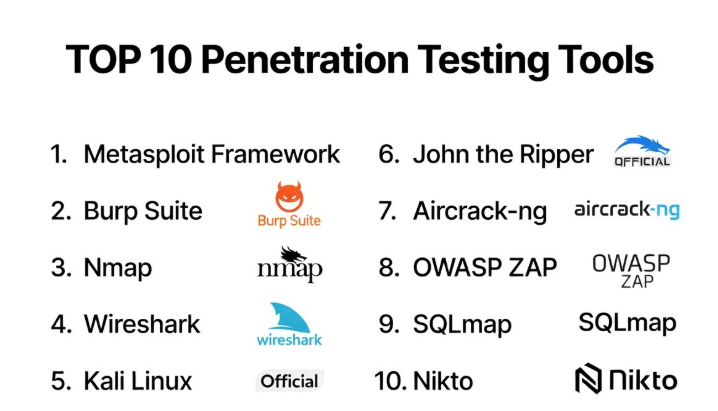
Introduction
Penetration Testing Tools (often called pentesting tools) are cybersecurity solutions used to simulate real-world attacks on systems, networks, and applications to identify exploitable vulnerabilities. In simple terms, these tools help ethical hackers and security professionals think like attackers to uncover weaknesses before malicious actors do.
With the rise in sophisticated cyber threats, penetration testing has become a critical part of proactive security. Unlike vulnerability scanners, pentesting tools go deeper by validating exploitability, testing defenses, and uncovering chained attack paths. Modern tools also integrate automation, AI-assisted testing, and DevSecOps workflows to keep up with fast-moving environments.
Common Use Cases
- Web application security testing
- Network penetration testing
- API and cloud security assessments
- Red team exercises
- Exploit validation and proof-of-concept testing
What Buyers Should Evaluate
- Depth of testing capabilities (web, network, API, cloud)
- Ease of use vs advanced flexibility
- Automation vs manual testing features
- Integration with DevOps and CI/CD pipelines
- Reporting and compliance support
- Community and plugin ecosystem
- Platform compatibility
- Learning curve and documentation
- Security and data handling features
- Cost and licensing model
Best for: Security professionals, ethical hackers, red teams, DevSecOps engineers, and organizations with mature security programs.
Not ideal for: Beginners with no cybersecurity background, small teams without security expertise, or organizations looking only for automated scanning tools.
Key Trends in Customer IAM (CIAM)
- AI-assisted penetration testing: Tools helping automate exploit discovery
- Shift-left security testing in CI/CD pipelines
- API and cloud-native pentesting focus
- Automated attack simulation platforms
- Integration with vulnerability management tools
- Container and Kubernetes security testing
- Hybrid testing (manual + automated)
- Bug bounty and crowdsourced testing integration
- Real-time reporting and collaboration tools
- Security validation for Zero Trust architectures
How We Selected These Tools (Methodology)
- Evaluated industry adoption and reputation
- Assessed breadth and depth of testing capabilities
- Reviewed automation vs manual flexibility
- Considered integration with DevOps and security stacks
- Analyzed platform support and deployment options
- Evaluated ease of use and learning curve
- Considered community support and plugin ecosystems
- Reviewed performance and reliability
- Included tools for both beginners and advanced users
- Ensured mix of open-source and enterprise tools
Top Penetration Testing Tools
#1 — Metasploit Framework
Short description: One of the most popular penetration testing frameworks, widely used for exploit development and testing.
Key Features
- Extensive exploit database
- Payload generation
- Post-exploitation modules
- Automation capabilities
- Integration with other tools
- Custom scripting
Pros
- Industry standard tool
- Highly flexible and powerful
Cons
- Requires expertise
- Complex for beginners
Platforms / Deployment
Windows / Linux / macOS
Security & Compliance
Not publicly stated
Integrations & Ecosystem
Large ecosystem with security tools
- Vulnerability scanners
- APIs
- Custom scripts
Support & Community
Very strong community and documentation
#2 — Burp Suite
Short description: A leading web application security testing tool used by professionals worldwide.
Key Features
- Web vulnerability scanning
- Proxy-based traffic interception
- Manual testing tools
- Automation features
- Plugin support
Pros
- Industry standard for web testing
- Highly customizable
Cons
- Steep learning curve
- Premium features require paid version
Platforms / Deployment
Windows / macOS / Linux
Security & Compliance
Not publicly stated
Integrations & Ecosystem
- Extensions marketplace
- APIs
- Security tools
Support & Community
Very strong community
#3 — Nmap
Short description: Network scanning tool used for discovering hosts, services, and vulnerabilities.
Key Features
- Network discovery
- Port scanning
- Service detection
- OS fingerprinting
- Scriptable engine
Pros
- Lightweight and fast
- Highly versatile
Cons
- Limited exploitation features
- Requires command-line knowledge
Platforms / Deployment
Windows / Linux / macOS
Security & Compliance
Varies / N/A
Integrations & Ecosystem
- Scripts (NSE)
- APIs
- Security tools
Support & Community
Large open-source community
#4 — Wireshark
Short description: Network protocol analyzer used for deep packet inspection and analysis.
Key Features
- Packet capture and analysis
- Protocol decoding
- Network troubleshooting
- Real-time monitoring
- Filtering capabilities
Pros
- Highly detailed analysis
- Free and open-source
Cons
- Not a direct pentesting tool
- Complex interface
Platforms / Deployment
Windows / Linux / macOS
Security & Compliance
Varies / N/A
Integrations & Ecosystem
- Network tools
- APIs
- Plugins
Support & Community
Strong community
#5 — Kali Linux
Short description: A penetration testing operating system that includes hundreds of security tools.
Key Features
- Pre-installed pentesting tools
- Customizable environment
- Regular updates
- Wide toolset
- Community support
Pros
- All-in-one solution
- Free and open-source
Cons
- Requires expertise
- Resource-heavy
Platforms / Deployment
Linux
Security & Compliance
Varies / N/A
Integrations & Ecosystem
- Built-in tools
- Security frameworks
- APIs
Support & Community
Very strong community
#6 — John the Ripper
Short description: Password cracking tool used to test password strength and security.
Key Features
- Password cracking
- Hash analysis
- Multiple attack modes
- Custom wordlists
- Cross-platform support
Pros
- Fast and efficient
- Highly customizable
Cons
- Limited scope
- Requires expertise
Platforms / Deployment
Windows / Linux / macOS
Security & Compliance
Varies / N/A
Integrations & Ecosystem
- Security tools
- Scripts
- APIs
Support & Community
Strong community
#7 — Aircrack-ng
Short description: Suite of tools for testing Wi-Fi network security.
Key Features
- Wi-Fi packet capture
- Password cracking
- Network analysis
- Wireless attack testing
- Monitoring tools
Pros
- Specialized for wireless testing
- Effective for audits
Cons
- Limited to Wi-Fi
- Requires technical knowledge
Platforms / Deployment
Windows / Linux
Security & Compliance
Varies / N/A
Integrations & Ecosystem
- Wireless tools
- APIs
- Scripts
Support & Community
Active community
#8 — OWASP ZAP
Short description: Open-source web application security scanner suitable for beginners and professionals.
Key Features
- Automated scanning
- Proxy-based testing
- API security testing
- CI/CD integration
- Reporting tools
Pros
- Free and open-source
- Easy to use
Cons
- Less advanced than Burp Suite
- Limited enterprise features
Platforms / Deployment
Windows / Linux / macOS
Security & Compliance
Varies / N/A
Integrations & Ecosystem
- DevOps tools
- APIs
- Plugins
Support & Community
Strong open-source community
#9 — SQLmap
Short description: Tool focused on detecting and exploiting SQL injection vulnerabilities.
Key Features
- Automated SQL injection detection
- Database fingerprinting
- Data extraction
- Command execution
- Multiple DB support
Pros
- Highly effective for SQL injection
- Automation capabilities
Cons
- Narrow focus
- Requires expertise
Platforms / Deployment
Windows / Linux
Security & Compliance
Varies / N/A
Integrations & Ecosystem
- Scripts
- APIs
- Security tools
Support & Community
Strong community
#10 — Nikto
Short description: Web server scanner used to identify vulnerabilities and misconfigurations.
Key Features
- Web server scanning
- Vulnerability detection
- Misconfiguration checks
- Plugin support
- Reporting
Pros
- Lightweight
- Easy to use
Cons
- Limited advanced features
- High false positives
Platforms / Deployment
Linux / Windows
Security & Compliance
Varies / N/A
Integrations & Ecosystem
- Security tools
- Scripts
- APIs
Support & Community
Open-source community
Comparison Table (Top 10)
| Tool Name | Best For | Platform(s) Supported | Deployment | Standout Feature | Public Rating |
|---|---|---|---|---|---|
| Metasploit | Advanced pentesting | Multi-OS | Software | Exploit framework | N/A |
| Burp Suite | Web testing | Multi-OS | Desktop | Proxy testing | N/A |
| Nmap | Network scanning | Multi-OS | CLI | Port scanning | N/A |
| Wireshark | Packet analysis | Multi-OS | Desktop | Deep inspection | N/A |
| Kali Linux | All-in-one testing | Linux | OS | Tool collection | N/A |
| John the Ripper | Password testing | Multi-OS | CLI | Password cracking | N/A |
| Aircrack-ng | Wi-Fi testing | Multi-OS | CLI | Wireless audits | N/A |
| OWASP ZAP | Web scanning | Multi-OS | Desktop | Open-source scanner | N/A |
| SQLmap | SQL injection | Multi-OS | CLI | Automated exploitation | N/A |
| Nikto | Web server scan | Multi-OS | CLI | Lightweight scanning | N/A |
Penetration Testing Tools Scoring
| Tool Name | Core (25%) | Ease (15%) | Integrations (15%) | Security (10%) | Performance (10%) | Support (10%) | Value (15%) | Weighted Total |
|---|---|---|---|---|---|---|---|---|
| Metasploit | 9 | 6 | 8 | 8 | 9 | 9 | 8 | 8.3 |
| Burp Suite | 9 | 7 | 8 | 8 | 8 | 9 | 7 | 8.1 |
| Nmap | 8 | 6 | 7 | 7 | 9 | 9 | 9 | 8.0 |
| Wireshark | 7 | 6 | 7 | 7 | 8 | 9 | 9 | 7.7 |
| Kali Linux | 9 | 6 | 8 | 8 | 8 | 9 | 9 | 8.3 |
| John Ripper | 7 | 6 | 6 | 7 | 8 | 8 | 9 | 7.5 |
| Aircrack-ng | 7 | 6 | 6 | 7 | 8 | 8 | 9 | 7.5 |
| OWASP ZAP | 8 | 8 | 7 | 7 | 8 | 8 | 9 | 8.0 |
| SQLmap | 8 | 6 | 6 | 7 | 8 | 8 | 9 | 7.7 |
| Nikto | 7 | 7 | 6 | 6 | 7 | 7 | 9 | 7.3 |
How to interpret scores:
These scores compare tools relative to each other across key criteria like features, usability, and ecosystem. A higher score indicates stronger overall capability, but the best tool depends on your use case, skill level, and environment.
Which Service Mesh Platforms Is Right for You?
Solo / Freelancer
- Best: OWASP ZAP, Nmap
- Easy to use and free
SMB
- Best: Burp Suite, OWASP ZAP
- Balance automation and usability
Mid-Market
- Best: Metasploit, Burp Suite
- Strong testing capabilities
Enterprise
- Best: Metasploit, Kali Linux
- Full-scale testing and flexibility
Budget vs Premium
- Budget: Open-source tools
- Premium: Burp Suite Pro
Feature Depth vs Ease of Use
- Feature-rich: Metasploit, Kali Linux
- Easy-to-use: OWASP ZAP
Integrations & Scalability
- High integration: Metasploit
- Moderate: Nmap
Security & Compliance Needs
- High: Burp Suite
- Moderate: Open-source tools
Penetration Testing Tools FAQs
What are penetration testing tools?
They simulate cyberattacks to identify exploitable vulnerabilities in systems and applications.
Are these tools legal to use?
Yes, but only with proper authorization and permission.
Do I need coding skills?
Some tools require scripting knowledge, while others are more user-friendly.
Can beginners use these tools?
Yes, tools like OWASP ZAP are beginner-friendly.
Are they free?
Many are open-source, but premium tools offer advanced features.
How often should pentesting be done?
Regularly, especially after major changes or deployments.
Can they replace vulnerability scanners?
No, they complement vulnerability scanning tools.
Do they support cloud environments?
Yes, many tools can test cloud-based systems.
What are common mistakes?
Running tests without proper scope or understanding results.
Can I automate penetration testing?
Partially, but manual testing is still essential.
Conclusion
Penetration Testing Tools are essential for organizations looking to proactively identify and validate security vulnerabilities before attackers can exploit them. From powerful frameworks like Metasploit and Kali Linux to accessible tools like OWASP ZAP and Nmap, there is a wide range of solutions available for different skill levels and use cases. The right choice depends on your expertise, testing requirements, and environment complexity. Instead of relying on a single tool, many security teams combine multiple tools for comprehensive coverage. Start by shortlisting a few tools that align with your needs, test them in controlled environments, and build a workflow that balances automation with manual expertise for the best results.
