Introduction
Focus Group Management Tools help researchers, brands, agencies, product teams, and customer insight teams plan, recruit, host, record, analyze, and report focus group discussions. In simple words, these tools make it easier to manage group-based research where selected participants discuss products, ideas, services, ads, messages, customer needs, or market experiences.
A focus group is different from a normal survey. A survey gives structured answers from many people, while a focus group helps teams understand deeper opinions, emotions, objections, language, and group reactions. Focus groups are useful when businesses want to hear how people talk about a problem, why they prefer one product over another, what they dislike, and how they respond to new ideas.
Real-world use cases include:
- Testing product ideas before launch
- Understanding customer attitudes and buying behavior
- Reviewing ads, packaging, concepts, and brand messages
- Collecting feedback from a target buyer group
- Running online research communities and moderated discussions
- Studying customer objections and emotional drivers
- Comparing reactions across different customer segments
- Capturing video, audio, transcripts, and research notes
Buyers should evaluate:
- Participant recruitment and screening
- Online focus group hosting
- Video, audio, and chat support
- Moderator controls and discussion guides
- Scheduling and incentive management
- Recording and transcription
- AI-assisted summaries and theme detection
- Polling, whiteboards, and stimulus testing
- Participant privacy and consent workflows
- Collaboration and observer rooms
- Reporting and insight export options
- Pricing, support, and research workflow fit
Best for: market researchers, UX researchers, product teams, brand teams, agencies, customer experience teams, academic researchers, consultants, and businesses that need deeper qualitative insight from targeted groups.
Not ideal for: teams that only need quick quantitative answers, businesses that do not have a clear discussion guide, or companies that cannot recruit the right participants. Focus group tools help manage the process, but strong research still depends on good moderation, clear objectives, and careful analysis.
Key Trends in Focus Group Management Tools
- Online focus groups are becoming standard: Teams can now run moderated discussions with participants from different cities, regions, or customer segments without requiring physical rooms.
- AI-assisted analysis is becoming useful: Many research teams now use AI to summarize transcripts, detect themes, highlight quotes, and reduce manual analysis time.
- Video-based qualitative research is growing: Seeing facial expressions, pauses, tone, and reactions helps researchers understand more than text responses alone.
- Participant quality is a major concern: Screening, identity checks, attention, incentives, and recruitment sources directly affect the quality of focus group insights.
- Asynchronous focus groups are becoming popular: Participants can respond over several days through discussion boards, video tasks, diaries, or mobile activities.
- Observer rooms are more important: Stakeholders want to watch sessions without interrupting moderators or influencing participants.
- Stimulus testing is becoming richer: Teams now test ads, videos, landing pages, packaging, product concepts, prototypes, and visual materials during focus groups.
- Research repositories are connecting with focus group tools: Teams want recordings, transcripts, tags, clips, and insights stored for future use.
- Privacy and consent are critical: Focus groups may include video, voice, personal opinions, customer data, and sensitive feedback, so consent and data handling matter.
- Hybrid research workflows are increasing: Companies combine surveys, interviews, focus groups, usability testing, and customer data to get a fuller view of the market.
How We Selected These Tools Methodology
The tools below were selected based on their relevance to focus group management, qualitative research workflows, participant engagement, video discussion support, research analysis, and practical fit across business sizes.
- Focus group support: Tools were reviewed for moderated group discussions, online research communities, video rooms, chat, activities, and discussion boards.
- Recruitment and screening: Participant targeting, screeners, panel access, scheduling, and incentive workflows were considered.
- Moderator experience: Discussion guides, prompts, activity design, observer access, and session control were evaluated.
- Data capture: Recording, transcription, note-taking, chat logs, video clips, and export options were reviewed.
- Analysis features: Tagging, themes, AI summaries, quote extraction, sentiment signals, and reporting workflows were considered.
- Collaboration: Observer rooms, stakeholder sharing, team notes, permissions, and project workspaces were evaluated.
- Research flexibility: Live online groups, asynchronous boards, video diaries, interviews, and mixed-method workflows were considered.
- Ease of use: Setup, participant experience, dashboard clarity, and moderator workflow were reviewed.
- Scalability: Tools for small research teams, agencies, mid-market teams, and enterprise research programs were included.
- Practical buyer fit: The goal is not one universal winner, but a useful comparison based on focus group style and research maturity.
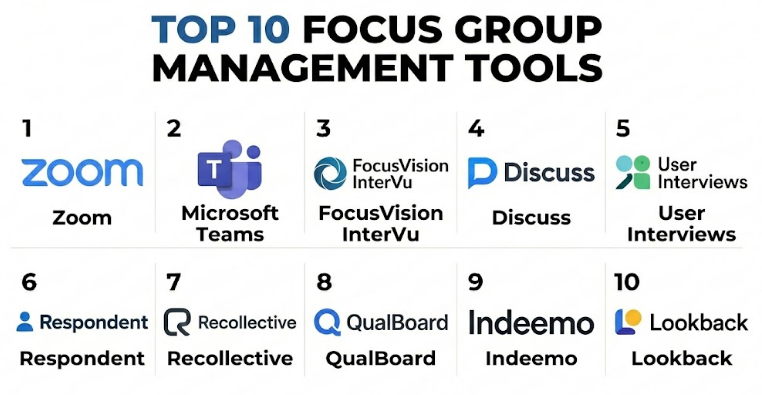
Top 10 Focus Group Management Tools
#1 — Zoom
Short description :
Zoom is a video meeting platform widely used for online focus groups, interviews, workshops, and moderated customer research sessions. It is not a dedicated research platform, but many teams use it because participants already understand how to join video calls. Zoom supports live discussions, breakout rooms, recording, chat, screen sharing, and observer participation when configured properly. It is especially useful for simple online focus groups where the research team already manages recruitment and analysis separately. Zoom is a practical choice for teams that need easy live video discussion without a complex research platform.
Key Features
- Live video focus group sessions
- Screen sharing for stimulus testing
- Breakout rooms
- Chat and reactions
- Session recording
- Waiting room and host controls
- Calendar and meeting workflow support
Pros
- Easy for most participants to understand
- Good for live moderated discussions
- Practical and widely adopted
Cons
- Not built specifically for research analysis
- Recruitment, consent, incentives, and reporting need separate tools
- Moderator must manage structure carefully
Platforms / Deployment
Web / Windows / macOS / Linux / iOS / Android
Cloud deployment
Security & Compliance
Zoom may process meeting data, recordings, chat, participant details, and session metadata. Specific certifications such as SOC 2, ISO 27001, GDPR, HIPAA, or other compliance details should be verified directly by plan and configuration.
Not publicly stated here for every plan and use case.
Integrations & Ecosystem
Zoom fits simple live focus group workflows when paired with research and analysis tools.
- Calendar tools
- Recording workflows
- Transcription tools
- Research repositories
- Collaboration platforms
- Survey and recruitment tools
Support & Community
Zoom has broad documentation and user familiarity. It is best for teams that need simple live video hosting and can manage the research process separately.
#2 — Microsoft Teams
Short description :
Microsoft Teams is a collaboration and video meeting platform that can be used for online focus groups, stakeholder observation, internal research reviews, and moderated customer sessions. It is especially useful for organizations already using Microsoft workplace tools. Teams supports video meetings, chat, recording, file sharing, meeting notes, and collaboration spaces. Like Zoom, it is not a dedicated focus group research platform, but it works well for structured live discussions when recruitment and analysis are handled separately. Microsoft Teams is a strong option for companies that want research sessions inside their existing workplace ecosystem.
Key Features
- Video meetings and group discussions
- Chat and file sharing
- Screen sharing
- Recording and meeting recap features depending on setup
- Calendar integration
- Team collaboration spaces
- Participant and guest access controls
Pros
- Good fit for Microsoft-based organizations
- Useful for stakeholder collaboration
- Familiar for business participants
Cons
- Not a dedicated qualitative research tool
- Participant access can be complex for external users
- Analysis and recruitment require separate workflows
Platforms / Deployment
Web / Windows / macOS / iOS / Android
Cloud deployment
Security & Compliance
Microsoft Teams may process meeting data, files, recordings, chats, participant data, and organizational information. Specific certifications and compliance details should be verified directly by Microsoft plan and tenant setup.
Not publicly stated here for every configuration.
Integrations & Ecosystem
Microsoft Teams fits organizations that run focus groups inside their existing business collaboration stack.
- Microsoft workspace tools
- Calendar workflows
- File sharing
- Recording and transcript workflows
- Collaboration channels
- Research documentation systems
Support & Community
Microsoft Teams has broad enterprise support and documentation. It is best for organizations already using Microsoft collaboration tools.
#3 — FocusVision InterVu
Short description :
FocusVision InterVu is a qualitative research platform designed for online interviews and focus groups. It helps research teams run live video sessions, manage participants, capture recordings, and support remote qualitative research. It is especially useful for research agencies and insights teams that need a more research-focused environment than general video meeting tools. FocusVision-style workflows are built around moderated research, observation, and session management. It is a strong option for teams that run focus groups regularly and need research-specific structure.
Key Features
- Online focus group and interview hosting
- Live video research sessions
- Participant and moderator controls
- Recording and playback
- Observer access support
- Research project workflows
- Qualitative research support tools
Pros
- Built for qualitative research workflows
- Better fit than generic meeting tools for serious research
- Useful for agencies and insights teams
Cons
- May be more expensive than basic video tools
- Setup and onboarding may be needed
- Feature availability should be verified by package
Platforms / Deployment
Web
Cloud deployment
Security & Compliance
FocusVision InterVu may process participant data, video recordings, research project data, session notes, and observer access. Specific certifications and compliance details should be verified directly.
Not publicly stated.
Integrations & Ecosystem
FocusVision InterVu fits professional qualitative research workflows.
- Online interviews
- Focus group sessions
- Research project management
- Transcription workflows
- Observer rooms
- Insight reporting processes
Support & Community
FocusVision-style platforms usually support professional research teams and agencies. It is best for teams that need structured remote qualitative research.
#4 — Discuss
Short description :
Discuss is a qualitative research platform designed for video-based customer conversations, interviews, online focus groups, and research analysis. It helps teams recruit or manage participants, conduct live sessions, capture recordings, create clips, and extract insights from customer conversations. Discuss is especially useful for brands, agencies, and product teams that want customer conversations to become reusable research assets. It supports moderated sessions, observer participation, and analysis workflows. Discuss is a strong choice for teams that need focus group management connected with video insight analysis.
Key Features
- Live video interviews and focus groups
- Participant management support
- Session recording and transcription
- Observer access
- Video clips and highlight reels
- Research analysis workflows
- Insight sharing and collaboration
Pros
- Strong for video-based qualitative research
- Useful for turning sessions into shareable insights
- Good fit for research and product teams
Cons
- May be more than small teams need
- Research design and moderation still require expertise
- Pricing and package features should be reviewed carefully
Platforms / Deployment
Web
Cloud deployment
Security & Compliance
Discuss may process participant data, video recordings, transcripts, research notes, clips, and team collaboration data. Specific security and compliance details should be verified directly.
Not publicly stated.
Integrations & Ecosystem
Discuss fits qualitative research and customer conversation workflows.
- Video focus groups
- Research interviews
- Transcription tools
- Insight repositories
- Team collaboration
- Highlight clip sharing
Support & Community
Discuss provides support for qualitative research teams. It is best for teams that need to capture, analyze, and share customer conversation insights.
#5 — User Interviews
Short description :
User Interviews is a participant recruitment and research operations platform that helps teams recruit, screen, schedule, and manage participants for interviews, focus groups, surveys, and user research. It is not mainly a video focus group room, but it solves one of the hardest parts of focus group research: finding the right people. It is useful for UX researchers, product teams, market researchers, agencies, and startups. Teams can use it to recruit participants and then run sessions in another video or research tool. User Interviews is a strong option when recruitment and scheduling are the biggest bottlenecks.
Key Features
- Participant recruitment
- Screener surveys
- Scheduling workflows
- Incentive management support depending on setup
- Research panel management
- Participant database features
- Research operations workflows
Pros
- Strong for recruiting research participants
- Useful for focus groups, interviews, and UX studies
- Helps reduce manual scheduling work
Cons
- Needs another tool for live focus group hosting
- Research analysis must be done separately
- Participant availability depends on target audience
Platforms / Deployment
Web
Cloud deployment
Security & Compliance
User Interviews may process participant profiles, screener responses, scheduling data, incentive records, and research project information. Specific certifications and compliance details should be verified directly.
Not publicly stated.
Integrations & Ecosystem
User Interviews fits research recruiting and operations workflows.
- Survey tools
- Calendar systems
- Video meeting platforms
- Research repositories
- Incentive workflows
- Participant management systems
Support & Community
User Interviews provides research operations support resources. It is best for teams that need reliable participant recruitment and scheduling.
#6 — Respondent
Short description :
Respondent is a participant recruitment platform used to find people for research interviews, focus groups, surveys, usability studies, and professional research. It is especially useful for recruiting B2B participants, professionals, niche audiences, and specific customer segments. Respondent helps teams create screeners, recruit qualified participants, schedule sessions, and manage incentives depending on the workflow. Like User Interviews, it is not a complete focus group room, but it supports the recruitment side of focus group management. Respondent is a strong option when audience quality and niche targeting matter.
Key Features
- Research participant recruitment
- Professional and consumer audience targeting
- Screener questions
- Scheduling support
- Incentive management support depending on setup
- Participant qualification workflows
- Research project setup
Pros
- Strong for B2B and professional participant recruitment
- Useful for niche focus group audiences
- Helps teams reach people beyond their customer base
Cons
- Live session hosting requires another tool
- Research design and analysis are separate
- Screening must be written carefully to avoid poor-fit participants
Platforms / Deployment
Web
Cloud deployment
Security & Compliance
Respondent may process participant profiles, screener data, research invitations, scheduling data, and incentive-related information. Specific compliance and privacy details should be verified directly.
Not publicly stated.
Integrations & Ecosystem
Respondent fits research workflows that need targeted recruitment.
- B2B focus groups
- UX research
- Product research
- Survey recruitment
- Professional interviews
- Scheduling workflows
Support & Community
Respondent provides participant recruitment workflows and research support resources. It is best for teams needing specific professional or niche participants.
#7 — Recollective
Short description :
Recollective is an online qualitative research platform used for focus groups, research communities, diary studies, discussion boards, and asynchronous research activities. It helps research teams design activities, manage participants, collect responses, capture media, and analyze qualitative data. Recollective is especially useful when teams want participants to respond over several days or weeks instead of only joining one live session. It supports text, video, images, tasks, discussions, and moderated activities. Recollective is a strong option for research communities and asynchronous focus group-style studies.
Key Features
- Online research communities
- Asynchronous discussion boards
- Focus group-style activities
- Video, image, and text responses
- Participant task management
- Moderation tools
- Analysis and reporting workflows
Pros
- Strong for asynchronous qualitative research
- Useful for longer research communities
- Good for diary studies and deep customer insight
Cons
- Not the simplest choice for one-time live focus groups
- Requires thoughtful activity design
- Participant engagement must be managed carefully
Platforms / Deployment
Web / mobile-friendly participant access
Cloud deployment
Security & Compliance
Recollective may process participant data, videos, images, text responses, research activities, and project records. Specific certifications and compliance details should be verified directly.
Not publicly stated.
Integrations & Ecosystem
Recollective fits qualitative research programs that need structured activities and longer engagement.
- Research communities
- Diary studies
- Online focus groups
- Media-based responses
- Moderation workflows
- Insight reporting
Support & Community
Recollective provides support for qualitative researchers and agencies. It is best for teams running structured online research communities or asynchronous studies.
#8 — QualBoard
Short description :
QualBoard is an online qualitative research platform designed for asynchronous focus groups, online discussion boards, research communities, and moderated qualitative studies. It helps researchers create discussion guides, invite participants, manage activities, collect responses, and analyze qualitative feedback. QualBoard is especially useful when participants cannot join at the same time or when researchers want deeper responses over multiple days. It supports moderated boards, multimedia responses, and group discussion workflows. QualBoard is a practical option for teams that need flexible online focus group management.
Key Features
- Online discussion boards
- Asynchronous focus groups
- Moderator activity controls
- Participant responses with media support
- Discussion guide management
- Analysis and export workflows
- Research project organization
Pros
- Strong for asynchronous focus group research
- Useful for multi-day discussions
- Helps participants respond thoughtfully
Cons
- Less suited for real-time video discussion needs
- Requires strong moderation and prompts
- Engagement may decline if activities are too long
Platforms / Deployment
Web
Cloud deployment
Security & Compliance
QualBoard may process participant responses, research notes, project data, multimedia uploads, and moderator activity. Specific certifications and compliance details should be verified directly.
Not publicly stated.
Integrations & Ecosystem
QualBoard fits online discussion-based qualitative research.
- Asynchronous focus groups
- Online research boards
- Participant activities
- Moderator guides
- Qualitative analysis
- Data exports
Support & Community
QualBoard provides qualitative research support resources. It is best for researchers who prefer flexible discussion-board style focus groups.
#9 — Indeemo
Short description :
Indeemo is a mobile ethnography and qualitative research platform used for diary studies, customer journeys, video tasks, in-the-moment feedback, and mobile research communities. It helps researchers collect real-world customer experiences through photos, videos, text responses, and tasks. While it is not only a focus group platform, it supports group-style qualitative projects where participants share experiences over time. Indeemo is especially useful for consumer behavior research, shopper studies, healthcare research, UX research, and customer experience studies. It is a strong option when real-life context matters more than a single group discussion.
Key Features
- Mobile diary studies
- Video and photo-based tasks
- Customer journey research
- Participant activity tracking
- In-the-moment feedback collection
- Research community workflows
- Qualitative analysis support
Pros
- Strong for real-world contextual research
- Useful for mobile-first participant tasks
- Good for understanding behavior over time
Cons
- Not designed only for traditional live focus groups
- Requires strong task design
- Analysis can take effort for rich media responses
Platforms / Deployment
Web / iOS / Android
Cloud deployment
Security & Compliance
Indeemo may process participant videos, images, diary entries, task responses, and research project data. Specific security and compliance details should be verified directly.
Not publicly stated.
Integrations & Ecosystem
Indeemo fits qualitative research where participant context and real-life evidence matter.
- Mobile research tasks
- Diary studies
- Customer journey research
- Ethnographic studies
- Video response workflows
- Insight reporting
Support & Community
Indeemo supports qualitative research and mobile ethnography workflows. It is best for teams that need real-world customer behavior insight.
#10 — Lookback
Short description :
Lookback is a user research platform focused on moderated interviews, usability tests, participant sessions, and video-based research. While it is more commonly used for UX research than classic focus groups, it can support small group or session-based qualitative research depending on workflow. Lookback helps teams observe participants, record sessions, capture reactions, and share research clips. It is especially useful for product teams and UX researchers who want to understand digital product experiences. Lookback is a strong option when focus group-style research overlaps with usability testing and product feedback.
Key Features
- Moderated user research sessions
- Video recording
- Screen sharing and observation
- Participant experience testing
- Research notes and clips
- Remote research workflows
- Team collaboration features
Pros
- Strong for UX and product research
- Useful for observing real user behavior
- Good video-based insight capture
Cons
- Not primarily built for large focus groups
- Recruitment must be handled separately
- Best suited for product and usability research
Platforms / Deployment
Web / mobile support may vary
Cloud deployment
Security & Compliance
Lookback may process participant recordings, screen data, research notes, session data, and team collaboration information. Specific compliance and security details should be verified directly.
Not publicly stated.
Integrations & Ecosystem
Lookback fits product and UX research workflows.
- Usability testing
- Moderated interviews
- Video research sessions
- Screen recording
- Research clips
- Product feedback workflows
Support & Community
Lookback provides support resources for user researchers and product teams. It is best for teams that need video-based product feedback and usability insight.
Comparison Table Top 10
| Tool Name | Best For | Platform(s) Supported | Deployment | Standout Feature | Public Rating |
|---|---|---|---|---|---|
| Zoom | Simple live online focus groups | Web, Windows, macOS, Linux, iOS, Android | Cloud | Familiar video meeting experience | N/A |
| Microsoft Teams | Business focus groups inside Microsoft workspace | Web, Windows, macOS, iOS, Android | Cloud | Collaboration and meeting workflow integration | N/A |
| FocusVision InterVu | Professional online qualitative research | Web | Cloud | Research-focused live video sessions | N/A |
| Discuss | Video-based customer conversations and insights | Web | Cloud | Live research plus clips and analysis workflows | N/A |
| User Interviews | Participant recruitment and research operations | Web | Cloud | Recruiting and scheduling research participants | N/A |
| Respondent | B2B and niche participant recruitment | Web | Cloud | Professional and targeted participant sourcing | N/A |
| Recollective | Online research communities and asynchronous groups | Web, mobile-friendly access | Cloud | Multi-day qualitative activities and discussions | N/A |
| QualBoard | Asynchronous focus groups and discussion boards | Web | Cloud | Moderated online discussion-board research | N/A |
| Indeemo | Mobile ethnography and diary studies | Web, iOS, Android | Cloud | Real-world video, photo, and diary tasks | N/A |
| Lookback | UX research and moderated product feedback | Web, mobile support varies | Cloud | Video-based usability and research sessions | N/A |
Evaluation & Focus Group Management Tools
| Tool Name | Core 25% | Ease 15% | Integrations 15% | Security 10% | Performance 10% | Support 10% | Value 15% | Weighted Total 0–10 |
|---|---|---|---|---|---|---|---|---|
| Zoom | 7.8 | 9.2 | 8.5 | 8.4 | 8.8 | 8.3 | 8.8 | 8.46 |
| Microsoft Teams | 7.8 | 8.5 | 8.8 | 8.6 | 8.7 | 8.4 | 8.4 | 8.38 |
| FocusVision InterVu | 8.8 | 8.0 | 8.0 | 8.3 | 8.6 | 8.5 | 7.8 | 8.31 |
| Discuss | 9.0 | 8.2 | 8.4 | 8.4 | 8.7 | 8.5 | 8.0 | 8.52 |
| User Interviews | 8.4 | 8.6 | 8.2 | 8.2 | 8.5 | 8.3 | 8.3 | 8.37 |
| Respondent | 8.3 | 8.5 | 7.8 | 8.0 | 8.4 | 8.0 | 8.3 | 8.21 |
| Recollective | 9.0 | 8.0 | 8.2 | 8.4 | 8.6 | 8.5 | 7.9 | 8.42 |
| QualBoard | 8.6 | 8.2 | 8.0 | 8.2 | 8.4 | 8.3 | 8.0 | 8.27 |
| Indeemo | 8.7 | 8.0 | 8.0 | 8.3 | 8.5 | 8.4 | 7.9 | 8.30 |
| Lookback | 8.2 | 8.3 | 8.1 | 8.2 | 8.4 | 8.2 | 8.1 | 8.22 |
These scores are comparative and should be used as a starting point. Teams needing simple live focus groups may rate Zoom or Microsoft Teams higher because ease and cost matter. Professional research teams may prefer Discuss, FocusVision InterVu, Recollective, or QualBoard. Teams struggling with recruitment may prefer User Interviews or Respondent. Product and UX teams may prefer Lookback or Indeemo depending on research style.
Which Focus Group Management Tool Should You Choose?
Solo / Founder
A solo founder should start with simple tools. Zoom or Microsoft Teams can be enough for early customer discussions, while Respondent or User Interviews can help find participants.
At this stage, the main goal is learning, not building a perfect research operation. Keep the discussion guide short, recruit carefully, and record notes immediately after each session.
Startup
Startups need fast customer feedback, concept validation, product discovery, and message testing. Zoom, User Interviews, Respondent, Lookback, and Discuss are useful tools to compare.
Startups should focus on who they speak with. A small group of the right participants is often more useful than a large group of poorly matched participants.
SMB
Small and mid-sized businesses may need focus groups for product ideas, customer experience, brand messaging, or campaign testing. Zoom, Microsoft Teams, Discuss, QualBoard, and User Interviews are practical options.
SMBs should create a repeatable research process: recruit, screen, schedule, moderate, record, tag insights, and share learnings with the team.
Mid-Market Business
Mid-market companies often need better research structure, stakeholder observation, reusable insights, and participant management. Discuss, FocusVision InterVu, Recollective, QualBoard, and User Interviews are strong options.
At this stage, research should not stay in recordings only. Teams should create summaries, clips, themes, and decision-ready insight reports.
Enterprise
Enterprise teams need security controls, permissions, scalable research workflows, participant privacy, observer rooms, global studies, and insight repositories. Discuss, FocusVision InterVu, Recollective, Indeemo, and Microsoft Teams can be evaluated depending on research needs.
Enterprise buyers should involve research, legal, privacy, IT, product, marketing, and customer experience teams before choosing a platform.
Agency
Research agencies need tools that support multiple clients, multiple projects, participants, recordings, analysis, and stakeholder sharing. FocusVision InterVu, Discuss, Recollective, QualBoard, and Indeemo are strong options.
Agencies should prioritize project organization, participant experience, analysis workflow, and clean reporting for clients.
Product Team
Product teams often need usability feedback, feature concept testing, prototype reaction, and customer journey insight. Lookback, Discuss, User Interviews, Respondent, and Indeemo are useful tools.
Product teams should combine focus group findings with usability tests, analytics, support tickets, and customer interviews before making roadmap decisions.
Academic Research
Academic researchers may need discussion boards, participant management, consent, recordings, and structured qualitative data. Recollective, QualBoard, Zoom, and Respondent can be useful depending on study design.
Researchers should prepare consent language, moderation protocols, privacy rules, and data storage plans before running sessions.
Budget vs Premium
Budget-focused teams can start with Zoom or Microsoft Teams plus a spreadsheet, screener survey, and manual analysis. This works well for early-stage or occasional focus groups.
Premium platforms become valuable when teams run many studies, need observer rooms, asynchronous discussions, mobile tasks, transcription, tagging, clips, and structured research reporting.
Feature Depth vs Ease of Use
Zoom and Microsoft Teams are easiest for live group calls. Discuss and FocusVision InterVu are stronger for professional video research. Recollective and QualBoard are better for asynchronous focus groups. User Interviews and Respondent are stronger for recruitment. Indeemo is stronger for mobile diary and real-world context. Lookback is better for UX-focused research.
The best tool depends on whether the main need is hosting live sessions, recruiting participants, running asynchronous discussions, collecting mobile diaries, or analyzing video insights.
Integrations & Scalability
Focus group tools may need to connect with calendar systems, survey tools, participant recruitment platforms, video tools, transcription services, research repositories, collaboration tools, customer databases, and reporting platforms.
Scalability means managing more participants, more research projects, more moderators, more recordings, more observers, more analysis tags, and more stakeholder reporting without losing research quality.
Security & Compliance Needs
Focus group tools may process participant names, video recordings, audio, chat messages, personal opinions, customer data, research consent, and sensitive business concepts. Buyers should review consent workflows, data retention, access permissions, encryption, participant privacy, and recording controls.
Teams should also clearly tell participants when they are being recorded, who can view the session, how data will be used, and whether quotes may be included in reports.
Frequently Asked Questions FAQs
1. What is a Focus Group Management Tool?
A Focus Group Management Tool helps researchers plan, recruit, host, record, moderate, analyze, and report group discussions with selected participants. It makes qualitative research easier to manage.
2. How is a focus group different from a survey?
A survey collects structured answers from many people, while a focus group explores deeper opinions through discussion. Focus groups help researchers understand why people think, feel, or behave in a certain way.
3. Which tool is best for simple online focus groups?
Zoom and Microsoft Teams are practical for simple live online focus groups. They are easy for participants to join, but recruitment, consent, analysis, and reporting must be managed separately.
4. Which tool is best for professional qualitative research?
Discuss, FocusVision InterVu, Recollective, and QualBoard are strong options for professional qualitative research. They provide more research-specific workflows than normal video meeting tools.
5. Which tool is best for recruiting participants?
User Interviews and Respondent are strong options for recruiting participants. User Interviews is useful for general research operations, while Respondent is helpful for professional and niche audiences.
6. What is an asynchronous focus group?
An asynchronous focus group is a discussion where participants respond over time instead of joining one live session. Tools like Recollective and QualBoard support this style of research.
7. How many participants should be in a focus group?
Many focus groups work well with a small group where everyone has time to speak. The right number depends on the topic, audience, discussion length, and moderation style.
8. What are common focus group mistakes?
Common mistakes include recruiting the wrong people, asking leading questions, letting one participant dominate, skipping consent, failing to record notes, and treating opinions as statistically representative.
9. Can focus groups be used for product testing?
Yes. Focus groups can help test product ideas, prototypes, packaging, messages, ads, onboarding flows, and customer pain points. However, usability testing may be better for observing actual product behavior.
10. Are online focus groups reliable?
Online focus groups can be reliable when participants are properly screened, the moderator is skilled, the discussion guide is clear, and the session environment is well managed.
Conclusion
Focus Group Management Tools help teams manage qualitative research more professionally by supporting participant recruitment, moderated discussions, recordings, observer workflows, asynchronous boards, mobile tasks, analysis, and reporting. The right tool depends on the research style and team maturity. Zoom and Microsoft Teams are practical for simple live discussions. FocusVision InterVu and Discuss are stronger for professional online qualitative research. User Interviews and Respondent help solve participant recruitment challenges. Recollective and QualBoard are strong for asynchronous focus groups and research communities. Indeemo is useful for mobile diary studies and real-world context. Lookback is better for UX and product-focused research sessions.
