Introduction
Source Code Management (SCM) Tools are platforms that help developers manage, track, and collaborate on changes to source code. In simple terms, they act as a version control system—allowing teams to store code, track history, manage branches, and collaborate without overwriting each other’s work.
In modern software development, where teams are distributed and releases are frequent, SCM tools are essential. They enable collaboration, ensure code integrity, and provide traceability for every change made in a project.
Common use cases include:
- Version control and code history tracking
- Collaborative development across teams
- Managing branches and releases
- Code reviews and approvals
- Integration with CI/CD pipelines
Key evaluation criteria:
- Version control capabilities (Git, centralized systems)
- Ease of collaboration and branching workflows
- Code review and pull request features
- Integration with DevOps and CI/CD tools
- Security and access controls
- Scalability for large repositories
- Performance and reliability
- Cloud vs self-hosted deployment
- Developer experience and UI
- Pricing and licensing
Best for: Developers, DevOps engineers, software teams, and organizations managing codebases across multiple projects.
Not ideal for: Non-technical teams or projects without code-based workflows, where document collaboration tools may be more suitable.
Key Trends in Source Code Management (SCM) Tools
- Cloud-native repositories: Increasing adoption of SaaS-based SCM platforms
- Integrated DevOps platforms: SCM tools bundled with CI/CD, security, and project management
- AI-assisted code reviews: Automated suggestions and code quality insights
- Enhanced security features: Secrets scanning, vulnerability detection, and access controls
- Shift to Git dominance: Distributed version control as the standard
- Collaboration-first workflows: Pull requests, comments, and inline reviews
- Automation and pipelines: Built-in CI/CD capabilities
- Large-scale repository support: Handling monorepos and large codebases
- Compliance and auditability: Tracking changes for regulatory requirements
- Developer experience improvements: Faster UI, better search, and navigation
How We Selected These Tools (Methodology)
We evaluated SCM tools based on:
- Industry adoption and market leadership
- Feature completeness (version control, collaboration, automation)
- Ease of use and developer experience
- Integration with DevOps and CI/CD ecosystems
- Security and compliance capabilities
- Scalability for teams of different sizes
- Performance and reliability
- Community and ecosystem strength
- Flexibility in deployment models
- Overall value for cost
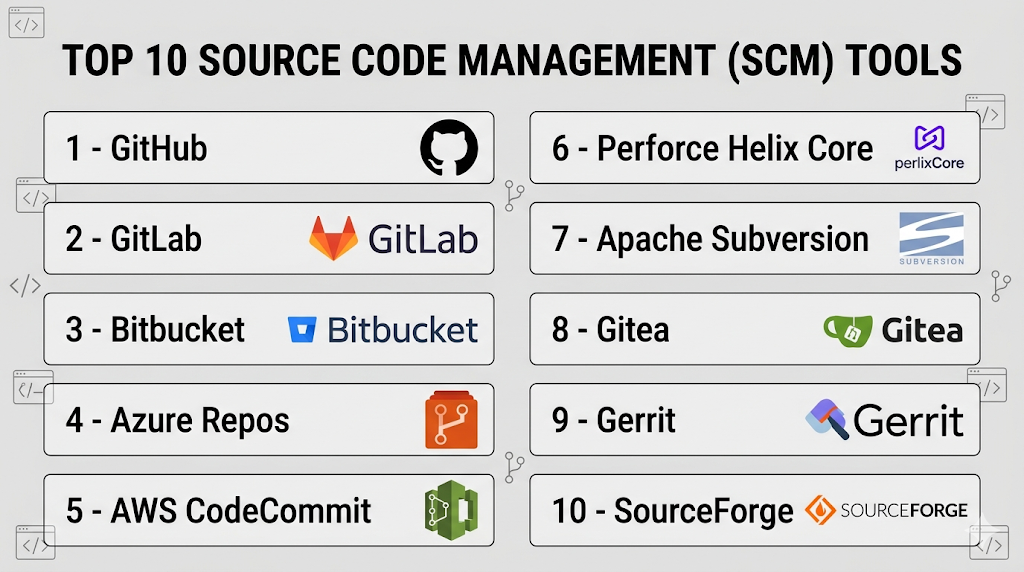
Top 10 Source Code Management (SCM) Tools
#1 — GitHub
Short description: A widely used cloud-based Git repository hosting platform with strong collaboration and DevOps features.
Key Features
- Git-based version control
- Pull requests and code reviews
- GitHub Actions for CI/CD
- Issue tracking and project boards
- Security scanning and insights
- Large developer community
Pros
- Easy to use and widely adopted
- Strong integrations and ecosystem
Cons
- Advanced features may require paid plans
- Limited customization compared to self-hosted tools
Platforms / Deployment
Web / Cloud
Security & Compliance
SSO, MFA, RBAC, encryption
Integrations & Ecosystem
GitHub integrates with a vast range of development tools and services, making it a central hub for modern DevOps workflows.
- CI/CD tools
- IDEs
- Cloud platforms
- Third-party apps
Support & Community
Very large global community and extensive documentation.
#2 — GitLab
Short description: A complete DevOps platform combining SCM, CI/CD, and security in a single application.
Key Features
- Git repository management
- Built-in CI/CD pipelines
- Issue tracking and project management
- Security scanning tools
- Self-hosted and cloud options
Pros
- All-in-one DevOps solution
- Strong automation capabilities
Cons
- Can be complex to manage
- Performance issues in large setups
Platforms / Deployment
Cloud / Self-hosted
Security & Compliance
RBAC, SSO, encryption, audit logs
Integrations & Ecosystem
GitLab offers a comprehensive ecosystem for DevOps and integrates with many external tools.
- Kubernetes
- CI/CD pipelines
- Monitoring tools
Support & Community
Strong community and enterprise support.
#3 — Bitbucket
Short description: A Git-based SCM tool by Atlassian, designed for teams using Jira and other Atlassian products.
Key Features
- Git repository hosting
- Pull requests and code reviews
- CI/CD with Bitbucket Pipelines
- Jira integration
- Branch permissions
Pros
- Seamless Atlassian integration
- Good for Agile teams
Cons
- Smaller community than GitHub
- Limited free tier features
Platforms / Deployment
Cloud / Self-hosted
Security & Compliance
RBAC, encryption, access control
Integrations & Ecosystem
Deep integration with Atlassian ecosystem.
- Jira
- Confluence
- CI/CD tools
Support & Community
Good support and documentation.
#4 — Azure Repos
Short description: A source control solution within Azure DevOps offering Git and centralized version control.
Key Features
- Git and TFVC support
- Pull requests and code reviews
- Integration with Azure DevOps
- Branch policies
- Secure access control
Pros
- Strong Microsoft ecosystem integration
- Enterprise-ready
Cons
- Best suited for Azure users
- UI can feel complex
Platforms / Deployment
Cloud
Security & Compliance
RBAC, encryption, SSO
Integrations & Ecosystem
Works seamlessly with Microsoft tools.
- Azure DevOps
- Visual Studio
- CI/CD pipelines
Support & Community
Strong enterprise support.
#5 — AWS CodeCommit
Short description: A fully managed source control service hosted by AWS.
Key Features
- Git-based repositories
- Fully managed service
- Integration with AWS services
- High scalability
- Secure access control
Pros
- Scalable and secure
- No infrastructure management
Cons
- Limited UI features
- AWS ecosystem dependency
Platforms / Deployment
Cloud
Security & Compliance
IAM, encryption, access control
Integrations & Ecosystem
Deep integration with AWS services.
- AWS CI/CD tools
- Cloud infrastructure
Support & Community
Enterprise support via AWS.
#6 — Perforce Helix Core
Short description: A high-performance version control system designed for large-scale and enterprise environments.
Key Features
- Centralized version control
- High performance for large files
- Fine-grained access control
- Scalability for large teams
- Integration with development tools
Pros
- Handles large repositories efficiently
- Enterprise-grade performance
Cons
- Complex setup
- Expensive
Platforms / Deployment
Cloud / Self-hosted
Security & Compliance
RBAC, encryption
Integrations & Ecosystem
Works with enterprise environments.
- Game development tools
- CI/CD pipelines
Support & Community
Strong enterprise support.
#7 — Apache Subversion (SVN)
Short description: A centralized version control system used for managing code repositories.
Key Features
- Centralized version control
- Version history tracking
- Access control
- Branching and tagging
- Stable performance
Pros
- Simple and reliable
- Good for legacy systems
Cons
- Less flexible than Git
- Declining popularity
Platforms / Deployment
Self-hosted
Security & Compliance
Access control, encryption
Integrations & Ecosystem
Supports traditional workflows.
- CI/CD tools
- Development environments
Support & Community
Established but declining community.
#8 — Gitea
Short description: A lightweight, self-hosted Git service for small teams and organizations.
Key Features
- Git repository hosting
- Lightweight deployment
- Web interface
- Issue tracking
- Access control
Pros
- Easy to deploy
- Open-source
Cons
- Limited advanced features
- Smaller ecosystem
Platforms / Deployment
Self-hosted
Security & Compliance
RBAC, encryption
Integrations & Ecosystem
Basic integrations.
- CI/CD tools
- Git ecosystem
Support & Community
Growing open-source community.
#9 — Gerrit
Short description: A web-based code review tool built around Git repositories.
Key Features
- Code review workflows
- Git integration
- Access control
- Workflow automation
- Fine-grained permissions
Pros
- Strong code review capabilities
- Highly customizable
Cons
- Complex setup
- Steep learning curve
Platforms / Deployment
Self-hosted
Security & Compliance
RBAC, authentication controls
Integrations & Ecosystem
Works with development pipelines.
- Git
- CI/CD tools
Support & Community
Active developer community.
#10 — SourceForge
Short description: A platform for hosting, managing, and distributing open-source projects.
Key Features
- Code repository hosting
- Project management tools
- Download distribution
- Version control support
- Community features
Pros
- Good for open-source projects
- Free hosting options
Cons
- Limited modern features
- Outdated compared to competitors
Platforms / Deployment
Cloud
Security & Compliance
Not publicly stated
Integrations & Ecosystem
Supports open-source workflows.
- Developer tools
Support & Community
Moderate community support.
Comparison Table (Top 10)
| Tool Name | Best For | Platform(s) Supported | Deployment | Standout Feature | Public Rating |
|---|---|---|---|---|---|
| GitHub | Developers | Web | Cloud | Community | N/A |
| GitLab | DevOps teams | Web | Hybrid | All-in-one platform | N/A |
| Bitbucket | Atlassian users | Web | Hybrid | Jira integration | N/A |
| Azure Repos | Enterprises | Web | Cloud | Microsoft integration | N/A |
| AWS CodeCommit | AWS users | Web | Cloud | Managed service | N/A |
| Perforce Helix | Large teams | Cross-platform | Hybrid | Performance | N/A |
| SVN | Legacy systems | Cross-platform | Self-hosted | Stability | N/A |
| Gitea | Small teams | Web | Self-hosted | Lightweight | N/A |
| Gerrit | Code review | Web | Self-hosted | Review workflows | N/A |
| SourceForge | Open-source | Web | Cloud | Project hosting | N/A |
Source Code Management (SCM) Tools Scoring
| Tool Name | Core (25%) | Ease (15%) | Integrations (15%) | Security (10%) | Performance (10%) | Support (10%) | Value (15%) | Weighted Total |
|---|---|---|---|---|---|---|---|---|
| GitHub | 9 | 9 | 10 | 9 | 9 | 10 | 8 | 9.1 |
| GitLab | 9 | 8 | 10 | 9 | 9 | 9 | 8 | 9.0 |
| Bitbucket | 8 | 8 | 9 | 9 | 8 | 8 | 8 | 8.4 |
| Azure Repos | 8 | 7 | 9 | 9 | 8 | 9 | 8 | 8.3 |
| AWS CodeCommit | 8 | 7 | 8 | 9 | 9 | 8 | 8 | 8.2 |
| Perforce Helix | 9 | 6 | 8 | 9 | 10 | 9 | 6 | 8.3 |
| SVN | 7 | 7 | 7 | 8 | 8 | 7 | 9 | 7.6 |
| Gitea | 7 | 8 | 7 | 8 | 7 | 7 | 9 | 7.7 |
| Gerrit | 8 | 6 | 7 | 8 | 8 | 7 | 8 | 7.6 |
| SourceForge | 6 | 7 | 6 | 6 | 7 | 6 | 9 | 6.8 |
How to interpret scores:
- Scores reflect overall capability across criteria
- Higher scores indicate balanced performance
- Enterprise tools score higher in scalability and security
- Lightweight tools score higher in value
- Choose based on team size and workflow needs
Which Source Code Management (SCM) Tools Is Right for You?
Solo / Freelancer
- Use GitHub or Gitea
- Focus on simplicity and accessibility
SMB
- GitHub or Bitbucket for collaboration
- Balance features and cost
Mid-Market
- GitLab or Azure Repos for integrated workflows
- Ensure CI/CD compatibility
Enterprise
- GitLab or Perforce Helix Core
- Focus on scalability and security
Budget vs Premium
- Open-source and free tiers provide great value
- Enterprise tools offer advanced features and support
Feature Depth vs Ease of Use
- GitLab = feature-rich
- GitHub = easy to use
Integrations & Scalability
- Choose tools with strong CI/CD and cloud integration
- Ensure support for large repositories
Security & Compliance Needs
- Enterprises should prioritize audit logs and access controls
- Cloud platforms often provide better compliance features
Frequently Asked Questions (FAQs)
What is an SCM tool?
It is a system used to manage and track changes in source code.
What is the difference between Git and SVN?
Git is distributed, while SVN is centralized.
Are SCM tools free?
Many offer free tiers, while enterprise features require payment.
Which SCM tool is most popular?
GitHub and GitLab are widely used.
Can SCM tools integrate with CI/CD?
Yes, most modern tools support CI/CD integration.
Do I need technical knowledge to use SCM tools?
Yes, basic knowledge of version control is required.
What is a pull request?
A request to merge code changes into a main branch.
Can I host SCM tools on-premise?
Yes, many tools support self-hosted deployment.
Are SCM tools secure?
Most provide strong security features like RBAC and encryption.
Can I migrate between SCM tools?
Yes, but it requires repository migration and setup.
Conclusion
Source Code Management (SCM) Tools are the backbone of modern software development, enabling teams to collaborate, track changes, and maintain code quality efficiently.
