Meta title: AMD Ryzen AI Halo Developer Platform Review: Specs, AI Performance, and Best Alternatives
Meta description: A complete review of the AMD Ryzen AI Halo Developer Platform, including full specs, AI use cases, model-size expectations, pros and cons, and comparisons with NVIDIA DGX Spark, Apple Mac Studio, Framework Desktop, Corsair AI Workstation 300, and RTX workstations.
Target keywords: AMD Ryzen AI Halo, Ryzen AI Max+ 395, Strix Halo, local AI workstation, AMD ROCm, DGX Spark alternative, local LLM PC, AI developer platform
Introduction: A New Kind of AI Developer Machine
For years, serious AI development has been split between two worlds.
On one side, you had cloud GPUs: powerful, scalable, and expensive over time. On the other side, you had local machines: convenient and private, but usually limited by GPU memory, power, heat, or software support.
The AMD Ryzen AI Halo Developer Platform tries to create a third category: a compact local AI workstation with enough unified memory to run large models, enough CPU power for real software development, and enough integrated GPU horsepower to make local AI inference practical.
This is not just another mini PC. It is AMD’s first serious attempt to package the Ryzen AI Max+ 395, also known as Strix Halo, into a developer-focused local AI machine.
The headline is simple:
128GB unified memory, 16 Zen 5 CPU cores, Radeon 8060S graphics, AMD XDNA 2 NPU, ROCm support, and Windows or Linux compatibility in a tiny desktop box.
That combination makes Ryzen AI Halo one of the most interesting machines for developers who want to run local LLMs, coding assistants, image models, AI agents, private code review, and AI experimentation without depending completely on cloud subscriptions.
But is it worth buying? Can it replace Claude, ChatGPT, or cloud GPUs? How does it compare with NVIDIA DGX Spark, Apple Mac Studio, Framework Desktop, Corsair AI Workstation 300, and a custom RTX workstation?
Let’s break it down properly.
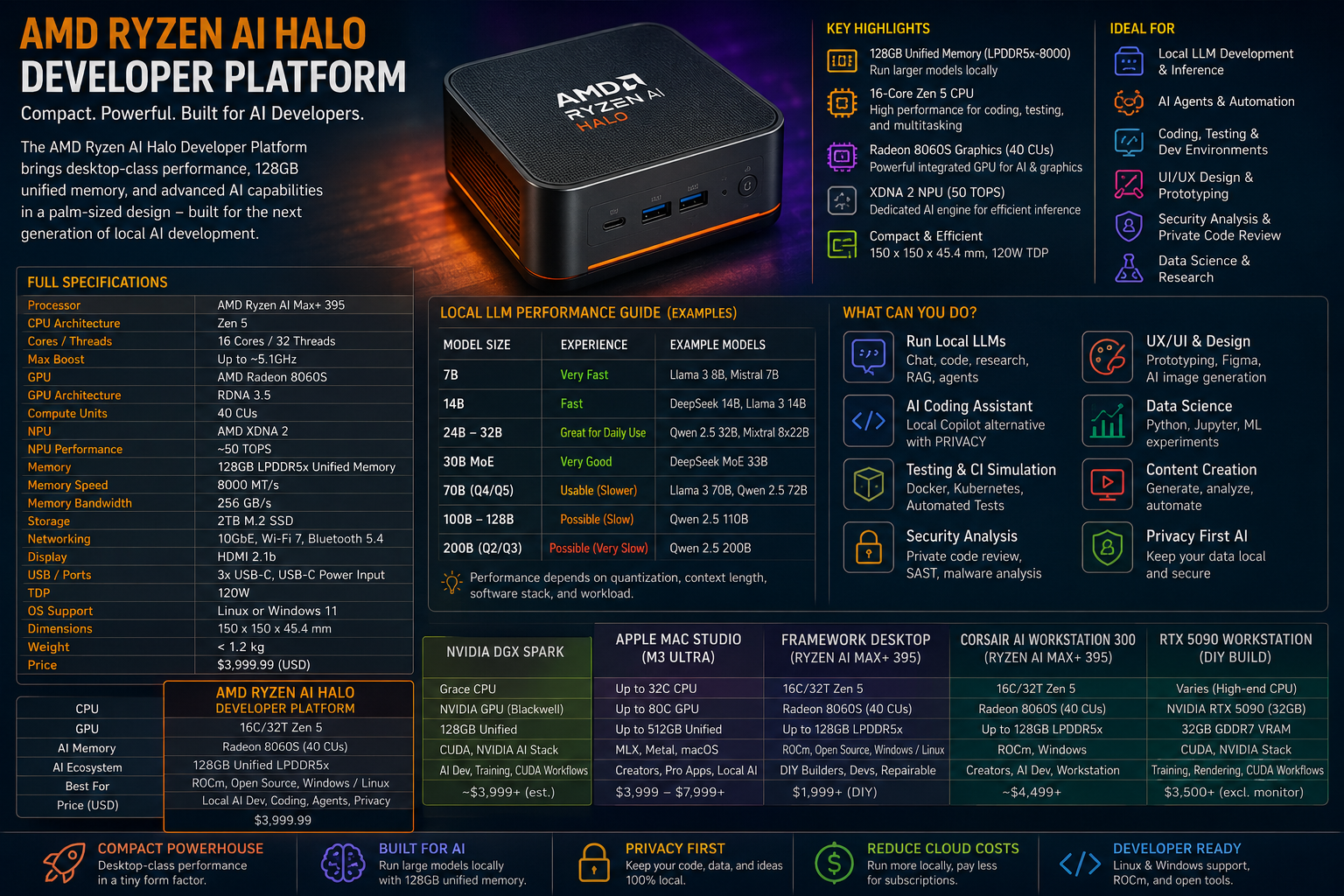
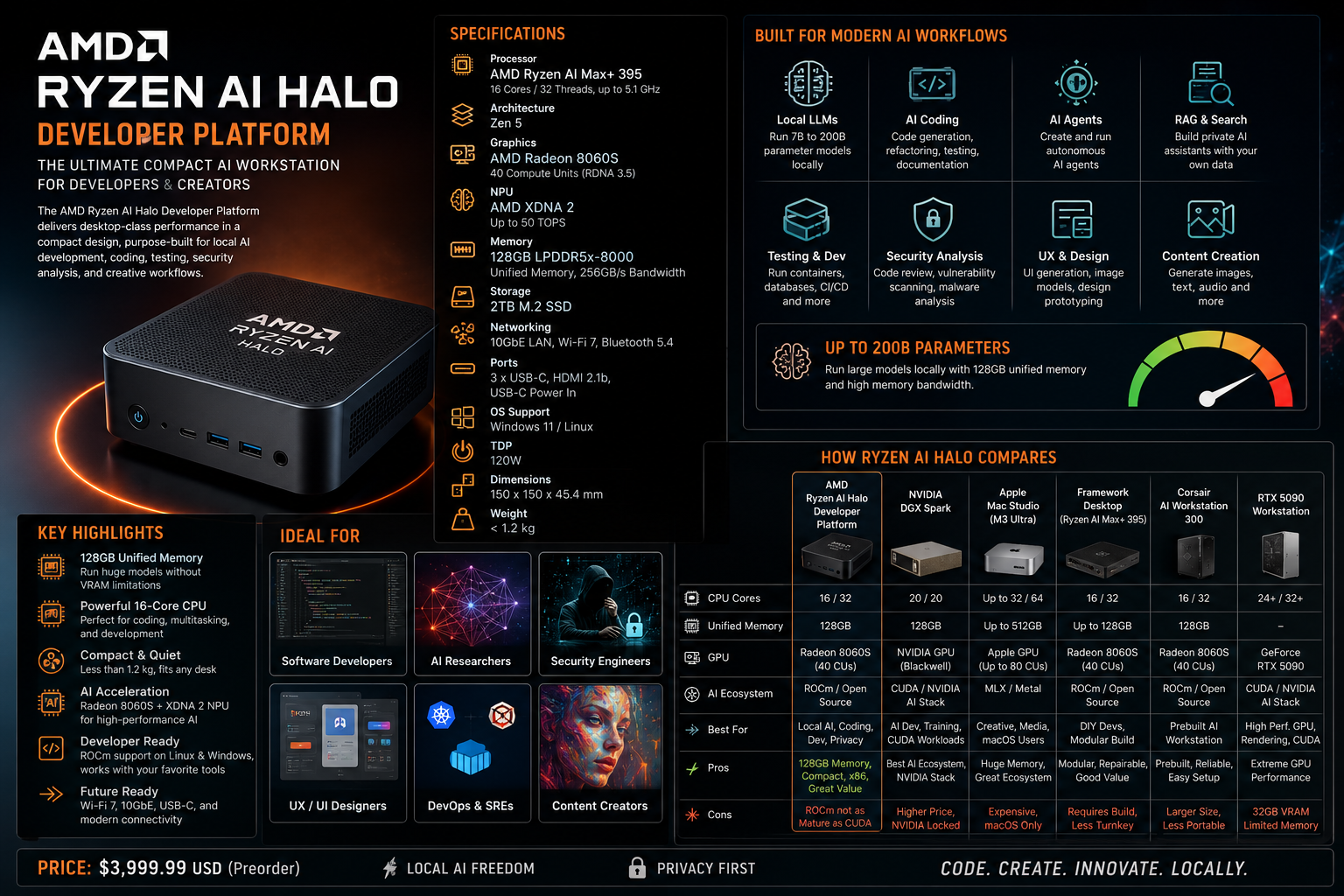
AMD Ryzen AI Halo Developer Platform: Full Specifications
| Category | Specification |
|---|---|
| Product | AMD Ryzen AI Halo Developer Platform |
| Processor | AMD Ryzen AI Max+ 395 |
| CPU architecture | Zen 5 |
| CPU cores / threads | 16 cores / 32 threads |
| Max boost | Up to around 5.1GHz |
| GPU | AMD Radeon 8060S integrated graphics |
| GPU architecture | RDNA 3.5 |
| GPU compute units | 40 CUs |
| NPU | AMD XDNA 2 |
| NPU performance | Around 50 TOPS |
| Memory | 128GB LPDDR5x unified memory |
| Memory speed | 8000 MT/s |
| Memory bandwidth | 256GB/s |
| Storage | 2TB M.2 SSD |
| Networking | 10GbE, Wi-Fi 7, Bluetooth 5.4 |
| Display | HDMI 2.1b |
| USB | 3 USB-C ports plus USB-C power input |
| TDP | 120W |
| OS support | Linux or Windows 11 |
| Dimensions | 150 × 150 × 45.4 mm |
| Weight | Under 1.2 kg |
| Price | Around $3,999.99 in the US |
| Target user | AI developers, local LLM users, software engineers, agent builders, creators, researchers |
The key specification is not the CPU. It is not even the NPU.
The most important feature is 128GB of unified LPDDR5x memory.
That one decision changes the machine’s personality. Most consumer GPUs are limited by VRAM. A 16GB or 24GB GPU can be fast, but it hits a wall with large local models. Ryzen AI Halo does not have traditional discrete VRAM. Instead, the CPU and integrated GPU share one large memory pool.
That means the platform can attempt large local AI workloads that would be awkward or impossible on many normal gaming PCs, laptops, and mini PCs.
What Makes Ryzen AI Halo Different?
The Ryzen AI Halo Developer Platform is built around AMD’s Strix Halo architecture. Strix Halo is not a normal laptop APU. It is much bigger, more powerful, and more AI-focused than mainstream Ryzen AI chips.
Most laptop APUs are built for balanced battery life and everyday productivity. Ryzen AI Max+ 395 is aimed at a different audience: developers, creators, and workstation users who want big local compute in a compact form.
There are four major pieces:
1. A serious 16-core CPU
The 16-core, 32-thread Zen 5 CPU gives the machine real workstation credibility. This matters because AI development is not just model inference. Developers run IDEs, Docker containers, local databases, test suites, build systems, browser sessions, vector databases, and automation tools.
For programming, testing, and multitasking, this CPU is strong enough to feel like a real development workstation rather than a toy AI appliance.
2. A large integrated Radeon GPU
The Radeon 8060S has 40 RDNA 3.5 compute units. That is unusually large for integrated graphics.
It is not an RTX 5090. It is not a workstation-class discrete GPU. But it is much stronger than normal integrated graphics and, more importantly, it can access a large shared memory pool.
That makes it very interesting for local LLM inference, image generation experiments, and AI workflows that need more memory than a typical consumer GPU can provide.
3. An XDNA 2 NPU
The platform includes an AMD XDNA 2 NPU with around 50 TOPS of AI acceleration.
The NPU is useful for low-power AI workloads, Windows AI features, edge inference, and optimized local tasks. But for big local LLMs, the NPU is not the main attraction. Most serious local model work will rely more on the Radeon GPU, CPU, ROCm, Vulkan, llama.cpp, Ollama, LM Studio, PyTorch, and related software stacks.
4. 128GB unified memory
This is the killer feature.
With 128GB unified memory, Ryzen AI Halo can run much larger models locally than a normal laptop or gaming desktop with limited VRAM. That does not mean every giant model will run fast, but it does mean the platform has the memory capacity to experiment with models in the 30B, 70B, 100B, and even larger range depending on quantization and runtime.
Real-World AI Use Cases
The Ryzen AI Halo Developer Platform is not just for benchmarks. Its real value is in daily AI development workflows.
Local LLMs
This is the obvious use case. You can run local models for:
- Coding help
- Code explanation
- Test generation
- Documentation
- Private code review
- Local chat assistants
- Repo search and Q&A
- Retrieval-augmented generation
- AI agents
- Offline experimentation
For daily coding, the sweet spot will likely be 14B to 32B models. These are large enough to be useful but small enough to remain responsive.
For deeper reasoning, security review, and architecture discussions, 70B quantized models become attractive, though they will be slower.
AMD says the platform can support models up to 200B parameters, but that should be understood carefully. “Can run” does not always mean “fast and comfortable.” Huge quantized models may fit, but daily productivity usually benefits more from a smaller, faster model.
AI Coding Assistants
This is one of the best reasons to buy Ryzen AI Halo.
A good local setup could include:
- Ollama or LM Studio for model hosting
- Continue.dev or Cline/Roo-style tools for IDE integration
- A 14B coding model for fast responses
- A 30B-class model for serious development tasks
- A 70B quantized model for deeper review
- A vector database for local repo search
This setup can reduce dependency on paid coding subscriptions. It may not fully replace Claude, ChatGPT, or Gemini for the hardest reasoning tasks, but it can handle a large amount of everyday programming work locally.
Testing and CI Simulation
The 16-core CPU and 128GB memory make this platform very strong for local development environments.
It should be comfortable running:
- Docker Compose stacks
- Local Kubernetes
- PostgreSQL, Redis, Kafka, Elasticsearch
- Backend services
- Front-end build systems
- Browser testing with Playwright or Cypress
- API integration tests
- Local security tools
- Multiple IDEs and terminals
For software engineers, this is not just an AI box. It is also a very capable development workstation.
UX and Design Work
For UX designers and front-end developers, Ryzen AI Halo can handle:
- Figma and browser-based design tools
- Front-end builds
- Storybook
- Local web previews
- Design-system testing
- AI image generation
- UI copy generation
- Accessibility review
- Screenshot-to-code experiments
- Product prototyping
It is not the ideal machine for heavy 3D rendering or high-end video effects, but for product design and front-end engineering, it should be very strong.
Security Analysis
This platform is also interesting for security researchers and application-security engineers.
Good use cases include:
- Static code analysis
- Dependency review
- SBOM analysis
- Container security labs
- Local vulnerable environments
- Reverse engineering tools
- Malware analysis in isolated environments
- AI-assisted threat modeling
- Private codebase security review
- Fuzzing CPU-heavy targets
The main weakness is GPU-heavy security tooling. If your work depends on Hashcat, CUDA-first tools, or raw GPU brute force, a high-end NVIDIA GPU workstation is still the better choice.
Local Model Size Expectations
Here is a realistic view of what Ryzen AI Halo can run.
| Model Size | Practical Experience |
|---|---|
| 7B | Very fast; good for lightweight assistants and autocomplete |
| 14B | Fast; excellent for everyday coding and writing |
| 24B–32B | Best serious daily-driver range |
| 30B MoE | Very attractive if active parameters are low |
| 70B quantized | Usable for deeper reasoning, slower than small models |
| 100B–128B quantized | Possible, workload-dependent |
| 200B quantized | Technically possible in some cases, not ideal as a daily driver |
For most developers, the best setup is not “run the biggest model possible.”
The best setup is:
Use a fast 14B model for quick coding, a 30B-class model for serious work, and a 70B quantized model for difficult reviews.
That gives you speed, quality, and flexibility.
Software Ecosystem: ROCm Is the Make-or-Break Factor
Hardware is only half the story. For AI development, software matters just as much.
AMD’s biggest challenge has always been competing with NVIDIA’s CUDA ecosystem. CUDA has years of maturity, deep adoption, and broad support across AI frameworks.
Ryzen AI Halo depends heavily on AMD’s ROCm ecosystem improving.
The good news: AMD is clearly positioning this platform around ROCm, local AI playbooks, Linux and Windows support, and popular developer tools. That makes this system much more practical than older AMD-based AI machines.
Expected software stack:
| Tool | Purpose |
|---|---|
| ROCm | AMD GPU compute stack |
| PyTorch ROCm | ML development and experimentation |
| llama.cpp | Efficient local LLM inference |
| Ollama | Simple local model serving |
| LM Studio | Easy local model UI |
| Open WebUI | Browser-based AI interface |
| ComfyUI | Image generation workflows |
| VS Code | Development |
| Continue.dev | Local coding assistant |
| Docker / Podman | Containers and reproducible environments |
| Qdrant / Chroma / pgvector | Local vector search |
The practical verdict:
Ryzen AI Halo is much more compelling if you are comfortable with Linux, containers, model runtimes, drivers, and occasional troubleshooting.
If you want a completely frictionless AI experience, cloud models are still easier.
Full Comparison: Ryzen AI Halo vs Similar Options
Comparison Table
| Option | Best For | Memory | AI Ecosystem | Main Strength | Main Weakness |
|---|---|---|---|---|---|
| AMD Ryzen AI Halo Developer Platform | Local AI dev, coding, agents | 128GB unified | ROCm / Vulkan / open tools | Compact x86 AI workstation | ROCm still behind CUDA |
| NVIDIA DGX Spark | CUDA-first AI development | 128GB unified | CUDA / NVIDIA AI stack | Best AI software ecosystem | More expensive, NVIDIA-specific |
| Apple Mac Studio M3 Ultra | macOS creators, local AI, media | Up to 512GB unified | MLX / Metal | Huge unified memory, great creator stack | Expensive, macOS-only |
| Framework Desktop Ryzen AI Max+ 395 | DIY Strix Halo workstation | Up to 128GB unified | ROCm / Linux / Windows | Cheaper, repairable, configurable | DIY setup, less turnkey |
| Corsair AI Workstation 300 | Prebuilt Strix Halo desktop | 128GB unified | ROCm / Windows | Ready-made workstation alternative | Larger and less “official” than AMD box |
| RTX 5090 workstation | CUDA, rendering, training, gaming | 32GB VRAM | CUDA | Massive GPU performance | Limited VRAM for huge local LLMs |
| AMD Radeon AI Pro R9700 workstation | AMD discrete GPU AI workstation | 32GB VRAM | ROCm | Strong AMD GPU option | Still less memory than Halo’s unified pool |
Ryzen AI Halo vs NVIDIA DGX Spark
The most direct competitor is NVIDIA DGX Spark.
DGX Spark is NVIDIA’s compact AI workstation for developers who want a desktop AI system powered by the NVIDIA software ecosystem. It has 128GB unified memory and strong AI compute capabilities.
Compared with Ryzen AI Halo, DGX Spark’s biggest advantage is obvious:
CUDA.
CUDA is still the most mature AI development ecosystem. If your workflow uses PyTorch, TensorRT, vLLM, CUDA kernels, NVIDIA containers, NVIDIA AI Enterprise, robotics frameworks, computer vision pipelines, or existing NVIDIA deployment infrastructure, DGX Spark has a strong advantage.
Ryzen AI Halo fights back with:
- x86 compatibility
- Windows and Linux flexibility
- Lower reported price
- Strong integrated CPU/GPU balance
- 128GB unified memory
- Compact size
- Good local AI capability
- More general-purpose desktop usefulness
Who should pick DGX Spark?
Choose DGX Spark if your work is NVIDIA-first, CUDA-first, robotics-heavy, or tied to NVIDIA deployment pipelines.
Who should pick Ryzen AI Halo?
Choose Ryzen AI Halo if you want an x86 local AI workstation that can also be your everyday software development machine.
Ryzen AI Halo vs Apple Mac Studio
Apple Mac Studio is another major comparison because Apple Silicon also uses unified memory.
High-end Mac Studio configurations can go far beyond Ryzen AI Halo in memory capacity, especially with M3 Ultra configurations that support up to 512GB unified memory. That makes Mac Studio extremely attractive for large local models, media production, and creative work.
Apple’s strengths:
- Excellent hardware design
- Very quiet operation
- Massive unified memory on high-end models
- Strong media engines
- Great creator software ecosystem
- MLX and Metal-based local AI tools
- macOS polish
Ryzen AI Halo’s strengths:
- x86 compatibility
- Linux support
- Windows support
- Better fit for backend/server-style development
- More natural Docker/Linux AI workflow
- Lower starting cost than high-memory Mac Studio configurations
- AMD ROCm path for AI developers
Choose Mac Studio if you are a macOS creator, video editor, designer, or Apple-native developer.
Choose Ryzen AI Halo if you are a Linux/Windows software engineer, local LLM developer, agent builder, or someone who wants a compact x86 AI workstation.
Ryzen AI Halo vs Framework Desktop
The Framework Desktop with Ryzen AI Max+ 395 is one of the most interesting alternatives because it uses the same general Strix Halo family.
Framework’s advantage is value and repairability. It is a DIY-friendly compact desktop with AMD Ryzen AI Max processors, up to 128GB LPDDR5x memory, and a more modular philosophy.
Compared with AMD’s official Ryzen AI Halo Developer Platform, Framework Desktop is less turnkey but potentially more attractive for builders.
Framework Desktop advantages:
- Lower starting price
- DIY-friendly
- Repairable design
- Mini-ITX-style thinking
- Configurable storage
- Strong community appeal
- Same broad Strix Halo performance category
Ryzen AI Halo advantages:
- Official AMD developer platform
- Smaller physical footprint
- Preconfigured AI software direction
- Better positioned for AMD AI support and playbooks
- More appliance-like experience
Choose Framework Desktop if you like building, configuring, and saving money.
Choose Ryzen AI Halo if you want the official AMD AI developer box with less setup friction.
Ryzen AI Halo vs Corsair AI Workstation 300
The Corsair AI Workstation 300 is another Strix Halo-based system. It uses Ryzen AI Max hardware, Radeon 8060S graphics, 128GB LPDDR5x memory in some configurations, and is positioned for local LLMs, creators, and AI development.
Corsair’s machine is more of a conventional small-form-factor workstation. It is larger than Ryzen AI Halo, but it may offer more traditional desktop flexibility depending on configuration.
Corsair advantages:
- Known PC brand
- Prebuilt workstation format
- More conventional desktop design
- Multiple storage configurations
- Strong option for Windows users
Ryzen AI Halo advantages:
- Official AMD platform
- Smaller and more portable
- More focused on developer playbooks and AI onboarding
- 10GbE in the official spec
- Cleaner “AI appliance” identity
Choose Corsair if you want a ready-made Strix Halo workstation from a PC vendor.
Choose Ryzen AI Halo if you want AMD’s own reference-style developer machine.
Ryzen AI Halo vs RTX 5090 Workstation
This is where the comparison gets spicy.
A custom RTX 5090 desktop will destroy Ryzen AI Halo in many raw GPU workloads. For CUDA, rendering, gaming, video effects, deep learning experiments, and GPU-heavy tools, RTX 5090 is the obvious monster.
But there is one catch:
RTX 5090 has 32GB of VRAM. Ryzen AI Halo has 128GB unified memory.
That means the RTX 5090 is much faster within its VRAM limit, while Ryzen AI Halo can attempt larger memory-heavy local models.
RTX 5090 workstation advantages:
- CUDA
- Massive raw GPU performance
- Better AI framework compatibility
- Better gaming
- Better rendering
- Better training and fine-tuning performance
- Better support for many professional GPU tools
Ryzen AI Halo advantages:
- Much larger shared memory pool
- Smaller size
- Lower power
- Better for experimenting with large local quantized models
- Strong all-in-one dev workstation identity
- No need for a large tower
Choose RTX 5090 if you need speed, CUDA, training, rendering, or GPU-heavy production workflows.
Choose Ryzen AI Halo if your priority is local LLM capacity, privacy, compactness, and software development.
Ryzen AI Halo vs AMD Radeon AI Pro R9700 Workstation
AMD’s Radeon AI Pro R9700 is a discrete workstation GPU with 32GB VRAM and RDNA 4 architecture. It is designed for local AI inference, workstation workloads, and professional GPU use.
Compared with Ryzen AI Halo, it gives you a more traditional GPU workstation path. You can pair it with a powerful Ryzen, Threadripper, or EPYC CPU and build a larger, more expandable machine.
Radeon AI Pro R9700 workstation advantages:
- Discrete GPU architecture
- Higher graphics/workstation GPU focus
- Expandability
- Potential multi-GPU systems
- Better for traditional workstation builds
Ryzen AI Halo advantages:
- 128GB unified memory
- Compact all-in-one design
- Lower complexity
- Lower power and desk footprint
- Stronger local huge-model memory story
Choose Radeon AI Pro R9700 if you want a traditional AMD GPU workstation.
Choose Ryzen AI Halo if you want a compact local AI box with a large unified memory pool.
Strengths of Ryzen AI Halo
1. Huge memory for the size
128GB unified memory in a tiny box is the platform’s greatest strength.
2. Excellent for local LLM development
It is ideal for developers who want to run local models, test agents, build RAG systems, and prototype AI apps privately.
3. Strong software development machine
The 16-core Zen 5 CPU makes it useful even without AI workloads.
4. Windows and Linux flexibility
This matters. Many AI boxes are Linux-first or Linux-only. Ryzen AI Halo can fit more workflows.
5. Compact and power-efficient
It gives you a serious local AI workstation without needing a giant tower.
6. Good for privacy-sensitive work
Local inference means private source code, documents, logs, and customer data do not need to leave your machine.
7. Can reduce cloud AI costs
If you currently pay for heavy coding subscriptions or API usage, this machine can shift a large amount of routine work local.
Weaknesses of Ryzen AI Halo
1. ROCm is still not CUDA
AMD’s software stack has improved, but NVIDIA still has the stronger AI ecosystem.
2. Not ideal for training large models
This is an inference and development machine first. Do not buy it expecting H100-style training performance.
3. Huge models may be slow
Yes, it can run large quantized models. No, that does not mean every 100B or 200B model will feel fast.
4. Integrated GPU has limits
The Radeon 8060S is impressive for integrated graphics, but high-end discrete GPUs are still much faster.
5. Price is not cheap
At around $3,999, this is a serious purchase. It makes sense only if you will actually use local AI heavily.
6. Upgradeability is limited
The unified memory is the point of the machine, but it also means you should buy the capacity you need upfront.
Can Ryzen AI Halo Replace Claude, ChatGPT, or GitHub Copilot?
Partially.
It can replace many routine AI coding tasks:
- Boilerplate generation
- Unit test generation
- Code explanation
- Simple refactoring
- Documentation
- Local repo Q&A
- Basic security review
- Local assistant workflows
But it will not fully replace frontier cloud models for:
- Very complex architecture decisions
- Deep multi-file reasoning
- Large-scale debugging
- Product strategy
- Advanced security reasoning
- Hard algorithmic work
- Ambiguous business logic
- High-quality long-form reasoning
The best strategy is hybrid:
Use Ryzen AI Halo for 70–85% of daily local AI work, then use Claude, ChatGPT, Gemini, or another frontier model for the hardest 15–30%.
This can reduce monthly subscription dependence without sacrificing access to top-tier reasoning when needed.
Who Should Buy Ryzen AI Halo?
Buy it if you are:
- An AI developer building local models or agents
- A software engineer who wants private coding assistance
- A security engineer reviewing private code
- A startup founder building AI prototypes
- A local LLM enthusiast
- A researcher experimenting with inference
- A developer who wants predictable cost instead of cloud bills
- A Windows/Linux user who wants one compact AI workstation
- A team that cannot send sensitive data to cloud AI tools
Do not buy it if you are:
- A CUDA-first ML engineer
- Training large models professionally
- Building multi-GPU infrastructure
- Doing heavy 3D rendering
- Mainly gaming
- Expecting Claude-level reasoning from local models
- Unwilling to troubleshoot AI software
- Looking for the cheapest possible coding machine
Best Configuration and Setup Advice
Since the Developer Platform already comes with 128GB memory and 2TB storage, the biggest choice is OS.
Recommended OS
For AI development: Linux
For mixed productivity and AI: Windows 11 Pro
For maximum flexibility: dual-boot or run Linux as the primary environment and use Windows on a separate system.
Recommended local AI setup
A strong local stack would be:
- Ollama or LM Studio for model management
- Open WebUI for browser-based local chat
- llama.cpp for efficient quantized models
- Continue.dev for IDE integration
- ComfyUI for image generation
- Docker or Podman for reproducible services
- Qdrant, Chroma, LanceDB, or pgvector for RAG
- VS Code for development
- PyTorch ROCm for AI experiments
Recommended model strategy
| Purpose | Recommended Model Class |
|---|---|
| Fast coding | 7B–14B coding model |
| Daily serious coding | 14B–32B coding model |
| Best quality/speed balance | 30B-class or MoE coding model |
| Deep review | 70B quantized model |
| Experimentation | 100B+ quantized models |
Do not obsess over the biggest model. The best developer experience usually comes from a model that is fast enough to stay in your flow.
Final Verdict
The AMD Ryzen AI Halo Developer Platform is one of the most compelling local AI machines available today.
It is not the fastest AI machine. It is not the best training machine. It is not a perfect CUDA replacement. It is not a magic box that replaces Claude, ChatGPT, or all cloud GPUs.
But it is something genuinely useful:
A compact, powerful, x86 local AI workstation with 128GB unified memory, strong CPU performance, a capable integrated Radeon GPU, ROCm support, and enough memory headroom to run serious local models.
That makes it especially attractive for AI developers, coding-agent builders, privacy-conscious teams, software engineers, security analysts, and local LLM enthusiasts.
If your work is mostly local inference, coding, testing, private analysis, RAG, automation, and AI prototyping, Ryzen AI Halo makes a lot of sense.
If your work is CUDA-heavy training, GPU rendering, large-scale inference serving, or enterprise NVIDIA deployment, DGX Spark or an RTX workstation may be a better fit.
Rating
Overall rating: 8.7/10
| Category | Rating |
|---|---|
| Local AI inference | 9/10 |
| Coding and development | 9/10 |
| Memory capacity | 9.5/10 |
| Software ecosystem | 7.5/10 |
| Value | 8/10 |
| Upgradeability | 6.5/10 |
| Portability | 9/10 |
| CUDA replacement | 5/10 |
Bottom Line
The AMD Ryzen AI Halo Developer Platform is not for everyone. But for the right developer, it is a fantastic machine.
It gives you something rare: local AI freedom without building a giant workstation.
For coding, local LLMs, test automation, private security review, AI agents, and serious experimentation, this is one of the most exciting compact developer platforms on the market.
If you want a private local AI workstation and you are comfortable with AMD’s software ecosystem, Ryzen AI Halo deserves a very serious look.
