Introduction
Privileged Access Management (PAM) tools are designed to secure, monitor, and control access to critical systems and sensitive data by privileged users such as administrators, IT staff, and third-party vendors. These tools help organizations prevent unauthorized access, reduce insider threats, and maintain compliance.
As cyber threats increasingly target privileged accounts, PAM solutions have become essential for enforcing least privilege access, session monitoring, and credential protection. They act as a critical layer in modern cybersecurity strategies, especially in complex IT environments.
Common Use Cases
- Managing admin and root account access
- Securing credentials and secrets
- Monitoring privileged user sessions
- Enforcing least privilege policies
- Auditing and compliance reporting
What Buyers Should Evaluate
- Privileged account discovery and management
- Session monitoring and recording
- Credential vaulting and rotation
- Integration with IAM and security tools
- Scalability across systems and environments
- Ease of deployment and usability
- Compliance and audit capabilities
- API and automation support
- Pricing and licensing
Best for: Enterprises, financial institutions, government organizations, and companies with critical infrastructure and sensitive data.
Not ideal for: Small teams with minimal privileged access requirements or simple IT environments.
Key Trends in Privileged Access Management (PAM)
- Zero Trust security models: Continuous verification of privileged users
- Just-in-time (JIT) access: Granting temporary access only when needed
- AI-driven threat detection: Identifying abnormal privileged behavior
- Cloud-native PAM solutions: Supporting hybrid and multi-cloud environments
- Secrets management integration: Managing API keys and credentials
- Session recording and analytics: Detailed monitoring of user activity
- Automation in access control: Reducing manual processes
- Integration with DevOps workflows: Securing pipelines and infrastructure
- Identity-first security approaches: Aligning PAM with IAM strategies
How We Selected These Tools (Methodology)
- Market leadership and adoption
- Strength of security features and controls
- Capability in session monitoring and credential management
- Integration with enterprise security ecosystems
- Ease of deployment and scalability
- Performance and reliability
- Support and documentation quality
- Suitability across industries and business sizes
- Innovation in security and automation
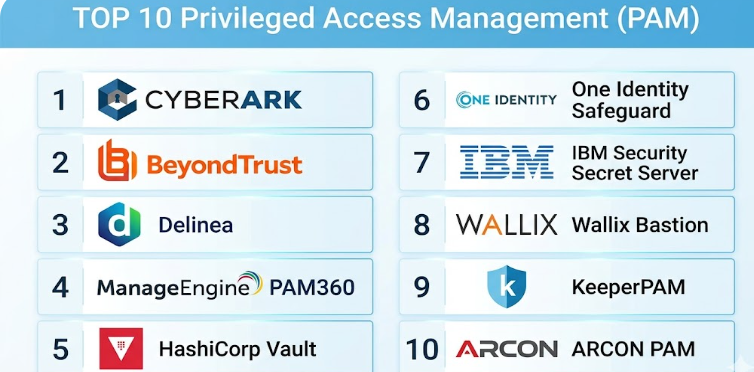
Top 10 Privileged Access Management (PAM) Tools
#1 — CyberArk
Short description: A leading PAM solution offering comprehensive privileged access security and monitoring.
Key Features
- Credential vaulting
- Session monitoring and recording
- Privileged account discovery
- Threat analytics
- Access controls
- Secrets management
Pros
- Industry-leading security
- Comprehensive feature set
Cons
- Complex implementation
- High cost
Platforms / Deployment
Cloud / Hybrid
Security & Compliance
RBAC, encryption, audit logs. Additional details: Not publicly stated
Integrations & Ecosystem
- Enterprise systems
- APIs
- Security platforms
Support & Community
Enterprise support
#2 — BeyondTrust
Short description: A robust PAM platform focused on secure remote access and privileged session management.
Key Features
- Privileged access control
- Session monitoring
- Credential management
- Endpoint security
- Remote access tools
Pros
- Strong remote access capabilities
- Flexible deployment
Cons
- Complex setup
- Pricing varies
Platforms / Deployment
Cloud / Hybrid
Security & Compliance
Encryption, RBAC. Additional details: Not publicly stated
Integrations & Ecosystem
- Security tools
- APIs
Support & Community
Enterprise-level support
#3 — Delinea (Thycotic + Centrify)
Short description: A PAM solution offering centralized credential and access management.
Key Features
- Secret management
- Privileged access control
- Session monitoring
- Role-based access
- Automation tools
Pros
- Strong usability
- Good balance of features
Cons
- Requires configuration
- Pricing complexity
Platforms / Deployment
Cloud / Hybrid
Security & Compliance
RBAC, encryption. Additional details: Not publicly stated
Integrations & Ecosystem
- APIs
- Enterprise tools
Support & Community
Strong support
#4 — ManageEngine PAM360
Short description: A comprehensive PAM solution with strong auditing and monitoring capabilities.
Key Features
- Credential vault
- Session recording
- Access control
- Audit logs
- Reporting
Pros
- Affordable
- Feature-rich
Cons
- UI could improve
- Setup complexity
Platforms / Deployment
On-premise / Cloud
Security & Compliance
RBAC, encryption. Additional details: Not publicly stated
Integrations & Ecosystem
- IT management tools
- APIs
Support & Community
Strong documentation
#5 — HashiCorp Vault
Short description: A secrets management tool widely used for securing credentials and API keys.
Key Features
- Secrets management
- Dynamic credentials
- Encryption as a service
- Access policies
- API integration
Pros
- Strong for DevOps
- Highly flexible
Cons
- Requires technical expertise
- Not a full PAM solution
Platforms / Deployment
Cloud / Self-hosted
Security & Compliance
Encryption, access policies. Additional details: Not publicly stated
Integrations & Ecosystem
- DevOps tools
- APIs
Support & Community
Strong open-source community
#6 — One Identity Safeguard
Short description: A PAM platform offering privileged session management and analytics.
Key Features
- Session monitoring
- Credential vaulting
- Access control
- Analytics
- Compliance reporting
Pros
- Strong analytics
- Good compliance features
Cons
- Complex setup
- Enterprise pricing
Platforms / Deployment
Cloud / Hybrid
Security & Compliance
RBAC, encryption. Additional details: Not publicly stated
Integrations & Ecosystem
- Enterprise tools
- APIs
Support & Community
Enterprise support
#7 — IBM Security Secret Server
Short description: A PAM solution focused on secrets management and privileged account security.
Key Features
- Credential vaulting
- Secret management
- Access control
- Auditing
- Reporting
Pros
- Strong enterprise features
- Good compliance tools
Cons
- Complex deployment
- Expensive
Platforms / Deployment
Cloud / Hybrid
Security & Compliance
RBAC, encryption. Additional details: Not publicly stated
Integrations & Ecosystem
- Enterprise systems
- APIs
Support & Community
Enterprise support
#8 — Wallix Bastion
Short description: A PAM solution focused on session monitoring and access control.
Key Features
- Session monitoring
- Access management
- Credential vaulting
- Audit logs
- Reporting
Pros
- Strong session control
- Good compliance support
Cons
- Limited ecosystem
- Complex setup
Platforms / Deployment
Cloud / On-premise
Security & Compliance
Not publicly stated
Integrations & Ecosystem
- Security tools
- APIs
Support & Community
Moderate support
#9 — KeeperPAM
Short description: A PAM solution extending Keeper’s password management capabilities to privileged access.
Key Features
- Credential vault
- Session monitoring
- Access control
- Secure sharing
- Audit logs
Pros
- Easy to use
- Strong security
Cons
- Limited advanced features
- Smaller ecosystem
Platforms / Deployment
Cloud
Security & Compliance
Encryption, RBAC. Additional details: Not publicly stated
Integrations & Ecosystem
- APIs
- Security tools
Support & Community
Growing support
#10 — ARCON PAM
Short description: A PAM solution offering strong compliance and privileged session monitoring.
Key Features
- Session monitoring
- Access control
- Credential management
- Audit logs
- Compliance tools
Pros
- Strong compliance features
- Flexible deployment
Cons
- Less global adoption
- UI improvements needed
Platforms / Deployment
Cloud / Hybrid
Security & Compliance
RBAC, encryption. Additional details: Not publicly stated
Integrations & Ecosystem
- Enterprise tools
- APIs
Support & Community
Moderate support
Comparison Table (Top 10)
| Tool Name | Best For | Platform(s) Supported | Deployment | Standout Feature | Public Rating |
|---|---|---|---|---|---|
| CyberArk | Enterprise | Web | Hybrid | Full PAM suite | N/A |
| BeyondTrust | Remote access | Web | Hybrid | Remote session control | N/A |
| Delinea | Balanced PAM | Web | Hybrid | Secrets + access mgmt | N/A |
| PAM360 | SMB | Web | Cloud | Affordable solution | N/A |
| HashiCorp Vault | DevOps | Web | Hybrid | Secrets management | N/A |
| One Identity | Enterprise | Web | Hybrid | Session analytics | N/A |
| IBM Secret | Enterprise | Web | Hybrid | Compliance tools | N/A |
| Wallix Bastion | Security | Web | Hybrid | Session monitoring | N/A |
| KeeperPAM | SMB | Web | Cloud | Ease of use | N/A |
| ARCON | Compliance | Web | Hybrid | Audit features | N/A |
Evaluation & Scoring of Privileged Access Management (PAM) Tools
| Tool Name | Core | Ease | Integrations | Security | Performance | Support | Value | Weighted Total |
|---|---|---|---|---|---|---|---|---|
| CyberArk | 9 | 6 | 9 | 9 | 9 | 9 | 6 | 8.3 |
| BeyondTrust | 9 | 7 | 8 | 9 | 8 | 8 | 7 | 8.2 |
| Delinea | 8 | 8 | 8 | 8 | 8 | 8 | 8 | 8.0 |
| PAM360 | 8 | 8 | 7 | 8 | 7 | 7 | 9 | 7.9 |
| HashiCorp Vault | 9 | 6 | 9 | 9 | 8 | 8 | 7 | 8.2 |
| One Identity | 8 | 6 | 8 | 8 | 8 | 8 | 7 | 7.8 |
| IBM Secret | 8 | 6 | 8 | 9 | 8 | 8 | 6 | 7.9 |
| Wallix Bastion | 7 | 6 | 7 | 8 | 7 | 7 | 7 | 7.3 |
| KeeperPAM | 7 | 8 | 7 | 8 | 7 | 7 | 8 | 7.6 |
| ARCON | 7 | 7 | 7 | 8 | 7 | 7 | 8 | 7.5 |
How to interpret scores:
- Scores are comparative across tools
- Higher scores indicate stronger capabilities
- Enterprise tools excel in security and features
- SMB tools perform better in ease and value
- Choose based on your organization size and needs
Which Privileged Access Management (PAM) Tool Is Right for You?
Solo / Freelancer
- Not typically required
- Use basic password or IAM tools instead
SMB
- Best: ManageEngine PAM360, KeeperPAM
- Focus on affordability and ease
Mid-Market
- Best: Delinea, BeyondTrust
- Balanced features and scalability
Enterprise
- Best: CyberArk, IBM Secret Server, One Identity
- Advanced security and compliance
Budget vs Premium
- Budget: PAM360
- Premium: CyberArk
Feature Depth vs Ease of Use
- Deep features: CyberArk
- Easy use: KeeperPAM
Integrations & Scalability
- Strong integrations: HashiCorp Vault
- Moderate: ARCON
Security & Compliance Needs
- Enterprise-grade: CyberArk, IBM
- Basic: KeeperPAM
Frequently Asked Questions (FAQs)
What is PAM?
PAM manages and secures privileged accounts and access.
Why is PAM important?
It protects sensitive systems from unauthorized access.
Who needs PAM?
Organizations with critical systems and privileged users.
Is PAM expensive?
Enterprise solutions can be costly.
Can PAM integrate with IAM?
Yes, most tools integrate with IAM systems.
Does PAM support cloud environments?
Yes, many tools support hybrid and cloud setups.
What is session monitoring?
Tracking and recording user activities.
Can PAM prevent insider threats?
Yes, it helps monitor and control access.
Is PAM hard to implement?
Some tools require expertise.
When should I use PAM?
When managing privileged accounts.
Conclusion
Privileged Access Management tools are essential for protecting sensitive systems and controlling high-level access within organizations. They help enforce strict security policies, monitor user activity, and reduce the risk of both external and insider threats. The right solution depends on your organization’s size, complexity, and compliance requirements—enterprise platforms like CyberArk and BeyondTrust offer comprehensive security and advanced features, while tools like ManageEngine PAM360 and KeeperPAM provide more accessible options for smaller teams. A practical approach is to evaluate your privileged access needs, test a few solutions, and ensure they integrate well with your existing security infrastructure before making a long-term investment.
