Introduction
Load Testing Tools are software solutions designed to simulate user traffic on applications, websites, or APIs to evaluate performance under various conditions. In simple terms, they help you understand how your system behaves when multiple users access it simultaneously—ensuring it remains stable, fast, and reliable.
With the increasing reliance on digital platforms, performance has become a critical business factor. Slow or unstable applications can lead to poor user experience, revenue loss, and reputational damage. Load testing tools allow teams to identify bottlenecks, optimize infrastructure, and validate scalability before real users are impacted.
Common use cases include:
- Testing website performance under heavy traffic
- Stress testing APIs and microservices
- Validating scalability of cloud infrastructure
- Identifying performance bottlenecks
- Ensuring SLA compliance before product launches
Key evaluation criteria:
- Ease of scripting and test creation
- Scalability of load generation
- Real-time monitoring and reporting
- Protocol and application support (HTTP, WebSocket, APIs)
- Integration with CI/CD pipelines
- Cloud vs on-premise execution options
- Cost and licensing model
- Collaboration and team features
- Support for distributed testing
- Accuracy and reliability of results
Best for: QA engineers, performance testers, DevOps teams, and organizations deploying high-traffic applications or APIs.
Not ideal for: Very small projects with minimal traffic expectations or static websites where performance risks are negligible.
Key Trends in Load Testing Tools
- Cloud-based load testing dominance: Scalable, on-demand infrastructure for simulating massive traffic
- Shift-left testing: Performance testing integrated earlier in development cycles
- AI-driven insights: Automated bottleneck detection and optimization suggestions
- Real user simulation: Tools mimic real-world user behavior more accurately
- API-first testing: Focus on microservices and backend performance
- Integration with CI/CD pipelines: Continuous performance testing during deployments
- Low-code/no-code scripting: Simplifying test creation for non-technical users
- Distributed load generation: Simulating traffic from multiple geographic regions
- Enhanced observability: Integration with monitoring and tracing tools
- Cost optimization models: Pay-as-you-go and usage-based pricing
How We Selected These Tools (Methodology)
We evaluated Load Testing Tools based on:
- Industry adoption and credibility
- Performance and scalability capabilities
- Ease of use and learning curve
- Feature depth (scripting, reporting, analytics)
- Integration with DevOps and CI/CD tools
- Flexibility across environments (cloud, on-premise)
- Community support and documentation
- Suitability for different team sizes and industries
- Cost-effectiveness and value
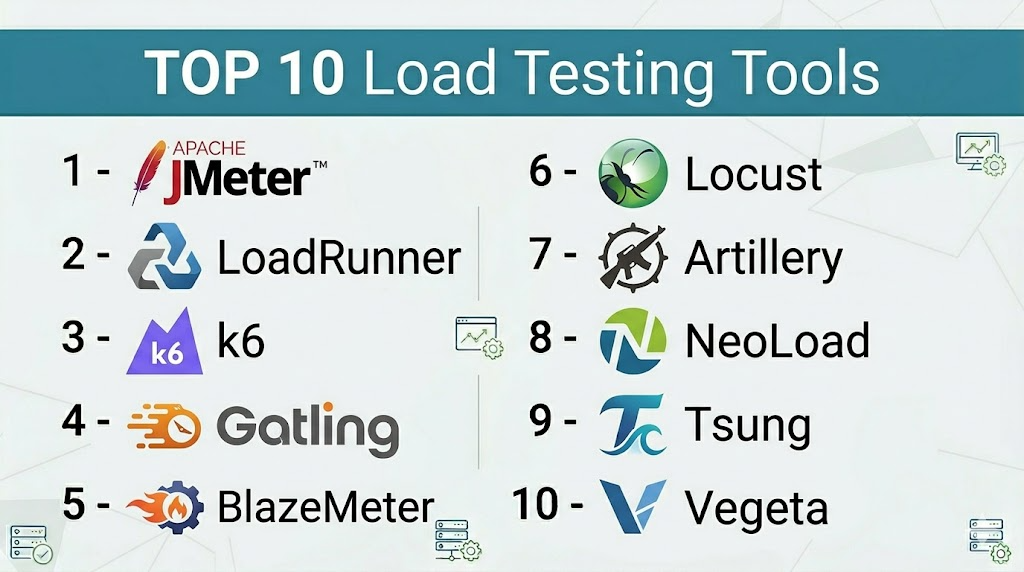
Top 10 Load Testing Tools
#1 — Apache JMeter
Short description: A widely used open-source load testing tool designed for testing web applications, APIs, and performance under heavy load.
Key Features
- Supports multiple protocols (HTTP, FTP, JDBC)
- GUI and CLI modes
- Extensive plugin ecosystem
- Distributed load testing
- Detailed reporting and analysis
Pros
- Free and open-source
- Highly customizable
Cons
- Steep learning curve
- UI can feel outdated
Platforms / Deployment
Windows / Linux / macOS / Self-hosted
Security & Compliance
Basic authentication, encryption support
Integrations & Ecosystem
JMeter integrates with various DevOps tools and monitoring systems.
- Jenkins
- Docker
- Grafana
- CI/CD pipelines
Support & Community
Very large global community and extensive documentation.
#2 — LoadRunner
Short description: An enterprise-grade load testing solution offering advanced performance testing capabilities.
Key Features
- Supports multiple protocols and applications
- Advanced analytics and reporting
- Realistic user simulation
- Cloud and on-premise testing
- AI-driven insights
Pros
- Enterprise-level features
- Highly scalable
Cons
- Expensive licensing
- Complex setup
Platforms / Deployment
Cloud / Self-hosted
Security & Compliance
RBAC, encryption, enterprise security features
Integrations & Ecosystem
Integrates with enterprise DevOps tools.
- CI/CD pipelines
- Monitoring tools
Support & Community
Strong enterprise support.
#3 — k6
Short description: A modern developer-centric load testing tool focused on scripting and automation.
Key Features
- JavaScript-based scripting
- CLI-first approach
- Cloud and local execution
- API and microservices testing
- Integration with CI/CD
Pros
- Developer-friendly
- Lightweight and fast
Cons
- Limited GUI
- Requires coding knowledge
Platforms / Deployment
Cloud / Self-hosted
Security & Compliance
Encryption, API authentication
Integrations & Ecosystem
Works well with modern DevOps stacks.
- GitHub Actions
- Jenkins
- Grafana
Support & Community
Growing community with strong documentation.
#4 — Gatling
Short description: A high-performance load testing tool focused on automation and scalability.
Key Features
- Code-based test scripting
- High-performance engine
- Detailed HTML reports
- CI/CD integration
- Real-time metrics
Pros
- Efficient and scalable
- Developer-friendly
Cons
- Requires coding skills
- Limited GUI
Platforms / Deployment
Linux / Windows / macOS
Security & Compliance
Basic security features
Integrations & Ecosystem
Works with development pipelines.
- Jenkins
- Maven
- Gradle
Support & Community
Active developer community.
#5 — BlazeMeter
Short description: A cloud-based load testing platform built around JMeter and modern testing needs.
Key Features
- Cloud-based testing
- JMeter compatibility
- Real-time reporting
- API testing
- Distributed load generation
Pros
- Easy to scale
- User-friendly interface
Cons
- Cost can increase with usage
- Limited offline capability
Platforms / Deployment
Cloud
Security & Compliance
Encryption, RBAC
Integrations & Ecosystem
Integrates with DevOps tools.
- Jenkins
- CI/CD tools
- Monitoring platforms
Support & Community
Commercial support available.
#6 — Locust
Short description: An open-source load testing tool using Python for scripting.
Key Features
- Python-based scripting
- Distributed testing
- Web-based UI
- Scalable architecture
- Real-time monitoring
Pros
- Flexible and customizable
- Easy for Python developers
Cons
- Requires coding
- Limited built-in reporting
Platforms / Deployment
Linux / Windows / macOS
Security & Compliance
Basic security features
Integrations & Ecosystem
Works with Python ecosystem.
- Docker
- CI/CD tools
Support & Community
Active open-source community.
#7 — Artillery
Short description: A modern load testing tool focused on APIs and microservices.
Key Features
- YAML/JSON-based configuration
- Real-time metrics
- Cloud execution
- API testing
- Lightweight
Pros
- Easy configuration
- Great for API testing
Cons
- Limited advanced features
- Smaller ecosystem
Platforms / Deployment
Cloud / Self-hosted
Security & Compliance
Basic security features
Integrations & Ecosystem
Works with modern stacks.
- Node.js
- CI/CD tools
Support & Community
Growing community.
#8 — NeoLoad
Short description: A user-friendly performance testing platform designed for enterprises.
Key Features
- Automated test design
- CI/CD integration
- Real-time analytics
- Cloud scalability
- API testing
Pros
- Easy to use
- Enterprise features
Cons
- Licensing cost
- Less flexible than open-source tools
Platforms / Deployment
Cloud / Self-hosted
Security & Compliance
RBAC, encryption
Integrations & Ecosystem
Integrates with enterprise tools.
- Jenkins
- Azure DevOps
Support & Community
Strong enterprise support.
#9 — Tsung
Short description: A distributed load testing tool for high-performance systems.
Key Features
- Multi-protocol support
- Distributed testing
- High concurrency
- Real-time monitoring
- Open-source
Pros
- Highly scalable
- Free
Cons
- Complex setup
- Limited UI
Platforms / Deployment
Linux
Security & Compliance
Basic security features
Integrations & Ecosystem
Focused on backend systems.
- Open-source tools
Support & Community
Smaller community.
#10 — Vegeta
Short description: A lightweight HTTP load testing tool designed for simplicity and performance.
Key Features
- CLI-based
- High performance
- Real-time metrics
- Simple configuration
- Lightweight
Pros
- Easy to use
- Fast execution
Cons
- Limited features
- No GUI
Platforms / Deployment
Linux / macOS / Windows
Security & Compliance
Basic security features
Integrations & Ecosystem
Works with DevOps tools.
- CI/CD pipelines
Support & Community
Moderate community support.
Comparison Table (Top 10)
| Tool Name | Best For | Platform(s) Supported | Deployment | Standout Feature | Public Rating |
|---|---|---|---|---|---|
| JMeter | Open-source users | Cross-platform | Self-hosted | Plugin ecosystem | N/A |
| LoadRunner | Enterprises | Cross-platform | Hybrid | Advanced analytics | N/A |
| k6 | Developers | Cross-platform | Hybrid | JS scripting | N/A |
| Gatling | Automation | Cross-platform | Self-hosted | High performance | N/A |
| BlazeMeter | Cloud testing | Cloud | Cloud | Scalability | N/A |
| Locust | Python users | Cross-platform | Self-hosted | Python scripting | N/A |
| Artillery | API testing | Cross-platform | Hybrid | YAML config | N/A |
| NeoLoad | Enterprises | Cross-platform | Hybrid | Ease of use | N/A |
| Tsung | High concurrency | Linux | Self-hosted | Distributed load | N/A |
| Vegeta | Lightweight testing | Cross-platform | Self-hosted | CLI simplicity | N/A |
Load Testing Tools Scoring
| Tool Name | Core (25%) | Ease (15%) | Integrations (15%) | Security (10%) | Performance (10%) | Support (10%) | Value (15%) | Weighted Total |
|---|---|---|---|---|---|---|---|---|
| JMeter | 9 | 6 | 9 | 7 | 8 | 9 | 10 | 8.5 |
| LoadRunner | 9 | 6 | 9 | 9 | 9 | 9 | 6 | 8.4 |
| k6 | 8 | 8 | 9 | 8 | 9 | 8 | 9 | 8.6 |
| Gatling | 8 | 7 | 8 | 7 | 9 | 8 | 9 | 8.1 |
| BlazeMeter | 8 | 9 | 9 | 8 | 8 | 8 | 7 | 8.3 |
| Locust | 7 | 7 | 7 | 7 | 8 | 8 | 9 | 7.8 |
| Artillery | 7 | 8 | 7 | 7 | 8 | 7 | 9 | 7.8 |
| NeoLoad | 8 | 9 | 8 | 8 | 8 | 9 | 7 | 8.2 |
| Tsung | 8 | 5 | 6 | 7 | 9 | 6 | 9 | 7.5 |
| Vegeta | 6 | 8 | 6 | 7 | 9 | 7 | 9 | 7.6 |
How to interpret scores:
- Scores are relative comparisons across tools
- Developer-focused tools score higher in flexibility
- Enterprise tools score higher in features and support
- Simpler tools may lack advanced capabilities
- Choose based on team skills and workload complexity
Which Load Testing Tools Is Right for You?
Solo / Freelancer
- Use k6 or Vegeta for lightweight testing
- Simple CLI tools are sufficient
SMB
- JMeter or Locust for cost-effective solutions
- Balance between features and ease
Mid-Market
- Gatling or BlazeMeter for scalability
- Focus on CI/CD integration
Enterprise
- LoadRunner or NeoLoad for advanced capabilities
- Strong reporting and support required
Budget vs Premium
- Open-source tools offer great value
- Enterprise tools provide automation and support
Feature Depth vs Ease of Use
- LoadRunner = powerful
- k6 = balanced
- Vegeta = simple
Integrations & Scalability
- Choose tools with CI/CD and cloud support
- Distributed testing is key for scaling
Security & Compliance Needs
- Enterprises should prioritize tools with RBAC and encryption
- Open-source tools require manual configuration
Frequently Asked Questions (FAQs)
What is load testing?
Load testing evaluates how a system performs under expected user traffic.
Why is load testing important?
It helps prevent downtime, improve performance, and ensure scalability.
Are load testing tools free?
Some are open-source, while others require licenses.
Which tool is best for beginners?
JMeter and k6 are good starting points.
Can load testing be automated?
Yes, many tools integrate with CI/CD pipelines.
What is stress testing?
Testing beyond normal load to find system limits.
Do I need coding skills?
Some tools require scripting, others offer GUIs.
Can I test APIs with these tools?
Yes, most tools support API testing.
How long does testing take?
Depends on complexity and test scenarios.
Can I switch tools later?
Yes, but scripts and configurations may need rewriting.
Conclusion
Load Testing Tools are essential for ensuring performance, scalability, and reliability in modern applications. Whether you are running a simple website or a complex microservices architecture, these tools help you identify bottlenecks and optimize user experience.
