Introduction
Content Management Systems (CMS) are software platforms that allow users to create, manage, and publish digital content—primarily websites—without needing deep technical expertise. A CMS provides tools for editing pages, organizing media, managing users, and maintaining site structure, all from a centralized interface.
As digital presence becomes essential for businesses, creators, and organizations, CMS platforms play a critical role in enabling fast, scalable, and flexible content delivery. From blogs and marketing websites to enterprise portals and eCommerce platforms, CMS tools simplify content workflows while supporting integrations and customization.
Common use cases include:
- Business websites and landing pages
- Blogs and content publishing platforms
- eCommerce stores and product catalogs
- Corporate intranets and knowledge bases
- Portfolio sites and personal branding
What buyers should evaluate:
- Ease of use and learning curve
- Customization and flexibility
- Themes, templates, and design options
- Plugin/extension ecosystem
- SEO capabilities
- Performance and scalability
- Security features and updates
- Hosting and deployment options
- Integration with third-party tools
- Cost and maintenance requirements
Best for: Marketers, bloggers, developers, startups, enterprises, and anyone managing digital content or websites at scale.
Not ideal for: Projects requiring highly custom-built applications or extremely lightweight static pages where a CMS may add unnecessary complexity.
Key Trends in Content Management Systems (CMS)
- Headless CMS adoption: Decoupling frontend and backend for flexibility across channels.
- AI-assisted content creation: Automated writing, SEO suggestions, and personalization.
- Composable architecture: Modular systems integrating multiple best-of-breed services.
- API-first design: Enabling seamless integration with apps, mobile, and IoT platforms.
- Low-code/no-code tools: Empowering non-developers to build and manage sites.
- Omnichannel publishing: Delivering content across web, mobile, and other digital touchpoints.
- Enhanced security features: Regular updates, role-based access, and compliance focus.
- Cloud-native CMS platforms: Scalable and easier deployment without infrastructure management.
- Performance optimization: Built-in caching, CDN support, and fast-loading templates.
- Personalization and analytics: Data-driven content delivery and user targeting.
How We Selected These Tools (Methodology)
- Evaluated market popularity and adoption
- Assessed core CMS functionality (editing, publishing, media management)
- Reviewed customization options and extensibility
- Considered performance and scalability
- Analyzed security features and update practices
- Examined integration ecosystems and APIs
- Included tools suitable for different user segments (beginner to enterprise)
- Balanced ease of use vs developer flexibility
- Considered community support and documentation
- Focused on future-ready capabilities like headless CMS and AI
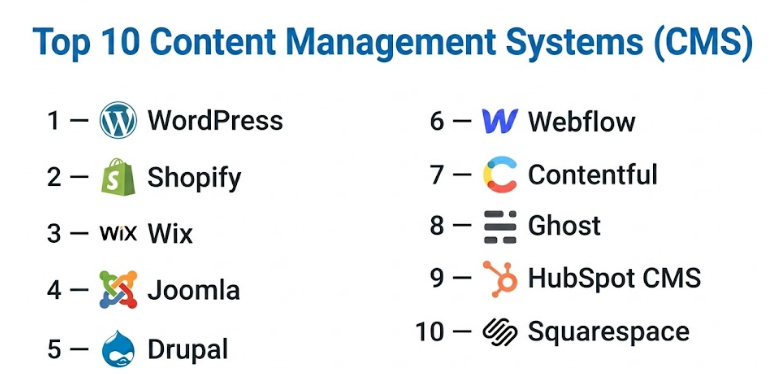
Top 10 Content Management Systems (CMS) Tools
#1 — WordPress
Short description: The most widely used CMS, offering flexibility for blogs, business sites, and complex web applications.
Key Features
- Open-source platform
- Thousands of themes and plugins
- SEO-friendly structure
- Content editor (block-based)
- Media management
- Custom post types
- REST API support
Pros
- अत्यधिक customizable
- Large community and ecosystem
Cons
- Requires maintenance and updates
- Security depends on configuration
Platforms / Deployment
Web / Windows / macOS / Linux
Self-hosted / Cloud
Security & Compliance
Role-based access, plugins for MFA and security
Compliance: Not publicly stated
Integrations & Ecosystem
WordPress has one of the largest ecosystems in the CMS space.
- WooCommerce
- SEO tools
- Marketing platforms
- APIs
Support & Community
Extensive global community, forums, and documentation.
#2 — Shopify
Short description: A leading CMS focused on eCommerce, enabling users to build and manage online stores easily.
Key Features
- Hosted platform
- Product and inventory management
- Payment integrations
- Themes and customization
- Analytics dashboard
- Mobile optimization
Pros
- Easy to use for eCommerce
- Fully managed hosting
Cons
- Limited customization beyond ecosystem
- Transaction fees may apply
Platforms / Deployment
Web / iOS / Android
Cloud
Security & Compliance
Encryption, secure payments
Compliance: Not publicly stated
Integrations & Ecosystem
- Payment gateways
- Marketing tools
- Shipping platforms
- APIs
Support & Community
Strong support and onboarding for merchants.
#3 — Wix
Short description: A beginner-friendly CMS with drag-and-drop functionality for creating websites quickly.
Key Features
- Visual editor
- Templates and design tools
- Built-in hosting
- App marketplace
- SEO tools
- Mobile optimization
Pros
- No coding required
- Fast setup
Cons
- Limited scalability
- Less flexible for developers
Platforms / Deployment
Web / Mobile
Cloud
Security & Compliance
Encryption
Compliance: Not publicly stated
Integrations & Ecosystem
- App marketplace
- Marketing tools
Support & Community
Good support for beginners and small businesses.
#4 — Joomla
Short description: An open-source CMS offering more flexibility than beginner tools and suitable for complex websites.
Key Features
- Multilingual support
- Advanced user management
- Extensions and templates
- SEO features
- Content scheduling
Pros
- Flexible and powerful
- Good for complex sites
Cons
- Steeper learning curve
- Smaller ecosystem than WordPress
Platforms / Deployment
Web / Windows / Linux
Self-hosted
Security & Compliance
Role-based access
Compliance: Not publicly stated
Integrations & Ecosystem
- Extensions
- APIs
Support & Community
Active community and documentation.
#5 — Drupal
Short description: A highly customizable CMS designed for developers and enterprise-grade applications.
Key Features
- Modular architecture
- Advanced content modeling
- API-first approach
- Strong security features
- Multisite support
Pros
- Highly scalable
- Enterprise-ready
Cons
- Requires technical expertise
- Complex setup
Platforms / Deployment
Web / Linux
Self-hosted
Security & Compliance
Advanced security controls
Compliance: Not publicly stated
Integrations & Ecosystem
- APIs
- Enterprise integrations
Support & Community
Strong developer community.
#6 — Webflow
Short description: A visual CMS combining design flexibility with front-end development capabilities.
Key Features
- Visual design interface
- CMS collections
- Hosting included
- Responsive design tools
- SEO controls
Pros
- Design-focused
- No-code with advanced control
Cons
- Learning curve for beginners
- Pricing varies
Platforms / Deployment
Web
Cloud
Security & Compliance
Encryption
Compliance: Not publicly stated
Integrations & Ecosystem
- APIs
- Marketing tools
Support & Community
Growing community and resources.
#7 — Contentful
Short description: A headless CMS designed for developers and teams building omnichannel digital experiences.
Key Features
- API-first architecture
- Content modeling
- Multi-channel delivery
- Localization support
- Cloud-native
Pros
- Flexible and scalable
- Ideal for modern apps
Cons
- Requires development effort
- Not beginner-friendly
Platforms / Deployment
Web
Cloud
Security & Compliance
Role-based access
Compliance: Not publicly stated
Integrations & Ecosystem
- APIs
- Frontend frameworks
Support & Community
Developer-focused documentation.
#8 — Ghost
Short description: A lightweight CMS focused on blogging and publishing.
Key Features
- Clean writing interface
- Membership and subscription features
- SEO tools
- Fast performance
- Markdown support
Pros
- Fast and minimal
- Great for writers
Cons
- Limited customization
- Smaller ecosystem
Platforms / Deployment
Web
Self-hosted / Cloud
Security & Compliance
Basic security controls
Compliance: Not publicly stated
Integrations & Ecosystem
- APIs
- Publishing tools
Support & Community
Active but smaller community.
#9 — HubSpot CMS
Short description: A CMS integrated with HubSpot’s marketing, CRM, and automation tools.
Key Features
- Drag-and-drop editor
- CRM integration
- Personalization
- SEO tools
- Analytics
Pros
- All-in-one marketing platform
- Strong automation features
Cons
- Pricing can be high
- Platform lock-in
Platforms / Deployment
Web
Cloud
Security & Compliance
Encryption
Compliance: Not publicly stated
Integrations & Ecosystem
- HubSpot tools
- APIs
Support & Community
Strong support and onboarding.
#10 — Squarespace
Short description: A design-focused CMS for creating visually appealing websites with minimal effort.
Key Features
- Templates
- Drag-and-drop editor
- Built-in hosting
- SEO tools
- eCommerce support
Pros
- Beautiful designs
- Easy to use
Cons
- Limited customization
- Less flexibility for developers
Platforms / Deployment
Web / Mobile
Cloud
Security & Compliance
Encryption
Compliance: Not publicly stated
Integrations & Ecosystem
- Built-in tools
- Limited third-party apps
Support & Community
Good support for creators and small businesses.
Comparison Table (Top 10)
| Tool Name | Best For | Platform(s) Supported | Deployment | Standout Feature | Public Rating |
|---|---|---|---|---|---|
| WordPress | All-purpose | Web, Desktop | Hybrid | Plugin ecosystem | N/A |
| Shopify | eCommerce | Web, Mobile | Cloud | Store management | N/A |
| Wix | Beginners | Web, Mobile | Cloud | Drag-and-drop builder | N/A |
| Joomla | Complex sites | Web | Self-hosted | Flexibility | N/A |
| Drupal | Enterprise | Web | Self-hosted | Scalability | N/A |
| Webflow | Designers | Web | Cloud | Visual development | N/A |
| Contentful | Headless CMS | Web | Cloud | API-first | N/A |
| Ghost | Blogging | Web | Hybrid | Speed and simplicity | N/A |
| HubSpot CMS | Marketing teams | Web | Cloud | CRM integration | N/A |
| Squarespace | Creators | Web, Mobile | Cloud | Design templates | N/A |
Evaluation & Scoring of Content Management Systems (CMS)
| Tool Name | Core (25%) | Ease (15%) | Integrations (15%) | Security (10%) | Performance (10%) | Support (10%) | Value (15%) | Weighted Total |
|---|---|---|---|---|---|---|---|---|
| WordPress | 9 | 7 | 9 | 7 | 8 | 9 | 9 | 8.5 |
| Shopify | 8 | 9 | 8 | 8 | 8 | 8 | 7 | 8.0 |
| Wix | 7 | 10 | 6 | 7 | 7 | 8 | 8 | 7.8 |
| Joomla | 8 | 6 | 7 | 7 | 7 | 7 | 8 | 7.3 |
| Drupal | 9 | 5 | 8 | 9 | 9 | 7 | 7 | 8.0 |
| Webflow | 8 | 7 | 7 | 7 | 8 | 7 | 7 | 7.5 |
| Contentful | 8 | 6 | 9 | 8 | 8 | 7 | 7 | 7.9 |
| Ghost | 7 | 8 | 6 | 7 | 9 | 7 | 8 | 7.6 |
| HubSpot CMS | 8 | 8 | 8 | 8 | 8 | 8 | 6 | 7.8 |
| Squarespace | 7 | 9 | 6 | 7 | 7 | 8 | 7 | 7.6 |
How to interpret scores:
- Scores are comparative across tools, not absolute.
- Higher scores indicate a balanced offering across features and usability.
- Developer-focused CMS score higher in flexibility and integrations.
- Beginner tools score higher in ease of use.
- Choose based on your use case rather than overall ranking.
Which Content Management System (CMS) Is Right for You?
Solo / Freelancer
Wix, Squarespace, and Ghost are ideal for simple websites and blogs.
SMB
WordPress and Shopify offer flexibility and scalability for growing businesses.
Mid-Market
Webflow and HubSpot CMS provide advanced marketing and design capabilities.
Enterprise
Drupal and Contentful are best for large-scale, complex applications.
Budget vs Premium
- Budget: WordPress (self-hosted), Ghost
- Premium: HubSpot CMS, Shopify
Feature Depth vs Ease of Use
- Feature-rich: Drupal, WordPress
- Easy-to-use: Wix, Squarespace
Integrations & Scalability
- High scalability: Contentful, Drupal
- Moderate: Wix, Squarespace
Security & Compliance Needs
- High security: Drupal
- Moderate: Most hosted CMS platforms
Frequently Asked Questions (FAQs)
What is a CMS?
A CMS is software used to create and manage digital content, especially websites.
Do I need coding skills?
No, many CMS platforms are designed for non-technical users.
Which CMS is best for beginners?
Wix and Squarespace are beginner-friendly options.
Is WordPress free?
The software is free, but hosting and plugins may cost money.
What is a headless CMS?
A CMS that separates backend content management from frontend display.
Can I switch CMS later?
Yes, but migration can be complex depending on content and structure.
Are CMS platforms secure?
Most offer security features, but proper setup and updates are essential.
Which CMS is best for SEO?
WordPress and Webflow are known for strong SEO capabilities.
Can CMS handle eCommerce?
Yes, platforms like Shopify and WordPress (with plugins) support eCommerce.
What is the difference between hosted and self-hosted CMS?
Hosted CMS includes infrastructure, while self-hosted requires you to manage hosting.
Conclusion
Content Management Systems are essential tools for building and managing digital experiences efficiently. From flexible platforms like WordPress to specialized solutions like Shopify and Contentful, each CMS serves a unique purpose.
