Introduction
Music Notation Software enables composers, arrangers, educators, and musicians to create, edit, and share sheet music digitally. These tools replace traditional handwritten notation with precise, editable scores that can include multiple instruments, dynamics, articulations, and playback.
With advancements in AI-assisted composition, real-time playback, and cloud collaboration, modern notation tools go beyond simple score writing. They now integrate with DAWs, support MIDI input, and offer high-quality audio rendering—making them essential for both creative and professional workflows.
Common Use Cases
- Composing music: Writing orchestral, band, or solo instrument scores
- Arranging: Adapting compositions for different ensembles
- Music education: Teaching theory, harmony, and composition
- Film & game scoring: Creating structured sheet music for productions
- Publishing: Preparing professional sheet music for distribution
What Buyers Should Evaluate
- Notation accuracy and engraving quality
- MIDI input and playback realism
- Instrument library and sound quality
- Ease of use and learning curve
- Collaboration and sharing features
- Integration with DAWs and audio tools
- Export formats (PDF, MusicXML, MIDI)
- Automation and layout tools
- Platform compatibility
- Pricing and licensing model
Best for: Composers, arrangers, educators, students, film scorers, and music publishers who need precise and professional notation tools.
Not ideal for: Users focused solely on audio production or beat-making. DAWs may be better suited for those workflows.
Key Trends in Music Notation Software
- AI-assisted composition: Suggesting harmonies, chords, and arrangements
- Realistic playback engines: High-quality instrument sounds and expression
- Cloud collaboration: Shared score editing and remote workflows
- Integration with DAWs: Seamless transition between notation and production
- Touch and pen input: Tablet-friendly score writing
- Automatic engraving: Intelligent layout and formatting
- Cross-platform compatibility: Desktop, web, and mobile access
- MusicXML standardization: Easier file sharing across tools
- Education-focused features: Interactive learning and exercises
- Affordable/free tiers: Increased accessibility for students
How We Selected These Tools (Methodology)
The tools in this list were selected based on:
- Industry adoption among composers and educators
- Quality of notation and engraving output
- Feature completeness for composing and arranging
- Playback realism and sound libraries
- Integration with MIDI and DAWs
- Ease of use for beginners and professionals
- Collaboration and sharing capabilities
- Ecosystem strength (plugins, templates, community)
- Documentation and support quality
- Suitability across different use cases
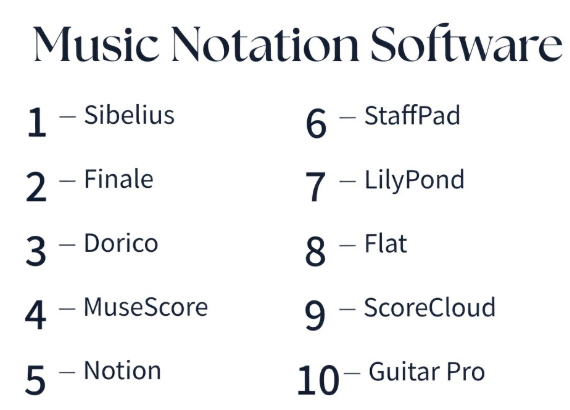
Top 10 Music Notation Software Tools
#1 — Sibelius
Short description: A widely used professional notation software known for its intuitive interface and high-quality engraving.
Key Features
- Advanced notation tools
- Real-time playback
- MIDI input support
- Cloud sharing
- Layout automation
- Large instrument library
- Plugin support
Pros
- Industry-standard notation quality
- Easy to learn compared to peers
- Strong educational use
Cons
- Subscription pricing
- Limited customization
- Performance issues on large scores
Platforms / Deployment
Windows / macOS
Security & Compliance
Not publicly stated
Integrations & Ecosystem
Sibelius integrates with music production and educational workflows.
- MIDI devices
- Plugins
- Cloud sharing tools
Support & Community
Large global community and strong educational presence.
#2 — Finale
Short description: A highly customizable notation software favored by professionals needing deep control over scores.
Key Features
- Advanced engraving tools
- Full customization
- MIDI input and editing
- Playback tools
- MusicXML support
- Plugin extensions
- Layout control
Pros
- Extremely powerful
- Highly customizable
- Professional-grade output
Cons
- Steep learning curve
- Complex interface
- Slower workflow
Platforms / Deployment
Windows / macOS
Security & Compliance
Not publicly stated
Integrations & Ecosystem
- MIDI devices
- Plugins
- MusicXML workflows
Support & Community
Established professional user base.
#3 — Dorico
Short description: A modern notation software focused on intelligent workflows and high-quality engraving.
Key Features
- Automatic engraving
- Advanced notation tools
- Realistic playback
- Expression mapping
- MIDI support
- Flexible layouts
- High-quality output
Pros
- Clean and modern interface
- Excellent engraving quality
- Efficient workflows
Cons
- Learning curve
- Requires powerful system
- Smaller ecosystem
Platforms / Deployment
Windows / macOS
Security & Compliance
Not publicly stated
Integrations & Ecosystem
- MIDI tools
- Playback engines
- MusicXML support
Support & Community
Growing community with strong documentation.
#4 — MuseScore
Short description: A free and open-source notation software widely used by students and hobbyists.
Key Features
- Multi-instrument scoring
- MIDI input
- Playback tools
- MusicXML support
- Plugin support
- Community sharing
- Cross-platform support
Pros
- Free and accessible
- Easy to use
- Active community
Cons
- Limited advanced features
- Playback realism limitations
- Performance issues with large scores
Platforms / Deployment
Windows / macOS / Linux
Security & Compliance
Not publicly stated
Integrations & Ecosystem
- Plugins
- MusicXML
- Community libraries
Support & Community
Large open-source community.
#5 — Notion
Short description: A notation software combining score writing with high-quality playback and DAW integration.
Key Features
- Notation and MIDI editing
- Realistic playback
- Built-in instruments
- DAW integration
- Automation tools
- MusicXML support
- Cross-platform support
Pros
- Strong playback quality
- Integration with DAWs
- Flexible workflows
Cons
- Smaller ecosystem
- Limited advanced engraving
- Learning curve
Platforms / Deployment
Windows / macOS / iOS
Security & Compliance
Not publicly stated
Integrations & Ecosystem
- DAWs
- MIDI tools
- Audio workflows
Support & Community
Moderate community support.
#6 — StaffPad
Short description: A tablet-based notation software focused on handwriting input and composition.
Key Features
- Handwriting recognition
- Real-time playback
- Touch and pen input
- Instrument libraries
- MIDI support
- Layout automation
- Audio export
Pros
- Unique input method
- Intuitive for composers
- High-quality playback
Cons
- Limited platforms
- Requires compatible devices
- Smaller ecosystem
Platforms / Deployment
Windows / iOS
Security & Compliance
Not publicly stated
Integrations & Ecosystem
- MIDI devices
- Audio tools
- Export workflows
Support & Community
Niche but dedicated community.
#7 — LilyPond
Short description: A text-based notation system focused on producing high-quality engraved sheet music.
Key Features
- Text-based input
- Professional engraving
- Scriptable workflows
- MusicXML support
- Custom layouts
- Open-source
- Automation tools
Pros
- High-quality output
- Free and open-source
- Powerful automation
Cons
- Not beginner-friendly
- Requires coding knowledge
- No visual editing
Platforms / Deployment
Windows / macOS / Linux
Security & Compliance
Not publicly stated
Integrations & Ecosystem
- MusicXML
- Scripting tools
- Open-source ecosystem
Support & Community
Active technical community.
#8 — Flat
Short description: A cloud-based notation tool designed for collaboration and education.
Key Features
- Web-based editing
- Real-time collaboration
- Playback tools
- MIDI input
- MusicXML support
- Cloud storage
- Educational features
Pros
- Easy collaboration
- Accessible from any device
- Beginner-friendly
Cons
- Limited offline capabilities
- Fewer advanced features
- Subscription model
Platforms / Deployment
Web
Security & Compliance
Not publicly stated
Integrations & Ecosystem
- Cloud tools
- Educational platforms
- MIDI devices
Support & Community
Strong in education sector.
#9 — ScoreCloud
Short description: A notation software that converts audio or MIDI input into sheet music automatically.
Key Features
- Audio-to-score conversion
- MIDI input
- Real-time transcription
- Playback tools
- Export formats
- Cloud storage
- Simple interface
Pros
- Unique transcription feature
- Easy to use
- Fast workflow
Cons
- Accuracy limitations
- Limited advanced features
- Smaller ecosystem
Platforms / Deployment
Windows / macOS / iOS
Security & Compliance
Not publicly stated
Integrations & Ecosystem
- MIDI tools
- Audio input
- Export formats
Support & Community
Moderate user base.
#10 — Guitar Pro
Short description: A notation software focused on guitar and tablature-based composition.
Key Features
- Tablature editing
- Playback tools
- MIDI input
- Effects and articulations
- Instrument support
- Export formats
- Practice tools
Pros
- Ideal for guitarists
- Easy to learn
- Strong playback features
Cons
- Limited orchestral support
- Niche focus
- Fewer advanced features
Platforms / Deployment
Windows / macOS / iOS / Android
Security & Compliance
Not publicly stated
Integrations & Ecosystem
- MIDI tools
- Practice tools
- Export workflows
Support & Community
Strong niche community.
Comparison Table (Top 10)
| Tool Name | Best For | Platform(s) Supported | Deployment | Standout Feature | Public Rating |
|---|---|---|---|---|---|
| Sibelius | Professional notation | Windows, macOS | Local/Cloud | Engraving quality | N/A |
| Finale | Advanced customization | Windows, macOS | Local | Deep control | N/A |
| Dorico | Modern workflows | Windows, macOS | Local | Automatic engraving | N/A |
| MuseScore | Beginners/free users | Windows, macOS, Linux | Local | Free notation | N/A |
| Notion | DAW integration | Windows, macOS, iOS | Local | Playback quality | N/A |
| StaffPad | Tablet composition | Windows, iOS | Local | Handwriting input | N/A |
| LilyPond | Engraving precision | Windows, macOS, Linux | Local | Text-based notation | N/A |
| Flat | Collaboration | Web | Cloud | Real-time editing | N/A |
| ScoreCloud | Transcription | Windows, macOS, iOS | Cloud/Local | Audio-to-score | N/A |
| Guitar Pro | Guitarists | Windows, macOS, iOS, Android | Local | Tablature | N/A |
Evaluation & Scoring of Music Notation Software
| Tool Name | Core | Ease | Integrations | Security | Performance | Support | Value | Weighted Total |
|---|---|---|---|---|---|---|---|---|
| Sibelius | 9 | 8 | 8 | 6 | 8 | 9 | 7 | 8.2 |
| Finale | 10 | 6 | 8 | 6 | 8 | 8 | 6 | 8.0 |
| Dorico | 9 | 7 | 7 | 6 | 9 | 8 | 8 | 8.2 |
| MuseScore | 7 | 9 | 7 | 5 | 7 | 9 | 10 | 8.0 |
| Notion | 8 | 7 | 8 | 5 | 8 | 7 | 8 | 7.7 |
| StaffPad | 8 | 8 | 6 | 5 | 8 | 7 | 7 | 7.5 |
| LilyPond | 9 | 4 | 7 | 5 | 8 | 7 | 10 | 7.6 |
| Flat | 7 | 9 | 7 | 5 | 7 | 8 | 8 | 7.6 |
| ScoreCloud | 7 | 9 | 6 | 5 | 7 | 7 | 8 | 7.4 |
| Guitar Pro | 7 | 9 | 6 | 5 | 7 | 8 | 8 | 7.5 |
How to interpret the scores:
- Scores are relative benchmarks, not absolute measures
- Professional tools rank high in core features and output quality
- Beginner tools score higher in ease and value
- Choose based on your workflow, not just total score
Which Music Notation Software Is Right for You?
Solo / Freelancer
- Best: MuseScore, Guitar Pro, Flat
- Focus on affordability and ease of use
SMB
- Best: Sibelius, Notion
- Balance features and usability
Mid-Market
- Best: Dorico, Finale
- Need advanced engraving and workflows
Enterprise
- Best: Sibelius, Dorico
- Focus on scalability and collaboration
Budget vs Premium
- Budget: MuseScore, LilyPond
- Premium: Sibelius, Finale
Feature Depth vs Ease of Use
- Deep: Finale, Dorico
- Easy: MuseScore, Flat
Integrations & Scalability
- Strong: Sibelius, Notion
- Flexible: LilyPond
Security & Compliance Needs
- Most tools: Not publicly stated
- Enterprises should validate internally
Frequently Asked Questions (FAQs)
What is music notation software?
It allows users to create and edit sheet music digitally.
Which tool is best for beginners?
MuseScore and Flat are good starting points.
Can I use MIDI input?
Yes, most tools support MIDI input.
What is MusicXML?
A format for sharing music scores between tools.
Is playback realistic?
Depends on the software and sound libraries.
Can I collaborate with others?
Some tools offer cloud collaboration features.
Are free tools good enough?
Yes, for basic to intermediate needs.
Can I export sheet music?
Yes, formats like PDF and MusicXML are common.
Is coding required?
Only for tools like LilyPond.
Can I integrate with DAWs?
Some tools support DAW integration.
Conclusion
Music notation software has evolved into powerful tools that support everything from basic composition to professional publishing. The best choice depends on your workflow, experience level, and creative goals.
- Choose simple tools for quick composition
- Choose advanced tools for professional engraving
- Consider integration and playback quality for production workflows
There is no single best option—only the one that fits your specific needs.
