Introduction
Audio Editing Software is used to record, edit, mix, and enhance sound for music production, podcasts, films, games, and digital content. It allows creators to clean up audio, apply effects, balance levels, and produce professional-quality sound output.
With advancements in AI-driven audio processing, real-time effects, and cloud collaboration, modern audio tools are more powerful and accessible than ever. From beginners editing podcasts to professionals working on film sound design, there are solutions tailored for every level and workflow.
Common Use Cases
- Music production: Recording, mixing, and mastering tracks
- Podcast editing: Noise reduction, voice enhancement, and publishing
- Film & video production: Sound design, Foley, and audio syncing
- Game development: Audio effects and environmental sound design
- Content creation: Voiceovers and audio enhancement
What Buyers Should Evaluate
- Multi-track editing capabilities
- Audio effects and plugin support (VST, AU)
- Real-time processing and latency
- Recording and mixing tools
- Noise reduction and restoration features
- Integration with video and production tools
- Automation and scripting support
- Collaboration and cloud features
- Ease of use vs advanced functionality
- Pricing and licensing model
Best for: Musicians, podcasters, sound engineers, video editors, game developers, and content creators who need precise control over audio.
Not ideal for: Users who only need simple trimming or recording. Basic audio tools or mobile apps may be sufficient in those cases.
Key Trends in Audio Editing Software
- AI-powered audio cleanup: Automatic noise reduction, voice isolation, and enhancement
- Cloud-based collaboration: Shared sessions and remote production workflows
- Real-time processing: Low-latency editing and live effects
- Integrated DAWs: Combining recording, editing, and mixing in one platform
- Spatial audio support: Growing demand for immersive sound experiences
- Plugin ecosystems: Expanding capabilities through third-party integrations
- Automation workflows: Faster editing using macros and scripting
- Cross-platform compatibility: Seamless workflows across devices
- Affordable pricing tiers: Accessible tools for beginners and professionals
- Podcast-focused features: Dedicated tools for voice content creation
How We Selected These Tools (Methodology)
The tools included in this list were evaluated based on:
- Industry adoption across music, film, and content creation
- Feature completeness for editing, mixing, and mastering
- Performance and reliability in real-world workflows
- Availability of AI and automation features
- Integration with video, VFX, and production pipelines
- Flexibility for different skill levels (beginner to enterprise)
- Plugin and ecosystem support
- Ease of learning and usability
- Community and documentation quality
- Suitability across multiple use cases
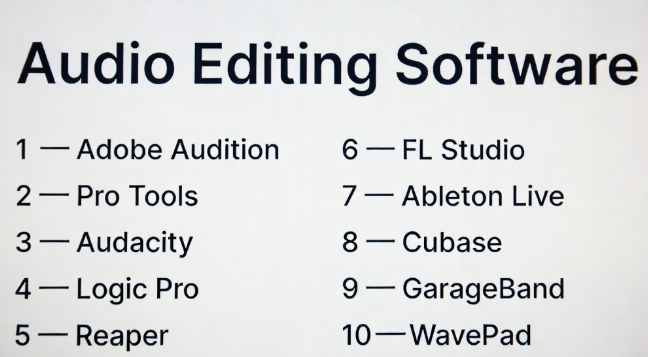
Top 10 Audio Editing Software Tools
#1 — Adobe Audition
Short description: A professional audio editing and mixing software widely used for video production, podcasts, and broadcast audio.
Key Features
- Multi-track editing
- Advanced noise reduction tools
- Real-time effects processing
- Spectral editing
- Integration with Adobe ecosystem
- Batch processing
- Audio restoration tools
Pros
- Professional-grade tools
- Strong integration with video workflows
- Excellent for podcast editing
Cons
- Subscription pricing
- Not ideal for music production
- Resource-intensive
Platforms / Deployment
Windows / macOS
Security & Compliance
Not publicly stated
Integrations & Ecosystem
Works seamlessly within creative production pipelines.
- Premiere Pro
- After Effects
- Plugins (VST)
- Cloud assets
Support & Community
Large community with extensive tutorials and documentation.
#2 — Pro Tools
Short description: An industry-standard digital audio workstation (DAW) used in professional music and film production.
Key Features
- Multi-track recording and editing
- Advanced mixing console
- High-quality audio engine
- Automation tools
- Plugin support
- Collaboration tools
- MIDI editing
Pros
- Industry-standard in studios
- High-quality output
- Strong collaboration features
Cons
- Expensive
- Steep learning curve
- Hardware requirements
Platforms / Deployment
Windows / macOS
Security & Compliance
Not publicly stated
Integrations & Ecosystem
Widely integrated into professional audio production workflows.
- Plugins (AAX)
- Studio hardware
- Post-production pipelines
Support & Community
Strong professional community and training resources.
#3 — Audacity
Short description: A free, open-source audio editor suitable for beginners and basic audio editing tasks.
Key Features
- Multi-track editing
- Basic effects and filters
- Noise reduction tools
- Plugin support
- Recording capabilities
- Cross-platform support
- Open-source flexibility
Pros
- Free to use
- Easy to learn
- Lightweight
Cons
- Limited advanced features
- Outdated interface
- Not ideal for professional production
Platforms / Deployment
Windows / macOS / Linux
Security & Compliance
Not publicly stated
Integrations & Ecosystem
Supports plugins and basic integrations.
- VST plugins
- Export formats
- Open-source tools
Support & Community
Large open-source community.
#4 — Logic Pro
Short description: A professional audio production software designed for macOS users, widely used in music production.
Key Features
- Multi-track editing
- MIDI sequencing
- Built-in instruments and effects
- Automation tools
- High-quality sound library
- Real-time playback
- Plugin support
Pros
- Powerful music production tools
- Optimized for Apple hardware
- One-time purchase
Cons
- macOS only
- Learning curve
- Less focused on post-production
Platforms / Deployment
macOS
Security & Compliance
Not publicly stated
Integrations & Ecosystem
- Apple ecosystem
- Plugins (AU)
- Sound libraries
Support & Community
Strong music production community.
#5 — Reaper
Short description: A flexible and lightweight DAW known for customization and affordability.
Key Features
- Multi-track editing
- Extensive customization
- Low system requirements
- Plugin support
- Automation tools
- Scripting capabilities
- MIDI editing
Pros
- Affordable
- Highly customizable
- Lightweight performance
Cons
- Interface complexity
- Requires setup customization
- Smaller ecosystem
Platforms / Deployment
Windows / macOS / Linux
Security & Compliance
Not publicly stated
Integrations & Ecosystem
- VST plugins
- Scripts
- Custom workflows
Support & Community
Active user community with strong forums.
#6 — FL Studio
Short description: A popular DAW for music production, especially among electronic and hip-hop producers.
Key Features
- Pattern-based workflow
- Multi-track editing
- Built-in instruments
- Automation tools
- Plugin support
- Real-time effects
- MIDI editing
Pros
- Beginner-friendly
- Strong music production tools
- Lifetime updates
Cons
- Less suited for audio post-production
- Workflow differences
- Learning curve for advanced use
Platforms / Deployment
Windows / macOS
Security & Compliance
Not publicly stated
Integrations & Ecosystem
- VST plugins
- Sound libraries
- MIDI tools
Support & Community
Large and active community.
#7 — Ableton Live
Short description: A powerful DAW focused on music production, live performance, and real-time audio manipulation.
Key Features
- Session and arrangement views
- Real-time audio manipulation
- MIDI editing
- Built-in effects and instruments
- Automation tools
- Plugin support
- Live performance tools
Pros
- Great for live performance
- Flexible workflows
- Strong creative tools
Cons
- Expensive
- Learning curve
- Not ideal for traditional editing workflows
Platforms / Deployment
Windows / macOS
Security & Compliance
Not publicly stated
Integrations & Ecosystem
- Plugins (VST/AU)
- MIDI controllers
- Live performance tools
Support & Community
Strong global community and resources.
#8 — Cubase
Short description: A professional DAW with advanced features for music production and audio editing.
Key Features
- Multi-track editing
- MIDI sequencing
- Advanced mixing tools
- Plugin support
- Automation features
- Audio effects
- Real-time processing
Pros
- Comprehensive feature set
- High-quality audio engine
- Strong MIDI tools
Cons
- Expensive
- Complex interface
- Requires powerful system
Platforms / Deployment
Windows / macOS
Security & Compliance
Not publicly stated
Integrations & Ecosystem
- VST plugins
- Studio hardware
- Production workflows
Support & Community
Strong professional user base.
#9 — GarageBand
Short description: A beginner-friendly audio editing and music production tool for Apple users.
Key Features
- Multi-track editing
- Built-in instruments
- Audio effects
- Simple interface
- Recording tools
- Templates
- Real-time playback
Pros
- Free and easy to use
- Great for beginners
- Integrated with Apple ecosystem
Cons
- Limited advanced features
- macOS/iOS only
- Not suitable for professionals
Platforms / Deployment
macOS / iOS
Security & Compliance
Not publicly stated
Integrations & Ecosystem
- Apple ecosystem
- Sound libraries
- Export tools
Support & Community
Large beginner-focused community.
#10 — WavePad
Short description: A simple audio editing tool designed for quick edits and basic audio processing.
Key Features
- Basic editing tools
- Audio effects
- Batch processing
- Noise reduction
- Format support
- Easy interface
- Export options
Pros
- Easy to use
- Lightweight
- Good for quick edits
Cons
- Limited advanced features
- Not suitable for large projects
- Smaller ecosystem
Platforms / Deployment
Windows / macOS
Security & Compliance
Not publicly stated
Integrations & Ecosystem
- Plugins
- Export formats
- Basic workflows
Support & Community
Moderate support and documentation.
Comparison Table (Top 10)
| Tool Name | Best For | Platform(s) Supported | Deployment | Standout Feature | Public Rating |
|---|---|---|---|---|---|
| Adobe Audition | Audio post-production | Windows, macOS | Local/Cloud | Spectral editing | N/A |
| Pro Tools | Professional studios | Windows, macOS | Local | Industry-standard DAW | N/A |
| Audacity | Beginners | Windows, macOS, Linux | Local | Free editing | N/A |
| Logic Pro | Music production | macOS | Local | Built-in instruments | N/A |
| Reaper | Custom workflows | Windows, macOS, Linux | Local | Flexibility | N/A |
| FL Studio | Beat production | Windows, macOS | Local | Pattern workflow | N/A |
| Ableton Live | Live performance | Windows, macOS | Local | Real-time manipulation | N/A |
| Cubase | Professional production | Windows, macOS | Local | MIDI tools | N/A |
| GarageBand | Beginners | macOS, iOS | Local | Simplicity | N/A |
| WavePad | Quick edits | Windows, macOS | Local | Ease of use | N/A |
Evaluation & Scoring of Audio Editing Software
| Tool Name | Core | Ease | Integrations | Security | Performance | Support | Value | Weighted Total |
|---|---|---|---|---|---|---|---|---|
| Adobe Audition | 9 | 8 | 9 | 6 | 9 | 9 | 7 | 8.6 |
| Pro Tools | 10 | 6 | 9 | 6 | 10 | 9 | 5 | 8.3 |
| Audacity | 6 | 9 | 6 | 5 | 7 | 8 | 10 | 7.6 |
| Logic Pro | 9 | 8 | 8 | 6 | 9 | 8 | 9 | 8.7 |
| Reaper | 8 | 7 | 8 | 5 | 9 | 8 | 10 | 8.4 |
| FL Studio | 8 | 9 | 7 | 5 | 8 | 8 | 9 | 8.3 |
| Ableton Live | 9 | 7 | 8 | 5 | 9 | 9 | 7 | 8.2 |
| Cubase | 9 | 6 | 8 | 6 | 9 | 8 | 7 | 8.0 |
| GarageBand | 6 | 10 | 6 | 5 | 8 | 8 | 10 | 7.8 |
| WavePad | 5 | 10 | 5 | 5 | 7 | 7 | 9 | 7.2 |
How to interpret the scores:
- Scores are comparative benchmarks, not absolute values
- Professional DAWs rank high in performance and features
- Beginner tools score higher in ease and value
- Choose based on your workflow, not just scores
Which Audio Editing Software Is Right for You?
Solo / Freelancer
- Best: Audacity, GarageBand, Reaper
- Focus on affordability and ease of use
SMB
- Best: Adobe Audition, FL Studio
- Balance features and usability
Mid-Market
- Best: Logic Pro, Ableton Live
- Require advanced tools and flexibility
Enterprise
- Best: Pro Tools, Cubase
- Focus on scalability and performance
Budget vs Premium
- Budget: Audacity, Reaper
- Premium: Pro Tools, Cubase
Feature Depth vs Ease of Use
- Deep: Pro Tools, Cubase
- Easy: GarageBand, Audacity
Integrations & Scalability
- Strong: Adobe Audition, Pro Tools
- Flexible: Reaper
Security & Compliance Needs
- Most tools: Not publicly stated
- Enterprises should validate internally
Frequently Asked Questions (FAQs)
What is audio editing software?
It is used to record, edit, and enhance sound for various media.
Which software is best for beginners?
Audacity and GarageBand are good starting points.
Do I need a powerful system?
For advanced editing, yes.
What are plugins?
Extensions that add effects and features.
Can I record audio directly?
Yes, most tools support recording.
What formats are supported?
Common formats include MP3, WAV, and FLAC.
Is free software good enough?
Yes, for basic to moderate tasks.
Can I edit podcasts?
Yes, many tools are ideal for podcast editing.
What is mixing?
Balancing audio tracks.
What is mastering?
Finalizing audio for distribution.
Conclusion
Audio editing software has evolved into a diverse ecosystem catering to beginners and professionals alike. The right tool depends on your workflow, budget, and production needs.
- Choose simple tools for quick edits
- Choose DAWs for music production
- Choose professional tools for advanced workflows
There is no single best option—only the one that fits your specific requirements
