Introduction
Color Grading Software is used to enhance, correct, and stylize the color of video footage to achieve a desired visual tone and consistency. It plays a crucial role in filmmaking, video production, advertising, and digital content creation by transforming raw footage into polished, cinematic visuals.
With advancements in HDR workflows, AI-assisted color correction, and real-time GPU processing, modern color grading tools offer powerful capabilities once limited to high-end studios. Today, creators across all levels—from YouTubers to professional colorists—can access sophisticated grading tools that support high-resolution formats and collaborative workflows.
Common Use Cases
- Film & TV production: Achieving cinematic color tones and visual consistency
- YouTube & content creation: Enhancing visual quality and branding
- Advertising & marketing: Creating impactful and stylized visuals
- Music videos: Applying creative color looks and effects
- Documentaries: Maintaining natural tones and correcting exposure issues
What Buyers Should Evaluate
- Color correction vs color grading capabilities
- HDR and high-resolution support
- Real-time playback performance
- Node-based vs layer-based workflows
- Integration with editing and VFX tools
- LUT (Look-Up Table) support
- Hardware acceleration (GPU usage)
- Collaboration features and project sharing
- Ease of use and learning curve
- Pricing model and licensing flexibility
Best for: Video editors, filmmakers, colorists, content creators, and post-production teams seeking precise control over visual aesthetics.
Not ideal for: Users who only need basic brightness/contrast adjustments. In such cases, standard video editing tools may be sufficient.
Key Trends in Color Grading Software
- AI-assisted color correction: Automatic exposure balancing, skin tone matching, and scene detection
- HDR workflows: Increasing support for high dynamic range formats
- Real-time grading: Faster playback and instant preview with GPU acceleration
- Cloud collaboration: Shared timelines and remote workflows
- Integrated post-production suites: Combining editing, VFX, and grading in one platform
- Color management systems: Advanced tools for consistent color across devices
- LUT marketplaces and presets: Faster workflow with reusable looks
- Cross-platform compatibility: Seamless workflows across devices and OS
- Automation and scripting: Custom grading pipelines
- Affordable professional tools: High-end features available at lower cost
How We Selected These Tools (Methodology)
The tools listed were evaluated based on:
- Industry adoption in film, TV, and digital production
- Depth of color grading features and precision controls
- Performance with high-resolution and HDR content
- Real-time playback and GPU acceleration capabilities
- Integration with editing, VFX, and animation pipelines
- Flexibility across different user levels (beginner to enterprise)
- Availability of LUT support and color management tools
- Strength of ecosystem and plugin support
- Community, training resources, and documentation
- Reliability in production environments
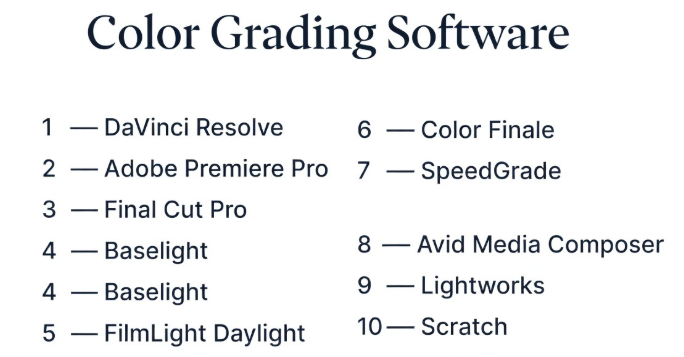
Top 10 Color Grading Software Tools
#1 — DaVinci Resolve
Short description: A leading color grading and post-production software known for its advanced tools and professional-grade capabilities.
Key Features
- Node-based color grading
- Advanced color wheels and curves
- HDR grading tools
- Real-time playback with GPU acceleration
- Integrated editing and VFX tools
- Collaboration features
- LUT support
Pros
- Industry-standard color grading
- Free version available
- All-in-one post-production suite
Cons
- High system requirements
- Learning curve for beginners
- Complex interface
Platforms / Deployment
Windows / macOS / Linux
Security & Compliance
Not publicly stated
Integrations & Ecosystem
Works as a central hub in post-production workflows.
- Editing tools
- VFX tools
- Audio tools
- Plugins
- External pipelines
Support & Community
Large community with extensive tutorials and training.
#2 — Adobe Premiere Pro
Short description: A widely used video editing tool with strong built-in color grading capabilities.
Key Features
- Lumetri Color panel
- LUT support
- Real-time playback
- Integration with Creative Cloud
- Basic color correction tools
- GPU acceleration
- Timeline-based workflow
Pros
- Easy to use
- Strong integration with Adobe tools
- Suitable for quick grading
Cons
- Limited advanced grading tools
- Subscription pricing
- Less precise than dedicated tools
Platforms / Deployment
Windows / macOS
Security & Compliance
Not publicly stated
Integrations & Ecosystem
- After Effects
- Photoshop
- Illustrator
- Plugins
- Cloud assets
Support & Community
Massive user base with abundant learning resources.
#3 — Final Cut Pro
Short description: A professional video editing and color grading software optimized for macOS users.
Key Features
- Built-in color grading tools
- Magnetic timeline
- HDR support
- Real-time playback
- LUT support
- Optimized performance
- Plugin support
Pros
- Fast and responsive
- Optimized for Apple hardware
- Easy to learn
Cons
- macOS only
- Limited compared to dedicated grading tools
- Smaller ecosystem
Platforms / Deployment
macOS
Security & Compliance
Not publicly stated
Integrations & Ecosystem
- Motion
- Compressor
- Plugins
- Apple ecosystem
Support & Community
Strong community among macOS users.
#4 — Baselight
Short description: A high-end color grading system used in professional film and broadcast production.
Key Features
- Advanced color grading tools
- HDR workflows
- Scene-referred grading
- Real-time performance
- High-end color management
- Multi-user collaboration
- Precision controls
Pros
- Extremely powerful
- Industry-grade accuracy
- Used in high-end productions
Cons
- Expensive
- Requires training
- Limited accessibility
Platforms / Deployment
Linux / macOS
Security & Compliance
Not publicly stated
Integrations & Ecosystem
- Film pipelines
- Post-production tools
- Custom workflows
Support & Community
Enterprise-level support and training.
#5 — FilmLight Daylight
Short description: A dailies and color grading tool designed for on-set and post-production workflows.
Key Features
- Real-time grading
- Dailies processing
- LUT application
- Color management
- HDR support
- Metadata handling
- Fast processing
Pros
- Efficient on-set workflows
- Fast processing
- Reliable performance
Cons
- Niche use case
- Expensive
- Limited general use
Platforms / Deployment
Linux / macOS
Security & Compliance
Not publicly stated
Integrations & Ecosystem
- Baselight ecosystem
- Production pipelines
- Media tools
Support & Community
Professional support with specialized usage.
#6 — Color Finale
Short description: A professional color grading plugin for Final Cut Pro users.
Key Features
- Advanced color wheels
- LUT support
- HDR grading
- Layer-based workflow
- Plugin integration
- Real-time preview
- Precision tools
Pros
- Enhances Final Cut Pro
- Easy integration
- Professional results
Cons
- Requires Final Cut Pro
- Limited standalone use
- Smaller ecosystem
Platforms / Deployment
macOS
Security & Compliance
Not publicly stated
Integrations & Ecosystem
- Final Cut Pro
- Plugins
- LUT workflows
Support & Community
Moderate support and documentation.
#7 — SpeedGrade
Short description: A color grading tool designed for professional workflows, historically integrated with Adobe pipelines.
Key Features
- Advanced grading tools
- LUT support
- Real-time playback
- Color matching
- GPU acceleration
- Timeline workflows
- HDR support
Pros
- Professional-grade features
- Good integration
- Strong color tools
Cons
- Limited active development
- Smaller user base
- Less modern compared to alternatives
Platforms / Deployment
Windows / macOS
Security & Compliance
Not publicly stated
Integrations & Ecosystem
- Adobe ecosystem
- LUT workflows
- Plugins
Support & Community
Varies / Not publicly stated
#8 — Avid Media Composer
Short description: A professional video editing platform with integrated color grading capabilities used in film and broadcast.
Key Features
- Built-in color correction tools
- Real-time playback
- HDR support
- Timeline-based grading
- Media management
- Collaboration tools
- Plugin support
Pros
- Industry-standard editing tool
- Strong collaboration features
- Reliable performance
Cons
- Complex interface
- Limited grading compared to dedicated tools
- Expensive
Platforms / Deployment
Windows / macOS
Security & Compliance
Not publicly stated
Integrations & Ecosystem
- Avid ecosystem
- Plugins
- Post-production pipelines
Support & Community
Strong enterprise and broadcast community.
#9 — Lightworks
Short description: A video editing and grading tool with professional features and a flexible pricing model.
Key Features
- Color correction tools
- Real-time playback
- Timeline editing
- Export options
- Plugin support
- Multi-format support
- GPU acceleration
Pros
- Flexible pricing
- Professional editing features
- Lightweight performance
Cons
- Limited advanced grading
- Interface learning curve
- Smaller ecosystem
Platforms / Deployment
Windows / macOS / Linux
Security & Compliance
Not publicly stated
Integrations & Ecosystem
- Plugins
- Export workflows
- Editing tools
Support & Community
Moderate community and resources.
#10 — Scratch
Short description: A high-end color grading and finishing tool designed for professional workflows.
Key Features
- Advanced grading tools
- HDR workflows
- Real-time playback
- Node-based workflow
- Finishing tools
- High-resolution support
- Color management
Pros
- Professional-grade tools
- Strong performance
- Flexible workflows
Cons
- Expensive
- Requires experience
- Limited accessibility
Platforms / Deployment
Windows / macOS / Linux
Security & Compliance
Not publicly stated
Integrations & Ecosystem
- Post-production pipelines
- Plugins
- Media tools
Support & Community
Professional support with niche community.
Comparison Table (Top 10)
| Tool Name | Best For | Platform(s) Supported | Deployment | Standout Feature | Public Rating |
|---|---|---|---|---|---|
| DaVinci Resolve | Professional grading | Windows, macOS, Linux | Local | Node-based grading | N/A |
| Premiere Pro | Editors | Windows, macOS | Local/Cloud | Lumetri Color | N/A |
| Final Cut Pro | macOS users | macOS | Local | Optimized performance | N/A |
| Baselight | High-end studios | Linux, macOS | Local | Precision grading | N/A |
| Daylight | On-set workflows | Linux, macOS | Local | Dailies processing | N/A |
| Color Finale | FCP users | macOS | Plugin | Enhanced grading | N/A |
| SpeedGrade | Adobe workflows | Windows, macOS | Local | Advanced grading | N/A |
| Avid Media Composer | Broadcast | Windows, macOS | Local | Media management | N/A |
| Lightworks | Indie editors | Windows, macOS, Linux | Local | Lightweight workflow | N/A |
| Scratch | Finishing | Windows, macOS, Linux | Local | HDR finishing | N/A |
Evaluation & Scoring of Color Grading Software
| Tool Name | Core | Ease | Integrations | Security | Performance | Support | Value | Weighted Total |
|---|---|---|---|---|---|---|---|---|
| DaVinci Resolve | 10 | 7 | 9 | 6 | 10 | 9 | 10 | 9.1 |
| Premiere Pro | 8 | 9 | 10 | 6 | 8 | 9 | 7 | 8.3 |
| Final Cut Pro | 8 | 9 | 7 | 6 | 9 | 8 | 8 | 8.2 |
| Baselight | 10 | 5 | 8 | 6 | 10 | 9 | 5 | 8.0 |
| Daylight | 8 | 6 | 7 | 6 | 9 | 8 | 6 | 7.5 |
| Color Finale | 7 | 8 | 7 | 5 | 8 | 7 | 7 | 7.3 |
| SpeedGrade | 7 | 7 | 7 | 5 | 7 | 6 | 7 | 6.9 |
| Avid Media Composer | 8 | 6 | 9 | 6 | 9 | 9 | 6 | 7.9 |
| Lightworks | 7 | 7 | 6 | 5 | 7 | 7 | 8 | 7.1 |
| Scratch | 9 | 6 | 7 | 6 | 9 | 8 | 6 | 7.8 |
How to interpret the scores:
- Scores are comparative benchmarks, not absolute values
- Dedicated grading tools score higher in precision and performance
- Editing tools score higher in ease and accessibility
- Choose based on workflow requirements, not just score
Which Color Grading Software Is Right for You?
Solo / Freelancer
- Best: DaVinci Resolve, Lightworks
- Focus on cost-effectiveness and flexibility
SMB
- Best: Premiere Pro, Final Cut Pro
- Balance usability and capability
Mid-Market
- Best: DaVinci Resolve, Avid Media Composer
- Need scalability and collaboration
Enterprise
- Best: Baselight, Scratch
- Prioritize precision and advanced workflows
Budget vs Premium
- Budget: DaVinci Resolve, Lightworks
- Premium: Baselight, Scratch
Feature Depth vs Ease of Use
- Deep features: DaVinci Resolve, Baselight
- Easy tools: Premiere Pro, Final Cut Pro
Integrations & Scalability
- Strong: Premiere Pro, Avid
- Flexible: Resolve
Security & Compliance Needs
- Most tools: Not publicly stated
- Enterprises should validate requirements internally
Frequently Asked Questions (FAQs)
What is color grading software?
It enhances and stylizes video footage by adjusting color, contrast, and tone.
Is color grading different from color correction?
Yes, correction fixes issues; grading adds creative style.
Which tool is best for beginners?
DaVinci Resolve and Premiere Pro are good starting points.
Do I need a powerful system?
Yes, especially for high-resolution and HDR workflows.
What are LUTs?
Predefined color profiles used to apply consistent looks.
Is free software good enough?
Yes, some free tools offer professional-level features.
Can I use color grading software for photos?
Some tools support images, but they are primarily for video.
Is HDR important?
It is increasingly important for high-quality video production.
Can I collaborate with others?
Some tools support collaboration features.
What is real-time grading?
It allows instant preview of color changes during editing.
Conclusion
Color grading software is essential for achieving professional-quality visuals in modern video production. From beginner-friendly tools to enterprise-grade systems, the market offers solutions for every level of expertise.
- Choose all-in-one tools for convenience
- Choose dedicated grading tools for precision
- Consider performance and integration when scaling workflows
There is no single “best” tool—only the one that aligns with your creative and technical needs.
