Introduction
Video Hosting Platforms are tools that help businesses upload, store, manage, secure, stream, embed, and analyze video content. Instead of keeping large video files on a normal website server, these platforms handle video delivery through optimized streaming infrastructure, adaptive playback, privacy controls, analytics, and integrations.
Video hosting matters more now because companies use video for marketing, product education, customer onboarding, employee training, webinars, virtual events, online courses, sales enablement, and internal communication. Buyers should evaluate video quality, playback speed, privacy controls, analytics, branding options, live streaming, integrations, API access, scalability, pricing, and compliance needs before choosing a platform.
Best for: marketing teams, SaaS companies, educators, enterprises, media teams, customer success teams, sales teams, creators, and training businesses that need reliable video delivery.
Not ideal for: users who only need occasional file sharing, simple social posting, or free public reach where YouTube-style platforms may be enough.
Key Trends in Video Hosting Platforms
- AI-powered video workflows are becoming common, including auto-transcription, summaries, chapters, search, captions, and content recommendations.
- Private and secure video hosting is growing because teams need password protection, domain restrictions, SSO, viewer permissions, and audit controls.
- Video analytics is moving beyond views toward engagement heatmaps, watch time, drop-off points, lead scoring, and account-level insights.
- Developer-first video infrastructure is rising for apps that need APIs, SDKs, encoding, streaming, and custom playback experiences.
- Interactive video experiences are becoming more useful for sales, training, product demos, and learning platforms.
- Hybrid video use cases are increasing, where one platform supports marketing, internal training, live events, and customer education.
- Compliance expectations are stronger, especially for enterprises, healthcare, finance, education, and regulated industries.
- Pricing transparency remains mixed, with many enterprise tools using custom pricing based on bandwidth, storage, seats, and features.
- Integration depth matters more, especially with CRM, marketing automation, LMS, CMS, analytics, and collaboration tools.
- Performance and global delivery are key because viewers expect fast playback across devices and regions.
How We Selected These Tools
The tools below were selected using a practical evaluation approach:
- Market adoption and recognition across business, education, enterprise, and developer use cases.
- Feature completeness for hosting, streaming, privacy, analytics, branding, and embedding.
- Reliability and performance signals such as CDN delivery, adaptive streaming, and playback quality.
- Security posture, including access controls, privacy options, SSO, encryption, and admin governance where known.
- Integration ecosystem with CRM, LMS, CMS, marketing automation, analytics, and developer tools.
- Customer fit across solo creators, SMBs, mid-market teams, enterprises, educators, and technical teams.
- Flexibility for different use cases such as marketing, training, live streaming, sales enablement, and app-based video.
- Ease of adoption for non-technical teams and customization options for technical teams.
- Support, documentation, onboarding, and community strength.
- Overall price-to-value balance based on typical buyer expectations.
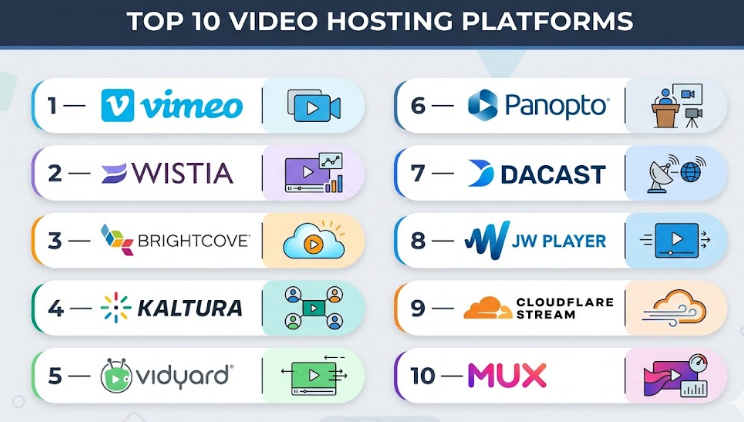
Top 10 Video Hosting Platforms
#1 — Vimeo
Short description :
Vimeo is a widely used video hosting platform for creators, marketers, agencies, and businesses that need polished video presentation.
It supports branded video pages, private sharing, embeds, analytics, live streaming options, and team collaboration.
It is useful for companies that want a cleaner video experience than public social platforms.
Vimeo works well for marketing videos, portfolios, training content, product videos, and event recordings.
It is especially strong when presentation quality, privacy options, and ease of use matter.
Key Features
- Branded video player and customizable embeds.
- Privacy controls for public, private, password-protected, and restricted sharing.
- Video analytics for views, engagement, and audience behavior.
- Live streaming and event support on selected plans.
- Team collaboration and review workflows.
- Video library management for business users.
- Support for high-quality playback across devices.
Pros
- Easy to use for non-technical teams.
- Clean viewing experience without unnecessary distractions.
- Good fit for marketing, creative, education, and business video use cases.
Cons
- Advanced business and enterprise features may require higher plans.
- Not as developer-first as platforms like Mux or Cloudflare Stream.
- Large-scale enterprise workflows may need careful plan evaluation.
Platforms / Deployment
Web / iOS / Android
Cloud
Security & Compliance
SSO/SAML, privacy controls, password protection, domain-level controls, and team permissions are available on selected plans.
Specific compliance details vary by plan and should be validated during procurement.
Integrations & Ecosystem
Vimeo connects well with common marketing, website, learning, and collaboration workflows. It is often used where teams need simple publishing, embedding, and analytics without complex infrastructure.
- Website and CMS embeds.
- Marketing and analytics tools.
- Collaboration and review workflows.
- API access for custom workflows.
- Learning and training use cases.
Support & Community
Vimeo provides documentation, help resources, business support options, and enterprise onboarding depending on plan. Its community and brand recognition are strong among creators and business video teams.
#2 — Wistia
Short description :
Wistia is a video hosting platform built mainly for marketing teams, SaaS companies, agencies, and B2B businesses.
It focuses on branded video hosting, lead generation, viewer analytics, engagement tracking, and marketing integrations.
Wistia is useful when video is part of a content marketing, product marketing, or demand generation strategy.
It helps teams understand how viewers interact with videos, not just how many people watched.
It is a strong option for businesses that want video to support pipeline, website conversion, and customer education.
Key Features
- Customizable branded video player.
- Viewer engagement analytics and heatmaps.
- Lead capture forms and calls to action.
- Channel-style video galleries.
- Podcast and video content support.
- CRM and marketing automation integrations.
- Simple embed and website publishing workflows.
Pros
- Strong for marketing and demand generation teams.
- Analytics are practical and easy to understand.
- Clean player experience with strong branding controls.
Cons
- May be expensive for teams with large video libraries or high usage.
- Not ideal for complex enterprise learning management needs.
- Advanced developer customization may be limited compared with infrastructure-first tools.
Platforms / Deployment
Web
Cloud
Security & Compliance
Supports privacy controls, password protection, team permissions, and domain restrictions on selected plans.
Specific certifications and compliance claims should be validated with the vendor.
Integrations & Ecosystem
Wistia is strongest when connected to marketing and revenue workflows. It fits well into websites, campaigns, landing pages, and product education flows.
- CRM integrations.
- Marketing automation tools.
- Website and CMS embeds.
- Analytics platforms.
- Lead capture and campaign workflows.
Support & Community
Wistia has strong documentation, educational content, onboarding resources, and a marketing-focused user community. Support level varies by plan.
#3 — Brightcove
Short description :
Brightcove is an enterprise-grade video platform built for large businesses, media companies, broadcasters, and global organizations.
It supports video hosting, live streaming, monetization, analytics, security controls, and large-scale video operations.
Brightcove is useful for companies that need advanced governance, reliability, and video distribution at scale.
It is often considered by enterprises that manage large audiences, internal video libraries, OTT content, or complex video workflows.
It is better suited for mature teams than for very small businesses.
Key Features
- Enterprise video hosting and streaming.
- Live streaming and event delivery.
- Video monetization and advertising support.
- Advanced analytics and reporting.
- Security and access control features.
- Global delivery and scalable playback.
- APIs and workflow customization.
Pros
- Strong enterprise feature depth.
- Suitable for large-scale video delivery.
- Good fit for media, enterprise communications, and digital experiences.
Cons
- May be complex for smaller teams.
- Pricing is usually enterprise-oriented.
- Implementation may require technical planning.
Platforms / Deployment
Web
Cloud
Security & Compliance
Enterprise security controls may include SSO, access management, encryption, roles, and governance features.
Specific compliance details should be confirmed directly during vendor evaluation.
Integrations & Ecosystem
Brightcove supports enterprise video workflows and can connect with digital experience, marketing, media, and analytics ecosystems.
- CMS and DXP integrations.
- Marketing and analytics tools.
- Advertising and monetization systems.
- APIs for custom workflows.
- Enterprise identity systems.
Support & Community
Brightcove provides enterprise support, documentation, onboarding, and professional services options. Support is strongest for larger customers with formal implementation needs.
#4 — Kaltura
Short description :
Kaltura is a flexible video platform used by enterprises, educational institutions, media teams, and organizations with complex video needs.
It supports video management, live and on-demand streaming, virtual events, learning video, and internal communication use cases.
Kaltura is often valued for customization, extensibility, and enterprise-grade deployment flexibility.
It can support both business video and education-focused workflows.
It is best for teams that need a broad video platform rather than a simple upload-and-embed tool.
Key Features
- Video content management.
- Live and on-demand video support.
- Learning and education video workflows.
- Virtual event capabilities.
- APIs and extensibility.
- Role-based management and access controls.
- Customizable video experiences.
Pros
- Strong for education and enterprise video.
- Flexible and customizable.
- Good fit for complex workflows and large organizations.
Cons
- Can be complex to configure.
- May require technical or implementation support.
- Smaller teams may find it more than they need.
Platforms / Deployment
Web
Cloud / Hybrid / Self-hosted options may vary
Security & Compliance
Supports enterprise access controls and identity-related features depending on deployment and plan.
Specific certifications and compliance coverage should be validated with the vendor.
Integrations & Ecosystem
Kaltura has a broad ecosystem for education, enterprise communication, and video management.
- LMS integrations.
- CMS and portal integrations.
- Enterprise identity systems.
- APIs and developer tools.
- Virtual event and webinar workflows.
Support & Community
Kaltura offers documentation, enterprise support, implementation guidance, and a mature ecosystem. Support experience can vary based on deployment model and contract.
#5 — Vidyard
Short description :
Vidyard is a video hosting and video selling platform focused on sales, marketing, and customer engagement.
It helps teams create, host, share, track, and personalize videos for prospects, customers, and internal stakeholders.
Vidyard is especially useful for B2B sales teams that use video messages in outreach and pipeline communication.
It also supports marketing video hosting, analytics, and integrations with CRM tools.
It is best for teams that want video to improve sales conversations and buyer engagement.
Key Features
- Video hosting and sharing.
- Sales video recording and messaging.
- Viewer engagement analytics.
- CRM and marketing integrations.
- Personalized video workflows.
- Team libraries and video management.
- Calls to action and lead engagement features.
Pros
- Strong for sales and revenue teams.
- Practical CRM-connected video analytics.
- Easy for teams to record and share videos quickly.
Cons
- Not ideal for advanced media streaming use cases.
- Enterprise features may require higher plans.
- Less suitable for developer-first video infrastructure needs.
Platforms / Deployment
Web / Browser extensions / Desktop recording support may vary
Cloud
Security & Compliance
Security features may include SSO, team permissions, privacy controls, and access management on selected plans.
Specific compliance details should be confirmed with the vendor.
Integrations & Ecosystem
Vidyard is strongest in sales and marketing ecosystems where video engagement connects to pipeline activity.
- CRM integrations.
- Sales engagement tools.
- Marketing automation platforms.
- Browser-based recording workflows.
- Analytics and reporting tools.
Support & Community
Vidyard provides documentation, support resources, onboarding content, and sales-focused enablement materials. Support options vary by plan.
#6 — Panopto
Short description :
Panopto is a video platform focused on education, corporate training, knowledge sharing, and internal communication.
It is widely used for lecture capture, training libraries, searchable video archives, and secure employee learning content.
Panopto is useful for universities, enterprises, healthcare organizations, and large training teams.
Its strength is structured video knowledge management rather than simple public video marketing.
It is best when searchable training video, access control, and learning workflows matter.
Key Features
- Lecture capture and training video management.
- Search inside videos using transcripts and metadata.
- Secure video libraries.
- Live and on-demand video support.
- LMS and enterprise integrations.
- Viewer analytics and reporting.
- Permission-based content access.
Pros
- Strong for education and enterprise learning.
- Excellent for searchable knowledge libraries.
- Good fit for internal video governance.
Cons
- Less focused on marketing-style lead generation.
- May feel heavy for small creators or simple hosting needs.
- Implementation can require planning for large organizations.
Platforms / Deployment
Web / Windows / macOS / iOS / Android support may vary
Cloud / Self-hosted options may vary
Security & Compliance
Supports enterprise access controls, SSO options, permissions, and secure video management.
Specific compliance details should be validated based on plan and region.
Integrations & Ecosystem
Panopto fits well in education, HR, training, and enterprise knowledge workflows.
- LMS integrations.
- Video conferencing integrations.
- Enterprise identity systems.
- Collaboration tools.
- Analytics and reporting systems.
Support & Community
Panopto provides documentation, training resources, customer support, and onboarding options. It has strong recognition in education and enterprise learning communities.
#7 — Dacast
Short description :
Dacast is a video hosting and live streaming platform designed for businesses that need secure video delivery, monetization, and professional streaming.
It supports on-demand video, live streaming, private video hosting, video player customization, and analytics.
Dacast is useful for events, media teams, online education, houses of worship, and companies that need controlled streaming.
It offers a practical balance between professional video features and business usability.
It is often considered by teams that need live and on-demand video without building infrastructure from scratch.
Key Features
- Live streaming and video-on-demand hosting.
- White-label video player options.
- Video monetization support.
- Analytics and viewer reporting.
- Secure video delivery controls.
- Embedding and player customization.
- API access for advanced workflows.
Pros
- Good balance of live and on-demand video.
- Useful for professional streaming and monetization.
- More business-focused than consumer video platforms.
Cons
- Pricing can depend heavily on bandwidth and usage.
- Advanced setup may require technical understanding.
- Not as marketing-specific as Wistia or Vidyard.
Platforms / Deployment
Web
Cloud
Security & Compliance
Supports privacy controls, secure streaming options, and access management features.
Specific compliance certifications should be validated directly with the vendor.
Integrations & Ecosystem
Dacast supports streaming, monetization, and business video workflows.
- Website embeds.
- API access.
- Paywall and monetization workflows.
- Analytics tools.
- Live event production workflows.
Support & Community
Dacast provides documentation, support resources, and business support plans. Community presence is practical but more vendor-led than open community-led.
#8 — JW Player
Short description :
JW Player is a video platform known for video playback, streaming, monetization, and media delivery use cases.
It is used by publishers, media companies, broadcasters, and businesses that need strong video player and distribution capabilities.
JW Player works well when playback quality, ad support, analytics, and content delivery are important.
It is more suitable for media and publisher workflows than basic internal training use cases.
It is a strong option for teams that need a mature video player and monetization ecosystem.
Key Features
- High-performance video player.
- Video hosting and streaming support.
- Advertising and monetization features.
- Analytics and audience insights.
- Adaptive streaming support.
- Content management capabilities.
- API and developer customization options.
Pros
- Strong video player technology.
- Good fit for publishers and media companies.
- Supports monetization and scalable video delivery.
Cons
- May be less simple for non-technical teams.
- Pricing and advanced features may suit larger organizations better.
- Not primarily designed for internal training workflows.
Platforms / Deployment
Web
Cloud
Security & Compliance
Security features may include access controls, secure delivery, and enterprise permissions depending on plan.
Specific compliance details are not always publicly stated and should be confirmed.
Integrations & Ecosystem
JW Player is strong in media, publishing, ad technology, and developer-driven video workflows.
- Advertising systems.
- CMS integrations.
- Analytics tools.
- APIs and SDKs.
- Media workflow integrations.
Support & Community
JW Player provides documentation, technical resources, and enterprise support options. Its ecosystem is strong among video developers, publishers, and media teams.
#9 — Cloudflare Stream
Short description :
Cloudflare Stream is a developer-friendly video hosting and streaming platform built on Cloudflare’s global infrastructure.
It helps teams upload, encode, store, stream, and deliver video through APIs without managing complex video infrastructure.
It is useful for SaaS products, marketplaces, learning apps, communities, and platforms that embed video into their own product.
Cloudflare Stream is better for technical teams than non-technical marketing teams.
It is a strong choice when performance, APIs, and scalable delivery matter.
Key Features
- Video upload, encoding, storage, and streaming.
- API-first video workflows.
- Global delivery through Cloudflare infrastructure.
- Adaptive streaming support.
- Custom player and embed options.
- Developer documentation and platform tools.
- Usage-based infrastructure model.
Pros
- Strong for developers and product teams.
- Scalable delivery without managing video infrastructure.
- Good fit for apps that need embedded video features.
Cons
- Less suitable for non-technical marketers.
- Fewer built-in marketing workflows than Wistia or Vidyard.
- Requires developer effort for custom experiences.
Platforms / Deployment
Web / API
Cloud
Security & Compliance
Cloudflare offers enterprise-grade security capabilities across its platform.
Specific Stream-related compliance and security requirements should be validated based on account, plan, and architecture.
Integrations & Ecosystem
Cloudflare Stream fits naturally into developer stacks, SaaS products, and custom applications.
- APIs.
- Web apps and SaaS platforms.
- Cloudflare ecosystem services.
- Custom players and front-end frameworks.
- Product analytics workflows.
Support & Community
Cloudflare has strong documentation, developer resources, community forums, and support plans. Enterprise support varies by contract.
#10 — Mux
Short description :
Mux is a developer-first video platform for teams building video into websites, apps, platforms, and digital products.
It provides APIs for video upload, encoding, streaming, playback, analytics, and live video workflows.
Mux is useful for engineering teams that need modern video infrastructure without building everything manually.
It is commonly considered for SaaS, edtech, fitness apps, marketplaces, creator platforms, and media products.
It is not a simple marketing video platform; it is best for product and engineering-led video experiences.
Key Features
- API-first video hosting and streaming.
- On-demand and live video workflows.
- Video encoding and adaptive delivery.
- Video analytics and quality monitoring.
- Developer tools and documentation.
- Playback performance insights.
- Scalable infrastructure for app-based video.
Pros
- Excellent for developers and product teams.
- Strong analytics for playback performance and viewer experience.
- Flexible for custom video products.
Cons
- Not ideal for non-technical teams wanting simple drag-and-drop hosting.
- Requires engineering effort.
- Pricing may need careful monitoring for usage-heavy products.
Platforms / Deployment
Web / API
Cloud
Security & Compliance
Supports secure video delivery patterns and developer-controlled access workflows.
Specific compliance details should be validated based on business requirements and plan.
Integrations & Ecosystem
Mux is designed for engineering ecosystems and custom video application development.
- APIs and SDKs.
- Web and mobile applications.
- Product analytics systems.
- Custom players.
- Cloud-native product workflows.
Support & Community
Mux has strong developer documentation, guides, and technical support options. Its community is strongest among product engineers, video developers, and modern SaaS teams.
Comparison Table (Top 10)
| Tool Name | Best For | Platform(s) Supported | Deployment | Standout Feature | Public Rating |
|---|---|---|---|---|---|
| Vimeo | Creators, marketers, agencies, business video teams | Web, iOS, Android | Cloud | Clean branded video hosting | N/A |
| Wistia | B2B marketing and demand generation teams | Web | Cloud | Marketing analytics and lead capture | N/A |
| Brightcove | Enterprises, media teams, large-scale video operations | Web | Cloud | Enterprise video delivery and monetization | N/A |
| Kaltura | Education, enterprise learning, customizable video workflows | Web | Cloud / Hybrid / Self-hosted options vary | Flexible enterprise video platform | N/A |
| Vidyard | Sales, marketing, and revenue teams | Web, browser-based tools | Cloud | Sales video and CRM-connected engagement | N/A |
| Panopto | Education, training, internal knowledge sharing | Web, desktop/mobile support varies | Cloud / Self-hosted options vary | Searchable video knowledge library | N/A |
| Dacast | Live streaming, secure business video, monetization | Web | Cloud | Professional live and VOD streaming | N/A |
| JW Player | Publishers, media, advertising-supported video | Web | Cloud | Mature player and monetization ecosystem | N/A |
| Cloudflare Stream | Developers and SaaS product teams | Web, API | Cloud | API-first video delivery on global infrastructure | N/A |
| Mux | Engineering-led video products and apps | Web, API | Cloud | Developer-first video infrastructure and analytics | N/A |
Evaluation & Video Hosting Platforms
| Tool Name | Core (25%) | Ease (15%) | Integrations (15%) | Security (10%) | Performance (10%) | Support (10%) | Value (15%) | Weighted Total (0–10) |
|---|---|---|---|---|---|---|---|---|
| Vimeo | 8 | 9 | 8 | 7 | 8 | 8 | 8 | 8.10 |
| Wistia | 8 | 9 | 9 | 7 | 8 | 8 | 7 | 8.10 |
| Brightcove | 9 | 7 | 9 | 9 | 9 | 9 | 7 | 8.45 |
| Kaltura | 9 | 6 | 9 | 8 | 8 | 8 | 7 | 7.95 |
| Vidyard | 8 | 9 | 9 | 7 | 8 | 8 | 7 | 8.10 |
| Panopto | 8 | 7 | 8 | 8 | 8 | 8 | 7 | 7.75 |
| Dacast | 8 | 7 | 7 | 7 | 8 | 7 | 8 | 7.50 |
| JW Player | 8 | 7 | 8 | 7 | 9 | 8 | 7 | 7.75 |
| Cloudflare Stream | 8 | 7 | 8 | 8 | 9 | 8 | 8 | 8.00 |
| Mux | 9 | 7 | 9 | 8 | 9 | 8 | 8 | 8.40 |
These scores are comparative, not absolute. A higher score does not mean the platform is best for every buyer. For example, Mux may score high for developers, but Wistia may be better for marketing teams. Enterprise buyers should weigh security, governance, support, and compliance more heavily. Smaller teams should give more weight to ease of use, pricing clarity, and setup speed.
Which Video Hosting Platforms
Solo / Freelancer
Solo creators, consultants, trainers, and freelancers usually need ease of use, clean embeds, basic analytics, and simple pricing. Vimeo is a strong fit for polished portfolios, course previews, and client-facing videos. Wistia can also work if the freelancer uses video for lead generation and website conversion.
For free public reach, a public video platform may be enough, but it will not provide the same control over branding, privacy, and viewer analytics.
SMB
Small and mid-sized businesses should focus on usability, marketing integrations, branding, and predictable cost. Wistia is strong for marketing teams that care about viewer engagement and lead capture. Vimeo is better when the priority is simple, professional video hosting. Dacast is useful for SMBs that need live streaming or monetized video delivery.
SMBs should avoid buying a complex enterprise platform unless they truly need advanced permissions, compliance, or large-scale video operations.
Mid-Market
Mid-market companies often need a balance of marketing, training, analytics, security, and integrations. Vidyard is useful for sales-led teams, while Wistia is better for marketing-led video programs. Panopto is a strong option for training and internal knowledge sharing. Dacast can work well for events and professional streaming.
At this stage, buyers should evaluate admin controls, team workflows, analytics depth, and integration with CRM, LMS, CMS, and collaboration tools.
Enterprise
Enterprises need stronger governance, security, reliability, support, and scalability. Brightcove is suitable for enterprise media, digital experiences, and large-scale streaming. Kaltura is strong for customizable enterprise and education workflows. Panopto works well for internal learning and searchable training libraries.
Enterprise buyers should run formal security reviews, validate SSO and access controls, confirm support SLAs, and test performance across regions.
Budget vs Premium
Budget-focused buyers should start with platforms that provide simple hosting and predictable entry-level plans. Vimeo and Dacast may be practical depending on usage. Developer teams may consider Cloudflare Stream when they want usage-based infrastructure.
Premium buyers should look at Brightcove, Kaltura, Panopto, Mux, or Wistia, depending on whether their priority is enterprise video, education, development, or marketing.
Feature Depth vs Ease of Use
If ease of use is the main goal, Vimeo, Wistia, and Vidyard are usually easier for business teams. If feature depth is more important, Brightcove, Kaltura, Panopto, Mux, and Cloudflare Stream provide more advanced options.
The best choice depends on who will manage the platform every day. A marketing manager and a software engineer will usually need very different tools.
Integrations & Scalability-
For marketing integrations, Wistia and Vidyard are strong choices. For LMS and training integrations, Panopto and Kaltura are better suited. For product and API-driven video, Mux and Cloudflare Stream are stronger.
Scalability should include not only video traffic but also content library size, permission complexity, team workflows, analytics needs, and long-term cost.
Security & Compliance Needs
Security-focused buyers should look beyond password protection. Important areas include SSO, SAML, MFA, RBAC, domain restrictions, encryption, audit logs, retention controls, and compliance documentation.
Enterprises should evaluate Brightcove, Kaltura, Panopto, Mux, and Cloudflare Stream carefully. Smaller teams can still use Vimeo, Wistia, or Vidyard, but should validate whether the available security features match their risk profile.
Frequently Asked Questions (FAQs)
1. What is a video hosting platform?
A video hosting platform stores, processes, streams, and manages video content for websites, apps, training portals, marketing campaigns, and internal communication. It is different from normal file storage because it supports optimized playback, embeds, analytics, privacy controls, and streaming quality.
2. How do video hosting platforms usually charge?
Pricing often depends on seats, storage, bandwidth, video plays, live streaming hours, security features, and enterprise support. Some platforms offer fixed plans, while others use usage-based or custom pricing. Buyers should review both current and future usage before choosing.
3. Which video hosting platform is best for marketing teams?
Wistia and Vidyard are strong options for marketing and sales teams because they focus on engagement analytics, lead capture, CRM connections, and viewer behavior. Vimeo is also useful when teams need clean branded hosting without complex marketing automation.
4. Which platform is best for developers?
Mux and Cloudflare Stream are better suited for developers because they provide APIs, scalable video infrastructure, encoding, playback, and custom application workflows. They are ideal when video is part of a product rather than only a website embed.
5. What is the biggest mistake buyers make?
The most common mistake is choosing a platform based only on price or brand name. Buyers should first define their use case: marketing, sales, training, live events, product video, education, or media streaming. Each use case needs different features.
6. Are video hosting platforms secure?
Many business and enterprise video platforms include security features such as privacy settings, password protection, SSO, permissions, encryption, and domain controls. However, security varies by vendor and plan, so buyers should confirm requirements before purchase.
7. Can video hosting platforms integrate with CRM and marketing tools?
Yes, many platforms integrate with CRM, marketing automation, analytics, CMS, LMS, and collaboration tools. Wistia and Vidyard are especially strong for marketing and sales workflows, while Panopto and Kaltura are stronger for learning and enterprise systems.
8. How long does implementation take?
Simple tools can be set up quickly for basic hosting and embedding. Enterprise platforms may require planning for users, permissions, migration, integrations, security review, and training. Implementation depends on content volume and workflow complexity.
9. Can I switch from one video hosting platform to another?
Yes, but switching requires planning. Teams may need to migrate video files, update embed codes, preserve analytics, recreate permissions, and reconnect integrations. Before switching, audit your video library and identify critical pages where videos are embedded.
10. What are alternatives to dedicated video hosting platforms?
Alternatives include public video platforms, cloud storage, LMS video tools, webinar tools, digital asset management systems, and custom cloud video infrastructure. These may work for simple needs, but dedicated video hosting is better for control, analytics, security, and scalability.
Conclusion
Choosing the best Video Hosting Platform depends on your real business need, not just the most popular name. A marketing team may get more value from Wistia or Vidyard, while a creator or agency may prefer Vimeo. A large enterprise may need Brightcove, Kaltura, or Panopto for governance, scale, and structured video management. A product team building video into an app may find Mux or Cloudflare Stream more suitable because they offer developer-first infrastructure and APIs.
