Introduction
Team Messaging Apps help people communicate, collaborate, share files, manage discussions, and coordinate work in one place. In simple words, these tools reduce dependency on long email threads and give teams a faster way to discuss projects, decisions, updates, tasks, incidents, customer issues, and daily operations.
Modern teams are often distributed across locations, departments, time zones, and devices. Because of this, a good team messaging app is no longer just a chat tool. It must support channels, groups, direct messages, file sharing, search, meetings, integrations, admin controls, security, and notification management.
Common use cases include project collaboration, remote team communication, customer support coordination, engineering incident response, leadership updates, HR announcements, and cross-functional teamwork.
Buyers should evaluate ease of use, message organization, search quality, integrations, file sharing, security controls, admin management, scalability, mobile experience, notification control, compliance needs, and pricing.
Best for: startups, SMBs, enterprises, remote teams, engineering teams, customer support teams, sales teams, HR teams, agencies, and organizations that need faster internal communication.
Not ideal for: teams that only need formal long-form communication, organizations that already operate fully inside email and document workflows, or companies where compliance rules require all communication to happen inside a controlled enterprise system.
Key Trends in Team Messaging Apps
- AI-assisted collaboration is becoming more common, especially for summarizing long conversations, finding information, drafting replies, and turning discussions into action items.
- Messaging tools are becoming work hubs, not just chat apps. Teams now expect meetings, files, tasks, workflows, and apps inside one platform.
- Async communication is growing, especially for remote and distributed teams that cannot depend on constant live meetings.
- Security and admin controls are major buying factors, especially for enterprises that need user provisioning, role controls, data retention, and access policies.
- Integrations are now essential, because team messaging apps must connect with project management, CRM, DevOps, HR, support, and monitoring tools.
- Notification management is becoming important, as too many alerts can reduce productivity and create communication fatigue.
- Open-source and self-hosted messaging options are gaining attention, especially among technical teams and organizations that want more control over data.
- Search and knowledge retrieval are becoming stronger differentiators, because important decisions are often buried inside old conversations.
- External collaboration is increasing, with teams needing controlled communication with vendors, clients, agencies, contractors, and partners.
- Mobile-first collaboration is now expected, especially for sales, field operations, support, and distributed teams.
How We Selected These Tools
The tools below were selected using practical business-focused evaluation logic.
- Market adoption and mindshare: Tools widely used or strongly recognized in team collaboration were prioritized.
- Feature completeness: Channels, direct messages, groups, files, calls, meetings, workflows, and search were considered.
- Ease of use: A team messaging app must be easy enough for non-technical users to adopt.
- Security posture: Admin controls, access management, retention, compliance support, and governance options were considered.
- Integrations and ecosystem: Tools with strong app marketplaces, APIs, bots, and business integrations were given higher weight.
- Customer fit: The list includes options for startups, SMBs, enterprises, developers, open-source users, and remote teams.
- Scalability: Tools were evaluated for their ability to support growing teams, departments, workspaces, and external collaboration.
- Communication structure: The ability to organize conversations through channels, threads, rooms, groups, and workspaces was considered.
- Support and documentation: Practical onboarding, help resources, and business support availability were included in the evaluation.
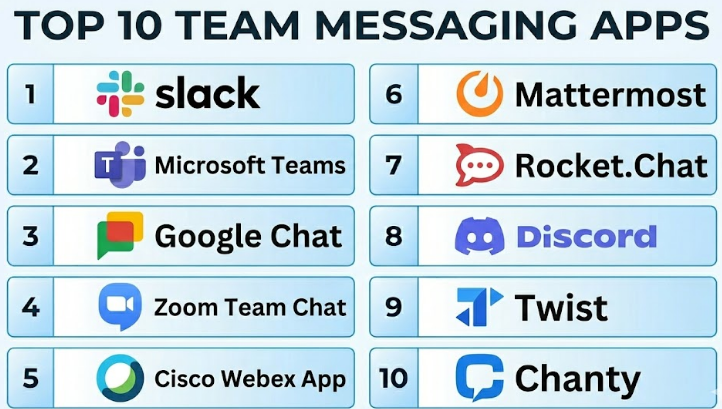
Top 10 Team Messaging Apps
#1 — Slack
Short description :
Slack is one of the most popular team messaging apps for modern workplace collaboration. It helps teams communicate through channels, direct messages, group conversations, file sharing, huddles, and app integrations. Slack is widely used by startups, technology companies, agencies, product teams, support teams, and enterprises. Its strength is its clean communication structure and large integration ecosystem. It is best for teams that want fast collaboration, searchable conversations, and strong workflow connectivity.
Key Features
- Channels for team, project, and topic-based communication.
- Direct messages and group conversations.
- Threads for organized discussions.
- Huddles for quick audio or video collaboration.
- File sharing and searchable message history.
- Workflow automation.
- Large app and integration ecosystem.
Pros
- Strong user experience and fast team adoption.
- Excellent integrations with business and developer tools.
- Good for async communication and organized channels.
Cons
- Can become noisy without proper channel governance.
- Pricing may increase for larger teams.
- Deep compliance and enterprise features may require higher plans.
Platforms / Deployment
Web / Windows / macOS / Linux / iOS / Android
Cloud
Security & Compliance
Supports enterprise security features such as SSO, admin controls, data retention options, and access management depending on plan. Specific certifications and compliance coverage should be validated directly with the vendor.
Integrations & Ecosystem
Slack has one of the strongest integration ecosystems in team messaging. It works well as a central communication hub for business and technical teams.
- Project management tools.
- CRM systems.
- DevOps and monitoring tools.
- HR and productivity apps.
- File storage platforms.
- Workflow automation tools.
Support & Community
Slack provides documentation, onboarding resources, business support options, and a large user community. Many teams already understand Slack-style collaboration, which helps adoption.
#2 — Microsoft Teams
Short description :
Microsoft Teams is a team messaging and collaboration platform designed for organizations using Microsoft productivity tools. It combines chat, channels, video meetings, calling, file sharing, calendar integration, and enterprise administration. Teams is especially strong for organizations already using Microsoft 365 because it connects naturally with Outlook, SharePoint, OneDrive, and Microsoft security controls. It is suitable for SMBs, mid-market companies, enterprises, schools, and government-adjacent organizations. It is best for businesses that want messaging, meetings, and document collaboration in one Microsoft-centered workspace.
Key Features
- Team channels and direct messages.
- Video meetings and voice calling.
- Calendar and Outlook integration.
- File sharing through Microsoft ecosystem.
- Meeting recordings and collaboration tools.
- Enterprise admin and security controls.
- Integration with Microsoft apps and third-party tools.
Pros
- Strong fit for Microsoft 365 users.
- Combines messaging, meetings, files, and enterprise controls.
- Good for large organizations with formal IT administration.
Cons
- Can feel heavy for small teams.
- User experience may require training for best adoption.
- Configuration can become complex in large environments.
Platforms / Deployment
Web / Windows / macOS / Linux / iOS / Android
Cloud
Security & Compliance
Supports enterprise-grade security and compliance features through Microsoft 365 plans, including identity controls, admin policies, retention options, and governance features depending on configuration.
Integrations & Ecosystem
Microsoft Teams works deeply with Microsoft business applications and also supports third-party app integrations.
- Outlook.
- SharePoint.
- OneDrive.
- Microsoft Planner.
- Microsoft Power Platform.
- Third-party business and productivity apps.
Support & Community
Microsoft provides extensive documentation, enterprise support, partner support, training resources, and a large admin community. It is one of the strongest options for Microsoft-first organizations.
#3 — Google Chat
Short description :
Google Chat is a team messaging app built into the Google Workspace ecosystem. It allows teams to communicate through spaces, direct messages, group conversations, file sharing, and collaboration around Google Docs, Sheets, Slides, Drive, and Meet. Google Chat is practical for businesses already using Gmail and Google Workspace. It is simple, lightweight, and easy for teams familiar with Google tools. It is best for organizations that want messaging closely connected with Google productivity apps.
Key Features
- Spaces for team and project discussions.
- Direct messages and group chats.
- Google Drive file sharing.
- Integration with Google Meet.
- Collaboration around Docs, Sheets, and Slides.
- Search across Google Workspace.
- Bots and workflow integrations.
Pros
- Easy for Google Workspace users.
- Good integration with Gmail, Drive, and Meet.
- Simple interface for everyday team communication.
Cons
- Smaller app ecosystem compared with Slack.
- May feel less feature-rich for advanced workflow automation.
- Best value is mainly for Google Workspace users.
Platforms / Deployment
Web / Windows / macOS / iOS / Android
Cloud
Security & Compliance
Security and compliance capabilities depend on Google Workspace plan and configuration. Admin controls, access management, and data governance features are available within the broader Google Workspace environment.
Integrations & Ecosystem
Google Chat works best inside Google Workspace and supports productivity-focused collaboration.
- Gmail.
- Google Drive.
- Google Meet.
- Google Docs.
- Google Calendar.
- Workspace apps and bots.
Support & Community
Google provides help documentation, admin resources, and support options depending on the Workspace plan. Google Chat is easy to adopt for teams already comfortable with Gmail and Drive.
#4 — Zoom Team Chat
Short description :
Zoom Team Chat is a messaging and collaboration tool inside the Zoom platform. It is useful for teams that already use Zoom for meetings, webinars, phone, and virtual collaboration. Zoom Team Chat supports direct messages, channels, file sharing, meetings, whiteboards, and collaboration across Zoom’s communication suite. Its strength is combining chat with video-first collaboration. It is best for organizations that want messaging tightly connected with meetings and real-time communication.
Key Features
- Direct messages and channels.
- Meeting-to-chat continuity.
- File sharing and collaboration.
- Integration with Zoom Meetings.
- Whiteboard and collaboration tools.
- Searchable conversations.
- Mobile and desktop access.
Pros
- Strong fit for teams already using Zoom.
- Good meeting and messaging connection.
- Simple adoption for video-heavy organizations.
Cons
- Less specialized as a messaging-first platform compared with Slack.
- Integration ecosystem may not be as deep for some workflows.
- Best value depends on existing Zoom usage.
Platforms / Deployment
Web / Windows / macOS / Linux / iOS / Android
Cloud
Security & Compliance
Zoom provides business security controls, admin settings, and access management depending on plan and configuration. Specific compliance details should be validated directly with the vendor.
Integrations & Ecosystem
Zoom Team Chat works well with Zoom’s broader communication suite and selected business tools.
- Zoom Meetings.
- Zoom Phone.
- Zoom Whiteboard.
- Calendar tools.
- Productivity apps.
- Business app integrations.
Support & Community
Zoom offers documentation, support resources, onboarding materials, and business support options. It is especially useful for teams already comfortable with Zoom meetings.
#5 — Cisco Webex App
Short description :
Cisco Webex App is a team collaboration platform that combines messaging, meetings, calling, file sharing, and enterprise communication. It is suitable for businesses that need secure collaboration and strong video or calling capabilities. Webex App is commonly used by enterprises, IT-managed organizations, education teams, and companies with Cisco communication infrastructure. It offers spaces for teamwork and integrates messaging with meetings and calling. It is best for organizations that want enterprise-grade communication from a trusted networking and collaboration provider.
Key Features
- Team spaces and direct messaging.
- Video meetings and calling.
- File sharing.
- Whiteboarding and collaboration features.
- Enterprise admin controls.
- Integration with Cisco collaboration ecosystem.
- Cross-device communication.
Pros
- Strong enterprise communication background.
- Good combination of messaging, meetings, and calling.
- Suitable for IT-managed environments.
Cons
- May feel more enterprise-oriented than startup-friendly.
- User adoption may depend on existing Cisco usage.
- Some advanced features may require specific plans.
Platforms / Deployment
Web / Windows / macOS / iOS / Android
Cloud
Security & Compliance
Cisco Webex App supports enterprise security controls, admin management, and compliance-related capabilities depending on plan and configuration. Specific certifications should be verified with the vendor.
Integrations & Ecosystem
Webex App integrates with Cisco communication systems and business productivity tools.
- Webex Meetings.
- Webex Calling.
- Calendar tools.
- Productivity apps.
- Cisco collaboration ecosystem.
- Enterprise communication workflows.
Support & Community
Cisco provides enterprise documentation, partner support, technical support, and onboarding resources. It is a strong fit for organizations with existing Cisco relationships.
#6 — Mattermost
Short description :
Mattermost is a team messaging and collaboration platform popular with technical teams, DevOps teams, security-conscious organizations, and businesses that want more control over deployment. It supports channels, direct messages, file sharing, playbooks, incident collaboration, and workflow integrations. Mattermost is known for self-hosting and enterprise deployment flexibility. It is especially useful for engineering, security, IT operations, and regulated teams. It is best for organizations that want secure collaboration with control over infrastructure and data.
Key Features
- Channels and direct messages.
- Self-hosted and cloud deployment options.
- DevOps and incident collaboration workflows.
- Playbooks and workflow support.
- File sharing and search.
- Role-based administration.
- Integrations with developer and operations tools.
Pros
- Strong choice for technical and security-sensitive teams.
- Self-hosting gives more infrastructure control.
- Good fit for DevOps, IT, and incident response workflows.
Cons
- May require technical resources for self-hosted deployment.
- User experience may feel more technical than mainstream tools.
- Non-technical teams may need onboarding.
Platforms / Deployment
Web / Windows / macOS / Linux / iOS / Android
Cloud / Self-hosted / Hybrid
Security & Compliance
Supports enterprise security controls, access management, and self-hosted deployment models. Compliance suitability depends on deployment, configuration, and plan. Specific certifications should be validated directly.
Integrations & Ecosystem
Mattermost works well with developer, DevOps, and operational workflows.
- Git repositories.
- CI/CD tools.
- Monitoring systems.
- Incident response workflows.
- Automation tools.
- Webhooks and APIs.
Support & Community
Mattermost has documentation, commercial support options, and an active technical community. It is particularly strong for engineering-led organizations.
#7 — Rocket.Chat
Short description :
Rocket.Chat is an open-source team messaging and collaboration platform that supports real-time chat, channels, direct messages, file sharing, omnichannel communication, and self-hosted deployment. It is useful for organizations that want more data control, customization, and flexibility. Rocket.Chat is often considered by technical teams, public sector organizations, customer support teams, and businesses that prefer open-source collaboration tools. It can serve both internal team messaging and customer-facing communication workflows. It is best for organizations that need customization and deployment control.
Key Features
- Team channels and direct messages.
- Open-source collaboration model.
- Self-hosted and cloud options.
- Omnichannel customer communication.
- File sharing and search.
- Customization and APIs.
- User and role management.
Pros
- Good for organizations wanting open-source flexibility.
- Supports both internal chat and customer messaging use cases.
- Self-hosting helps with control and customization.
Cons
- Self-hosting requires technical ownership.
- User experience may need configuration for best results.
- Enterprise support and advanced features may depend on plan.
Platforms / Deployment
Web / Windows / macOS / Linux / iOS / Android
Cloud / Self-hosted / Hybrid
Security & Compliance
Security and compliance depend on deployment model, configuration, and selected plan. Self-hosted options can support organizations that need stronger data control.
Integrations & Ecosystem
Rocket.Chat offers extensibility and integration options for technical and support workflows.
- APIs and webhooks.
- Customer support tools.
- CRM workflows.
- Bots and automation.
- Identity systems.
- Custom apps and extensions.
Support & Community
Rocket.Chat has an open-source community, documentation, and commercial support options. It is a practical choice for teams that want flexibility and customization.
#8 — Discord
Short description :
Discord is a communication platform known for communities, voice channels, chat servers, groups, and real-time collaboration. While it started as a gaming-focused platform, many communities, startups, creators, education groups, and informal teams use it for discussion and coordination. Discord supports text channels, voice rooms, video calls, file sharing, bots, roles, and community management. It is best for communities and informal collaboration rather than highly regulated enterprise messaging. It works well when engagement and real-time interaction matter.
Key Features
- Servers with channels and categories.
- Direct messages and group chats.
- Voice channels and video calls.
- Roles and permissions.
- Bots and community automation.
- File sharing.
- Community moderation features.
Pros
- Excellent for communities and informal team collaboration.
- Strong voice-first communication experience.
- Large bot and community ecosystem.
Cons
- Not ideal for regulated enterprise environments.
- Business compliance and governance features are limited.
- Can become noisy without moderation.
Platforms / Deployment
Web / Windows / macOS / Linux / iOS / Android
Cloud
Security & Compliance
Provides account security and server controls, but it is not mainly designed as an enterprise compliance messaging platform. Organizations with strict compliance needs should evaluate carefully.
Integrations & Ecosystem
Discord has a strong community-driven ecosystem with bots and automation.
- Community bots.
- Moderation tools.
- Voice channels.
- Creator communities.
- Developer communities.
- Event and announcement workflows.
Support & Community
Discord has large community adoption, documentation, and support resources. It is strongest for communities, creators, and informal collaboration rather than formal enterprise governance.
#9 — Twist
Short description :
Twist is a team communication app focused on calm, organized, asynchronous communication. It is designed to reduce the noise and pressure of real-time chat by using topic-based threads. Twist is useful for remote teams, small businesses, agencies, and knowledge workers who want thoughtful conversations instead of constant interruptions. Its main value is structure and focus. It is best for teams that prefer async communication and want fewer distractions.
Key Features
- Thread-first team communication.
- Channels for organized topics.
- Direct messages.
- Async-friendly conversation design.
- Searchable history.
- File sharing.
- Simple and focused interface.
Pros
- Good for async and remote teams.
- Reduces noisy real-time communication.
- Simple structure for thoughtful discussions.
Cons
- Less suitable for teams needing fast live collaboration.
- Smaller integration ecosystem than Slack or Teams.
- May not fit high-speed incident or support workflows.
Platforms / Deployment
Web / Windows / macOS / iOS / Android
Cloud
Security & Compliance
Basic business security features are available depending on plan. Advanced enterprise compliance features should be validated directly with the vendor.
Integrations & Ecosystem
Twist focuses more on structured communication than large-scale integrations.
- Task management workflows.
- File sharing.
- Async discussions.
- Remote team communication.
- Productivity tools.
- Simple team organization.
Support & Community
Twist provides documentation and support resources. Its community is smaller, but it is respected by teams that value calm and async-first work.
#10 — Chanty
Short description :
Chanty is a team messaging and collaboration app designed for small and medium-sized teams. It supports team chat, direct messages, audio calls, video calls, task management, file sharing, and integrations. Chanty is useful for teams that want a simple alternative to larger collaboration platforms. It combines messaging with lightweight task features, making it practical for everyday team coordination. It is best for SMBs that want easy communication without too much complexity.
Key Features
- Team chat and direct messages.
- Audio and video calls.
- Built-in task management.
- File sharing.
- Kanban-style task view.
- Searchable conversations.
- Business app integrations.
Pros
- Simple and easy for small teams.
- Includes lightweight task management.
- Practical for teams that want chat plus basic productivity.
Cons
- Smaller ecosystem than Slack or Microsoft Teams.
- May not fit complex enterprise governance needs.
- Advanced integrations may be limited compared with larger platforms.
Platforms / Deployment
Web / Windows / macOS / Linux / iOS / Android
Cloud
Security & Compliance
Provides business communication security features, but advanced compliance details should be validated directly with the vendor.
Integrations & Ecosystem
Chanty supports practical integrations for small team productivity.
- File storage tools.
- Productivity apps.
- Task workflows.
- Calendar-related workflows.
- Team communication tools.
- Basic automation support.
Support & Community
Chanty provides documentation and customer support resources. It is suitable for small and growing teams that need simple onboarding.
Comparison Table
| Tool Name | Best For | Platform(s) Supported | Deployment | Standout Feature | Public Rating |
|---|---|---|---|---|---|
| Slack | Startups, product teams, and modern businesses | Web / Windows / macOS / Linux / iOS / Android | Cloud | Strong channels and app ecosystem | N/A |
| Microsoft Teams | Microsoft 365 organizations | Web / Windows / macOS / Linux / iOS / Android | Cloud | Messaging, meetings, files, and admin control in one platform | N/A |
| Google Chat | Google Workspace users | Web / Windows / macOS / iOS / Android | Cloud | Simple messaging connected with Google Workspace | N/A |
| Zoom Team Chat | Video-first collaboration teams | Web / Windows / macOS / Linux / iOS / Android | Cloud | Chat connected with Zoom meetings | N/A |
| Cisco Webex App | Enterprise communication and calling | Web / Windows / macOS / iOS / Android | Cloud | Messaging with enterprise meetings and calling | N/A |
| Mattermost | Technical and self-hosted teams | Web / Windows / macOS / Linux / iOS / Android | Cloud / Self-hosted / Hybrid | Secure team collaboration with deployment control | N/A |
| Rocket.Chat | Open-source and customizable collaboration | Web / Windows / macOS / Linux / iOS / Android | Cloud / Self-hosted / Hybrid | Open-source messaging with customization | N/A |
| Discord | Communities and informal teams | Web / Windows / macOS / Linux / iOS / Android | Cloud | Voice channels and community engagement | N/A |
| Twist | Async remote teams | Web / Windows / macOS / iOS / Android | Cloud | Thread-first calm communication | N/A |
| Chanty | SMB team communication | Web / Windows / macOS / Linux / iOS / Android | Cloud | Team chat with built-in task management | N/A |
Evaluation & Team Messaging Apps
| Tool Name | Core (25%) | Ease (15%) | Integrations (15%) | Security (10%) | Performance (10%) | Support (10%) | Value (15%) | Weighted Total (0–10) |
|---|---|---|---|---|---|---|---|---|
| Slack | 9 | 9 | 10 | 8 | 8 | 9 | 7 | 8.65 |
| Microsoft Teams | 9 | 8 | 10 | 9 | 8 | 9 | 8 | 8.80 |
| Google Chat | 8 | 8 | 8 | 8 | 8 | 8 | 8 | 8.00 |
| Zoom Team Chat | 8 | 8 | 7 | 8 | 8 | 8 | 8 | 7.85 |
| Cisco Webex App | 8 | 7 | 7 | 9 | 8 | 9 | 7 | 7.80 |
| Mattermost | 8 | 7 | 8 | 9 | 8 | 8 | 8 | 8.00 |
| Rocket.Chat | 8 | 7 | 8 | 8 | 8 | 7 | 8 | 7.75 |
| Discord | 8 | 9 | 8 | 7 | 9 | 7 | 9 | 8.15 |
| Twist | 7 | 8 | 6 | 7 | 8 | 7 | 8 | 7.25 |
| Chanty | 7 | 8 | 6 | 7 | 8 | 7 | 8 | 7.25 |
These scores are comparative and should be used as a practical guide, not as a final verdict. A higher score may reflect broad business readiness, but that does not mean the tool is the best for every team. For example, Discord may be excellent for communities, Mattermost may be better for self-hosted technical teams, and Microsoft Teams may be strongest for Microsoft-first enterprises. Always test tools with real workflows before making a final decision.
Which Team Messaging Apps
Solo / Freelancer
Solo professionals usually do not need a heavy enterprise messaging platform. If they work with clients, they may prefer Slack, Google Chat, Microsoft Teams, or Discord, depending on where their clients already communicate.
For freelancers who want simple internal organization, Chanty or Twist can also work well. The best choice should reduce communication friction, not create another tool that clients refuse to use.
SMB
Small and medium businesses should focus on ease of use, pricing, integrations, and daily adoption. Slack, Microsoft Teams, Google Chat, Chanty, and Zoom Team Chat are practical options.
If the SMB already uses Microsoft 365, Microsoft Teams is a natural choice. If the team already uses Google Workspace, Google Chat is easier to adopt. If the team wants a dedicated chat-first platform, Slack is a strong option.
Mid-Market
Mid-market companies need stronger structure, admin controls, app integrations, onboarding processes, and communication governance. Slack, Microsoft Teams, Zoom Team Chat, Cisco Webex App, and Mattermost are useful options.
At this level, companies should evaluate external collaboration, department-level workspaces, search quality, retention needs, and integration with project management and customer support tools.
Enterprise
Enterprises should prioritize identity management, security controls, retention, compliance, support, scalability, and admin governance. Microsoft Teams, Slack, Cisco Webex App, Mattermost, and Rocket.Chat are strong candidates depending on the organization’s ecosystem.
Enterprises should avoid choosing a tool only because employees like it. The selected app must satisfy security, IT, legal, compliance, and operational requirements.
Budget vs Premium
Budget-conscious teams may consider Google Chat, Discord, Chanty, Twist, or bundled tools already included in their existing productivity suite. These options can work well when communication needs are simple.
Premium tools like Slack, Microsoft Teams, Cisco Webex App, and enterprise versions of Mattermost or Rocket.Chat are better when security, scalability, support, integrations, and governance matter more.
Feature Depth vs Ease of Use
If ease of use matters most, Slack, Google Chat, Chanty, and Discord are generally easier for everyday users. They provide simple navigation and quick adoption.
If feature depth is more important, Microsoft Teams, Slack, Mattermost, Rocket.Chat, and Cisco Webex App offer stronger business controls, integrations, and deployment flexibility.
Integrations & Scalability
For integrations, Slack and Microsoft Teams are among the strongest choices because they connect with many business systems. Mattermost and Rocket.Chat are better for organizations needing more control and customization.
For scaling across departments, locations, and external users, buyers should test workspace structure, channel governance, app permissions, admin roles, and data retention before rollout.
Security & Compliance Needs
For security-conscious enterprises, Microsoft Teams, Slack, Cisco Webex App, Mattermost, and Rocket.Chat should be evaluated carefully. The best tool depends on whether the company wants cloud convenience, self-hosted control, or deep enterprise governance.
Security teams should validate SSO, MFA, encryption, retention controls, audit logs, access policies, device management, and data export options before final selection.
Frequently Asked Questions
1. What is a Team Messaging App?
A Team Messaging App is a workplace communication tool that helps teams chat, share files, organize conversations, and collaborate in real time or asynchronously. It usually includes channels, direct messages, group chats, search, notifications, and integrations. It helps reduce long email threads and improves team coordination.
2. How is a team messaging app different from email?
Email is better for formal, long-form, external, and record-based communication. Team messaging apps are better for fast conversations, project updates, team discussions, and quick decisions. Many organizations use both because they solve different communication needs.
3. What pricing models are common for Team Messaging Apps?
Most team messaging apps use per-user pricing, tiered plans, or bundled pricing inside a larger productivity suite. Some tools also offer free plans with limits on message history, integrations, storage, or admin features. Enterprise pricing is often custom based on security, compliance, and support needs.
4. What are the most common mistakes when adopting a team messaging tool?
Common mistakes include creating too many channels, not setting naming rules, ignoring notification policies, and using chat for every decision. Teams also fail when they do not define what belongs in chat, email, project tools, or documentation. Good communication rules are just as important as the tool.
5. Which Team Messaging App is best for remote teams?
Slack, Microsoft Teams, Google Chat, Zoom Team Chat, Twist, and Mattermost can all support remote teams well. The right choice depends on whether the team prefers real-time chat, async discussions, video meetings, or self-hosted control. Remote teams should prioritize search, notifications, file sharing, and meeting integration.
6. Are Team Messaging Apps secure?
Many business-grade team messaging apps provide strong security features, but security depends on the plan and configuration. Buyers should check SSO, MFA, encryption, admin roles, retention policies, audit logs, and data export controls. Security review should happen before company-wide rollout.
7. Can Team Messaging Apps replace project management tools?
Usually, no. Team messaging apps are good for discussion and coordination, but project management tools are better for assigning tasks, tracking deadlines, managing dependencies, and reporting progress. Some messaging apps include lightweight task features, but larger teams often need both.
8. Which tool is best for Microsoft 365 users?
Microsoft Teams is usually the strongest fit for organizations already using Microsoft 365. It connects with Outlook, SharePoint, OneDrive, and Microsoft admin controls. However, some Microsoft-based companies still use Slack if they prefer Slack’s communication style and integrations.
9. Which tool is best for Google Workspace users?
Google Chat is a natural fit for teams already using Gmail, Drive, Meet, and Google Docs. It keeps communication inside the Google Workspace environment. However, teams that need a stronger app ecosystem or more advanced channel workflows may still consider Slack.
10. What is the best open-source Team Messaging App?
Mattermost and Rocket.Chat are two of the strongest open-source-oriented team messaging options. Mattermost is popular with technical, DevOps, and security-focused teams. Rocket.Chat is strong for organizations that want customization, self-hosting, and internal plus customer-facing communication workflows.
Conclusion
Team Messaging Apps are now a central part of modern workplace communication. They help teams reduce email overload, speed up decisions, organize project discussions, connect tools, and support remote or hybrid work. However, the best tool depends on the team’s size, work style, existing software stack, security needs, and budget. Slack is strong for integration-heavy modern teams, Microsoft Teams is ideal for Microsoft-first organizations, Google Chat works well for Google Workspace users, Mattermost and Rocket.Chat are practical for teams needing more control, and Twist is useful for async-first communication.
