Introduction
Org Chart & Directory Tools help organizations show employee profiles, reporting lines, departments, teams, roles, locations, and contact details in one clear place. In simple words, these tools help employees understand “who works where,” “who reports to whom,” “who owns what,” and “how to contact the right person.”
These platforms are important because modern organizations are often distributed across offices, remote teams, departments, contractors, regions, and business units. Without a clear org chart and searchable employee directory, employees waste time finding owners, managers, experts, and decision-makers.
Common use cases include employee directory search, reporting structure visibility, onboarding support, workforce planning, manager hierarchy mapping, department-level visibility, headcount planning, succession planning, and internal collaboration.
Buyers should evaluate org chart clarity, profile depth, search quality, HRIS integration, automatic updates, permissions, planning features, employee experience, mobile access, security, scalability, and reporting.
Best for: HR teams, people operations teams, IT teams, managers, executives, internal communication teams, growing startups, mid-market companies, enterprises, remote teams, and organizations with complex reporting structures.
Not ideal for: very small teams where everyone already knows each other, companies that only need a static employee list, or businesses where org structure changes rarely and can be managed with a simple spreadsheet or presentation.
Key Trends in Org Chart & Directory Tools
- Dynamic org charts are replacing static charts, because reporting lines, teams, and roles now change more frequently.
- Employee directories are becoming richer, including skills, locations, departments, pronouns, time zones, reporting lines, and collaboration links.
- Workforce planning is becoming part of org chart tools, helping leaders model future teams, hiring needs, reorgs, and budget scenarios.
- HRIS integration is now essential, because manual updates create outdated org charts very quickly.
- Skills-based directories are gaining importance, helping employees find internal experts, mentors, project owners, and cross-functional collaborators.
- Privacy and permissions are becoming more important, especially when directories include personal details, compensation planning, or sensitive reporting structures.
- Remote and hybrid work has increased directory usage, because employees need better ways to find teammates across locations and time zones.
- Scenario planning is becoming more common, allowing leaders to test organizational changes before making them official.
- Employee experience matters more, with modern tools offering clean profiles, searchable directories, mobile access, and easy navigation.
- People analytics and org design are merging, giving HR and leadership teams better insight into spans of control, layers, headcount, and reporting patterns.
How We Selected These Tools
The tools below were selected using practical business-focused evaluation logic.
- Market recognition: Tools known in org chart, employee directory, workforce planning, HR operations, and people management categories were prioritized.
- Feature completeness: Org charts, directories, employee profiles, reporting lines, search, permissions, and planning features were considered.
- Ease of use: Employees and managers should be able to navigate the org structure without training.
- HRIS integration: Tools that can sync with HR systems and employee data sources were given stronger consideration.
- Workforce planning depth: Scenario planning, headcount planning, and organizational modeling were included in the evaluation.
- Directory quality: Searchable profiles, filters, skills, departments, locations, and contact visibility were reviewed.
- Security and governance: Role-based access, permissions, privacy controls, and admin management were considered.
- Scalability: Tools suitable for growing companies, mid-market teams, and enterprises were included.
- Support and implementation: Documentation, onboarding, customer support, and configuration guidance were considered important.
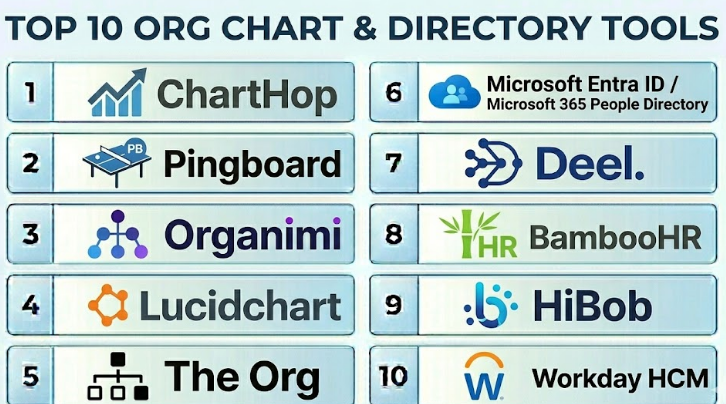
Top 10 Org Chart & Directory Tools
#1 — ChartHop
Short description :
ChartHop is a people operations platform that combines dynamic org charts, employee directories, headcount planning, compensation planning, and people analytics. It helps HR teams and leaders visualize the organization, understand reporting lines, plan workforce changes, and manage people data more clearly. ChartHop is especially useful for growing companies that need more than a static org chart. It supports scenario planning, employee profiles, and organizational visibility. It is best for people teams that want org charts connected with workforce planning and people analytics.
Key Features
- Dynamic org charts.
- Employee directory and profiles.
- Headcount planning.
- Scenario modeling.
- Compensation planning support.
- People analytics dashboards.
- HRIS and employee data integrations.
Pros
- Strong visual approach to people data.
- Useful for fast-growing companies and people operations teams.
- Good for planning reorganizations and headcount changes.
Cons
- May be more advanced than small teams need.
- Data accuracy depends on HRIS sync quality.
- Some advanced features require careful setup.
Platforms / Deployment
Web
Cloud
Security & Compliance
Supports business access controls, permissions, and people data governance features. Specific security certifications and compliance details should be validated directly with the vendor.
Integrations & Ecosystem
ChartHop connects with HR and business systems to create a visual people data layer.
- HRIS systems.
- ATS platforms.
- Payroll tools.
- Compensation workflows.
- Identity providers.
- Planning and reporting tools.
Support & Community
ChartHop provides onboarding, documentation, and customer support resources. It is practical for people operations teams managing growth, planning, and organizational change.
#2 — Pingboard
Short description :
Pingboard is an org chart and employee directory platform designed to help companies make employee information easy to find and understand. It provides visual org charts, searchable directories, employee profiles, team views, and reporting-line visibility. Pingboard is useful for HR teams, employees, managers, and growing companies that want a simple and clear people directory. It can help new employees learn who is who and how teams are connected. It is best for organizations that want a user-friendly org chart and directory experience without unnecessary complexity.
Key Features
- Interactive org charts.
- Searchable employee directory.
- Employee profiles.
- Team and department views.
- Reporting-line visibility.
- Birthday and work anniversary visibility.
- HR system integrations.
Pros
- Easy for employees to use.
- Strong fit for onboarding and internal discovery.
- Good balance of org chart and directory functionality.
Cons
- May not offer the deepest workforce planning capabilities.
- Advanced analytics may be limited compared with people analytics platforms.
- Value depends on accurate employee data sync.
Platforms / Deployment
Web / iOS / Android
Cloud
Security & Compliance
Supports business administration, permissions, and access controls. Specific security and compliance details should be validated directly with the vendor.
Integrations & Ecosystem
Pingboard connects employee directory data with HR and workplace tools.
- HRIS systems.
- Identity providers.
- Calendar tools.
- Slack-style communication workflows.
- Employee profile systems.
- Directory sync workflows.
Support & Community
Pingboard provides documentation, onboarding resources, and customer support. It is suitable for teams that want quick adoption and simple employee visibility.
#3 — Organimi
Short description :
Organimi is an org chart software platform designed for building, sharing, and managing organizational charts. It helps companies visualize reporting structures, departments, roles, and teams. Organimi is useful for HR teams, operations teams, consultants, nonprofits, schools, and growing businesses that need clear visual org charts. It supports manual chart creation as well as data import options. It is best for organizations that need professional org charts for planning, communication, and reporting.
Key Features
- Org chart creation and visualization.
- Drag-and-drop chart editing.
- Employee profile cards.
- Department and role mapping.
- Chart sharing and export options.
- Data import support.
- Custom chart styles and views.
Pros
- Simple and practical org chart creation.
- Useful for presentations, planning, and documentation.
- Good for teams that need visual clarity quickly.
Cons
- May not be as deep as full people operations platforms.
- Manual updates may be needed depending on setup.
- Advanced HR analytics features are limited.
Platforms / Deployment
Web
Cloud
Security & Compliance
Supports standard business access and account controls. Specific enterprise security and compliance details should be validated directly with the vendor.
Integrations & Ecosystem
Organimi focuses on org chart creation and sharing, with data import and business use workflows.
- HR data imports.
- Spreadsheet imports.
- Directory data workflows.
- Presentation workflows.
- Chart exports.
- Team planning processes.
Support & Community
Organimi provides documentation, support resources, and onboarding help. It is useful for teams that need easy org chart creation without a large HR technology rollout.
#4 — Lucidchart
Short description :
Lucidchart is a visual diagramming platform that can be used to create org charts, process maps, flowcharts, network diagrams, and business visuals. While it is not only an org chart tool, many organizations use it to design reporting structures, team maps, and organizational diagrams. Lucidchart is useful for teams that need flexible diagramming beyond employee directories. It works well for HR, operations, consultants, project teams, and business analysts. It is best for organizations that want flexible org chart drawing with broader diagramming capabilities.
Key Features
- Org chart diagramming.
- Drag-and-drop visual editor.
- Templates for org structures.
- Collaboration and comments.
- Data linking options.
- Export and sharing capabilities.
- Broader diagramming use cases.
Pros
- Very flexible visual diagramming tool.
- Useful beyond org charts.
- Good for collaborative planning and presentations.
Cons
- Not a dedicated employee directory platform.
- Org charts may require manual maintenance.
- Workforce planning features are limited compared with HR-focused tools.
Platforms / Deployment
Web / Windows / macOS / iOS / Android
Cloud
Security & Compliance
Supports business security and admin features depending on plan. Specific security certifications should be validated directly with the vendor.
Integrations & Ecosystem
Lucidchart integrates with productivity and collaboration tools for visual work.
- Google Workspace.
- Microsoft 365.
- Atlassian tools.
- Slack-style collaboration workflows.
- Data import options.
- Presentation and documentation workflows.
Support & Community
Lucidchart provides templates, documentation, tutorials, and customer support. It has broad adoption across business, education, and technical teams.
#5 — The Org
Short description :
The Org is an org chart and company directory platform focused on making organizational structures more visible and transparent. It helps companies show teams, roles, reporting lines, and employee profiles. The Org is especially useful for companies that want internal and sometimes public-facing team visibility. It can help recruiting, employer branding, onboarding, and organizational transparency. It is best for companies that want a clean org chart experience with profile-driven visibility.
Key Features
- Company org charts.
- Employee profiles.
- Team and department visibility.
- Role and reporting-line mapping.
- Internal and external visibility options.
- Recruiting and employer branding support.
- Simple profile discovery.
Pros
- Clean and modern org chart experience.
- Useful for transparency and employer branding.
- Helps employees and candidates understand company structure.
Cons
- May not fit companies requiring private-only internal directories.
- Workforce planning features may be limited.
- Data visibility settings need careful governance.
Platforms / Deployment
Web
Cloud
Security & Compliance
Supports access and visibility controls depending on configuration. Specific security and compliance details should be validated directly with the vendor.
Integrations & Ecosystem
The Org supports organizational visibility and employee profile workflows.
- HR data workflows.
- Recruiting workflows.
- Employee profiles.
- Company team pages.
- Public or private org visibility options.
- Internal discovery processes.
Support & Community
The Org provides product support and resources for setting up company profiles and org charts. It is useful for companies that value organizational transparency.
#6 — Microsoft Entra ID / Microsoft 365 People Directory
Short description :
Microsoft Entra ID and Microsoft 365 provide employee directory capabilities through user profiles, organizational information, manager fields, contact search, Teams profiles, Outlook people search, and Microsoft 365 identity data. This is not a standalone org chart product in the same way as ChartHop or Pingboard, but it is highly relevant for organizations already using Microsoft 365. It helps employees find coworkers, view profile information, and understand reporting relationships when properly configured. It is best for Microsoft-first organizations that want directory visibility inside existing tools.
Key Features
- Employee profile directory.
- Manager and reporting-line fields.
- People search across Microsoft 365.
- Integration with Teams and Outlook.
- Identity and access management.
- Department and contact information.
- Admin-managed user data.
Pros
- Strong fit for Microsoft 365 organizations.
- Already connected to identity and user management.
- Useful for basic directory and people search needs.
Cons
- Not a full-featured workforce planning platform.
- Org chart experience depends on configuration and Microsoft apps used.
- Profile quality depends on directory data completeness.
Platforms / Deployment
Web / Windows / macOS / iOS / Android
Cloud
Security & Compliance
Security and compliance depend on Microsoft 365 configuration and licensing. Supports enterprise identity, access controls, admin policies, and governance features through Microsoft Entra ID and Microsoft 365.
Integrations & Ecosystem
Microsoft directory data powers people search and identity experiences across the Microsoft ecosystem.
- Microsoft Teams.
- Outlook.
- SharePoint.
- Microsoft Entra ID.
- Microsoft 365 admin tools.
- Viva and employee experience tools.
Support & Community
Microsoft provides extensive documentation, admin support, partner resources, and a large technical community. It is best suited for organizations already using Microsoft 365.
#7 — Deel
Short description :
Deel is a global HR and workforce platform that includes employee records, contractor management, global payroll, HR workflows, and people directory capabilities. While Deel is not only an org chart tool, it is relevant for companies managing global teams, contractors, and distributed workforces. It can help organizations keep employee and contractor data organized in one place. Deel is best for companies that need global workforce visibility along with HR, payroll, and compliance workflows.
Key Features
- Global employee and contractor records.
- People directory features.
- Team and workforce visibility.
- Global HR and payroll workflows.
- Contractor management.
- Employee profile management.
- Workforce administration tools.
Pros
- Strong for global and distributed teams.
- Useful for companies managing employees and contractors together.
- Combines directory data with HR and payroll workflows.
Cons
- Not a dedicated visual org chart platform.
- Best value depends on using Deel’s broader HR capabilities.
- Companies needing advanced org planning may require another tool.
Platforms / Deployment
Web
Cloud
Security & Compliance
Supports global HR, payroll, and workforce administration controls. Specific security certifications and compliance details should be validated directly with the vendor.
Integrations & Ecosystem
Deel connects global workforce records with HR and business processes.
- HRIS workflows.
- Payroll systems.
- Contractor management.
- Identity-related workflows.
- Finance and workforce operations.
- Employee record management.
Support & Community
Deel provides documentation, onboarding, support resources, and global HR guidance. It is useful for organizations managing international teams and contractors.
#8 — BambooHR
Short description :
BambooHR is an HR platform for small and mid-sized businesses that includes employee records, company directory, org chart views, time-off data, onboarding, and core HR workflows. It is not only an org chart tool, but its employee directory and people data features make it useful for teams that want basic organizational visibility. BambooHR is suitable for companies that want HR operations, employee data, and people directory functionality in one system. It is best for SMBs that want a simple HR system with built-in directory and org chart support.
Key Features
- Employee records.
- Company directory.
- Org chart visibility.
- Time-off and HR workflows.
- Onboarding support.
- Employee profile management.
- Reporting and HR data access.
Pros
- Easy-to-use HR system for SMBs.
- Built-in employee directory and org chart features.
- Good for centralizing basic people data.
Cons
- Not as advanced as dedicated org planning platforms.
- Enterprise workforce planning features may be limited.
- Best fit is small to mid-sized HR operations.
Platforms / Deployment
Web / iOS / Android
Cloud
Security & Compliance
Supports HR data protection, admin access controls, and business security features. Specific certifications and compliance details should be validated directly with the vendor.
Integrations & Ecosystem
BambooHR connects core HR data with related business workflows.
- Payroll workflows.
- ATS integrations.
- Employee records.
- Time-off management.
- Performance workflows.
- Reporting and people data tools.
Support & Community
BambooHR provides documentation, customer support, onboarding resources, and HR guidance. It is well suited for SMB HR teams.
#9 — HiBob
Short description :
HiBob, also known as Bob, is a modern HR platform that includes employee profiles, company directory, org chart views, people data, onboarding, performance, compensation, and HR workflows. It is useful for growing companies that want a more modern employee experience and people management platform. HiBob helps employees understand teams, departments, roles, and reporting lines while giving HR teams a central place for people operations. It is best for mid-sized companies that want org visibility inside a broader HR platform.
Key Features
- Employee profiles and directory.
- Org chart visibility.
- People analytics.
- Onboarding workflows.
- Performance and compensation modules.
- Employee engagement features.
- HR workflow automation.
Pros
- Modern employee experience.
- Good directory and people profile visibility.
- Useful for growing companies with broader HR needs.
Cons
- Not a dedicated org chart-only tool.
- Best value comes when using broader HR features.
- Advanced workforce planning may require additional tools.
Platforms / Deployment
Web / iOS / Android
Cloud
Security & Compliance
Supports business security features, access controls, and HR data governance depending on plan. Specific security certifications should be validated directly with the vendor.
Integrations & Ecosystem
HiBob connects employee data with HR and workplace systems.
- Payroll workflows.
- HRIS integrations.
- Slack-style collaboration workflows.
- Performance systems.
- Identity providers.
- Reporting and analytics tools.
Support & Community
HiBob provides onboarding, documentation, customer support, and HR operations resources. It is useful for companies modernizing people operations.
#10 — Workday HCM
Short description :
Workday HCM is an enterprise human capital management platform that includes employee records, job data, reporting structures, workforce data, manager hierarchy, and people directory capabilities. While Workday is much broader than an org chart tool, it is highly relevant for enterprises that want organizational data connected to HR, payroll, talent, workforce planning, and analytics. Workday helps large organizations maintain accurate people data and reporting structures at scale. It is best for enterprises that need org visibility inside a complete HCM ecosystem.
Key Features
- Employee records and job data.
- Organization and manager hierarchy.
- Workforce directory features.
- HR workflows and approvals.
- Talent and performance data.
- Workforce analytics.
- Enterprise reporting and governance.
Pros
- Strong enterprise HR data foundation.
- Useful for large and complex organizations.
- Connects org structure with HR, talent, and workforce planning.
Cons
- More than needed for companies wanting only an org chart.
- Implementation can be complex.
- Best value depends on enterprise HCM adoption.
Platforms / Deployment
Web / iOS / Android
Cloud
Security & Compliance
Security and compliance depend on Workday configuration and licensing. Supports enterprise role-based access, HR data governance, and administrative controls within the Workday ecosystem.
Integrations & Ecosystem
Workday HCM connects org data with enterprise HR and workforce processes.
- HR management.
- Payroll workflows.
- Talent management.
- Workforce planning.
- Reporting and analytics.
- Identity and integration workflows.
Support & Community
Workday provides enterprise documentation, implementation partner support, customer support, and a large HCM ecosystem. It is best suited for large organizations with complex HR operations.
Comparison Table
| Tool Name | Best For | Platform(s) Supported | Deployment | Standout Feature | Public Rating |
|---|---|---|---|---|---|
| ChartHop | People operations and workforce planning | Web | Cloud | Dynamic org charts with planning and analytics | N/A |
| Pingboard | Simple org chart and employee directory | Web / iOS / Android | Cloud | User-friendly employee directory and org visibility | N/A |
| Organimi | Professional org chart creation | Web | Cloud | Easy org chart building and sharing | N/A |
| Lucidchart | Flexible org chart diagramming | Web / Windows / macOS / iOS / Android | Cloud | Diagramming beyond org charts | N/A |
| The Org | Transparent team and company visibility | Web | Cloud | Modern profile-based org charts | N/A |
| Microsoft Entra ID / Microsoft 365 People Directory | Microsoft 365 people search | Web / Windows / macOS / iOS / Android | Cloud | Directory visibility inside Microsoft ecosystem | N/A |
| Deel | Global workforce and contractor visibility | Web | Cloud | Global HR records and workforce directory | N/A |
| BambooHR | SMB HR directory and org chart | Web / iOS / Android | Cloud | Simple HRIS with built-in employee directory | N/A |
| HiBob | Modern HR platform with org visibility | Web / iOS / Android | Cloud | Employee profiles and people operations workflows | N/A |
| Workday HCM | Enterprise org and HR data management | Web / iOS / Android | Cloud | Enterprise HCM with reporting structure data | N/A |
Evaluation & Org Chart & Directory Tools
| Tool Name | Core (25%) | Ease (15%) | Integrations (15%) | Security (10%) | Performance (10%) | Support (10%) | Value (15%) | Weighted Total (0–10) |
|---|---|---|---|---|---|---|---|---|
| ChartHop | 9 | 8 | 9 | 8 | 8 | 8 | 8 | 8.40 |
| Pingboard | 8 | 9 | 8 | 8 | 8 | 8 | 8 | 8.15 |
| Organimi | 8 | 9 | 6 | 7 | 8 | 7 | 8 | 7.70 |
| Lucidchart | 7 | 9 | 8 | 8 | 8 | 8 | 8 | 7.95 |
| The Org | 7 | 9 | 6 | 7 | 8 | 7 | 8 | 7.60 |
| Microsoft Entra ID / Microsoft 365 People Directory | 7 | 8 | 10 | 9 | 8 | 9 | 8 | 8.30 |
| Deel | 7 | 8 | 8 | 8 | 8 | 8 | 8 | 7.85 |
| BambooHR | 7 | 9 | 8 | 8 | 8 | 8 | 8 | 8.00 |
| HiBob | 8 | 8 | 8 | 8 | 8 | 8 | 8 | 8.00 |
| Workday HCM | 8 | 7 | 9 | 9 | 8 | 9 | 7 | 8.10 |
These scores are comparative and should be used as a practical guide, not as a final ranking. ChartHop is strong for workforce planning and people analytics. Pingboard and Organimi are practical for simple org chart and directory needs. Microsoft directory capabilities are strong for Microsoft-first companies. BambooHR, HiBob, Deel, and Workday are best when org chart functionality should live inside a broader HR system.
Which Org Chart & Directory Tools
Solo / Freelancer
Solo professionals usually do not need an org chart and directory platform. A simple contact list, client directory, or spreadsheet is enough for personal work.
However, consultants, HR advisors, and operations specialists may use tools like Lucidchart, Organimi, or ChartHop when helping clients design teams, map reporting structures, or plan organizational changes.
SMB
Small and medium businesses should focus on simplicity, affordability, and easy employee discovery. Pingboard, Organimi, BambooHR, HiBob, and Lucidchart can be practical depending on whether the business needs a directory, HR system, or visual chart.
If the company already uses BambooHR or HiBob, built-in directory and org chart features may be enough. If the company only needs org chart visualization, Organimi or Lucidchart may be simpler.
Mid-Market
Mid-market organizations usually need stronger HRIS sync, employee profiles, department visibility, headcount planning, and manager hierarchy views. ChartHop, Pingboard, HiBob, BambooHR, and Deel are useful options.
At this stage, companies should evaluate whether the tool supports future planning, reporting-line history, permissions, employee search, and role-based access. Static org charts become difficult to maintain as the company grows.
Enterprise
Enterprises should prioritize governance, security, data accuracy, HR system integration, role-based visibility, reporting structure complexity, and workforce planning. Workday HCM, Microsoft Entra ID / Microsoft 365 People Directory, ChartHop, Deel, and HiBob may be relevant depending on the existing HR ecosystem.
Large companies should avoid maintaining org charts manually. The tool should sync with HR systems and identity systems so employee data stays accurate.
Budget vs Premium
Budget-conscious teams may use Lucidchart, Organimi, or built-in HRIS directory features if they only need simple charts and employee visibility.
Premium tools such as ChartHop, Workday HCM, and broader HR platforms are better when companies need workforce planning, compensation planning, people analytics, HR workflows, or enterprise-scale governance.
Feature Depth vs Ease of Use
If ease of use matters most, Pingboard, Organimi, Lucidchart, and BambooHR are practical choices. They are easier for employees and HR teams to understand quickly.
If feature depth matters more, ChartHop, Workday HCM, HiBob, and Microsoft Entra ID / Microsoft 365 People Directory provide stronger data connections, governance, and workforce context.
Integrations & Scalability
For Microsoft-heavy organizations, Microsoft Entra ID and Microsoft 365 people directory features may be a practical starting point. For companies needing HR-first people operations, BambooHR, HiBob, Deel, and Workday may be better.
For planning-heavy organizations, ChartHop is strong because it connects org charts with people analytics, headcount planning, compensation planning, and scenario modeling.
Security & Compliance Needs
Org chart and directory tools may contain sensitive employee data, reporting lines, job titles, locations, contact details, departments, and sometimes compensation or planning data.
Buyers should validate SSO, MFA, role-based access, permissions, data visibility controls, audit logs, employee data privacy, integration security, and data retention policies before rollout.
Frequently Asked Questions
1. What is an Org Chart & Directory Tool?
An Org Chart & Directory Tool helps companies show employee profiles, reporting lines, departments, roles, teams, and contact information. It makes it easier for employees to find coworkers, understand company structure, and identify the right person for a question or project.
2. How is an org chart different from an employee directory?
An org chart shows reporting relationships and team structure. An employee directory helps people search for coworkers by name, department, role, location, skills, or contact details. Many modern tools include both features together.
3. What pricing models are common for Org Chart & Directory Tools?
Most tools use per-user pricing, subscription pricing, custom enterprise pricing, or pricing based on features and company size. Some org chart features may be included inside HRIS platforms, while standalone tools may charge separately for planning, analytics, or integrations.
4. What are common mistakes when using org chart tools?
Common mistakes include relying on manual updates, showing outdated employee data, giving too much visibility to sensitive information, and not connecting the tool to the HRIS. Another mistake is using org charts only for reporting lines instead of workforce planning and collaboration.
5. Which tool is best for small businesses?
Small businesses may prefer Pingboard, Organimi, Lucidchart, BambooHR, or HiBob depending on their needs. If the company already uses an HR system, built-in org chart and directory features may be enough.
6. Which tool is best for enterprises?
Enterprises often evaluate Workday HCM, Microsoft Entra ID / Microsoft 365 People Directory, ChartHop, Deel, and HiBob depending on their HR ecosystem. The best choice depends on HR data quality, security needs, workforce planning depth, and integration requirements.
7. Can org chart tools support workforce planning?
Yes, some tools support workforce planning, scenario modeling, headcount planning, and organizational design. ChartHop is especially strong in this area. Basic diagramming tools may show structure but may not support deeper planning workflows.
8. What integrations should buyers check?
Buyers should check HRIS, payroll, ATS, identity provider, SSO, Slack, Microsoft Teams, Google Workspace, Microsoft 365, and employee directory integrations. HRIS integration is especially important because it helps keep employee data accurate.
9. Are employee directories secure?
Employee directories can be secure when permissions and access controls are configured properly. Buyers should check what employee data is visible, who can edit profiles, who can export data, and whether sensitive fields can be hidden.
10. Can org charts help onboarding?
Yes, org charts and directories are very helpful for onboarding. New employees can quickly learn who their manager is, who works on their team, who leads other departments, and how to contact people across the company.
Conclusion
Org Chart & Directory Tools help employees understand company structure, find the right people, improve onboarding, and support better workforce planning. The best tool depends on whether your company needs a simple employee directory, a visual org chart, a full HR system, or a people operations planning platform. Pingboard and Organimi are strong for clear org charts and directories, Lucidchart is useful for flexible visual diagrams, ChartHop is powerful for people analytics and workforce planning, Microsoft directory tools work well for Microsoft-first companies, and BambooHR, HiBob, Deel, and Workday are practical when org visibility should live inside a broader HR platform.
