Introduction
Mobile Workforce Apps help organizations manage employees, contractors, field workers, technicians, drivers, inspectors, sales reps, and service teams who work outside a fixed office location. In simple words, these apps allow mobile teams to receive tasks, update job status, track time, capture photos, fill forms, communicate with managers, access customer details, share location updates, and complete work from a phone or tablet.
These apps matter because many businesses no longer operate only from desks. Field service teams visit customers, logistics teams deliver products, sales teams meet clients, healthcare-adjacent teams visit patients, construction teams work on sites, and operations teams inspect assets. Without a mobile workforce app, managers often depend on phone calls, paper forms, chat messages, spreadsheets, and delayed updates.
Common use cases include field task management, employee scheduling, mobile time tracking, job dispatch, route updates, proof of work, inspections, field reporting, team communication, GPS check-ins, mobile forms, attendance tracking, and work order completion.
Buyers should evaluate mobile app usability, offline access, task assignment, scheduling, GPS tracking, time tracking, forms, photo capture, communication tools, integrations, reporting, permissions, security, scalability, and pricing.
Best for: field service companies, logistics teams, construction firms, maintenance teams, sales teams, delivery businesses, facilities teams, healthcare-adjacent field teams, security teams, cleaning companies, utilities, and organizations managing distributed or deskless employees.
Not ideal for: fully office-based teams, very small businesses with only one or two mobile workers, or organizations that only need basic chat or calendar scheduling without field reporting, task tracking, or operational visibility.
Key Trends in Mobile Workforce Apps
- Deskless workforce digitization is increasing, as companies want mobile employees to access tasks, forms, schedules, and updates without returning to the office.
- Real-time field visibility is becoming essential, helping managers track job status, location updates, completion proof, and daily workforce productivity.
- Offline mobile access is still critical, especially for workers in remote sites, warehouses, basements, construction zones, rural areas, and industrial environments.
- Mobile forms and checklists are replacing paper, allowing teams to capture inspections, safety reports, service notes, customer signatures, and compliance records digitally.
- GPS-based accountability is becoming more common, helping teams verify attendance, job locations, travel routes, and proof of service.
- AI-assisted workforce planning is emerging, helping managers optimize schedules, assign tasks, summarize field notes, and identify operational bottlenecks.
- Integrated communication is becoming important, because mobile teams need quick updates, announcements, job changes, and manager support from one app.
- Time tracking and attendance are becoming more mobile-friendly, with clock-in, clock-out, geo-fencing, shift records, and timesheet approval workflows.
- Customer experience is driving mobile workforce adoption, especially when customers expect arrival updates, proof of completion, faster service, and accurate communication.
- Security and privacy controls are becoming stronger, because mobile apps may store customer addresses, employee locations, photos, signatures, job notes, and operational data.
How We Selected These Tools
The tools below were selected using practical business-focused evaluation logic.
- Market recognition: Tools known in mobile workforce management, field operations, deskless employee management, scheduling, task tracking, and field service workflows were prioritized.
- Feature completeness: Scheduling, tasks, mobile forms, GPS, time tracking, communication, reporting, and integrations were reviewed.
- Mobile usability: Field workers need simple apps that work quickly on phones and tablets.
- Offline and field readiness: Tools with offline support, mobile data capture, and job updates were considered valuable.
- Operational fit: Apps that support field service, logistics, construction, facilities, retail, healthcare-adjacent teams, and deskless operations were included.
- Integration ecosystem: CRM, HR, payroll, ERP, accounting, field service, communication, and reporting integrations were considered.
- Security and governance: User permissions, location data controls, admin settings, audit logs, and mobile security features were reviewed.
- Scalability: Tools suitable for small field teams, growing operations, and enterprise mobile workforces were included.
- Reporting value: Dashboards, productivity reports, time records, job completion rates, and field performance visibility were considered important.
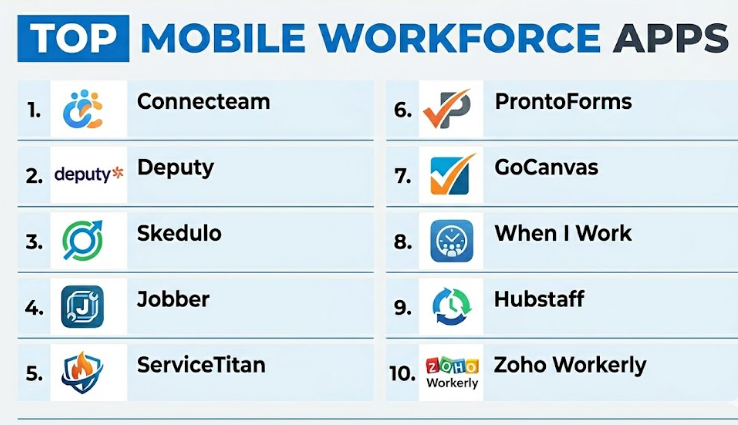
Top 10 Mobile Workforce Apps
#1 — Connecteam
Short description :
Connecteam is a mobile workforce management app designed for deskless teams, field employees, shift workers, and distributed workforces. It helps companies manage scheduling, time tracking, task management, employee communication, forms, checklists, training, and daily operations from one mobile-first platform. Connecteam is useful for cleaning companies, construction teams, retail teams, healthcare-adjacent teams, logistics, security, hospitality, and field operations. It is especially practical for businesses that want one app for employee communication and operations. It is best for companies managing mobile or deskless employees across multiple locations.
Key Features
- Employee scheduling.
- Mobile time clock.
- Task management.
- Forms and checklists.
- Team communication.
- Training and knowledge base.
- GPS and geo-fencing features.
Pros
- Strong all-in-one mobile workforce platform.
- Good for deskless and shift-based teams.
- Easy for employees to use from mobile devices.
Cons
- May not replace deep industry-specific field service software.
- Advanced workflows require careful setup.
- Best value depends on employee adoption.
Platforms / Deployment
Web / iOS / Android
Cloud
Security & Compliance
Supports user permissions, admin controls, time tracking records, employee data management, and mobile access controls depending on plan. Specific compliance details should be validated directly with the vendor.
Integrations & Ecosystem
Connecteam connects mobile workforce operations with daily business workflows.
- Payroll workflows.
- Scheduling operations.
- Employee communication.
- Training and onboarding.
- Forms and checklists.
- Time tracking exports.
Support & Community
Connecteam provides documentation, onboarding support, templates, and customer support. It is useful for businesses that want a practical mobile-first workforce platform.
#2 — Deputy
Short description :
Deputy is a workforce management app focused on employee scheduling, time tracking, attendance, shift planning, labor cost visibility, and team communication. It is useful for retail, hospitality, healthcare-adjacent teams, security, facilities, field teams, and shift-based businesses. Deputy helps managers build schedules, track attendance, manage breaks, communicate changes, and export timesheets for payroll. While it is not a full field service platform, it is highly relevant for managing mobile and shift-based workers. It is best for businesses that need strong scheduling and mobile time tracking.
Key Features
- Employee scheduling.
- Mobile clock-in and clock-out.
- Timesheets and attendance tracking.
- Shift swapping and approvals.
- Team communication.
- Labor cost visibility.
- Payroll integrations.
Pros
- Strong scheduling and time tracking features.
- Good for shift-based and mobile teams.
- Useful payroll and attendance workflows.
Cons
- Not focused on complex work orders or field service jobs.
- May need another tool for detailed task workflows.
- Best value depends on scheduling complexity.
Platforms / Deployment
Web / iOS / Android
Cloud
Security & Compliance
Supports user roles, timesheet controls, attendance records, and admin permissions depending on plan. Payroll and labor compliance needs should be validated based on region and configuration.
Integrations & Ecosystem
Deputy connects workforce scheduling with business operations.
- Payroll systems.
- HR workflows.
- Point-of-sale systems.
- Time attendance records.
- Team communication.
- Labor reporting.
Support & Community
Deputy provides documentation, support resources, onboarding guidance, and workforce management templates. It is practical for businesses managing shift workers and mobile teams.
#3 — Skedulo
Short description :
Skedulo is a mobile workforce scheduling and field operations platform designed for organizations that manage mobile employees, appointments, field visits, and complex workforce assignments. It helps companies schedule workers, dispatch jobs, manage appointments, track status, and coordinate field teams. Skedulo is useful for healthcare-adjacent services, field sales, nonprofit services, government programs, utilities, and mobile service teams. It is especially relevant when work depends on matching the right worker to the right appointment or location. It is best for organizations that need intelligent scheduling for mobile teams.
Key Features
- Mobile workforce scheduling.
- Job dispatch and assignment.
- Appointment management.
- Mobile worker app.
- Availability and capacity planning.
- Status tracking.
- Reporting and workforce visibility.
Pros
- Strong for appointment-based mobile workforce operations.
- Useful for complex scheduling and dispatching.
- Good fit for service teams with distributed workers.
Cons
- May require implementation planning.
- More advanced than simple scheduling apps.
- Best value depends on workforce complexity.
Platforms / Deployment
Web / iOS / Android
Cloud
Security & Compliance
Supports business security controls, user permissions, mobile workforce data management, and admin controls depending on plan. Specific compliance details should be validated directly with the vendor.
Integrations & Ecosystem
Skedulo connects workforce scheduling with service operations.
- CRM systems.
- Calendar workflows.
- Workforce operations.
- Dispatch workflows.
- Reporting tools.
- Mobile job management.
Support & Community
Skedulo provides onboarding, documentation, implementation support, and customer success resources. It is suitable for organizations with complex mobile workforce scheduling needs.
#4 — Jobber
Short description :
Jobber is a field service and mobile workforce app designed for small and growing service businesses. It helps companies manage jobs, schedules, quotes, invoices, customer communication, payments, and mobile technician work. Jobber is useful for cleaning, landscaping, plumbing, HVAC, electrical, home repair, pest control, and similar field service teams. It provides mobile tools for workers and office tools for managers. It is best for small service businesses that need simple mobile workforce management connected with customer jobs.
Key Features
- Job scheduling.
- Mobile worker app.
- Customer profiles.
- Quotes and estimates.
- Invoicing and payments.
- Customer notifications.
- Job status tracking.
Pros
- Easy for small service teams to adopt.
- Good for scheduling, jobs, and invoices.
- Helps reduce manual phone and paper-based coordination.
Cons
- Not ideal for large enterprise mobile workforces.
- Advanced route optimization and asset workflows may be limited.
- Best suited for service businesses rather than general deskless teams.
Platforms / Deployment
Web / iOS / Android
Cloud
Security & Compliance
Supports user permissions, customer data management, payment-related workflows, and account controls depending on plan. Specific security details should be validated directly with the vendor.
Integrations & Ecosystem
Jobber connects field service work with small business operations.
- Accounting tools.
- Payment processors.
- Online booking.
- Customer communication.
- Mobile job workflows.
- Scheduling systems.
Support & Community
Jobber provides onboarding resources, documentation, customer support, and service business guidance. It is practical for small mobile service teams.
#5 — ServiceTitan
Short description :
ServiceTitan is a field service management platform for home service and commercial service companies that need scheduling, dispatch, mobile technician workflows, estimates, invoices, customer history, reporting, and revenue operations. It is useful for HVAC, plumbing, electrical, pest control, garage door, and similar trade businesses. ServiceTitan gives technicians mobile access to job details, customer records, forms, payments, and service workflows. It is best for growing service companies that need advanced mobile workforce management tied to business operations.
Key Features
- Technician mobile app.
- Scheduling and dispatching.
- Job history and customer profiles.
- Estimates and invoices.
- Payments and memberships.
- Reporting and business analytics.
- Customer communication tools.
Pros
- Strong for growing trade service businesses.
- Combines mobile workforce workflows with revenue operations.
- Useful reporting and customer history tools.
Cons
- May be too advanced for very small teams.
- Implementation and training are important.
- Pricing may be higher than lightweight mobile workforce apps.
Platforms / Deployment
Web / iOS / Android
Cloud
Security & Compliance
Supports user permissions, operational data controls, payment-related workflows, and administrative access depending on plan. Specific compliance details should be validated directly with the vendor.
Integrations & Ecosystem
ServiceTitan connects mobile workforce workflows with service business operations.
- Accounting tools.
- Payment processors.
- Customer communication.
- Marketing workflows.
- Inventory workflows.
- Business analytics.
Support & Community
ServiceTitan provides onboarding, documentation, training, customer support, and industry-focused resources. It is suitable for service businesses with larger operational needs.
#6 — ProntoForms
Short description :
ProntoForms is a mobile forms and workflow platform designed for field teams that need to collect data, complete inspections, follow checklists, capture photos, and update business systems from mobile devices. It is useful for utilities, manufacturing, construction, field service, facilities, telecom, and inspection-heavy operations. ProntoForms helps mobile workers complete structured field tasks and submit accurate data in real time or offline. It is best for organizations that need mobile workflow execution and field data capture rather than only scheduling.
Key Features
- Mobile forms.
- Offline data collection.
- Conditional logic.
- Photo and barcode capture.
- Field workflow automation.
- Enterprise integrations.
- Reporting and analytics.
Pros
- Strong for inspections and field data capture.
- Good for structured mobile workflows.
- Useful for enterprise field operations.
Cons
- Not primarily a scheduling or time clock platform.
- Setup requires form and process planning.
- Best value depends on field workflow complexity.
Platforms / Deployment
Web / iOS / Android
Cloud
Security & Compliance
Supports user permissions, mobile data controls, workflow governance, and business security features depending on plan. Specific compliance details should be validated directly with the vendor.
Integrations & Ecosystem
ProntoForms connects mobile forms with enterprise field operations.
- Field service systems.
- CRM platforms.
- ERP workflows.
- Cloud storage.
- Reporting tools.
- APIs and enterprise integrations.
Support & Community
ProntoForms provides documentation, onboarding, customer support, and implementation guidance. It is suitable for organizations digitizing structured mobile work.
#7 — GoCanvas
Short description :
GoCanvas is a mobile forms and field workflow platform that helps organizations replace paper forms with digital forms, checklists, inspections, reports, and work orders. It is useful for construction, logistics, maintenance, field service, inspections, safety checks, and facilities operations. GoCanvas allows field workers to capture signatures, photos, GPS data, and form responses from mobile devices. It can also generate reports from submissions. It is best for companies that want mobile workers to complete forms and reports without paper.
Key Features
- Mobile form builder.
- Offline data collection.
- Photo and signature capture.
- GPS data capture.
- Work orders and inspections.
- PDF report generation.
- Field workflow templates.
Pros
- Strong for paperless field operations.
- Useful for reports, inspections, and checklists.
- Easy for mobile workers to submit field data.
Cons
- Not a full workforce scheduling suite.
- Advanced dispatch workflows may need additional tools.
- Requires thoughtful form design for best results.
Platforms / Deployment
Web / iOS / Android
Cloud
Security & Compliance
Supports user controls, mobile form data management, and business security features depending on plan. Specific compliance details should be validated directly with the vendor.
Integrations & Ecosystem
GoCanvas connects mobile field data with business workflows.
- Cloud storage.
- CRM and operations systems.
- Work order processes.
- Reporting tools.
- Email notifications.
- APIs and integrations.
Support & Community
GoCanvas provides documentation, templates, onboarding resources, and customer support. It is practical for teams moving from paper to mobile field forms.
#8 — When I Work
Short description :
When I Work is a workforce scheduling and time tracking app designed for hourly, shift-based, and mobile workers. It helps managers create schedules, communicate with employees, track attendance, manage shift changes, and simplify workforce coordination. It is useful for retail, hospitality, healthcare-adjacent teams, services, events, security, cleaning, and mobile teams with rotating shifts. While it is not a deep field service platform, it is useful for scheduling and attendance management. It is best for businesses that need simple mobile scheduling and team communication.
Key Features
- Employee scheduling.
- Mobile time clock.
- Shift swapping.
- Attendance tracking.
- Team messaging.
- Timesheet management.
- Labor visibility.
Pros
- Easy scheduling for hourly teams.
- Good mobile experience for employees.
- Useful for shift changes and attendance tracking.
Cons
- Not designed for complex job dispatch or field forms.
- May need additional tools for task completion proof.
- Best for shift-based teams rather than service job workflows.
Platforms / Deployment
Web / iOS / Android
Cloud
Security & Compliance
Supports user permissions, timesheet controls, and workforce data management depending on plan. Labor compliance needs should be reviewed by region and business policy.
Integrations & Ecosystem
When I Work connects scheduling with workforce operations.
- Payroll workflows.
- Time tracking.
- Team messaging.
- Shift planning.
- Attendance records.
- Labor reporting.
Support & Community
When I Work provides documentation, support resources, and onboarding guidance. It is practical for businesses managing hourly and shift-based mobile employees.
#9 — Hubstaff
Short description :
Hubstaff is a workforce productivity, time tracking, GPS tracking, and team management platform. It helps businesses monitor work hours, field locations, project time, productivity, timesheets, payroll workflows, and remote or mobile workforce activity. Hubstaff is useful for field teams, remote teams, agencies, service businesses, construction crews, logistics teams, and companies needing time and location visibility. It is best for organizations that need mobile time tracking and workforce accountability.
Key Features
- Mobile time tracking.
- GPS location tracking.
- Timesheets.
- Project and task tracking.
- Payroll workflow support.
- Productivity reporting.
- Geofencing features may vary by plan.
Pros
- Strong time and location tracking.
- Useful for remote and field workforce visibility.
- Helps improve payroll and productivity reporting.
Cons
- Not a full field service dispatch system.
- Employee monitoring features require clear policies.
- Best fit depends on comfort with tracking practices.
Platforms / Deployment
Web / Windows / macOS / Linux / iOS / Android
Cloud
Security & Compliance
Supports user permissions, timesheet records, location data controls, and account security features depending on plan. Privacy policies should be clearly communicated to employees.
Integrations & Ecosystem
Hubstaff connects time tracking with workforce and business systems.
- Payroll workflows.
- Project management tools.
- Accounting systems.
- Task management tools.
- Reporting dashboards.
- GPS workforce tracking.
Support & Community
Hubstaff provides documentation, customer support, onboarding resources, and productivity guidance. It is useful for teams that need time and location accountability.
#10 — Zoho Workerly
Short description :
Zoho Workerly is a workforce management platform designed for staffing agencies and temporary workforce management. It helps teams manage temps, schedules, timesheets, jobs, clients, and worker assignments. While it is more staffing-focused than general field operations-focused, it is relevant for companies that manage mobile or temporary workers across assignments. Zoho Workerly is useful for staffing agencies, contract workforce managers, event staffing teams, and businesses already using Zoho tools. It is best for organizations that need mobile workforce scheduling and timesheet management for temporary workers.
Key Features
- Temporary workforce scheduling.
- Job assignment management.
- Timesheets.
- Client and worker management.
- Worker mobile app workflows.
- Attendance tracking.
- Zoho ecosystem integration.
Pros
- Good for staffing and temp workforce operations.
- Useful for assignment scheduling and timesheets.
- Strong fit for Zoho ecosystem users.
Cons
- Not a general field service management platform.
- Best suited for staffing use cases.
- Advanced dispatch and route workflows may require other tools.
Platforms / Deployment
Web / iOS / Android
Cloud
Security & Compliance
Supports user roles, workforce data controls, timesheet records, and admin permissions depending on plan. Specific compliance details should be validated directly with the vendor.
Integrations & Ecosystem
Zoho Workerly connects mobile workforce scheduling with staffing operations.
- Zoho CRM.
- Zoho People workflows.
- Timesheet systems.
- Client records.
- Worker assignments.
- Payroll-related workflows may vary.
Support & Community
Zoho provides documentation, support resources, and ecosystem guidance. It is practical for staffing teams already using Zoho applications.
Comparison Table
| Tool Name | Best For | Platform(s) Supported | Deployment | Standout Feature | Public Rating |
|---|---|---|---|---|---|
| Connecteam | Deskless workforce operations | Web / iOS / Android | Cloud | All-in-one mobile workforce management | N/A |
| Deputy | Shift scheduling and time tracking | Web / iOS / Android | Cloud | Strong scheduling and mobile attendance workflows | N/A |
| Skedulo | Complex mobile workforce scheduling | Web / iOS / Android | Cloud | Intelligent scheduling for mobile teams | N/A |
| Jobber | Small service businesses | Web / iOS / Android | Cloud | Jobs, scheduling, quotes, and invoices | N/A |
| ServiceTitan | Growing trade service companies | Web / iOS / Android | Cloud | Advanced mobile field service operations | N/A |
| ProntoForms | Field forms and workflow execution | Web / iOS / Android | Cloud | Structured mobile forms for field teams | N/A |
| GoCanvas | Paperless field forms and reports | Web / iOS / Android | Cloud | Mobile forms with photos, signatures, and reports | N/A |
| When I Work | Hourly and shift-based teams | Web / iOS / Android | Cloud | Simple mobile scheduling and shift management | N/A |
| Hubstaff | Time and GPS workforce tracking | Web / Windows / macOS / Linux / iOS / Android | Cloud | Time tracking with GPS workforce visibility | N/A |
| Zoho Workerly | Staffing and temporary workforce management | Web / iOS / Android | Cloud | Temp worker scheduling and timesheets | N/A |
Evaluation & Mobile Workforce Apps
| Tool Name | Core (25%) | Ease (15%) | Integrations (15%) | Security (10%) | Performance (10%) | Support (10%) | Value (15%) | Weighted Total (0–10) |
|---|---|---|---|---|---|---|---|---|
| Connecteam | 9 | 9 | 8 | 8 | 8 | 8 | 9 | 8.60 |
| Deputy | 8 | 9 | 9 | 8 | 8 | 8 | 8 | 8.30 |
| Skedulo | 9 | 7 | 9 | 9 | 8 | 8 | 7 | 8.15 |
| Jobber | 8 | 9 | 8 | 8 | 8 | 8 | 9 | 8.30 |
| ServiceTitan | 10 | 7 | 9 | 8 | 9 | 9 | 7 | 8.45 |
| ProntoForms | 9 | 7 | 9 | 9 | 8 | 8 | 7 | 8.20 |
| GoCanvas | 8 | 8 | 8 | 8 | 8 | 8 | 8 | 8.00 |
| When I Work | 8 | 9 | 8 | 8 | 8 | 8 | 8 | 8.15 |
| Hubstaff | 8 | 8 | 8 | 8 | 8 | 8 | 8 | 8.00 |
| Zoho Workerly | 7 | 8 | 8 | 8 | 8 | 8 | 8 | 7.75 |
These scores are comparative and should be used as a practical guide, not a fixed ranking. Connecteam is strong for all-in-one deskless workforce management. Deputy and When I Work are stronger for scheduling and time tracking. Jobber and ServiceTitan are better for field service businesses. ProntoForms and GoCanvas are strong for mobile forms and field reporting. Hubstaff is useful for time and GPS tracking, while Skedulo is strong for complex mobile workforce scheduling.
Which Mobile Workforce Apps
Solo / Freelancer
Solo professionals usually need simple mobile tools for scheduling, time tracking, customer records, job notes, and invoices. Jobber, Hubstaff, GoCanvas, or Connecteam can be practical depending on the work type.
A solo technician may prefer Jobber for customer jobs and invoices. A consultant or contractor may prefer Hubstaff for time tracking. A field inspector may prefer GoCanvas or ProntoForms for mobile forms and reports.
SMB
Small and medium businesses should focus on easy adoption, mobile usability, scheduling, communication, time tracking, and simple reporting. Connecteam, Deputy, Jobber, When I Work, and GoCanvas are strong options.
SMBs should start with the biggest operational pain point. If scheduling is the issue, Deputy or When I Work may help. If field job tracking is the issue, Jobber may fit. If mobile forms are the issue, GoCanvas or ProntoForms may be better.
Mid-Market
Mid-market organizations usually need stronger workforce visibility, permissions, reporting, integrations, mobile forms, dispatch, and time tracking. Connecteam, Skedulo, ProntoForms, ServiceTitan, and Deputy are strong candidates.
At this stage, companies should evaluate team roles, job workflows, mobile access, offline needs, location tracking policies, payroll processes, and integration with existing systems.
Enterprise
Enterprises should prioritize scalability, security, admin controls, mobile device policies, role-based access, integrations, audit trails, analytics, and workforce governance. Skedulo, ServiceTitan, ProntoForms, Connecteam, and Deputy may be relevant depending on workforce type.
Large organizations should involve IT, operations, HR, legal, security, payroll, compliance, and field leadership before rolling out a mobile workforce app at scale.
Budget vs Premium
Budget-conscious teams may prefer Connecteam, When I Work, Hubstaff, Zoho Workerly, or lightweight mobile forms depending on needs.
Premium platforms such as Skedulo, ServiceTitan, ProntoForms, and enterprise-grade Deputy or Connecteam are better when organizations need complex scheduling, workflow automation, integrations, mobile forms, and stronger governance.
Feature Depth vs Ease of Use
If ease of use matters most, Connecteam, Deputy, When I Work, Jobber, and Hubstaff are practical choices because employees can start using them quickly.
If feature depth matters more, Skedulo, ServiceTitan, ProntoForms, and GoCanvas provide stronger workflow, dispatch, field reporting, mobile forms, and operational control.
Integrations & Scalability
Mobile workforce apps should integrate with payroll systems, HR software, CRM tools, accounting systems, field service platforms, project management tools, cloud storage, communication tools, and reporting dashboards.
For scheduling and attendance, Deputy and When I Work are strong. For field service, Jobber and ServiceTitan are better. For mobile forms, ProntoForms and GoCanvas are practical. For staffing, Zoho Workerly is relevant. For workforce-wide operations, Connecteam is a strong all-round option.
Security & Compliance Needs
Mobile workforce apps may store employee data, customer addresses, job photos, signatures, timesheets, location history, payroll records, forms, safety reports, and service notes.
Buyers should validate SSO, MFA, role-based access, GPS privacy settings, timesheet controls, mobile device security, offline data storage, audit logs, data retention, and admin permissions before rollout.
Frequently Asked Questions
1. What is a Mobile Workforce App?
A Mobile Workforce App helps companies manage employees who work outside a traditional office. It can support scheduling, time tracking, task management, communication, forms, field reporting, GPS tracking, and job updates from mobile devices.
2. How is a mobile workforce app different from field service software?
Field service software is usually focused on service jobs, technicians, work orders, dispatch, and customer service. A mobile workforce app is broader and may include scheduling, communication, time tracking, forms, training, and employee management for many types of deskless workers.
3. What pricing models are common for Mobile Workforce Apps?
Pricing may be based on users, employees, locations, features, forms, time tracking, scheduling modules, storage, integrations, or enterprise plans. Some platforms offer small business plans, while enterprise tools may require custom pricing.
4. What are common mistakes when choosing a mobile workforce app?
Common mistakes include choosing a tool only for managers and ignoring field worker experience, not testing offline use, collecting location data without clear policy, and failing to integrate payroll or job systems. Another mistake is buying a complex tool when simple scheduling is enough.
5. Which app is best for deskless employees?
Connecteam is a strong option for deskless employees because it combines scheduling, communication, tasks, forms, training, and time tracking. Deputy and When I Work are also useful when scheduling and attendance are the main needs.
6. Which app is best for field service teams?
Jobber and ServiceTitan are strong choices for field service teams. Jobber fits small service businesses, while ServiceTitan is better for growing trade service companies that need deeper dispatch, reporting, estimates, payments, and customer workflows.
7. Which app is best for mobile forms and inspections?
ProntoForms and GoCanvas are strong for mobile forms, inspections, checklists, reports, photos, signatures, and field data collection. They are better when the main goal is replacing paper forms with structured mobile workflows.
8. Can Mobile Workforce Apps track employee location?
Many mobile workforce apps support GPS tracking, geo-fencing, location-based clock-ins, or job location verification. Employers should clearly explain location tracking policies and only collect location data when it is necessary and appropriate.
9. Can these apps work offline?
Some mobile workforce apps support offline features, especially tools focused on field forms and inspections. Offline support varies by platform and feature, so teams should test real field conditions before rollout.
10. Are Mobile Workforce Apps secure?
They can be secure when configured properly. Buyers should review access controls, mobile data storage, encryption, role permissions, GPS privacy settings, user authentication, audit logs, and data retention policies.
Conclusion
Mobile Workforce Apps help organizations manage field workers, deskless employees, contractors, technicians, drivers, inspectors, and shift-based teams with better visibility and less manual coordination. The best app depends on the type of mobile work being managed. Connecteam is strong for all-in-one deskless workforce management, Deputy and When I Work are excellent for scheduling and attendance, Skedulo is useful for complex mobile workforce scheduling, Jobber and ServiceTitan are better for field service teams, ProntoForms and GoCanvas are strong for mobile forms and inspections, Hubstaff is useful for time and GPS tracking, and Zoho Workerly is practical for staffing and temporary workforce operations.
