Introduction
Meeting Notes Automation Tools help teams capture, transcribe, summarize, and organize meeting discussions without manually writing every note. In simple words, these tools listen to meetings, create transcripts, highlight action items, summarize key decisions, and help teams follow up faster.
These tools are useful because meetings often contain important decisions, customer feedback, project updates, sales commitments, hiring discussions, and leadership instructions. When notes are missed or poorly written, teams lose context, repeat discussions, and delay work. Automated meeting notes reduce manual effort and make meetings easier to review later.
Common use cases include sales call summaries, customer success handoffs, product discovery notes, project meeting recaps, hiring interview notes, leadership meeting summaries, training session documentation, and internal team follow-ups.
Buyers should evaluate transcription accuracy, summary quality, action item detection, video meeting integrations, CRM sync, privacy controls, speaker identification, collaboration features, language support, admin controls, storage options, and pricing.
Best for: sales teams, customer success teams, product managers, recruiters, consultants, agencies, project managers, remote teams, leadership teams, and organizations that run frequent meetings.
Not ideal for: teams with very few meetings, organizations that prohibit meeting recording, companies handling highly sensitive conversations without clear consent policies, or users who only need simple manual notes inside a document.
Key Trends in Meeting Notes Automation Tools
- AI-generated meeting summaries are becoming standard, helping teams quickly understand decisions, blockers, next steps, and follow-up items.
- Action item detection is becoming more practical, allowing tools to identify tasks, owners, deadlines, and commitments from meeting conversations.
- Sales and customer teams are using meeting notes for revenue intelligence, including CRM updates, coaching insights, deal risks, and customer sentiment.
- Privacy and consent controls are becoming major buying factors, especially when tools record calls, store transcripts, and process sensitive conversations.
- Meeting assistants are becoming more integrated with daily workflows, including calendars, video meeting platforms, CRM systems, project tools, and team chat apps.
- Multilingual transcription is becoming more important, especially for global teams, customer calls, and distributed organizations.
- Async review is growing, because teams do not always need to attend every meeting if they can review summaries, clips, and action items later.
- AI note quality is improving, but human review is still important for sensitive decisions, legal discussions, customer commitments, and executive communication.
- Personal meeting note tools are becoming popular, especially for founders, managers, consultants, and professionals who want private meeting memory.
- Meeting analytics are expanding, with some platforms tracking talk time, sentiment, objections, topics, engagement, and follow-up quality.
How We Selected These Tools
The tools below were selected using practical business-focused evaluation logic.
- Market recognition: Tools commonly known in AI meeting notes, transcription, conversation intelligence, and meeting productivity categories were prioritized.
- Feature completeness: Transcription, summaries, action items, speaker labels, recording, sharing, search, and meeting integrations were evaluated.
- Ease of use: Meeting notes tools should reduce work, not add another complex process.
- Integration ecosystem: Video meeting tools, calendars, CRM platforms, project tools, and collaboration apps were considered.
- AI summary quality: Tools that provide useful summaries, decisions, action items, and topic breakdowns were given stronger consideration.
- Customer fit: The list includes tools for individuals, sales teams, recruiters, product teams, consultants, SMBs, and enterprises.
- Security and governance: Consent controls, access permissions, admin settings, privacy handling, and data management were reviewed.
- Collaboration value: Sharing notes, assigning tasks, commenting, and syncing with work tools were considered.
- Scalability: Tools suitable for personal use, growing teams, and large organizations were included.
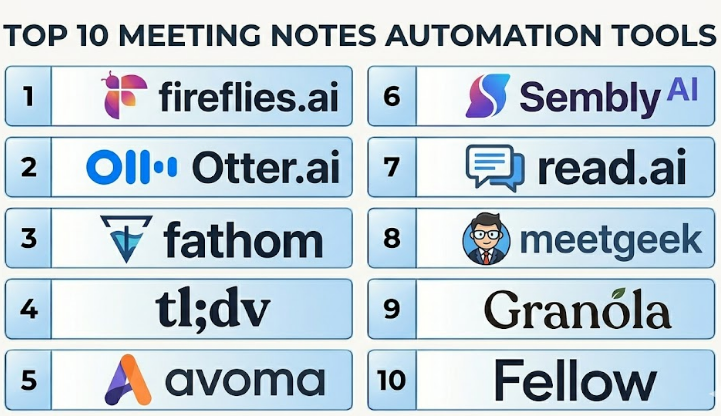
Top 10 Meeting Notes Automation Tools
#1 — Fireflies.ai
Short description :
Fireflies.ai is an AI meeting assistant that records, transcribes, summarizes, and organizes meetings across popular video conferencing platforms. It is useful for teams that want searchable meeting transcripts, AI summaries, action items, and collaboration around meeting content. Fireflies.ai works well for sales, customer success, recruiting, product, consulting, and internal team meetings. It can help teams reduce manual note-taking and improve follow-up quality. It is best for organizations that want a flexible meeting notes platform with broad use cases.
Key Features
- AI meeting transcription.
- Automated meeting summaries.
- Action item detection.
- Searchable meeting library.
- Speaker identification.
- Meeting recording and playback.
- Integrations with calendars, CRM, and collaboration tools.
Pros
- Strong all-purpose meeting notes automation.
- Useful searchable archive for past meetings.
- Good fit for multiple departments and use cases.
Cons
- Summary quality may still require review for important meetings.
- Recording bots may not fit every company culture.
- Privacy and consent policies must be managed carefully.
Platforms / Deployment
Web / iOS / Android
Cloud
Security & Compliance
Supports business security and admin controls depending on plan. Specific security certifications and compliance details should be validated directly with the vendor.
Integrations & Ecosystem
Fireflies.ai connects meeting notes with common productivity and business tools.
- Zoom.
- Google Meet.
- Microsoft Teams.
- Google Calendar.
- CRM systems.
- Project and collaboration tools.
Support & Community
Fireflies.ai provides documentation, onboarding resources, support options, and a large user base. It is practical for teams that want meeting notes across many workflows.
#2 — Otter.ai
Short description :
Otter.ai is a meeting transcription and AI notes platform known for live transcription, automated summaries, speaker identification, and collaborative notes. It is useful for business meetings, lectures, interviews, team discussions, and remote collaboration. Otter.ai helps users capture meeting content in real time and review important moments after the call. It is suitable for individuals, teams, educators, journalists, recruiters, and business users. It is best for users who need reliable transcription and easy meeting review.
Key Features
- Live meeting transcription.
- AI meeting summaries.
- Speaker identification.
- Searchable transcripts.
- Shared notes and collaboration.
- Calendar-based meeting capture.
- Highlighting and keyword search.
Pros
- Strong transcription-focused experience.
- Easy for individuals and teams to use.
- Good for reviewing detailed meeting conversations.
Cons
- Advanced business workflows may require higher plans.
- Summary accuracy depends on audio quality and meeting structure.
- Sensitive meetings require clear recording consent.
Platforms / Deployment
Web / iOS / Android
Cloud
Security & Compliance
Supports business account security and administrative controls depending on plan. Specific compliance and security certifications should be validated directly with the vendor.
Integrations & Ecosystem
Otter.ai fits well into meeting, calendar, and collaboration workflows.
- Zoom.
- Google Meet.
- Microsoft Teams.
- Calendar tools.
- File sharing workflows.
- Team collaboration processes.
Support & Community
Otter.ai provides documentation, support resources, and onboarding guidance. It is widely used for transcription-heavy meeting workflows.
#3 — Fathom
Short description :
Fathom is an AI meeting notes tool that records meetings, creates summaries, highlights key moments, and helps users share follow-ups quickly. It is especially popular with professionals who want clean meeting recaps without spending time writing notes manually. Fathom is useful for sales calls, customer meetings, team syncs, product interviews, and coaching conversations. It helps users capture decisions, action items, and important meeting clips. It is best for teams that want simple and fast meeting summaries with minimal friction.
Key Features
- AI meeting recording.
- Automated summaries.
- Action item capture.
- Meeting highlights and clips.
- CRM update support.
- Searchable meeting history.
- Shareable meeting recaps.
Pros
- Easy and fast to use.
- Good for customer-facing and internal meetings.
- Helps create follow-ups quickly after calls.
Cons
- Advanced analytics may be limited compared with revenue intelligence platforms.
- Bot-based recording may not suit every meeting.
- Important summaries should still be reviewed before sharing.
Platforms / Deployment
Web
Cloud
Security & Compliance
Supports business security features depending on plan. Specific security and compliance details should be verified directly with the vendor.
Integrations & Ecosystem
Fathom connects meeting notes with video, CRM, and productivity workflows.
- Zoom.
- Google Meet.
- Microsoft Teams.
- CRM workflows.
- Calendar tools.
- Collaboration tools.
Support & Community
Fathom provides documentation, product support, and onboarding resources. It is useful for users who want simple AI notes without a heavy setup process.
#4 — tl;dv
Short description :
tl;dv is an AI meeting recorder and notes tool designed to help teams capture calls, create summaries, highlight moments, and share insights from meetings. It is useful for sales, customer success, product research, user interviews, recruiting, and internal team meetings. tl;dv helps teams turn long meetings into searchable transcripts, short clips, and action-focused summaries. It is especially practical for teams that want to review customer conversations and share important moments across departments. It is best for teams that need meeting notes plus easy knowledge sharing.
Key Features
- AI meeting recording.
- Transcription and summaries.
- Highlight clips.
- Searchable meeting library.
- Speaker identification.
- CRM and workflow integrations.
- Team collaboration around meeting insights.
Pros
- Good for sharing meeting moments.
- Useful for customer research and sales calls.
- Helps teams avoid watching full meeting recordings.
Cons
- Requires clear recording consent.
- Summary quality depends on meeting clarity.
- Advanced revenue analytics may require more specialized tools.
Platforms / Deployment
Web
Cloud
Security & Compliance
Supports business security and admin settings depending on plan. Specific certifications and compliance details should be validated directly with the vendor.
Integrations & Ecosystem
tl;dv works with common meeting and business workflow tools.
- Google Meet.
- Zoom.
- Microsoft Teams.
- CRM systems.
- Calendar workflows.
- Collaboration and documentation tools.
Support & Community
tl;dv provides documentation, support resources, and product guidance. It is suitable for teams that regularly share meeting insights internally.
#5 — Avoma
Short description :
Avoma is an AI meeting assistant and conversation intelligence platform designed for customer-facing teams. It helps sales, customer success, account management, and support teams record meetings, create notes, analyze conversations, and sync insights with CRM systems. Avoma is stronger than basic transcription tools because it adds conversation intelligence, coaching, deal insights, and revenue workflow support. It is useful for organizations that want structured meeting notes connected to customer relationships. It is best for revenue teams that need meeting automation plus customer conversation intelligence.
Key Features
- AI meeting transcription.
- Automated notes and summaries.
- Conversation intelligence.
- CRM sync and field updates.
- Coaching insights.
- Topic and keyword tracking.
- Meeting templates and scorecards.
Pros
- Strong fit for sales and customer success teams.
- Helps turn meetings into CRM-ready insights.
- Useful for coaching and customer conversation analysis.
Cons
- May be more than needed for simple internal meeting notes.
- Setup requires alignment with revenue workflows.
- Best value depends on CRM adoption and process maturity.
Platforms / Deployment
Web
Cloud
Security & Compliance
Supports business and enterprise security controls depending on plan. Specific security certifications and compliance details should be validated directly with the vendor.
Integrations & Ecosystem
Avoma connects meeting notes with customer-facing workflows.
- Zoom.
- Google Meet.
- Microsoft Teams.
- CRM systems.
- Sales engagement tools.
- Calendar platforms.
Support & Community
Avoma provides onboarding, documentation, customer support, and revenue workflow guidance. It is suitable for teams that need more than transcription.
#6 — Sembly AI
Short description :
Sembly AI is an AI meeting assistant that records, transcribes, summarizes, and extracts insights from meetings. It helps users capture key discussion points, decisions, risks, requirements, and action items. Sembly AI is useful for project teams, managers, consultants, executives, customer teams, and remote workers who need structured meeting records. It can help teams keep track of meeting outcomes and reduce manual note-taking. It is best for users who want AI-generated meeting intelligence and organized follow-up details.
Key Features
- Meeting transcription.
- AI-generated summaries.
- Action item extraction.
- Decision and issue tracking.
- Searchable meeting records.
- Speaker identification.
- Meeting insight organization.
Pros
- Good for structured meeting summaries.
- Useful for action items and decision tracking.
- Practical for project and management meetings.
Cons
- AI summaries should be reviewed for accuracy.
- Recording consent is required for many meeting contexts.
- Advanced integrations may vary by plan.
Platforms / Deployment
Web / iOS / Android
Cloud
Security & Compliance
Supports business account controls and security features depending on plan. Specific security certifications should be validated directly with the vendor.
Integrations & Ecosystem
Sembly AI connects meeting outputs with productivity and collaboration workflows.
- Zoom.
- Google Meet.
- Microsoft Teams.
- Calendar tools.
- Task workflows.
- Collaboration platforms.
Support & Community
Sembly AI provides documentation, onboarding resources, and customer support. It is useful for teams that want structured meeting intelligence.
#7 — Read.ai
Short description :
Read.ai is a meeting intelligence platform that provides AI summaries, meeting analytics, engagement insights, and productivity signals. It helps teams understand meeting content, participation, sentiment, and follow-up items. Read.ai is useful for managers, sales teams, customer teams, executives, and distributed teams that want more visibility into meeting quality and outcomes. It goes beyond basic notes by adding analytics around communication and meeting effectiveness. It is best for organizations that want meeting summaries plus meeting performance insights.
Key Features
- AI meeting summaries.
- Meeting transcription.
- Engagement and sentiment insights.
- Action item capture.
- Meeting performance analytics.
- Calendar and meeting platform integrations.
- Searchable meeting history.
Pros
- Good combination of notes and meeting analytics.
- Useful for managers and distributed teams.
- Helps identify meeting quality and engagement patterns.
Cons
- Meeting analytics may require careful privacy communication.
- Not every team may need sentiment or engagement scoring.
- Summary quality depends on meeting structure and audio.
Platforms / Deployment
Web
Cloud
Security & Compliance
Supports business security and admin controls depending on plan. Specific security and compliance details should be validated directly with the vendor.
Integrations & Ecosystem
Read.ai connects with common meeting and productivity platforms.
- Zoom.
- Google Meet.
- Microsoft Teams.
- Calendar systems.
- Collaboration workflows.
- Productivity dashboards.
Support & Community
Read.ai provides documentation, support resources, and onboarding guidance. It is helpful for teams that want to improve meeting productivity and follow-up.
#8 — MeetGeek
Short description :
MeetGeek is an AI meeting assistant that automatically records, transcribes, summarizes, and organizes meetings. It helps users extract highlights, action items, decisions, and follow-ups from calls. MeetGeek is useful for sales, customer success, HR, project teams, and remote teams that want meeting recaps without manual effort. It can also help users search across past meetings and share important insights. It is best for teams that want meeting automation across multiple business functions.
Key Features
- Automated meeting recording.
- AI transcription.
- Meeting summaries and highlights.
- Action item extraction.
- Searchable meeting archive.
- CRM and productivity integrations.
- Meeting templates and insights.
Pros
- Good all-purpose meeting notes automation.
- Useful for both internal and external meetings.
- Helps organize meeting history and follow-ups.
Cons
- Requires recording consent and privacy planning.
- Summary quality may need human review.
- Advanced workflow features may depend on plan.
Platforms / Deployment
Web
Cloud
Security & Compliance
Supports business security and admin controls depending on plan. Specific compliance details should be validated directly with the vendor.
Integrations & Ecosystem
MeetGeek connects meeting records with sales, productivity, and collaboration tools.
- Zoom.
- Google Meet.
- Microsoft Teams.
- CRM systems.
- Project management tools.
- Calendar platforms.
Support & Community
MeetGeek provides documentation, support resources, and onboarding guidance. It is useful for teams needing structured meeting recaps and searchable meeting memory.
#9 — Granola
Short description :
Granola is an AI meeting notes tool focused on helping users create better personal meeting notes. It combines the user’s own notes with AI-generated context, allowing professionals to capture meetings in a more natural and private way. Granola is useful for founders, managers, consultants, product managers, recruiters, and professionals who want thoughtful notes without relying fully on bot-style meeting recording. It is best for individuals who want personal AI-assisted meeting notes with more control over what gets captured and organized.
Key Features
- AI-assisted personal meeting notes.
- Combines typed notes with meeting context.
- Meeting summary generation.
- Action item support.
- Clean note-taking interface.
- Calendar-based meeting support.
- Personal meeting history.
Pros
- Strong for personal productivity and thoughtful notes.
- Less intrusive than some bot-based meeting recorders.
- Useful for managers, consultants, and product professionals.
Cons
- May not offer full team-wide meeting intelligence.
- Enterprise governance features may be limited compared with larger platforms.
- Best suited for personal or small-team note workflows.
Platforms / Deployment
macOS / Web options may vary
Cloud
Security & Compliance
Supports account-level security and privacy controls. Specific business security and compliance details should be validated directly with the vendor.
Integrations & Ecosystem
Granola is designed around personal meeting productivity and note workflows.
- Calendar workflows.
- Personal meeting notes.
- AI summaries.
- Task follow-up workflows.
- Desktop note-taking.
- Productivity processes.
Support & Community
Granola provides product support and onboarding resources. It is especially useful for individuals who want AI assistance without a heavy meeting intelligence platform.
#10 — Fellow
Short description :
Fellow is a meeting management platform that helps teams prepare agendas, capture notes, track action items, run one-on-ones, and improve meeting habits. While Fellow is not only an AI meeting transcription tool, it is highly relevant for meeting notes automation because it helps structure notes before, during, and after meetings. It is useful for managers, leadership teams, product teams, project teams, and remote organizations. Fellow supports meeting agendas, collaborative notes, action items, feedback, and meeting templates. It is best for teams that want better meeting discipline, not just automatic transcripts.
Key Features
- Meeting agendas.
- Collaborative notes.
- Action item tracking.
- Meeting templates.
- One-on-one meeting workflows.
- AI meeting note features may vary by plan.
- Integrations with calendars and productivity tools.
Pros
- Strong for structured meeting management.
- Helps teams improve meeting habits.
- Good for managers and recurring meeting workflows.
Cons
- Not purely a transcription-first tool.
- Teams must adopt agenda and note discipline.
- Advanced AI automation may vary by plan and configuration.
Platforms / Deployment
Web / iOS / Android
Cloud
Security & Compliance
Supports business security controls and admin features depending on plan. Specific security certifications should be validated directly with the vendor.
Integrations & Ecosystem
Fellow connects meeting notes with calendars, productivity tools, and collaboration workflows.
- Google Calendar.
- Microsoft Outlook.
- Video meeting platforms.
- Slack-style collaboration tools.
- Project management tools.
- Task and workflow systems.
Support & Community
Fellow provides documentation, templates, onboarding resources, and support. It is useful for organizations that want better meeting structure and accountability.
Comparison Table
| Tool Name | Best For | Platform(s) Supported | Deployment | Standout Feature | Public Rating |
|---|---|---|---|---|---|
| Fireflies.ai | General meeting notes automation | Web / iOS / Android | Cloud | Searchable meeting transcripts and summaries | N/A |
| Otter.ai | Live transcription and meeting review | Web / iOS / Android | Cloud | Real-time transcription and collaborative notes | N/A |
| Fathom | Fast AI meeting summaries | Web | Cloud | Simple meeting recaps and highlights | N/A |
| tl;dv | Meeting highlights and knowledge sharing | Web | Cloud | Clips, transcripts, and shareable insights | N/A |
| Avoma | Sales and customer conversation intelligence | Web | Cloud | CRM-connected meeting notes and coaching | N/A |
| Sembly AI | Structured meeting intelligence | Web / iOS / Android | Cloud | Decisions, issues, and action item extraction | N/A |
| Read.ai | Meeting analytics and summaries | Web | Cloud | Engagement, sentiment, and meeting productivity insights | N/A |
| MeetGeek | Multi-purpose meeting automation | Web | Cloud | Automated summaries and searchable meeting archive | N/A |
| Granola | Personal AI meeting notes | macOS / Web varies | Cloud | AI-assisted notes combined with user notes | N/A |
| Fellow | Structured meeting management | Web / iOS / Android | Cloud | Agendas, notes, and action item workflows | N/A |
Evaluation & Meeting Notes Automation Tools
| Tool Name | Core (25%) | Ease (15%) | Integrations (15%) | Security (10%) | Performance (10%) | Support (10%) | Value (15%) | Weighted Total (0–10) |
|---|---|---|---|---|---|---|---|---|
| Fireflies.ai | 9 | 8 | 9 | 8 | 8 | 8 | 8 | 8.35 |
| Otter.ai | 8 | 9 | 8 | 8 | 8 | 8 | 8 | 8.25 |
| Fathom | 8 | 9 | 8 | 8 | 8 | 8 | 9 | 8.35 |
| tl;dv | 8 | 8 | 8 | 8 | 8 | 8 | 8 | 8.00 |
| Avoma | 9 | 8 | 9 | 8 | 8 | 8 | 7 | 8.25 |
| Sembly AI | 8 | 8 | 8 | 8 | 8 | 8 | 8 | 8.00 |
| Read.ai | 8 | 8 | 8 | 8 | 8 | 8 | 8 | 8.00 |
| MeetGeek | 8 | 8 | 8 | 8 | 8 | 8 | 8 | 8.00 |
| Granola | 7 | 9 | 6 | 8 | 8 | 7 | 8 | 7.55 |
| Fellow | 8 | 8 | 8 | 8 | 8 | 8 | 8 | 8.00 |
These scores are comparative and should be used as a practical guide, not as a final ranking. Fireflies.ai, Otter.ai, Fathom, tl;dv, Sembly AI, Read.ai, and MeetGeek are strong for automated meeting capture and summaries. Avoma is stronger for sales and customer conversation intelligence. Granola is better for personal AI-assisted notes, while Fellow is useful for teams that want structured agendas, notes, and action tracking.
Which Meeting Notes Automation Tools
Solo / Freelancer
Solo professionals usually need simple meeting capture, clean summaries, and easy follow-up notes. Fathom, Otter.ai, Granola, Fireflies.ai, and MeetGeek are practical options.
Consultants, coaches, freelancers, and founders should choose a tool that creates clean notes without making clients uncomfortable. For sensitive client meetings, consent and privacy communication are very important.
SMB
Small and medium businesses should focus on ease of use, meeting platform integrations, action item capture, and searchable meeting history. Fireflies.ai, Otter.ai, Fathom, tl;dv, and Fellow are strong candidates.
If the business wants meeting structure before the call, Fellow may be useful. If the team wants automatic transcripts and summaries, Fireflies.ai, Otter.ai, Fathom, or MeetGeek may be better.
Mid-Market
Mid-market companies often need CRM sync, team sharing, role-based access, meeting libraries, customer insights, and action tracking. Avoma, Fireflies.ai, tl;dv, Read.ai, Sembly AI, and MeetGeek are useful options.
At this stage, companies should evaluate whether meeting notes need to support sales, customer success, product research, recruiting, or internal project management. Different tools are stronger for different workflows.
Enterprise
Enterprises should prioritize security, governance, consent controls, admin management, retention policies, access permissions, integrations, and compliance review. Avoma, Fireflies.ai, Otter.ai, Read.ai, Sembly AI, and Fellow may be relevant depending on use case.
Large organizations should involve IT, legal, security, HR, sales operations, and department leaders before rollout. Meeting recordings and transcripts often contain sensitive business information.
Budget vs Premium
Budget-conscious users may prefer tools with simple meeting summaries and limited automation. Fathom, Otter.ai, Fireflies.ai, and Granola may be practical depending on feature needs and plan limits.
Premium tools such as Avoma, enterprise-grade Fireflies.ai, Read.ai, and Sembly AI are better when teams need CRM workflows, analytics, admin controls, team libraries, and broader governance.
Feature Depth vs Ease of Use
If ease of use matters most, Fathom, Otter.ai, Granola, and Fireflies.ai are practical choices. They are designed to reduce manual note-taking quickly.
If feature depth matters more, Avoma, Read.ai, Sembly AI, MeetGeek, and Fellow offer stronger analytics, structure, templates, action management, and business workflow support.
Integrations & Scalability
Meeting notes automation should connect with calendars, video meeting platforms, CRM systems, project tools, knowledge bases, and collaboration apps. Without integrations, summaries can become another place where information gets trapped.
Sales and customer teams should prioritize CRM sync. Product teams should prioritize searchable recordings and clips. Managers should prioritize action items and meeting templates. Enterprises should prioritize admin controls and data governance.
Security & Compliance Needs
Meeting notes tools may capture confidential customer data, employee discussions, pricing details, legal topics, hiring feedback, strategy conversations, and internal decisions. Security and privacy review are essential.
Buyers should validate SSO, MFA, role-based access, recording consent, transcript retention, data deletion, encryption, audit logs, admin controls, and whether sensitive meetings can be excluded from recording.
Frequently Asked Questions
1. What is a Meeting Notes Automation Tool?
A Meeting Notes Automation Tool records, transcribes, summarizes, and organizes meeting discussions using AI or automation. It helps users capture key points, decisions, action items, and follow-ups without writing every note manually.
2. How is it different from a normal note-taking app?
A normal note-taking app depends mostly on manual typing. A meeting notes automation tool can capture spoken conversation, create transcripts, generate summaries, and detect action items automatically. Some tools also sync notes to CRM, project management, or collaboration systems.
3. What pricing models are common for Meeting Notes Automation Tools?
Most tools use free plans, per-user subscriptions, team plans, or custom enterprise pricing. Some features such as unlimited transcription, CRM sync, advanced analytics, admin controls, or long-term storage may require paid plans.
4. What are common mistakes when using AI meeting notes?
Common mistakes include sharing summaries without review, recording meetings without consent, relying on AI for sensitive decisions, and failing to update CRM or task tools after meetings. AI notes are helpful, but important outputs should still be checked by humans.
5. Which tool is best for sales teams?
Avoma, Fireflies.ai, Fathom, tl;dv, and MeetGeek can be useful for sales teams. Avoma is especially strong when meeting notes need to connect with CRM workflows, coaching, and conversation intelligence.
6. Which tool is best for personal meeting notes?
Granola, Fathom, Otter.ai, and Fireflies.ai are practical for personal meeting notes. Granola is especially useful for people who want AI-assisted notes combined with their own written notes instead of relying fully on automated transcripts.
7. Can these tools detect action items?
Yes, many meeting notes automation tools can detect action items, next steps, decisions, and follow-ups. However, accuracy depends on meeting clarity, speaker behavior, audio quality, and how clearly tasks are discussed.
8. Are Meeting Notes Automation Tools secure?
Many tools offer business security controls, but security depends on vendor, plan, and configuration. Buyers should check encryption, access controls, SSO, data retention, transcript permissions, recording consent, and deletion policies.
9. Do these tools work with Zoom, Google Meet, and Microsoft Teams?
Most leading meeting notes automation tools support popular meeting platforms such as Zoom, Google Meet, and Microsoft Teams. Buyers should still test the exact workflow because bot behavior, permissions, and recording rules can vary by platform.
10. Can AI meeting summaries replace human notes?
AI summaries can reduce manual work, but they should not fully replace human judgment. For customer commitments, legal discussions, executive decisions, hiring feedback, or sensitive topics, a human should review the summary before sharing or acting on it.
Conclusion
Meeting Notes Automation Tools help teams save time, capture important discussions, improve follow-ups, and reduce the risk of losing meeting context. They are especially useful for sales calls, customer success meetings, product interviews, recruiting conversations, consulting sessions, leadership discussions, and remote team updates. The best tool depends on your workflow. Fireflies.ai and Otter.ai are strong all-purpose options, Fathom is simple and fast for summaries, tl;dv is useful for sharing clips and insights, Avoma is strong for revenue teams, Sembly AI and Read.ai provide structured meeting intelligence, MeetGeek offers broad meeting automation, Granola is strong for personal AI notes, and Fellow is useful for structured agendas and action tracking.
