Introduction
Speech-to-Text (STT) platforms are software solutions that convert spoken audio into written text using advanced AI and machine learning algorithms. In 2026+, these platforms are essential for content creators, educators, marketers, and enterprises to improve accessibility, streamline workflows, and generate searchable transcripts for audio and video content. High-quality STT can save time, enhance productivity, and ensure content accuracy across multiple languages and contexts.
Real-world use cases include:
- Podcasting and media production – creating transcripts for accessibility and content indexing.
- Corporate meetings and webinars – automated minutes, searchable recordings, and captions.
- E-learning and training – generating transcripts and subtitles for courses.
- Customer support – transcription for call center recordings and AI training.
- Market research and interviews – rapid conversion of audio interviews into text for analysis.
When evaluating STT platforms, buyers should consider:
- Accuracy and speed of transcription
- Multi-language and accent support
- Real-time vs batch transcription capabilities
- Integration with video/audio editors, CMS, and collaboration tools
- Cloud vs on-premises deployment
- Speaker identification and timestamps
- Editing and export options
- Cost and subscription models
- Security and compliance standards
Best for: Enterprises, content creators, podcasters, educators, researchers, and organizations producing audio/video content.
Not ideal for: Individuals with minimal transcription needs or teams relying on manual transcription tools.
Key Trends in Speech-to-Text Platforms
- AI-powered neural transcription for high accuracy
- Real-time transcription for meetings, webinars, and live events
- Multi-language and accent recognition
- Speaker diarization for identifying multiple speakers
- Cloud-based platforms with collaborative editing
- Integration with video/audio editing tools and LMS
- Batch processing for large audio/video libraries
- Accessibility compliance for hearing-impaired users
- Custom vocabulary support for industry-specific terminology
- Hybrid deployment options for enterprise flexibility
How We Selected These Tools (Methodology)
- Market adoption across content creators, enterprises, and research organizations
- Accuracy and speed of transcription across languages and accents
- Real-time and batch processing capabilities
- Integration with video/audio editors, LMS, and collaboration tools
- Security and compliance posture
- Scalability for large audio/video libraries or live events
- Customer satisfaction, onboarding, and ease of use
- Cost-to-value assessment for various user segments
- Support for custom vocabularies and industry-specific terms
- Flexibility between cloud, desktop, and hybrid deployments
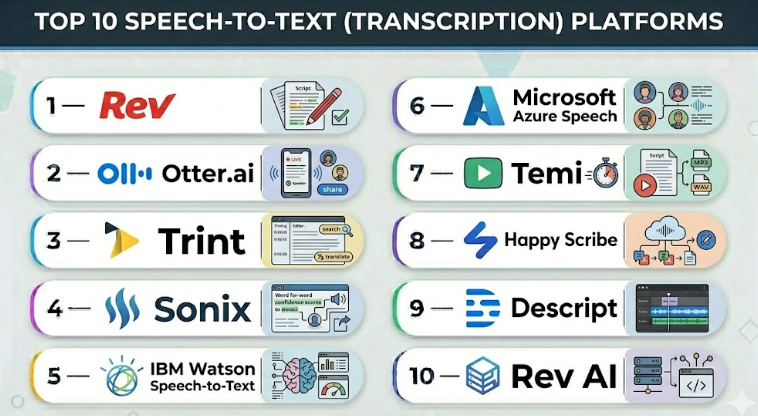
Top 10 Speech-to-Text (Transcription) Platforms
#1 — Rev
Short description :
Rev offers both AI-powered and human transcription services for enterprises, educators, and media teams. It provides high-accuracy transcripts suitable for captions, accessibility, and content indexing.
Key Features
- Human and AI transcription options
- Multi-language support
- Time-stamped transcripts
- Integration with video platforms
- Batch processing for large files
- Collaboration features for teams
Pros
- High accuracy with human transcriptions
- Fast turnaround options
Cons
- Human transcription is more expensive
- Limited offline functionality
Platforms / Deployment
- Web / Cloud
Security & Compliance
- Not publicly stated
Integrations & Ecosystem
- Works with video editors, CMS, and LMS
- API support for automation
- Multiple export formats
Support & Community
- Customer support available
- Documentation and tutorials
- Active user community
#2 — Otter.ai
Short description :
Otter.ai provides AI-driven real-time and batch transcription for meetings, lectures, podcasts, and interviews. It is widely used by educators, researchers, and corporate teams.
Key Features
- Real-time transcription and captioning
- Speaker identification and diarization
- Multi-language support
- Cloud collaboration
- Audio export and integration
- Searchable transcripts
Pros
- Accurate real-time transcription
- Easy collaboration for teams
Cons
- Accuracy may vary with poor audio quality
- Subscription-based pricing
Platforms / Deployment
- Web / iOS / Android / Cloud
Security & Compliance
- Not publicly stated
Integrations & Ecosystem
- Integrates with video conferencing apps, LMS, and CMS
- API workflows available
- Export to multiple formats
Support & Community
- Online tutorials and FAQs
- Email support
- Active user community
#3 — Trint
Short description :
Trint is a cloud-based transcription platform for media, marketing, and corporate teams, focusing on searchable, editable transcripts with AI-assisted accuracy.
Key Features
- AI-powered transcription
- Multi-language support
- Collaborative editing
- Time-stamped transcripts
- Batch processing for large projects
- Integration with video and audio editors
Pros
- User-friendly interface
- Fast processing for large files
Cons
- Subscription cost
- Accuracy may require manual review for noisy recordings
Platforms / Deployment
- Web / Cloud
Security & Compliance
- Not publicly stated
Integrations & Ecosystem
- Works with video editors, CMS, and marketing tools
- API for automation
- Multiple export formats
Support & Community
- Tutorials and documentation
- Email support
- Moderate user community
#4 — Sonix
Short description :
Sonix provides automated transcription with multi-language support, designed for media, education, and enterprise workflows.
Key Features
- AI transcription with timestamps
- Multi-language support
- Speaker identification
- Batch processing
- Editable transcripts
- Cloud-based collaboration
Pros
- Fast, accurate automated transcripts
- Easy-to-use editing interface
Cons
- Subscription cost
- Limited offline capabilities
Platforms / Deployment
- Web / Cloud
Security & Compliance
- Not publicly stated
Integrations & Ecosystem
- Integrates with video editors, CMS, and audio tools
- API workflows
- Multiple export formats
Support & Community
- Online documentation
- Customer support available
- Moderate community
#5 — IBM Watson Speech-to-Text
Short description :
IBM Watson STT offers enterprise-grade transcription for customer service, corporate communications, and media, emphasizing accuracy and customization.
Key Features
- AI-powered transcription
- Multi-language and accent support
- Custom vocabulary
- Real-time and batch processing
- API integration
- Cloud deployment
Pros
- Enterprise-ready platform
- Custom vocabulary improves industry-specific accuracy
Cons
- Subscription cost
- Requires cloud access
Platforms / Deployment
- Web / Cloud
Security & Compliance
- Not publicly stated
Integrations & Ecosystem
- Integrates with enterprise apps, IVR, and media platforms
- API-driven workflows
- Multiple audio export formats
Support & Community
- Documentation and tutorials
- Enterprise support tiers
- Active developer community
#6 — Microsoft Azure Speech
Short description :
Azure Speech provides real-time and batch transcription for enterprises, focusing on multi-language support and integration with Microsoft’s ecosystem.
Key Features
- Neural STT for natural-sounding transcription
- Multi-language support
- Speaker diarization
- Real-time streaming
- Custom vocabulary
- API access
Pros
- Enterprise-scale transcription
- High accuracy for structured content
Cons
- Subscription-based pricing
- Requires cloud connectivity
Platforms / Deployment
- Web / Cloud
Security & Compliance
- Not publicly stated
Integrations & Ecosystem
- Integrates with Microsoft 365, apps, and video platforms
- API-based automation
- Multiple export formats
Support & Community
- Documentation and training
- Enterprise support tiers
- Developer community
#7 — Temi
Short description :
Temi is an automated transcription service for podcasts, meetings, and interviews, emphasizing speed and ease of use.
Key Features
- AI-powered transcription
- Time-stamped transcripts
- Multi-language support
- Editable transcripts
- Batch processing
- Cloud collaboration
Pros
- Fast transcription
- Affordable pricing
Cons
- Accuracy varies with poor audio
- Limited customization for enterprise workflows
Platforms / Deployment
- Web / Cloud
Security & Compliance
- Not publicly stated
Integrations & Ecosystem
- Integrates with audio/video editors and CMS
- Export options for multiple formats
- API support limited
Support & Community
- Online documentation
- Email support
- Small community
#8 — Happy Scribe
Short description :
Happy Scribe offers automated transcription and captioning for media, education, and enterprise, with multi-language support and collaboration features.
Key Features
- AI transcription
- Multi-language support
- Time-stamped editable transcripts
- Batch processing
- Speaker identification
- Cloud-based collaboration
Pros
- High-quality automated transcription
- Collaborative editing features
Cons
- Subscription required
- Accuracy may require manual review
Platforms / Deployment
- Web / Cloud
Security & Compliance
- Not publicly stated
Integrations & Ecosystem
- Integrates with video editors, CMS, and LMS
- API workflows
- Multiple export formats
Support & Community
- Documentation and tutorials
- Customer support
- Moderate community
#9 — Descript
Short description :
Descript provides transcription, audio editing, and collaborative editing for media creators, educators, and enterprises.
Key Features
- AI-powered transcription
- Multi-language support
- Collaborative editing
- Time-stamped transcripts
- Integration with video/audio editors
- Batch processing
Pros
- High-quality transcription
- Easy editing and collaboration
Cons
- Subscription cost
- Requires cloud connectivity
Platforms / Deployment
- Web / macOS / Windows / Cloud
Security & Compliance
- Not publicly stated
Integrations & Ecosystem
- Integrates with video editors, CMS, and LMS
- API support
- Multiple export formats
Support & Community
- Tutorials and documentation
- Customer support tiers
- Active user community
#10 — Rev AI
Short description :
Rev AI offers automated speech-to-text services for enterprises and developers, providing accurate, scalable transcription.
Key Features
- AI-powered transcription
- Real-time streaming and batch processing
- Multi-language support
- Custom vocabulary
- Time-stamped transcripts
- API access
Pros
- Enterprise-grade transcription
- Scalable and fast
Cons
- Subscription pricing
- Requires cloud access
Platforms / Deployment
- Web / Cloud
Security & Compliance
- Not publicly stated
Integrations & Ecosystem
- Integrates with video editors, CMS, and enterprise apps
- API workflows
- Multiple export formats
Support & Community
- Documentation and tutorials
- Enterprise support tiers
- Moderate community
Comparison Table (Top 10)
| Tool Name | Best For | Platform(s) Supported | Deployment | Standout Feature | Public Rating |
|---|---|---|---|---|---|
| Rev | Enterprise, Media | Web / Cloud | Cloud | Human + AI transcription | N/A |
| Otter.ai | Meetings, Education | Web/iOS/Android | Cloud | Real-time transcription | N/A |
| Trint | Media, Marketing | Web / Cloud | Cloud | Editable AI transcripts | N/A |
| Sonix | Media, Education | Web / Cloud | Cloud | Speaker identification | N/A |
| IBM Watson STT | Enterprise, Accessibility | Web / Cloud | Cloud | Custom vocabulary | N/A |
| Microsoft Azure Speech | Enterprise, Developers | Web / Cloud | Cloud | Neural STT | N/A |
| Temi | Podcasts, Interviews | Web / Cloud | Cloud | Fast AI transcription | N/A |
| Happy Scribe | Media, Education | Web / Cloud | Cloud | Collaborative editing | N/A |
| Descript | Media, Education | Web/macOS/Windows | Cloud | Audio editing + transcription | N/A |
| Rev AI | Enterprise, Developers | Web / Cloud | Cloud | Scalable AI transcription | N/A |
Evaluation & Speech-to-Text Platforms
| Tool Name | Core (25%) | Ease (15%) | Integrations (15%) | Security (10%) | Performance (10%) | Support (10%) | Value (15%) | Weighted Total (0–10) |
|---|---|---|---|---|---|---|---|---|
| Rev | 9 | 8 | 8 | 6 | 8 | 7 | 6 | 7.9 |
| Otter.ai | 8 | 9 | 7 | 5 | 7 | 7 | 6 | 7.3 |
| Trint | 8 | 8 | 7 | 5 | 7 | 7 | 6 | 7.3 |
| Sonix | 8 | 8 | 6 | 5 | 7 | 6 | 6 | 7.0 |
| IBM Watson STT | 8 | 7 | 7 | 6 | 7 | 7 | 5 | 7.1 |
| Microsoft Azure Speech | 9 | 7 | 7 | 6 | 8 | 7 | 5 | 7.3 |
| Temi | 7 | 8 | 6 | 5 | 6 | 6 | 6 | 6.6 |
| Happy Scribe | 8 | 8 | 7 | 5 | 7 | 7 | 6 | 7.3 |
| Descript | 8 | 8 | 7 | 5 | 7 | 7 | 6 | 7.3 |
| Rev AI | 9 | 7 | 7 | 5 | 8 | 7 | 5 | 7.2 |
Which Speech-to-Text Platforms
Solo / Freelancer
Temi, Otter.ai, Descript – affordable and easy-to-use for small projects.
SMB
Trint, Happy Scribe, Otter.ai – fast AI transcription with collaborative editing.
Mid-Market
Rev, Rev AI, Microsoft Azure Speech – scalable, real-time, multi-language support.
Enterprise
IBM Watson STT, Amazon Rev, Microsoft Azure Speech – high accuracy, large-scale, and custom vocabulary support.
Budget vs Premium
Free/low-cost: Temi, Otter.ai
Premium: Rev, IBM Watson STT, Microsoft Azure Speech
Feature Depth vs Ease of Use
Microsoft Azure Speech and IBM Watson STT provide depth; Temi and Otter.ai prioritize ease of use.
Integrations & Scalability
Enterprise platforms integrate with APIs, video editors, CMS, and cloud pipelines for large-scale deployments.
Security & Compliance Needs
Enterprise platforms ensure secure cloud deployments and compliance; freelancers rely on platform security.
Frequently Asked Questions (FAQs)
1. How accurate are AI transcriptions?
Modern STT platforms can achieve 85–95% accuracy, depending on audio quality and language complexity.
2. Do these platforms support multiple languages?
Yes. Most top platforms support 20–50 languages, including accents and dialects.
3. Can STT platforms work in real-time?
Yes. Platforms like Otter.ai and Microsoft Azure Speech support live transcription and captions.
4. Can STT handle multiple speakers?
Yes. Speaker diarization is supported by most advanced STT platforms for accurate speaker identification.
5. How do STT platforms integrate with video workflows?
Via APIs, batch exports, and plugins compatible with video editors, LMS, and CMS platforms.
6. Are these platforms cost-effective?
AI transcription reduces time and labor compared to manual methods, though enterprise usage can increase subscription costs.
7. Are STT outputs editable?
Yes. Most platforms provide an editing interface for corrections and formatting adjustments.
8. Can custom vocabularies be used?
Yes. Enterprise platforms like IBM Watson STT and Microsoft Azure Speech support custom industry-specific terms.
9. Are there offline options?
Most platforms are cloud-based; a few provide desktop or hybrid options for offline processing.
10. What common mistakes do users make?
Neglecting speaker labeling, ignoring noisy audio, and skipping post-transcription review can reduce accuracy.
Conclusion
Speech-to-Text platforms streamline transcription for podcasts, webinars, e-learning, and enterprise content. Freelancers and SMBs can use Temi, Otter.ai, or Descript for fast, affordable transcription, while mid-market and enterprise teams benefit from Rev, Microsoft Azure Speech, and IBM Watson STT for large-scale, multi-language transcription and real-time streaming. When choosing a platform, consider accuracy, language support, workflow integration, and scalability.
