Introduction
Grammar and spell checking tools help writers find spelling mistakes, grammar errors, punctuation issues, unclear sentences, tone problems, and style inconsistencies before publishing or sending content. In plain English, these tools act like a writing assistant that reviews your text and suggests corrections so your writing becomes cleaner, more professional, and easier to understand.
These tools matter because most business communication now happens through written content. Emails, blogs, proposals, social media posts, documentation, product pages, support replies, reports, academic writing, and marketing campaigns all need clear language. A small spelling mistake may not destroy trust, but repeated errors can make a brand look careless. For teams working at scale, grammar tools also help maintain consistency and reduce editing time.
Real-world use cases include:
- Checking blog posts, landing pages, and SEO content before publishing.
- Improving business emails, proposals, and client communication.
- Reviewing academic writing, essays, and research-style content.
- Editing technical documentation, product guides, and help articles.
- Supporting customer support teams with clear and professional replies.
- Improving tone, clarity, spelling, and punctuation in daily writing.
Key evaluation criteria for buyers:
- Grammar and spelling accuracy.
- Punctuation and sentence clarity suggestions.
- Tone, style, and readability guidance.
- AI rewriting and paraphrasing support.
- Browser, desktop, and app availability.
- Team collaboration and admin controls.
- Security, privacy, and compliance visibility.
- Support for multiple languages.
- Integrations with documents, email, CMS, and workplace tools.
- Pricing flexibility for individuals, teams, and enterprises.
Best for: Content writers, bloggers, marketers, students, teachers, editors, business teams, customer support teams, HR teams, SaaS companies, agencies, and enterprises that publish or send written content regularly.
Not ideal for: Users who only write very short casual messages, teams that need deep human editing for legal or literary work, or businesses that require expert editorial judgment beyond automated suggestions.
Key Trends in Grammar & Spell Checking Tools
- AI-powered writing assistance is now moving beyond basic grammar and spelling into tone rewriting, clarity improvement, summarization, and sentence restructuring.
- Real-time writing correction is becoming a standard expectation across browsers, email clients, document editors, social media tools, and workplace apps.
- Business tone control is gaining importance because companies want employees to write in a clear, polite, consistent, and brand-safe style.
- Team writing governance is becoming more useful for enterprises that want shared style guides, custom terms, banned words, and admin controls.
- Multilingual grammar checking is becoming more valuable for global teams writing in English and other major languages.
- Privacy and data control are now major buying factors, especially for enterprises handling confidential emails, customer data, contracts, product plans, or internal documents.
- AI rewriting and paraphrasing are becoming common, but users still need to check accuracy, context, and originality before publishing.
- Browser extensions and desktop apps are still important because users want grammar support wherever they write.
- Academic writing tools are expanding into citation support, plagiarism checks, structure feedback, and formal tone suggestions.
- Lightweight free tools and premium enterprise tools are separating more clearly, with free plans suitable for basic writing and paid plans offering deeper control.
How We Selected These Tools
The tools below were selected based on practical relevance for grammar checking, spell checking, writing improvement, business communication, academic writing, content creation, and team usage. The evaluation focused on:
- Market recognition and common usage among writers, students, teams, and businesses.
- Grammar, spelling, punctuation, and clarity-checking capabilities.
- Writing improvement features such as tone, readability, style, rewriting, and conciseness.
- Platform availability across web, browser extensions, desktop apps, and mobile apps.
- Fit for different users, including individuals, students, agencies, SMBs, and enterprises.
- Support for integrations with email, documents, browsers, CMS tools, and workplace platforms.
- Security and compliance visibility where publicly known; otherwise marked as “Not publicly stated.”
- Ease of use for non-technical users and busy professionals.
- Collaboration and team management features where relevant.
- Overall value based on usability, feature depth, and practical workflow fit.
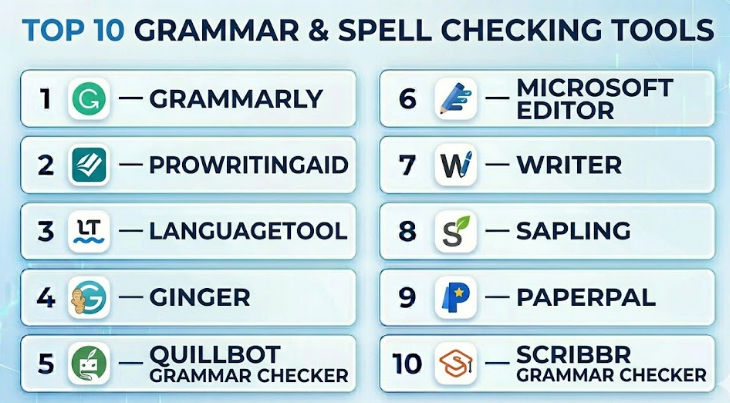
Top 10 Grammar & Spell Checking Tools
#1 — Grammarly
Short description :
Grammarly is one of the most widely used grammar and writing assistant tools for individuals, teams, and enterprises. It checks grammar, spelling, punctuation, clarity, tone, and writing style across many writing environments. Grammarly is useful for emails, documents, blogs, business writing, academic drafts, social posts, and workplace communication. It is especially strong for users who want real-time suggestions while writing. Teams can also use Grammarly for brand tone, style consistency, and business communication improvement.
Key Features
- Grammar, spelling, and punctuation correction.
- Clarity, tone, and conciseness suggestions.
- Browser extension and desktop writing support.
- AI writing and rewriting assistance.
- Custom style guidance for teams.
- Plagiarism checking in selected plans.
- Business admin and team management features.
Pros
- Very easy to use across daily writing workflows.
- Strong real-time grammar, spelling, and clarity suggestions.
- Good fit for individuals, teams, and enterprise users.
Cons
- Some advanced features require paid plans.
- Suggestions still require human review for context.
- May not be ideal for highly technical or creative writing without careful editing.
Platforms / Deployment
Web / Windows / macOS / iOS / Android
Cloud
Security & Compliance
SOC 2 Type 2 and ISO 27001 are publicly stated by the vendor. Other details may vary by plan and enterprise agreement.
Integrations & Ecosystem
Grammarly works across common writing environments and is useful for people who write in many places during the day.
- Browser-based writing.
- Email and workplace communication.
- Document editing workflows.
- Mobile writing support.
- Team writing and admin workflows.
Support & Community
Grammarly offers help resources, documentation, support channels, and enterprise support options. Its large user base makes it easy to find usage guidance and workflow tips.
#2 — ProWritingAid
Short description :
ProWritingAid is a grammar and style-checking tool designed for writers who want deeper feedback than basic spelling correction. It is popular among authors, bloggers, content writers, editors, and long-form writing teams. The tool focuses on grammar, readability, sentence structure, repetition, style, pacing, and writing reports. It is especially useful for people writing articles, books, essays, and detailed content. ProWritingAid is best for users who want writing improvement guidance, not just quick corrections.
Key Features
- Grammar, spelling, and punctuation checking.
- Detailed writing reports.
- Readability and style suggestions.
- Repetition, overused word, and sentence structure analysis.
- Rephrase and writing improvement features.
- Browser extension and app support.
- Useful for long-form writing and editing.
Pros
- Strong for long-form writing and detailed editing.
- Helpful reports for improving writing quality.
- Good fit for authors, bloggers, and content writers.
Cons
- Can feel more detailed than needed for quick emails.
- Some reports may overwhelm beginners.
- Best results require users to review suggestions carefully.
Platforms / Deployment
Web / Windows / macOS / Browser extensions
Cloud / Desktop options may vary
Security & Compliance
Not publicly stated
Integrations & Ecosystem
ProWritingAid works well for writers who draft, revise, and polish longer content across multiple environments.
- Browser writing workflows.
- Document editing.
- Long-form manuscript editing.
- Blogging and content writing.
- Writing improvement reports.
Support & Community
ProWritingAid provides learning resources, documentation, writing education content, and support options. It also has a strong community among authors and long-form writers.
#3 — LanguageTool
Short description :
LanguageTool is a grammar, spelling, and style checker known for multilingual support and flexible usage. It is useful for individuals, students, writers, translators, and teams that need grammar checking beyond only English. The tool checks spelling, grammar, punctuation, word choice, and style across supported languages. It is especially helpful for multilingual users and teams writing in different languages. LanguageTool also appeals to users who want a practical alternative to mainstream grammar tools.
Key Features
- Grammar, spelling, and punctuation checking.
- Multilingual writing support.
- Style and word choice suggestions.
- Browser extension and desktop options.
- Personal dictionary support.
- Team and premium features may vary.
- Useful for multilingual writers and global teams.
Pros
- Strong multilingual grammar-checking support.
- Practical for users writing in more than one language.
- Good balance between simplicity and capability.
Cons
- Some advanced features may require premium access.
- English writing depth may vary compared with English-first tools.
- Team-level governance may be lighter than enterprise-focused platforms.
Platforms / Deployment
Web / Windows / macOS / Browser extensions
Cloud / Desktop options may vary
Security & Compliance
Not publicly stated
Integrations & Ecosystem
LanguageTool fits well into browser-based and desktop writing environments for multilingual users.
- Browser writing workflows.
- Desktop writing support.
- Multilingual content checking.
- Email and document writing.
- Personal dictionary workflows.
Support & Community
LanguageTool provides documentation, help resources, and user support options. It has strong visibility among multilingual users and grammar-checking tool communities.
#4 — Ginger
Short description :
Ginger is a grammar, spelling, punctuation, and writing improvement tool focused on helping users write clearer English. It offers grammar correction, sentence rephrasing, translation support, and writing assistance. Ginger is useful for students, professionals, non-native English writers, and everyday users who want help with sentence improvement. It can support emails, documents, messages, and general business writing. The tool is especially useful for users who want simple correction plus rephrasing help.
Key Features
- Grammar, spelling, and punctuation correction.
- Sentence rephrasing suggestions.
- Translation support in selected workflows.
- Writing improvement assistance.
- Browser and desktop support.
- Mobile keyboard support may vary.
- Useful for non-native English writers.
Pros
- Helpful for sentence rewriting and everyday writing.
- Good support for users improving English fluency.
- Simple and practical for daily communication.
Cons
- May not offer the same enterprise depth as business-focused tools.
- Advanced style guidance may be limited.
- Some platform features may vary.
Platforms / Deployment
Web / Windows / macOS / iOS / Android
Cloud / App-based options may vary
Security & Compliance
Not publicly stated
Integrations & Ecosystem
Ginger supports practical writing correction across common writing environments.
- Browser-based writing.
- Desktop writing.
- Mobile writing.
- Email and message editing.
- Rephrasing workflows.
Support & Community
Ginger provides support resources and help documentation. Community visibility is moderate compared with larger grammar tools.
#5 — QuillBot Grammar Checker
Short description :
QuillBot Grammar Checker is part of the broader QuillBot writing platform, which includes grammar checking, paraphrasing, summarizing, and writing improvement features. It is popular among students, bloggers, content creators, and users who need quick writing assistance. The grammar checker helps identify spelling, punctuation, and sentence-level issues. QuillBot is especially useful for people who want grammar checking combined with paraphrasing and rewriting tools. It is best for users who need fast writing improvement rather than heavy enterprise governance.
Key Features
- Grammar and spelling correction.
- Punctuation checking.
- Paraphrasing and rewriting tools.
- Summarization and writing support features.
- Browser extension support.
- Useful for academic and content writing.
- Simple web-based interface.
Pros
- Easy to use for quick writing correction.
- Strong combination of grammar checking and paraphrasing.
- Useful for students and content creators.
Cons
- Enterprise writing governance is limited.
- Rewritten text still needs human review.
- Advanced features may require paid access.
Platforms / Deployment
Web / Browser extensions
Cloud
Security & Compliance
Not publicly stated
Integrations & Ecosystem
QuillBot is useful for users who need a combination of grammar correction and rewriting support.
- Web writing workflows.
- Browser-based checking.
- Paraphrasing workflows.
- Academic writing support.
- Content drafting and rewriting.
Support & Community
QuillBot provides help resources and product support options. It has strong adoption among students, writers, and content creators.
#6 — Microsoft Editor
Short description :
Microsoft Editor is a grammar and spell checking tool built into Microsoft writing environments and available through browser support. It helps users check spelling, grammar, clarity, conciseness, and writing style. Microsoft Editor is especially useful for teams already using Microsoft apps for documents, email, and workplace communication. It is a practical option for business users who want writing assistance inside familiar productivity tools. It may not be as specialized as dedicated writing platforms, but it is convenient for Microsoft-focused workflows.
Key Features
- Spelling and grammar checking.
- Clarity and conciseness suggestions.
- Integration with Microsoft writing environments.
- Browser extension support.
- Useful for emails and documents.
- Writing style suggestions may vary by plan.
- Good fit for workplace productivity.
Pros
- Convenient for Microsoft users.
- Easy to use inside common business workflows.
- Good for basic grammar and spelling improvement.
Cons
- May not offer the same depth as dedicated writing tools.
- Advanced features may depend on Microsoft plan.
- Less suitable for specialized long-form editing.
Platforms / Deployment
Web / Windows / macOS / Browser extension
Cloud / Productivity suite-based
Security & Compliance
Not publicly stated
Integrations & Ecosystem
Microsoft Editor is strongest for users already working inside Microsoft productivity tools.
- Document editing.
- Email writing.
- Browser-based writing.
- Workplace communication.
- Microsoft productivity workflows.
Support & Community
Support is available through Microsoft help resources and product documentation. Users already familiar with Microsoft tools will find adoption easier.
#7 — Writer
Short description :
Writer is an AI writing and grammar platform designed for businesses that need consistent, brand-safe communication. It helps teams improve grammar, style, tone, terminology, and content quality while following company writing rules. Writer is especially useful for marketing teams, support teams, sales teams, HR teams, and enterprises that want centralized writing governance. It is more business-focused than many individual grammar tools. The platform is best for companies that need writing consistency across teams, not just simple spelling correction.
Key Features
- Grammar, spelling, and clarity checking.
- Brand voice and style guide enforcement.
- Custom terminology and approved language rules.
- Team admin and governance features.
- AI writing assistance.
- Enterprise workflow support.
- Useful for marketing, support, and sales teams.
Pros
- Strong for enterprise writing consistency.
- Useful brand voice and terminology controls.
- Good fit for teams, not just individuals.
Cons
- May be too advanced for casual users.
- Pricing may be enterprise-focused.
- Setup requires style guide and governance planning.
Platforms / Deployment
Web / Browser-based workflows
Cloud
Security & Compliance
Not publicly stated
Integrations & Ecosystem
Writer works well for business teams that want consistent communication across writing channels.
- Marketing content workflows.
- Customer support writing.
- Sales communication.
- Internal style guides.
- Team writing governance.
Support & Community
Writer offers business-focused onboarding, support, and documentation. Community visibility is stronger among enterprise content and AI writing teams.
#8 — Sapling
Short description :
Sapling is an AI writing assistant focused on grammar correction, autocomplete, and messaging improvement for business communication. It is often used by customer support, sales, and operations teams that write many messages every day. Sapling helps improve response quality, reduce writing errors, and speed up repetitive communication. It is especially useful in customer-facing workflows where clarity and professionalism matter. The tool is best for teams that need writing help inside support and CRM environments.
Key Features
- Grammar and spelling correction.
- AI autocomplete suggestions.
- Message quality improvement.
- Team-focused writing assistance.
- Useful for support and sales workflows.
- Integration with workplace and customer communication tools.
- Analytics and team features may vary.
Pros
- Strong fit for customer support and sales teams.
- Helps speed up repetitive business writing.
- Useful for improving communication quality at scale.
Cons
- Less focused on long-form creative writing.
- Best value is in team workflows.
- Feature depth may vary by plan.
Platforms / Deployment
Web / Browser-based workflows
Cloud
Security & Compliance
Not publicly stated
Integrations & Ecosystem
Sapling is useful for teams writing inside business communication systems.
- Customer support platforms.
- Sales and CRM workflows.
- Browser-based writing.
- Team communication tools.
- Messaging workflows.
Support & Community
Sapling provides documentation and support options. Its user base is more business and team-focused than student or author-focused.
#9 — Paperpal
Short description :
Paperpal is a writing assistant focused on academic and research-style writing. It helps users improve grammar, spelling, clarity, academic tone, sentence structure, and formal writing quality. Paperpal is especially useful for students, researchers, scholars, and academic writers who need writing support for essays, papers, manuscripts, and formal documents. It is not a general business writing tool only; its strength is academic language improvement. Users should still review suggestions carefully, especially in technical or subject-specific writing.
Key Features
- Grammar and spelling correction.
- Academic writing suggestions.
- Formal tone improvement.
- Sentence clarity and structure support.
- Language polishing for research-style documents.
- Web-based writing support.
- Useful for students and researchers.
Pros
- Strong focus on academic writing.
- Helpful for formal and research-oriented language.
- Good for improving clarity in scholarly content.
Cons
- Less suitable for marketing or casual writing.
- Not a replacement for subject-matter review.
- Advanced features may require paid access.
Platforms / Deployment
Web
Cloud
Security & Compliance
Not publicly stated
Integrations & Ecosystem
Paperpal supports academic writing workflows where grammar, clarity, and formal tone matter.
- Academic draft editing.
- Research writing support.
- Formal document improvement.
- Manuscript language polishing.
- Student writing workflows.
Support & Community
Paperpal provides help resources and support options. It is mainly used by academic writers, researchers, and students looking for formal writing assistance.
#10 — Scribbr Grammar Checker
Short description :
Scribbr Grammar Checker is a writing tool aimed largely at students, academic writers, and users who need clear grammar and spelling correction. It is useful for essays, assignments, academic drafts, and general writing improvement. Scribbr is known for student-friendly writing resources and academic support tools. The grammar checker helps users improve spelling, grammar, punctuation, and readability. It is best for users who need straightforward writing correction in an academic or learning-focused context.
Key Features
- Grammar and spelling checking.
- Punctuation correction.
- Student-friendly writing support.
- Academic writing assistance.
- Web-based checking.
- Useful for essays and assignments.
- Simple interface for quick editing.
Pros
- Easy to use for students and academic writers.
- Good for basic grammar and punctuation improvement.
- Helpful learning-focused writing environment.
Cons
- Not designed as a deep enterprise writing governance platform.
- May not be ideal for complex business style control.
- Advanced writing needs may require additional editing tools.
Platforms / Deployment
Web
Cloud
Security & Compliance
Not publicly stated
Integrations & Ecosystem
Scribbr Grammar Checker is useful for users who need straightforward academic and general writing correction.
- Academic writing workflows.
- Essay editing.
- Web-based grammar checking.
- Student writing support.
- General proofreading workflows.
Support & Community
Scribbr provides writing resources, educational content, and support options. It has strong visibility among students and academic users.
Comparison Table
| Tool Name | Best For | Platform(s) Supported | Deployment | Standout Feature | Public Rating |
|---|---|---|---|---|---|
| Grammarly | Individuals, teams, and enterprises | Web / Windows / macOS / iOS / Android | Cloud | Real-time grammar, tone, and clarity checking | N/A |
| ProWritingAid | Authors, bloggers, and long-form writers | Web / Windows / macOS / Browser extensions | Cloud / Desktop options vary | Detailed writing reports | N/A |
| LanguageTool | Multilingual writers and global teams | Web / Windows / macOS / Browser extensions | Cloud / Desktop options vary | Multilingual grammar checking | N/A |
| Ginger | Everyday writers and English learners | Web / Windows / macOS / iOS / Android | Cloud / App-based options vary | Grammar correction with rephrasing | N/A |
| QuillBot Grammar Checker | Students and content creators | Web / Browser extensions | Cloud | Grammar checking plus paraphrasing | N/A |
| Microsoft Editor | Microsoft productivity users | Web / Windows / macOS / Browser extension | Cloud / Productivity suite-based | Built-in writing support for Microsoft workflows | N/A |
| Writer | Enterprises and brand teams | Web / Browser-based workflows | Cloud | Brand voice and style governance | N/A |
| Sapling | Support and sales teams | Web / Browser-based workflows | Cloud | AI writing assistance for business messages | N/A |
| Paperpal | Academic and research writers | Web | Cloud | Academic writing improvement | N/A |
| Scribbr Grammar Checker | Students and essay writers | Web | Cloud | Simple academic-friendly grammar checking | N/A |
Evaluation & Grammar & Spell Checking Tools
| Tool Name | Core (25%) | Ease (15%) | Integrations (15%) | Security (10%) | Performance (10%) | Support (10%) | Value (15%) | Weighted Total (0–10) |
|---|---|---|---|---|---|---|---|---|
| Grammarly | 9 | 9 | 9 | 8 | 9 | 8 | 8 | 8.65 |
| ProWritingAid | 8 | 8 | 8 | 6 | 8 | 8 | 8 | 7.75 |
| LanguageTool | 8 | 8 | 8 | 6 | 8 | 7 | 8 | 7.65 |
| Ginger | 7 | 8 | 7 | 5 | 7 | 7 | 7 | 6.95 |
| QuillBot Grammar Checker | 7 | 9 | 7 | 5 | 8 | 7 | 8 | 7.35 |
| Microsoft Editor | 7 | 9 | 8 | 6 | 8 | 8 | 8 | 7.70 |
| Writer | 8 | 8 | 8 | 7 | 8 | 8 | 7 | 7.80 |
| Sapling | 7 | 8 | 8 | 6 | 8 | 7 | 7 | 7.30 |
| Paperpal | 7 | 8 | 6 | 5 | 7 | 7 | 7 | 6.80 |
| Scribbr Grammar Checker | 6 | 9 | 5 | 5 | 7 | 7 | 8 | 6.70 |
These scores are comparative and should be used as a shortlist guide, not as a final universal ranking. A higher score usually means broader usability, stronger writing support, or better workflow coverage. A lower score does not mean the tool is weak; it may simply serve a narrower audience. For example, Paperpal may be more useful than a general business tool for academic writing, while Writer may be better for enterprise brand governance than casual proofreading.
Which Grammar & Spell Checking Tool Should You Choose?
Solo / Freelancer
Solo writers, freelancers, and independent content creators should prioritize ease of use, real-time correction, browser support, and value. Grammarly, ProWritingAid, LanguageTool, and QuillBot Grammar Checker are strong choices depending on the type of writing.
If you write blogs, long articles, or books, ProWritingAid can be useful because of its deeper writing reports. If you write emails, proposals, and daily content, Grammarly or LanguageTool may feel faster and easier.
SMB
Small and mid-sized businesses usually need grammar checking for emails, blogs, website content, customer replies, and internal documents. Grammarly, Microsoft Editor, Writer, and Sapling are practical options depending on the existing workflow.
SMBs should choose tools that employees will actually use. A grammar checker that works inside browsers, documents, and email clients is usually more valuable than a tool that requires extra manual copy-paste steps.
Mid-Market
Mid-market companies need writing consistency across marketing, sales, support, HR, and product teams. Grammarly, Writer, Sapling, and Microsoft Editor can support this need well.
At this stage, buyers should look beyond grammar accuracy. They should evaluate style guides, team controls, custom vocabulary, admin features, analytics, and whether the tool supports common workplace apps.
Enterprise
Enterprise buyers need security, governance, privacy controls, admin visibility, and brand consistency. Writer, Grammarly, Microsoft Editor, and Sapling are stronger options for enterprise-style workflows.
Large organizations should check SSO, MFA, data handling, encryption, admin controls, role-based access, auditability, and vendor documentation before rollout. For regulated teams, security review should happen before users paste sensitive content into any writing tool.
Budget vs Premium
Free or lower-cost tools may be enough for students, casual writers, and occasional proofreading. LanguageTool, QuillBot Grammar Checker, Scribbr Grammar Checker, and Microsoft Editor can be useful for basic needs.
Premium tools make more sense when writing volume is high, quality expectations are strict, or teams need collaboration and governance. Grammarly, ProWritingAid, Writer, and Sapling offer more value when writing directly affects business outcomes.
Feature Depth vs Ease of Use
If you want quick corrections, choose tools that are simple and real-time, such as Grammarly, Microsoft Editor, LanguageTool, or QuillBot Grammar Checker. These tools are easy to use and work well for daily writing.
If you want deeper writing development, ProWritingAid is stronger for long-form analysis. If you need team style control, Writer is stronger because it focuses on brand voice and company-wide writing rules.
Integrations & Scalability
Integration matters because grammar tools are most useful when they appear where people already write. Browser extensions, document editor support, email support, desktop apps, and workplace integrations should be tested before purchase.
For scaling across teams, check admin controls, shared dictionaries, custom style guides, onboarding resources, and whether the tool can handle multiple departments with different writing needs.
Security & Compliance Needs
Security is important when writing tools process sensitive emails, contracts, customer messages, internal documents, or unreleased business content. Enterprises should check vendor security documentation, data retention, encryption, access controls, and compliance claims.
If security details are not publicly stated, do not assume. Ask vendors directly and involve IT, legal, and compliance teams before using the tool for confidential content.
Frequently Asked Questions
1. What are grammar and spell checking tools?
Grammar and spell checking tools are software applications that review written text and suggest corrections for spelling, grammar, punctuation, clarity, and style. Some tools also offer tone suggestions, rewriting, readability checks, and AI writing help.
2. Are grammar checking tools always accurate?
No tool is perfect. Grammar tools are helpful, but they can misunderstand context, tone, industry terms, or creative writing style. Users should review suggestions carefully before accepting them, especially for formal, legal, academic, or technical writing.
3. What is the difference between grammar checking and spell checking?
Spell checking focuses on incorrect or misspelled words. Grammar checking reviews sentence structure, punctuation, subject-verb agreement, word usage, clarity, and other writing rules. Modern tools often combine both features.
4. Do these tools replace human editors?
No. They reduce basic errors and improve writing speed, but they do not replace human editors. Human review is still important for strategy, accuracy, tone, brand voice, storytelling, legal meaning, and subject-matter correctness.
5. Which tool is best for students?
Students may benefit from Grammarly, QuillBot Grammar Checker, Paperpal, Scribbr Grammar Checker, and LanguageTool. The best choice depends on whether the student needs general grammar correction, academic tone, paraphrasing, or multilingual support.
6. Which tool is best for business teams?
Business teams should consider Grammarly, Writer, Microsoft Editor, and Sapling. These tools are useful for emails, sales messages, support replies, internal documents, marketing content, and brand-consistent communication.
7. What pricing models do grammar tools use?
Most grammar tools use freemium or subscription-based pricing. Free plans usually cover basic grammar and spelling. Paid plans may include advanced suggestions, tone checks, plagiarism tools, team controls, AI writing, and enterprise security features.
8. Can grammar tools improve SEO content?
Yes, grammar tools can improve readability, clarity, sentence flow, and spelling quality in SEO content. However, they do not replace SEO strategy, keyword research, search intent analysis, content structure, or human editorial judgment.
9. Are grammar checking tools safe for confidential content?
It depends on the vendor, plan, and security controls. Businesses should review privacy policies, data handling, encryption, access controls, and compliance documentation before using any grammar tool for confidential or regulated content.
10. Can grammar tools check multiple languages?
Some tools support multiple languages, while others are strongest in English. LanguageTool is known for multilingual grammar support. Before buying, test the exact languages your team writes in, including regional spelling and grammar differences.
Conclusion
Grammar and spell checking tools are now important for almost every person and organization that writes regularly. They help reduce mistakes, improve clarity, polish tone, and make communication more professional. However, the best tool depends on the user’s writing style, team size, content type, budget, and security needs. A student may need a simple grammar checker for assignments, while a content writer may need deeper readability and style feedback. A customer support team may need faster response writing, and an enterprise may need brand voice control, admin management, and stronger security visibility.
