Introduction
Nurse Scheduling Systems help hospitals, clinics, nursing homes, home healthcare agencies, and healthcare staffing teams plan nurse shifts, manage staff availability, handle time-off requests, reduce scheduling conflicts, and maintain safe staffing coverage. In simple words, these tools help healthcare managers decide who works when, where they are assigned, whether enough nurses are available, and whether staffing rules are being followed.
These systems matter because healthcare staffing is complex. Nurse managers must balance patient demand, staff skills, shift preferences, overtime, labor costs, compliance rules, fatigue risk, union rules, float pools, part-time staff, agency nurses, and last-minute callouts. A poor schedule can create burnout, coverage gaps, high overtime, and patient safety concerns.
Common use cases include nurse shift scheduling, self-scheduling, open shift management, float pool assignment, overtime control, time-off approval, compliance tracking, mobile shift swaps, staffing dashboards, and labor cost forecasting.
Buyers should evaluate ease of scheduling, mobile access, shift swap controls, overtime visibility, compliance rules, EHR or workforce integration, payroll integration, staffing analytics, self-scheduling, reporting, scalability, and user adoption.
Best for: Hospitals, clinics, nursing homes, long-term care facilities, home healthcare agencies, nurse managers, staffing coordinators, HR teams, workforce management leaders, and healthcare operations teams.
Not ideal for: Very small clinics with only a few staff members, teams that only need a simple calendar, or organizations that already have a complete workforce management platform that fully supports nurse scheduling needs.
Key Trends in Nurse Scheduling Systems
- AI-assisted scheduling is becoming more common, helping managers predict staffing needs, reduce gaps, and build fairer shift plans.
- Self-scheduling is growing, allowing nurses to choose preferred shifts within approved staffing rules.
- Mobile-first scheduling is now expected, because nurses need to view schedules, swap shifts, request time off, and receive alerts from their phones.
- Fatigue management is becoming more important, especially in hospitals where long shifts, overtime, and back-to-back assignments can increase burnout risk.
- Real-time staffing visibility is improving, helping managers respond faster to callouts, census changes, and department-level staffing shortages.
- Integration with payroll and time tracking is now a key requirement, because schedules must connect with attendance, overtime, and labor cost control.
- Skill-based scheduling is becoming more practical, ensuring the right nurse with the right certification or unit experience is assigned to the right shift.
- Float pool and agency nurse management is gaining importance, especially for hospitals dealing with variable demand and staffing shortages.
- Predictive workforce analytics are growing, helping leaders forecast demand, staffing gaps, overtime trends, and labor budget pressure.
- Employee experience is a major buying factor, because better scheduling can support retention, reduce frustration, and improve work-life balance.
How We Selected These Tools
- We selected tools widely recognized for nurse scheduling, healthcare workforce management, staff scheduling, shift planning, or healthcare labor optimization.
- We considered practical fit for hospitals, clinics, long-term care facilities, home healthcare teams, and multi-site healthcare organizations.
- We prioritized tools that support shift scheduling, self-scheduling, time-off management, mobile access, open shift filling, overtime tracking, and staffing visibility.
- We included enterprise healthcare workforce platforms as well as flexible scheduling tools suitable for smaller healthcare teams.
- We considered integration potential with payroll, HRIS, timekeeping, EHR, workforce management, and communication systems.
- We looked at ease of use for nurse managers, staffing coordinators, HR teams, and frontline nurses.
- We avoided guessing public ratings, certifications, security claims, or pricing details.
- We used N/A, Varies / N/A, and Not publicly stated where information is uncertain.
#1 — UKG Pro Workforce Management
Short description: UKG Pro Workforce Management is an enterprise workforce management platform used by large organizations, including healthcare systems, to manage scheduling, timekeeping, labor forecasting, compliance, and workforce analytics. For nursing teams, it can support shift planning, staffing coverage, overtime visibility, absence management, and mobile access. It is a strong fit for hospitals and health systems that need workforce management beyond simple nurse scheduling. The platform is especially useful where scheduling must connect with payroll, HR, compliance, and labor cost controls.
Key Features
- Nurse and staff scheduling.
- Time and attendance management.
- Labor forecasting.
- Absence and leave management.
- Mobile workforce access.
- Overtime visibility.
- Reporting and analytics.
Pros
- Strong enterprise workforce management capabilities.
- Good fit for large hospitals and multi-site health systems.
- Connects scheduling with timekeeping, payroll, and labor analytics.
Cons
- May be too complex for small clinics.
- Implementation can require strong planning.
- Best value comes when used as a broader workforce platform.
Platforms / Deployment
Web / iOS / Android / Varies / N/A
Cloud / Hybrid / Varies / N/A
Security & Compliance
Security capabilities may include role-based access, identity controls, audit logs, and enterprise data protection features. Specific certifications: Not publicly stated.
Integrations & Ecosystem
UKG can connect scheduling with HR, payroll, timekeeping, and workforce management workflows.
- Payroll integration.
- HRIS connectivity.
- Time clock and attendance workflows.
- Labor forecasting tools.
- Reporting dashboards.
- Mobile workforce apps.
Support & Community
UKG provides enterprise support, documentation, implementation services, training resources, and partner assistance. Support quality depends on customer contract, implementation scope, and internal workforce management maturity.
#2 — ShiftWizard
Short description: ShiftWizard is a nurse scheduling and healthcare workforce management tool designed to help nurse leaders manage schedules, shift swaps, time-off requests, staffing visibility, and communication. It is commonly positioned for healthcare environments where nurse scheduling needs are more specialized than general staff scheduling. The platform is useful for hospitals, nursing departments, and healthcare teams that want better control over shift coverage and staff preferences. It is a practical fit for organizations that need nurse-focused scheduling workflows.
Key Features
- Nurse scheduling.
- Self-scheduling.
- Shift swap management.
- Time-off request handling.
- Open shift management.
- Staffing dashboards.
- Mobile schedule access.
Pros
- Built with nurse scheduling needs in mind.
- Useful for reducing manual scheduling work.
- Supports self-scheduling and shift visibility.
Cons
- May need integration with HR or payroll systems.
- Enterprise depth should be validated for large health systems.
- Reporting needs should be checked during demo.
Platforms / Deployment
Web / iOS / Android / Varies / N/A
Cloud / Varies / N/A
Security & Compliance
Security details vary by deployment and customer agreement. Specific certifications: Not publicly stated.
Integrations & Ecosystem
ShiftWizard can support nurse scheduling workflows and may connect with workforce and payroll systems depending on implementation.
- Payroll system integration options.
- HR system connectivity.
- Time-off workflow support.
- Mobile notifications.
- Staffing dashboard workflows.
- Reporting and export options.
Support & Community
Support is vendor-led with onboarding, training, customer support, and implementation guidance. Public community strength is limited, but healthcare scheduling focus is clear.
#3 — Smart Square
Short description: Smart Square is a healthcare workforce and scheduling platform focused on staffing, scheduling, labor forecasting, and workforce visibility. It is used by healthcare organizations to align staffing with patient demand and operational needs. For nursing departments, it can support schedules, staffing plans, open shifts, float pool decisions, and productivity visibility. It is a strong option for hospitals that need data-driven scheduling and staffing decisions.
Key Features
- Staff scheduling.
- Labor forecasting.
- Demand-based staffing.
- Open shift management.
- Float pool support.
- Workforce dashboards.
- Productivity and staffing analytics.
Pros
- Strong fit for healthcare staffing optimization.
- Useful for demand-based scheduling.
- Helps leaders manage labor and coverage visibility.
Cons
- May require good data inputs for best results.
- Implementation can be more involved than simple scheduling tools.
- Small facilities may not need full functionality.
Platforms / Deployment
Web / Mobile / Varies / N/A
Cloud / Varies / N/A
Security & Compliance
Security details vary by customer agreement and implementation. Specific certifications: Not publicly stated.
Integrations & Ecosystem
Smart Square can connect scheduling and staffing workflows with healthcare operations and workforce systems.
- EHR or census data integration options.
- Payroll integration options.
- Timekeeping workflows.
- Staffing analytics.
- Float pool management.
- Reporting dashboards.
Support & Community
Support is typically vendor-led, with implementation help, training, customer success resources, and workforce optimization guidance. Public community strength is limited.
#4 — QGenda
Short description: QGenda is a healthcare workforce management and scheduling platform used by hospitals, clinics, and provider organizations. While often known for provider scheduling, it can support broader healthcare workforce scheduling and capacity planning needs depending on deployment. For nursing and clinical teams, it can help manage shifts, staffing visibility, resource planning, and workforce coordination. It is a strong fit for healthcare organizations that need scheduling across different clinical roles and departments.
Key Features
- Healthcare staff scheduling.
- Shift and assignment management.
- Workforce visibility.
- Mobile schedule access.
- Time-off and availability workflows.
- Reporting and analytics.
- Multi-department scheduling support.
Pros
- Strong healthcare scheduling focus.
- Useful for multi-role clinical workforce planning.
- Good for organizations needing centralized scheduling visibility.
Cons
- Nurse-specific depth should be validated.
- Implementation scope may vary by use case.
- May require configuration for complex staffing rules.
Platforms / Deployment
Web / iOS / Android / Varies / N/A
Cloud
Security & Compliance
Security features may include controlled access, role permissions, and audit-related capabilities. Specific certifications: Not publicly stated.
Integrations & Ecosystem
QGenda can connect scheduling workflows with healthcare workforce, payroll, and operational systems depending on implementation.
- HRIS integration options.
- Payroll connectivity.
- Calendar workflows.
- Mobile schedule access.
- Reporting dashboards.
- Workforce analytics.
Support & Community
QGenda provides vendor-led onboarding, customer support, documentation, and implementation assistance. Community strength is stronger in healthcare workforce scheduling than in general scheduling markets.
#5 — symplr Workforce
Short description: symplr Workforce is a healthcare workforce management solution designed to help hospitals and healthcare organizations manage staffing, scheduling, workforce visibility, productivity, and labor operations. It supports healthcare-specific workforce needs, including staffing decisions, shift coverage, and operational planning. For nurse scheduling, it can help leaders manage coverage, open shifts, labor utilization, and workforce analytics. It is a good fit for hospitals that want workforce planning connected to broader healthcare operations.
Key Features
- Healthcare workforce scheduling.
- Staffing and productivity visibility.
- Open shift management.
- Labor analytics.
- Workforce planning.
- Compliance support.
- Reporting dashboards.
Pros
- Healthcare-focused workforce management.
- Useful for staffing and productivity tracking.
- Good for hospitals managing complex labor operations.
Cons
- May require implementation and process alignment.
- Product scope should be confirmed by module.
- Smaller teams may not need full workforce suite depth.
Platforms / Deployment
Web / Mobile / Varies / N/A
Cloud / Varies / N/A
Security & Compliance
Security details vary by product, deployment, and agreement. Specific certifications: Not publicly stated.
Integrations & Ecosystem
symplr Workforce can support healthcare staffing workflows and integrate with operational systems depending on customer setup.
- HR system integrations.
- Payroll integration options.
- Timekeeping workflows.
- Workforce analytics.
- Staffing dashboards.
- Compliance reporting workflows.
Support & Community
symplr provides customer support, implementation services, documentation, and healthcare-focused workforce guidance. Public community strength is limited, but industry focus is strong.
#6 — Avantas Smart Square
Short description: Avantas Smart Square is a healthcare workforce scheduling and labor management solution focused on helping hospitals optimize staffing based on demand, skill mix, and patient care needs. It supports scheduling, staffing visibility, forecasting, and workforce analytics for clinical teams. For nurse scheduling, it can help leaders reduce overtime, improve coverage, and manage staffing resources more proactively. It is useful for hospitals seeking a more strategic approach to workforce planning.
Key Features
- Demand-based scheduling.
- Nurse staffing visibility.
- Workforce forecasting.
- Open shift management.
- Float pool planning.
- Labor utilization reporting.
- Staffing analytics.
Pros
- Strong focus on healthcare staffing optimization.
- Useful for reducing overtime and coverage gaps.
- Supports better alignment between demand and staffing.
Cons
- Requires good operational data.
- May take time to configure staffing rules.
- Best fit is for organizations ready for data-driven scheduling.
Platforms / Deployment
Web / Mobile / Varies / N/A
Cloud / Varies / N/A
Security & Compliance
Security and compliance details vary by deployment and agreement. Specific certifications: Not publicly stated.
Integrations & Ecosystem
Avantas Smart Square can connect staffing, scheduling, and workforce analytics with healthcare operations.
- Census or demand data integration options.
- Payroll connections.
- Timekeeping workflows.
- Staffing dashboards.
- Float pool workflows.
- Reporting and analytics.
Support & Community
Support is vendor-led with onboarding, implementation guidance, customer support, and workforce optimization assistance. Public community strength is limited.
#7 — AMiON
Short description: AMiON is a healthcare scheduling tool used by clinical teams to manage on-call schedules, shift calendars, and staff availability. It is commonly used in hospitals, clinics, and medical groups for provider and clinical staff scheduling. For nurse scheduling, it may be useful in environments that need simple visibility, on-call management, and schedule access across teams. It is a practical option for smaller or department-level scheduling use cases.
Key Features
- Clinical shift scheduling.
- On-call scheduling.
- Schedule sharing.
- Mobile access.
- Calendar visibility.
- Department-level scheduling.
- Staff availability tracking.
Pros
- Simple and familiar scheduling experience.
- Useful for on-call and department schedules.
- Easier to adopt than heavy workforce platforms.
Cons
- May not support advanced nurse staffing optimization.
- Limited compared with full workforce management suites.
- Integration and analytics depth should be validated.
Platforms / Deployment
Web / iOS / Android / Varies / N/A
Cloud / Varies / N/A
Security & Compliance
Security details are Not publicly stated.
Integrations & Ecosystem
AMiON can support schedule sharing and clinical calendar workflows.
- Calendar access.
- Mobile schedule viewing.
- Department scheduling workflows.
- On-call schedule sharing.
- Export options may vary.
- Integration details should be confirmed.
Support & Community
AMiON provides vendor-led support and help resources. Public community strength is limited, but it is familiar to many clinical scheduling users.
#8 — Deputy
Short description: Deputy is a workforce scheduling and time tracking platform used across many industries, including healthcare, clinics, senior care, and service-based teams. It helps managers create schedules, manage time clocks, approve timesheets, handle availability, and communicate shift updates. For nurse scheduling, it can be useful for smaller clinics, care teams, and healthcare businesses that need simple shift scheduling without a heavy enterprise workforce platform. It is best for teams that value ease of use and quick adoption.
Key Features
- Shift scheduling.
- Time clock and attendance.
- Timesheet approvals.
- Employee availability.
- Leave management.
- Mobile app access.
- Team communication.
Pros
- Easy to use for small and mid-sized teams.
- Good mobile experience.
- Useful for scheduling and time tracking together.
Cons
- Not built specifically for complex hospital nurse staffing.
- May lack advanced healthcare compliance workflows.
- Enterprise hospital integration depth should be validated.
Platforms / Deployment
Web / iOS / Android
Cloud
Security & Compliance
Security capabilities may include access controls and data protection features. Specific certifications: Not publicly stated.
Integrations & Ecosystem
Deputy can connect scheduling with payroll, HR, and timekeeping workflows.
- Payroll integrations.
- HR system connections.
- Time clock workflows.
- Mobile notifications.
- Timesheet exports.
- Team communication tools.
Support & Community
Deputy provides documentation, customer support, onboarding resources, and a broad user base across industries. Healthcare-specific community depth may be more limited than specialized nurse scheduling systems.
#9 — When I Work
Short description: When I Work is a staff scheduling and time tracking platform used by small and mid-sized businesses, including clinics, care providers, and healthcare support teams. It helps managers build schedules, manage shift swaps, track attendance, and communicate with employees. For nurse scheduling, it can work well in smaller healthcare environments that do not need advanced staffing analytics or complex compliance rules. It is a practical choice for simple shift planning and mobile schedule access.
Key Features
- Employee scheduling.
- Shift swapping.
- Time clock support.
- Availability management.
- Team messaging.
- Mobile schedule access.
- Attendance tracking.
Pros
- Simple and easy to adopt.
- Good for small healthcare teams.
- Useful for basic shift scheduling and communication.
Cons
- Not designed for complex hospital nurse staffing.
- Limited advanced healthcare workforce analytics.
- May not support detailed skill-based staffing needs.
Platforms / Deployment
Web / iOS / Android
Cloud
Security & Compliance
Security details are Not publicly stated.
Integrations & Ecosystem
When I Work can support scheduling, time tracking, and team communication workflows.
- Payroll integration options.
- Time clock workflows.
- Mobile notifications.
- Team messaging.
- Availability tracking.
- Reporting exports.
Support & Community
When I Work provides documentation, customer support, onboarding resources, and a broad small-business user base. Healthcare-specific support depth should be reviewed during evaluation.
#10 — Shiftboard
Short description: Shiftboard is a workforce scheduling platform designed for organizations with complex shift-based operations. It supports scheduling, workforce visibility, compliance rules, shift preferences, and staffing workflows. For healthcare teams, it may be useful where scheduling complexity, workforce availability, and shift coverage are major challenges. It is a good fit for organizations that need more control than basic scheduling tools but may not require a full healthcare-only workforce platform.
Key Features
- Workforce scheduling.
- Shift assignment workflows.
- Worker availability tracking.
- Compliance rule support.
- Shift preference management.
- Reporting dashboards.
- Mobile schedule access.
Pros
- Good for complex shift-based scheduling.
- Useful for large staffing pools.
- Supports workforce rules and availability management.
Cons
- Healthcare-specific depth should be validated.
- May require configuration for nursing workflows.
- Not always a complete hospital workforce suite.
Platforms / Deployment
Web / iOS / Android / Varies / N/A
Cloud
Security & Compliance
Security capabilities may include controlled access and user management. Specific certifications: Not publicly stated.
Integrations & Ecosystem
Shiftboard can connect workforce scheduling with operational and HR workflows depending on customer needs.
- HR system integrations.
- Payroll integration options.
- Timekeeping workflows.
- Reporting dashboards.
- Mobile notifications.
- Workforce planning data.
Support & Community
Shiftboard provides vendor-led support, documentation, onboarding, and implementation guidance. Public community strength is limited, but shift-based workforce scheduling expertise is relevant.
Comparison Table
| Tool Name | Best For | Platform(s) Supported | Deployment | Standout Feature | Public Rating |
|---|---|---|---|---|---|
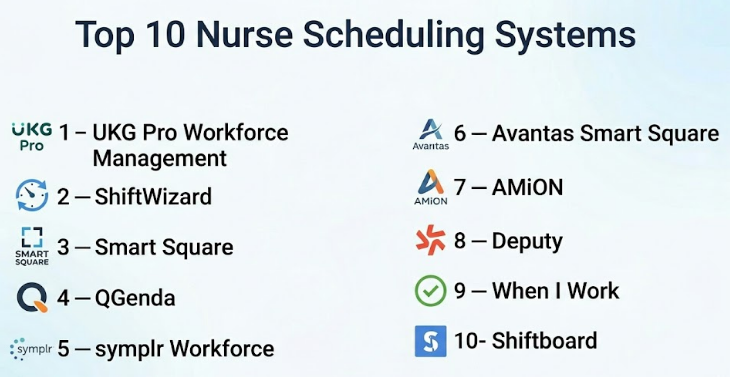
| UKG Pro Workforce Management | Large hospitals and health systems | Web / iOS / Android / Varies | Cloud / Hybrid / Varies | Enterprise workforce management with scheduling and timekeeping | N/A |
| ShiftWizard | Nurse-focused scheduling | Web / iOS / Android / Varies | Cloud / Varies | Self-scheduling and nurse shift visibility | N/A |
| Smart Square | Healthcare staffing optimization | Web / Mobile / Varies | Cloud / Varies | Demand-based staffing and workforce analytics | N/A |
| QGenda | Healthcare workforce scheduling | Web / iOS / Android / Varies | Cloud | Multi-role clinical scheduling visibility | N/A |
| symplr Workforce | Healthcare labor and staffing management | Web / Mobile / Varies | Cloud / Varies | Workforce productivity and staffing visibility | N/A |
| Avantas Smart Square | Data-driven nurse staffing | Web / Mobile / Varies | Cloud / Varies | Forecasting and demand-based scheduling | N/A |
| AMiON | Clinical on-call and department schedules | Web / iOS / Android / Varies | Cloud / Varies | Simple clinical schedule sharing | N/A |
| Deputy | Small healthcare team scheduling | Web / iOS / Android | Cloud | Easy scheduling with time tracking | N/A |
| When I Work | Simple clinic and care team scheduling | Web / iOS / Android | Cloud | Easy shift scheduling and team messaging | N/A |
| Shiftboard | Complex shift-based workforce scheduling | Web / iOS / Android / Varies | Cloud | Rule-based shift scheduling and workforce availability | N/A |
Evaluation & Nurse Scheduling Systems
| Tool Name | Core (25%) | Ease (15%) | Integrations (15%) | Security (10%) | Performance (10%) | Support (10%) | Value (15%) | Weighted Total |
|---|---|---|---|---|---|---|---|---|
| UKG Pro Workforce Management | 9 | 7 | 9 | 8 | 8 | 8 | 7 | 8.15 |
| ShiftWizard | 8 | 8 | 7 | 7 | 8 | 8 | 8 | 7.75 |
| Smart Square | 9 | 7 | 8 | 7 | 8 | 8 | 7 | 7.85 |
| QGenda | 8 | 8 | 8 | 7 | 8 | 8 | 7 | 7.80 |
| symplr Workforce | 8 | 7 | 8 | 7 | 8 | 8 | 7 | 7.65 |
| Avantas Smart Square | 8 | 7 | 8 | 7 | 8 | 8 | 7 | 7.65 |
| AMiON | 7 | 8 | 6 | 6 | 7 | 7 | 8 | 7.00 |
| Deputy | 7 | 9 | 7 | 7 | 8 | 8 | 9 | 7.75 |
| When I Work | 7 | 9 | 7 | 6 | 8 | 8 | 9 | 7.65 |
| Shiftboard | 8 | 8 | 7 | 7 | 8 | 7 | 8 | 7.60 |
These scores are comparative and should be used as a starting point, not a final ranking. Enterprise platforms usually score higher on integrations, workforce depth, and scalability, while simpler scheduling tools may score better on ease of use and value. A smaller clinic may get more practical benefit from Deputy or When I Work than from a large hospital workforce platform. Hospitals should validate rules, shift complexity, payroll needs, security, mobile adoption, and reporting before choosing.
Which Nurse Scheduling System Should You Choose?
Solo / Freelancer
Solo healthcare consultants, independent nurse managers, or small advisory teams usually do not need a full workforce management platform. They may use simple scheduling tools, spreadsheets, or calendar-based workflows for small teams. If a formal tool is needed, AMiON, Deputy, When I Work, or Shiftboard may be easier to evaluate for smaller scheduling projects.
SMB
Small clinics, home healthcare agencies, senior care providers, and small nursing teams should focus on ease of use, mobile access, time-off requests, shift swaps, and basic time tracking. Deputy and When I Work are practical options for simple scheduling. ShiftWizard or Shiftboard may be better if the team needs more healthcare-focused shift management.
Mid-Market
Mid-sized hospitals, specialty care centers, and growing healthcare organizations need stronger scheduling rules, overtime visibility, integrations, staffing dashboards, and mobile workflows. ShiftWizard, QGenda, symplr Workforce, Smart Square, and Avantas Smart Square can be strong options depending on scheduling complexity and workforce planning needs.
Enterprise
Large hospitals and health systems need advanced workforce planning, scheduling governance, payroll integration, compliance rules, demand forecasting, analytics, and multi-site scalability. UKG Pro Workforce Management, Smart Square, symplr Workforce, Avantas Smart Square, and QGenda are stronger enterprise options. These systems should be evaluated with HR, nursing leadership, payroll, finance, IT, and operations teams.
Budget vs Premium
Budget-focused teams should avoid buying a large workforce suite if they only need shift calendars and time-off management. Simple tools can work well for smaller teams. Premium buyers should focus on demand forecasting, overtime controls, float pool management, labor analytics, payroll integration, and enterprise-grade support.
Feature Depth vs Ease of Use
Basic scheduling tools are easier to adopt but may not handle complex nurse staffing rules, fatigue controls, union rules, skill mix, or float pool management. Enterprise systems offer deeper features but require more setup, training, and change management. The right balance depends on staff size, scheduling complexity, and compliance needs.
Integrations & Scalability
Nurse scheduling systems should ideally connect with payroll, HRIS, timekeeping, EHR, staffing analytics, communication tools, and labor reporting systems. Scalability matters because scheduling needs become more complex as organizations add units, sites, roles, float pools, and agency staff.
Security & Compliance Needs
Healthcare organizations should review role-based access, audit logs, authentication, mobile access control, data retention, encryption, and user permissions. Scheduling systems may include employee data and sometimes patient-related staffing context, so security review is important before implementation.
Frequently Asked Questions
1. What is a Nurse Scheduling System?
A Nurse Scheduling System is software that helps healthcare organizations create, manage, and update nurse shift schedules. It can handle shift assignments, availability, time-off requests, open shifts, overtime, mobile access, and staffing visibility.
2. Why do hospitals need nurse scheduling software?
Hospitals need nurse scheduling software because manual scheduling is time-consuming and error-prone. A good system helps reduce staffing gaps, manage overtime, improve fairness, and give nurse managers better visibility into coverage.
3. What is nurse self-scheduling?
Nurse self-scheduling allows nurses to choose preferred shifts within approved staffing rules. Managers still control coverage, fairness, skill mix, and compliance, but staff get more flexibility and visibility.
4. Can nurse scheduling systems reduce overtime?
Yes, many systems help managers see overtime risk before schedules are finalized. They can also show open shifts, staffing gaps, and labor patterns so leaders can make better decisions.
5. How much does nurse scheduling software cost?
Pricing varies based on users, locations, modules, integrations, support level, and enterprise requirements. Small tools may use subscription pricing, while enterprise healthcare workforce systems often use custom pricing.
6. How long does implementation take?
Implementation depends on staff size, scheduling rules, integrations, payroll setup, historical data, and training needs. Simple tools may be adopted faster, while enterprise workforce platforms require more planning.
7. What common mistakes should buyers avoid?
Common mistakes include choosing a tool without mapping scheduling rules, ignoring nurse preferences, skipping payroll integration review, underestimating training needs, and failing to involve nurse managers early.
8. Can these systems integrate with payroll?
Many nurse scheduling systems can integrate with payroll or timekeeping systems, but integration depth varies. Buyers should validate payroll rules, overtime calculations, approval workflows, and export formats before purchase.
9. Are mobile apps important for nurse scheduling?
Yes, mobile access is very important because nurses often need to view shifts, request time off, swap shifts, accept open shifts, and receive schedule changes while away from a desktop computer.
10. Can scheduling tools support skill-based staffing?
Some tools support skill-based scheduling, certifications, unit qualifications, and role requirements. Buyers should confirm whether the system can handle specialty units, ICU coverage, emergency department staffing, and float pool rules.
Conclusion
Nurse Scheduling Systems help healthcare organizations manage one of their most important operational challenges: placing the right staff in the right shift at the right time while balancing patient care, employee preferences, overtime, compliance, and labor costs. The best system depends on organization size, scheduling complexity, payroll requirements, mobile adoption, workforce analytics needs, and budget. UKG, Smart Square, symplr Workforce, Avantas Smart Square, and QGenda are stronger for enterprise healthcare workforce planning. ShiftWizard is a strong nurse-focused option, while AMiON can work well for simpler clinical schedules.
