Introduction
Asset Inspection Apps help organizations inspect, document, monitor, and maintain physical assets using mobile devices, digital forms, photos, checklists, GPS data, signatures, and structured reports. In simple words, these apps allow field teams, maintenance teams, safety teams, and operations teams to check equipment, buildings, vehicles, machines, facilities, tools, infrastructure, and other assets without relying on paper forms or scattered spreadsheets.
Asset inspection is important because physical assets must be safe, reliable, compliant, and ready for use. A missed inspection can lead to equipment failure, safety incidents, downtime, repair delays, customer complaints, and compliance risks. Asset inspection apps help teams standardize inspections, collect proof, assign follow-up actions, track issues, and maintain inspection history.
Common use cases include equipment inspections, vehicle inspections, facility audits, safety checks, preventive maintenance, construction site inspections, fire safety checks, utility asset inspections, machinery checks, property inspections, warehouse audits, and compliance reporting.
Buyers should evaluate mobile usability, offline access, checklist builder, photo capture, GPS tagging, barcode or QR scanning, issue tracking, corrective actions, asset history, reporting, workflow automation, integrations, permissions, security, and scalability.
Best for: maintenance teams, facilities managers, safety officers, field inspectors, construction teams, utilities, manufacturing plants, logistics teams, property managers, government teams, telecom teams, energy companies, and organizations that inspect physical assets regularly.
Not ideal for: teams with very few assets, businesses that only need occasional visual checks, or organizations that already manage inspections effectively with a simple checklist and do not need digital records, audit history, photos, or reporting.
Key Trends in Asset Inspection Apps
- Mobile-first inspections are becoming standard, allowing inspectors to complete checklists, attach photos, scan asset tags, and submit reports directly from the field.
- Offline inspection capability is now important, especially for teams working in plants, basements, remote sites, construction areas, industrial zones, and locations with weak connectivity.
- QR code and barcode scanning are growing, helping teams quickly identify assets and open the correct inspection checklist.
- Photo and video proof is becoming essential, especially for safety inspections, equipment damage, property condition reports, and maintenance verification.
- Corrective action tracking is becoming more important, because inspection findings must lead to repairs, follow-ups, approvals, or work orders.
- Preventive maintenance workflows are merging with inspections, helping teams inspect assets before failures happen and reduce unplanned downtime.
- GPS and location tagging are improving field accountability, especially for infrastructure, utilities, construction, logistics, and remote asset inspections.
- Inspection analytics are becoming more valuable, helping managers identify recurring failures, high-risk assets, overdue inspections, and team performance gaps.
- Integration with CMMS, EAM, and field service tools is expected, because inspection data should connect with maintenance planning, asset records, and work orders.
- AI-assisted inspection is emerging, helping teams summarize inspection notes, identify anomalies, classify images, and recommend corrective actions.
How We Selected These Tools
The tools below were selected using practical business-focused evaluation logic.
- Market recognition: Tools known in asset inspection, maintenance, mobile forms, safety inspections, field audits, and asset management were prioritized.
- Feature completeness: Inspection checklists, mobile forms, offline access, photos, signatures, QR scanning, issue tracking, and reporting were reviewed.
- Asset workflow fit: Tools that connect inspections with asset records, preventive maintenance, corrective actions, and work orders were given stronger consideration.
- Mobile usability: Field teams need apps that are simple, fast, and reliable on phones or tablets.
- Reporting value: Inspection reports, dashboards, audit history, export options, and analytics were considered important.
- Integration ecosystem: CMMS, EAM, ERP, cloud storage, BI tools, work order systems, and automation platforms were reviewed.
- Security and governance: User roles, permissions, audit trails, data retention, and mobile data protection were considered.
- Scalability: Tools suitable for small teams, mid-market companies, and enterprise inspection programs were included.
- Customer fit: The list includes tools for maintenance, safety, construction, manufacturing, facilities, field service, and asset-heavy industries.
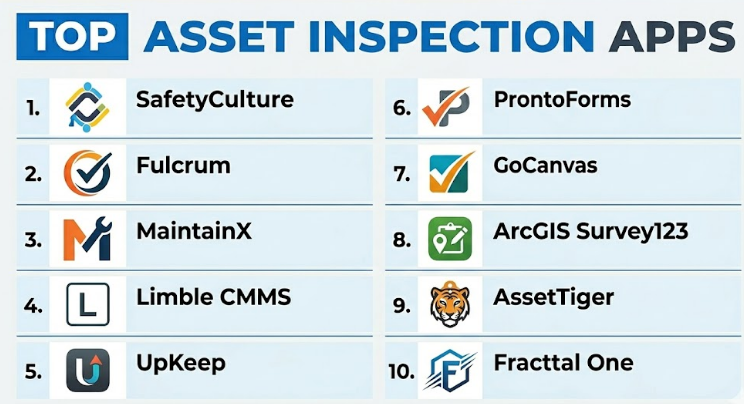
Top 10 Asset Inspection Apps
#1 — SafetyCulture
Short description :
SafetyCulture is a mobile inspection and operations platform used for checklists, audits, safety inspections, asset inspections, issue reporting, and corrective actions. It helps teams replace paper inspection forms with mobile checklists that include photos, notes, signatures, and automated reports. SafetyCulture is useful for manufacturing, construction, facilities, logistics, hospitality, retail, healthcare-adjacent operations, and field teams. It supports recurring inspections, issue tracking, templates, and team visibility. It is best for organizations that need a flexible inspection app for safety, quality, and asset checks.
Key Features
- Mobile inspection checklists.
- Photo, note, and signature capture.
- Issue and corrective action tracking.
- Template library.
- Scheduled inspections.
- Reporting dashboards.
- Team and permission controls.
Pros
- Easy to use for many inspection types.
- Strong template and checklist experience.
- Useful for safety, quality, and asset inspection workflows.
Cons
- May need configuration for complex asset maintenance workflows.
- Advanced integrations may require higher plans.
- Asset-heavy teams may still need a dedicated CMMS or EAM system.
Platforms / Deployment
Web / iOS / Android
Cloud
Security & Compliance
Supports user permissions, admin controls, inspection records, and audit-style reporting depending on plan. Specific compliance details should be validated directly with the vendor.
Integrations & Ecosystem
SafetyCulture connects inspection workflows with operations and reporting systems.
- Cloud storage workflows.
- Business reporting tools.
- Task and corrective action workflows.
- Mobile field operations.
- Safety and quality processes.
- Automation workflows.
Support & Community
SafetyCulture provides documentation, templates, onboarding resources, and customer support. It is practical for teams digitizing inspections and audits.
#2 — Fulcrum
Short description :
Fulcrum is a field data collection and inspection platform designed for teams that inspect assets, infrastructure, utilities, facilities, construction sites, and environmental conditions. It supports offline mobile forms, GPS capture, photos, maps, custom inspection workflows, and structured field data collection. Fulcrum is especially useful for teams that need location-based asset inspection and field reporting. It is suitable for utilities, engineering teams, environmental teams, government agencies, telecom, and operations teams. It is best for organizations that inspect assets across many field locations.
Key Features
- Mobile asset inspection forms.
- Offline data collection.
- GPS and map-based capture.
- Photo and media attachments.
- Custom form logic.
- Field assignment workflows.
- Data exports and integrations.
Pros
- Strong for location-based field inspections.
- Good offline capability for remote sites.
- Useful for infrastructure and asset-heavy teams.
Cons
- May require planning for form and data structure.
- Not a full enterprise asset management system by itself.
- Advanced reporting may require integrations.
Platforms / Deployment
Web / iOS / Android
Cloud
Security & Compliance
Supports user permissions, business account controls, and field data management features depending on plan. Specific compliance details should be validated directly with the vendor.
Integrations & Ecosystem
Fulcrum connects asset inspection data with operational systems.
- GIS and mapping workflows.
- Cloud storage.
- Databases.
- Reporting tools.
- APIs and data exports.
- Field operations systems.
Support & Community
Fulcrum provides documentation, customer support, onboarding guidance, and field data collection resources. It is suitable for field-heavy inspection programs.
#3 — MaintainX
Short description :
MaintainX is a maintenance and operations platform that helps teams manage inspections, work orders, preventive maintenance, assets, procedures, and team communication. It is useful for manufacturing plants, facilities teams, restaurants, hotels, logistics operations, property teams, and industrial maintenance groups. MaintainX allows teams to create recurring inspection checklists, attach photos, track issues, assign work, and maintain asset history. It is best for organizations that want asset inspections directly connected to maintenance and work order management.
Key Features
- Asset inspection checklists.
- Work order management.
- Preventive maintenance scheduling.
- Asset records and history.
- Mobile app for technicians.
- Photo and comment capture.
- Team messaging and task tracking.
Pros
- Strong connection between inspections and maintenance work.
- Easy mobile experience for frontline teams.
- Useful for recurring checks and asset history.
Cons
- May not be ideal for highly specialized enterprise EAM needs.
- Complex asset hierarchies may require careful setup.
- Advanced reporting needs should be validated.
Platforms / Deployment
Web / iOS / Android
Cloud
Security & Compliance
Supports user permissions, maintenance records, asset data controls, and admin features depending on plan. Specific compliance details should be validated directly with the vendor.
Integrations & Ecosystem
MaintainX connects asset inspections with maintenance operations.
- Work order workflows.
- Preventive maintenance.
- Asset records.
- Team communication.
- Reporting dashboards.
- Business system integrations.
Support & Community
MaintainX provides documentation, onboarding, customer support, and maintenance workflow resources. It is practical for teams moving from paper maintenance logs to mobile inspection workflows.
#4 — Limble CMMS
Short description :
Limble CMMS is a computerized maintenance management system that supports asset inspections, preventive maintenance, work orders, parts management, maintenance schedules, and reporting. It helps maintenance teams inspect assets, track conditions, assign corrective work, and maintain asset service history. Limble is useful for manufacturing, facilities, utilities, education, property management, and industrial operations. It is especially strong when inspections must connect with maintenance planning and asset lifecycle management. It is best for teams that need CMMS capabilities with mobile inspection workflows.
Key Features
- Asset inspection checklists.
- Work order management.
- Preventive maintenance scheduling.
- Asset history and records.
- Mobile technician app.
- Parts and inventory tracking.
- Maintenance reporting.
Pros
- Strong maintenance and asset management focus.
- Good for inspections tied to corrective work.
- Useful for asset-heavy operations.
Cons
- More CMMS-focused than general mobile forms.
- Implementation requires asset data setup.
- May be more than teams need for simple inspections only.
Platforms / Deployment
Web / iOS / Android
Cloud
Security & Compliance
Supports user permissions, maintenance records, asset controls, and administrative features depending on plan. Specific compliance details should be validated directly with the vendor.
Integrations & Ecosystem
Limble connects inspections with broader maintenance operations.
- Asset management.
- Preventive maintenance.
- Work orders.
- Inventory workflows.
- Reporting dashboards.
- Business system integrations.
Support & Community
Limble provides onboarding, customer support, documentation, and maintenance management guidance. It is well suited for maintenance teams that need structured asset inspection and repair workflows.
#5 — UpKeep
Short description :
UpKeep is a maintenance management platform that supports mobile inspections, asset management, preventive maintenance, work orders, inventory, and maintenance reporting. It helps teams inspect equipment, create work orders from inspection findings, track asset history, and manage maintenance from mobile devices. UpKeep is useful for facilities, manufacturing, property management, hospitality, education, and operations teams. It is best for organizations that want asset inspection capabilities inside a broader mobile-first maintenance platform.
Key Features
- Mobile inspections and checklists.
- Work order management.
- Asset records and maintenance history.
- Preventive maintenance scheduling.
- Inventory and parts tracking.
- Photo and file attachments.
- Reporting and analytics.
Pros
- Good mobile-first maintenance experience.
- Useful for connecting inspections to work orders.
- Strong fit for maintenance and facilities teams.
Cons
- May require setup effort for asset hierarchy and workflows.
- Some advanced enterprise features may depend on plan.
- Not mainly a survey-style inspection tool.
Platforms / Deployment
Web / iOS / Android
Cloud
Security & Compliance
Supports user access controls, asset records, maintenance history, and admin management depending on plan. Specific compliance details should be validated directly with the vendor.
Integrations & Ecosystem
UpKeep connects inspections with maintenance and operations workflows.
- Work orders.
- Preventive maintenance.
- Asset management.
- Inventory workflows.
- Team communication.
- Reporting systems.
Support & Community
UpKeep provides documentation, onboarding resources, customer support, and maintenance workflow education. It is practical for teams modernizing maintenance inspection processes.
#6 — ProntoForms
Short description :
ProntoForms is a mobile forms and workflow platform used by field teams to complete inspections, audits, service reports, checklists, and compliance forms. It is useful for utilities, construction, manufacturing, field service, telecom, facilities, and safety teams. ProntoForms supports offline data collection, conditional logic, photos, barcode capture, workflows, and enterprise integrations. It is especially useful when asset inspections require structured mobile forms and data routing into business systems. It is best for enterprise field teams that need advanced mobile inspection workflows.
Key Features
- Mobile inspection forms.
- Offline data capture.
- Conditional logic.
- Photo, barcode, and signature capture.
- Workflow automation.
- Enterprise integrations.
- Reporting and analytics.
Pros
- Strong for structured field inspection workflows.
- Good enterprise integration capabilities.
- Useful for complex mobile data collection.
Cons
- Not a full CMMS by itself.
- Setup requires form and process design.
- May be more advanced than simple checklist needs.
Platforms / Deployment
Web / iOS / Android
Cloud
Security & Compliance
Supports user permissions, mobile data controls, workflow governance, and business security features depending on plan. Specific compliance details should be validated directly with the vendor.
Integrations & Ecosystem
ProntoForms connects inspection data with enterprise workflows.
- Field service systems.
- CRM platforms.
- ERP workflows.
- Cloud storage.
- Reporting tools.
- APIs and enterprise integrations.
Support & Community
ProntoForms provides documentation, onboarding, customer support, and implementation guidance. It is suitable for teams with complex mobile inspection needs.
#7 — GoCanvas
Short description :
GoCanvas is a mobile forms and field workflow app that helps teams replace paper inspection forms with digital checklists, reports, audits, and service records. It allows users to capture photos, signatures, GPS data, notes, and structured responses from mobile devices. GoCanvas is useful for construction, facilities, logistics, maintenance, safety, inspections, and compliance workflows. It can generate professional reports from inspection submissions. It is best for teams that need easy mobile asset inspection forms and paperless reporting.
Key Features
- Mobile inspection forms.
- Offline data collection.
- Photo and signature capture.
- GPS data capture.
- PDF report generation.
- Work order and checklist templates.
- Field workflow support.
Pros
- Strong for paperless inspections and reports.
- Easy for field teams to collect structured data.
- Good for photos, signatures, and proof of inspection.
Cons
- Not a full asset lifecycle management platform.
- Complex maintenance workflows may require integration.
- Form quality depends on setup and template design.
Platforms / Deployment
Web / iOS / Android
Cloud
Security & Compliance
Supports user controls, mobile form data management, and business security features depending on plan. Specific compliance details should be validated directly with the vendor.
Integrations & Ecosystem
GoCanvas connects mobile inspections with business workflows.
- Cloud storage.
- CRM and operations systems.
- Work order processes.
- Reporting tools.
- Email notifications.
- APIs and integrations.
Support & Community
GoCanvas provides templates, documentation, onboarding, and support resources. It is practical for teams replacing paper-based inspection processes.
#8 — ArcGIS Survey123
Short description :
ArcGIS Survey123 is a form-based mobile data collection app designed for location-based inspections and GIS-connected workflows. It allows teams to inspect assets, collect GPS data, attach photos, complete forms, and connect results with maps and spatial datasets. It is useful for utilities, government agencies, environmental teams, public works, telecom, infrastructure teams, and emergency response groups. Survey123 is especially strong when asset inspections need map-based visibility and geographic context. It is best for organizations that rely on GIS for asset inspections.
Key Features
- GIS-connected inspection forms.
- GPS and map-based asset data.
- Offline mobile collection.
- Photo and signature capture.
- Form logic and validation.
- Spatial data integration.
- Field dashboards and map workflows.
Pros
- Excellent for map-based asset inspections.
- Strong fit for utilities, public works, and infrastructure.
- Useful for GIS-connected field operations.
Cons
- Best value depends on GIS ecosystem adoption.
- May be more complex than simple inspection apps.
- Non-GIS teams may prefer easier checklist tools.
Platforms / Deployment
Web / iOS / Android
Cloud / Enterprise GIS deployment options vary
Security & Compliance
Security depends on GIS platform configuration, user permissions, and deployment model. Specific compliance details should be validated according to organizational setup.
Integrations & Ecosystem
ArcGIS Survey123 connects inspection data with spatial and operational workflows.
- GIS maps.
- Spatial databases.
- Field operations dashboards.
- Offline map workflows.
- Public works systems.
- Environmental data workflows.
Support & Community
ArcGIS Survey123 has documentation, training resources, enterprise support options, and a strong GIS user community. It is best for location-driven inspection programs.
#9 — AssetTiger
Short description :
AssetTiger is an asset tracking platform that helps organizations manage asset records, barcode labels, check-in/check-out workflows, maintenance records, and asset history. While it is more asset tracking-focused than inspection-first, it can support asset audits and basic inspection-style workflows for teams that need visibility into equipment and property. AssetTiger is useful for schools, nonprofits, IT teams, offices, equipment managers, and small businesses managing physical assets. It is best for teams that need affordable asset tracking with basic inspection and audit support.
Key Features
- Asset tracking.
- Barcode and QR code support.
- Asset history records.
- Maintenance tracking.
- Check-in/check-out workflows.
- Audit and reporting features.
- Mobile app support.
Pros
- Good for asset inventory and tracking.
- Useful for barcode-based asset audits.
- Practical for smaller teams with basic asset needs.
Cons
- Not as inspection-heavy as dedicated inspection apps.
- Advanced maintenance workflows may be limited.
- Complex field inspections may require another tool.
Platforms / Deployment
Web / iOS / Android
Cloud
Security & Compliance
Supports asset records, user access, and administrative controls depending on plan. Specific security and compliance details should be validated directly with the vendor.
Integrations & Ecosystem
AssetTiger connects asset records with tracking and audit workflows.
- Barcode labels.
- Asset inventories.
- Maintenance records.
- Check-in/check-out workflows.
- Reporting dashboards.
- Mobile asset updates.
Support & Community
AssetTiger provides documentation, support resources, and asset tracking guidance. It is practical for organizations that need asset visibility before advanced inspection workflows.
#10 — Fracttal One
Short description :
Fracttal One is an intelligent maintenance management platform that supports asset inspections, work orders, preventive maintenance, condition monitoring, inventory, and asset performance visibility. It helps maintenance teams inspect assets, report failures, schedule service, track performance, and manage maintenance operations. Fracttal One is useful for manufacturing, facilities, energy, healthcare-adjacent operations, logistics, and asset-heavy organizations. It is best for teams that want asset inspections connected with maintenance management, reliability, and operational analytics.
Key Features
- Asset inspection workflows.
- Work order management.
- Preventive maintenance.
- Asset history and condition tracking.
- Mobile app for field teams.
- Inventory and spare parts workflows.
- Maintenance dashboards.
Pros
- Strong for maintenance-connected asset inspections.
- Useful for reliability and asset performance tracking.
- Good fit for asset-heavy operations.
Cons
- May be more advanced than simple checklist needs.
- Implementation requires asset and workflow setup.
- Integration requirements should be validated.
Platforms / Deployment
Web / iOS / Android
Cloud
Security & Compliance
Supports user permissions, maintenance records, asset data controls, and administrative features depending on plan. Specific compliance details should be validated directly with the vendor.
Integrations & Ecosystem
Fracttal One connects inspections with maintenance and asset reliability workflows.
- Work order systems.
- Preventive maintenance.
- Inventory management.
- Asset performance monitoring.
- Reporting dashboards.
- Business system integrations.
Support & Community
Fracttal provides documentation, onboarding support, customer resources, and maintenance management guidance. It is suitable for teams building stronger digital maintenance operations.
Comparison Table
| Tool Name | Best For | Platform(s) Supported | Deployment | Standout Feature | Public Rating |
|---|---|---|---|---|---|
| SafetyCulture | Safety, quality, and asset inspections | Web / iOS / Android | Cloud | Flexible mobile checklists and corrective actions | N/A |
| Fulcrum | Location-based field asset inspections | Web / iOS / Android | Cloud | GPS and map-based field data collection | N/A |
| MaintainX | Maintenance-connected inspections | Web / iOS / Android | Cloud | Inspections linked with work orders and asset history | N/A |
| Limble CMMS | CMMS-based asset inspection workflows | Web / iOS / Android | Cloud | Preventive maintenance and asset records | N/A |
| UpKeep | Mobile-first maintenance inspections | Web / iOS / Android | Cloud | Mobile inspections with work order creation | N/A |
| ProntoForms | Enterprise mobile inspection forms | Web / iOS / Android | Cloud | Advanced mobile forms and enterprise integrations | N/A |
| GoCanvas | Paperless field inspection reports | Web / iOS / Android | Cloud | Mobile forms with photos, signatures, and reports | N/A |
| ArcGIS Survey123 | GIS-based asset inspections | Web / iOS / Android | Cloud / Enterprise varies | Inspections connected with maps and spatial data | N/A |
| AssetTiger | Asset tracking and basic audits | Web / iOS / Android | Cloud | Barcode-based asset tracking and audit records | N/A |
| Fracttal One | Asset maintenance and reliability inspections | Web / iOS / Android | Cloud | Inspections connected with maintenance analytics | N/A |
Evaluation & Asset Inspection Apps
| Tool Name | Core (25%) | Ease (15%) | Integrations (15%) | Security (10%) | Performance (10%) | Support (10%) | Value (15%) | Weighted Total (0–10) |
|---|---|---|---|---|---|---|---|---|
| SafetyCulture | 9 | 9 | 8 | 8 | 8 | 8 | 8 | 8.40 |
| Fulcrum | 9 | 8 | 8 | 8 | 9 | 8 | 8 | 8.35 |
| MaintainX | 9 | 9 | 8 | 8 | 8 | 8 | 9 | 8.55 |
| Limble CMMS | 9 | 8 | 8 | 8 | 8 | 9 | 8 | 8.35 |
| UpKeep | 9 | 8 | 8 | 8 | 8 | 8 | 8 | 8.25 |
| ProntoForms | 9 | 7 | 9 | 9 | 8 | 8 | 7 | 8.20 |
| GoCanvas | 8 | 8 | 8 | 8 | 8 | 8 | 8 | 8.00 |
| ArcGIS Survey123 | 9 | 7 | 10 | 9 | 9 | 9 | 7 | 8.55 |
| AssetTiger | 7 | 8 | 7 | 8 | 8 | 8 | 9 | 7.85 |
| Fracttal One | 9 | 8 | 8 | 8 | 8 | 8 | 8 | 8.25 |
These scores are comparative and should be used as a practical guide, not a fixed ranking. MaintainX, Limble, UpKeep, and Fracttal One are strong when asset inspections must connect with maintenance and work orders. SafetyCulture, GoCanvas, and ProntoForms are strong for mobile checklists and inspection forms. Fulcrum and ArcGIS Survey123 are better for location-based and GIS-connected inspections. AssetTiger is practical for asset tracking and basic audit workflows.
Which Asset Inspection Apps
Solo / Freelancer
Solo professionals usually need an app that is easy to use, affordable, and mobile-friendly. SafetyCulture, GoCanvas, AssetTiger, and Jotform-style mobile forms may be enough for basic asset inspections.
A solo inspector, consultant, or property manager should focus on checklist creation, photo capture, PDF reports, offline access, and simple asset records. A full CMMS may be unnecessary unless recurring maintenance is part of the work.
SMB
Small and medium businesses should focus on mobile inspections, asset history, issue tracking, and simple reporting. MaintainX, UpKeep, SafetyCulture, GoCanvas, and AssetTiger are practical options.
If the business mainly needs checklists and inspection reports, SafetyCulture or GoCanvas may work well. If inspections often create maintenance tasks, MaintainX or UpKeep may be better.
Mid-Market
Mid-market organizations usually need stronger workflow control, asset records, recurring inspections, corrective actions, reporting dashboards, and integrations. MaintainX, Limble CMMS, UpKeep, Fulcrum, and ProntoForms are strong candidates.
At this stage, teams should define inspection frequency, asset categories, issue severity, approval workflows, reporting needs, and integration points with maintenance or operations tools.
Enterprise
Enterprises should prioritize scalability, security, permissions, audit trails, offline reliability, asset hierarchy, maintenance integration, analytics, and governance. ArcGIS Survey123, ProntoForms, Limble CMMS, Fracttal One, Fulcrum, and MaintainX may be relevant depending on asset type and operational complexity.
Large organizations should involve maintenance leaders, operations, IT, safety teams, compliance, facilities, and field managers before standardizing inspection workflows.
Budget vs Premium
Budget-conscious teams may prefer AssetTiger, SafetyCulture, GoCanvas, or lightweight mobile form tools if inspection needs are simple.
Premium platforms such as ProntoForms, ArcGIS Survey123, Limble CMMS, Fracttal One, and enterprise-grade Fulcrum are better when organizations need offline reliability, GIS, maintenance workflows, asset hierarchy, integrations, and detailed reporting.
Feature Depth vs Ease of Use
If ease of use matters most, SafetyCulture, MaintainX, GoCanvas, and AssetTiger are practical choices. They help teams start digital inspections quickly.
If feature depth matters more, Limble CMMS, ProntoForms, ArcGIS Survey123, Fulcrum, and Fracttal One provide stronger support for complex assets, workflows, GIS data, maintenance planning, and enterprise reporting.
Integrations & Scalability
Asset inspection apps should integrate with CMMS, EAM, ERP, GIS, field service systems, cloud storage, reporting tools, BI platforms, and workflow automation tools.
For maintenance-first workflows, MaintainX, Limble, UpKeep, and Fracttal One are strong. For location-based inspections, Fulcrum and ArcGIS Survey123 are better. For general mobile inspections, SafetyCulture, GoCanvas, and ProntoForms are useful.
Security & Compliance Needs
Asset inspection apps may store photos, GPS data, inspection notes, safety findings, equipment records, customer locations, signatures, compliance evidence, and maintenance history.
Buyers should validate user permissions, role-based access, encryption, offline data storage, audit logs, data retention, mobile device security, export controls, and compliance suitability before rollout.
Frequently Asked Questions
1. What is an Asset Inspection App?
An Asset Inspection App helps teams inspect physical assets using mobile devices. It allows users to complete checklists, capture photos, add notes, scan asset tags, record GPS location, create reports, and track issues digitally.
2. How is an asset inspection app different from a normal form builder?
A normal form builder collects responses. An asset inspection app is designed around physical assets, inspection checklists, recurring checks, photo proof, corrective actions, asset history, and field workflows. Some form builders can support inspections, but dedicated tools usually provide stronger operational features.
3. What pricing models are common for Asset Inspection Apps?
Pricing may be based on users, assets, inspections, forms, locations, storage, features, integrations, or enterprise plans. CMMS-based tools may price by maintenance users, while mobile form tools may price by form submissions or team size.
4. What are common mistakes when choosing an asset inspection app?
Common mistakes include choosing a tool without testing mobile usability, ignoring offline needs, failing to define asset categories, not standardizing checklists, and not linking inspection failures to corrective actions. Another mistake is collecting photos and GPS data without clear data policies.
5. Which app is best for simple asset inspections?
SafetyCulture, GoCanvas, AssetTiger, and MaintainX can be practical for simple asset inspections. The best choice depends on whether the team needs checklists, photos, reports, asset tracking, or maintenance follow-up.
6. Which app is best for maintenance-connected inspections?
MaintainX, Limble CMMS, UpKeep, and Fracttal One are strong options for maintenance-connected inspections. They help teams turn inspection findings into work orders, preventive maintenance tasks, and asset history records.
7. Which app is best for GIS-based asset inspections?
ArcGIS Survey123 and Fulcrum are strong for GIS-based or location-heavy asset inspections. They are useful for utilities, infrastructure teams, public works, environmental teams, telecom, and field teams that need map-based asset data.
8. Can Asset Inspection Apps work offline?
Yes, many asset inspection apps support offline data collection. Offline access is important for remote sites, industrial locations, basements, plants, rural areas, and facilities with weak internet. Buyers should test offline sync before deployment.
9. Can these apps capture photos and signatures?
Yes, most modern asset inspection apps support photo capture, signatures, notes, timestamps, and sometimes video or barcode scanning. These features help create proof of inspection and improve accountability.
10. Are Asset Inspection Apps secure?
They can be secure when configured correctly. Buyers should review user permissions, encryption, mobile storage, offline data handling, audit logs, access controls, and data retention policies before using the app for sensitive inspections.
Conclusion
Asset Inspection Apps help organizations move from paper-based checks to structured, mobile, and accountable inspection workflows. They make it easier to inspect equipment, facilities, vehicles, infrastructure, buildings, tools, and operational assets while capturing proof through photos, signatures, GPS, notes, and reports. The best app depends on the inspection environment. SafetyCulture, GoCanvas, and ProntoForms are strong for mobile checklists and field reports. MaintainX, Limble CMMS, UpKeep, and Fracttal One are better when inspections must connect with maintenance and work orders.
