Introduction
Scheduling Assistants help individuals and teams book meetings, manage availability, reduce calendar conflicts, and automate appointment coordination. In simple words, these tools remove the back-and-forth messages usually needed to find a suitable meeting time. Instead of asking, “Are you free tomorrow?” users can share availability, let invitees choose a slot, and automatically create calendar events.
Scheduling assistants matter because modern work involves remote teams, clients, sales calls, interviews, demos, support sessions, coaching calls, internal meetings, and cross-time-zone collaboration. Without proper scheduling automation, teams lose time, miss meetings, double-book calendars, or create a poor experience for customers and candidates.
Common use cases include sales demo booking, customer onboarding calls, recruitment interviews, coaching sessions, consulting appointments, internal one-on-ones, support scheduling, class bookings, and team availability coordination.
Buyers should evaluate calendar integrations, booking page customization, routing logic, team scheduling, time-zone handling, reminders, payment support, CRM integrations, workflow automation, security controls, mobile experience, and reporting.
Best for: sales teams, recruiters, consultants, coaches, customer success teams, support teams, founders, freelancers, educators, agencies, healthcare-adjacent service providers, and any team that schedules many meetings.
Not ideal for: users who only schedule a few informal meetings, teams that already manage appointments inside a dedicated industry platform, or organizations where all scheduling must happen manually through an internal coordinator.
Key Trends in Scheduling Assistants
- AI-assisted scheduling is becoming more common, helping users find meeting times, protect focus blocks, reschedule automatically, and reduce calendar overload.
- Calendar automation is moving beyond simple booking links, with tools supporting routing, qualification, reminders, workflows, payments, and CRM updates.
- Sales and revenue teams now expect routing logic, so leads can be assigned to the right person based on region, account owner, language, priority, or deal stage.
- Candidate scheduling is becoming more automated, helping recruiting teams coordinate interviews across hiring managers, interview panels, and time zones.
- Focus time protection is becoming important, especially for remote workers, executives, product teams, and engineers who need uninterrupted work blocks.
- Team scheduling is a major buying factor, including round-robin booking, collective availability, pooled availability, and group scheduling.
- No-show reduction features are gaining importance, including automated reminders, confirmations, rescheduling links, and follow-up workflows.
- Calendar integrations are expected by default, especially with Google Calendar, Microsoft Outlook, Microsoft 365, and Apple Calendar workflows.
- Scheduling tools are becoming part of customer experience, because a smooth booking process affects sales conversion, onboarding speed, and professional impression.
- Open-source and developer-friendly scheduling platforms are growing, especially for teams that want more control, self-hosting, customization, and API-based scheduling.
How We Selected These Tools
The tools below were selected using practical business-focused evaluation logic.
- Market recognition: Tools commonly known in scheduling automation, calendar booking, meeting coordination, sales scheduling, and appointment booking were prioritized.
- Feature completeness: Booking links, calendar sync, reminders, team scheduling, routing, forms, workflows, and customization were considered.
- Ease of use: Scheduling tools should be simple for both the organizer and the invitee.
- Team support: Round-robin scheduling, group meetings, collective availability, and admin controls were evaluated.
- Integration ecosystem: CRM, calendar, video conferencing, payment, email, automation, and productivity tool integrations were reviewed.
- Automation depth: Tools with reminders, routing, forms, rescheduling, buffers, and workflow triggers were given stronger consideration.
- Customer fit: The list includes options for freelancers, SMBs, sales teams, recruiters, developers, enterprises, and productivity-focused users.
- Security and governance: SSO, admin controls, permissions, data privacy, and role-based management were considered.
- Scalability: Tools suitable for individuals, growing teams, and large organizations were included.
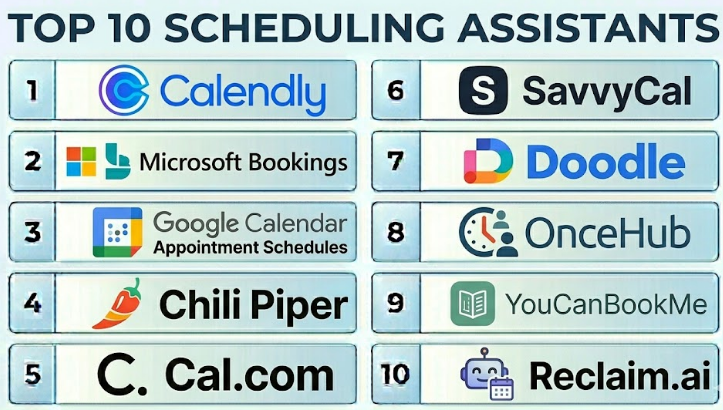
Top 10 Scheduling Assistants
#1 — Calendly
Short description :
Calendly is one of the most widely used scheduling assistants for booking meetings, appointments, interviews, demos, consultations, and team calls. It allows users to create booking links, define availability, add buffers, connect calendars, and automate reminders. Calendly is useful for individuals, sales teams, recruiters, customer success teams, consultants, and enterprises. It is known for its simple booking experience and broad integration ecosystem. It is best for teams that want a reliable and easy-to-adopt scheduling platform.
Key Features
- Personalized booking links.
- One-on-one, group, collective, and round-robin scheduling.
- Calendar sync with major calendar platforms.
- Automated reminders and confirmations.
- Meeting buffers and availability rules.
- Forms and invitee questions.
- Integrations with CRM, video, and productivity tools.
Pros
- Very easy for users and invitees.
- Strong fit for individuals and teams.
- Broad integration ecosystem and workflow support.
Cons
- Advanced routing and enterprise controls may require higher plans.
- Popular booking links can feel generic without customization.
- Complex revenue scheduling may need a more sales-focused tool.
Platforms / Deployment
Web / iOS / Android
Cloud
Security & Compliance
Supports business and enterprise security features such as SSO, admin controls, and access management depending on plan. Specific security certifications and compliance details should be validated directly with the vendor.
Integrations & Ecosystem
Calendly works well with common productivity, sales, video, and automation tools.
- Google Calendar.
- Microsoft Outlook and Microsoft 365.
- Zoom and video meeting tools.
- Salesforce and CRM workflows.
- Slack-style communication tools.
- Automation platforms.
Support & Community
Calendly provides documentation, onboarding resources, customer support, and a large user community. It is easy for most teams to adopt quickly.
#2 — Microsoft Bookings
Short description :
Microsoft Bookings is a scheduling tool designed for organizations using Microsoft 365. It helps teams create booking pages, manage appointments, schedule staff availability, send confirmations, and connect bookings with Outlook calendars. It is useful for service teams, internal departments, consultants, education teams, healthcare-adjacent appointments, and customer-facing teams. Microsoft Bookings is strongest when a company already works inside the Microsoft ecosystem. It is best for Microsoft-first organizations that want appointment scheduling without adding a separate standalone platform.
Key Features
- Booking pages for services and appointments.
- Staff availability management.
- Outlook and Microsoft 365 calendar integration.
- Automated confirmations and reminders.
- Customer self-service scheduling.
- Appointment management dashboard.
- Microsoft Teams meeting support.
Pros
- Strong fit for Microsoft 365 organizations.
- Useful for service-based appointment scheduling.
- Reduces the need for another external scheduling tool.
Cons
- Best value depends on Microsoft 365 adoption.
- May not be as flexible as dedicated scheduling platforms.
- Advanced sales routing may require other tools.
Platforms / Deployment
Web / Windows / macOS / iOS / Android
Cloud
Security & Compliance
Security and compliance depend on Microsoft 365 configuration and licensing. Supports Microsoft identity, admin controls, access management, and governance features within the Microsoft ecosystem.
Integrations & Ecosystem
Microsoft Bookings works naturally with Microsoft productivity tools.
- Outlook.
- Microsoft Teams.
- Microsoft 365.
- Microsoft Entra ID.
- Microsoft Calendar.
- Microsoft admin workflows.
Support & Community
Microsoft provides documentation, enterprise support, partner resources, and admin guidance. It is best for organizations already familiar with Microsoft 365 administration.
#3 — Google Calendar Appointment Schedules
Short description :
Google Calendar Appointment Schedules helps users create booking pages directly from Google Calendar. It is practical for individuals, educators, consultants, small businesses, internal teams, and Google Workspace users who need simple appointment booking. Users can define availability, create appointment slots, and let others book time based on open calendar availability. It is not as advanced as some dedicated scheduling platforms, but it is convenient for Google-first teams. It is best for users who want simple scheduling inside Google Calendar.
Key Features
- Booking pages inside Google Calendar.
- Availability-based appointment scheduling.
- Google Meet support.
- Calendar conflict detection.
- Booking confirmations.
- Time-zone handling.
- Simple self-service scheduling.
Pros
- Easy for Google Workspace users.
- No need to manage a separate scheduling system.
- Good for simple appointment booking and individual scheduling.
Cons
- Less advanced than dedicated scheduling platforms.
- Limited routing and complex team scheduling features.
- Best fit is Google Calendar-based workflows.
Platforms / Deployment
Web / iOS / Android
Cloud
Security & Compliance
Security and access controls depend on Google Workspace configuration and licensing. Supports Google account security, calendar permissions, and workspace admin controls depending on plan.
Integrations & Ecosystem
Google Calendar Appointment Schedules works naturally inside Google Workspace.
- Google Calendar.
- Google Meet.
- Gmail.
- Google Workspace.
- Google Contacts.
- Workspace admin controls.
Support & Community
Google provides help documentation, admin support resources, and broad user familiarity. It is easy to adopt for teams already using Google Calendar daily.
#4 — Chili Piper
Short description :
Chili Piper is a scheduling and routing platform designed especially for sales, revenue, and customer-facing teams. It helps businesses route leads, book qualified meetings, assign prospects to the right representative, and reduce friction in the sales funnel. Chili Piper is useful for inbound sales teams, business development teams, account executives, marketing teams, and customer success teams. It supports advanced routing logic, handoff workflows, and CRM-connected scheduling. It is best for revenue teams that need more than a simple booking link.
Key Features
- Lead routing and meeting booking.
- Round-robin and account-based routing.
- CRM-connected scheduling.
- Instant inbound meeting booking.
- Handoff workflows.
- Team availability management.
- Sales pipeline scheduling automation.
Pros
- Strong fit for sales and revenue teams.
- Useful for reducing lead response time.
- Advanced routing helps assign meetings correctly.
Cons
- May be too advanced for simple personal scheduling.
- Best value depends on CRM and sales process maturity.
- Setup requires careful routing logic design.
Platforms / Deployment
Web
Cloud
Security & Compliance
Supports business and enterprise security features depending on plan. Specific security certifications and compliance details should be validated directly with the vendor.
Integrations & Ecosystem
Chili Piper connects scheduling with revenue and sales operations workflows.
- CRM systems.
- Sales engagement tools.
- Calendar platforms.
- Video meeting tools.
- Marketing automation workflows.
- Revenue operations systems.
Support & Community
Chili Piper provides onboarding, documentation, support, and revenue operations guidance. It is best suited for teams with structured sales processes.
#5 — Cal.com
Short description :
Cal.com is a scheduling platform known for its flexible, developer-friendly, and open-source-oriented approach. It supports booking links, team scheduling, routing, calendar integrations, and customization. Cal.com is useful for startups, developers, agencies, product teams, consultants, and organizations that want more control over scheduling workflows. It can be used as a hosted service, and self-hosting options may be relevant for technical teams. It is best for users who want scheduling flexibility, customization, and developer control.
Key Features
- Booking links and availability management.
- Team scheduling.
- Calendar integrations.
- Routing forms and workflows.
- API and developer-friendly customization.
- Open-source-oriented ecosystem.
- Self-hosting options may be available.
Pros
- Flexible and developer-friendly.
- Good for teams needing customization.
- Useful for technical organizations that want more control.
Cons
- Advanced setup may require technical knowledge.
- Non-technical teams may prefer simpler tools.
- Self-hosted deployments require internal ownership.
Platforms / Deployment
Web
Cloud / Self-hosted options may vary
Security & Compliance
Supports business security features depending on deployment and plan. Self-hosted security depends on internal configuration. Specific compliance details should be validated directly with the vendor.
Integrations & Ecosystem
Cal.com supports productivity, calendar, and developer workflows.
- Google Calendar.
- Microsoft Outlook.
- Video meeting tools.
- Payment workflows.
- APIs and webhooks.
- Custom app integrations.
Support & Community
Cal.com provides documentation, community resources, and support options. It is especially attractive to technical teams and users who value customization.
#6 — SavvyCal
Short description :
SavvyCal is a scheduling assistant designed to make booking meetings feel more collaborative and less rigid. It allows invitees to overlay their calendar with the organizer’s availability, making it easier to choose a time that works for both sides. SavvyCal is useful for consultants, founders, creators, product teams, and professionals who care about a polished scheduling experience. It supports booking links, team scheduling, personalized availability, and calendar integrations. It is best for users who want a more human and flexible scheduling experience.
Key Features
- Personalized scheduling links.
- Calendar overlay experience for invitees.
- Team scheduling support.
- Availability rules.
- Meeting buffers.
- Time-zone handling.
- Calendar integrations.
Pros
- Invitee-friendly scheduling experience.
- Good for consultants, founders, and relationship-based meetings.
- Easier to personalize than generic booking flows.
Cons
- Smaller ecosystem than larger scheduling platforms.
- May not fit complex enterprise routing needs.
- Advanced sales operations workflows may require another tool.
Platforms / Deployment
Web
Cloud
Security & Compliance
Supports business account security and scheduling privacy features. Specific certifications and compliance details should be validated directly with the vendor.
Integrations & Ecosystem
SavvyCal connects with common calendar and meeting workflows.
- Google Calendar.
- Outlook calendar workflows.
- Video meeting tools.
- Team scheduling workflows.
- Payment or form workflows may vary.
- Productivity workflows.
Support & Community
SavvyCal provides documentation, product support, and practical onboarding resources. It is valued by users who want a cleaner and more considerate booking experience.
#7 — Doodle
Short description :
Doodle is a scheduling assistant known for group scheduling, polls, and finding the best meeting time among multiple participants. It is useful for teams, educators, committees, event organizers, recruiters, and people who need to coordinate availability across several attendees. Doodle helps users create polls, collect responses, and finalize meeting times without long email chains. It is especially useful when the organizer does not know everyone’s calendar availability. It is best for group scheduling and meeting polls.
Key Features
- Group scheduling polls.
- One-on-one booking pages.
- Calendar integrations.
- Time-zone handling.
- Availability collection.
- Meeting confirmations.
- Simple invitee experience.
Pros
- Strong for group scheduling.
- Easy for external participants to respond.
- Useful when calendars are not shared.
Cons
- Less advanced for sales routing or workflow automation.
- Some teams may prefer calendar-native scheduling.
- Advanced business features may require paid plans.
Platforms / Deployment
Web / iOS / Android
Cloud
Security & Compliance
Supports business account security and scheduling privacy features depending on plan. Specific security and compliance details should be validated directly with the vendor.
Integrations & Ecosystem
Doodle supports simple meeting coordination across calendar environments.
- Google Calendar.
- Outlook calendar workflows.
- Video meeting tools.
- Email invites.
- Group availability polling.
- Team scheduling workflows.
Support & Community
Doodle provides documentation, support resources, and broad user familiarity. It is practical for quick group scheduling without heavy setup.
#8 — OnceHub
Short description :
OnceHub is a scheduling and engagement platform designed for booking meetings, routing prospects, managing appointment workflows, and supporting customer-facing teams. It helps businesses create booking pages, manage availability, automate reminders, and connect scheduling with sales or service workflows. OnceHub is useful for sales teams, consultants, customer success teams, education teams, and service providers. It supports team scheduling, routing, forms, and workflow automation. It is best for organizations that need structured scheduling with customer engagement workflows.
Key Features
- Booking pages and appointment scheduling.
- Team scheduling and routing.
- Calendar integrations.
- Automated reminders.
- Forms and qualification workflows.
- Time-zone handling.
- Customer engagement automation.
Pros
- Good for structured customer-facing scheduling.
- Supports routing and team availability workflows.
- Useful for sales, service, and consulting teams.
Cons
- May require setup effort for advanced workflows.
- Interface and configuration may feel detailed for simple users.
- Best value comes from using automation features.
Platforms / Deployment
Web
Cloud
Security & Compliance
Supports business access controls and scheduling security features depending on plan. Specific compliance details should be validated directly with the vendor.
Integrations & Ecosystem
OnceHub connects booking workflows with customer-facing business systems.
- Calendar platforms.
- CRM systems.
- Video meeting tools.
- Email workflows.
- Form and qualification processes.
- Automation workflows.
Support & Community
OnceHub provides documentation, onboarding resources, and customer support. It is practical for teams that need more structured scheduling than a basic booking page.
#9 — YouCanBookMe
Short description :
YouCanBookMe is a scheduling assistant that helps individuals and teams create booking pages connected to their calendars. It is useful for consultants, educators, small businesses, customer support teams, recruiters, and service providers. Users can customize availability, booking forms, confirmations, reminders, and cancellation rules. YouCanBookMe is known for practical scheduling customization and straightforward appointment booking. It is best for teams that want flexible booking pages without enterprise-level complexity.
Key Features
- Custom booking pages.
- Calendar availability sync.
- Booking forms and questions.
- Automated confirmations and reminders.
- Time-zone handling.
- Team scheduling options.
- Cancellation and rescheduling rules.
Pros
- Flexible booking page customization.
- Good for service providers and small teams.
- Practical reminders and booking controls.
Cons
- May not fit complex revenue routing needs.
- Advanced enterprise governance may be limited.
- Design and workflow polish depend on configuration.
Platforms / Deployment
Web
Cloud
Security & Compliance
Supports business scheduling security and account controls depending on plan. Specific security certifications should be validated directly with the vendor.
Integrations & Ecosystem
YouCanBookMe connects with calendars and appointment workflows.
- Google Calendar.
- Microsoft calendar workflows.
- Video meeting tools.
- Payment workflows may vary.
- Email reminders.
- Team scheduling processes.
Support & Community
YouCanBookMe provides documentation, support resources, and onboarding guidance. It is useful for users who want practical control over booking pages and appointment rules.
#10 — Reclaim.ai
Short description :
Reclaim.ai is an AI-powered scheduling assistant focused on calendar optimization, focus time, task scheduling, habits, and meeting management. It helps users automatically find time for work, protect focus blocks, schedule recurring routines, and balance meetings with deep work. Reclaim.ai is useful for busy professionals, managers, product teams, engineers, founders, and remote workers who struggle with calendar overload. It is different from basic booking tools because it focuses on time management as well as scheduling. It is best for users who want an intelligent calendar assistant for productivity and meeting control.
Key Features
- AI-assisted calendar scheduling.
- Focus time protection.
- Task and habit scheduling.
- Smart meeting scheduling.
- Calendar conflict management.
- Automatic time blocking.
- Team availability support.
Pros
- Strong for personal productivity and calendar optimization.
- Helps protect focus time and reduce meeting overload.
- Useful for busy knowledge workers and managers.
Cons
- Not mainly a sales booking or appointment platform.
- Requires calendar trust and proper setup.
- Some teams may need a separate external booking tool.
Platforms / Deployment
Web
Cloud
Security & Compliance
Supports account security and calendar access controls depending on plan. Specific security certifications and compliance details should be validated directly with the vendor.
Integrations & Ecosystem
Reclaim.ai connects with calendars and productivity workflows.
- Google Calendar.
- Task management workflows.
- Project management tools.
- Team scheduling workflows.
- Productivity systems.
- Calendar automation processes.
Support & Community
Reclaim.ai provides documentation, support resources, and productivity-focused onboarding guidance. It is especially useful for individuals and teams trying to improve calendar discipline.
Comparison Table
| Tool Name | Best For | Platform(s) Supported | Deployment | Standout Feature | Public Rating |
|---|---|---|---|---|---|
| Calendly | General meeting scheduling for individuals and teams | Web / iOS / Android | Cloud | Easy booking links and broad integrations | N/A |
| Microsoft Bookings | Microsoft 365 appointment scheduling | Web / Windows / macOS / iOS / Android | Cloud | Appointment booking inside Microsoft ecosystem | N/A |
| Google Calendar Appointment Schedules | Google Calendar users | Web / iOS / Android | Cloud | Simple booking pages inside Google Calendar | N/A |
| Chili Piper | Sales and revenue teams | Web | Cloud | Lead routing and CRM-connected scheduling | N/A |
| Cal.com | Developer-friendly and customizable scheduling | Web | Cloud / Self-hosted varies | Flexible open-source-oriented scheduling | N/A |
| SavvyCal | Personalized and invitee-friendly booking | Web | Cloud | Calendar overlay scheduling experience | N/A |
| Doodle | Group scheduling and meeting polls | Web / iOS / Android | Cloud | Availability polling for multiple participants | N/A |
| OnceHub | Customer-facing appointment workflows | Web | Cloud | Structured scheduling with routing and forms | N/A |
| YouCanBookMe | Custom booking pages for small teams | Web | Cloud | Flexible booking rules and reminders | N/A |
| Reclaim.ai | AI calendar optimization and focus time | Web | Cloud | Smart scheduling for tasks, habits, and focus blocks | N/A |
Evaluation & Scheduling Assistants
| Tool Name | Core (25%) | Ease (15%) | Integrations (15%) | Security (10%) | Performance (10%) | Support (10%) | Value (15%) | Weighted Total (0–10) |
|---|---|---|---|---|---|---|---|---|
| Calendly | 9 | 9 | 9 | 8 | 9 | 8 | 8 | 8.60 |
| Microsoft Bookings | 8 | 8 | 10 | 9 | 8 | 9 | 8 | 8.55 |
| Google Calendar Appointment Schedules | 7 | 9 | 8 | 8 | 8 | 8 | 9 | 8.05 |
| Chili Piper | 9 | 7 | 9 | 8 | 9 | 8 | 7 | 8.20 |
| Cal.com | 8 | 8 | 8 | 8 | 8 | 8 | 8 | 8.00 |
| SavvyCal | 8 | 9 | 7 | 8 | 8 | 8 | 8 | 8.05 |
| Doodle | 8 | 9 | 7 | 7 | 8 | 8 | 8 | 7.85 |
| OnceHub | 8 | 8 | 8 | 8 | 8 | 8 | 8 | 8.00 |
| YouCanBookMe | 8 | 8 | 7 | 8 | 8 | 8 | 8 | 7.85 |
| Reclaim.ai | 8 | 8 | 8 | 8 | 8 | 8 | 8 | 8.00 |
These scores are comparative and should be used as a practical guide, not as a fixed ranking. Calendly is strong for general scheduling, Microsoft Bookings is strong for Microsoft-first organizations, Google Calendar Appointment Schedules is practical for simple Google-based booking, Chili Piper is strong for sales routing, and Reclaim.ai is better for calendar optimization and focus-time protection. The best choice depends on your meeting volume, team structure, workflow complexity, and existing software stack.
Which Scheduling Assistants
Solo / Freelancer
Solo professionals usually need a simple booking page, calendar sync, reminders, and clear availability controls. Calendly, Google Calendar Appointment Schedules, SavvyCal, YouCanBookMe, and Reclaim.ai are practical options.
A freelancer should choose based on client experience. If the goal is simple external booking, Calendly or SavvyCal may work well. If the goal is protecting focus time and managing tasks, Reclaim.ai may be more useful.
SMB
Small and medium businesses should focus on easy setup, team scheduling, reminders, and integration with calendars and video meeting tools. Calendly, Microsoft Bookings, YouCanBookMe, Doodle, and OnceHub are strong options.
If the company already uses Microsoft 365, Microsoft Bookings may be the simplest starting point. If the company uses Google Calendar heavily, Google Calendar Appointment Schedules or Calendly may be practical.
Mid-Market
Mid-market companies often need team scheduling, round-robin booking, CRM integration, reminders, qualification forms, and reporting. Calendly, Chili Piper, OnceHub, Cal.com, and Microsoft Bookings are strong candidates.
At this stage, companies should test routing logic, team availability, calendar conflicts, CRM sync, rescheduling workflows, and no-show reduction features before rollout.
Enterprise
Enterprises should prioritize governance, admin controls, SSO, security, CRM integration, team routing, analytics, and compliance review. Calendly, Microsoft Bookings, Chili Piper, Cal.com, and OnceHub may be relevant depending on the use case.
Large organizations should involve sales operations, IT, security, HR, customer success, and legal teams when scheduling affects customer meetings, candidate interviews, and employee calendar access.
Budget vs Premium
Budget-conscious users should first check what is already available inside Google Calendar or Microsoft 365. Google Calendar Appointment Schedules and Microsoft Bookings may be enough for simple scheduling.
Premium tools such as Calendly, Chili Piper, OnceHub, and advanced Cal.com deployments are better when organizations need routing, integrations, team management, workflows, CRM sync, and stronger admin controls.
Feature Depth vs Ease of Use
If ease of use matters most, Calendly, Google Calendar Appointment Schedules, Doodle, and SavvyCal are strong choices. They help users start quickly with minimal setup.
If feature depth matters more, Chili Piper, OnceHub, Cal.com, Microsoft Bookings, and Reclaim.ai offer stronger routing, customization, calendar control, and workflow automation depending on the use case.
Integrations & Scalability
Scheduling assistants should connect smoothly with calendars, video meeting tools, CRM systems, payment tools, automation platforms, and internal productivity systems.
For revenue teams, Chili Piper and Calendly are worth testing. For Microsoft-first organizations, Microsoft Bookings is practical. For developer-focused customization, Cal.com may be better. For productivity and calendar optimization, Reclaim.ai is a strong option.
Security & Compliance Needs
Scheduling assistants can access calendar data, participant details, meeting titles, contact information, and sometimes CRM data. Security-conscious organizations should validate SSO, MFA, role-based access, calendar permissions, audit logs, data retention, and vendor security documentation.
Teams should also define booking rules clearly so sensitive internal meetings, private calendar events, and personal time blocks are not exposed incorrectly.
Frequently Asked Questions
1. What is a Scheduling Assistant?
A Scheduling Assistant is a tool that helps users book meetings or appointments automatically based on calendar availability. It reduces back-and-forth communication by allowing invitees to choose available time slots. Many tools also send reminders, create video links, and handle rescheduling.
2. How is a scheduling assistant different from a calendar app?
A calendar app stores events and availability. A scheduling assistant automates the booking process by sharing available times, collecting invitee details, preventing conflicts, and creating meetings automatically. Many scheduling assistants connect directly with calendar apps.
3. What pricing models are common for Scheduling Assistants?
Most scheduling assistants use free plans, per-user subscriptions, team plans, or custom enterprise pricing. Some tools charge based on advanced routing, integrations, admin controls, workflow automation, or support level. Buyers should compare both user cost and workflow value.
4. What are common mistakes when using scheduling tools?
Common mistakes include exposing too much availability, forgetting meeting buffers, not setting time-zone rules, ignoring reminders, and failing to test the invitee experience. Another mistake is using a simple booking link when the team actually needs routing or qualification logic.
5. Which Scheduling Assistant is best for sales teams?
Chili Piper and Calendly are strong options for sales teams. Chili Piper is especially useful for lead routing and revenue workflows, while Calendly is strong for general booking and team scheduling. The best choice depends on CRM setup and sales process complexity.
6. Which tool is best for Microsoft 365 users?
Microsoft Bookings is a practical option for Microsoft 365 users because it connects with Outlook, Teams, and Microsoft calendar workflows. Calendly can also work well in Microsoft environments if the team needs broader scheduling features and integrations.
7. Which tool is best for Google Calendar users?
Google Calendar Appointment Schedules is simple and convenient for Google Calendar users. Calendly, SavvyCal, Cal.com, and YouCanBookMe are also strong options depending on whether the user needs customization, team scheduling, or better invitee experience.
8. Can Scheduling Assistants reduce no-shows?
Yes, scheduling assistants can reduce no-shows through reminders, confirmations, rescheduling links, calendar invites, and clear meeting details. For customer-facing meetings, automated reminders and easy rescheduling are especially important.
9. Are Scheduling Assistants secure?
Many scheduling assistants offer business security features, but security depends on vendor, plan, and configuration. Buyers should check calendar permissions, SSO, MFA, admin controls, audit logs, data retention, and privacy settings before company-wide rollout.
10. Can these tools handle team scheduling?
Yes, many scheduling assistants support team scheduling through round-robin, collective availability, pooled availability, and routing rules. Calendly, Chili Piper, OnceHub, Cal.com, and Microsoft Bookings are practical options for team-based scheduling.
Conclusion
Scheduling Assistants help individuals and teams save time, reduce back-and-forth communication, avoid calendar conflicts, and create a smoother booking experience for clients, candidates, customers, and coworkers. The best tool depends on the use case. Calendly is strong for general scheduling, Microsoft Bookings is useful for Microsoft 365 organizations, Google Calendar Appointment Schedules is simple for Google users, Chili Piper is powerful for sales routing, Cal.com is flexible for technical teams, Doodle is practical for group polls, and Reclaim.ai is valuable for focus-time protection and calendar optimization.
