Introduction
Intranet Platforms help organizations create a private digital workplace where employees can find company news, policies, documents, tools, announcements, directories, knowledge resources, and internal updates. In simple words, an intranet is the company’s internal home page where employees go to stay informed, connected, and productive.
Modern intranet platforms are no longer just static document libraries. They now include employee experience features, personalized content, social feeds, mobile apps, search, integrations, workflow automation, analytics, and collaboration tools. For distributed, hybrid, and global teams, a strong intranet helps reduce confusion and improves access to trusted company information.
Common use cases include HR policy sharing, leadership announcements, employee onboarding, department pages, knowledge bases, IT support resources, company news, employee directories, and internal communication campaigns.
Buyers should evaluate ease of use, content management, search quality, personalization, integrations, mobile experience, governance, security, analytics, scalability, and employee adoption.
Best for: HR teams, internal communication teams, IT teams, large enterprises, growing mid-market companies, remote teams, frontline workforces, and organizations that need one trusted place for company information.
Not ideal for: very small teams that can manage communication with shared drives, email, and chat; businesses that only need project task tracking; or companies that do not yet have enough internal content to justify a full intranet rollout.
Key Trends in Intranet Platforms
- Employee experience is becoming the center of intranet design, with platforms focusing on engagement, personalization, and easier access to company resources.
- AI-powered search and content recommendations are becoming more useful, helping employees find policies, documents, people, and answers faster.
- Mobile-first intranets are now important, especially for frontline workers, field teams, retail staff, healthcare teams, and distributed employees.
- Personalized content delivery is becoming a standard expectation, so employees only see updates relevant to their role, department, region, or location.
- Intranets are becoming digital workplace hubs, connecting HR tools, IT systems, collaboration apps, learning platforms, and productivity suites.
- Analytics are more important than before, as internal communication teams need to measure content reach, employee engagement, page usage, and search behavior.
- Governance and content ownership are becoming major success factors, because outdated intranet content reduces trust quickly.
- Integration with Microsoft 365 and Google Workspace is a key buying factor, especially for companies already using those productivity ecosystems.
- No-code and low-code publishing tools are growing, allowing HR, communications, and department owners to publish without depending fully on IT.
- Security and access control remain critical, especially when intranets contain internal policies, employee data, leadership updates, and sensitive documents.
How We Selected These Tools
The tools below were selected using practical business-focused evaluation logic.
- Market recognition: Platforms commonly known in intranet, employee experience, internal communication, and digital workplace categories were prioritized.
- Feature completeness: Content publishing, search, employee directory, personalization, analytics, mobile access, and integrations were considered.
- Ease of use: Intranet success depends on adoption, so user-friendly design and editor-friendly publishing were important.
- Enterprise readiness: Security, access control, governance, scalability, and user management were considered.
- Integration ecosystem: Tools that connect with Microsoft 365, Google Workspace, HR systems, identity providers, and collaboration apps were evaluated.
- Customer fit: The list includes enterprise platforms, mid-market solutions, Microsoft-focused options, employee experience platforms, and frontline-friendly tools.
- Content management strength: Platforms were assessed for how well they help organize, update, target, and maintain internal content.
- Search and discovery: Good intranet platforms must help employees quickly find trusted information.
- Analytics and measurement: Engagement reporting and content performance insights were included in the evaluation.
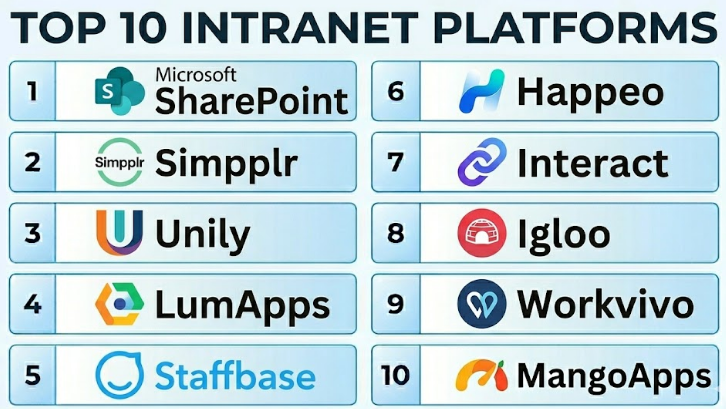
Top 10 Intranet Platforms
#1 — Microsoft SharePoint
Short description :
Microsoft SharePoint is one of the most widely used intranet and document collaboration platforms for organizations using Microsoft 365. It helps companies create internal sites, department pages, document libraries, knowledge hubs, and communication portals. SharePoint is especially useful for companies that already use Teams, OneDrive, Outlook, and Microsoft identity tools. It can support simple intranet pages as well as complex enterprise knowledge and document management structures. It is best for Microsoft-first organizations that need strong document control and internal site management.
Key Features
- Internal sites and department portals.
- Document libraries and file collaboration.
- Integration with Microsoft 365.
- Permission and access control.
- News publishing and communication pages.
- Search across Microsoft content.
- Workflow automation through Microsoft tools.
Pros
- Strong fit for Microsoft 365 environments.
- Good document management and permission control.
- Scales well for large organizations with proper governance.
Cons
- Can become complex without clear structure.
- Design flexibility may require skilled configuration.
- Poor governance can lead to outdated or cluttered sites.
Platforms / Deployment
Web / Windows / macOS / iOS / Android
Cloud / Hybrid options may vary
Security & Compliance
Security and compliance capabilities depend on Microsoft 365 licensing and configuration. Supports enterprise identity, access controls, retention, governance, and admin policies through the Microsoft ecosystem.
Integrations & Ecosystem
SharePoint works deeply with Microsoft 365 and many business workflows.
- Microsoft Teams.
- OneDrive.
- Outlook.
- Microsoft Viva.
- Power Automate.
- Microsoft Entra ID.
Support & Community
Microsoft provides extensive documentation, partner support, enterprise support options, and a very large administrator community. SharePoint is widely supported by consultants and Microsoft specialists.
#2 — Simpplr
Short description :
Simpplr is a modern intranet and employee experience platform designed to make internal communication easier, cleaner, and more engaging. It helps organizations publish company news, create employee resource hubs, personalize content, manage knowledge, and improve employee discovery. Simpplr is useful for HR, internal communications, IT, and operations teams that want a modern intranet without heavy technical complexity. It is suitable for mid-market and enterprise companies. It is best for organizations that want a user-friendly employee experience platform with strong content delivery.
Key Features
- Modern intranet homepage.
- Employee news and announcements.
- Personalized content feeds.
- Employee directory and profiles.
- Knowledge and resource hubs.
- Engagement analytics.
- Integration with workplace tools.
Pros
- Clean and employee-friendly interface.
- Strong fit for internal communications teams.
- Easier to manage than many traditional intranet systems.
Cons
- May not be ideal for companies wanting complete custom development control.
- Implementation still requires content planning.
- Pricing may be more suitable for growing or larger organizations.
Platforms / Deployment
Web / iOS / Android
Cloud
Security & Compliance
Supports enterprise security features such as SSO, access controls, and admin management depending on plan. Specific certification details should be validated directly with the vendor.
Integrations & Ecosystem
Simpplr connects with common workplace productivity and employee systems.
- Microsoft 365.
- Google Workspace.
- Slack.
- Salesforce ecosystem.
- HR systems.
- Identity providers.
Support & Community
Simpplr provides onboarding, customer support, documentation, and employee experience guidance. It is useful for organizations that want structured intranet adoption support.
#3 — Unily
Short description :
Unily is an enterprise intranet and employee experience platform built for large organizations with complex communication and content needs. It helps companies create branded digital workplaces, publish personalized content, manage internal resources, support employee communities, and measure engagement. Unily is suitable for global enterprises, multi-brand companies, and organizations that need a polished intranet experience. It can support leadership communication, knowledge sharing, employee engagement, and workplace resources. It is best for enterprises planning a serious intranet transformation.
Key Features
- Enterprise intranet and digital workplace.
- Personalized employee content.
- Internal communication tools.
- Employee communities and social features.
- Content management and publishing.
- Analytics and engagement insights.
- Mobile employee access.
Pros
- Strong enterprise-grade intranet capabilities.
- Good for branded employee experience.
- Useful for complex organizations with many departments.
Cons
- May be more than smaller teams need.
- Implementation can require planning and internal ownership.
- Pricing and rollout may be enterprise-focused.
Platforms / Deployment
Web / iOS / Android
Cloud
Security & Compliance
Supports enterprise security controls, role-based access, and administrative governance depending on configuration. Specific compliance certifications should be validated directly with the vendor.
Integrations & Ecosystem
Unily connects with common productivity, HR, and business systems.
- Microsoft 365.
- Google Workspace.
- HR systems.
- Identity providers.
- Business applications.
- Content and knowledge systems.
Support & Community
Unily provides enterprise onboarding, customer support, implementation guidance, and documentation. It is suitable for organizations with formal digital workplace programs.
#4 — LumApps
Short description :
LumApps is an employee experience and intranet platform that helps organizations connect employees with company news, knowledge, communities, and workplace tools. It is designed for companies that need personalized communication and strong digital workplace access. LumApps is useful for large and distributed teams, especially when employees need targeted updates based on role, location, or department. It combines intranet, social communication, knowledge sharing, and employee engagement features. It is best for enterprises that need a modern and connected employee portal.
Key Features
- Social intranet and employee portal.
- Personalized news and content feeds.
- Communities and employee groups.
- Knowledge sharing and resource access.
- Mobile access.
- Analytics and content performance.
- Integration with workplace systems.
Pros
- Strong personalization capabilities.
- Good for large distributed organizations.
- Useful for employee communication and knowledge discovery.
Cons
- Requires content and governance planning.
- May be too advanced for very small teams.
- Implementation effort depends on complexity and integrations.
Platforms / Deployment
Web / iOS / Android
Cloud
Security & Compliance
Supports enterprise access controls and identity integrations depending on configuration. Specific security and compliance details should be verified directly with the vendor.
Integrations & Ecosystem
LumApps integrates with major productivity and workplace systems.
- Microsoft 365.
- Google Workspace.
- HR platforms.
- Identity providers.
- Collaboration tools.
- Content management workflows.
Support & Community
LumApps provides documentation, onboarding, implementation support, and customer success resources. It is commonly used for enterprise digital workplace projects.
#5 — Staffbase
Short description :
Staffbase is an employee communications and intranet platform designed to help organizations reach employees across offices, locations, and frontline teams. It combines company news, employee apps, targeted communication, campaign planning, analytics, and internal content delivery. Staffbase is especially useful for organizations with distributed or non-desk workers. It helps internal communication teams publish the right message to the right employee groups. It is best for companies that want a strong communication-led intranet with mobile-first reach.
Key Features
- Employee news and announcements.
- Branded employee app.
- Targeted communication.
- Internal communication campaign tools.
- Intranet content publishing.
- Analytics and engagement reporting.
- Frontline workforce communication.
Pros
- Strong for internal communication teams.
- Excellent fit for frontline and distributed workforces.
- Good analytics for message reach and engagement.
Cons
- More communication-focused than document-management-focused.
- May require strong content planning.
- Pricing may be better suited for mid-market and enterprise buyers.
Platforms / Deployment
Web / iOS / Android
Cloud
Security & Compliance
Supports enterprise communication governance, access management, and admin controls depending on plan. Specific compliance details should be validated directly with the vendor.
Integrations & Ecosystem
Staffbase connects employee communication with workplace and HR systems.
- Microsoft 365.
- HR systems.
- Identity providers.
- Employee apps.
- Intranet workflows.
- Analytics systems.
Support & Community
Staffbase provides onboarding, documentation, customer support, and internal communications guidance. It is a strong fit for teams with formal communication programs.
#6 — Happeo
Short description :
Happeo is an intranet and employee communication platform often used by organizations that want a modern, social, and easy-to-manage digital workplace. It supports pages, channels, employee communication, knowledge sharing, search, and integrations with productivity tools. Happeo is especially relevant for companies using Google Workspace, though it can also support broader workplace communication needs. It is suitable for growing companies and mid-market organizations that want a lighter intranet experience. It is best for teams that value simplicity, communication, and employee engagement.
Key Features
- Intranet pages and content hubs.
- Employee channels and communication spaces.
- Knowledge sharing.
- Search and content discovery.
- Employee directory features.
- Google Workspace-friendly workflows.
- Analytics and engagement tracking.
Pros
- Easy-to-use intranet experience.
- Strong fit for Google Workspace teams.
- Good balance of social and content features.
Cons
- May not fit highly complex enterprise intranet requirements.
- Advanced customization may be limited compared with larger platforms.
- Adoption depends on clear content ownership.
Platforms / Deployment
Web / iOS / Android
Cloud
Security & Compliance
Supports business security features such as SSO and access controls depending on plan. Specific security certifications should be validated directly with the vendor.
Integrations & Ecosystem
Happeo connects with productivity and communication tools used by modern teams.
- Google Workspace.
- Microsoft 365 options may vary.
- Slack.
- HR systems.
- Identity providers.
- Workplace productivity tools.
Support & Community
Happeo provides documentation, onboarding support, and customer success resources. It is practical for teams wanting a modern intranet without too much technical overhead.
#7 — Interact
Short description :
Interact is an intranet platform focused on internal communication, knowledge sharing, employee engagement, and content discovery. It helps organizations create a centralized place for news, policies, resources, employee information, and collaboration. Interact is suitable for mid-market and enterprise organizations that want a purpose-built intranet rather than a custom-built portal. It offers content targeting, search, analytics, and employee communication features. It is best for companies that need a structured intranet with strong publishing and discovery capabilities.
Key Features
- Intranet homepage and content pages.
- Internal news and announcements.
- Content targeting and personalization.
- Employee directory.
- Search and knowledge discovery.
- Engagement analytics.
- Governance and content management tools.
Pros
- Purpose-built for intranet use cases.
- Good balance between communication and knowledge management.
- Useful for organizations needing structured content governance.
Cons
- May require planning for content architecture.
- Not a full project management or chat replacement.
- Advanced integrations may depend on configuration.
Platforms / Deployment
Web / iOS / Android
Cloud
Security & Compliance
Supports enterprise security and access management features depending on plan. Specific compliance details should be checked directly with the vendor.
Integrations & Ecosystem
Interact connects with workplace and employee systems to support internal communication.
- Microsoft 365.
- Google Workspace.
- HR systems.
- Identity providers.
- Collaboration platforms.
- Employee directory workflows.
Support & Community
Interact provides onboarding resources, customer support, documentation, and intranet best-practice guidance. It is suitable for organizations that want structured intranet implementation support.
#8 — Igloo
Short description :
Igloo is a digital workplace and intranet platform that helps organizations create communication hubs, knowledge bases, team spaces, and employee resource centers. It is useful for companies that want to organize internal content, improve collaboration, and provide employees with trusted information. Igloo can support department sites, policies, communities, and internal communication. It is suitable for mid-market and enterprise organizations. It is best for companies that need a flexible digital workplace platform with intranet and collaboration capabilities.
Key Features
- Digital workplace and intranet portals.
- Team spaces and department areas.
- Knowledge management.
- Company news and updates.
- Document and resource sharing.
- Search and content discovery.
- Employee engagement features.
Pros
- Good flexibility for different intranet structures.
- Useful for knowledge sharing and department portals.
- Suitable for organizations needing a digital workplace hub.
Cons
- May require thoughtful information architecture.
- Design and adoption depend on implementation quality.
- Some teams may prefer more modern employee experience interfaces.
Platforms / Deployment
Web / iOS / Android
Cloud
Security & Compliance
Supports enterprise access controls and user management depending on plan. Specific security and compliance details should be validated directly with the vendor.
Integrations & Ecosystem
Igloo can connect with workplace tools and internal business systems.
- Microsoft 365.
- Google Workspace.
- File storage tools.
- Identity providers.
- HR systems.
- Collaboration workflows.
Support & Community
Igloo provides customer support, documentation, onboarding guidance, and implementation resources. It is useful for teams building structured digital workplace environments.
#9 — Workvivo
Short description :
Workvivo is an employee experience and internal communication platform that combines social engagement, company news, employee recognition, podcasts, live streams, and community communication. It is designed to help employees feel connected and informed. While it is often seen as an engagement platform, it can also support intranet-style communication and employee resource access. Workvivo is useful for organizations that want a more human and social employee communication experience. It is best for culture-driven companies and distributed workforces.
Key Features
- Employee news feed.
- Social-style updates and engagement.
- Employee recognition.
- Communities and groups.
- Live streams and media communication.
- Employee resources.
- Engagement analytics.
Pros
- Strong employee engagement and culture focus.
- User-friendly social experience.
- Good for leadership communication and recognition.
Cons
- May not replace a complex document-heavy intranet.
- Best results require active internal communication strategy.
- Some intranet needs may require integration with other systems.
Platforms / Deployment
Web / iOS / Android
Cloud
Security & Compliance
Supports enterprise security and access control features depending on plan and configuration. Specific compliance details should be verified directly with the vendor.
Integrations & Ecosystem
Workvivo connects employee engagement with workplace communication systems.
- Microsoft 365.
- HR systems.
- Identity providers.
- Employee communication workflows.
- Recognition and engagement processes.
- Business collaboration tools.
Support & Community
Workvivo provides onboarding, support, documentation, and customer success guidance. It is strong for employee engagement and internal communication teams.
#10 — MangoApps
Short description :
MangoApps is an employee intranet, collaboration, and digital workplace platform that combines company news, employee directories, team spaces, social networking, file sharing, recognition, and workflow tools. It is suitable for organizations that want one platform for intranet, communication, and collaboration. MangoApps can support both desk and frontline workers depending on setup. It is useful for companies that need a broad feature set without relying on many separate tools. It is best for organizations looking for an all-in-one employee platform.
Key Features
- Employee intranet and company portal.
- Company news and announcements.
- Team collaboration spaces.
- Employee directory and profiles.
- File sharing and knowledge management.
- Recognition and engagement features.
- Mobile employee app.
Pros
- Broad all-in-one employee platform.
- Good mix of intranet, communication, and collaboration.
- Useful for both office and distributed teams.
Cons
- Broad feature set requires thoughtful configuration.
- May feel complex if the company only needs a simple intranet.
- Adoption depends on clear governance and training.
Platforms / Deployment
Web / Windows / macOS / iOS / Android
Cloud
Security & Compliance
Supports enterprise access controls, admin management, and security features depending on plan. Specific compliance certifications should be validated directly with the vendor.
Integrations & Ecosystem
MangoApps supports communication, collaboration, and employee experience workflows.
- HR systems.
- Identity providers.
- File storage tools.
- Productivity apps.
- Team collaboration workflows.
- Employee communication tools.
Support & Community
MangoApps provides documentation, onboarding support, and customer success resources. It is useful for organizations looking for a broad intranet and digital workplace solution.
Comparison Table
| Tool Name | Best For | Platform(s) Supported | Deployment | Standout Feature | Public Rating |
|---|---|---|---|---|---|
| Microsoft SharePoint | Microsoft 365 intranet and document management | Web / Windows / macOS / iOS / Android | Cloud / Hybrid varies | Deep Microsoft 365 integration | N/A |
| Simpplr | Modern employee experience intranet | Web / iOS / Android | Cloud | Clean and personalized employee experience | N/A |
| Unily | Large enterprise digital workplace | Web / iOS / Android | Cloud | Branded enterprise intranet experience | N/A |
| LumApps | Personalized employee portal | Web / iOS / Android | Cloud | Targeted content and employee experience | N/A |
| Staffbase | Internal communications and frontline reach | Web / iOS / Android | Cloud | Mobile-first communication-led intranet | N/A |
| Happeo | Google Workspace-friendly intranet | Web / iOS / Android | Cloud | Simple intranet with social channels | N/A |
| Interact | Structured intranet content and discovery | Web / iOS / Android | Cloud | Strong content targeting and search | N/A |
| Igloo | Digital workplace and knowledge hubs | Web / iOS / Android | Cloud | Flexible team and department spaces | N/A |
| Workvivo | Employee engagement and social intranet | Web / iOS / Android | Cloud | Social employee experience and recognition | N/A |
| MangoApps | All-in-one intranet and collaboration | Web / Windows / macOS / iOS / Android | Cloud | Intranet, communication, and collaboration together | N/A |
Evaluation & Intranet Platforms
| Tool Name | Core (25%) | Ease (15%) | Integrations (15%) | Security (10%) | Performance (10%) | Support (10%) | Value (15%) | Weighted Total (0–10) |
|---|---|---|---|---|---|---|---|---|
| Microsoft SharePoint | 9 | 7 | 10 | 9 | 8 | 9 | 8 | 8.60 |
| Simpplr | 9 | 9 | 8 | 8 | 8 | 8 | 8 | 8.45 |
| Unily | 9 | 8 | 8 | 8 | 8 | 9 | 7 | 8.15 |
| LumApps | 9 | 8 | 8 | 8 | 8 | 8 | 7 | 8.05 |
| Staffbase | 8 | 8 | 8 | 8 | 8 | 9 | 7 | 8.00 |
| Happeo | 8 | 8 | 8 | 8 | 8 | 8 | 8 | 8.00 |
| Interact | 8 | 8 | 7 | 8 | 8 | 8 | 8 | 7.85 |
| Igloo | 8 | 7 | 7 | 8 | 8 | 8 | 7 | 7.50 |
| Workvivo | 8 | 9 | 7 | 8 | 8 | 8 | 8 | 8.00 |
| MangoApps | 8 | 8 | 8 | 8 | 8 | 8 | 8 | 8.00 |
These scores are comparative and should be treated as a practical guide, not a fixed ranking. A platform with the highest score may not be the best fit for every company. Microsoft SharePoint is strong for Microsoft-based organizations, Staffbase is strong for frontline communication, Simpplr is strong for modern employee experience, and MangoApps is strong for all-in-one communication and collaboration. Buyers should validate the final choice through a pilot, employee feedback, integration testing, and security review.
Which Intranet Platforms
Solo / Freelancer
Solo professionals usually do not need a full intranet platform. A simple document workspace, knowledge base, cloud drive, or project management tool may be enough.
However, consultants who support internal communication, HR transformation, or digital workplace projects should understand platforms like SharePoint, Simpplr, Unily, LumApps, and Staffbase because enterprise clients often use these tools for employee communication and knowledge access.
SMB
Small and medium businesses should choose an intranet platform only when they have enough internal content, employee policies, team resources, and company updates to organize. For SMBs, Happeo, MangoApps, Simpplr, Workvivo, and Microsoft SharePoint can be practical depending on the existing software stack.
If the SMB already uses Microsoft 365, SharePoint may be the simplest starting point. If the company wants a more modern employee experience with less technical setup, Simpplr, Happeo, or MangoApps may be better.
Mid-Market
Mid-market companies need better content governance, employee directories, department spaces, internal news, onboarding hubs, and search. Simpplr, LumApps, Happeo, Interact, Staffbase, and MangoApps are strong candidates.
At this stage, buyers should ask whether the platform can support role-based content, location-based announcements, analytics, mobile access, HR integrations, and clear content ownership.
Enterprise
Enterprises should focus on governance, scalability, security, personalization, content lifecycle management, analytics, and integration with existing systems. Microsoft SharePoint, Unily, LumApps, Simpplr, Staffbase, and Interact are strong options depending on company needs.
Large organizations should involve HR, internal communications, IT, security, legal, and business unit leaders before choosing. Intranet success depends on ownership and adoption, not only software features.
Budget vs Premium
Budget-conscious organizations should first review what is already included in their productivity suite. Microsoft 365 organizations may already have SharePoint available, which can reduce additional software costs.
Premium platforms such as Unily, LumApps, Staffbase, and Simpplr are better when the organization needs modern design, personalized employee experience, branded mobile apps, advanced analytics, and structured internal communication workflows.
Feature Depth vs Ease of Use
If ease of use matters most, Simpplr, Happeo, Workvivo, and Staffbase may feel more employee-friendly. These tools are often easier for communication and HR teams to manage.
If feature depth matters more, SharePoint, Unily, LumApps, Interact, and MangoApps offer broader intranet, content management, governance, and digital workplace capabilities.
Integrations & Scalability
For Microsoft-heavy organizations, SharePoint is usually the strongest starting point. For Google Workspace-heavy organizations, Happeo and LumApps may be worth reviewing. For enterprises needing a branded employee experience, Unily, Simpplr, and LumApps are strong options.
Scalability should be tested across departments, regions, languages, mobile users, permission levels, search performance, and content publishing workflows.
Security & Compliance Needs
Security-conscious organizations should validate SSO, MFA, RBAC, audit logs, permission inheritance, content approval workflows, data residency, retention policies, and admin reporting.
Intranets often contain policies, leadership updates, HR content, internal processes, and sensitive documents. Security review should happen before launch, not after employees start using the platform.
Frequently Asked Questions
1. What is an Intranet Platform?
An Intranet Platform is a private internal website or digital workplace where employees can access company news, documents, policies, tools, directories, and knowledge resources. It helps organizations keep employees informed and connected. A modern intranet often includes search, personalization, mobile access, analytics, and integrations.
2. How is an intranet different from a team messaging app?
A team messaging app is mainly used for fast conversations, channels, and direct messages. An intranet is more focused on trusted company information, policies, resources, announcements, and long-term knowledge. Many organizations use both because they serve different purposes.
3. What pricing models are common for Intranet Platforms?
Most intranet platforms use per-user pricing, custom enterprise pricing, or bundled pricing inside a larger productivity suite. Some platforms charge based on modules, employee count, support level, or advanced features. Buyers should request pricing based on real usage, not only the number of employees.
4. What are common mistakes when launching an intranet?
Common mistakes include launching without content governance, copying old content without review, ignoring mobile users, not assigning content owners, and failing to train employees. Another mistake is treating the intranet as only an IT project instead of an employee communication and knowledge program.
5. Which Intranet Platform is best for Microsoft 365 users?
Microsoft SharePoint is usually the strongest starting point for Microsoft 365 users because it connects deeply with Teams, OneDrive, Outlook, and Microsoft identity tools. However, companies that want a more modern employee experience may also evaluate Simpplr, Unily, LumApps, or Staffbase.
6. Which platform is best for frontline workers?
Staffbase, Workvivo, Blink-style employee communication tools, and mobile-first intranet platforms are often useful for frontline workers. For this list, Staffbase and Workvivo are especially relevant because they focus strongly on employee communication, mobile access, and engagement.
7. Can an intranet replace a knowledge base?
An intranet can include knowledge base features, but it may not fully replace a specialized knowledge base for technical documentation, customer support, or product help content. For internal HR, IT, policy, and company knowledge, an intranet can work very well when content is properly organized.
8. Are Intranet Platforms secure?
Many intranet platforms provide strong security features, but security depends on the vendor, plan, and configuration. Buyers should review SSO, MFA, permissions, audit logs, data residency, content approval, retention, and admin roles. Security should be part of the selection process from the beginning.
9. How can companies improve intranet adoption?
Adoption improves when the intranet is useful, updated, easy to search, mobile-friendly, and supported by leadership. Employees should know what content belongs there and why they should use it. Clear ownership, strong launch communication, and regular content cleanup are also important.
10. What are alternatives to Intranet Platforms?
Alternatives include shared drives, team messaging apps, HR portals, knowledge bases, document management systems, project management tools, and company newsletters. Smaller companies may use a combination of these before investing in a dedicated intranet.
Conclusion
Intranet Platforms are now central to modern employee communication, knowledge sharing, onboarding, HR support, and digital workplace strategy. The best intranet is not always the most expensive or feature-heavy platform. It is the one that employees actually use, trust, and return to when they need company information. Microsoft SharePoint is strong for Microsoft-first organizations, Simpplr and Happeo are useful for modern employee-friendly intranets, Unily and LumApps are strong for enterprise digital workplace programs, Staffbase is excellent for communication-led and frontline-focused organizations, and MangoApps offers broad all-in-one functionality.
