Introduction
Job board software helps businesses, recruiters, staffing agencies, associations, universities, communities, and niche platforms create online job portals where employers can post jobs and candidates can search, apply, upload resumes, and manage applications. Instead of manually sharing openings through spreadsheets, emails, or social posts, job board software gives organizations a structured platform for hiring visibility, candidate discovery, employer branding, and application management.
Job board software matters because hiring has become more digital, competitive, and niche-focused. Companies want better candidate reach, recruiters want searchable talent pools, and communities want job portals for their members. A good job board platform can support job listings, resume databases, employer accounts, candidate profiles, paid listings, featured jobs, job alerts, SEO pages, and integrations with recruiting tools.
Common use cases include:
- Creating a niche job board for a specific industry
- Running a job portal for a university or alumni network
- Helping associations connect members with employers
- Supporting staffing and recruitment businesses
- Building internal or external career marketplaces
- Monetizing job postings through paid listings
- Managing employer profiles and candidate applications
- Sending job alerts to registered candidates
- Creating SEO-friendly job pages
- Building a talent community around hiring
Buyers should evaluate:
- Job posting and listing management
- Candidate profiles and resume database
- Employer accounts and company pages
- Search and filtering experience
- Application workflow
- Job alerts and email notifications
- Payment and monetization options
- SEO and marketing features
- Applicant tracking system integrations
- Security, privacy, and data handling
Best for: Recruiters, staffing agencies, HR teams, associations, universities, communities, media companies, niche industry platforms, startups, and businesses that want to create a searchable job marketplace.
Not ideal for: Small companies that only need to post occasional jobs on existing platforms or businesses that require a complete HR suite instead of a dedicated job board.
Key Trends in Job Board Software
- Niche job boards are growing: Industry-specific boards for tech, healthcare, remote work, climate, education, freelance, and local hiring are becoming more valuable.
- AI-assisted matching: Platforms are adding resume parsing, job matching, candidate scoring, and smarter recommendations.
- Remote and hybrid job filters: Candidates expect clear filters for remote, hybrid, onsite, location, salary, and work type.
- SEO-first job pages: Job boards need clean job pages, structured content, and search-friendly layouts to attract organic traffic.
- Monetization features: Paid job posts, featured listings, subscriptions, employer packages, and resume access are common revenue models.
- Candidate experience matters: Fast search, mobile-friendly applications, saved jobs, and alerts improve conversion.
- Employer branding: Company profiles, logos, culture sections, and featured employer pages help attract better applicants.
- Integrations with ATS tools: Employers want job boards to connect with applicant tracking systems, HR systems, and workflow tools.
- Data privacy expectations: Resume databases and candidate profiles require careful consent, storage, and access controls.
- Community-led hiring: Many communities, associations, and creator-led platforms now add job boards as a member value feature.
How We Selected These Tools
The tools below were selected based on job board relevance, market recognition, feature completeness, usability, customization flexibility, monetization capability, and suitability for different organization types.
The evaluation considered:
- Job posting and candidate application workflows
- Employer and candidate account management
- Resume database and profile features
- Search, filtering, and job alert capability
- Monetization and payment features
- Custom branding and SEO support
- Integrations with recruitment tools
- Ease of setup and administration
- Support, documentation, and community strength
- Fit for solo founders, SMBs, mid-market organizations, and enterprise-style hiring marketplaces
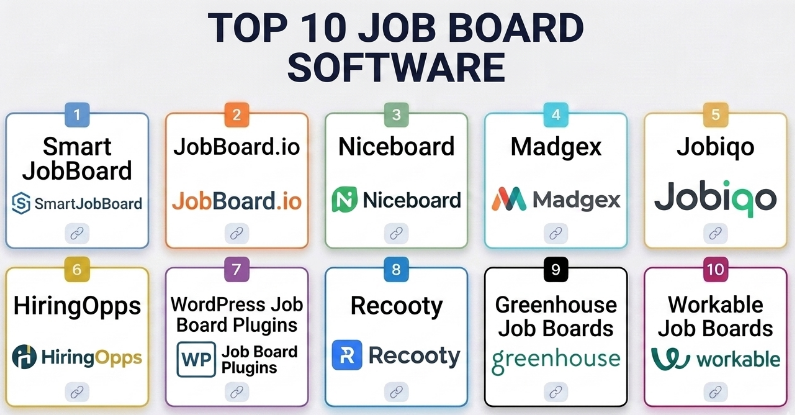
Top 10 Job Board Software
#1 — SmartJobBoard
Short description :
SmartJobBoard is a dedicated job board platform designed for organizations that want to launch and manage a professional job portal. It supports job listings, employer accounts, candidate profiles, resume databases, job alerts, paid postings, and customizable design. It is especially useful for niche job boards, associations, recruitment businesses, and media companies that want a branded hiring marketplace. SmartJobBoard is built specifically for job board operations rather than general website publishing.
Key Features
- Job posting management
- Employer and candidate accounts
- Resume database
- Paid job listings
- Featured jobs and employer packages
- Job alerts
- Custom branding and templates
Pros
- Purpose-built for job board businesses
- Good monetization features
- Useful for niche and association job boards
Cons
- May be more than small internal hiring teams need
- Customization depth depends on plan and setup
- Requires marketing effort to attract employers and candidates
Platforms / Deployment
- Web
- Cloud
Security & Compliance
Not publicly stated for all compliance requirements. Buyers should review candidate data storage, employer permissions, payment security, privacy controls, and data retention settings.
Integrations & Ecosystem
SmartJobBoard supports job board business workflows.
- Employer accounts
- Candidate profiles
- Job alerts
- Payment workflows
- Resume search
- Job board SEO workflows
Support & Community
SmartJobBoard provides product documentation and support resources. It is most relevant for organizations building dedicated job board platforms.
#2 — JobBoard.io
Short description :
JobBoard.io is a job board software platform for launching branded job boards quickly. It is suitable for communities, publishers, associations, creators, and companies that want to add a job board to their website or build a standalone hiring portal. It supports job posting, employer accounts, candidate applications, payment options, and customizable branding. It is especially useful for teams that want a hosted job board without building from scratch.
Key Features
- Hosted job board setup
- Employer job posting tools
- Candidate application workflows
- Paid job posting support
- Custom branding
- Job alerts
- Employer profile features
Pros
- Faster launch than custom development
- Good for branded community job boards
- Supports job board monetization
Cons
- Advanced customization may be limited compared with custom builds
- Success depends on traffic and employer demand
- Pricing should be reviewed against expected revenue
Platforms / Deployment
- Web
- Cloud
Security & Compliance
Not publicly stated for every compliance scenario. Buyers should validate privacy, candidate data handling, payment security, and account controls before adoption.
Integrations & Ecosystem
JobBoard.io fits hosted job board workflows.
- Branded job portals
- Paid listings
- Candidate applications
- Employer accounts
- Job alerts
- Community hiring workflows
Support & Community
JobBoard.io provides customer support and setup resources. It is useful for teams that want a managed job board platform.
#3 — Niceboard
Short description :
Niceboard is a modern job board builder designed for communities, newsletters, associations, and niche hiring platforms. It helps users create job boards with clean design, job postings, employer pages, payment options, and candidate-friendly search. Niceboard is useful for non-technical teams that want a simple and professional job board experience. It is especially strong for creators and communities building a niche hiring audience.
Key Features
- No-code job board creation
- Employer job posting
- Paid listings
- Custom branding
- Job alerts
- Candidate applications
- Clean job search experience
Pros
- Easy to launch and manage
- Modern and clean interface
- Good for niche communities and newsletters
Cons
- Not ideal for highly complex enterprise workflows
- Custom workflow depth may be limited
- Requires audience building for success
Platforms / Deployment
- Web
- Cloud
Security & Compliance
Not publicly stated for all compliance needs. Buyers should review candidate data policies, payment handling, permissions, and privacy settings.
Integrations & Ecosystem
Niceboard supports modern niche job board workflows.
- Community job boards
- Newsletter-based hiring
- Employer posting packages
- Candidate job search
- Branded job pages
- Payment workflows
Support & Community
Niceboard provides support resources and is useful for creators, communities, and small teams launching focused job boards.
#4 — Madgex
Short description :
Madgex is a job board platform often used by media brands, publishers, associations, and organizations that need a more advanced recruitment marketplace. It supports job listings, employer services, candidate engagement, job alerts, and revenue-focused job board operations. Madgex is suitable for larger job boards that require scalability, commercial features, and a more mature recruitment advertising setup. It is best for organizations with serious job board business goals.
Key Features
- Job board platform for publishers and associations
- Employer advertising tools
- Candidate engagement workflows
- Job alerts
- Revenue and listing packages
- Search and filtering
- Scalable job board operations
Pros
- Strong for larger job board businesses
- Good fit for publishers and associations
- Supports recruitment advertising models
Cons
- May be too advanced for small job boards
- Likely requires structured implementation
- Best value appears when traffic and employer demand already exist
Platforms / Deployment
- Web
- Cloud / Managed platform depending on setup
Security & Compliance
Security and compliance details vary by implementation. Buyers should validate candidate data handling, access controls, privacy rules, payment workflows, and enterprise requirements.
Integrations & Ecosystem
Madgex supports commercial recruitment marketplace workflows.
- Job advertising
- Candidate engagement
- Employer packages
- Publisher job boards
- Association career centers
- Recruitment revenue models
Support & Community
Madgex provides business-focused support and implementation resources. It is best suited for organizations treating job boards as a serious revenue channel.
#5 — Jobiqo
Short description :
Jobiqo is a job board and recruitment marketplace platform designed for publishers, associations, staffing businesses, and niche job portals. It supports job listings, employer accounts, candidate profiles, content-driven recruitment, search, and monetization features. Jobiqo is useful for organizations that want a flexible job board solution with recruitment marketing capabilities. It is especially relevant for job boards that need content, SEO, and candidate engagement combined.
Key Features
- Job board management
- Employer and candidate portals
- Resume and profile workflows
- Job alerts
- Recruitment marketing features
- Monetization options
- Search and filtering
Pros
- Strong for professional job board operations
- Useful for niche recruitment marketplaces
- Supports employer and candidate engagement
Cons
- Implementation may require planning
- Small teams may find it more complex than needed
- Pricing and configuration should be evaluated carefully
Platforms / Deployment
- Web
- Cloud / Managed deployment depending on setup
Security & Compliance
Not publicly stated for all compliance scenarios. Buyers should review data privacy, candidate permissions, employer access, and retention controls.
Integrations & Ecosystem
Jobiqo fits recruitment marketplace and content-led job board workflows.
- Employer portals
- Candidate profiles
- Job alerts
- Recruitment marketing
- SEO-focused job pages
- Monetization workflows
Support & Community
Jobiqo provides implementation and support resources. It is relevant for organizations building professional job boards and career marketplaces.
#6 — HiringOpps
Short description :
HiringOpps is a job board software platform that helps organizations create job boards, career centers, and recruitment marketplaces. It supports job posting, candidate applications, employer accounts, resume databases, and job board monetization. HiringOpps is useful for associations, communities, staffing groups, and businesses that need a dedicated job board platform. It is especially practical for organizations that want both candidate and employer management features.
Key Features
- Job posting and management
- Employer accounts
- Candidate profiles
- Resume database
- Paid posting options
- Job alerts
- Career center features
Pros
- Good for career centers and associations
- Supports resume and employer workflows
- Useful for monetized job boards
Cons
- Design flexibility may need review
- Advanced needs may require configuration
- Success depends on marketplace activity
Platforms / Deployment
- Web
- Cloud
Security & Compliance
Not publicly stated for all compliance requirements. Buyers should review privacy, data storage, candidate consent, payment settings, and admin permissions.
Integrations & Ecosystem
HiringOpps supports career center and job board workflows.
- Association job boards
- Employer posting
- Candidate applications
- Resume search
- Paid listings
- Job alerts
Support & Community
HiringOpps provides product support and resources for organizations managing job boards or career centers.
#7 — WordPress Job Board Plugins
Short description :
WordPress job board plugins allow website owners to add job listing functionality to an existing WordPress site. These plugins can support job posts, filters, employer submissions, application forms, categories, and paid listings depending on the plugin. This option is useful for bloggers, communities, small businesses, and niche website owners who already use WordPress. It is flexible but requires more hands-on setup and maintenance.
Key Features
- Job listing pages
- Job categories and filters
- Employer submission forms
- Application workflows
- Payment add-ons depending on plugin
- Theme customization
- WordPress ecosystem flexibility
Pros
- Flexible and customizable
- Good for existing WordPress sites
- Can be cost-effective for small job boards
Cons
- Requires maintenance and updates
- Plugin quality varies
- Security depends on WordPress setup and hosting
Platforms / Deployment
- Web / WordPress
- Self-hosted / Managed hosting depending on setup
Security & Compliance
Security depends on hosting, plugin quality, updates, user permissions, payment setup, forms, spam protection, and data handling practices. Compliance is Varies / N/A.
Integrations & Ecosystem
WordPress job board plugins fit content-led and small-site workflows.
- WordPress themes
- Payment plugins
- Form plugins
- SEO plugins
- Email tools
- Content marketing workflows
Support & Community
Support depends on the plugin vendor and WordPress community. This option is best for users comfortable managing a website.
#8 — Recooty
Short description :
Recooty is primarily a recruitment and applicant tracking platform, but it can support branded career pages and job posting workflows. It is useful for small businesses and startups that want to manage jobs, applicants, and hiring pipelines without building a full job board marketplace. Recooty is more suitable for company hiring than for running a public multi-employer job board. It works well when the main goal is company recruitment.
Key Features
- Branded career pages
- Job posting management
- Candidate applications
- Applicant tracking workflows
- Hiring pipeline stages
- Team collaboration
- Job distribution features depending on setup
Pros
- Good for company hiring workflows
- Easier than building a full job board
- Useful for startups and SMB HR teams
Cons
- Not a full multi-employer job board marketplace
- Monetization features may be limited
- Best for internal recruitment rather than job board businesses
Platforms / Deployment
- Web
- Cloud
Security & Compliance
Not publicly stated for all compliance scenarios. Buyers should review candidate data handling, user permissions, privacy controls, and retention settings.
Integrations & Ecosystem
Recooty fits recruitment and career page workflows.
- Company career pages
- Applicant tracking
- Job posting
- Hiring team collaboration
- Candidate pipeline management
- Recruitment workflows
Support & Community
Recooty provides support resources for small businesses and hiring teams managing recruitment workflows.
#9 — Greenhouse Job Boards
Short description :
Greenhouse is an applicant tracking and hiring platform that includes branded job board and career page functionality for companies. It is not mainly a job board marketplace builder, but it is very relevant for companies that want polished job listings connected to structured hiring pipelines. Greenhouse is best for organizations managing their own hiring process, candidate applications, interviews, and recruiting workflows.
Key Features
- Branded company job boards
- Applicant tracking
- Candidate pipeline management
- Interview workflows
- Hiring team collaboration
- Job application forms
- Recruiting analytics
Pros
- Strong for structured company hiring
- Good candidate pipeline management
- Useful for growing recruitment teams
Cons
- Not designed for multi-employer job marketplaces
- May be more expensive than simple job board tools
- Requires HR process discipline
Platforms / Deployment
- Web
- Cloud
Security & Compliance
Security and compliance details vary by plan and configuration. Buyers should review user permissions, candidate data policies, access controls, retention, and reporting settings.
Integrations & Ecosystem
Greenhouse fits company hiring and ATS workflows.
- Company careers pages
- Candidate tracking
- Interview scheduling
- HR and recruiting tools
- Hiring analytics
- Structured recruitment workflows
Support & Community
Greenhouse provides business support resources and is widely used by recruitment teams building structured hiring processes.
#10 — Workable Job Boards
Short description :
Workable is a recruiting and applicant tracking platform that includes job posting, branded careers pages, candidate sourcing, and application management. Like Greenhouse, it is not primarily a multi-employer job board marketplace builder, but it is useful for companies that need job board-style career pages connected to ATS workflows. Workable is suitable for SMBs and mid-market companies that want to publish jobs and manage applicants in one system.
Key Features
- Branded careers pages
- Job posting management
- Applicant tracking
- Candidate sourcing support
- Hiring pipeline workflows
- Team collaboration
- Reporting and recruiting analytics
Pros
- Good for company recruitment
- Easy job publishing and applicant tracking
- Useful for SMB and mid-market hiring teams
Cons
- Not a dedicated job board marketplace platform
- Monetized job board features are limited
- May be more than needed for very small hiring needs
Platforms / Deployment
- Web
- Cloud
Security & Compliance
Security depends on plan, account configuration, candidate data handling, access permissions, and privacy controls. Buyers should validate requirements before adoption.
Integrations & Ecosystem
Workable fits company recruiting workflows.
- Careers pages
- Candidate applications
- Applicant tracking
- Job distribution
- Team hiring workflows
- Recruiting analytics
Support & Community
Workable provides support resources and is used by hiring teams that want a combined job posting and applicant tracking platform.
Comparison Table
| Tool Name | Best For | Platform(s) Supported | Deployment | Standout Feature | Public Rating |
|---|---|---|---|---|---|
| SmartJobBoard | Niche job boards and associations | Web | Cloud | Purpose-built job board platform | N/A |
| JobBoard.io | Branded hosted job boards | Web | Cloud | Fast hosted job board launch | N/A |
| Niceboard | Communities and newsletters | Web | Cloud | Clean no-code niche job boards | N/A |
| Madgex | Publishers and large job boards | Web | Cloud / Managed | Recruitment advertising marketplace features | N/A |
| Jobiqo | Recruitment marketplaces | Web | Cloud / Managed | Content-led job board workflows | N/A |
| HiringOpps | Career centers and associations | Web | Cloud | Resume database and career center features | N/A |
| WordPress Job Board Plugins | Existing WordPress sites | Web, WordPress | Self-hosted / Managed hosting | Flexible plugin-based job listings | N/A |
| Recooty | SMB company hiring | Web | Cloud | Career pages plus applicant tracking | N/A |
| Greenhouse Job Boards | Structured company recruiting | Web | Cloud | ATS-connected company job boards | N/A |
| Workable Job Boards | SMB and mid-market recruiting | Web | Cloud | Job posting and applicant tracking | N/A |
Evaluation & Job Board Software
| Tool Name | Core (25%) | Ease (15%) | Integrations (15%) | Security (10%) | Performance (10%) | Support (10%) | Value (15%) | Weighted Total (0–10) |
|---|---|---|---|---|---|---|---|---|
| SmartJobBoard | 9 | 8 | 8 | 8 | 8 | 8 | 8 | 8.25 |
| JobBoard.io | 8 | 9 | 7 | 8 | 8 | 8 | 8 | 8.10 |
| Niceboard | 8 | 9 | 7 | 8 | 8 | 8 | 8 | 8.10 |
| Madgex | 9 | 7 | 9 | 8 | 9 | 9 | 7 | 8.30 |
| Jobiqo | 9 | 7 | 8 | 8 | 8 | 8 | 8 | 8.10 |
| HiringOpps | 8 | 8 | 7 | 8 | 8 | 8 | 8 | 7.95 |
| WordPress Job Board Plugins | 7 | 7 | 9 | 6 | 7 | 6 | 9 | 7.30 |
| Recooty | 7 | 9 | 8 | 8 | 8 | 8 | 8 | 7.95 |
| Greenhouse Job Boards | 8 | 8 | 9 | 9 | 9 | 9 | 7 | 8.40 |
| Workable Job Boards | 8 | 8 | 9 | 9 | 9 | 8 | 8 | 8.40 |
The scoring is comparative and should be used as a shortlist guide, not as a universal ranking. SmartJobBoard, JobBoard.io, Niceboard, Madgex, Jobiqo, and HiringOpps are stronger for building job board businesses or career centers. Greenhouse, Workable, and Recooty are better for company hiring pages connected to applicant tracking workflows. WordPress plugins are flexible but require more maintenance and security management.
Which Job Board Software Is Right for You?
Solo / Freelancer
Solo founders, recruiters, and creators should start with a simple hosted job board tool if they want to launch quickly. Niceboard, JobBoard.io, or SmartJobBoard can be practical depending on budget and feature needs.
If the freelancer already manages a WordPress site and understands website maintenance, a WordPress job board plugin can be cost-effective. However, hosted tools are usually easier for non-technical users.
SMB
Small businesses should first decide whether they need a job board marketplace or a company career page. If the goal is to hire for the company, Recooty, Workable, or Greenhouse-style tools may be better. If the goal is to run a job board for an audience, SmartJobBoard, Niceboard, JobBoard.io, or HiringOpps may fit better.
SMBs should avoid building a complex marketplace before validating employer demand and candidate traffic.
Mid-Market
Mid-market organizations may need stronger employer accounts, candidate databases, job alerts, SEO pages, and monetization workflows. SmartJobBoard, Jobiqo, HiringOpps, and Madgex can support more serious job board operations.
If the organization is hiring internally, Greenhouse or Workable can provide stronger applicant tracking, structured interviews, and recruiting analytics.
Enterprise
Enterprises should separate two needs: internal company hiring and external marketplace operations. For internal hiring, Greenhouse and Workable are better suited. For job board marketplaces, Madgex, Jobiqo, SmartJobBoard, or a custom platform may be more relevant.
Enterprise buyers should evaluate security, access control, candidate privacy, integrations, scalability, support, data retention, and reporting before making a decision.
Budget vs Premium
Budget-focused users can start with WordPress job board plugins or lightweight hosted tools. This is useful for testing a niche job board idea before investing heavily.
Premium job board platforms are worth considering when the board has real employer demand, traffic, monetization goals, and a need for reliable support, employer packages, resume databases, and advanced search.
Feature Depth vs Ease of Use
For ease of use, Niceboard, JobBoard.io, Recooty, and Workable are easier to adopt. They are useful when teams need to launch quickly.
For feature depth, Madgex, Jobiqo, SmartJobBoard, HiringOpps, Greenhouse, and Workable provide stronger workflows depending on whether the use case is marketplace hiring or company recruiting.
Integrations & Scalability
Job boards need integrations for payments, email, analytics, applicant tracking systems, employer workflows, and marketing tools. Company hiring platforms need HR, calendar, sourcing, interview, and reporting integrations.
Scalability depends on traffic, job volume, candidate database size, search performance, employer accounts, email alerts, and admin workflows.
Security & Compliance Needs
Job board software handles sensitive candidate information, resumes, applications, employer accounts, and sometimes payment data. Buyers should review privacy policies, access permissions, resume visibility, data retention, consent, and export options.
For regions with strict privacy rules, candidate data protection should be treated as a core requirement, not an optional feature.
Frequently Asked Questions
1. What is job board software?
Job board software is a platform that lets organizations create websites where employers can post jobs and candidates can search, apply, upload resumes, and manage job alerts. It can be used for niche job boards, career centers, or company career pages.
2. What is the difference between job board software and an ATS?
Job board software focuses on publishing jobs and attracting candidates. An applicant tracking system focuses on managing applicants through the hiring process. Some tools offer both, but many are stronger in one area.
3. Which job board software is best for niche job boards?
SmartJobBoard, Niceboard, JobBoard.io, Jobiqo, HiringOpps, and Madgex are strong options for niche job boards. The best choice depends on budget, monetization needs, customization, and expected traffic.
4. Which tool is best for company career pages?
Greenhouse, Workable, and Recooty are better for company career pages because they connect job listings with applicant tracking, interview workflows, hiring teams, and recruiting analytics.
5. Can job board software make money?
Yes. Job boards can generate revenue through paid job posts, featured listings, employer subscriptions, resume database access, sponsored companies, newsletter sponsorships, and hiring packages.
6. What is the biggest mistake when launching a job board?
The biggest mistake is building the platform before building the audience. A job board needs candidate traffic and employer demand. Without both, even good software will not succeed.
7. Do job boards need SEO?
Yes. SEO is important because job seekers often search by job title, location, industry, remote status, and skill. SEO-friendly job pages can help attract organic traffic over time.
8. Can I build a job board on WordPress?
Yes. WordPress job board plugins can help create job listing sites. This is flexible and budget-friendly, but it requires maintenance, security updates, hosting management, and plugin quality checks.
9. What features should a job board have?
A good job board should include job posting, search filters, employer accounts, candidate applications, job alerts, resume database, payment options, SEO settings, admin moderation, and reporting.
10. Is a resume database important?
A resume database is important if employers want to search candidates directly. However, it also increases privacy responsibility, so candidate consent and access controls must be handled carefully.
11. Can job board software support remote jobs?
Yes. Most modern job boards can support remote jobs through filters, tags, location settings, and job type fields. Remote and hybrid filters are now important for candidate experience.
12. How should I choose job board software?
Start by defining your goal. Choose SmartJobBoard, Niceboard, or JobBoard.io for niche job boards; Madgex or Jobiqo for larger recruitment marketplaces; WordPress plugins for low-cost flexibility; and Greenhouse, Workable, or Recooty for company hiring pages.
Conclusion
Job board software helps organizations create structured hiring platforms where employers can post opportunities and candidates can discover relevant jobs. The best tool depends on the business model. SmartJobBoard, JobBoard.io, Niceboard, Jobiqo, Madgex, and HiringOpps are better for niche job boards, associations, publishers, and career centers. WordPress plugins can work for low-cost, content-led job boards but require more maintenance. Recooty, Greenhouse, and Workable are stronger for companies that need career pages connected to applicant tracking.
