Introduction
Transcoding and encoding tools are software solutions designed to convert digital media files—videos, audio, and images—from one format to another, ensuring compatibility across devices, platforms, and bandwidth conditions. These tools are crucial in modern media workflows because media consumption has diversified across smartphones, tablets, desktops, streaming platforms, and smart TVs. Efficient transcoding ensures optimal file size, quality, and playback performance while maintaining content security.
In 2026, the need for reliable transcoding is higher than ever. AI-assisted automation is now integrated into several tools to optimize encoding parameters dynamically, reduce processing time, and maintain high-quality output. Organizations increasingly rely on these tools to support video-on-demand services, live streaming, content delivery networks, and OTT platforms.
Real-world use cases include:
- OTT Streaming Services – converting original media to multiple adaptive bitrate formats for smooth playback.
- Video Editing & Production Studios – exporting projects into platform-specific codecs for distribution.
- Corporate Training & E-learning – ensuring videos are accessible across diverse devices with low bandwidth.
- Marketing & Advertising Agencies – compressing and optimizing large video campaigns for social media.
- Live Event Broadcasting – real-time encoding to multiple streaming platforms simultaneously.
When evaluating these tools, buyers should consider:
- Supported codecs and formats
- AI-assisted encoding or optimization features
- Integration capabilities with workflow tools
- Performance and processing speed
- Scalability for large batch jobs
- Cloud vs on-premises deployment flexibility
- Security and compliance standards
- Pricing and licensing models
- Customer support and documentation quality
Best for: Media teams, streaming platforms, video production houses, marketing agencies, freelancers handling video content, enterprises scaling content distribution.
Not ideal for: Organizations with minimal media content needs, low volume operations, or teams relying solely on consumer-grade video converters.
Key Trends in Transcoding & Encoding Tools
- AI-driven encoding: Machine learning optimizes bitrate and resolution dynamically.
- Cloud-native deployments: Increased adoption of scalable, serverless transcoding services.
- Multi-format support: Tools increasingly handle emerging codecs like AV1 and HEVC.
- Real-time live streaming: Low-latency encoding for broadcast and esports.
- Automation pipelines: Integration with CI/CD media workflows for batch processing.
- Enhanced security: End-to-end encryption and compliance with GDPR, SOC 2, HIPAA.
- API-first architecture: Easier integration with CMS, DAM, and video platforms.
- Cost optimization: AI-assisted compression reduces storage and bandwidth expenses.
- Edge encoding: Processing at the edge for faster delivery and reduced latency.
- Hybrid deployment models: Flexibility between cloud and on-premises infrastructure.
How We Selected These Tools (Methodology)
- Evaluated market adoption and mindshare among global media and tech companies.
- Assessed feature completeness, including AI-assisted encoding and multi-format support.
- Reviewed reliability and performance signals such as processing speed and batch efficiency.
- Verified security posture, encryption standards, and compliance certifications where available.
- Analyzed integration ecosystem, including APIs, plugins, and pipeline support.
- Considered customer fit across solo creators, SMBs, mid-market, and enterprise.
- Checked scalability options for large-scale media operations.
- Reviewed documentation quality, onboarding support, and community engagement.
- Examined flexibility of deployment: cloud, on-premises, hybrid options.
- Balanced cost, licensing, and total value for varying budgets.
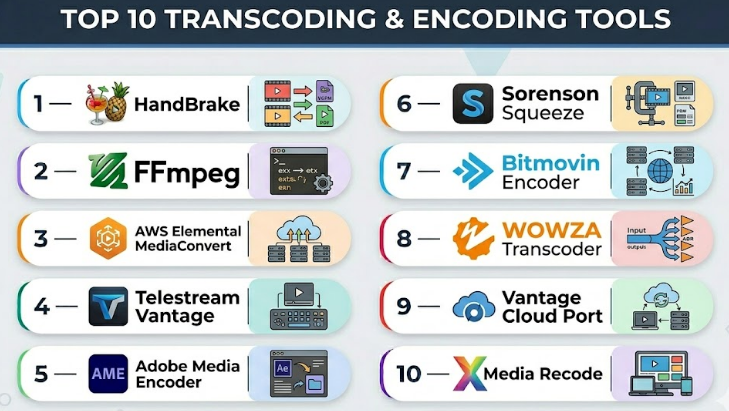
Top 10 Transcoding & Encoding Tools
#1 — HandBrake
Short description :
HandBrake is a widely used open-source video transcoder for converting video from nearly any format to modern, widely supported codecs. It is particularly popular with developers, video enthusiasts, and small media teams for personal or professional projects.
Key Features
- Multi-platform support: Windows, macOS, Linux
- Batch encoding for multiple files simultaneously
- Supports H.264, H.265, VP8, VP9 codecs
- Presets for devices and platforms
- Subtitle and chapter handling
- Video filters: deinterlacing, denoise, cropping
Pros
- Free and open-source
- Regular updates and community support
Cons
- Limited enterprise workflow integration
- GUI may be less intuitive for beginners
Platforms / Deployment
- Windows / macOS / Linux
- Self-hosted
Security & Compliance
- Not publicly stated
Integrations & Ecosystem
HandBrake integrates into simple scripts and automated workflows.
- CLI support for batch processing
- Plugins with media management software
- Automation scripts for personal media servers
Support & Community
- Extensive online forums
- Community-driven documentation
- Tutorials and active development
#2 — FFmpeg
Short description :
FFmpeg is a command-line utility to process multimedia content. It’s used by developers, broadcasters, and video processing engineers for high-volume transcoding, format conversion, and streaming tasks.
Key Features
- Supports nearly all video and audio codecs
- High-performance encoding with hardware acceleration
- Streaming input/output support
- Video filtering and manipulation
- Scripting and batch automation
Pros
- Highly flexible and scriptable
- Efficient and lightweight
Cons
- Steep learning curve for non-developers
- Lacks GUI for beginners
Platforms / Deployment
- Windows / macOS / Linux
- Self-hosted / Cloud scripting
Security & Compliance
- Not publicly stated
Integrations & Ecosystem
FFmpeg integrates with video editors, broadcast software, and cloud pipelines.
- API bindings for multiple languages
- Supports containerized workflows
- Compatible with media servers and streaming platforms
Support & Community
- Strong developer community
- Documentation extensive but technical
- Tutorials widely available
#3 — AWS Elemental MediaConvert
Short description :
AWS Elemental MediaConvert is a cloud-based file transcoding service designed for broadcast and streaming at scale, supporting professional-quality video outputs for global audiences.
Key Features
- Supports broadcast-grade and OTT codecs
- Adaptive bitrate outputs
- AI-assisted content analysis
- DRM and watermark support
- Integration with AWS ecosystem
- Scalable cloud processing
Pros
- Enterprise-ready cloud service
- Handles large-scale transcoding efficiently
Cons
- Pay-as-you-go can become costly at scale
- AWS ecosystem dependency
Platforms / Deployment
- Web / Cloud
Security & Compliance
- Encryption in transit and at rest
- Not publicly stated
Integrations & Ecosystem
Seamlessly integrates with AWS media services, storage, and streaming.
- CloudFront delivery integration
- AWS Lambda automation
- API-driven workflows
Support & Community
- AWS enterprise support tiers
- Documentation extensive
- Community forums active
#4 — Telestream Vantage
Short description :
Telestream Vantage is a professional media processing platform for automated transcoding and workflow orchestration, designed for broadcasters and media enterprises.
Key Features
- Automated media workflows
- Multi-format encoding
- Metadata management
- Quality control monitoring
- Cloud and on-premises support
Pros
- Robust workflow automation
- Enterprise scalability
Cons
- High cost for smaller teams
- Complex configuration
Platforms / Deployment
- Windows / Linux
- Hybrid / Cloud / Self-hosted
Security & Compliance
- Not publicly stated
Integrations & Ecosystem
Integrates with video asset management, broadcast servers, and cloud platforms.
- API-based automation
- Plugin support for media systems
- Extensible scripting
Support & Community
- Dedicated enterprise support
- Training available
- Limited open community
#5 — Adobe Media Encoder
Short description :
Adobe Media Encoder enables professional video editors to export media in multiple formats efficiently, tightly integrated with Adobe Creative Cloud apps.
Key Features
- Supports multiple formats and codecs
- Presets for web, mobile, and broadcast
- GPU acceleration for faster encoding
- Batch processing
- Integration with Premiere Pro, After Effects
Pros
- Seamless Creative Cloud integration
- High-quality output and device presets
Cons
- Subscription-based pricing
- Not ideal outside Adobe ecosystem
Platforms / Deployment
- Windows / macOS
- Self-hosted
Security & Compliance
- Not publicly stated
Integrations & Ecosystem
- Tight integration with Adobe suite
- Supports plugin extensions
- Automation through Watch Folders
Support & Community
- Adobe support tiers
- Community forums
- Extensive tutorials
#6 — Sorenson Squeeze
Short description :
Sorenson Squeeze is a media encoding solution designed for video professionals to create high-quality media for web and broadcast distribution.
Key Features
- High-quality H.264, HEVC encoding
- Batch encoding
- Preset library for platforms
- Closed caption support
- GPU acceleration
Pros
- Quality-focused encoding
- Efficient batch processing
Cons
- Software discontinued in 2022, limited updates
- Subscription required for older versions
Platforms / Deployment
- Windows / macOS
- Self-hosted
Security & Compliance
- Not publicly stated
Integrations & Ecosystem
- Compatible with NLEs and DAMs
- Watch Folder automation
- Limited plugin support
Support & Community
- Vendor support limited
- Community resources mostly archived
#7 — Bitmovin Encoder
Short description :
Bitmovin provides cloud-native transcoding for live and on-demand video workflows, focusing on high-performance, adaptive streaming.
Key Features
- Adaptive bitrate encoding
- AV1, HEVC, H.264 support
- DRM and encryption
- API-first for automation
- Real-time analytics
Pros
- Fast cloud transcoding
- Enterprise streaming ready
Cons
- Cost scales with usage
- Requires integration effort
Platforms / Deployment
- Web / Cloud
Security & Compliance
- Encryption and access control
- Not publicly stated
Integrations & Ecosystem
- Integrates with CDNs, OTT platforms, and analytics services
- API-driven workflows
- Extensible automation
Support & Community
- Enterprise support available
- Documentation detailed
- Community forums active
#8 — Wowza Transcoder
Short description :
Wowza Transcoder delivers cloud and on-premises transcoding for live and on-demand streams, targeting media teams and streaming services.
Key Features
- Real-time transcoding for live events
- Multi-format output
- Adaptive bitrate support
- Integration with Wowza Streaming Engine
- Cloud and hybrid options
Pros
- Reliable for live streaming
- Flexible deployment
Cons
- Setup complexity for beginners
- Cost higher than entry-level tools
Platforms / Deployment
- Windows / Linux / Cloud / Hybrid
Security & Compliance
- Not publicly stated
Integrations & Ecosystem
- Works with CMS, DAM, CDNs
- API support for automation
- Compatible with streaming platforms
Support & Community
- Vendor support tiers
- Documentation comprehensive
- Active user forums
#9 — Vantage Cloud Port
Short description :
Vantage Cloud Port offers cloud-based transcoding services with automation and workflow orchestration for enterprises and broadcasters.
Key Features
- Multi-codec support
- Automated batch transcoding
- Quality control tools
- Metadata handling
- Cloud-native scalability
Pros
- Enterprise-focused cloud solution
- Scalable for high-volume content
Cons
- Subscription costs may be high
- Limited for solo or small teams
Platforms / Deployment
- Web / Cloud
Security & Compliance
- Not publicly stated
Integrations & Ecosystem
- API-driven integrations with broadcast and OTT systems
- Extensible workflow automation
- Compatible with storage and delivery systems
Support & Community
- Enterprise-level support
- Documentation detailed
- Limited open community
#10 — XMedia Recode
Short description :
XMedia Recode is a free video and audio transcoding tool aimed at individual creators and small studios needing versatile format support.
Key Features
- Wide codec and container support
- Batch conversion
- Presets for devices and platforms
- Audio/video filters
- Simple GUI
Pros
- Free and lightweight
- Easy to use for small-scale projects
Cons
- Limited enterprise features
- Slower processing for large files
Platforms / Deployment
- Windows
- Self-hosted
Security & Compliance
- Not publicly stated
Integrations & Ecosystem
- Basic integration with local media players and editors
- No advanced API support
Support & Community
- Community forums
- Tutorials and documentation available
- Support limited to community
Comparison Table (Top 10)
| Tool Name | Best For | Platform(s) Supported | Deployment | Standout Feature | Public Rating |
|---|---|---|---|---|---|
| HandBrake | Personal, SMB | Windows/macOS/Linux | Self-hosted | Open-source flexibility | N/A |
| FFmpeg | Developers, Broadcast | Windows/macOS/Linux | Self-hosted/Cloud | Command-line versatility | N/A |
| AWS Elemental MediaConvert | OTT, Enterprise | Web | Cloud | Scalable cloud transcoding | N/A |
| Telestream Vantage | Broadcast, Media Enterprise | Windows/Linux | Hybrid/Cloud/Self-hosted | Workflow automation | N/A |
| Adobe Media Encoder | Creative professionals | Windows/macOS | Self-hosted | Adobe CC integration | N/A |
| Sorenson Squeeze | Video professionals | Windows/macOS | Self-hosted | Quality-focused encoding | N/A |
| Bitmovin Encoder | Enterprise streaming | Web | Cloud | Adaptive bitrate streaming | N/A |
| Wowza Transcoder | Live streaming | Windows/Linux | Cloud/Hybrid | Real-time live transcoding | N/A |
| Vantage Cloud Port | Enterprise media | Web | Cloud | Automated cloud workflows | N/A |
| XMedia Recode | Individual creators | Windows | Self-hosted | Free, versatile conversion | N/A |
Evaluation & Scoring
| Tool Name | Core (25%) | Ease (15%) | Integrations (15%) | Security (10%) | Performance (10%) | Support (10%) | Value (15%) | Weighted Total (0–10) |
|---|---|---|---|---|---|---|---|---|
| HandBrake | 8 | 7 | 6 | 5 | 7 | 6 | 9 | 7.1 |
| FFmpeg | 9 | 5 | 8 | 6 | 9 | 7 | 8 | 7.6 |
| AWS Elemental MediaConvert | 9 | 8 | 9 | 7 | 9 | 8 | 6 | 8.2 |
| Telestream Vantage | 8 | 6 | 8 | 6 | 8 | 7 | 5 | 7.1 |
| Adobe Media Encoder | 8 | 8 | 7 | 6 | 8 | 7 | 6 | 7.4 |
| Sorenson Squeeze | 7 | 6 | 5 | 5 | 7 | 5 | 7 | 6.4 |
| Bitmovin Encoder | 9 | 7 | 9 | 7 | 9 | 8 | 6 | 8.0 |
| Wowza Transcoder | 8 | 6 | 8 | 6 | 8 | 7 | 6 | 7.3 |
| Vantage Cloud Port | 8 | 7 | 8 | 6 | 8 | 7 | 5 | 7.2 |
| XMedia Recode | 6 | 8 | 5 | 5 | 6 | 5 | 9 | 6.6 |
Interpretation: Higher scores indicate stronger performance relative to the category’s needs. Weighted total balances features, ease, ecosystem, security, and value. Use this as a comparative guide rather than an absolute benchmark.
Which Transcoding & Encoding Tools
Solo / Freelancer
HandBrake, XMedia Recode, FFmpeg (for CLI enthusiasts) offer low-cost, flexible options.
SMB
Adobe Media Encoder or HandBrake provide balance between usability and multi-format output.
Mid-Market
Bitmovin Encoder, Wowza Transcoder, or AWS Elemental MediaConvert offer scalability for multiple workflows and streaming.
Enterprise
Telestream Vantage, Vantage Cloud Port, AWS Elemental MediaConvert are ideal for broadcast, OTT, and automated enterprise media pipelines.
Budget vs Premium
Free/Open-source: HandBrake, XMedia Recode
Premium/Enterprise: AWS Elemental, Telestream Vantage, Bitmovin
Feature Depth vs Ease of Use
FFmpeg offers maximum depth but lower ease; Adobe Media Encoder prioritizes ease with moderate depth.
Integrations & Scalability
Cloud-native tools like AWS Elemental and Bitmovin excel in APIs, CDN integrations, and scaling high-volume jobs.
Security & Compliance Needs
Enterprise-focused cloud tools provide encryption, access control, and compliance-ready deployments; open-source tools rely on environment security.
Frequently Asked Questions (FAQs)
1. What is the difference between transcoding and encoding?
Encoding converts media into a specific digital format. Transcoding converts media from one encoded format to another for compatibility or optimization.
2. Are open-source tools suitable for enterprise workflows?
Open-source tools like FFmpeg and HandBrake can work, but may lack integrated automation, support, and enterprise-grade scalability.
3. How does AI enhance modern encoding?
AI optimizes bitrate, resolution, and compression dynamically, reducing file size while maintaining quality and accelerating processing.
4. Can these tools handle live streaming?
Yes, cloud-native tools like Wowza and Bitmovin support low-latency real-time encoding for live events.
5. What security measures should I consider?
Encryption, access controls, DRM, and compliance with GDPR, SOC 2, or HIPAA (when applicable) are critical for sensitive content.
6. How do I choose between cloud and on-premises deployment?
Consider workload volume, latency needs, integration requirements, and infrastructure cost when deciding between cloud, on-premises, or hybrid models.
7. Are there cost-effective options for small teams?
Yes, HandBrake and XMedia Recode are free, open-source options. Adobe Media Encoder is moderate-cost for Creative Cloud users.
8. How can I integrate transcoding into automated workflows?
Use tools with API or CLI support (FFmpeg, Bitmovin, AWS Elemental) to script batch jobs, pipeline triggers, and CDN uploads.
9. What common mistakes do organizations make?
Neglecting output compatibility, ignoring quality monitoring, underestimating batch processing needs, and overlooking security standards.
10. Can transcoding tools handle multiple formats simultaneously?
Yes, most professional tools allow batch encoding and adaptive bitrate output to produce multiple formats in a single
Conclusion
Choosing the right transcoding and encoding tool depends heavily on your workflow, scale, and technical requirements. Freelancers and SMBs may prioritize cost-effective, easy-to-use solutions like HandBrake or Adobe Media Encoder, while mid-market and enterprise teams benefit from scalable, cloud-native platforms like AWS Elemental MediaConvert, Bitmovin Encoder, or Telestream Vantage. Security, integrations, and automation capabilities should guide enterprise choices, whereas simplicity and format versatility matter most for individual creators.
