Introduction
Outbound Email Sequencing Tools help sales and marketing teams send structured follow-up emails automatically. In simple words, these tools allow users to create a sequence of emails that are sent to prospects over time based on schedule, behavior, reply status, or campaign rules.
They matter because outbound sales is no longer about sending one cold email and waiting. Teams need organized follow-ups, personalization, deliverability controls, reply tracking, CRM sync, and reporting. A good sequencing tool helps sales teams stay consistent without manually remembering every follow-up.
Best for: SDR teams, BDR teams, sales teams, founders, agencies, recruiters, SaaS companies, B2B marketers, and revenue operations teams.
Not ideal for: Businesses that only rely on inbound leads, teams with very low email volume, or companies that are not ready to manage email quality, compliance, and deliverability.
Key Trends in Outbound Email Sequencing Tools
- AI-assisted email writing is helping teams draft personalized first lines, subject lines, and follow-up messages.
- Deliverability protection is becoming more important because cold email rules and inbox filters are stricter.
- Inbox rotation and warm-up workflows are used by some teams to reduce sending risk.
- Multi-step follow-up automation is now expected, not optional.
- CRM-native sequencing is growing because sales teams want every activity synced automatically.
- Intent-based outreach is becoming more useful for sending emails at the right time.
- Personalization at scale is now a major buying factor.
- Compliance controls such as unsubscribe handling and sender identity management are more important.
- Revenue reporting is becoming deeper, connecting email activity with meetings and pipeline.
- Multi-channel sequencing is growing beyond email into LinkedIn, calls, SMS, and tasks.
How We Selected These Tools (Methodology)
- Selected tools widely recognized in outbound email sequencing, sales engagement, and cold outreach automation.
- Balanced enterprise platforms, SMB-friendly tools, agency tools, and founder-friendly options.
- Evaluated email sequencing depth, automation controls, personalization, deliverability, and analytics.
- Considered CRM integrations, email provider support, and workflow scalability.
- Reviewed team usability for SDRs, founders, agencies, and revenue teams.
- Considered support quality, documentation, onboarding, and implementation needs.
- Checked security and compliance claims only where confidently known.
- Avoided invented public ratings, certifications, or unsupported claims.
- Compared practical value across solo, SMB, mid-market, and enterprise use cases.
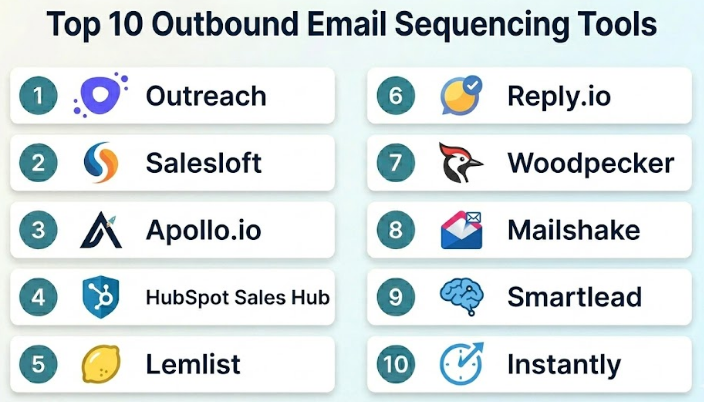
Top 10 Outbound Email Sequencing Tools
#1 — Outreach
Short description :
Outreach is a sales engagement platform built for structured outbound communication and revenue team workflows. It helps sales teams create email sequences, manage follow-ups, track replies, schedule tasks, and sync activities with CRM systems. Outreach is best suited for mid-market and enterprise sales organizations that need strong process control, reporting, and team management. It is more advanced than basic cold email tools and works well for sales teams with mature outbound motions. It is useful for SDR teams, account executives, sales managers, and RevOps teams.
Key Features
- Email sequence automation
- Multi-channel sales engagement
- CRM synchronization
- Reply and engagement tracking
- Sales task management
- Team analytics and reporting
- Workflow governance for larger teams
Pros
- Strong fit for enterprise sales teams.
- Excellent workflow control for structured outbound.
- Good reporting for sales leaders and RevOps teams.
Cons
- Can be complex for small teams.
- Requires proper setup and training.
- Lead data usually needs to come from another source.
Platforms / Deployment
Web / Cloud
Security & Compliance
Enterprise security controls may be available. Specific certifications: Not publicly stated.
Integrations & Ecosystem
Outreach works well inside larger sales technology stacks where CRM and sales intelligence tools are already used.
- Salesforce
- Microsoft Dynamics
- Gmail
- Outlook
- Sales intelligence tools
- Conversation intelligence tools
Support & Community
Outreach provides documentation, onboarding, customer success, and enterprise support options. Implementation quality is important for long-term success.
#2 — Salesloft
Short description :
Salesloft is a sales engagement and email sequencing platform used by sales teams to manage cadences, follow-ups, calls, emails, and buyer engagement. It is suitable for companies that want repeatable outbound processes and better visibility into sales activity. Salesloft helps teams create structured outreach workflows and measure how prospects respond. It is commonly used by SDR teams, account executives, and sales managers. It is especially useful for mid-market and enterprise sales teams that need cadence management with strong CRM alignment.
Key Features
- Email cadence automation
- Call and task workflow support
- CRM integration
- Buyer engagement tracking
- Sales performance reporting
- Team workflow management
- Follow-up automation
Pros
- Strong cadence management features.
- Good fit for sales teams needing process consistency.
- Useful analytics for managers.
Cons
- May be too advanced for small teams.
- Setup requires careful planning.
- Prospect data may require separate tools.
Platforms / Deployment
Web / Cloud
Security & Compliance
Enterprise-grade security controls may be available. Specific certifications: Not publicly stated.
Integrations & Ecosystem
Salesloft connects well with sales and revenue technology stacks.
- Salesforce
- Microsoft Dynamics
- Gmail
- Outlook
- Conversation intelligence tools
- Sales intelligence platforms
Support & Community
Salesloft offers onboarding, customer support, learning resources, and documentation. Enterprise support may vary by package.
#3 — Apollo.io
Short description :
Apollo.io combines prospecting data, lead enrichment, email sequencing, and outbound sales automation in one platform. It is popular among startups, SMBs, agencies, and growing sales teams that want both lead discovery and outreach in a single tool. Apollo helps users build lists, verify emails, create sequences, track replies, and update CRM records. It is easy to adopt compared with many enterprise sales engagement tools. It is a strong choice for teams that want value, usability, and prospecting automation together.
Key Features
- Email sequence automation
- B2B contact database
- Email verification
- Lead enrichment
- CRM integrations
- Prospect list building
- Campaign analytics
Pros
- Combines prospecting and sequencing in one tool.
- Good value for small and growing teams.
- Easy to start for outbound sales workflows.
Cons
- Data accuracy can vary by region.
- Heavy sending requires deliverability discipline.
- Enterprise-level workflow control may be limited.
Platforms / Deployment
Web / Cloud
Security & Compliance
Not publicly stated.
Integrations & Ecosystem
Apollo.io connects data, sequencing, and CRM workflows in one sales platform.
- Salesforce
- HubSpot
- Gmail
- Outlook
- API workflows
- Sales engagement workflows
Support & Community
Apollo.io provides documentation, onboarding resources, and support options. Support quality may vary by plan.
#4 — HubSpot Sales Hub
Short description :
HubSpot Sales Hub includes email sequencing, CRM, meeting scheduling, pipeline tracking, task automation, and sales reporting. It is useful for SMBs and growing teams that want sales outreach connected with CRM and marketing workflows. HubSpot is not only an outbound sequencing tool, but it works well when teams want email follow-ups, lead tracking, and customer data in one system. It is especially good for teams that prefer ease of use and a connected business platform. It supports sales teams that want a clean and simple workflow without too much technical setup.
Key Features
- Email sequences
- CRM-based lead management
- Task automation
- Email tracking
- Meeting scheduling
- Pipeline management
- Sales reporting
Pros
- Easy to use for SMB teams.
- Strong CRM and marketing ecosystem.
- Good for teams that want one connected platform.
Cons
- Advanced outbound features may require higher plans.
- Prospecting data may need separate tools.
- Costs can grow as more features are added.
Platforms / Deployment
Web / Cloud / iOS / Android
Security & Compliance
MFA and access controls are available. Specific certifications: Not publicly stated here.
Integrations & Ecosystem
HubSpot works well for teams that want CRM, marketing, sales, and service workflows connected.
- HubSpot CRM
- Gmail
- Outlook
- Marketing automation tools
- Meeting tools
- Workflow automation apps
Support & Community
HubSpot has strong documentation, learning resources, community support, and paid support options depending on plan.
#5 — Lemlist
Short description :
Lemlist is an outbound email sequencing tool focused on personalized cold outreach, deliverability, and multi-channel campaigns. It is popular with agencies, founders, startups, and sales teams that want creative personalization in cold email. Lemlist helps users build campaigns, personalize messages, track replies, and manage follow-ups. It is useful for teams that want a practical cold email platform without heavy enterprise complexity. It is especially strong for personalized outbound campaigns and agency-style workflows.
Key Features
- Cold email sequence automation
- Personalization features
- Deliverability-focused tools
- Reply tracking
- Campaign analytics
- Multi-channel outreach support
- Email warm-up and sending controls may vary by plan
Pros
- Strong personalization features.
- Good fit for agencies and startups.
- Practical for cold email campaigns.
Cons
- Not as enterprise-focused as Outreach or Salesloft.
- Requires careful campaign quality control.
- CRM depth may vary depending on setup.
Platforms / Deployment
Web / Cloud
Security & Compliance
Not publicly stated.
Integrations & Ecosystem
Lemlist supports outbound teams that need campaign automation and prospecting workflow connections.
- CRM tools
- Gmail
- Outlook
- Sales automation workflows
- Data enrichment tools
- API or automation connectors
Support & Community
Lemlist provides documentation, learning resources, and support options. It also has a strong practical user community around outbound sales.
#6 — Reply.io
Short description :
Reply.io is a sales engagement and outbound sequencing platform designed for email, calls, LinkedIn tasks, and automated follow-ups. It is used by sales teams, agencies, recruiters, and revenue teams that need structured outbound campaigns. Reply.io helps users build sequences, manage replies, track performance, and automate daily sales activities. It is suitable for SMB and mid-market teams that want multi-channel outreach without a very heavy enterprise setup. It balances automation, usability, and sales workflow coverage.
Key Features
- Email sequence automation
- Multi-channel outreach workflows
- Reply detection
- CRM integrations
- Team collaboration features
- Analytics and reporting
- AI-assisted outreach support may vary by plan
Pros
- Good balance of email and multi-channel outreach.
- Suitable for SMB and mid-market teams.
- Useful automation for follow-ups and tasks.
Cons
- Advanced features may require setup time.
- Deliverability still depends on sender practices.
- Data sourcing may need external tools.
Platforms / Deployment
Web / Cloud
Security & Compliance
Not publicly stated.
Integrations & Ecosystem
Reply.io connects with common sales and prospecting workflows.
- Salesforce
- HubSpot
- Gmail
- Outlook
- LinkedIn task workflows
- Automation tools
Support & Community
Reply.io provides documentation, onboarding resources, and customer support. Support depth may vary by plan.
#7 — Woodpecker
Short description :
Woodpecker is an outbound email sequencing tool designed for cold email campaigns, follow-ups, and agency workflows. It is especially useful for small sales teams, agencies, consultants, and B2B service providers. Woodpecker focuses on email deliverability, personalization, and simple campaign automation. It helps users send outreach sequences, detect replies, stop follow-ups automatically, and manage campaign performance. It is a good choice for teams that want a focused cold email tool rather than a full enterprise sales engagement platform.
Key Features
- Cold email sequence automation
- Automatic follow-up stopping after replies
- Personalization fields
- Deliverability controls
- Agency account management
- Campaign analytics
- Email provider integrations
Pros
- Strong for focused cold email workflows.
- Good fit for agencies and small B2B teams.
- Simple and practical campaign setup.
Cons
- Not a complete sales engagement platform.
- Limited enterprise workflow depth.
- Prospecting data usually needs another tool.
Platforms / Deployment
Web / Cloud
Security & Compliance
Not publicly stated.
Integrations & Ecosystem
Woodpecker works best with email providers and CRM-style workflows.
- Gmail
- Outlook
- CRM systems
- Agency workflows
- Data enrichment tools
- Automation connectors
Support & Community
Woodpecker provides documentation, support resources, and practical guidance for cold email users.
#8 — Mailshake
Short description :
Mailshake is an outbound sales and email outreach platform used by sales teams, marketers, agencies, and founders. It helps users create email campaigns, automate follow-ups, track replies, and manage prospect conversations. Mailshake is known for being approachable and practical for cold email outreach. It supports users who need a simpler sequencing tool without heavy enterprise complexity. It is useful for small teams running sales, link-building, partnership, or agency outreach campaigns.
Key Features
- Email sequence automation
- Follow-up scheduling
- Reply tracking
- Campaign analytics
- Personalization fields
- Team collaboration
- Sales engagement workflows
Pros
- Easy to use for small teams.
- Good for cold email and outreach campaigns.
- Practical for agencies and founders.
Cons
- Not as deep as enterprise sales engagement tools.
- Deliverability depends on user setup and sending behavior.
- CRM and automation depth may be limited for larger teams.
Platforms / Deployment
Web / Cloud
Security & Compliance
Not publicly stated.
Integrations & Ecosystem
Mailshake fits well with simple sales and outreach stacks.
- Gmail
- Outlook
- CRM systems
- Sales tools
- Automation tools
- Data import workflows
Support & Community
Mailshake offers documentation, learning content, and customer support resources. Support depth may vary by plan.
#9 — Smartlead
Short description :
Smartlead is an outbound email sequencing and cold email automation platform focused on high-volume campaigns, inbox rotation, deliverability, and agency workflows. It is used by agencies, lead generation teams, founders, and outbound teams that need to manage multiple inboxes and campaigns. Smartlead helps users create email sequences, manage sending accounts, track replies, and monitor campaign performance. It is especially useful for teams that need operational control over cold email infrastructure. It is better suited for experienced outbound users than beginners.
Key Features
- Email sequence automation
- Multi-inbox sending support
- Inbox rotation
- Campaign analytics
- Reply management
- Deliverability-focused controls
- Agency and lead generation workflows
Pros
- Strong for high-volume outbound operations.
- Useful inbox rotation and campaign controls.
- Good fit for agencies and lead generation teams.
Cons
- May be complex for beginners.
- Requires strong deliverability knowledge.
- Not ideal for teams needing deep CRM-first sales engagement.
Platforms / Deployment
Web / Cloud
Security & Compliance
Not publicly stated.
Integrations & Ecosystem
Smartlead works well with outbound infrastructure and agency workflows.
- Email inboxes
- CRM tools
- Data enrichment tools
- Automation workflows
- Agency campaign systems
- Webhook or API-style workflows
Support & Community
Smartlead provides documentation and support resources. Community learning is useful because many users run advanced outbound workflows.
#10 — Instantly
Short description :
Instantly is a cold email and outbound sequencing platform focused on campaign automation, inbox management, and deliverability support. It is popular with founders, agencies, growth teams, and lead generation teams. Instantly helps users build email sequences, manage multiple sending accounts, track replies, and monitor campaign performance. It is useful for teams that want a simple but scalable cold email workflow. It is best for users who already understand responsible outbound sending and deliverability basics.
Key Features
- Cold email sequencing
- Multi-inbox management
- Campaign analytics
- Reply tracking
- Email sending controls
- Lead management
- Deliverability-oriented workflows
Pros
- Good for cold email-focused teams.
- Simple interface for campaign setup.
- Useful for agencies and founders.
Cons
- Requires careful deliverability management.
- Not as CRM-heavy as enterprise sales engagement tools.
- Best for users who understand outbound email operations.
Platforms / Deployment
Web / Cloud
Security & Compliance
Not publicly stated.
Integrations & Ecosystem
Instantly fits into cold email and outbound sales workflows.
- Email inboxes
- CRM exports
- Data enrichment tools
- Lead lists
- Automation workflows
- Campaign reporting systems
Support & Community
Instantly offers documentation, support resources, and learning content. Support depth may vary by plan.
Comparison Table (Top 10)
| Tool Name | Best For | Platform(s) Supported | Deployment | Standout Feature | Public Rating |
|---|---|---|---|---|---|
| Outreach | Enterprise sales engagement | Web | Cloud | Structured outbound workflow control | N/A |
| Salesloft | Sales cadence automation | Web | Cloud | Cadence and buyer engagement tracking | N/A |
| Apollo.io | SMB prospecting and sequencing | Web | Cloud | Database plus email sequencing | N/A |
| HubSpot Sales Hub | CRM-based sales sequences | Web / iOS / Android | Cloud | CRM and sequencing in one platform | N/A |
| Lemlist | Personalized cold outreach | Web | Cloud | Creative personalization workflows | N/A |
| Reply.io | Multi-channel sales outreach | Web | Cloud | Email plus task-based sequencing | N/A |
| Woodpecker | Agency cold email campaigns | Web | Cloud | Focused cold email follow-up automation | N/A |
| Mailshake | Simple outbound campaigns | Web | Cloud | Easy cold email campaign setup | N/A |
| Smartlead | High-volume cold email operations | Web | Cloud | Multi-inbox campaign management | N/A |
| Instantly | Cold email scaling | Web | Cloud | Simple multi-inbox sequencing | N/A |
Evaluation & Outbound Email Sequencing Tools
| Tool Name | Core (25%) | Ease (15%) | Integrations (15%) | Security (10%) | Performance (10%) | Support (10%) | Value (15%) | Weighted Total (0–10) |
|---|---|---|---|---|---|---|---|---|
| Outreach | 9 | 7 | 9 | 8 | 8 | 8 | 6 | 7.95 |
| Salesloft | 9 | 7 | 9 | 8 | 8 | 8 | 6 | 7.95 |
| Apollo.io | 9 | 9 | 8 | 7 | 8 | 8 | 9 | 8.45 |
| HubSpot Sales Hub | 8 | 9 | 9 | 8 | 8 | 9 | 8 | 8.40 |
| Lemlist | 8 | 8 | 7 | 6 | 8 | 8 | 8 | 7.65 |
| Reply.io | 8 | 8 | 8 | 7 | 8 | 8 | 8 | 7.90 |
| Woodpecker | 7 | 8 | 7 | 6 | 8 | 7 | 8 | 7.40 |
| Mailshake | 7 | 8 | 7 | 6 | 7 | 7 | 8 | 7.25 |
| Smartlead | 8 | 7 | 7 | 6 | 8 | 7 | 9 | 7.55 |
| Instantly | 8 | 8 | 7 | 6 | 8 | 7 | 9 | 7.70 |
These scores are comparative and should be treated as a practical buying guide, not a universal ranking. Apollo.io may be better for SMBs that need prospecting and sequencing together. Outreach and Salesloft are stronger for enterprise sales teams with structured workflows. Smartlead and Instantly may fit high-volume cold email operations, but they require stronger deliverability knowledge. Always test with your real email process, CRM setup, and compliance needs before choosing.
Which Outbound Email Sequencing Tools
Solo / Freelancer
Solo users usually need simple setup, affordable pricing, and easy campaign control. Instantly, Mailshake, Woodpecker, Lemlist, and Apollo.io can be practical options for founder-led sales, consulting outreach, agency work, or freelance business development.
SMB
SMBs need usability, CRM sync, follow-up automation, and good value. Apollo.io, HubSpot Sales Hub, Lemlist, Reply.io, and Woodpecker can work well depending on whether the team needs prospecting data, CRM workflows, or cold email-focused automation.
Mid-Market
Mid-market teams often need better reporting, team controls, CRM integration, and repeatable workflows. Reply.io, Apollo.io, HubSpot Sales Hub, Salesloft, and Outreach can be strong choices for teams moving beyond basic email campaigns.
Enterprise
Enterprise teams should focus on governance, CRM depth, analytics, security, permission control, and sales process alignment. Outreach, Salesloft, HubSpot Sales Hub, and Apollo.io are stronger fits for larger teams with structured sales operations.
Budget vs Premium
Budget-focused users may prefer Instantly, Smartlead, Mailshake, Woodpecker, or Apollo.io. Premium buyers with advanced governance and larger sales teams may prefer Outreach, Salesloft, HubSpot Sales Hub, or Reply.io.
Feature Depth vs Ease of Use
For feature depth, Outreach, Salesloft, Apollo.io, Reply.io, and HubSpot Sales Hub are strong options. For ease of use, Mailshake, Woodpecker, Lemlist, Instantly, and Apollo.io are easier starting points.
Integrations & Scalability-
If integrations and scalability are important, prioritize CRM sync, email provider support, API access, task automation, and reporting depth. Outreach, Salesloft, HubSpot Sales Hub, Apollo.io, and Reply.io are strong choices for scaling teams.
Security & Compliance Needs
Security-focused teams should check SSO, MFA, RBAC, audit logs, unsubscribe management, data retention, bounce handling, and compliance controls. Teams should also follow email laws and responsible outreach rules in their target regions.
Frequently Asked Questions (FAQs)
1. What are Outbound Email Sequencing Tools?
Outbound Email Sequencing Tools help users send a planned series of emails to prospects automatically. They manage follow-ups, reply tracking, scheduling, personalization, and campaign performance.
2. How are these tools different from normal email marketing tools?
Email marketing tools are usually built for newsletters and opt-in campaigns. Outbound sequencing tools are built for sales outreach, follow-ups, prospecting, reply management, and CRM activity tracking.
3. Do these tools improve cold email results?
They can improve consistency and follow-up timing, but results depend on targeting, message quality, offer relevance, deliverability, and personalization. Automation cannot fix poor strategy.
4. What pricing models are common?
Common pricing models include per-user pricing, monthly plans, campaign limits, inbox limits, credit-based pricing, and custom enterprise pricing. Some tools also charge based on prospecting data or enrichment usage.
5. How long does onboarding usually take?
Simple cold email tools can be set up quickly. Enterprise sales engagement platforms may take longer because teams need CRM mapping, email domain setup, sequence design, permissions, and training.
6. What is the biggest mistake in outbound sequencing?
The biggest mistake is sending generic emails at high volume without good targeting. Poor personalization, unverified emails, weak subject lines, and bad deliverability practices can damage results.
7. Can these tools integrate with CRM systems?
Yes, many tools integrate with Salesforce, HubSpot, Microsoft Dynamics, and other CRMs. CRM integration helps teams sync contacts, activities, replies, tasks, and pipeline updates.
8. Are outbound email sequencing tools safe for deliverability?
They can be safe when used responsibly. Teams should verify emails, control sending volume, use proper domain setup, personalize content, monitor bounce rates, and include clear unsubscribe options.
9. What are good alternatives to outbound sequencing tools?
Alternatives include manual email follow-ups, CRM task reminders, inbound marketing, LinkedIn outreach, referral selling, paid ads, webinars, and account-based marketing campaigns.
10. How should a team choose the best tool?
Start by defining your outreach volume, CRM needs, team size, personalization requirements, deliverability controls, and budget. Then test two or three tools with a real campaign before final purchase.
Conclusion
Outbound Email Sequencing Tools help sales teams stay organized, follow up consistently, and manage outreach at scale. However, the best tool depends on the team’s size, sales process, budget, and deliverability maturity. A founder or agency may prefer Instantly, Smartlead, Woodpecker, Lemlist, or Mailshake for focused cold email campaigns. A growing SMB may choose Apollo.io or HubSpot Sales Hub for a balance of data, CRM, and sequencing. Larger teams may need Outreach or Salesloft for governance, reporting, and sales process control. The most important point is that sequencing tools should support responsible outreach, not replace good targeting and human judgment.
