Introduction
Database Replication Tools help businesses copy, sync, and continuously replicate data from one database or system to another. In simple words, they keep the same data available in more than one place. This is useful when companies need high availability, disaster recovery, reporting databases, cloud migration, real-time analytics, or backup-ready environments.
Database replication matters because modern businesses cannot afford long downtime, slow reporting, or data loss. Teams often run applications across cloud, hybrid, and multi-region environments, so reliable replication has become a core part of database architecture.
Common use cases include:
- Real-time database backup
- Disaster recovery replication
- Cloud database migration
- Multi-region application availability
- Analytics database synchronization
- Zero-downtime database upgrades
- Operational reporting without affecting production
Buyers should evaluate:
- Supported databases
- Change data capture support
- Replication latency
- Conflict handling
- Monitoring and alerts
- Security and encryption
- Ease of setup
- Scalability
- Pricing model
- Support quality
Best for: database administrators, cloud architects, DevOps teams, data engineers, IT managers, enterprise infrastructure teams, and companies running mission-critical applications.
Not ideal for: very small projects where manual backup and restore is enough, simple one-time data exports, or teams that do not need continuous synchronization.
Key Trends in Database Replication Tools
- Real-time replication is becoming standard for production systems, analytics platforms, and cloud migration projects.
- Change data capture is widely used to track only changed records instead of copying full databases repeatedly.
- Cloud-native replication is growing as companies move workloads to AWS, Azure, Google Cloud, Snowflake, and Databricks.
- Hybrid replication remains important because many enterprises still run sensitive systems on-premises.
- Multi-region availability is now a priority for customer-facing applications.
- Security controls are more important including encryption, RBAC, audit logs, private networking, and compliance readiness.
- Automation is reducing manual DBA work through managed services, templates, and monitoring dashboards.
- AI-ready data pipelines need reliable replication so analytics and machine learning teams can work with fresh data.
- Usage-based pricing is common especially for cloud replication and managed data movement tools.
- Open-source tools are gaining adoption among engineering teams that want flexibility and cost control.
How We Selected These Tools
The tools below were selected based on practical database replication needs:
- Recognition in enterprise and cloud database environments
- Support for real-time or near-real-time replication
- Change data capture capability
- Fit for migration, backup, disaster recovery, and analytics use cases
- Database and platform compatibility
- Reliability for high-volume workloads
- Security and governance signals
- Cloud, hybrid, and self-hosted deployment options
- Documentation and support maturity
- Fit across SMB, mid-market, and enterprise teams
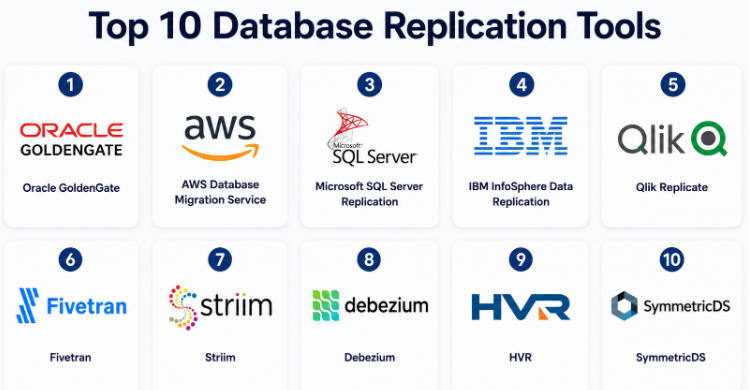
Top 10 Database Replication Tools
#1 — Oracle GoldenGate
Short description :
Oracle GoldenGate is an enterprise-grade database replication platform used for real-time data movement, disaster recovery, database migration, and high availability. It is especially strong in Oracle database environments but can also support heterogeneous replication. Large enterprises use it for mission-critical systems where downtime and data loss must be minimized. It is a mature tool for complex database architectures. It is best suited for skilled database teams that need deep control and reliability.
Key Features
- Real-time data replication
- Change data capture support
- Heterogeneous database replication
- High availability and disaster recovery use cases
- Low-latency transactional replication
- Support for complex enterprise environments
- Monitoring and operational controls
Pros
- Very strong for mission-critical replication
- Mature and trusted in enterprise database environments
- Good for low-downtime migration and disaster recovery
Cons
- Can be complex to configure and manage
- Licensing may be costly for smaller teams
- Best handled by experienced database professionals
Platforms / Deployment
Cloud / Self-hosted / Hybrid
Security & Compliance
Security depends on Oracle environment configuration. Encryption, access controls, auditing, and network security can be implemented, but exact compliance depends on deployment and licensing. Not publicly stated for every use case.
Integrations & Ecosystem
Oracle GoldenGate works strongly within enterprise database ecosystems.
- Oracle Database
- Oracle Cloud Infrastructure
- SQL Server
- MySQL
- PostgreSQL
- Big data and analytics platforms
Support & Community
Oracle provides enterprise documentation, support plans, training, and partner services. Community strength is highest among Oracle database administrators and enterprise database teams.
#2 — AWS Database Migration Service
Short description :
AWS Database Migration Service is a cloud-based service used for database migration and continuous replication into AWS environments. It supports both one-time migration and ongoing replication using change data capture. It is useful for teams moving workloads from on-premises systems to Amazon RDS, Aurora, Redshift, and other AWS services. It is a practical choice for AWS-first companies. It helps reduce downtime during database modernization.
Key Features
- Continuous replication with change data capture
- Supports homogeneous and heterogeneous migration
- Works with many relational and NoSQL databases
- Useful for cloud migration and modernization
- Monitoring through AWS ecosystem
- Pay-as-you-go cloud model
- Supports schema conversion workflows with related AWS tools
Pros
- Strong fit for AWS database migration
- Helps reduce downtime during migration
- Scales well for cloud-native workloads
Cons
- Best value is inside AWS
- Complex transformations may require extra tools
- DBA planning is still needed for large migrations
Platforms / Deployment
Cloud / Hybrid
Security & Compliance
AWS provides IAM access controls, encryption, private networking, logging, and compliance programs. Exact compliance depends on configuration, AWS region, and connected services.
Integrations & Ecosystem
AWS DMS integrates deeply with AWS data platforms.
- Amazon RDS
- Amazon Aurora
- Amazon Redshift
- Amazon S3
- Oracle, SQL Server, MySQL, PostgreSQL
- AWS CloudWatch and IAM
Support & Community
AWS has strong documentation, cloud support plans, partner support, and a large technical community. Support quality depends on the selected AWS support tier.
#3 — Microsoft SQL Server Replication
Short description :
Microsoft SQL Server Replication is a built-in replication technology for SQL Server environments. It is used to copy and distribute data between SQL Server databases and sometimes other supported systems. It supports different replication models such as snapshot, transactional, and merge replication. It is best for organizations already using SQL Server heavily. It works well for reporting, distributed applications, and controlled database synchronization.
Key Features
- Snapshot replication
- Transactional replication
- Merge replication
- Strong fit for SQL Server environments
- Useful for reporting database synchronization
- Supports distributed database scenarios
- Integrated with SQL Server tools
Pros
- Built into SQL Server ecosystem
- Useful for Microsoft-heavy database environments
- Good for controlled replication patterns
Cons
- Best suited for SQL Server workloads
- Setup and troubleshooting can be complex
- Not ideal as a universal cross-platform replication tool
Platforms / Deployment
Windows / Cloud / Self-hosted / Hybrid
Security & Compliance
Security depends on SQL Server configuration. Supports authentication, authorization, encryption options, roles, and auditing features depending on edition and setup. Compliance depends on deployment practices.
Integrations & Ecosystem
SQL Server Replication fits naturally into Microsoft environments.
- SQL Server
- Azure SQL-related environments
- SQL Server Management Studio
- Reporting databases
- Microsoft BI ecosystem
- Windows Server environments
Support & Community
Microsoft provides documentation and support options. SQL Server also has a large DBA community, making troubleshooting resources widely available.
#4 — IBM InfoSphere Data Replication
Short description :
IBM InfoSphere Data Replication is an enterprise data replication solution designed for high-volume, low-latency data movement. It is used by large organizations for database replication, data synchronization, warehouse loading, and operational analytics. It supports change data capture and works across complex enterprise environments. It is especially useful where reliability, governance, and mainframe or enterprise system integration matter. It is best for large-scale and regulated organizations.
Key Features
- Change data capture replication
- Real-time data synchronization
- Enterprise database support
- High-volume data movement
- Mainframe and distributed system support
- Data warehouse loading use cases
- Operational monitoring capabilities
Pros
- Strong enterprise replication depth
- Good for complex legacy environments
- Suitable for regulated and large-scale workloads
Cons
- Can be expensive and complex
- Requires skilled implementation
- Less suitable for small teams
Platforms / Deployment
Self-hosted / Hybrid / Cloud
Security & Compliance
Security depends on IBM deployment and enterprise configuration. Access controls, encryption, and audit-related capabilities may be available. Specific compliance should be validated by buyers.
Integrations & Ecosystem
IBM InfoSphere Data Replication fits enterprise data ecosystems.
- IBM Db2
- Mainframe systems
- Oracle
- SQL Server
- Data warehouses
- Enterprise analytics platforms
Support & Community
IBM provides enterprise support, consulting, documentation, and partner services. Community is strongest among enterprise data teams and IBM specialists.
#5 — Qlik Replicate
Short description :
Qlik Replicate is a data replication and change data capture tool used to move data across databases, data warehouses, data lakes, and cloud platforms. It is known for simplifying real-time data movement without heavy manual coding. It is useful for analytics modernization, cloud migration, and operational replication. Many enterprises use it to feed modern data platforms from legacy systems. It is a strong option for teams that need fast and reliable CDC pipelines.
Key Features
- Change data capture support
- Real-time data replication
- Broad source and target support
- Data lake and warehouse loading
- Cloud migration support
- Automation-focused replication setup
- Monitoring and management dashboard
Pros
- Strong CDC and replication capabilities
- Good for analytics and cloud modernization
- Reduces manual replication scripting
Cons
- Enterprise pricing may be high
- Advanced use cases need experienced setup
- Some capabilities depend on licensing
Platforms / Deployment
Cloud / Self-hosted / Hybrid
Security & Compliance
Security features may include encryption, access controls, and enterprise governance options. Specific compliance certifications should be validated based on product edition and deployment. Not publicly stated for every scenario.
Integrations & Ecosystem
Qlik Replicate supports many enterprise and cloud platforms.
- Oracle
- SQL Server
- PostgreSQL
- MySQL
- Snowflake
- Databricks, cloud warehouses, and data lakes
Support & Community
Qlik provides enterprise support, documentation, training, and partner services. It has strong recognition among enterprise data integration teams.
#6 — Fivetran
Short description :
Fivetran is a managed data movement platform widely used for database replication and SaaS-to-warehouse synchronization. It supports automated pipelines, schema drift handling, and change data capture for supported databases. It is especially useful for analytics teams that want reliable replication into cloud warehouses. Fivetran is less focused on traditional disaster recovery and more focused on modern data platform synchronization. It is a strong choice for cloud analytics pipelines.
Key Features
- Managed database replication
- Change data capture support
- Automated schema handling
- Large connector ecosystem
- Cloud warehouse destinations
- Pipeline monitoring
- Minimal infrastructure management
Pros
- Easy to manage compared with self-hosted tools
- Strong for warehouse and analytics replication
- Large connector marketplace
Cons
- Pricing can rise with scale
- Less control than self-hosted replication tools
- Not ideal for every operational replication use case
Platforms / Deployment
Cloud / Hybrid
Security & Compliance
Known capabilities include SOC 1, SOC 2, ISO 27001, GDPR, HIPAA BAA, PCI DSS Level 1, and HITRUST for applicable services and plans.
Integrations & Ecosystem
Fivetran works well with the modern data stack.
- Snowflake
- BigQuery
- Redshift
- Databricks
- PostgreSQL and MySQL
- SaaS applications and business systems
Support & Community
Fivetran has strong documentation, onboarding resources, customer support, and a large modern data community. Support level depends on the selected plan.
#7 — Striim
Short description :
Striim is a real-time data integration and streaming platform used for database replication, change data capture, and streaming analytics. It is useful when businesses need to move data continuously from transactional systems into cloud databases, warehouses, or streaming platforms. Striim is often used for low-latency use cases where data freshness matters. It is a good fit for enterprises modernizing operational data flows. It combines replication with streaming and processing capabilities.
Key Features
- Real-time change data capture
- Streaming data pipelines
- Database replication
- In-flight data transformation
- Cloud and hybrid support
- Monitoring and alerting
- Support for analytics and operational use cases
Pros
- Strong for real-time data movement
- Useful for streaming and replication together
- Good for cloud modernization projects
Cons
- Can be more complex than simple replication tools
- Requires planning for streaming architecture
- Pricing and setup may not suit small teams
Platforms / Deployment
Cloud / Self-hosted / Hybrid
Security & Compliance
Security capabilities may include encryption, access controls, authentication, and enterprise deployment controls. Specific compliance should be validated by buyers. Not publicly stated for every scenario.
Integrations & Ecosystem
Striim supports databases, cloud platforms, and streaming systems.
- Oracle
- SQL Server
- PostgreSQL
- MySQL
- Kafka
- Snowflake, BigQuery, and cloud platforms
Support & Community
Striim provides documentation, enterprise support, onboarding help, and technical resources. Community is more specialized around real-time data teams.
#8 — Debezium
Short description :
Debezium is an open-source change data capture platform commonly used with Apache Kafka. It captures database changes and streams them to other systems in real time. It is popular with developer and platform engineering teams building event-driven architectures. Debezium is a strong option when teams want flexibility, open-source control, and Kafka-based data replication. It works best when engineers are comfortable managing infrastructure.
Key Features
- Open-source change data capture
- Kafka-based event streaming
- Supports popular databases
- Captures inserts, updates, and deletes
- Useful for microservices and event-driven systems
- Flexible integration with downstream systems
- Strong developer ecosystem
Pros
- Open-source and flexible
- Excellent for event-driven architectures
- Strong fit for technical engineering teams
Cons
- Requires Kafka and infrastructure knowledge
- More engineering effort than managed tools
- Support depends on internal skill or vendor ecosystem
Platforms / Deployment
Self-hosted / Cloud / Hybrid
Security & Compliance
Security depends on Kafka, database, connector, and infrastructure configuration. Compliance is not automatic and must be designed by the implementation team.
Integrations & Ecosystem
Debezium fits modern streaming architectures.
- Apache Kafka
- PostgreSQL
- MySQL
- MongoDB
- SQL Server
- Kafka Connect ecosystem
Support & Community
Debezium has an active open-source community, technical documentation, and ecosystem support. Enterprise support may depend on vendors using or packaging Debezium.
#9 — HVR
Short description :
HVR is a data replication platform designed for high-volume data movement across databases, warehouses, data lakes, and cloud environments. It is known for efficient change data capture and enterprise replication patterns. HVR is often used in complex environments that require reliable data movement from operational systems into analytics platforms. It became part of the Fivetran ecosystem, but it is still recognized for deep replication capability. It is best suited for enterprise-grade data replication.
Key Features
- High-volume data replication
- Change data capture
- Cloud and hybrid data movement
- Data warehouse and data lake support
- Enterprise monitoring
- Low-latency movement
- Broad source and target coverage
Pros
- Strong for complex replication workloads
- Good performance for high-volume environments
- Useful for enterprise analytics modernization
Cons
- More complex than simple ELT tools
- May require specialist knowledge
- Product packaging may vary under broader vendor ecosystem
Platforms / Deployment
Cloud / Self-hosted / Hybrid
Security & Compliance
Security and compliance details vary by deployment and vendor packaging. Buyers should validate encryption, access controls, audit logs, and compliance requirements. Not publicly stated for every scenario.
Integrations & Ecosystem
HVR supports enterprise and cloud data ecosystems.
- Oracle
- SQL Server
- PostgreSQL
- MySQL
- Snowflake
- Data lakes and warehouses
Support & Community
Support depends on the vendor package and customer plan. Documentation and enterprise support options are available, but buyers should confirm current support scope before adoption.
#10 — SymmetricDS
Short description :
SymmetricDS is an open-source database replication and synchronization tool. It supports multi-master replication, filtered synchronization, and distributed database use cases. It is useful for retail, remote branches, edge systems, and environments where data must sync across many locations. It is a practical option for teams that need flexible replication without fully relying on expensive enterprise platforms. It works best when technical teams can manage configuration and operations.
Key Features
- Open-source database replication
- Multi-master synchronization
- Filtered data replication
- Offline and remote site support
- Cross-platform database support
- Useful for edge and branch systems
- Flexible configuration options
Pros
- Good for distributed and branch-level replication
- Open-source option with commercial support available
- Flexible for custom synchronization needs
Cons
- Requires technical setup and maintenance
- UI and experience may feel less polished than enterprise tools
- Not ideal for teams needing fully managed service
Platforms / Deployment
Windows / macOS / Linux / Self-hosted / Hybrid
Security & Compliance
Security depends on deployment, database configuration, network setup, and access controls. Compliance is not automatic and should be validated by the buyer.
Integrations & Ecosystem
SymmetricDS supports many relational database environments.
- PostgreSQL
- MySQL
- MariaDB
- Oracle
- SQL Server
- Embedded and branch databases
Support & Community
SymmetricDS has open-source documentation, community usage, and commercial support options. It is best for teams comfortable managing self-hosted software.
Comparison Table
| Tool Name | Best For | Platform(s) Supported | Deployment | Standout Feature | Public Rating |
|---|---|---|---|---|---|
| Oracle GoldenGate | Enterprise real-time replication | Enterprise databases | Cloud / Self-hosted / Hybrid | Mission-critical transactional replication | N/A |
| AWS Database Migration Service | AWS database replication and migration | Cloud databases, on-prem databases | Cloud / Hybrid | AWS-native CDC migration | N/A |
| Microsoft SQL Server Replication | SQL Server environments | Windows, SQL Server ecosystem | Self-hosted / Hybrid | Built-in SQL Server replication models | N/A |
| IBM InfoSphere Data Replication | Large enterprise replication | Enterprise databases, mainframe systems | Self-hosted / Hybrid / Cloud | Enterprise CDC and legacy support | N/A |
| Qlik Replicate | Real-time CDC and analytics replication | Databases, warehouses, lakes | Cloud / Self-hosted / Hybrid | Broad CDC automation | N/A |
| Fivetran | Managed warehouse replication | SaaS, databases, warehouses | Cloud / Hybrid | Automated data pipelines | N/A |
| Striim | Real-time streaming replication | Databases, Kafka, cloud platforms | Cloud / Self-hosted / Hybrid | CDC plus streaming analytics | N/A |
| Debezium | Open-source CDC with Kafka | Databases, Kafka ecosystem | Self-hosted / Cloud / Hybrid | Developer-first change data capture | N/A |
| HVR | High-volume enterprise replication | Databases, warehouses, lakes | Cloud / Self-hosted / Hybrid | High-performance CDC replication | N/A |
| SymmetricDS | Distributed database synchronization | Windows, macOS, Linux | Self-hosted / Hybrid | Multi-master and branch replication | N/A |
Evaluation & Database Replication Tools
| Tool Name | Core (25%) | Ease (15%) | Integrations (15%) | Security (10%) | Performance (10%) | Support (10%) | Value (15%) | Weighted Total (0–10) |
|---|---|---|---|---|---|---|---|---|
| Oracle GoldenGate | 10 | 6 | 9 | 8 | 10 | 9 | 6 | 8.45 |
| AWS Database Migration Service | 9 | 7 | 8 | 9 | 9 | 9 | 8 | 8.40 |
| Microsoft SQL Server Replication | 8 | 7 | 7 | 8 | 8 | 8 | 8 | 7.75 |
| IBM InfoSphere Data Replication | 9 | 6 | 8 | 8 | 9 | 9 | 6 | 7.95 |
| Qlik Replicate | 9 | 8 | 9 | 8 | 9 | 8 | 7 | 8.35 |
| Fivetran | 8 | 9 | 10 | 9 | 8 | 8 | 7 | 8.45 |
| Striim | 9 | 7 | 8 | 8 | 9 | 8 | 7 | 8.10 |
| Debezium | 8 | 6 | 9 | 7 | 8 | 7 | 9 | 7.80 |
| HVR | 9 | 7 | 9 | 8 | 9 | 8 | 7 | 8.25 |
| SymmetricDS | 7 | 6 | 7 | 6 | 7 | 6 | 9 | 6.95 |
The scores are comparative and should be used as a shortlist guide, not as a final buying decision. A tool with a lower ease-of-use score may still be the right choice for enterprise systems. A tool with a higher value score may still require strong internal engineering skills. Always test replication latency, failover behavior, schema handling, monitoring, and security before production rollout.
Which Database Replication Tools
Solo / Freelancer
Solo users should avoid overly complex enterprise replication platforms unless the client specifically requires them. Debezium can be a strong choice for developers comfortable with Kafka. SymmetricDS may work for smaller distributed systems. For cloud database migration, AWS DMS can be practical if the project is AWS-based.
SMB
SMBs should prioritize ease of setup, predictable maintenance, and clear monitoring. Fivetran, AWS DMS, SQL Server Replication, and SymmetricDS can be good options depending on the environment. If the company has limited DBA capacity, managed tools are usually safer than self-hosted replication systems.
Mid-Market
Mid-market companies usually need stronger reliability, security, and integration coverage. Qlik Replicate, Striim, Fivetran, HVR, and cloud-native services are strong candidates. The best choice depends on whether the goal is analytics replication, cloud migration, operational synchronization, or disaster recovery.
Enterprise
Enterprises should focus on performance, governance, auditability, failover support, and vendor support. Oracle GoldenGate, IBM InfoSphere Data Replication, Qlik Replicate, HVR, Striim, and AWS DMS are strong enterprise-level options. Large companies should run a proof of concept with production-like workloads before final selection.
Budget vs Premium
For budget-conscious teams, Debezium and SymmetricDS provide flexible open-source paths, but they require internal skills. AWS DMS can also be cost-effective for AWS migration projects. Premium tools such as Oracle GoldenGate, IBM InfoSphere Data Replication, Qlik Replicate, HVR, and Striim provide deeper enterprise controls but may cost more.
Feature Depth vs Ease of Use
If ease of use matters most, Fivetran and managed cloud services are better starting points. If feature depth matters more, Oracle GoldenGate, Qlik Replicate, IBM InfoSphere Data Replication, HVR, and Striim offer stronger advanced capabilities. Debezium is powerful but requires engineering maturity.
Integrations & Scalability
Fivetran is strong for modern warehouse replication. Qlik Replicate, HVR, and Informatica-style enterprise platforms are better for broad enterprise integration. Debezium works well in Kafka-based architectures. Oracle GoldenGate is excellent for Oracle-heavy and mission-critical enterprise systems.
Security & Compliance Needs
For regulated industries, buyers should validate encryption, RBAC, audit logs, private connectivity, SSO, compliance reports, data residency, and access control. Enterprise vendors and major cloud providers are usually better prepared for compliance-heavy environments, but the final responsibility depends on deployment and configuration.
Frequently Asked Questions
1. What is a database replication tool?
A database replication tool copies and syncs data from one database to another. It may work in real time, near real time, or scheduled batches depending on the tool and configuration.
2. Why do companies use database replication tools?
Companies use them for disaster recovery, high availability, reporting, cloud migration, data warehouse loading, and multi-region application support. Replication helps reduce downtime and data loss risk.
3. What is change data capture?
Change data capture tracks inserts, updates, and deletes from a source database. Instead of copying the full database every time, it only moves changed data, making replication faster and more efficient.
4. Which database replication tool is best for enterprises?
Oracle GoldenGate, IBM InfoSphere Data Replication, Qlik Replicate, HVR, and Striim are strong enterprise options. The right choice depends on database type, scale, compliance needs, and internal expertise.
5. Which tool is best for open-source replication?
Debezium and SymmetricDS are strong open-source options. Debezium is better for Kafka-based CDC, while SymmetricDS is useful for distributed and multi-master synchronization.
6. Is database replication the same as backup?
No. Replication keeps data synchronized across systems, while backup creates recoverable copies at specific points in time. Most businesses need both replication and backup for strong resilience.
7. Can replication tools support cloud migration?
Yes. Many tools support cloud migration by replicating data from on-premises databases to cloud databases. AWS DMS, Oracle GoldenGate, Qlik Replicate, Striim, and HVR are common choices for this use case.
8. What are common mistakes in database replication?
Common mistakes include poor schema planning, missing validation, weak monitoring, ignoring network limits, not testing failover, and assuming replication replaces backup. Teams should test carefully before production use.
9. Are database replication tools secure?
Mature tools can support encryption, role-based access, authentication, and audit controls. However, security depends heavily on configuration, network design, and access management.
10. How do I choose the right database replication tool?
Start with your source database, target database, downtime tolerance, latency needs, budget, and team skills. Then shortlist tools and test with real data before committing.
Conclusion
Database Replication Tools are essential for modern businesses that need reliable data availability, faster recovery, real-time analytics, and smooth cloud migration. The right tool depends on your environment, not just brand popularity. Oracle GoldenGate is strong for enterprise transactional replication. AWS Database Migration Service is practical for AWS-focused migration. SQL Server Replication is useful for Microsoft database environments. Qlik Replicate, HVR, Striim, and IBM InfoSphere Data Replication are strong for complex enterprise needs. Fivetran is excellent for managed analytics replication, while Debezium and SymmetricDS are good choices for technical teams that want open-source flexibility.
