Introduction
Home Automation Hubs are the central “brain” of a smart home ecosystem. Instead of controlling devices individually through separate apps, a hub connects and manages everything—from lights and thermostats to security cameras and voice assistants—through a single interface. In simple terms, it brings all your smart devices together so they can communicate and automate tasks.
As smart homes become more mainstream, especially in the 2026+ landscape, automation is no longer about convenience alone. It’s about efficiency, security, energy optimization, and intelligent decision-making. With the rise of AI-driven routines, interoperability standards like Matter, and increasing privacy concerns, choosing the right hub has become a critical decision.
Real-world use cases:
- Automating lighting and climate based on occupancy
- Smart security systems with alerts and remote monitoring
- Energy-saving automation using schedules and sensors
- Voice-controlled home environments
- Multi-device orchestration (e.g., “Good Night” routines)
What buyers should evaluate:
- Device compatibility (Zigbee, Z-Wave, Wi-Fi, Matter)
- Ease of setup and daily use
- Automation capabilities (rules, AI routines)
- Security features and data privacy
- Integration with voice assistants
- Local vs cloud control
- Scalability and performance
- Mobile app quality and reliability
- Ecosystem support and future updates
Best for: Homeowners, tech enthusiasts, smart home installers, and SMB property managers who want centralized control and automation across devices.
Not ideal for: Users with only 1–2 smart devices or those who prefer standalone apps without automation complexity.
Key Trends in Home Automation Hubs
- Matter Standard Adoption: Unified protocol improving cross-brand compatibility
- AI-Based Automation: Predictive routines based on user behavior
- Edge Processing: More hubs processing data locally for privacy and speed
- Voice Ecosystem Expansion: Deeper integration with voice assistants
- Energy Optimization Features: Smart load balancing and consumption tracking
- Security Enhancements: Encrypted communications and local storage options
- Subscription Models: Advanced features increasingly behind paywalls
- Multi-Protocol Support: Zigbee, Z-Wave, Thread becoming standard
- Cloud + Local Hybrid Models: Balance between performance and remote access
How We Selected These Tools (Methodology)
- Evaluated market adoption and brand recognition
- Assessed feature completeness and automation depth
- Considered device compatibility and ecosystem size
- Reviewed performance reliability and uptime signals
- Checked security capabilities and privacy controls
- Analyzed integration flexibility and API support
- Looked at ease of use for different user segments
- Balanced consumer-friendly and developer-first platforms
- Included both closed ecosystems and open-source solutions
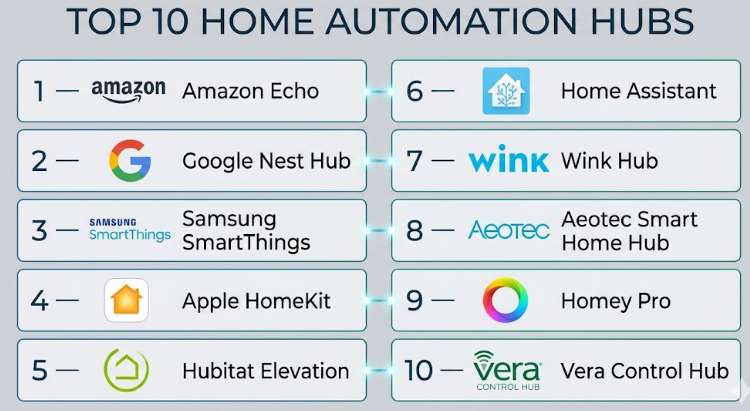
Top 10 Home Automation Hubs
#1 — Amazon Echo (Alexa Hub)
Short description: A widely used smart home hub built into Echo devices. Ideal for users invested in voice automation and smart assistants. It supports multiple devices and offers simple setup for beginners.
Key Features
- Alexa voice assistant integration
- Smart routines and automation
- Zigbee support in select models
- Multi-device grouping
- Voice-based control
- Cloud-based processing
Pros
- Easy to set up and use
- Strong ecosystem support
Cons
- Limited advanced automation
- Heavy reliance on cloud
Platforms / Deployment
iOS / Android / Cloud
Security & Compliance
MFA, encryption; compliance not publicly stated
Integrations & Ecosystem
Supports a wide range of smart devices and services. Works well with lighting, security, and entertainment systems.
- Philips Hue
- Ring devices
- Smart thermostats
Support & Community
Strong documentation and global user base
#2 — Google Nest Hub
Short description: A smart display and hub powered by Google Assistant, offering seamless integration with Google services and smart devices.
Key Features
- Google Assistant integration
- Smart home dashboard
- Voice and touch control
- Automation routines
- Camera and sensor integration
Pros
- Intuitive UI
- Strong AI assistant
Cons
- Limited local control
- Fewer protocols than competitors
Platforms / Deployment
iOS / Android / Cloud
Security & Compliance
Encryption; compliance not publicly stated
Integrations & Ecosystem
Integrates with Google ecosystem and third-party devices.
- Nest products
- Smart lights
- Streaming services
Support & Community
Strong support and active community
#3 — Samsung SmartThings
Short description: A versatile hub supporting multiple protocols, ideal for users needing flexibility and automation depth.
Key Features
- Zigbee, Z-Wave, Wi-Fi support
- Automation engine
- Mobile app control
- Device grouping
- Cloud + local processing
Pros
- Wide compatibility
- Flexible automation
Cons
- Some cloud dependency
- Learning curve
Platforms / Deployment
iOS / Android / Hybrid
Security & Compliance
Encryption; compliance not publicly stated
Integrations & Ecosystem
Strong ecosystem with extensive integrations.
- Smart appliances
- Sensors
- Third-party APIs
Support & Community
Active developer and user community
#4 — Apple HomeKit (Home Hub)
Short description: Apple’s ecosystem-focused hub providing strong privacy and seamless integration for Apple users.
Key Features
- Secure automation
- iCloud integration
- Voice control via Siri
- Scene automation
- End-to-end encryption
Pros
- High security
- Smooth Apple integration
Cons
- Limited device compatibility
- Apple-only ecosystem
Platforms / Deployment
iOS / Cloud
Security & Compliance
Strong encryption, privacy-first design
Integrations & Ecosystem
Works best within Apple ecosystem.
- HomeKit-enabled devices
- Apple TV, HomePod
Support & Community
Strong support but smaller ecosystem
#5 — Hubitat Elevation
Short description: A local-first hub designed for advanced users who prioritize privacy and customization.
Key Features
- Local automation engine
- Zigbee and Z-Wave support
- Rule-based automation
- Dashboard customization
- No cloud dependency
Pros
- Fast local processing
- High customization
Cons
- Complex setup
- Limited UI polish
Platforms / Deployment
Web / Local
Security & Compliance
Local processing; compliance not publicly stated
Integrations & Ecosystem
Supports multiple integrations via community.
- Custom drivers
- Smart devices
- APIs
Support & Community
Strong enthusiast community
#6 — Home Assistant
Short description: An open-source platform offering maximum flexibility and control for advanced users.
Key Features
- Open-source automation
- Local and cloud support
- Extensive integrations
- Custom scripting
- Dashboard customization
Pros
- Highly customizable
- Strong community
Cons
- Steep learning curve
- Requires maintenance
Platforms / Deployment
Linux / Web / Self-hosted
Security & Compliance
Varies / user-managed
Integrations & Ecosystem
Massive integration library.
- Thousands of integrations
- APIs
- IoT devices
Support & Community
Very strong global community
#7 — Wink Hub
Short description: A user-friendly hub focusing on simplicity and ease of integration.
Key Features
- Multi-protocol support
- Mobile app control
- Automation routines
- Device grouping
- Cloud connectivity
Pros
- Easy setup
- Clean UI
Cons
- Limited innovation
- Subscription requirements
Platforms / Deployment
iOS / Android / Cloud
Security & Compliance
Not publicly stated
Integrations & Ecosystem
Supports multiple device types.
- Sensors
- Lighting
- Locks
Support & Community
Moderate support
#8 — Aeotec Smart Home Hub
Short description: A SmartThings-based hub optimized for performance and reliability.
Key Features
- Zigbee and Z-Wave support
- SmartThings compatibility
- Automation engine
- Mobile app control
Pros
- Reliable hardware
- Good compatibility
Cons
- Dependent on SmartThings ecosystem
- Limited unique features
Platforms / Deployment
iOS / Android / Hybrid
Security & Compliance
Encryption; compliance not publicly stated
Integrations & Ecosystem
Works within SmartThings ecosystem.
- Sensors
- Appliances
- APIs
Support & Community
Good community support
#9 — Homey Pro
Short description: A premium hub offering broad compatibility and a user-friendly interface.
Key Features
- Multi-protocol support
- Advanced automation
- Visual flow editor
- Local processing
- App ecosystem
Pros
- Powerful automation
- Attractive UI
Cons
- Expensive
- Limited availability
Platforms / Deployment
Web / iOS / Android / Hybrid
Security & Compliance
Encryption; compliance not publicly stated
Integrations & Ecosystem
Supports many devices and protocols.
- Apps marketplace
- Smart home devices
- APIs
Support & Community
Active support and growing ecosystem
#10 — Vera Control Hub
Short description: A long-standing hub focused on automation and device management.
Key Features
- Z-Wave support
- Automation rules
- Remote access
- Energy monitoring
Pros
- Stable platform
- Good automation
Cons
- Outdated UI
- Limited updates
Platforms / Deployment
Web / Cloud
Security & Compliance
Not publicly stated
Integrations & Ecosystem
Supports common smart devices.
- Sensors
- Security systems
- APIs
Support & Community
Moderate community presence
Comparison Table (Top 10)
| Tool Name | Best For | Platform(s) Supported | Deployment | Standout Feature | Public Rating |
|---|---|---|---|---|---|
| Amazon Echo | Beginners | iOS, Android | Cloud | Voice automation | N/A |
| Google Nest Hub | Google users | iOS, Android | Cloud | AI assistant | N/A |
| SmartThings | Flexible users | iOS, Android | Hybrid | Multi-protocol | N/A |
| Apple HomeKit | Apple users | iOS | Cloud | Privacy-first | N/A |
| Hubitat | Advanced users | Web | Local | Local automation | N/A |
| Home Assistant | Developers | Linux, Web | Self-hosted | Open-source | N/A |
| Wink Hub | Beginners | iOS, Android | Cloud | Ease of use | N/A |
| Aeotec Hub | SmartThings users | iOS, Android | Hybrid | Reliable hardware | N/A |
| Homey Pro | Premium users | Web, Mobile | Hybrid | Flow automation | N/A |
| Vera Hub | Legacy users | Web | Cloud | Stability | N/A |
Evaluation & Scoring of Home Automation Hubs
| Tool Name | Core | Ease | Integrations | Security | Performance | Support | Value | Weighted Total |
|---|---|---|---|---|---|---|---|---|
| Amazon Echo | 8 | 9 | 8 | 7 | 8 | 9 | 8 | 8.2 |
| Google Nest Hub | 8 | 9 | 7 | 7 | 8 | 8 | 8 | 8.0 |
| SmartThings | 9 | 7 | 9 | 7 | 8 | 8 | 8 | 8.3 |
| Apple HomeKit | 8 | 8 | 7 | 9 | 8 | 8 | 7 | 8.1 |
| Hubitat | 9 | 6 | 8 | 8 | 9 | 7 | 8 | 8.2 |
| Home Assistant | 10 | 5 | 10 | 8 | 9 | 9 | 9 | 8.8 |
| Wink Hub | 7 | 8 | 7 | 6 | 7 | 7 | 7 | 7.2 |
| Aeotec Hub | 8 | 7 | 8 | 7 | 8 | 7 | 8 | 7.9 |
| Homey Pro | 9 | 8 | 9 | 8 | 9 | 8 | 7 | 8.5 |
| Vera Hub | 7 | 6 | 7 | 6 | 7 | 6 | 7 | 6.8 |
How to interpret scores:
These scores are comparative, not absolute. A higher score indicates better balance across features, usability, and ecosystem. Open-source tools score high in flexibility but lower in ease. Simpler tools score high in usability but may lack depth.
Which Home Automation Hubs
Solo / Freelancer
Choose Amazon Echo or Google Nest for simplicity and quick setup.
SMB
SmartThings or Homey Pro offer flexibility and scalability.
Mid-Market
Hubitat or Aeotec provide better control and performance.
Enterprise
Home Assistant is ideal for large-scale, customizable deployments.
Budget vs Premium
Budget: Echo, Nest
Premium: Homey Pro, Hubitat
Feature Depth vs Ease of Use
- Easy: Echo, Nest
- Advanced: Home Assistant, Hubitat
Integrations & Scalability
- Best: Home Assistant, SmartThings
Security & Compliance Needs
- Strong privacy: Apple HomeKit
- Local control: Hubitat
Frequently Asked Questions (FAQs)
1. What is a home automation hub?
A hub connects and controls smart devices in one place. It allows automation, scheduling, and centralized management across multiple devices.
2. Do I need a hub for smart devices?
Not always. Some devices work independently, but hubs improve automation and integration.
3. What protocols should I look for?
Zigbee, Z-Wave, Wi-Fi, and Matter are the most common protocols.
4. Are hubs secure?
Most hubs use encryption and authentication, but security varies by platform.
5. Can I control hubs remotely?
Yes, most hubs offer mobile apps for remote access.
6. What is local vs cloud control?
Local control processes commands on the device, while cloud relies on internet servers.
7. Are there subscription costs?
Some hubs offer free features, while advanced automation may require subscriptions.
8. Can I switch hubs later?
Yes, but device compatibility and reconfiguration can be challenging.
9. Which hub is best for beginners?
Amazon Echo and Google Nest are easiest to start with.
10. Which hub is best for advanced users?
Home Assistant and Hubitat provide maximum control and customization.
Conclusion
Home Automation Hubs have evolved from simple device controllers into powerful platforms that manage entire living environments. Whether your priority is ease of use, deep customization, privacy, or scalability, there is no one-size-fits-all solution. Beginners often benefit from voice-first ecosystems like Amazon Echo or Google Nest, while advanced users gravitate toward platforms like Home Assistant or Hubitat for full control and flexibility.
