Introduction
Status Page Tools are platforms that help organizations communicate the real-time status of their systems, services, and applications to users. In simple terms, they provide a public or private dashboard where customers can check if services are operational, experiencing issues, or undergoing maintenance.
In an era where uptime and transparency directly impact customer trust, status pages have become a critical component of modern DevOps and customer communication strategies. Instead of overwhelming support teams during outages, businesses can proactively inform users and provide updates in real time.
Common use cases include:
- Communicating outages and incidents to users
- Displaying real-time system health
- Managing scheduled maintenance announcements
- Reducing support tickets during downtime
- Building trust through transparency
Key evaluation criteria:
- Real-time status updates and automation
- Incident communication workflows
- Customization and branding
- Integration with monitoring and incident tools
- Notification channels (email, SMS, webhooks)
- Ease of setup and management
- Scalability for large user bases
- Security and access control
- Historical uptime reporting
- Pricing and flexibility
Best for: SaaS companies, DevOps teams, IT operations, and any organization providing online services.
Not ideal for: Small internal tools or applications where external communication is not required.
Key Trends in Status Page Tools
- Automation from monitoring tools: Auto-triggering status updates from alerts
- Private status pages: Internal dashboards for teams and stakeholders
- Multi-channel notifications: Email, SMS, Slack, and webhooks
- Customization and branding: Fully white-labeled status pages
- Integration with incident management tools: Unified incident communication
- Component-based monitoring: Granular service-level status updates
- API-driven updates: Automating status changes
- Global service visibility: Multi-region system tracking
- Historical uptime reporting: Transparency and SLA reporting
- Security and access controls: Managing public vs private visibility
How We Selected These Tools (Methodology)
We evaluated Status Page Tools based on:
- Market adoption and credibility
- Feature completeness (status updates, notifications, reporting)
- Ease of use and onboarding
- Integration with monitoring and incident management tools
- Customization and branding capabilities
- Scalability across services and users
- Security and compliance features
- Performance and reliability
- Community and vendor support
- Overall value for cost
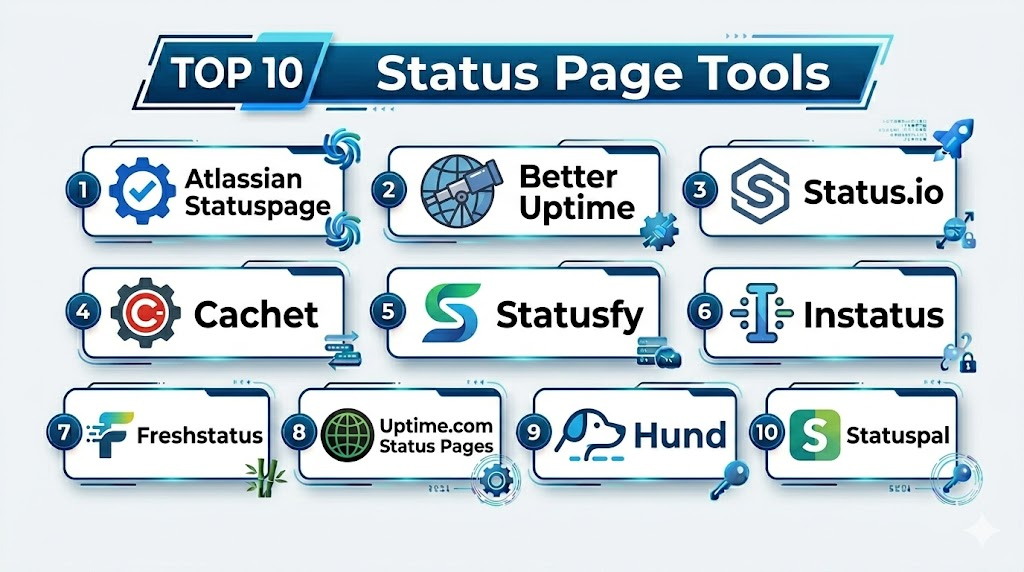
Top 10 Status Page Tools
#1 — Atlassian Statuspage
Short description: A widely used status page platform for communicating incidents and system status to users.
Key Features
- Real-time incident updates
- Component-based status tracking
- Custom branding
- Multi-channel notifications
- Incident history and reporting
- API access
Pros
- Highly customizable
- Strong ecosystem
Cons
- Pricing can be high
- Requires setup for automation
Platforms / Deployment
Cloud
Security & Compliance
SSO, RBAC, audit logs
Integrations & Ecosystem
Statuspage integrates with monitoring and incident tools for automated updates.
- PagerDuty
- Opsgenie
- Slack
Support & Community
Strong vendor support and community.
#2 — Better Uptime
Short description: A modern uptime monitoring and status page tool with built-in incident management features.
Key Features
- Uptime monitoring
- Status pages
- Incident management
- Alerting
- On-call scheduling
Pros
- All-in-one platform
- Easy to use
Cons
- Limited advanced customization
- Smaller ecosystem
Platforms / Deployment
Cloud
Security & Compliance
RBAC, encryption
Integrations & Ecosystem
Better Uptime integrates with monitoring and DevOps tools.
- APIs
- Alerting tools
Support & Community
Good support.
#3 — Status.io
Short description: A status page platform focused on high availability and real-time updates.
Key Features
- Real-time status updates
- Multi-region hosting
- Incident management
- Notifications
- API access
Pros
- High reliability
- Fast updates
Cons
- Limited UI customization
- Pricing tiers
Platforms / Deployment
Cloud
Security & Compliance
RBAC, encryption
Integrations & Ecosystem
Integrates with monitoring and DevOps tools.
- APIs
- Alerting systems
Support & Community
Vendor support available.
#4 — Cachet
Short description: An open-source status page system for creating customizable status dashboards.
Key Features
- Open-source platform
- Incident tracking
- Customizable UI
- API access
- Metrics tracking
Pros
- Free and flexible
- Fully customizable
Cons
- Requires hosting and maintenance
- Limited built-in automation
Platforms / Deployment
Self-hosted
Security & Compliance
Not publicly stated
Integrations & Ecosystem
Works with APIs and custom integrations.
- Monitoring tools
- Custom scripts
Support & Community
Open-source community.
#5 — Statusfy
Short description: A static status page generator for modern web applications.
Key Features
- Static site generation
- Custom themes
- Incident reporting
- Multi-language support
- API integration
Pros
- Lightweight
- Developer-friendly
Cons
- Requires technical setup
- Limited dynamic features
Platforms / Deployment
Self-hosted
Security & Compliance
Not publicly stated
Integrations & Ecosystem
Integrates with modern web development tools.
- Static hosting platforms
- APIs
Support & Community
Open-source community.
#6 — Instatus
Short description: A simple and fast status page tool focused on ease of use and quick setup.
Key Features
- Status pages
- Incident updates
- Custom domains
- Notifications
- API access
Pros
- Very easy to use
- Affordable
Cons
- Limited advanced features
- Smaller ecosystem
Platforms / Deployment
Cloud
Security & Compliance
Not publicly stated
Integrations & Ecosystem
Supports integration via APIs.
- Monitoring tools
- Webhooks
Support & Community
Growing support.
#7 — Freshstatus
Short description: A status page solution by Freshworks for managing service availability and communication.
Key Features
- Status tracking
- Incident updates
- Notifications
- SLA reporting
- Customization
Pros
- Easy setup
- Affordable
Cons
- Limited enterprise features
- Smaller ecosystem
Platforms / Deployment
Cloud
Security & Compliance
RBAC, encryption
Integrations & Ecosystem
Integrates with Freshworks ecosystem and APIs.
- Monitoring tools
- Freshworks products
Support & Community
Vendor support.
#8 — Uptime.com Status Pages
Short description: A monitoring and status page platform offering real-time updates and performance tracking.
Key Features
- Status pages
- Uptime monitoring
- Incident alerts
- Reporting
- API access
Pros
- Combined monitoring and status
- Reliable
Cons
- UI complexity
- Pricing tiers
Platforms / Deployment
Cloud
Security & Compliance
RBAC, encryption
Integrations & Ecosystem
Integrates with monitoring and DevOps tools.
- APIs
- Alerting systems
Support & Community
Vendor support.
#9 — Hund
Short description: A status page tool focused on reliability and customer communication.
Key Features
- Status updates
- Incident tracking
- Notifications
- API access
- Custom branding
Pros
- Simple interface
- Good reliability
Cons
- Limited advanced features
- Smaller ecosystem
Platforms / Deployment
Cloud
Security & Compliance
Not publicly stated
Integrations & Ecosystem
Supports integration through APIs.
- Monitoring tools
- Webhooks
Support & Community
Vendor support.
#10 — Statuspal
Short description: A status page platform focused on automation and customization.
Key Features
- Automated status updates
- Incident tracking
- Custom branding
- Notifications
- API access
Pros
- Good automation features
- Flexible customization
Cons
- Learning curve
- Smaller ecosystem
Platforms / Deployment
Cloud
Security & Compliance
RBAC, encryption
Integrations & Ecosystem
Integrates with monitoring and DevOps tools.
- APIs
- Alerting tools
Support & Community
Vendor support.
Comparison Table (Top 10)
| Tool Name | Best For | Platform(s) Supported | Deployment | Standout Feature | Public Rating |
|---|---|---|---|---|---|
| Statuspage | Enterprise | Web | Cloud | Customization | N/A |
| Better Uptime | SMB | Web | Cloud | All-in-one | N/A |
| Status.io | Reliability | Web | Cloud | Speed | N/A |
| Cachet | Open-source | Web | Self-hosted | Flexibility | N/A |
| Statusfy | Developers | Web | Self-hosted | Static pages | N/A |
| Instatus | Simplicity | Web | Cloud | Ease of use | N/A |
| Freshstatus | SMB | Web | Cloud | Affordability | N/A |
| Uptime.com | Monitoring | Web | Cloud | Combined features | N/A |
| Hund | Simplicity | Web | Cloud | Reliability | N/A |
| Statuspal | Automation | Web | Cloud | Automation | N/A |
Status Page Tools Scoring
| Tool Name | Core (25%) | Ease (15%) | Integrations (15%) | Security (10%) | Performance (10%) | Support (10%) | Value (15%) | Weighted Total |
|---|---|---|---|---|---|---|---|---|
| Statuspage | 10 | 8 | 10 | 9 | 9 | 9 | 7 | 9.1 |
| Better Uptime | 8 | 9 | 8 | 8 | 8 | 8 | 9 | 8.4 |
| Status.io | 9 | 8 | 8 | 8 | 9 | 8 | 8 | 8.5 |
| Cachet | 7 | 7 | 7 | 7 | 8 | 8 | 10 | 7.8 |
| Statusfy | 7 | 7 | 7 | 7 | 8 | 8 | 9 | 7.7 |
| Instatus | 8 | 10 | 7 | 7 | 8 | 8 | 9 | 8.2 |
| Freshstatus | 7 | 9 | 7 | 8 | 8 | 8 | 9 | 8.0 |
| Uptime.com | 8 | 8 | 8 | 8 | 8 | 8 | 8 | 8.0 |
| Hund | 7 | 9 | 7 | 7 | 8 | 7 | 8 | 7.8 |
| Statuspal | 8 | 8 | 8 | 8 | 8 | 8 | 8 | 8.0 |
How to interpret scores:
- Scores are relative comparisons across tools
- Enterprise tools excel in automation and integrations
- Open-source tools provide strong value
- Simpler tools score higher in ease of use
- Choose based on communication needs and scale
Which Status Page Tools Is Right for You?
Solo / Freelancer
- Use Instatus or Cachet
- Focus on simplicity and cost
SMB
- Better Uptime or Freshstatus
- Balance usability and features
Mid-Market
- Status.io or Uptime.com
- Focus on reliability and reporting
Enterprise
- Atlassian Statuspage or Statuspal
- Focus on automation, integrations, and scalability
Budget vs Premium
- Open-source tools offer cost savings
- Premium tools provide automation and integrations
Feature Depth vs Ease of Use
- Statuspage = powerful
- Instatus = simple
Integrations & Scalability
- Choose tools with monitoring and incident integrations
- Ensure scalability for user base
Security & Compliance Needs
- Enterprises should prioritize RBAC and audit logs
- Smaller teams can focus on basic functionality
Frequently Asked Questions (FAQs)
What is a status page?
A dashboard showing the real-time status of services.
Why are status pages important?
They improve transparency and reduce support load.
Are status page tools free?
Some open-source tools are free; others are paid.
Can status pages be private?
Yes, many tools support private pages.
Do they integrate with monitoring tools?
Yes, most support integrations.
Can I customize branding?
Yes, many tools allow customization.
How often are updates shown?
Real-time or near real-time.
Are notifications supported?
Yes, via email, SMS, and more.
Can I host my own status page?
Yes, with open-source tools.
Can I switch tools later?
Yes, but data migration may be needed.
Conclusion
Status Page Tools are essential for maintaining transparency and trust with users by providing real-time updates on system performance and incidents. They help reduce support overhead and improve communication during outages.
