Introduction
eLearning Authoring Tools are software platforms used to create digital learning content such as online courses, training modules, simulations, and assessments. These tools enable instructional designers, educators, and organizations to build interactive, multimedia-rich learning experiences without needing deep programming skills.
As digital learning continues to expand across corporate training, education, and upskilling initiatives, authoring tools have become essential for delivering scalable, engaging, and trackable content. Modern tools support mobile-first design, AI-assisted content creation, and integration with Learning Management Systems (LMS).
Common use cases include:
- Corporate training and onboarding programs
- Compliance and certification courses
- Software simulations and product training
- Academic course development
- Microlearning and mobile learning content
Key evaluation criteria:
- Ease of use and learning curve
- Content flexibility and interactivity
- Responsive/mobile-friendly design
- SCORM/xAPI compatibility
- Collaboration and version control
- Integration with LMS and HR systems
- Media support (video, audio, simulations)
- AI and automation features
- Scalability for large teams
- Pricing and overall value
Best for: Instructional designers, L&D teams, educators, enterprises, and training organizations building structured digital learning experiences.
Not ideal for: Individuals needing only simple video recording or presentation tools without structured course delivery requirements.
Key Trends in Portfolio & eLearning Authoring Tools
- AI-assisted content creation: Automated course outlines, quizzes, and narration.
- No-code/low-code authoring: Simplifying course creation for non-technical users.
- Mobile-first design: Responsive content optimized for smartphones and tablets.
- Microlearning focus: Short, bite-sized learning modules.
- Cloud-based collaboration: Real-time editing and team workflows.
- Immersive learning (VR/AR): Simulations and 360° experiences.
- Data-driven learning analytics: Tracking learner behavior and outcomes.
- Integration with LMS ecosystems: Seamless publishing and tracking via SCORM/xAPI.
- Template-driven design: Faster content creation using pre-built components.
- Video-based learning growth: Increased use of interactive video content.
How We Selected These Tools (Methodology)
The tools were selected using a structured evaluation approach:
- Strong industry adoption and instructional design usage
- Comprehensive authoring capabilities (interactive, video, simulation)
- Ease of use for beginners and professionals
- Support for modern standards (SCORM, xAPI, HTML5)
- Integration ecosystem with LMS and enterprise tools
- Collaboration and workflow capabilities
- Vendor maturity and innovation
- Performance and reliability
- Scalability across SMB and enterprise use cases
- Support quality and documentation
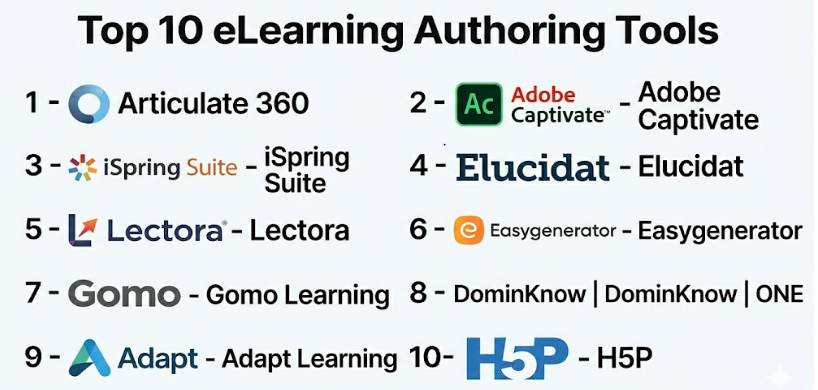
Top 10 eLearning Authoring Tools
#1 — Articulate 360
Short description: Industry-leading authoring suite combining powerful desktop and cloud tools for creating interactive and responsive courses.
Key Features
- Storyline 360 for advanced interactivity
- Rise 360 for responsive, web-based courses
- Content library with templates and assets
- Built-in review and collaboration tools
- SCORM, xAPI, and HTML5 publishing
- Screen recording and video tools
Pros
- Highly flexible and widely adopted
- Strong community and ecosystem
Cons
- Premium pricing
- Learning curve for advanced features
Platforms / Deployment
Web / Windows / macOS (via browser tools)
Cloud + Desktop
Security & Compliance
Not publicly stated
Integrations & Ecosystem
Articulate integrates with major LMS platforms and enterprise tools.
- LMS platforms (SCORM/xAPI support)
- Content libraries
- APIs
Support & Community
Extensive documentation, tutorials, and active user community.
#2 — Adobe Captivate
Short description: Powerful authoring tool known for simulations, interactive content, and advanced learning experiences.
Key Features
- Software simulations and screen recording
- Interactive video and VR support
- Responsive design tools
- Quiz and assessment creation
- PowerPoint import
- SCORM and xAPI support
Pros
- Strong simulation capabilities
- Advanced feature set
Cons
- Steep learning curve
- Complex interface
Platforms / Deployment
Windows / macOS
Desktop
Security & Compliance
Not publicly stated
Integrations & Ecosystem
Integrates with LMS and Adobe ecosystem.
- LMS platforms
- Adobe tools
- APIs
Support & Community
Strong documentation and enterprise support.
#3 — iSpring Suite
Short description: PowerPoint-based authoring tool ideal for rapid course development.
Key Features
- PowerPoint integration
- Quiz and assessment builder
- Video and narration tools
- Screen recording
- SCORM/xAPI export
Pros
- Easy to learn for beginners
- Fast course creation
Cons
- Limited advanced interactivity
- Windows dependency
Platforms / Deployment
Windows
Desktop
Security & Compliance
Not publicly stated
Integrations & Ecosystem
Integrates with LMS platforms and PowerPoint workflows.
- LMS systems
- APIs
Support & Community
Good support and onboarding resources.
#4 — Elucidat
Short description: Cloud-based authoring tool focused on large-scale content creation and team collaboration.
Key Features
- Responsive course design
- Collaboration workflows
- Template-based authoring
- Analytics and reporting
- Localization support
Pros
- Scalable for enterprises
- Strong collaboration features
Cons
- Expensive
- Limited deep customization
Platforms / Deployment
Web
Cloud
Security & Compliance
Not publicly stated
Integrations & Ecosystem
Supports integrations with LMS and enterprise tools.
- LMS platforms
- APIs
- Analytics tools
Support & Community
Enterprise-level support and onboarding.
#5 — Lectora
Short description: Flexible authoring tool known for accessibility and compliance-focused training.
Key Features
- Advanced scripting and customization
- Responsive design
- Accessibility compliance (WCAG support)
- SCORM/xAPI support
- Template library
Pros
- Strong accessibility features
- Highly customizable
Cons
- Outdated UI
- Learning curve
Platforms / Deployment
Web / Windows
Cloud + Desktop
Security & Compliance
Not publicly stated
Integrations & Ecosystem
Integrates with LMS and enterprise systems.
- LMS platforms
- APIs
Support & Community
Strong enterprise support.
#6 — Easygenerator
Short description: Cloud-based authoring tool designed for SMEs and non-technical users.
Key Features
- Drag-and-drop course builder
- AI-assisted content creation
- Collaboration tools
- Cloud hosting
- SCORM export
Pros
- Easy to use
- Fast content creation
Cons
- Limited advanced features
- Customization constraints
Platforms / Deployment
Web
Cloud
Security & Compliance
Not publicly stated
Integrations & Ecosystem
Supports integrations with LMS tools.
- LMS platforms
- APIs
Support & Community
Good onboarding and support.
#7 — Gomo Learning
Short description: Cloud-based authoring tool focused on responsive, mobile-first learning.
Key Features
- Responsive design
- Collaboration tools
- Analytics dashboards
- Multi-language support
- SCORM/xAPI export
Pros
- Strong mobile support
- Easy collaboration
Cons
- Limited customization
- Pricing varies
Platforms / Deployment
Web
Cloud
Security & Compliance
Not publicly stated
Integrations & Ecosystem
Integrates with LMS platforms.
- LMS systems
- APIs
Support & Community
Reliable support and documentation.
#8 — DominKnow | ONE
Short description: All-in-one authoring platform with responsive and collaborative capabilities.
Key Features
- Responsive and adaptive design
- Collaboration workflows
- Content reuse
- SCORM/xAPI support
- Analytics
Pros
- Strong team collaboration
- Flexible content reuse
Cons
- Complex interface
- Learning curve
Platforms / Deployment
Web
Cloud
Security & Compliance
Not publicly stated
Integrations & Ecosystem
Supports integrations with LMS and enterprise tools.
- LMS platforms
- APIs
Support & Community
Enterprise-level support.
#9 — Adapt Learning
Short description: Open-source authoring framework for responsive eLearning development.
Key Features
- Open-source framework
- Responsive design
- Plugin ecosystem
- Custom development flexibility
- SCORM support
Pros
- Free and customizable
- Strong developer flexibility
Cons
- Requires technical expertise
- Limited out-of-the-box features
Platforms / Deployment
Web
Self-hosted
Security & Compliance
Varies / N/A
Integrations & Ecosystem
Extensible via plugins and APIs.
- LMS systems
- Plugins
- APIs
Support & Community
Strong open-source community.
#10 — H5P
Short description: Open-source tool for creating interactive content embedded in LMS and websites.
Key Features
- Interactive content types (quizzes, videos)
- LMS integration
- Open-source flexibility
- Easy embedding
- Content reuse
Pros
- Free and widely supported
- Easy to use
Cons
- Limited standalone capabilities
- Requires hosting or LMS
Platforms / Deployment
Web
Cloud / Self-hosted
Security & Compliance
Varies / N/A
Integrations & Ecosystem
Strong integration with LMS platforms.
- Moodle
- WordPress
- APIs
Support & Community
Large open-source community.
Comparison Table (Top 10)
| Tool Name | Best For | Platform(s) Supported | Deployment | Standout Feature | Public Rating |
|---|---|---|---|---|---|
| Articulate 360 | Enterprise | Web, Windows | Cloud + Desktop | Interactive courses | N/A |
| Adobe Captivate | Simulations | Windows, macOS | Desktop | Software training | N/A |
| iSpring Suite | SMB | Windows | Desktop | PowerPoint integration | N/A |
| Elucidat | Enterprise | Web | Cloud | Collaboration | N/A |
| Lectora | Compliance | Web, Windows | Hybrid | Accessibility | N/A |
| Easygenerator | SMB | Web | Cloud | Ease of use | N/A |
| Gomo Learning | Mobile learning | Web | Cloud | Responsive design | N/A |
| DominKnow | Enterprise | Web | Cloud | Content reuse | N/A |
| Adapt Learning | Developers | Web | Self-hosted | Open-source | N/A |
| H5P | LMS users | Web | Cloud/Self-hosted | Interactive content | N/A |
Evaluation & Scoring of eLearning Authoring Tools
| Tool Name | Core (25%) | Ease (15%) | Integrations (15%) | Security (10%) | Performance (10%) | Support (10%) | Value (15%) | Weighted Total |
|---|---|---|---|---|---|---|---|---|
| Articulate 360 | 9 | 7 | 9 | 7 | 9 | 9 | 7 | 8.3 |
| Adobe Captivate | 9 | 6 | 8 | 7 | 9 | 8 | 6 | 7.9 |
| iSpring Suite | 8 | 9 | 7 | 6 | 8 | 8 | 9 | 8.1 |
| Elucidat | 8 | 8 | 8 | 6 | 8 | 8 | 6 | 7.7 |
| Lectora | 8 | 6 | 7 | 7 | 8 | 7 | 7 | 7.4 |
| Easygenerator | 7 | 9 | 7 | 6 | 7 | 7 | 8 | 7.5 |
| Gomo Learning | 7 | 8 | 7 | 6 | 7 | 7 | 7 | 7.2 |
| DominKnow | 8 | 7 | 8 | 6 | 8 | 7 | 7 | 7.5 |
| Adapt Learning | 7 | 5 | 7 | 6 | 7 | 6 | 9 | 6.9 |
| H5P | 7 | 8 | 8 | 6 | 7 | 7 | 9 | 7.5 |
How to interpret scores:
- Scores are comparative across tools, not absolute.
- Enterprise tools score higher in features but may require expertise.
- SMB tools balance ease of use and value.
- Open-source tools offer flexibility but require technical skills.
- Choose based on content complexity and team capabilities.
Which eLearning Authoring Tool Is Right for You?
Solo / Freelancer
H5P or Easygenerator for simple and cost-effective content creation.
SMB
iSpring Suite and Easygenerator offer fast deployment and ease of use.
Mid-Market
Gomo, DominKnow, and Lectora provide balance between features and scalability.
Enterprise
Articulate 360, Adobe Captivate, and Elucidat are best for complex, large-scale training.
Budget vs Premium
- Budget: H5P, Adapt Learning
- Premium: Articulate 360, Elucidat
Feature Depth vs Ease of Use
- Feature-rich: Captivate, Lectora
- Easy to use: iSpring, Easygenerator
Integrations & Scalability
- Strong integrations: Articulate, Elucidat
- Moderate: SMB tools
Security & Compliance Needs
- High compliance: Enterprise tools
- Basic: Open-source tools
Frequently Asked Questions (FAQs)
What are eLearning authoring tools?
They are software platforms used to create digital learning content such as courses and training modules.
Do I need coding skills?
Most tools are no-code or low-code, but advanced tools may require technical knowledge.
What is SCORM?
A standard that allows eLearning content to work with LMS platforms.
Can I create mobile-friendly courses?
Yes, many tools support responsive design.
Are these tools cloud-based?
Some are cloud-based, while others are desktop or hybrid.
How much do they cost?
Pricing varies widely depending on features and scale.
Can I integrate with LMS?
Yes, most tools support LMS integration.
Which tool is best for beginners?
Easygenerator and iSpring Suite are beginner-friendly.
Are open-source tools good?
They offer flexibility but require technical expertise.
What should I avoid when choosing?
Avoid tools that lack scalability, integration, or usability.
Conclusion
eLearning Authoring Tools are essential for building engaging, scalable, and interactive learning experiences. Whether you’re creating simple training modules or complex simulations, the right tool can significantly improve both learning outcomes and content development efficiency.
