Introduction
Screen Recording Software allows users to capture on-screen activity along with audio, webcam input, and system interactions. These tools are widely used for creating tutorials, software demos, presentations, gameplay recordings, and online courses.
Modern screen recording solutions go beyond simple capture—they now include AI-powered editing, automatic captions, cloud sharing, collaboration tools, and integrations with productivity platforms. As remote work, online learning, and content creation continue to grow, screen recording software has become an essential tool for individuals and organizations alike.
Common Use Cases
- Tutorial creation: Software walkthroughs and how-to videos
- Online education: Recording lectures and training sessions
- Product demos: Showcasing apps and features
- Content creation: YouTube videos and social media content
- Bug reporting & support: Recording issues for troubleshooting
What Buyers Should Evaluate
- Recording quality (resolution, frame rate)
- Audio capture (system + microphone)
- Webcam overlay support
- Editing and annotation tools
- Export formats and sharing options
- Cloud storage and collaboration
- Performance and system impact
- Ease of use and workflow
- Integration with other tools
- Pricing and licensing model
Best for: Content creators, educators, developers, marketers, and support teams who need to capture and share screen activity efficiently.
Not ideal for: Users who only need basic screenshots or minimal recording. Built-in OS tools may be sufficient for simple needs.
Key Trends in Screen Recording Software
- AI-powered editing: Auto-trimming, noise removal, and caption generation
- Cloud-based workflows: Instant sharing and collaboration
- Interactive video features: Clickable elements and viewer engagement
- Integrated editing suites: Built-in video editing capabilities
- Cross-platform recording: Desktop, web, and mobile support
- Low-performance impact: Optimized recording for minimal lag
- Real-time annotation tools: Drawing, highlighting, and cursor effects
- Secure sharing: Access controls and private links
- Automation tools: Scheduled recordings and workflows
- Freemium pricing models: Free tiers with premium upgrades
How We Selected These Tools (Methodology)
The tools in this list were selected based on:
- Popularity among creators, educators, and businesses
- Feature completeness for recording and editing
- Performance and reliability during recording
- Ease of use for beginners and professionals
- Integration with productivity and sharing tools
- Availability of cloud and local deployment options
- Support for different recording scenarios
- Documentation and community support
- Pricing flexibility and value
- Suitability across multiple use cases
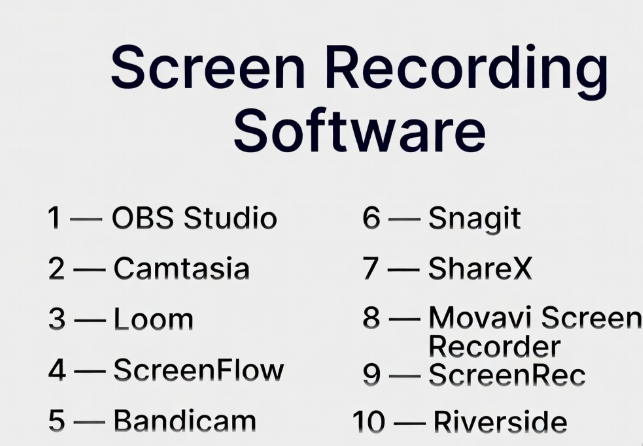
Top 10 Screen Recording Software Tools
#1 — OBS Studio
Short description: A powerful open-source tool for screen recording and live streaming, widely used by creators and professionals.
Key Features
- Screen and window capture
- Multi-source recording
- Audio mixing
- Scene switching
- Real-time encoding
- Plugin support
- High-quality output
Pros
- Free and open-source
- Highly customizable
- Strong community support
Cons
- Steep learning curve
- No built-in editing tools
- Manual setup required
Platforms / Deployment
Windows / macOS / Linux
Security & Compliance
Not publicly stated
Integrations & Ecosystem
OBS Studio supports a wide ecosystem of plugins and integrations.
- Streaming platforms
- Plugins and extensions
- Hardware devices
Support & Community
Very large community with extensive tutorials.
#2 — Camtasia
Short description: An all-in-one screen recording and video editing tool designed for professional content creation.
Key Features
- Screen recording
- Built-in video editor
- Annotations and effects
- Templates
- Audio editing
- Interactive elements
- Export options
Pros
- Easy-to-use interface
- Integrated editing tools
- High-quality output
Cons
- Expensive
- Resource-intensive
- Limited advanced recording features
Platforms / Deployment
Windows / macOS
Security & Compliance
Not publicly stated
Integrations & Ecosystem
- Editing tools
- Export platforms
- Templates
Support & Community
Strong support and learning resources.
#3 — Loom
Short description: A cloud-based screen recording tool focused on quick sharing and collaboration.
Key Features
- Instant recording
- Cloud storage
- Shareable links
- Webcam overlay
- Viewer analytics
- Team collaboration
- Basic editing
Pros
- Very easy to use
- Fast sharing
- Great for teams
Cons
- Limited editing features
- Subscription model
- Internet dependency
Platforms / Deployment
Web / Windows / macOS / iOS / Android
Security & Compliance
Not publicly stated
Integrations & Ecosystem
- Collaboration tools
- Productivity apps
- Cloud storage
Support & Community
Strong adoption among teams.
#4 — ScreenFlow
Short description: A macOS-based screen recording and editing software known for its high-quality output and intuitive interface.
Key Features
- Screen recording
- Video editing
- Audio tools
- Annotations
- Stock media library
- Multi-track editing
- Export options
Pros
- High-quality output
- Easy editing workflow
- Great for Mac users
Cons
- macOS only
- Paid software
- Limited advanced features
Platforms / Deployment
macOS
Security & Compliance
Not publicly stated
Integrations & Ecosystem
- Media libraries
- Editing tools
- Export platforms
Support & Community
Active user community.
#5 — Bandicam
Short description: A lightweight screen recording tool optimized for high-performance capture and gameplay recording.
Key Features
- High-performance recording
- Screen and game capture
- Webcam overlay
- Real-time drawing
- Scheduled recording
- Compression tools
- Audio capture
Pros
- Lightweight
- High-quality recording
- Good for gaming
Cons
- Windows only
- Limited editing tools
- Paid license
Platforms / Deployment
Windows
Security & Compliance
Not publicly stated
Integrations & Ecosystem
- Gaming tools
- Export formats
- Recording tools
Support & Community
Moderate community support.
#6 — Snagit
Short description: A simple screen capture and recording tool focused on quick content creation and annotation.
Key Features
- Screen recording
- Screenshot capture
- Annotation tools
- Templates
- Quick sharing
- Basic editing
- Cloud integration
Pros
- Very easy to use
- Great for quick tasks
- Strong annotation tools
Cons
- Limited advanced features
- Not for complex projects
- Paid software
Platforms / Deployment
Windows / macOS
Security & Compliance
Not publicly stated
Integrations & Ecosystem
- Productivity tools
- Cloud storage
- Sharing platforms
Support & Community
Strong support resources.
#7 — ShareX
Short description: A free and open-source screen capture and recording tool with extensive customization options.
Key Features
- Screen recording
- Screenshot capture
- Workflow automation
- Customizable settings
- File sharing
- Hotkey support
- Open-source
Pros
- Free
- Highly customizable
- Lightweight
Cons
- Windows only
- Complex interface
- Limited editing
Platforms / Deployment
Windows
Security & Compliance
Not publicly stated
Integrations & Ecosystem
- File sharing tools
- Automation workflows
- Plugins
Support & Community
Active open-source community.
#8 — Movavi Screen Recorder
Short description: A user-friendly screen recording software with built-in editing and scheduling features.
Key Features
- Screen recording
- Audio capture
- Webcam overlay
- Scheduling
- Basic editing
- Export tools
- Easy sharing
Pros
- Simple interface
- Good performance
- Affordable
Cons
- Limited advanced features
- Basic editing tools
- Paid software
Platforms / Deployment
Windows / macOS
Security & Compliance
Not publicly stated
Integrations & Ecosystem
- Export tools
- Sharing platforms
- Media tools
Support & Community
Moderate support.
#9 — ScreenRec
Short description: A lightweight screen recording tool focused on instant sharing and secure recordings.
Key Features
- Instant recording
- Cloud sharing
- Secure links
- Audio capture
- Lightweight performance
- No watermarks
- Quick uploads
Pros
- Fast and simple
- Lightweight
- Free usage
Cons
- Limited editing
- Basic features
- Smaller ecosystem
Platforms / Deployment
Windows / macOS / Linux
Security & Compliance
Not publicly stated
Integrations & Ecosystem
- Cloud storage
- Sharing tools
- Recording tools
Support & Community
Smaller but growing user base.
#10 — Riverside
Short description: A recording platform focused on high-quality video and audio capture, often used for interviews and podcasts.
Key Features
- Local recording
- High-quality output
- Remote recording
- Screen sharing
- Cloud storage
- Editing tools
- Transcription
Pros
- Excellent recording quality
- Great for remote interviews
- Built-in editing
Cons
- Subscription pricing
- Internet dependency
- Limited traditional screen recording features
Platforms / Deployment
Web
Security & Compliance
Not publicly stated
Integrations & Ecosystem
- Editing tools
- Cloud storage
- Recording workflows
Support & Community
Growing modern community.
Comparison Table (Top 10)
| Tool Name | Best For | Platform(s) Supported | Deployment | Standout Feature | Public Rating |
|---|---|---|---|---|---|
| OBS Studio | Advanced users | Windows, macOS, Linux | Local | Customization | N/A |
| Camtasia | Professional editing | Windows, macOS | Local | Built-in editor | N/A |
| Loom | Teams | Web, Windows, macOS, iOS, Android | Cloud | Quick sharing | N/A |
| ScreenFlow | Mac users | macOS | Local | High-quality editing | N/A |
| Bandicam | Gamers | Windows | Local | Performance | N/A |
| Snagit | Quick tasks | Windows, macOS | Local | Annotation | N/A |
| ShareX | Advanced users | Windows | Local | Automation | N/A |
| Movavi | Beginners | Windows, macOS | Local | Ease of use | N/A |
| ScreenRec | Quick sharing | Windows, macOS, Linux | Cloud/Local | Instant sharing | N/A |
| Riverside | Remote recording | Web | Cloud | High-quality capture | N/A |
Evaluation & Scoring of Screen Recording Software
| Tool Name | Core | Ease | Integrations | Security | Performance | Support | Value | Weighted Total |
|---|---|---|---|---|---|---|---|---|
| OBS Studio | 9 | 6 | 9 | 6 | 9 | 9 | 10 | 8.6 |
| Camtasia | 9 | 9 | 7 | 6 | 8 | 9 | 7 | 8.3 |
| Loom | 8 | 10 | 8 | 6 | 7 | 8 | 8 | 8.2 |
| ScreenFlow | 8 | 9 | 7 | 6 | 8 | 8 | 7 | 8.0 |
| Bandicam | 8 | 8 | 6 | 6 | 9 | 7 | 7 | 7.9 |
| Snagit | 7 | 10 | 7 | 6 | 7 | 8 | 8 | 7.9 |
| ShareX | 8 | 6 | 8 | 6 | 8 | 7 | 10 | 8.0 |
| Movavi | 7 | 9 | 6 | 6 | 7 | 7 | 8 | 7.6 |
| ScreenRec | 7 | 9 | 6 | 6 | 7 | 7 | 9 | 7.7 |
| Riverside | 8 | 9 | 7 | 6 | 8 | 8 | 7 | 7.9 |
How to interpret the scores:
- Scores are relative comparisons, not absolute guarantees
- Tools with editing features score higher in core capabilities
- Cloud tools rank higher in ease and collaboration
- Choose based on your workflow and priorities
Which Screen Recording Software Is Right for You?
Solo / Freelancer
- Best: OBS Studio, Loom, ShareX
- Focus on flexibility and cost
SMB
- Best: Camtasia, Snagit
- Balance features and usability
Mid-Market
- Best: ScreenFlow, Movavi
- Need editing and scalability
Enterprise
- Best: Camtasia, Loom
- Focus on collaboration and workflows
Budget vs Premium
- Budget: OBS Studio, ShareX
- Premium: Camtasia, ScreenFlow
Feature Depth vs Ease of Use
- Deep: OBS Studio, Camtasia
- Easy: Loom, Snagit
Integrations & Scalability
- Strong: Loom, OBS Studio
- Flexible: ShareX
Security & Compliance Needs
- Most tools: Not publicly stated
- Enterprises should validate internally
Frequently Asked Questions (FAQs)
What is screen recording software?
It captures on-screen activity along with audio and video inputs.
Is there free software available?
Yes, tools like OBS Studio and ShareX are free.
Can I record audio and video together?
Yes, most tools support both.
Do I need editing tools?
Not required, but helpful for professional output.
Can I share recordings easily?
Cloud tools offer instant sharing links.
What formats are supported?
Common formats include MP4, AVI, and GIF.
Is high performance required?
Depends on resolution and recording type.
Can I record games?
Yes, tools like OBS and Bandicam support it.
Are there mobile options?
Some tools support mobile recording.
Is cloud recording better?
It depends on your workflow and collaboration needs.
Conclusion
Screen recording software has become essential for content creation, education, and communication workflows. The right tool depends on your technical needs, budget, and level of expertise.
- Choose lightweight tools for quick recordings
- Choose advanced tools for editing and production
- Consider sharing and integration features for collaboration
There is no single best solution—only the one that fits your workflow.
