Introduction
Writing assistance tools help users plan, draft, edit, rewrite, polish, and improve written content. These tools go beyond basic grammar and spelling correction. They can help with sentence clarity, tone, structure, readability, content ideas, summaries, outlines, paraphrasing, brand voice, and team writing consistency.
In simple words, a writing assistance tool acts like a digital writing partner. It helps you write faster, reduce mistakes, improve flow, and communicate more clearly. For businesses, these tools are useful because writing is part of almost every workflow: emails, blogs, proposals, product documentation, social media posts, sales messages, customer support replies, reports, landing pages, and internal communication.
Modern writing assistance tools are also becoming more AI-driven. Many can now generate drafts, rewrite paragraphs, summarize long text, suggest better tone, and help teams follow a consistent style guide. However, they still need human review. A good writing tool improves productivity, but final judgment should always come from the writer, editor, or subject expert.
Real-world use cases include:
- Drafting blog posts, articles, emails, and social media captions.
- Improving grammar, clarity, tone, and readability.
- Rewriting long or complex sentences in simpler language.
- Creating outlines, summaries, and content briefs.
- Helping customer support and sales teams write better replies.
- Maintaining brand voice and style across business teams.
- Supporting students, professionals, marketers, and content creators.
Key evaluation criteria for buyers:
- Writing quality and suggestion accuracy.
- Grammar, spelling, tone, and clarity support.
- AI drafting and rewriting capabilities.
- Ease of use across daily writing tools.
- Browser, desktop, mobile, and web availability.
- Collaboration and team features.
- Brand voice and style guide controls.
- Security, privacy, and admin settings.
- Integrations with email, documents, CMS, and workplace tools.
- Pricing flexibility for individuals, teams, and enterprises.
Best for: Writers, marketers, bloggers, students, educators, founders, sales teams, support teams, HR teams, technical writers, content agencies, and businesses that create written content regularly.
Not ideal for: Users who need highly specialized legal, medical, or academic judgment without expert review; teams that only write occasional short messages; or anyone expecting AI writing tools to fully replace human thinking, creativity, and editing.
Key Trends in Writing Assistance Tools
- AI-powered drafting is now mainstream, helping users create first drafts, outlines, summaries, and rewritten versions of existing content faster.
- Human-in-the-loop editing remains important because AI suggestions can miss context, tone, accuracy, compliance, or brand meaning.
- Brand voice control is becoming a business priority, especially for marketing, sales, and customer support teams that need consistent communication.
- Real-time writing suggestions are expected across browsers, email tools, document editors, chat platforms, and CMS environments.
- Multilingual writing support is growing, helping global teams write, translate, and improve content across different languages.
- Security and data privacy are major buying factors, especially when teams use writing tools for customer data, contracts, internal plans, or confidential business content.
- Workflow integrations matter more than standalone editors, because users want help where they already write.
- Writing analytics and team governance are expanding, allowing managers to monitor style guide usage, quality improvements, and content consistency.
- Academic and research-focused writing assistants are becoming more specialized, with support for formal tone, citations, structure, and clarity.
- Budget-friendly tools and enterprise-grade platforms are separating clearly, giving users options based on content volume and governance needs.
How We Selected These Tools
The tools below were selected based on practical usefulness for writing assistance across individual, team, academic, and business workflows. The evaluation focused on:
- Market recognition and common adoption among writers, teams, and organizations.
- Strength of grammar, clarity, tone, rewriting, and content generation features.
- Practical fit for different users such as freelancers, students, marketers, support teams, SMBs, and enterprises.
- Platform availability across web, browser extensions, desktop apps, and mobile environments.
- Integration with everyday writing workflows such as documents, email, CMS platforms, and workplace tools.
- Collaboration, style guide, and brand voice features for teams.
- Security and compliance visibility where publicly known; otherwise marked as “Not publicly stated.”
- Ease of use for non-technical users and fast-moving teams.
- Value for money based on feature depth, usability, and workflow impact.
- Overall balance between writing quality, productivity, governance, and accessibility.
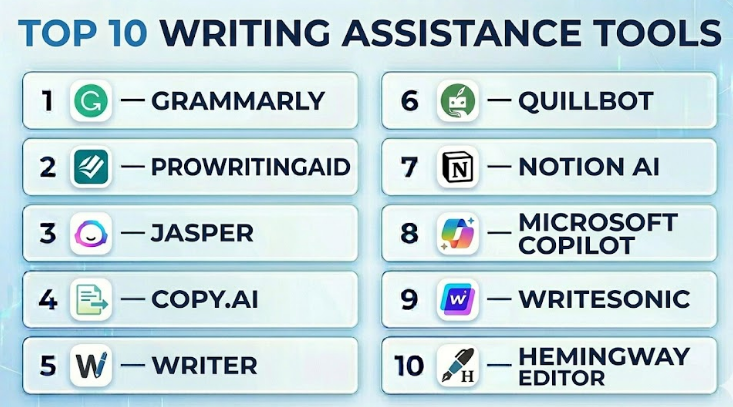
Top 10 Writing Assistance Tools
#1 — Grammarly
Short description :
Grammarly is one of the most widely used writing assistance tools for individuals, students, professionals, and business teams. It helps users improve grammar, spelling, punctuation, clarity, tone, and overall writing quality. Grammarly works across many writing environments, making it useful for emails, documents, blogs, social media posts, proposals, and workplace communication. Its AI writing features also help users rewrite, shorten, expand, and improve text. It is best for users who want real-time writing support across daily writing tasks.
Key Features
- Grammar, spelling, and punctuation checking.
- Tone, clarity, and conciseness suggestions.
- AI-powered rewriting and drafting support.
- Browser, desktop, and mobile writing assistance.
- Custom style guidance for teams.
- Plagiarism checking in selected plans.
- Business features for team writing consistency.
Pros
- Easy to use across many writing environments.
- Strong grammar, clarity, and tone suggestions.
- Useful for individuals, teams, and enterprises.
Cons
- Advanced features require paid plans.
- Suggestions still need human review.
- May not always understand highly technical or creative context.
Platforms / Deployment
Web / Windows / macOS / iOS / Android
Cloud
Security & Compliance
SOC 2 Type 2 and ISO 27001 are publicly stated by the vendor. Other details may vary by plan and enterprise agreement.
Integrations & Ecosystem
Grammarly is useful because it works where many users already write. It supports daily writing across business, education, and content workflows.
- Browser writing workflows.
- Email and document editing.
- Desktop writing support.
- Mobile keyboard support.
- Team writing and admin workflows.
Support & Community
Grammarly offers help resources, support channels, business onboarding options, and a large user community. Its wide adoption makes it easier for teams to train users quickly.
#2 — ProWritingAid
Short description :
ProWritingAid is a detailed writing assistance tool built for authors, bloggers, editors, students, and long-form content creators. It helps users improve grammar, sentence structure, readability, repetition, pacing, style, and overall writing quality. Unlike tools that focus mostly on quick corrections, ProWritingAid provides deeper writing reports that help users understand patterns in their writing. It is especially useful for books, articles, essays, and detailed content. The tool is best for users who want to improve writing quality over time, not just correct surface-level errors.
Key Features
- Grammar, spelling, and punctuation checking.
- Detailed writing reports.
- Readability and style analysis.
- Repetition and overused word detection.
- Sentence structure improvement.
- Rephrasing and editing suggestions.
- Long-form writing support.
Pros
- Strong for long-form writing and editing.
- Helpful reports for improving writing habits.
- Good fit for authors, bloggers, and content writers.
Cons
- Can feel too detailed for quick business emails.
- Beginners may feel overwhelmed by reports.
- Suggestions need careful review for creative writing.
Platforms / Deployment
Web / Windows / macOS / Browser extensions
Cloud / Desktop options may vary
Security & Compliance
Not publicly stated
Integrations & Ecosystem
ProWritingAid is useful for people who write and revise longer content. It supports workflows where deeper editing and writing improvement are important.
- Document editing.
- Browser-based writing.
- Long-form manuscript workflows.
- Blog and article editing.
- Writing improvement reports.
Support & Community
ProWritingAid provides documentation, tutorials, writing education resources, and support options. It has a strong community among authors and long-form writers.
#3 — Jasper
Short description :
Jasper is an AI writing assistant designed mainly for marketers, content teams, agencies, and businesses that create content at scale. It helps users generate marketing copy, blog drafts, social media content, product descriptions, email campaigns, and campaign ideas. Jasper is especially useful for teams that need structured AI writing workflows and brand voice support. It is more focused on content creation than basic grammar correction. The tool is best for marketing teams that want faster ideation, drafting, and content production with human review.
Key Features
- AI-assisted content generation.
- Blog, email, ad, and social copy workflows.
- Brand voice support.
- Campaign content creation.
- Templates for common marketing writing needs.
- Team collaboration features.
- Workflow support for content operations.
Pros
- Strong for marketing and campaign content.
- Helps speed up ideation and first drafts.
- Useful for agencies and content teams.
Cons
- Output requires editing and fact-checking.
- Not mainly a grammar-first tool.
- May be too much for users who only need basic writing correction.
Platforms / Deployment
Web
Cloud
Security & Compliance
Not publicly stated
Integrations & Ecosystem
Jasper is built around marketing and content workflows, where teams need structured content creation support.
- Marketing campaign workflows.
- Blog and article drafting.
- Social media content creation.
- Brand voice management.
- Team content operations.
Support & Community
Jasper provides onboarding resources, product documentation, and support options. Its community is strongest among marketers, agencies, and AI content teams.
#4 — Copy.ai
Short description :
Copy.ai is an AI writing platform focused on helping teams create marketing, sales, and business content quickly. It supports content generation for emails, social media, product copy, blog ideas, outreach messages, and campaign drafts. Copy.ai is useful for startups, marketers, sales teams, and small businesses that need fast content creation support. The platform is especially helpful for turning rough ideas into usable drafts. Like all AI writing tools, its output should be reviewed for accuracy, tone, originality, and brand fit.
Key Features
- AI content generation.
- Sales and marketing copy workflows.
- Email and outreach message support.
- Blog ideas and draft creation.
- Social media caption generation.
- Workflow automation features may vary by plan.
- Useful templates for common writing tasks.
Pros
- Easy to use for fast content drafting.
- Helpful for sales and marketing teams.
- Good for turning ideas into first drafts.
Cons
- Requires human editing for final quality.
- Not ideal for highly technical or regulated content without review.
- Some advanced workflow features may depend on plan.
Platforms / Deployment
Web
Cloud
Security & Compliance
Not publicly stated
Integrations & Ecosystem
Copy.ai fits marketing, sales, and small business writing workflows where speed and draft generation matter.
- Sales email drafting.
- Marketing copy generation.
- Blog idea creation.
- Social media writing.
- Campaign messaging workflows.
Support & Community
Copy.ai provides help resources and support options. It has strong adoption among marketers, founders, and teams exploring AI-assisted content workflows.
#5 — Writer
Short description :
Writer is an AI writing assistance platform built for businesses that need consistent, controlled, and brand-safe communication. It helps teams improve grammar, tone, style, terminology, and writing quality while following company writing rules. Writer is especially useful for enterprise marketing, support, HR, sales, legal, and content teams. Unlike basic writing tools, it focuses on governance, brand voice, and team-wide consistency. It is best for organizations that want writing assistance with control, not just open-ended AI text generation.
Key Features
- Grammar, clarity, and style suggestions.
- Brand voice and style guide enforcement.
- Custom terminology and approved language rules.
- AI writing assistance for teams.
- Admin and governance features.
- Collaboration and enterprise workflow support.
- Useful for regulated and brand-sensitive teams.
Pros
- Strong for enterprise writing governance.
- Helps teams maintain consistent brand language.
- Useful across marketing, sales, support, and HR.
Cons
- May be too advanced for casual users.
- Requires setup for brand rules and style guides.
- Pricing may be more suitable for business teams.
Platforms / Deployment
Web / Browser-based workflows
Cloud
Security & Compliance
Not publicly stated
Integrations & Ecosystem
Writer works well for businesses that want writing assistance inside team content workflows.
- Brand voice workflows.
- Marketing content review.
- Customer support writing.
- Sales communication.
- Enterprise writing governance.
Support & Community
Writer offers business-focused support, onboarding, and documentation. Its user base is strongest among enterprise teams and content operations professionals.
#6 — QuillBot
Short description :
QuillBot is a writing assistance tool known for paraphrasing, grammar checking, summarizing, and rewriting support. It is widely used by students, bloggers, content creators, and professionals who want to improve sentence flow and rewrite content quickly. QuillBot is especially helpful when users need alternative wording, simpler phrasing, or a more polished version of a draft. It is not a replacement for expert editing, but it can speed up everyday writing improvement. The tool is best for users who want rewriting help in a simple and accessible format.
Key Features
- Paraphrasing and rewriting support.
- Grammar and spelling checking.
- Summarization tools.
- Sentence improvement suggestions.
- Writing modes for different tones may vary by plan.
- Browser extension support.
- Useful for students and content creators.
Pros
- Very useful for rewriting and paraphrasing.
- Simple interface for quick writing improvement.
- Helpful for students and everyday writers.
Cons
- Rewritten text must be reviewed for meaning.
- Not ideal for full enterprise writing governance.
- Overuse can make writing sound generic.
Platforms / Deployment
Web / Browser extensions
Cloud
Security & Compliance
Not publicly stated
Integrations & Ecosystem
QuillBot is useful for quick rewriting and editing workflows where users want alternative phrasing or simplified text.
- Paraphrasing workflows.
- Grammar checking.
- Academic writing support.
- Blog and content editing.
- Browser-based writing.
Support & Community
QuillBot provides help resources and support options. It has strong visibility among students, writers, and content creators.
#7 — Notion AI
Short description :
Notion AI is a writing assistant built into the Notion workspace. It helps users draft, summarize, rewrite, brainstorm, organize, and improve content inside notes, documents, project pages, and knowledge bases. Notion AI is especially useful for teams already using Notion for planning, documentation, content calendars, meeting notes, and internal knowledge management. It is not only a writing checker; it supports content creation and organization in the same workspace. The tool is best for users who want writing help directly inside their productivity system.
Key Features
- AI drafting and rewriting inside Notion.
- Summarization of notes and documents.
- Brainstorming and outline generation.
- Content improvement and tone adjustment.
- Useful for internal documentation.
- Supports knowledge base workflows.
- Helps organize written information.
Pros
- Convenient for Notion users.
- Good for summarizing and improving internal content.
- Useful for planning, notes, and documentation.
Cons
- Best value comes if your team already uses Notion.
- Not a dedicated grammar-first platform.
- May not replace advanced editing tools.
Platforms / Deployment
Web / Windows / macOS / iOS / Android
Cloud
Security & Compliance
Not publicly stated
Integrations & Ecosystem
Notion AI works inside the broader Notion workspace, making it useful for content planning and internal documentation.
- Notes and documents.
- Knowledge bases.
- Project planning.
- Meeting summaries.
- Content calendars.
Support & Community
Notion provides documentation, tutorials, templates, and support resources. Its community is large, especially among startups, creators, and productivity-focused teams.
#8 — Microsoft Copilot
Short description :
Microsoft Copilot is an AI writing and productivity assistant built into Microsoft work environments. It helps users draft emails, summarize documents, rewrite text, create outlines, improve communication, and work with business content inside familiar productivity tools. Copilot is especially useful for companies already using Microsoft apps for documents, email, meetings, and collaboration. It is not only a writing tool; it supports broader productivity workflows. The tool is best for business users who want writing assistance inside their existing workplace environment.
Key Features
- AI-assisted drafting and rewriting.
- Email and document writing support.
- Summarization of business content.
- Productivity workflow assistance.
- Useful inside Microsoft work environments.
- Collaboration and workplace support.
- Business-focused AI assistance.
Pros
- Strong fit for Microsoft-based teams.
- Useful for emails, documents, and business communication.
- Reduces context switching for workplace users.
Cons
- Best value depends on Microsoft ecosystem usage.
- Not a standalone creative writing platform.
- Features and availability may vary by plan.
Platforms / Deployment
Web / Windows / macOS / Mobile options may vary
Cloud / Productivity suite-based
Security & Compliance
Not publicly stated
Integrations & Ecosystem
Microsoft Copilot is most useful when writing is connected with workplace productivity.
- Document writing.
- Email drafting.
- Meeting summaries.
- Workplace collaboration.
- Business productivity workflows.
Support & Community
Microsoft provides product documentation, enterprise support channels, and admin resources. Adoption is easier for teams already using Microsoft tools.
#9 — Writesonic
Short description :
Writesonic is an AI writing platform designed for marketers, bloggers, entrepreneurs, and teams that create digital content. It helps users generate blog drafts, landing page copy, product descriptions, ads, social media posts, and other marketing materials. Writesonic is useful for people who need fast content generation and idea expansion. It can also support rewriting and content improvement workflows. The tool is best for marketing and content teams that need quick drafts but still plan to review and edit the output before publishing.
Key Features
- AI blog and article generation.
- Marketing copy creation.
- Product description writing.
- Social media content support.
- Rewriting and text improvement.
- Templates for common writing needs.
- Content ideation support.
Pros
- Useful for fast marketing content drafts.
- Good for blogs, ads, and product copy.
- Helps reduce blank-page pressure.
Cons
- Output needs fact-checking and human editing.
- Not a deep grammar or style governance tool.
- May not suit sensitive or highly technical content without review.
Platforms / Deployment
Web
Cloud
Security & Compliance
Not publicly stated
Integrations & Ecosystem
Writesonic supports digital marketing and content creation workflows where speed and variety matter.
- Blog writing.
- Landing page copy.
- Product descriptions.
- Social media posts.
- Marketing campaign drafts.
Support & Community
Writesonic offers documentation, tutorials, and support options. Its user base includes marketers, creators, and small business teams.
#10 — Hemingway Editor
Short description :
Hemingway Editor is a writing improvement tool focused on readability, clarity, and sentence simplicity. It highlights long sentences, passive voice, complex wording, and hard-to-read text. Unlike AI-heavy writing tools, Hemingway is more focused on helping users make writing clearer and more direct. It is useful for bloggers, business writers, students, editors, and anyone who wants simpler writing. The tool is best for users who care about readability and concise communication rather than broad content generation.
Key Features
- Readability analysis.
- Long sentence detection.
- Passive voice highlighting.
- Complex word suggestions.
- Simple editing interface.
- Useful for concise writing.
- Helps improve clarity and flow.
Pros
- Excellent for improving readability.
- Simple and distraction-free.
- Useful for business and blog writing.
Cons
- Not a full grammar checker.
- Does not replace detailed editing tools.
- Can oversimplify writing if used too strictly.
Platforms / Deployment
Web / Desktop options may vary
Cloud / Desktop options may vary
Security & Compliance
Not publicly stated
Integrations & Ecosystem
Hemingway Editor is useful as a focused readability layer in the writing process.
- Blog editing.
- Business writing cleanup.
- Readability review.
- Draft polishing.
- Simple copy editing workflows.
Support & Community
Hemingway is easy to learn because of its simple interface. Support resources may be lighter than larger platforms, but the tool is straightforward for most users.
Comparison Table
| Tool Name | Best For | Platform(s) Supported | Deployment | Standout Feature | Public Rating |
|---|---|---|---|---|---|
| Grammarly | Everyday writing, teams, and enterprises | Web / Windows / macOS / iOS / Android | Cloud | Real-time grammar, tone, and AI writing help | N/A |
| ProWritingAid | Authors and long-form writers | Web / Windows / macOS / Browser extensions | Cloud / Desktop options vary | Detailed writing reports | N/A |
| Jasper | Marketing teams and agencies | Web | Cloud | AI marketing content generation | N/A |
| Copy.ai | Sales, marketing, and startup teams | Web | Cloud | Fast AI copy generation | N/A |
| Writer | Enterprise brand and content teams | Web / Browser-based workflows | Cloud | Brand voice and writing governance | N/A |
| QuillBot | Students and content creators | Web / Browser extensions | Cloud | Paraphrasing and rewriting | N/A |
| Notion AI | Productivity and documentation teams | Web / Windows / macOS / iOS / Android | Cloud | Writing support inside Notion workspace | N/A |
| Microsoft Copilot | Microsoft-based business teams | Web / Windows / macOS / Mobile options vary | Cloud / Productivity suite-based | AI writing inside workplace tools | N/A |
| Writesonic | Bloggers and digital marketers | Web | Cloud | AI blog and marketing draft generation | N/A |
| Hemingway Editor | Readability-focused writers | Web / Desktop options vary | Cloud / Desktop options vary | Clear and concise writing improvement | N/A |
Evaluation & Writing Assistance Tools
| Tool Name | Core (25%) | Ease (15%) | Integrations (15%) | Security (10%) | Performance (10%) | Support (10%) | Value (15%) | Weighted Total (0–10) |
|---|---|---|---|---|---|---|---|---|
| Grammarly | 9 | 9 | 9 | 8 | 9 | 8 | 8 | 8.65 |
| ProWritingAid | 8 | 8 | 8 | 6 | 8 | 8 | 8 | 7.75 |
| Jasper | 8 | 8 | 8 | 6 | 8 | 8 | 7 | 7.65 |
| Copy.ai | 8 | 9 | 7 | 6 | 8 | 7 | 8 | 7.75 |
| Writer | 8 | 8 | 8 | 7 | 8 | 8 | 7 | 7.80 |
| QuillBot | 7 | 9 | 7 | 5 | 8 | 7 | 8 | 7.35 |
| Notion AI | 7 | 8 | 8 | 6 | 8 | 8 | 7 | 7.40 |
| Microsoft Copilot | 8 | 8 | 9 | 7 | 8 | 8 | 7 | 7.95 |
| Writesonic | 8 | 8 | 7 | 6 | 8 | 7 | 8 | 7.60 |
| Hemingway Editor | 6 | 9 | 5 | 5 | 8 | 6 | 8 | 6.75 |
These scores are comparative and should be used as a shortlist guide rather than a final universal ranking. A higher score usually means broader usability, stronger workflow coverage, or better team fit. A lower score may simply mean the tool is more focused. For example, Hemingway Editor is not a complete AI writing platform, but it is very useful for improving readability. Similarly, Writer may be more valuable for enterprise brand governance than for casual individual writing.
Which Writing Assistance Tool Should You Choose?
Solo / Freelancer
Solo writers, freelancers, consultants, and independent creators should focus on tools that improve writing quality without adding too much complexity. Grammarly, ProWritingAid, QuillBot, and Hemingway Editor are practical choices.
If you write emails, blogs, proposals, and social posts, Grammarly can support daily writing. If you write long-form articles or books, ProWritingAid may provide deeper feedback. If you often rewrite or paraphrase content, QuillBot can be useful. If your main goal is clearer writing, Hemingway Editor is a simple and effective option.
SMB
Small and mid-sized businesses need tools that help teams write better emails, website content, sales messages, support replies, and marketing materials. Grammarly, Copy.ai, Writesonic, Notion AI, and Microsoft Copilot can work well depending on the existing workflow.
SMBs should choose tools that reduce content bottlenecks. A tool that helps your team create drafts, improve clarity, and publish faster can be more valuable than a tool with many advanced features that nobody uses.
Mid-Market
Mid-market companies usually need a balance of content speed, writing quality, team collaboration, and consistency. Writer, Grammarly, Jasper, Microsoft Copilot, and Notion AI are strong candidates.
At this level, teams should consider shared style rules, brand voice, content approval workflows, and integration with existing tools. The right writing assistant should support multiple departments, not just individual writers.
Enterprise
Enterprises need writing assistance with governance, security, admin control, brand consistency, and workflow integration. Writer, Grammarly, Microsoft Copilot, and Jasper are better suited for larger organizations.
Enterprise buyers should review privacy, access controls, admin dashboards, team policies, data handling, and support options before rollout. A writing tool used across departments should align with legal, compliance, IT, and brand requirements.
Budget vs Premium
Budget-friendly users can begin with simpler tools like Hemingway Editor, QuillBot, or basic versions of grammar and writing platforms. These can support everyday writing without large investment.
Premium tools are better when writing directly affects revenue, customer experience, brand quality, or team productivity. Businesses that publish high-volume content or manage multiple writers should consider tools with brand voice, collaboration, and admin controls.
Feature Depth vs Ease of Use
If ease of use is the top priority, choose tools like Grammarly, QuillBot, Copy.ai, or Hemingway Editor. These tools are simple enough for fast adoption.
If feature depth matters more, consider Writer, Jasper, Microsoft Copilot, or ProWritingAid. These tools offer broader writing support, stronger team features, or deeper content workflows.
Integrations & Scalability
A writing assistance tool becomes more useful when it works inside your daily workflow. Browser extensions, email support, document editor integration, CMS workflows, workspace tools, and team dashboards can make adoption easier.
For scalability, check whether the tool supports multiple users, admin controls, shared style guides, brand voice, custom vocabulary, workflow permissions, and security review. The more people using the tool, the more important governance becomes.
Security & Compliance Needs
Security matters when writing tools process customer messages, internal documents, contracts, proposals, HR communication, or confidential business content. Enterprises should check data handling, retention, encryption, access control, auditability, and compliance documentation.
If security information is not clearly available, mark it as “Not publicly stated” and ask the vendor directly. Do not paste sensitive data into any writing assistant without reviewing privacy and compliance requirements.
Frequently Asked Questions
1. What are writing assistance tools?
Writing assistance tools are software platforms that help users write, edit, rewrite, summarize, and improve text. They may include grammar checking, spell checking, tone suggestions, AI drafting, paraphrasing, readability analysis, and brand voice control.
2. Are writing assistance tools the same as grammar checkers?
No. Grammar checkers mainly focus on grammar, spelling, punctuation, and sentence correctness. Writing assistance tools are broader. They may help with content ideas, structure, tone, rewriting, summaries, long-form drafts, and team writing consistency.
3. Can writing assistance tools replace human writers?
No. These tools can speed up drafting and editing, but they do not replace human judgment, creativity, strategy, subject knowledge, or final review. The best results come when humans use these tools as assistants, not replacements.
4. Which writing assistance tool is best for bloggers?
Bloggers may benefit from Grammarly, ProWritingAid, Jasper, Writesonic, QuillBot, and Hemingway Editor. The best choice depends on whether the blogger needs grammar correction, long-form editing, AI drafting, or readability improvement.
5. Which tool is best for business teams?
Business teams should consider Grammarly, Writer, Microsoft Copilot, Jasper, and Notion AI. These tools support daily communication, content creation, brand voice, internal documentation, and team writing productivity.
6. What pricing models do writing assistance tools use?
Most tools use subscription pricing. Some offer free plans with limited features, while paid plans may include advanced AI writing, rewriting, plagiarism checks, brand voice controls, collaboration, admin settings, and enterprise support.
7. Are AI writing tools safe for confidential content?
It depends on the vendor and plan. Businesses should review privacy terms, data handling, retention policies, encryption, admin controls, and compliance documentation before using any writing assistant with confidential or regulated content.
8. Can writing assistance tools improve SEO content?
Yes, they can improve clarity, readability, sentence flow, grammar, structure, and content drafting speed. However, they do not replace SEO strategy, keyword research, search intent analysis, internal linking planning, or expert editorial review.
9. What mistakes should users avoid?
Common mistakes include accepting every AI suggestion blindly, publishing AI-generated content without fact-checking, ignoring brand voice, using generic rewritten text, pasting sensitive data without review, and relying on tools instead of learning writing fundamentals.
10. Are writing assistance tools useful for students?
Yes, students can use writing tools for grammar, clarity, paraphrasing, summaries, and academic tone improvement. However, students should follow academic integrity rules and avoid submitting AI-generated work as original thinking where it is not allowed.
Conclusion
Writing assistance tools have become valuable for individuals and businesses because clear writing is now part of almost every professional workflow. Whether someone is writing emails, blogs, documentation, proposals, support replies, social media posts, or internal notes, these tools can help improve quality and save time. However, the best writing assistance tool depends on the user’s goal. A freelancer may need grammar and readability support, a blogger may need drafting and editing help, a student may need clarity and paraphrasing support, and an enterprise may need brand voice, governance, and security controls.
