Introduction
Network Analysis Tools are software solutions used to monitor, capture, inspect, and analyze network traffic to ensure performance, security, and reliability. In simple terms, they help IT teams understand what’s happening inside their network—who is communicating, how data flows, and where issues or bottlenecks occur.
As organizations rely heavily on cloud services, remote work, and distributed infrastructure, network visibility has become more critical than ever. Network analysis tools enable teams to detect anomalies, troubleshoot performance issues, identify security threats, and optimize network usage in real time.
Common use cases include:
- Troubleshooting network latency and packet loss
- Monitoring bandwidth usage
- Detecting suspicious or malicious traffic
- Analyzing application performance over the network
- Ensuring network reliability and uptime
Key evaluation criteria:
- Packet capture and deep packet inspection capabilities
- Real-time monitoring and alerting
- Protocol analysis and visualization
- Scalability for large networks
- Integration with security and monitoring tools
- Ease of use and interface
- Reporting and analytics features
- Deployment flexibility (on-prem/cloud)
- Security and compliance capabilities
- Pricing and licensing
Best for: Network engineers, security teams, IT administrators, and organizations managing complex networks.
Not ideal for: Very small setups with minimal network complexity or basic router-level monitoring needs.
Key Trends in Network Analysis Tools
- AI-driven anomaly detection: Identifying unusual traffic patterns automatically
- Cloud and hybrid monitoring: Visibility across on-prem and cloud networks
- Encrypted traffic analysis: Monitoring without decrypting sensitive data
- Integration with security tools: Combining network monitoring with threat detection
- Real-time analytics: Faster detection of issues and threats
- Automation and alerting: Reducing manual intervention
- Scalable architectures: Handling high-throughput networks
- Visualization improvements: Better dashboards and traffic maps
- Support for modern protocols: Including HTTP/2, QUIC, and others
- Network observability convergence: Combining metrics, logs, and traces
How We Selected These Tools (Methodology)
We evaluated Network Analysis Tools based on:
- Market adoption and industry reputation
- Feature completeness (packet capture, monitoring, analytics)
- Ease of use and learning curve
- Integration with security and observability tools
- Scalability and performance
- Security and compliance capabilities
- Visualization and reporting quality
- Community and vendor support
- Flexibility and deployment options
- Overall value for cost
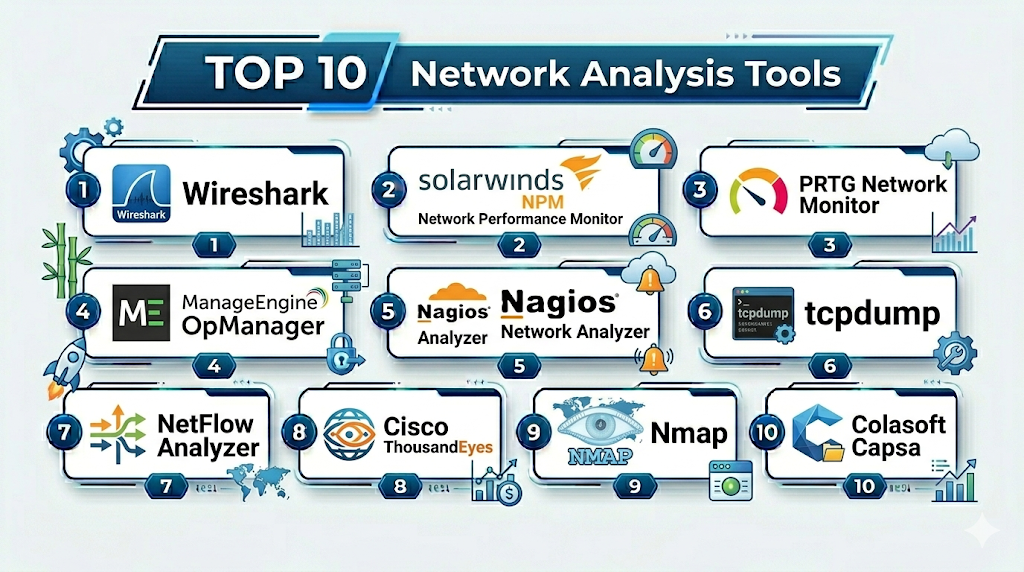
Top 10 Network Analysis Tools
#1 — Wireshark
Short description: A widely used open-source network protocol analyzer for deep packet inspection and troubleshooting.
Key Features
- Packet capture and analysis
- Support for hundreds of protocols
- Deep packet inspection
- Filtering and search capabilities
- Cross-platform support
Pros
- Free and open-source
- Highly detailed analysis
Cons
- Steep learning curve
- Not ideal for real-time large-scale monitoring
Platforms / Deployment
Windows / macOS / Linux
Security & Compliance
Not publicly stated
Integrations & Ecosystem
Wireshark integrates with network capture tools and supports export for analysis.
- tcpdump
- Network interfaces
Support & Community
Very large open-source community and extensive documentation.
#2 — SolarWinds Network Performance Monitor (NPM)
Short description: A comprehensive network monitoring and analysis tool for enterprise environments.
Key Features
- Network performance monitoring
- Traffic analysis
- Alerting and reporting
- Network mapping
- SNMP monitoring
Pros
- Rich feature set
- Strong visualization
Cons
- Expensive
- Complex setup
Platforms / Deployment
Windows / Self-hosted
Security & Compliance
RBAC, encryption
Integrations & Ecosystem
SolarWinds integrates with IT management and monitoring tools.
- Network devices
- ITSM tools
Support & Community
Strong vendor support.
#3 — PRTG Network Monitor
Short description: An all-in-one monitoring tool with strong network analysis capabilities.
Key Features
- Network monitoring
- Packet sniffing
- Bandwidth monitoring
- Alerts and notifications
- Custom dashboards
Pros
- Easy to use
- All-in-one solution
Cons
- Licensing limits
- Windows-focused
Platforms / Deployment
Windows / Self-hosted
Security & Compliance
RBAC, encryption
Integrations & Ecosystem
PRTG integrates with network and IT systems.
- APIs
- SNMP devices
Support & Community
Vendor support available.
#4 — ManageEngine OpManager
Short description: A network monitoring and analysis tool with performance tracking and alerting features.
Key Features
- Network monitoring
- Fault management
- Performance analytics
- Alerts
- Visualization
Pros
- Affordable
- Easy setup
Cons
- Limited advanced analytics
- UI complexity
Platforms / Deployment
Windows / Linux / Self-hosted
Security & Compliance
RBAC, encryption
Integrations & Ecosystem
Integrates with ManageEngine and IT tools.
- ITSM tools
- Network devices
Support & Community
Good support.
#5 — Nagios Network Analyzer
Short description: A network traffic analysis tool built on the Nagios platform.
Key Features
- Traffic analysis
- Flow data monitoring
- Alerting
- Reporting
- Integration with Nagios
Pros
- Flexible
- Strong ecosystem
Cons
- Requires setup
- Interface can be outdated
Platforms / Deployment
Linux / Self-hosted
Security & Compliance
Not publicly stated
Integrations & Ecosystem
Integrates with Nagios ecosystem.
- Nagios Core
- Network devices
Support & Community
Strong community support.
#6 — tcpdump
Short description: A command-line packet analyzer for capturing and analyzing network traffic.
Key Features
- Packet capture
- Command-line interface
- Lightweight
- Protocol analysis
- Filtering
Pros
- Lightweight and fast
- Highly flexible
Cons
- No GUI
- Requires technical expertise
Platforms / Deployment
Linux / macOS
Security & Compliance
Not publicly stated
Integrations & Ecosystem
Works with network interfaces and tools.
- Wireshark
- System tools
Support & Community
Strong open-source community.
#7 — NetFlow Analyzer (ManageEngine)
Short description: A network traffic analysis tool focusing on flow-based monitoring.
Key Features
- NetFlow monitoring
- Bandwidth analysis
- Traffic reports
- Alerts
- Visualization
Pros
- Strong traffic insights
- Easy reporting
Cons
- Limited deep packet inspection
- Licensing costs
Platforms / Deployment
Windows / Linux / Self-hosted
Security & Compliance
RBAC, encryption
Integrations & Ecosystem
Integrates with network devices and IT tools.
- Routers
- Switches
Support & Community
Vendor support.
#8 — Cisco ThousandEyes
Short description: A network intelligence platform providing visibility across internet and cloud networks.
Key Features
- End-to-end network visibility
- Internet performance monitoring
- Path visualization
- Alerts
- Cloud monitoring
Pros
- Excellent cloud visibility
- Strong analytics
Cons
- Premium pricing
- Cisco ecosystem focus
Platforms / Deployment
Cloud
Security & Compliance
RBAC, encryption
Integrations & Ecosystem
Integrates with Cisco and cloud tools.
- Cisco platforms
- Cloud providers
Support & Community
Enterprise support.
#9 — Nmap
Short description: A network scanning tool used for discovery and security auditing.
Key Features
- Network scanning
- Port analysis
- Host discovery
- Security auditing
- Scriptable engine
Pros
- Free and powerful
- Widely used
Cons
- Not a full monitoring tool
- Requires expertise
Platforms / Deployment
Windows / Linux / macOS
Security & Compliance
Not publicly stated
Integrations & Ecosystem
Integrates with security and network tools.
- Security tools
- Scripts
Support & Community
Large community.
#10 — Colasoft Capsa
Short description: A network analyzer focused on packet capture and performance monitoring.
Key Features
- Packet capture
- Protocol analysis
- Real-time monitoring
- Alerts
- Visualization
Pros
- User-friendly interface
- Good visualization
Cons
- Windows-only
- Limited scalability
Platforms / Deployment
Windows
Security & Compliance
Not publicly stated
Integrations & Ecosystem
Works with network interfaces and tools.
- Network devices
- Analysis tools
Support & Community
Vendor support.
Comparison Table (Top 10)
| Tool Name | Best For | Platform(s) Supported | Deployment | Standout Feature | Public Rating |
|---|---|---|---|---|---|
| Wireshark | Packet analysis | Cross-platform | Self-hosted | Deep inspection | N/A |
| SolarWinds NPM | Enterprise | Windows | Self-hosted | Visualization | N/A |
| PRTG | SMB | Windows | Self-hosted | Ease of use | N/A |
| OpManager | SMB/Mid | Cross-platform | Self-hosted | Affordability | N/A |
| Nagios Analyzer | Custom setups | Linux | Self-hosted | Flexibility | N/A |
| tcpdump | CLI users | Linux/macOS | Self-hosted | Lightweight | N/A |
| NetFlow Analyzer | Traffic insights | Cross-platform | Self-hosted | Flow analysis | N/A |
| ThousandEyes | Cloud networks | Web | Cloud | Internet visibility | N/A |
| Nmap | Security scanning | Cross-platform | Self-hosted | Discovery | N/A |
| Capsa | Windows users | Windows | Self-hosted | Visualization | N/A |
Network Analysis Tools Scoring
| Tool Name | Core (25%) | Ease (15%) | Integrations (15%) | Security (10%) | Performance (10%) | Support (10%) | Value (15%) | Weighted Total |
|---|---|---|---|---|---|---|---|---|
| Wireshark | 10 | 7 | 8 | 7 | 9 | 9 | 10 | 8.8 |
| SolarWinds NPM | 9 | 8 | 9 | 9 | 9 | 9 | 7 | 8.8 |
| PRTG | 8 | 9 | 8 | 8 | 8 | 8 | 9 | 8.3 |
| OpManager | 8 | 8 | 8 | 8 | 8 | 8 | 9 | 8.2 |
| Nagios Analyzer | 8 | 7 | 8 | 7 | 8 | 8 | 9 | 8.0 |
| tcpdump | 7 | 6 | 7 | 7 | 9 | 8 | 10 | 7.8 |
| NetFlow Analyzer | 8 | 8 | 8 | 8 | 8 | 8 | 8 | 8.0 |
| ThousandEyes | 9 | 8 | 9 | 9 | 9 | 9 | 7 | 8.8 |
| Nmap | 8 | 6 | 7 | 8 | 8 | 9 | 10 | 8.0 |
| Capsa | 7 | 8 | 7 | 7 | 8 | 7 | 8 | 7.6 |
How to interpret scores:
- Scores are comparative across tools
- Enterprise tools excel in visualization and scalability
- Open-source tools provide strong value
- CLI tools require expertise but offer flexibility
- Choose based on network complexity and team skill level
Which Network Analysis Tools Is Right for You?
Solo / Freelancer
- Use Wireshark or Nmap
- Focus on cost-effective and powerful tools
SMB
- PRTG or OpManager
- Balance ease of use and features
Mid-Market
- SolarWinds NPM or NetFlow Analyzer
- Focus on performance monitoring
Enterprise
- Cisco ThousandEyes or SolarWinds
- Focus on scalability and advanced insights
Budget vs Premium
- Open-source tools reduce cost
- Premium tools provide automation and visualization
Feature Depth vs Ease of Use
- Wireshark = deep analysis
- PRTG = easy setup
Integrations & Scalability
- Choose tools with strong device and cloud integrations
- Ensure scalability for large networks
Security & Compliance Needs
- Enterprises should prioritize RBAC and encryption
- Smaller teams can focus on core monitoring
Frequently Asked Questions (FAQs)
What is a network analysis tool?
It monitors and analyzes network traffic and performance.
Why are these tools important?
They help detect issues and optimize network performance.
Are these tools free?
Some are open-source; others are paid.
Do they support real-time monitoring?
Yes, most tools provide real-time insights.
Can they detect security threats?
Yes, many help identify suspicious traffic.
Are they cloud-based?
Some are cloud-based; many are on-prem.
Do I need technical expertise?
Yes, especially for advanced tools.
Can I integrate them with other tools?
Yes, integration is common.
Are they scalable?
Most enterprise tools are highly scalable.
Can small teams use them?
Yes, but simpler tools are recommended.
Conclusion
Network Analysis Tools are essential for maintaining visibility, performance, and security in modern IT environments. They enable teams to monitor traffic, troubleshoot issues, and detect threats effectively.
