Introduction
Enterprise Social Networks are internal communication and collaboration platforms that help employees connect, share updates, discuss ideas, recognize peers, build communities, and access company knowledge. In simple words, these tools work like a private social network for an organization, but with business controls, security, user management, and workplace collaboration features.
Unlike simple team chat apps, Enterprise Social Networks focus more on company-wide communication, employee engagement, leadership announcements, communities of practice, knowledge sharing, culture building, and cross-department visibility. They are useful for organizations where employees are spread across offices, regions, departments, field locations, or remote work environments.
Common use cases include internal announcements, leadership communication, employee communities, knowledge sharing, HR engagement, frontline workforce updates, onboarding, innovation programs, and company culture initiatives.
Buyers should evaluate ease of use, employee adoption, mobile experience, moderation controls, analytics, integrations, governance, security, content discovery, community management, and scalability.
Best for: mid-market companies, large enterprises, HR teams, internal communications teams, distributed workforces, frontline teams, global organizations, and companies that want stronger employee engagement.
Not ideal for: very small teams that can manage communication through chat and email, organizations that only need project task management, or companies where employee communication must remain fully inside a strict document-based workflow.
Key Trends in Enterprise Social Networks
- Employee experience is becoming the main focus, with platforms designed to improve engagement, recognition, belonging, and workplace connection.
- AI-powered content discovery is becoming more common, helping employees find updates, people, policies, documents, and discussions faster.
- Mobile-first communication is now essential, especially for frontline workers, field teams, retail staff, healthcare teams, and distributed employees.
- Leadership communication is moving from email to social-style feeds, where employees can react, comment, ask questions, and engage more openly.
- Communities of practice are becoming important, allowing employees with shared roles, skills, locations, or interests to collaborate across departments.
- Integration with productivity suites is a major buying factor, especially for organizations using Microsoft 365, Google Workspace, CRM, HRIS, and intranet systems.
- Analytics and engagement measurement are growing in importance, as internal communication teams need to understand reach, participation, sentiment, and adoption.
- Governance and moderation controls are more important than before, especially for large companies managing thousands of users and many employee groups.
- Knowledge sharing and social learning are merging, with enterprise social tools supporting onboarding, peer learning, FAQs, and expert communities.
- Hybrid work has increased demand for digital culture platforms, helping employees feel connected even when they are not in the same office.
How We Selected These Tools
The tools below were selected using practical business-focused evaluation logic.
- Market recognition: Tools with strong visibility in enterprise collaboration, employee engagement, intranet, and workplace communication were prioritized.
- Feature completeness: Employee feeds, groups, communities, announcements, profiles, recognition, search, analytics, and mobile access were considered.
- Enterprise readiness: User management, security controls, governance, moderation, compliance, and scalability were evaluated.
- Adoption potential: Platforms that are easy for employees to understand and use regularly were given strong consideration.
- Integration ecosystem: Tools that connect with productivity suites, HR systems, identity providers, and business apps were prioritized.
- Customer fit: The list includes enterprise-grade platforms, Microsoft-focused tools, intranet-social platforms, frontline communication tools, and community-driven solutions.
- Communication depth: Platforms were evaluated for leadership updates, employee communities, knowledge sharing, and cross-functional collaboration.
- Analytics capability: Reporting on engagement, reach, adoption, and content performance was considered important.
- Scalability: Tools suitable for large organizations, multi-location teams, and distributed workforces were included.
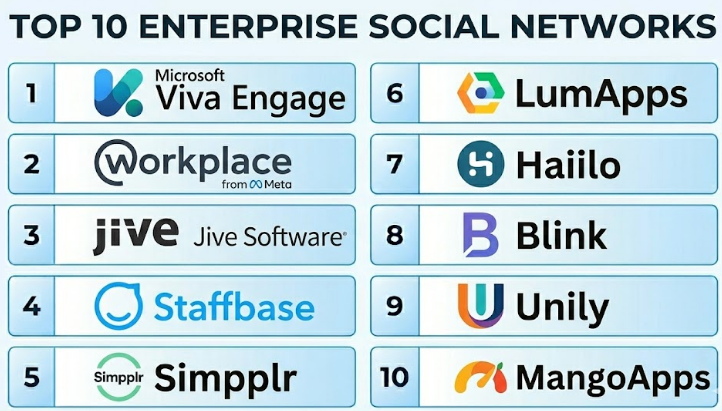
Top 10 Enterprise Social Networks
#1 — Microsoft Viva Engage
Short description :
Microsoft Viva Engage is an enterprise social networking platform built for employee communities, leadership engagement, announcements, and organization-wide conversations. It is especially useful for companies already using Microsoft 365. Viva Engage helps employees join communities, follow discussions, ask questions, share knowledge, and connect with leaders. It is a strong option for enterprises that want social communication inside the Microsoft ecosystem. It works well for internal communications, HR, leadership teams, and distributed organizations.
Key Features
- Employee communities and discussion spaces.
- Leadership communication and announcements.
- Question-and-answer style knowledge sharing.
- Integration with Microsoft 365.
- Employee profiles and social engagement features.
- Mobile and web access.
- Analytics and engagement visibility.
Pros
- Strong fit for Microsoft 365 organizations.
- Good for company-wide communities and employee engagement.
- Reduces the need for a separate social platform in Microsoft-first environments.
Cons
- Best value is mainly for Microsoft ecosystem users.
- Adoption depends on good community governance.
- May not be flexible enough for companies wanting a fully independent social intranet.
Platforms / Deployment
Web / Windows / macOS / iOS / Android
Cloud
Security & Compliance
Security and compliance capabilities depend on Microsoft 365 configuration and licensing. Enterprise identity, access controls, admin policies, and governance features are available through the Microsoft ecosystem.
Integrations & Ecosystem
Viva Engage works naturally with Microsoft 365 and related employee experience tools.
- Microsoft Teams.
- SharePoint.
- Outlook.
- Microsoft Viva suite.
- Microsoft Entra ID.
- Microsoft 365 admin and compliance tools.
Support & Community
Microsoft provides extensive documentation, admin resources, partner support, and enterprise support options. Viva Engage is supported by a large Microsoft business ecosystem.
#2 — Workplace from Meta
Short description :
Workplace from Meta is an enterprise social network designed to make workplace communication feel familiar and social. It supports groups, news feeds, posts, comments, live video, chat, reactions, and employee communities. It has been used by organizations that want a social-style communication experience for employees across offices, stores, plants, and field locations. It is useful for companies that want high engagement and simple adoption. Buyers should carefully validate product availability, roadmap, and long-term fit before selection.
Key Features
- Company news feed.
- Employee groups and communities.
- Posts, comments, reactions, and sharing.
- Live video and leadership communication.
- Chat and group communication.
- Mobile-first employee engagement.
- Admin and moderation controls.
Pros
- Familiar social-style user experience.
- Useful for frontline and distributed employee communication.
- Strong engagement features for announcements and communities.
Cons
- Long-term product direction should be carefully validated.
- Not ideal for companies avoiding social-media-style workplace tools.
- Advanced workflow integration may require additional tools.
Platforms / Deployment
Web / iOS / Android
Cloud
Security & Compliance
Enterprise controls, admin settings, and access management features are available depending on plan and configuration. Specific compliance and roadmap details should be verified directly with the vendor.
Integrations & Ecosystem
Workplace from Meta supports social-style internal communication and connects with common workplace systems depending on configuration.
- Identity systems.
- HR communication workflows.
- Live video communication.
- Employee groups.
- Mobile employee communication.
- Business app integrations.
Support & Community
Support and documentation availability depend on product status and vendor offering. Organizations should validate implementation support and long-term availability before adopting.
#3 — Jive
Short description :
Jive is a long-standing enterprise collaboration and social intranet platform used for employee communities, knowledge sharing, internal communication, and collaboration. It helps organizations create digital workplaces where employees can discuss topics, share content, ask questions, and participate in communities. Jive is suitable for large organizations that need structured social collaboration and knowledge management. It is useful for companies with complex teams, departments, and internal communities. It works well when employee discussions need to be organized and searchable.
Key Features
- Employee communities and groups.
- Discussion forums and Q&A.
- Blogs, documents, and knowledge sharing.
- Social intranet capabilities.
- Activity streams and updates.
- Search and content discovery.
- Analytics and engagement tracking.
Pros
- Strong history in enterprise social collaboration.
- Good for knowledge sharing and employee communities.
- Useful for large organizations with many internal groups.
Cons
- May feel heavier than newer employee experience platforms.
- Implementation and governance require planning.
- User adoption depends on content quality and community management.
Platforms / Deployment
Web / Cloud / Hybrid options may vary
Security & Compliance
Enterprise access controls and governance features are available depending on deployment and plan. Specific security and compliance details should be validated directly with the vendor.
Integrations & Ecosystem
Jive supports enterprise collaboration and can connect with workplace systems.
- Intranet workflows.
- Document collaboration.
- Identity providers.
- Business applications.
- Knowledge management systems.
- Community engagement workflows.
Support & Community
Jive provides enterprise-oriented support and documentation depending on the offering. It is known among organizations with mature internal community programs.
#4 — Staffbase
Short description :
Staffbase is an employee communications platform designed for internal communication, employee engagement, and workforce connection. It is especially useful for large, distributed, and frontline-heavy organizations. Staffbase helps communication teams publish announcements, manage campaigns, reach employees through mobile apps, and measure engagement. It is more than a social network because it combines communication planning, publishing, employee app features, and analytics. It is best for companies that need structured employee communication across many locations.
Key Features
- Employee news feed and announcements.
- Branded employee app.
- Internal communication campaign tools.
- Targeted messaging.
- Analytics and engagement reporting.
- Frontline worker communication.
- Integration with intranet and workplace tools.
Pros
- Strong for internal communications teams.
- Good fit for frontline and distributed workforces.
- Useful analytics for measuring message reach and engagement.
Cons
- May be more communication-platform focused than pure social network.
- Pricing may be better suited for mid-market and enterprise buyers.
- Requires content planning and governance for best results.
Platforms / Deployment
Web / iOS / Android
Cloud
Security & Compliance
Supports enterprise communication governance, access control, and admin management depending on plan. Specific compliance certifications should be validated directly with the vendor.
Integrations & Ecosystem
Staffbase connects internal communication with employee experience and business systems.
- Microsoft 365.
- Intranet systems.
- HR systems.
- Employee apps.
- Analytics workflows.
- Identity management systems.
Support & Community
Staffbase provides customer support, onboarding, documentation, and internal communications guidance. It is strong for organizations with formal communication teams.
#5 — Simpplr
Short description :
Simpplr is a modern employee experience and intranet platform that includes social communication, employee engagement, knowledge sharing, and internal content discovery. It helps organizations create a connected digital workplace where employees can access news, resources, communities, and company updates. Simpplr is suitable for mid-market and enterprise companies that want an easy-to-use intranet with social features. It is useful for HR, internal communications, IT, and operations teams. It is best for companies that want employee communication and knowledge access in one platform.
Key Features
- Modern social intranet.
- Employee news and announcements.
- Communities and employee groups.
- Personalized content feeds.
- Knowledge and resource discovery.
- Engagement analytics.
- Integration with workplace tools.
Pros
- Clean and modern employee experience.
- Good balance between intranet and social communication.
- Strong for employee engagement and content discovery.
Cons
- May not be suitable for companies wanting a simple chat-only tool.
- Implementation requires content structure planning.
- Advanced customization may depend on package and configuration.
Platforms / Deployment
Web / iOS / Android
Cloud
Security & Compliance
Supports enterprise security features such as SSO, user management, and access controls depending on plan. Specific compliance certifications should be verified directly with the vendor.
Integrations & Ecosystem
Simpplr works well with common workplace productivity and identity systems.
- Microsoft 365.
- Google Workspace.
- Slack.
- Salesforce ecosystem.
- HR systems.
- Identity providers.
Support & Community
Simpplr provides onboarding, documentation, customer support, and employee experience guidance. It is well suited for organizations improving intranet adoption.
#6 — LumApps
Short description :
LumApps is an employee experience and social intranet platform designed to connect employees with company news, communities, knowledge, and workplace tools. It is often used by large organizations that need personalized communication, employee engagement, and content management. LumApps supports social features, targeted communication, integrations, and mobile access. It is useful for companies that want to improve internal communication across regions, departments, and worker groups. It is best for enterprises needing a modern digital workplace hub.
Key Features
- Employee experience platform.
- Social intranet and communities.
- Personalized content feeds.
- Internal announcements.
- Knowledge sharing.
- Mobile employee access.
- Analytics and content performance tracking.
Pros
- Strong fit for large and distributed organizations.
- Good personalization and employee experience capabilities.
- Useful for communication and knowledge discovery.
Cons
- May require strong internal ownership for setup.
- More suitable for structured enterprise rollouts than small teams.
- Pricing and implementation may be enterprise-oriented.
Platforms / Deployment
Web / iOS / Android
Cloud
Security & Compliance
Supports enterprise security controls and identity integrations depending on configuration. Specific certifications and compliance details should be validated with the vendor.
Integrations & Ecosystem
LumApps integrates with productivity suites and business systems to support employee communication.
- Microsoft 365.
- Google Workspace.
- HR systems.
- Identity providers.
- Collaboration tools.
- Content management workflows.
Support & Community
LumApps provides documentation, implementation support, and customer success resources. It is commonly used in large employee experience and intranet transformation projects.
#7 — Haiilo
Short description :
Haiilo is an employee communications and engagement platform that supports internal news, employee advocacy, communities, surveys, and social-style workplace engagement. It helps organizations connect employees, strengthen culture, and improve communication reach. Haiilo is useful for HR, internal communications, marketing, and leadership teams that want employees to participate more actively in company communication. It is suitable for companies that need engagement, feedback, and advocacy in one platform. It is best for organizations focused on culture and employee voice.
Key Features
- Internal communication feeds.
- Employee engagement features.
- Employee advocacy tools.
- Communities and social interaction.
- Surveys and feedback.
- Content targeting.
- Analytics and engagement insights.
Pros
- Strong employee engagement and advocacy focus.
- Useful for internal communication and culture programs.
- Good for organizations wanting employee participation.
Cons
- May be broader than a basic enterprise social network.
- Requires communication strategy for best results.
- Some features may depend on selected modules.
Platforms / Deployment
Web / iOS / Android
Cloud
Security & Compliance
Enterprise access controls and admin management are available depending on plan. Specific security certifications should be validated directly with the vendor.
Integrations & Ecosystem
Haiilo connects employee communication with advocacy and engagement workflows.
- HR systems.
- Communication platforms.
- Social advocacy workflows.
- Employee feedback tools.
- Identity systems.
- Analytics dashboards.
Support & Community
Haiilo provides onboarding, documentation, and customer support resources. It is useful for companies building employee engagement and advocacy programs.
#8 — Blink
Short description :
Blink is an employee experience and communication platform designed especially for frontline and distributed workers. It helps organizations reach employees through mobile-first communication, news feeds, chat, employee apps, forms, and workplace resources. Blink is useful for industries such as healthcare, logistics, retail, manufacturing, transportation, hospitality, and field services. It focuses on giving non-desk employees access to company updates and communication tools. It is best for organizations where many employees do not sit at a desk all day.
Key Features
- Mobile-first employee communication.
- Company news feed.
- Employee chat and messaging.
- Digital workplace hub.
- Forms and workflows.
- Employee directory.
- Targeted updates and engagement analytics.
Pros
- Strong fit for frontline workers.
- Mobile-first design supports non-desk employees.
- Combines communication, resources, and lightweight workflows.
Cons
- May be less suitable for office-only teams needing deep collaboration suites.
- Advanced enterprise workflows may require setup.
- Content and adoption strategy are still important.
Platforms / Deployment
Web / iOS / Android
Cloud
Security & Compliance
Supports business security controls and access management depending on configuration. Specific compliance claims should be validated directly with the vendor.
Integrations & Ecosystem
Blink connects frontline communication with workforce systems and employee resources.
- HR systems.
- Employee directories.
- Internal communication tools.
- Forms and workflow tools.
- Mobile employee apps.
- Identity providers.
Support & Community
Blink provides onboarding, support, and implementation resources. It is especially valuable for organizations with frontline workforce communication challenges.
#9 — Unily
Short description :
Unily is an employee experience platform and intranet solution that supports social collaboration, internal communications, knowledge sharing, personalization, and employee engagement. It is designed for large organizations that need a branded digital workplace. Unily helps employees access news, tools, documents, communities, and workplace resources from one central platform. It is suitable for enterprises with complex communication needs, multiple departments, and distributed teams. It is best for companies that want a polished intranet with strong employee experience capabilities.
Key Features
- Enterprise intranet and employee experience platform.
- Employee communities and social features.
- Personalized content delivery.
- Internal communications tools.
- Knowledge and resource management.
- Analytics and engagement insights.
- Mobile access.
Pros
- Strong enterprise digital workplace capabilities.
- Good for personalized communication and content management.
- Suitable for large organizations with complex intranet needs.
Cons
- May be more platform than smaller companies need.
- Implementation can require content and governance planning.
- Pricing and setup may be enterprise-oriented.
Platforms / Deployment
Web / iOS / Android
Cloud
Security & Compliance
Supports enterprise-grade security and access controls depending on configuration. Specific compliance certifications should be validated directly with the vendor.
Integrations & Ecosystem
Unily connects internal communication with employee experience and enterprise systems.
- Microsoft 365.
- Google Workspace.
- HR systems.
- Identity providers.
- Business applications.
- Content management workflows.
Support & Community
Unily provides enterprise onboarding, customer support, documentation, and implementation guidance. It is suitable for organizations planning a serious intranet or employee experience transformation.
#10 — MangoApps
Short description :
MangoApps is an employee experience, intranet, team collaboration, and enterprise social networking platform. It combines company news, groups, messaging, employee recognition, file sharing, knowledge management, and workplace tools. MangoApps is useful for companies that want one platform for communication, collaboration, and employee engagement. It serves desk workers and frontline workers depending on configuration. It is best for organizations that want social networking, intranet, and collaboration features together.
Key Features
- Enterprise social networking.
- Employee intranet.
- Team messaging and groups.
- Company announcements.
- Employee recognition.
- File sharing and knowledge management.
- Mobile employee app.
Pros
- Broad feature set covering communication and collaboration.
- Useful for both office and frontline communication.
- Good fit for companies wanting an all-in-one employee platform.
Cons
- Breadth of features may require careful setup.
- User adoption depends on clear governance and training.
- Some advanced needs may require configuration support.
Platforms / Deployment
Web / Windows / macOS / iOS / Android
Cloud
Security & Compliance
Supports enterprise access controls, admin management, and security features depending on plan. Specific compliance certifications should be verified directly with the vendor.
Integrations & Ecosystem
MangoApps supports communication, collaboration, and employee experience workflows.
- HR systems.
- Identity providers.
- File storage tools.
- Productivity apps.
- Team collaboration workflows.
- Employee communication tools.
Support & Community
MangoApps provides documentation, onboarding support, and customer success resources. It is useful for organizations looking for a broad digital workplace platform.
Comparison Table
| Tool Name | Best For | Platform(s) Supported | Deployment | Standout Feature | Public Rating |
|---|---|---|---|---|---|
| Microsoft Viva Engage | Microsoft 365 enterprises | Web / Windows / macOS / iOS / Android | Cloud | Enterprise social communities inside Microsoft ecosystem | N/A |
| Workplace from Meta | Social-style employee engagement | Web / iOS / Android | Cloud | Familiar news feed and group experience | N/A |
| Jive | Knowledge sharing and enterprise communities | Web | Cloud / Hybrid varies | Mature enterprise social collaboration | N/A |
| Staffbase | Internal communications and frontline reach | Web / iOS / Android | Cloud | Employee communication campaigns and branded app | N/A |
| Simpplr | Modern intranet and employee experience | Web / iOS / Android | Cloud | Clean social intranet with personalized content | N/A |
| LumApps | Large digital workplace programs | Web / iOS / Android | Cloud | Personalized employee experience platform | N/A |
| Haiilo | Engagement, advocacy, and employee voice | Web / iOS / Android | Cloud | Employee advocacy plus internal communication | N/A |
| Blink | Frontline and distributed workers | Web / iOS / Android | Cloud | Mobile-first employee communication | N/A |
| Unily | Enterprise intranet transformation | Web / iOS / Android | Cloud | Branded digital workplace and social intranet | N/A |
| MangoApps | All-in-one employee communication platform | Web / Windows / macOS / iOS / Android | Cloud | Social networking, intranet, and collaboration together | N/A |
Evaluation & Enterprise Social Networks
| Tool Name | Core (25%) | Ease (15%) | Integrations (15%) | Security (10%) | Performance (10%) | Support (10%) | Value (15%) | Weighted Total (0–10) |
|---|---|---|---|---|---|---|---|---|
| Microsoft Viva Engage | 8 | 8 | 10 | 9 | 8 | 9 | 8 | 8.55 |
| Workplace from Meta | 8 | 9 | 7 | 8 | 8 | 7 | 7 | 7.75 |
| Jive | 8 | 7 | 8 | 8 | 8 | 8 | 7 | 7.65 |
| Staffbase | 9 | 8 | 8 | 8 | 8 | 9 | 7 | 8.15 |
| Simpplr | 9 | 9 | 8 | 8 | 8 | 8 | 8 | 8.45 |
| LumApps | 9 | 8 | 8 | 8 | 8 | 8 | 7 | 8.05 |
| Haiilo | 8 | 8 | 7 | 8 | 8 | 8 | 8 | 7.85 |
| Blink | 8 | 9 | 7 | 8 | 8 | 8 | 8 | 8.00 |
| Unily | 9 | 8 | 8 | 8 | 8 | 9 | 7 | 8.15 |
| MangoApps | 8 | 8 | 8 | 8 | 8 | 8 | 8 | 8.00 |
These scores are comparative and should be used as a practical guide, not as a final buying decision. A higher score means the platform is broadly strong across multiple criteria, but it may not be the best fit for every organization. For example, Microsoft Viva Engage is strong for Microsoft 365 environments, Blink is strong for frontline teams, and Staffbase is strong for structured internal communication. Buyers should validate fit through a pilot, employee feedback, integration testing, and security review.
Which Enterprise Social Networks
Solo / Freelancer
Solo professionals usually do not need a full Enterprise Social Network. A freelancer or consultant may use lighter tools such as chat apps, email newsletters, project management tools, or small community platforms.
However, consultants working with enterprise clients may need to understand tools like Microsoft Viva Engage, Staffbase, Simpplr, or Unily because these platforms are often part of internal communication and employee experience projects.
SMB
Small and medium businesses should avoid overbuying. If the company only needs simple employee updates and team discussions, a full enterprise platform may be too much. SMBs may consider MangoApps, Simpplr, or Microsoft Viva Engage if they already use Microsoft 365 and need structured internal communication.
The key for SMBs is adoption. A tool should be easy to launch, simple for employees, and not require a large internal communications team to manage daily.
Mid-Market
Mid-market organizations usually need stronger communication structure, employee communities, leadership updates, HR announcements, mobile access, and engagement analytics. Simpplr, Staffbase, LumApps, MangoApps, and Microsoft Viva Engage are strong candidates.
At this stage, companies should evaluate whether the tool supports content targeting, department groups, employee profiles, knowledge sharing, and integration with HR and productivity systems.
Enterprise
Enterprises should focus on governance, scalability, security, content management, analytics, regional communication, and executive engagement. Microsoft Viva Engage, Staffbase, Unily, LumApps, Simpplr, and Jive are suitable options depending on the digital workplace strategy.
Large organizations should involve HR, internal communications, IT, security, compliance, and business unit leaders before choosing a platform. Enterprise Social Networks succeed when they are treated as culture and communication programs, not just software deployments.
Budget vs Premium
Budget-conscious organizations should first check what they already have inside Microsoft 365, Google Workspace, HR systems, or intranet tools. If Microsoft 365 is already in use, Viva Engage may reduce the need for another standalone platform.
Premium platforms such as Staffbase, Unily, LumApps, and Simpplr are better when the organization needs branded employee experience, advanced communication analytics, personalization, frontline reach, and formal content governance.
Feature Depth vs Ease of Use
If ease of use matters most, Simpplr, Blink, Workplace from Meta, and Microsoft Viva Engage may feel more familiar to employees. These tools focus on simple feeds, communities, mobile access, and employee-friendly design.
If feature depth matters more, Unily, LumApps, Staffbase, Jive, and MangoApps provide broader digital workplace, intranet, communication, and engagement capabilities.
Integrations & Scalability
For Microsoft-focused organizations, Microsoft Viva Engage is a strong choice because it connects with Microsoft Teams, SharePoint, Outlook, and other Microsoft tools. For companies needing a full digital workplace hub, Unily, LumApps, Simpplr, and MangoApps are useful options.
For frontline-heavy companies, Staffbase and Blink should be reviewed carefully because mobile-first communication and targeted updates are critical. Integration with HR systems, identity providers, and employee directories should be tested before rollout.
Security & Compliance Needs
Security-conscious organizations should validate SSO, MFA, RBAC, audit logs, access controls, content moderation, data retention, data residency, and admin reporting. Enterprise Social Networks often contain sensitive internal conversations, employee feedback, leadership updates, and business documents.
Companies in regulated industries should involve legal, compliance, IT security, and HR before rollout. The platform should support both open employee engagement and responsible governance.
Frequently Asked Questions
1. What is an Enterprise Social Network?
An Enterprise Social Network is a private digital platform where employees can communicate, share updates, join communities, ask questions, and engage with company content. It works like a workplace social platform, but with business security, admin controls, and internal communication features.
2. How is an Enterprise Social Network different from a team messaging app?
A team messaging app is usually focused on fast project communication, direct messages, and channels. An Enterprise Social Network is broader and focuses on company-wide engagement, leadership communication, employee communities, knowledge sharing, and culture building.
3. What pricing models are common for Enterprise Social Networks?
Most Enterprise Social Networks use per-user pricing, custom enterprise pricing, or module-based pricing. Some platforms are bundled inside larger workplace suites, while others are sold as standalone employee experience platforms. Buyers should request pricing based on user count, features, support, and deployment needs.
4. What are common mistakes when implementing an Enterprise Social Network?
Common mistakes include launching without a communication strategy, creating too many groups, ignoring moderation, failing to train leaders, and not measuring engagement. Another mistake is treating the platform like a software project instead of an employee adoption and culture program.
5. Which Enterprise Social Network is best for Microsoft 365 users?
Microsoft Viva Engage is usually the most natural fit for Microsoft 365 users because it connects with the Microsoft ecosystem. However, companies needing a broader branded intranet or employee experience platform may also evaluate Simpplr, Unily, LumApps, Staffbase, or MangoApps.
6. Which tool is best for frontline employees?
Blink and Staffbase are strong options for frontline and distributed employees because they focus on mobile-first communication, targeted updates, and employee app experiences. The best choice depends on workforce type, industry, languages, locations, and HR system integration.
7. Can Enterprise Social Networks replace intranets?
Some Enterprise Social Networks can replace or modernize traditional intranets, especially platforms like Simpplr, Unily, LumApps, and MangoApps. However, if a company needs heavy document management, policy libraries, and complex publishing workflows, it should evaluate intranet capabilities carefully.
8. Are Enterprise Social Networks secure?
Many enterprise platforms offer strong security controls, but security depends on the vendor, plan, and configuration. Buyers should check SSO, MFA, admin roles, audit logs, data retention, content moderation, and compliance support before adoption.
9. How can companies improve adoption?
Adoption improves when leaders actively participate, content is relevant, employees know where to post, and communities have clear purposes. The platform should also be mobile-friendly, easy to search, and connected to daily workflows. Training and governance are important from the beginning.
10. What are alternatives to Enterprise Social Networks?
Alternatives include team messaging apps, intranet platforms, HR portals, email newsletters, knowledge bases, project management tools, and employee engagement platforms. For some companies, a combination of Microsoft Teams, SharePoint, email, and HR tools may be enough.
Conclusion
Enterprise Social Networks help organizations build stronger internal communication, employee engagement, knowledge sharing, and workplace culture. They are especially valuable for companies with distributed teams, frontline workers, multiple departments, and complex communication needs. However, the best platform depends on context. Microsoft Viva Engage is a strong fit for Microsoft 365 organizations, Staffbase and Blink are valuable for frontline communication, Simpplr and LumApps are strong for employee experience, Unily is useful for enterprise intranet transformation, and MangoApps offers broad communication and collaboration features.
