Introduction
Forum Moderation Tools help community managers, forum admins, support teams, trust and safety teams, and online platform owners keep discussions safe, useful, organized, and respectful. In simple words, these tools help detect spam, manage abusive posts, review flagged content, approve new users, control permissions, enforce community rules, and reduce harmful behavior in online forums.
As online communities grow, manual moderation becomes harder. A small community may handle moderation with one admin, but larger forums need automation, reporting, user trust systems, AI-assisted review, keyword filters, audit logs, and clear escalation workflows. Good moderation tools protect members, reduce spam, improve discussion quality, and help communities build long-term trust.
Real-world use cases include:
- Detecting spam posts and fake user accounts
- Reviewing reported comments and flagged discussions
- Blocking abusive language, harassment, and policy violations
- Managing moderators, permissions, and approval queues
- Protecting customer communities and support forums
- Enforcing rules in public, private, and member-only communities
- Tracking moderation actions and community health
Buyers should evaluate:
- Spam detection and bot prevention
- Keyword filtering and content rules
- AI-assisted moderation options
- User reporting and flagging workflows
- Moderator roles and permissions
- Audit logs and moderation history
- Integration with forum platforms
- Safety, privacy, and compliance controls
- Scalability for large communities
- Ease of configuration
- Reporting and analytics
- Pricing and support quality
Best for: online forums, SaaS customer communities, developer communities, gaming communities, membership forums, education communities, social platforms, brand communities, internal employee forums, and public discussion platforms that need safer and better-managed conversations.
Not ideal for: very small private groups with trusted members and low activity, teams that only need basic comment approval, or organizations that do not have a clear moderation policy. In those cases, built-in forum controls may be enough.
Key Trends in Forum Moderation Tools
- AI-assisted moderation: Platforms are increasingly using AI to identify spam, hate speech, abuse, toxicity, scams, and policy violations before they spread.
- Human-in-the-loop workflows: Automation helps prioritize risky content, but human moderators still make final decisions for sensitive cases.
- Trust-based user systems: Many forums now use reputation, badges, trust levels, post history, and behavior patterns to decide what users can do.
- Real-time spam protection: Communities need fast detection of bots, link spam, fake accounts, and mass-posting behavior.
- Context-aware moderation: Modern moderation is moving beyond keyword blocking and looking at intent, user behavior, conversation history, and severity.
- Better moderator dashboards: Teams need queues, filters, labels, notes, escalation paths, and clear action history.
- Privacy and compliance focus: Moderation tools must handle user data carefully, especially in regions with strict privacy expectations.
- Cross-platform moderation: Organizations want moderation workflows that work across forums, comments, chats, reviews, and community spaces.
- Community health analytics: Teams want dashboards showing flagged content, active moderators, repeat offenders, response times, and topic quality.
- Policy customization: Different communities need different rules, so flexible moderation policies, custom filters, and category-level controls are becoming important.
How We Selected These Tools Methodology
The tools below were selected based on relevance to forum moderation, community safety, spam prevention, content review, platform fit, and practical usefulness for different types of online communities.
- Moderation capability: Tools were evaluated for spam control, flagging, approval queues, role management, and content review.
- AI and automation: Automated detection, classification, scoring, and moderation assistance were considered.
- Forum compatibility: Tools that work directly with forums or are commonly used in community environments were prioritized.
- Admin usability: Moderator dashboards, queues, logs, and workflow clarity were important.
- Scalability: The list includes tools for small forums, open-source communities, enterprise communities, and large user-generated content platforms.
- Security and privacy: User data handling, permissions, and auditability were considered.
- Integration ecosystem: APIs, plugins, webhooks, and platform compatibility were evaluated.
- Community health support: Tools that help improve discussion quality and reduce abuse were rated higher.
- Support and documentation: Vendor support, open-source community, and admin documentation were considered.
- Practical buyer fit: The goal is not one universal winner, but a realistic comparison based on community size and moderation needs.
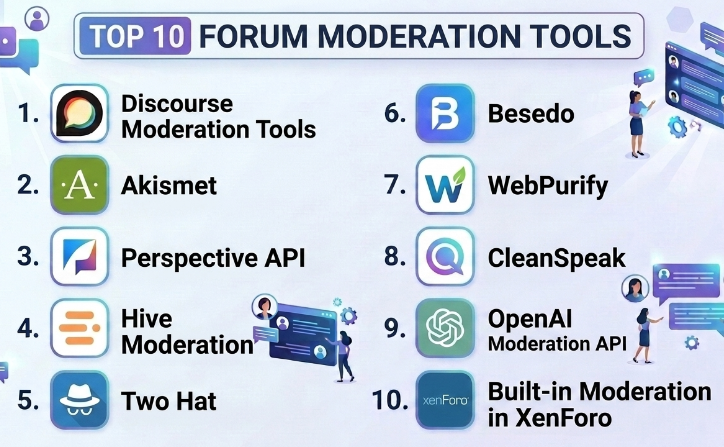
Top 10 Forum Moderation Tools
#1 — Discourse Moderation Tools
Short description :
Discourse includes built-in moderation tools designed for modern online communities, support forums, product communities, and developer forums. It supports flags, trust levels, spam controls, post approvals, moderator queues, user suspensions, category permissions, and admin review workflows. Discourse is especially strong because moderation is built into the community structure rather than added as an afterthought. It is useful for forums that want member-driven moderation supported by clear admin controls. Discourse works well for communities that need structured discussions, reputation-based participation, and scalable moderation.
Key Features
- User flagging and review queues
- Trust levels and reputation-based permissions
- Spam and new-user controls
- Category-level permissions
- Moderator actions and user management
- Post approval workflows
- Admin dashboards and moderation logs
Pros
- Strong built-in moderation for forum communities
- Trust-level system reduces manual admin work
- Good fit for public, private, and technical communities
Cons
- Best value comes when using Discourse as the forum platform
- Configuration may require learning
- Advanced AI moderation may require integrations or plugins
Platforms / Deployment
Web
Cloud / Self-hosted / Hybrid depending on setup
Security & Compliance
Role-based access, admin permissions, user controls, moderation logs, and authentication options are available depending on configuration. Specific certifications should be verified directly for hosted or enterprise use.
Not publicly stated.
Integrations & Ecosystem
Discourse moderation works well within the broader Discourse ecosystem and can be extended through plugins and integrations.
- Forum-native moderation workflows
- SSO and identity integrations
- Spam prevention tools
- Analytics and reporting
- Plugin ecosystem
- Webhooks and API workflows
Support & Community
Discourse has strong documentation, active community support, hosted support options, and an open-source ecosystem. It is one of the strongest choices for forum-native moderation.
#2 — Akismet
Short description :
Akismet is a widely used anti-spam tool designed to detect and filter spam in comments, forms, and community-generated content. It is commonly used with WordPress and other platforms where user comments or forum-style discussions need spam protection. Akismet is especially useful for smaller communities and content sites that face repeated spam submissions. It helps reduce manual review by automatically identifying likely spam. While it is not a full moderation dashboard, it is a strong spam prevention layer for forums, blogs, and community sites.
Key Features
- Automated spam detection
- Comment and form spam filtering
- Spam queue support
- API-based spam checking
- Useful for WordPress-based communities
- Reduces manual spam review
- Supports high-volume spam filtering
Pros
- Strong spam filtering capability
- Easy to use for WordPress-based sites
- Good lightweight protection for smaller forums
Cons
- Not a full community moderation suite
- Focuses mainly on spam, not all policy violations
- Best fit depends on platform compatibility
Platforms / Deployment
Web / API-based
Cloud-based service
Security & Compliance
Spam filtering involves processing submitted content and related metadata. Specific certifications and privacy commitments should be verified directly.
Not publicly stated.
Integrations & Ecosystem
Akismet is commonly used as a spam protection layer for websites and communities.
- WordPress comment systems
- Form tools
- Forum plugins where supported
- API-based moderation checks
- Spam queues
- Content submission workflows
Support & Community
Akismet has strong recognition in the website and WordPress ecosystem. Support and documentation are available through product channels.
#3 — Perspective API
Short description :
Perspective API is a machine learning-based moderation tool designed to score text for attributes such as toxicity, insult, threat, and other harmful language signals. It is useful for platforms, forums, comment sections, and online communities that want automated assistance in identifying potentially harmful content. It does not replace human moderators, but it can help prioritize review queues and reduce exposure to abusive comments. Perspective API is best for teams with developer resources that can integrate moderation scoring into their own systems. It is a strong option for custom forums and platforms that need AI-assisted content moderation.
Key Features
- Toxicity scoring for text content
- API-based integration
- Harmful language detection signals
- Useful for comments, forums, and UGC workflows
- Can prioritize moderation queues
- Supports custom moderation logic
- Developer-friendly implementation model
Pros
- Strong AI-assisted toxicity detection
- Flexible for custom platforms
- Useful for large-scale moderation triage
Cons
- Requires developer integration
- Not a full moderation dashboard by itself
- Human review is still needed for context-sensitive decisions
Platforms / Deployment
API-based
Cloud service
Security & Compliance
Content is processed through an API-based workflow. Buyers should review data handling, privacy, and compliance details before implementation.
Not publicly stated here.
Integrations & Ecosystem
Perspective API is best for technical teams building or improving moderation workflows.
- Custom forum platforms
- Comment systems
- Review queues
- Internal moderation dashboards
- Machine learning moderation workflows
- API-based safety systems
Support & Community
Support is more developer-oriented than admin-oriented. It is suitable for teams with engineering resources and custom moderation needs.
#4 — Hive Moderation
Short description :
Hive Moderation provides AI-powered content moderation for text, image, video, and audio content. It is used by platforms that need automated detection of unsafe, harmful, spammy, or policy-violating content. For forums that include images, profile pictures, attachments, or multimedia posts, Hive can provide broader moderation coverage than text-only tools. It is useful for social platforms, marketplaces, gaming communities, forums, and apps with user-generated content. Hive is best suited for teams that need scalable automated moderation across multiple content types.
Key Features
- AI moderation for text, image, video, and audio
- Policy violation detection
- Spam and harmful content detection
- API-based integration
- Custom moderation thresholds
- Review workflow support depending on setup
- Scalable content safety workflows
Pros
- Supports multiple content types
- Useful for larger communities with user-generated media
- Strong automation potential for moderation teams
Cons
- Requires integration planning
- May be more than small text-only forums need
- Pricing and workflow setup should be reviewed carefully
Platforms / Deployment
API-based / Web dashboard availability may vary
Cloud deployment
Security & Compliance
Content processing, user data handling, and moderation workflows should be reviewed carefully. Specific certifications should be verified directly.
Not publicly stated.
Integrations & Ecosystem
Hive Moderation fits platforms that need automated content safety across several media types.
- Forum and community platforms
- Social apps
- Marketplace platforms
- Gaming communities
- Internal review systems
- API-driven moderation pipelines
Support & Community
Hive is generally suited for business and platform teams with technical moderation needs. Support availability may depend on contract and implementation scope.
#5 — Two Hat
Short description :
Two Hat is a content moderation and community safety platform designed to help online communities detect harmful behavior, harassment, abuse, and policy violations. It is especially relevant for platforms with user-generated content, gaming communities, social spaces, youth-focused platforms, and interactive communities. Two Hat focuses on protecting users through automated moderation, filtering, and safety workflows. It can help identify risky content and reduce exposure to harmful conversations. It is best suited for organizations with serious trust and safety needs.
Key Features
- Automated content moderation
- Abuse and harassment detection
- Community safety workflows
- Policy-based filtering
- Text moderation support
- Real-time protection options
- Moderation review assistance
Pros
- Strong focus on community safety
- Useful for high-risk or youth-focused communities
- Helps reduce harmful user behavior
Cons
- May be too advanced for small forums
- Requires implementation and policy planning
- Pricing and availability should be validated directly
Platforms / Deployment
API-based / Cloud deployment
Exact platform details may vary
Security & Compliance
Trust and safety tools process user-generated content and may involve sensitive moderation data. Specific certifications and compliance details should be verified directly.
Not publicly stated.
Integrations & Ecosystem
Two Hat can fit into larger moderation and trust and safety systems.
- Custom community platforms
- Gaming communities
- Social apps
- Text moderation workflows
- Safety dashboards
- API-based content filtering
Support & Community
Support is generally business and platform focused. It is best for organizations that need stronger policy enforcement and community safety workflows.
#6 — Besedo
Short description :
Besedo provides content moderation services and technology for online platforms, marketplaces, communities, classifieds, and user-generated content environments. It combines automation and human moderation support, making it useful for organizations that need both technology and operational moderation services. For forums, Besedo can help with spam, harmful content, policy violations, scams, and user-generated posts that need review. It is especially useful for larger platforms that want outsourced or hybrid moderation support. Besedo is a strong choice when moderation volume is too high for internal teams alone.
Key Features
- Automated content moderation
- Human moderation service options
- Spam and scam detection
- Policy-based review workflows
- Text and image moderation capabilities
- Marketplace and community safety support
- Moderation operations support
Pros
- Combines technology and human moderation
- Good for larger platforms with high content volume
- Useful for policy enforcement and safety operations
Cons
- May be more than small forums need
- Service model and pricing require direct evaluation
- Requires clear moderation policies for best results
Platforms / Deployment
Cloud / Service-based / API-based depending on setup
Security & Compliance
Content moderation services require careful review of data handling, privacy, access controls, and compliance practices. Specific certifications should be verified directly.
Not publicly stated.
Integrations & Ecosystem
Besedo fits platforms that need moderation operations across user-generated content.
- Forum and community platforms
- Marketplace moderation
- Classifieds and listings
- Image and text review
- Internal moderation queues
- Trust and safety workflows
Support & Community
Besedo provides business-focused moderation support and services. It is best suited for platforms with enough volume to require dedicated moderation operations.
#7 — WebPurify
Short description :
WebPurify provides content moderation tools and services for text, images, and user-generated content. It is used by platforms that need profanity filtering, image moderation, text moderation, and human review options. For forums, WebPurify can help detect offensive language, unsafe images, and content that violates community rules. It is useful for communities that allow user uploads, public comments, or member-generated posts. WebPurify is a practical option for teams that want both automated filtering and human moderation support.
Key Features
- Profanity filtering
- Text moderation
- Image moderation
- Human review services
- API-based integration
- Custom blocklists and allowlists
- User-generated content safety workflows
Pros
- Useful for profanity and unsafe content filtering
- Supports both automated and human moderation options
- Good for forums with images and user posts
Cons
- Requires integration setup
- Not a full forum management platform
- Policy complexity may require careful configuration
Platforms / Deployment
API-based / Cloud service
Security & Compliance
Content processing and moderation workflows should be reviewed for privacy, data handling, and compliance requirements. Specific certifications should be verified directly.
Not publicly stated.
Integrations & Ecosystem
WebPurify can be added to many community and content systems through API workflows.
- Forum platforms
- Comment systems
- Image upload workflows
- UGC platforms
- Moderation queues
- Content safety pipelines
Support & Community
Support is generally available through product channels. It is useful for teams that need a practical moderation layer rather than a complete forum platform.
#8 — CleanSpeak
Short description :
CleanSpeak is a moderation and profanity filtering tool designed to help online communities, games, forums, and platforms manage user-generated text content. It focuses on filtering inappropriate language, managing custom word lists, and supporting moderation workflows. CleanSpeak is useful for communities that need stronger control over language, chat, comments, and posts. It can help teams enforce community rules and reduce harmful or inappropriate content. It is especially relevant for games, youth communities, and platforms with real-time or high-volume user communication.
Key Features
- Profanity filtering
- Custom word and phrase lists
- Text moderation workflows
- Real-time content filtering
- User-generated content review support
- Policy-based moderation controls
- API-based implementation
Pros
- Strong focus on language filtering
- Useful for real-time and high-volume communities
- Good fit for games and youth-focused platforms
Cons
- Not a complete forum platform
- Requires integration and policy setup
- May need human review for context-sensitive decisions
Platforms / Deployment
API-based / Cloud or deployment options may vary
Security & Compliance
Text moderation involves user-generated content processing. Buyers should validate data handling, security, and compliance details directly.
Not publicly stated.
Integrations & Ecosystem
CleanSpeak works best as a moderation layer inside custom community or communication systems.
- Forums and comments
- Chat systems
- Gaming communities
- User-generated text workflows
- Review queues
- Custom policy filters
Support & Community
Support is generally product and implementation focused. It is best for teams that need structured language filtering and custom moderation logic.
#9 — OpenAI Moderation API
Short description :
OpenAI Moderation API is a developer-focused moderation tool that helps classify text or content according to safety categories. It can be used by forums, apps, communities, support platforms, and user-generated content systems to detect potentially harmful content before it is published or to route it for review. It is best for teams with engineering resources that want to build custom moderation workflows. The tool is not a complete forum moderation dashboard, but it can support automated safety checks. It is useful when teams want AI-assisted moderation inside a custom platform.
Key Features
- API-based moderation classification
- Harmful content detection support
- Custom workflow integration
- Pre-publication or post-publication review logic
- Scalable moderation checks
- Developer-friendly implementation
- Useful for custom forum and UGC platforms
Pros
- Flexible for custom moderation workflows
- Useful for AI-assisted safety checks
- Can support scalable content review pipelines
Cons
- Requires developer implementation
- Not a complete moderation dashboard
- Human review is still important for sensitive decisions
Platforms / Deployment
API-based
Cloud service
Security & Compliance
Content is processed through an API workflow. Buyers should review data handling, retention, privacy, and compliance terms before implementation.
Not publicly stated here for every use case.
Integrations & Ecosystem
OpenAI Moderation API works best as part of custom moderation architecture.
- Forum platforms
- Comment systems
- Review queues
- AI safety workflows
- Support communities
- User-generated content pipelines
Support & Community
Support is developer-oriented. It is best for teams that can design, test, and monitor their own moderation workflow.
#10 — Built-in Moderation in XenForo
Short description :
XenForo includes built-in moderation features for forum administrators who want to manage user behavior, approve content, handle reports, control permissions, and reduce spam. It is a dedicated forum platform, so moderation is closely connected with user groups, discussion categories, member history, and forum rules. XenForo is useful for communities that want self-hosted control and traditional forum moderation workflows. It works well for hobby forums, fan communities, private communities, and support forums. Its moderation tools are practical for teams that prefer a full forum system rather than external-only moderation tools.
Key Features
- Post approval and moderation queues
- User reports and moderator actions
- User groups and permissions
- Spam controls and registration controls
- Warning and discipline workflows
- Thread and post management
- Moderator logs and admin controls
Pros
- Strong built-in moderation for self-hosted forums
- Good control over users, groups, and permissions
- Practical for traditional forum communities
Cons
- Requires hosting and technical maintenance
- Advanced AI moderation may require add-ons or integrations
- Not ideal for teams wanting fully managed SaaS simplicity
Platforms / Deployment
Web
Self-hosted deployment
Security & Compliance
Security depends on hosting, configuration, updates, add-ons, and admin practices. Specific certifications are not standard across all deployments.
Varies / N/A.
Integrations & Ecosystem
XenForo moderation works well inside the XenForo forum ecosystem and can be extended with add-ons.
- Forum-native moderation
- User group permissions
- Add-ons and plugins
- Spam prevention tools
- Authentication workflows
- Admin reporting
Support & Community
XenForo has official support, documentation, and an active community of forum administrators. It is useful for teams comfortable with self-hosted forum management.
Comparison Table Top 10
| Tool Name | Best For | Platform(s) Supported | Deployment | Standout Feature | Public Rating |
|---|---|---|---|---|---|
| Discourse Moderation Tools | Modern forum-native moderation | Web | Cloud / Self-hosted / Hybrid | Trust levels, flags, and review queues | N/A |
| Akismet | Spam filtering for comments and forums | Web / API | Cloud | Automated spam detection | N/A |
| Perspective API | AI-assisted toxicity scoring | API-based | Cloud | Text toxicity and harmful language scoring | N/A |
| Hive Moderation | Multi-content AI moderation | API / Web dashboard availability varies | Cloud | Text, image, video, and audio moderation | N/A |
| Two Hat | Community safety and abuse detection | API / Cloud | Cloud | Harassment and harmful behavior detection | N/A |
| Besedo | Hybrid automated and human moderation | API / Service-based | Cloud / Service-based | Moderation operations plus technology | N/A |
| WebPurify | Profanity, text, and image moderation | API-based | Cloud | Automated and human moderation options | N/A |
| CleanSpeak | Profanity filtering and text moderation | API-based | Cloud / Varies | Real-time language filtering | N/A |
| OpenAI Moderation API | Custom AI moderation workflows | API-based | Cloud | Developer-friendly safety classification | N/A |
| Built-in Moderation in XenForo | Self-hosted forum moderation | Web | Self-hosted | User groups, reports, and approval queues | N/A |
Evaluation & Forum Moderation Tools
| Tool Name | Core 25% | Ease 15% | Integrations 15% | Security 10% | Performance 10% | Support 10% | Value 15% | Weighted Total 0–10 |
|---|---|---|---|---|---|---|---|---|
| Discourse Moderation Tools | 9.0 | 8.2 | 8.5 | 8.2 | 8.7 | 8.5 | 8.7 | 8.60 |
| Akismet | 7.8 | 9.0 | 8.0 | 7.8 | 8.6 | 8.0 | 8.8 | 8.29 |
| Perspective API | 8.3 | 7.2 | 8.8 | 8.0 | 8.6 | 7.5 | 8.5 | 8.11 |
| Hive Moderation | 9.0 | 7.5 | 8.8 | 8.3 | 9.0 | 8.0 | 7.8 | 8.44 |
| Two Hat | 8.8 | 7.5 | 8.5 | 8.3 | 8.8 | 8.0 | 7.6 | 8.28 |
| Besedo | 8.7 | 7.8 | 8.0 | 8.2 | 8.6 | 8.5 | 7.5 | 8.22 |
| WebPurify | 8.2 | 8.0 | 8.2 | 8.0 | 8.4 | 8.0 | 8.0 | 8.14 |
| CleanSpeak | 8.0 | 7.5 | 8.2 | 7.8 | 8.4 | 7.8 | 8.0 | 7.97 |
| OpenAI Moderation API | 8.3 | 7.0 | 9.0 | 8.2 | 8.8 | 7.5 | 8.4 | 8.15 |
| Built-in Moderation in XenForo | 8.2 | 8.0 | 7.8 | 7.8 | 8.3 | 8.0 | 8.5 | 8.12 |
These scores are comparative and should be used as a starting point. A Discourse community may not need a separate moderation tool at first because native moderation is strong. A WordPress-based site may start with Akismet. A large user-generated content platform may need API-based tools such as Hive Moderation, Perspective API, WebPurify, CleanSpeak, or OpenAI Moderation API. Human moderation service providers may be better when content volume is too large for internal teams.
Which Forum Moderation Tool Should You Choose?
Solo / Small Community Group
Small communities should begin with built-in forum moderation features. If the forum is on Discourse or XenForo, native moderation tools may be enough. If spam is the main issue, Akismet or built-in spam controls may solve the problem.
Small communities should avoid overcomplicating moderation. Start with clear rules, post approvals for new users, spam filters, and a simple reporting process.
Small Business or Support Community
Small businesses need reliable spam control, user reporting, moderator permissions, and approval queues. Discourse moderation tools, Akismet, XenForo moderation, and WebPurify can be practical depending on the platform.
The focus should be on reducing spam, protecting users, and keeping customer discussions helpful without creating too much admin work.
Mid-Market Community
Mid-market communities often need stronger moderation workflows, multiple moderators, escalation rules, AI-assisted review, and analytics. Discourse, Perspective API, WebPurify, CleanSpeak, and Hive Moderation are good tools to compare.
At this stage, teams should define clear moderation policies, response times, and escalation paths. Tools work better when community rules are clearly written.
Enterprise / Large Platform
Large communities and user-generated content platforms need scalable moderation systems, AI assistance, human review, auditability, policy enforcement, and trust and safety workflows. Hive Moderation, Two Hat, Besedo, WebPurify, Perspective API, and OpenAI Moderation API may be suitable depending on use case.
Enterprise teams should involve trust and safety, legal, privacy, security, product, engineering, and community leadership before choosing moderation tools.
Budget vs Premium
Budget-focused teams should use built-in moderation features first. Many forum platforms already include roles, flags, approvals, reports, and spam controls. Add external tools only when spam, abuse, volume, or risk becomes difficult to manage.
Premium tools are useful when communities face high-volume content, images, videos, real-time chat, youth safety, marketplace scams, or policy-sensitive user-generated content.
Feature Depth vs Ease of Use
Built-in tools such as Discourse and XenForo moderation are easier because they are part of the forum platform. Akismet is simple for spam control. API-based tools such as Perspective API, Hive, WebPurify, CleanSpeak, and OpenAI Moderation API provide deeper automation but require technical work.
The best tool depends on whether the problem is spam, toxicity, images, scams, harassment, or high-volume review.
Integrations & Scalability
Moderation tools may need to integrate with forum software, support systems, identity tools, analytics, dashboards, reporting tools, and internal review queues. API-based tools are powerful, but they need proper implementation and monitoring.
Scalability also includes moderator staffing, escalation policies, user appeals, audit logs, and community health reporting.
Security & Compliance Needs
Moderation tools process user-generated content, user behavior signals, account information, and sometimes sensitive posts. Buyers should review data retention, privacy, encryption, access permissions, audit logs, region-specific requirements, and content handling policies.
Forums involving minors, healthcare, finance, education, or workplace discussions should be especially careful with privacy and compliance.
Frequently Asked Questions FAQs
1. What are Forum Moderation Tools?
Forum Moderation Tools help admins and moderators manage posts, users, reports, spam, abuse, harmful content, and community rule violations. They keep online discussions safer, cleaner, and more useful.
2. Why is forum moderation important?
Moderation protects users from spam, harassment, scams, abuse, and low-quality content. It also helps maintain trust, keeps discussions organized, and improves the overall community experience.
3. What features should I look for first?
Start with spam protection, user reports, moderator queues, post approvals, user roles, keyword filters, audit logs, and moderation history. Larger communities should also check AI moderation, analytics, and escalation workflows.
4. Can AI replace human moderators?
No, AI can help detect risky content and reduce workload, but human moderators are still important for context, fairness, appeals, sensitive discussions, and community judgment.
5. What is the best tool for spam prevention?
Akismet is a strong option for spam filtering, especially in comment and WordPress-style environments. Discourse and XenForo also include useful spam and new-user controls inside their forum systems.
6. What is the best tool for toxicity detection?
Perspective API and OpenAI Moderation API can help detect harmful or toxic language through AI-based scoring and classification. However, these tools require developer integration and human review policies.
7. What is the best tool for image moderation?
Hive Moderation and WebPurify are useful options for communities that allow image uploads. They can help detect unsafe images, inappropriate visuals, or policy-violating media.
8. What are common mistakes in forum moderation?
Common mistakes include relying only on keyword filters, having unclear rules, not training moderators, ignoring appeals, over-moderating normal disagreement, and failing to act quickly on harmful behavior.
9. Can moderation tools integrate with existing forums?
Yes, many tools integrate through APIs, plugins, or built-in platform features. However, integration depth varies. Teams should test how flagged content, user data, and moderation decisions flow through the system.
10. Are moderation tools secure?
Good moderation tools include access controls and secure workflows, but buyers should verify details directly. Important areas include data handling, content retention, moderator permissions, encryption, audit logs, and privacy practices.
Conclusion
Forum Moderation Tools are essential for keeping online communities safe, respectful, and useful. The right tool depends on the type of community, content volume, risk level, platform, and moderation policy. Discourse and XenForo provide strong built-in forum moderation for many communities. Akismet is useful for spam prevention. Perspective API and OpenAI Moderation API help with AI-assisted text moderation. Hive Moderation, WebPurify, CleanSpeak, Two Hat, and Besedo are stronger options for larger platforms, multimedia content, or more serious trust and safety needs.
