Introduction
Grocery list apps help users create, organize, share, and manage shopping lists from a phone, tablet, or computer. In simple words, these apps replace paper grocery lists with smarter digital lists that can be updated anytime, shared with family members, grouped by store sections, connected with recipes, and reused for weekly shopping.
These tools are useful because grocery shopping often becomes messy when lists are scattered across WhatsApp messages, sticky notes, memory, recipe screenshots, and last-minute reminders. A good grocery list app helps users avoid forgotten items, duplicate purchases, overspending, and unnecessary store trips.
Grocery list apps are especially helpful for families, roommates, busy professionals, students, meal planners, home cooks, and anyone managing recurring household shopping. Some apps are simple list tools, while others include recipe management, meal planning, barcode scanning, pantry tracking, price tracking, and shared household collaboration.
Real-world use cases include:
- Creating weekly grocery lists.
- Sharing shopping lists with family members or roommates.
- Organizing items by store category.
- Adding ingredients from recipes.
- Planning groceries for meal prep.
- Tracking pantry items and household supplies.
- Reducing forgotten items and duplicate purchases.
- Managing shopping for multiple stores.
Key evaluation criteria for buyers:
- Ease of list creation and editing.
- Shared list collaboration.
- Real-time sync across devices.
- Grocery category organization.
- Recipe-to-list support.
- Pantry and household inventory features.
- Voice input and quick add options.
- Cross-platform availability.
- Offline access.
- Free vs premium value.
Best for: Families, couples, roommates, students, busy professionals, home cooks, meal planners, grocery shoppers, household managers, and anyone who wants a more organized shopping routine.
Not ideal for: Users who only buy a few items occasionally, people who prefer paper lists, or businesses needing full retail inventory, procurement, or supply chain management software.
Key Trends in Grocery List Apps
- Shared household shopping lists are becoming essential, especially for families, couples, and roommates who need real-time updates.
- Recipe-to-grocery workflows are growing, allowing users to add ingredients directly from saved recipes or meal plans.
- Voice-based item entry is becoming more useful, especially when users want to add items quickly while cooking or checking the pantry.
- Pantry tracking is gaining attention, helping users avoid buying items they already have at home.
- Smart categorization is now expected, with items automatically grouped into produce, dairy, bakery, frozen, pantry, and household sections.
- Cross-device sync matters more, because users may create a list on a laptop and shop from a phone.
- Meal planning integration is becoming a key differentiator, especially for people who plan weekly meals before shopping.
- Budget-conscious shopping features are growing, including price notes, store-based lists, and reusable shopping templates.
- Simple design is still important, because grocery apps must be fast and easy during real shopping.
- Privacy expectations are increasing, because shopping lists may reveal household habits, diet choices, family size, and recurring purchases.
How We Selected These Tools
The tools below were selected based on practical usefulness for grocery shopping, household planning, shared lists, meal preparation, and daily shopping organization. The evaluation focused on:
- Market recognition among household users and meal planners.
- Ease of creating, editing, and reusing grocery lists.
- Shared list collaboration and real-time sync.
- Support for categories, stores, pantry items, and recurring purchases.
- Recipe and meal planning integration.
- Fit for individuals, families, roommates, and busy professionals.
- Mobile app quality and cross-platform support.
- Offline access and reliability during shopping.
- Privacy and security visibility where clearly known; otherwise marked as “Not publicly stated.”
- Overall value based on usability, simplicity, collaboration, and practical shopping impact.
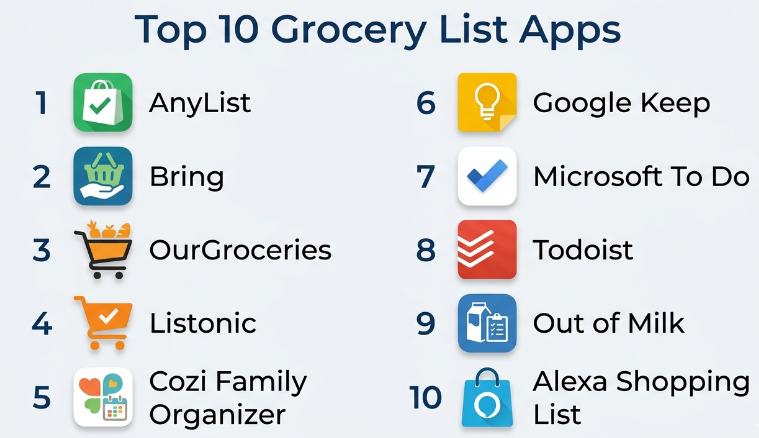
Top 10 Grocery List Apps
#1 — AnyList
Short description :
AnyList is one of the strongest grocery list apps for families, couples, roommates, and organized shoppers. It helps users create shared grocery lists, categorize items, save recipes, and convert recipe ingredients into shopping lists. The app is especially useful for households where more than one person adds or buys groceries. AnyList focuses on practical shopping coordination rather than unnecessary complexity. It is best for users who want shared lists, recipe support, and a clean grocery shopping workflow.
Key Features
- Shared grocery lists.
- Real-time list sync.
- Recipe storage and ingredient lists.
- Grocery category organization.
- List sharing with family members.
- Item notes, quantities, and categories.
- Cross-device access.
Pros
- Excellent for shared household shopping.
- Simple and practical interface.
- Strong recipe-to-grocery workflow.
Cons
- Some advanced features may require paid access.
- Less focused on grocery delivery.
- Recipe discovery is limited compared with recipe-first apps.
Platforms / Deployment
iOS / Android / Web
Cloud / Mobile app-based
Security & Compliance
Not publicly stated
Integrations & Ecosystem
AnyList connects grocery lists with household planning and recipe organization. It works well for people who want one shared space for shopping coordination.
- Shared family lists.
- Recipe ingredient planning.
- Meal planning support.
- Cross-device syncing.
- Store-category organization.
Support & Community
AnyList provides documentation, app support, and a loyal user base among families and organized grocery shoppers. Its strength is reliability and ease of daily use.
#2 — Bring!
Short description :
Bring! is a grocery list app designed for simple, visual, and shared shopping. It helps users create grocery lists, share them with household members, add product images, organize items, and plan shopping together. The app is especially useful for families and roommates who want an easy visual grocery list that everyone can understand quickly. Bring! focuses on simplicity and collaboration. It is best for users who want a clean shared grocery list app without heavy meal planning complexity.
Key Features
- Shared grocery lists.
- Visual item cards.
- Real-time list updates.
- Household collaboration.
- Store-based list organization.
- Quick item adding.
- Recipe and inspiration features may vary.
Pros
- Very easy and visual.
- Good for families and roommates.
- Fast for everyday grocery shopping.
Cons
- Advanced recipe and pantry features may be limited.
- Some users may prefer text-heavy list control.
- Feature availability may vary by region.
Platforms / Deployment
iOS / Android / Web
Cloud / Mobile app-based
Security & Compliance
Not publicly stated
Integrations & Ecosystem
Bring! is built around shared grocery shopping and visual list management.
- Household shopping lists.
- Shared list updates.
- Visual grocery planning.
- Store-based shopping.
- Quick mobile list creation.
Support & Community
Bring! provides app support and user guidance. It is popular among users who want an easy and visual shopping list experience.
#3 — OurGroceries
Short description :
OurGroceries is a grocery list app focused on shared household shopping lists. It allows family members or roommates to update grocery lists from their own devices, making it easier to coordinate shopping. The app is practical for households where multiple people may add items throughout the week. It supports multiple lists, item categories, and quick list updates. OurGroceries is best for users who want a simple shared grocery list without too many extra features.
Key Features
- Shared grocery lists.
- Real-time sync across household members.
- Multiple shopping lists.
- Item categories.
- Quick add and delete options.
- Cross-device access.
- Simple household shopping workflow.
Pros
- Strong for shared family lists.
- Simple and easy to use.
- Good for recurring grocery planning.
Cons
- Interface may feel basic compared with newer apps.
- Limited recipe and meal planning depth.
- Advanced features may vary by plan or platform.
Platforms / Deployment
iOS / Android / Web
Cloud / Mobile app-based
Security & Compliance
Not publicly stated
Integrations & Ecosystem
OurGroceries is useful for families and shared households that mainly need list sync.
- Shared household lists.
- Multiple store lists.
- Real-time item updates.
- Cross-device shopping.
- Recurring shopping workflows.
Support & Community
OurGroceries provides support resources and has a practical user base among families who want simple shared list functionality.
#4 — Listonic
Short description :
Listonic is a grocery list app designed to help users create smart shopping lists quickly. It supports item suggestions, categories, quantity notes, sharing, and practical list organization. The app is useful for individuals, couples, and families who want a clean grocery list experience with helpful shopping-focused features. Listonic can make shopping faster by grouping items and remembering frequently used products. It is best for users who want a straightforward grocery list app with smart suggestions.
Key Features
- Smart grocery list creation.
- Product suggestions.
- Category-based organization.
- Shared list support.
- Quantity and note options.
- Frequently used item memory.
- Cross-device sync.
Pros
- Easy and fast list creation.
- Helpful item suggestions.
- Good for regular grocery shopping.
Cons
- Recipe management is limited.
- Advanced meal planning is not the main focus.
- Feature depth may vary by region.
Platforms / Deployment
iOS / Android / Web options may vary
Cloud / Mobile app-based
Security & Compliance
Not publicly stated
Integrations & Ecosystem
Listonic fits users who want fast, smart, and simple grocery list creation.
- Grocery item suggestions.
- Shared shopping lists.
- Category grouping.
- Recurring item planning.
- Mobile shopping workflows.
Support & Community
Listonic provides user support and help resources. It is useful for shoppers who want quick list building with minimal effort.
#5 — Cozi Family Organizer
Short description :
Cozi Family Organizer is a household organization app that includes grocery lists, shared calendars, to-do lists, meal planning, and family coordination features. It is useful for busy families who want more than just a grocery list. Cozi helps families manage schedules, shopping, tasks, and meals in one place. The grocery list feature is practical when combined with family planning. It is best for families that want a broader home organization system.
Key Features
- Shared grocery lists.
- Family calendar.
- To-do lists.
- Meal planning support.
- Household task coordination.
- Shared access for family members.
- Cross-device sync.
Pros
- Strong for family organization.
- Combines groceries, tasks, and schedules.
- Useful for busy households.
Cons
- Grocery features may be less specialized than dedicated grocery apps.
- Some features may require premium access.
- May feel too broad for users who only need shopping lists.
Platforms / Deployment
iOS / Android / Web
Cloud / Mobile app-based
Security & Compliance
Not publicly stated
Integrations & Ecosystem
Cozi is useful for households that want grocery lists connected with family planning.
- Shared family calendar.
- Grocery lists.
- Meal planning.
- To-do lists.
- Household coordination.
Support & Community
Cozi provides help resources and app support. It has strong appeal among families managing multiple schedules and household responsibilities.
#6 — Google Keep
Short description :
Google Keep is a simple note-taking app that can also work well as a grocery list tool. Users can create checklists, share lists with others, add voice notes, use labels, and access lists across devices. It is not a dedicated grocery app, but it is useful for people who want a lightweight and familiar tool. Google Keep is especially practical for users already using Google services. It is best for simple grocery lists, quick reminders, and shared household notes.
Key Features
- Checklist creation.
- Shared notes and lists.
- Voice notes.
- Labels and color organization.
- Cross-device sync.
- Quick mobile access.
- Simple reminder support.
Pros
- Very easy to use.
- Good for simple shared lists.
- Works well for users already using Google tools.
Cons
- No dedicated grocery categories.
- No recipe-to-list workflow.
- Limited meal planning and pantry features.
Platforms / Deployment
Web / iOS / Android
Cloud
Security & Compliance
Not publicly stated
Integrations & Ecosystem
Google Keep is useful for lightweight grocery lists and simple household reminders.
- Shared checklists.
- Quick notes.
- Voice capture.
- Cross-device access.
- Simple reminder workflows.
Support & Community
Google Keep is widely used and easy to learn. Support is available through general product help resources, and many users already understand the interface.
#7 — Microsoft To Do
Short description :
Microsoft To Do is a task and checklist app that can be used for grocery shopping, household tasks, and recurring lists. It is useful for users already working in the Microsoft ecosystem who want a simple grocery checklist that syncs across devices. The app allows users to create lists, add subtasks, set reminders, and share lists. It is not built specifically for groceries, but it works well for basic shopping organization. It is best for users who want grocery lists inside a broader task management workflow.
Key Features
- Checklist and task creation.
- Shared lists.
- Reminders and due dates.
- Recurring tasks.
- Cross-device sync.
- Simple list organization.
- Microsoft ecosystem support.
Pros
- Good for users already using Microsoft tools.
- Simple shared checklist support.
- Useful for recurring household lists.
Cons
- No grocery-specific categorization.
- No recipe or meal planning features.
- Less visual than dedicated grocery apps.
Platforms / Deployment
Web / Windows / macOS / iOS / Android
Cloud
Security & Compliance
Not publicly stated
Integrations & Ecosystem
Microsoft To Do is useful for shoppers who want grocery lists inside a task management app.
- Shared task lists.
- Recurring grocery reminders.
- Household task planning.
- Cross-device list access.
- Microsoft productivity workflows.
Support & Community
Microsoft To Do has documentation and support resources. Adoption is easy for users already familiar with Microsoft productivity tools.
#8 — Todoist
Short description :
Todoist is a task management app that can also be used for grocery lists, recurring shopping tasks, pantry reminders, and household planning. It is more powerful than a simple grocery list app because it supports projects, labels, priorities, recurring tasks, and collaboration. Todoist is useful for people who want grocery shopping inside a broader productivity system. It is best for organized users who manage shopping, errands, work tasks, and personal routines in one app.
Key Features
- Task and checklist management.
- Shared projects and lists.
- Recurring tasks.
- Labels and priorities.
- Mobile and desktop sync.
- Natural language task entry.
- Collaboration features.
Pros
- Strong productivity features.
- Good for recurring grocery and household tasks.
- Works across many platforms.
Cons
- Not grocery-specific.
- No built-in recipe-to-list workflow.
- May feel too structured for simple shoppers.
Platforms / Deployment
Web / Windows / macOS / iOS / Android
Cloud
Security & Compliance
Not publicly stated
Integrations & Ecosystem
Todoist fits users who want grocery planning as part of a complete productivity system.
- Shared household tasks.
- Recurring grocery reminders.
- Project-based lists.
- Label-based organization.
- Cross-device task sync.
Support & Community
Todoist provides documentation, support resources, and a strong productivity-focused user community.
#9 — Out of Milk
Short description :
Out of Milk is a grocery list and pantry tracking app designed to help users manage shopping lists, pantry items, and household needs. It is useful for people who want to know what they need to buy and what they already have at home. The app supports shopping lists, pantry lists, and to-do lists. It is especially practical for users trying to reduce duplicate purchases and better manage household supplies. Out of Milk is best for users who want grocery lists plus pantry awareness.
Key Features
- Grocery list creation.
- Pantry list tracking.
- To-do list support.
- Item categories.
- List sharing features may vary.
- Quantity and note support.
- Household shopping organization.
Pros
- Useful pantry tracking.
- Helps reduce duplicate purchases.
- Good for household supply management.
Cons
- Interface may feel less modern.
- Advanced sync or sharing features may vary.
- Recipe and meal planning features are limited.
Platforms / Deployment
iOS / Android / Web options may vary
Cloud / Mobile app-based
Security & Compliance
Not publicly stated
Integrations & Ecosystem
Out of Milk supports shopping and pantry organization for households.
- Grocery lists.
- Pantry tracking.
- Household supply lists.
- Category-based shopping.
- To-do lists.
Support & Community
Out of Milk provides support resources and is useful for shoppers who want pantry visibility along with grocery planning.
#10 — Alexa Shopping List
Short description :
Alexa Shopping List is useful for users who want to add grocery items through voice commands using Alexa-enabled devices. It helps users quickly add items while cooking, checking the fridge, or moving around the house. The list can then be viewed on a phone while shopping. Alexa Shopping List is especially helpful for smart home users who want hands-free grocery list creation. It is best for users who already use Alexa devices and want voice-based shopping list convenience.
Key Features
- Voice-based grocery item adding.
- Shopping list access through mobile app.
- Smart speaker support.
- Household convenience.
- Quick item capture.
- Simple list checking.
- Smart home ecosystem support.
Pros
- Very convenient for hands-free list creation.
- Good for smart home users.
- Useful while cooking or checking pantry items.
Cons
- Best value requires Alexa-enabled devices.
- Grocery organization features may be basic.
- Less powerful than dedicated grocery list apps.
Platforms / Deployment
iOS / Android / Alexa-enabled devices
Cloud / Smart home ecosystem-based
Security & Compliance
Not publicly stated
Integrations & Ecosystem
Alexa Shopping List works best for users already using Alexa at home.
- Voice grocery capture.
- Smart speaker workflows.
- Mobile shopping list access.
- Household shopping reminders.
- Smart home routines.
Support & Community
Support is available through general Alexa help resources. The biggest advantage is convenience for users already comfortable with voice assistants.
Comparison Table
| Tool Name | Best For | Platform(s) Supported | Deployment | Standout Feature | Public Rating |
|---|---|---|---|---|---|
| AnyList | Families and shared grocery planning | iOS / Android / Web | Cloud / Mobile app-based | Shared grocery lists with recipe support | N/A |
| Bring! | Visual shared shopping lists | iOS / Android / Web | Cloud / Mobile app-based | Visual grocery item cards | N/A |
| OurGroceries | Simple shared household lists | iOS / Android / Web | Cloud / Mobile app-based | Real-time family list sync | N/A |
| Listonic | Fast smart grocery list creation | iOS / Android / Web options vary | Cloud / Mobile app-based | Smart item suggestions | N/A |
| Cozi Family Organizer | Family grocery and schedule planning | iOS / Android / Web | Cloud / Mobile app-based | Grocery lists with family calendar | N/A |
| Google Keep | Simple shared checklists | Web / iOS / Android | Cloud | Lightweight grocery checklist | N/A |
| Microsoft To Do | Microsoft users and recurring lists | Web / Windows / macOS / iOS / Android | Cloud | Grocery lists inside task management | N/A |
| Todoist | Productivity-focused grocery planning | Web / Windows / macOS / iOS / Android | Cloud | Recurring grocery tasks and labels | N/A |
| Out of Milk | Grocery lists with pantry tracking | iOS / Android / Web options vary | Cloud / Mobile app-based | Pantry and shopping list management | N/A |
| Alexa Shopping List | Voice-based grocery list creation | iOS / Android / Alexa devices | Cloud / Smart home ecosystem-based | Hands-free voice item adding | N/A |
Evaluation & Grocery List Apps
| Tool Name | Core (25%) | Ease (15%) | Integrations (15%) | Security (10%) | Performance (10%) | Support (10%) | Value (15%) | Weighted Total (0–10) |
|---|---|---|---|---|---|---|---|---|
| AnyList | 9 | 9 | 8 | 6 | 9 | 8 | 8 | 8.20 |
| Bring! | 8 | 9 | 7 | 6 | 8 | 7 | 8 | 7.65 |
| OurGroceries | 8 | 8 | 7 | 6 | 8 | 7 | 8 | 7.50 |
| Listonic | 8 | 9 | 7 | 6 | 8 | 7 | 8 | 7.65 |
| Cozi Family Organizer | 8 | 8 | 7 | 6 | 8 | 8 | 7 | 7.55 |
| Google Keep | 6 | 10 | 8 | 6 | 9 | 8 | 9 | 7.95 |
| Microsoft To Do | 6 | 9 | 8 | 6 | 9 | 8 | 9 | 7.80 |
| Todoist | 7 | 8 | 9 | 6 | 9 | 8 | 8 | 7.90 |
| Out of Milk | 8 | 7 | 6 | 5 | 7 | 6 | 7 | 6.85 |
| Alexa Shopping List | 6 | 9 | 8 | 6 | 8 | 7 | 8 | 7.35 |
These scores are comparative and should be used as a shortlist guide, not as a universal ranking. A higher score usually means stronger grocery-specific features, easier collaboration, or better daily usability. A lower score does not mean the app is weak; it may simply fit a narrower use case. For example, Google Keep is not a dedicated grocery app, but it is excellent for simple shared checklists. AnyList is stronger for grocery-specific household planning.
Which Grocery List App Should You Choose?
Solo / Freelancer
Solo users and freelancers should choose a grocery list app that is fast, simple, and easy to access while shopping. Google Keep, Microsoft To Do, Listonic, and Bring! are practical choices for simple shopping lists.
If you cook often and want recipe support, AnyList is a better option. If you already manage all personal tasks in Todoist, it may make sense to keep grocery lists there too.
SMB
Small teams, office managers, shared apartments, small food businesses, and wellness coaches may need grocery lists for recurring supplies or simple shopping coordination. AnyList, OurGroceries, Google Keep, and Todoist can support shared list workflows.
For SMB use, simplicity matters. The best app is the one people will actually update consistently before shopping.
Mid-Market
Mid-market organizations may use grocery-style list apps for pantry management, office supplies, team snacks, event shopping, or small kitchen operations. Todoist, Microsoft To Do, Google Keep, and Cozi-style shared planning workflows can help coordinate recurring purchases.
However, if the need includes inventory costing, vendor purchasing, approvals, or stock control, a grocery list app may not be enough. A dedicated procurement or inventory tool may be better.
Enterprise
Enterprise teams generally should not rely on consumer grocery list apps for formal purchasing, inventory, or procurement. These apps are best for informal household or small-team shopping.
For enterprise use, review privacy, account ownership, admin controls, data retention, and purchasing governance. Grocery list apps can support simple internal lists, but they are not replacements for procurement systems.
Budget vs Premium
Budget-conscious users can start with Google Keep, Microsoft To Do, Alexa Shopping List, or free versions of grocery apps. These are enough for basic list creation and sharing.
Premium tools like AnyList, Cozi, or advanced versions of dedicated grocery apps may be better when users need family sharing, recipe support, better sync, meal planning, or more organized household workflows.
Feature Depth vs Ease of Use
If ease of use matters most, choose Google Keep, Bring!, Listonic, or Alexa Shopping List. These are simple and fast.
If feature depth matters more, choose AnyList, Cozi Family Organizer, Out of Milk, or Todoist depending on whether you need recipes, family planning, pantry tracking, or recurring task workflows.
Integrations & Scalability
Grocery list apps become more useful when they connect with voice assistants, recipes, meal plans, household calendars, task systems, and shared devices. AnyList, Cozi, Alexa Shopping List, Google Keep, and Todoist are useful in different integration scenarios.
For scalability, check whether the app supports multiple users, shared lists, categories, recurring items, cross-device sync, and export or backup options.
Security & Compliance Needs
Grocery lists may seem simple, but they can still reveal food habits, family routines, allergies, household size, and shopping patterns. Users should review account privacy and sharing settings.
If security details are not clearly available, mark them as “Not publicly stated” and avoid storing sensitive health or dietary information unless the app’s privacy approach is acceptable.
Frequently Asked Questions
1. What are grocery list apps?
Grocery list apps are digital tools that help users create, organize, share, and manage shopping lists. They often include categories, item notes, quantities, recurring items, real-time sync, and sometimes recipe or pantry features.
2. Are grocery list apps better than paper lists?
For many users, yes. Digital grocery lists are easier to update, share, reuse, and access from a phone. Paper lists can still work for simple needs, but apps are better for families and recurring shopping.
3. Which grocery list app is best for families?
AnyList, Bring!, OurGroceries, and Cozi Family Organizer are strong choices for families because they support shared lists and household coordination.
4. Which app is best for simple grocery lists?
Google Keep, Microsoft To Do, Bring!, and Listonic are good for simple grocery lists. They are easy to use and do not require complex setup.
5. Can grocery list apps be shared with others?
Yes. Many grocery list apps allow users to share lists with family members, roommates, or partners. Shared lists are useful because everyone can add items before shopping.
6. Can grocery apps organize items by store section?
Many dedicated grocery apps automatically group items into categories such as produce, dairy, bakery, frozen, pantry, and household goods. This makes shopping faster and more organized.
7. Which grocery list app works best with recipes?
AnyList is a strong option for recipe-to-grocery workflows. Some meal planning and recipe apps also support grocery list generation from saved recipes.
8. Can I use a task app as a grocery list app?
Yes. Apps like Google Keep, Microsoft To Do, and Todoist can work well for grocery lists. However, they may not include grocery-specific categories, pantry tracking, or recipe features.
9. What is the best grocery app for pantry tracking?
Out of Milk is useful for users who want grocery lists plus pantry tracking. Pantry features help users avoid buying items they already have at home.
10. Are grocery list apps free?
Many grocery list apps offer free versions. Premium plans may include advanced sharing, meal planning, recipe support, sync features, family tools, or an ad-free experience.
Conclusion
Grocery list apps are simple but powerful tools for making shopping more organized, faster, and less stressful. They help users avoid forgotten items, reduce duplicate purchases, coordinate with family members, and plan shopping around meals or household needs. The best app depends on how you shop. A family may prefer AnyList, Bring!, or OurGroceries for shared lists. A productivity-focused user may prefer Todoist or Microsoft To Do. A simple shopper may use Google Keep, while someone who wants pantry tracking may choose Out of Milk.
