Introduction
Subtitle and captioning tools are software solutions that allow creators, broadcasters, and enterprises to generate, edit, and synchronize text for video content. These tools ensure that media is accessible, SEO-friendly, and engaging across languages and audiences. In 2026, subtitles and captions are no longer optional—they are crucial for inclusivity, compliance, and engagement on streaming platforms, social media, and corporate content.
Real-world use cases include:
- Streaming platforms – providing multi-language subtitles for global audiences.
- Corporate training – improving comprehension and accessibility in e-learning videos.
- Marketing content – creating auto-generated captions for social media clips.
- Live events – real-time captioning for accessibility compliance.
- Video production – ensuring accurate dialogue representation for post-production editing.
When evaluating these tools, buyers should consider:
- Accuracy of automatic speech recognition (ASR)
- Support for multiple languages and dialects
- Editing and styling capabilities
- Integration with video platforms or CMS
- Real-time captioning support
- Export formats and compatibility
- Security and compliance
- Cloud vs on-premises deployment
- Pricing and scalability
Best for: Video editors, broadcasters, OTT platforms, marketers, training teams, enterprises producing multi-language content.
Not ideal for: Individuals with minimal video content, or organizations relying solely on pre-produced content without accessibility requirements.
Key Trends in Subtitle & Captioning Tools
- AI-powered automatic transcription for high accuracy
- Multi-language and multi-dialect support
- Cloud-based collaborative editing and workflow management
- Integration with video streaming and editing platforms
- Real-time captioning for live events and webinars
- Compliance with accessibility standards like WCAG and FCC
- Custom styling for branding consistency
- Adaptive caption formats (SRT, VTT, SCC)
- Cost optimization via AI-driven corrections
- Hybrid deployment models for enterprise flexibility
How We Selected These Tools (Methodology)
- Market adoption and recognition among media and enterprise teams
- Accuracy and speed of automatic transcription
- Ease of manual editing and workflow flexibility
- Support for multiple languages and captions formats
- Security and compliance features
- Integration capabilities with video platforms, CMS, and DAMs
- Cloud, on-premises, or hybrid deployment flexibility
- Scalability for batch or live events
- Customer satisfaction signals and support quality
- Cost-to-value balance for various user segments
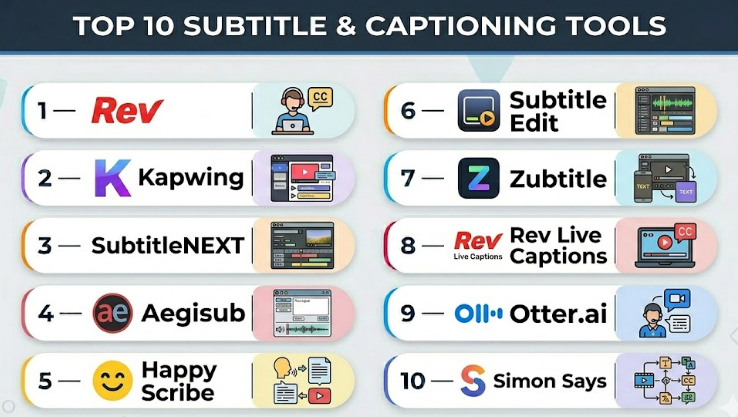
Top 10 Subtitle & Captioning Tools
#1 — Rev
Short description :
Rev is a cloud-based captioning and transcription platform used by media professionals, enterprises, and educators. It provides human and automated captions for high-quality, accurate video content.
Key Features
- Human-generated and AI-powered transcription
- Multi-language support
- Integration with video platforms
- Customizable caption styling
- Export in SRT, VTT, and SCC formats
- Collaboration tools for team editing
Pros
- High accuracy with human captions
- Fast turnaround for enterprise workflows
Cons
- Human captions are costlier than automated
- Limited offline capabilities
Platforms / Deployment
- Web / Cloud
Security & Compliance
- Not publicly stated
Integrations & Ecosystem
Rev integrates with video editors, LMS, and streaming platforms.
- API for automation
- Supports CMS workflows
- Compatible with video hosting platforms
Support & Community
- Customer support available
- Documentation and tutorials provided
- Community resources moderate
#2 — Kapwing
Short description :
Kapwing is an online video editor with built-in subtitle and captioning tools, widely used by creators, marketers, and educators for social media content and marketing videos.
Key Features
- Auto-generated subtitles
- Multi-language support
- Video editing and trimming
- Collaborative online editing
- Styling and formatting captions
- Export to multiple formats
Pros
- Easy-to-use interface
- Cloud-based collaboration
Cons
- Accuracy may vary with poor audio
- Limited batch processing
Platforms / Deployment
- Web / Cloud
Security & Compliance
- Not publicly stated
Integrations & Ecosystem
Kapwing integrates with social media platforms and content management systems.
- API not publicly stated
- Direct exports to video platforms
- Works in browsers without software installation
Support & Community
- Online tutorials
- Email support
- Active creator community
#3 — SubtitleNEXT
Short description :
SubtitleNEXT is a professional subtitle and captioning software for broadcasters, film studios, and video production houses, supporting advanced workflows and accessibility standards.
Key Features
- Multi-language subtitling
- Advanced styling and formatting
- Timecode synchronization
- Collaboration for large projects
- Supports multiple file formats
- Compliance with broadcast standards
Pros
- Enterprise-grade quality
- Highly customizable workflow
Cons
- Learning curve for new users
- Premium pricing
Platforms / Deployment
- Windows / macOS / Self-hosted
Security & Compliance
- Not publicly stated
Integrations & Ecosystem
- Integrates with NLEs and broadcast systems
- Supports import/export in professional formats
- API/automation capabilities for workflows
Support & Community
- Vendor support tiers
- Documentation and training available
- Limited open community
#4 — Aegisub
Short description :
Aegisub is an open-source subtitle editor used for video enthusiasts, translators, and smaller studios needing manual subtitle creation.
Key Features
- Manual subtitle editing
- Timing and frame synchronization
- Styling and formatting for subtitles
- SRT, ASS, SSA support
- Spell-checking and karaoke support
Pros
- Free and open-source
- Flexible for detailed manual work
Cons
- No AI transcription
- No cloud collaboration
Platforms / Deployment
- Windows / macOS / Linux / Self-hosted
Security & Compliance
- Not publicly stated
Integrations & Ecosystem
- Can be used with local video editors
- Supports script automation for batch editing
- Limited plugin ecosystem
Support & Community
- Active developer community
- Tutorials available
- No official enterprise support
#5 — Happy Scribe
Short description :
Happy Scribe offers automated transcription and subtitling for media creators, education, and corporate training teams, emphasizing multilingual support.
Key Features
- AI-powered transcription
- Multi-language subtitles
- Export in multiple formats
- Editor for fine-tuning subtitles
- Collaboration tools
- Supports video and audio uploads
Pros
- High accuracy in clear audio
- Supports diverse languages
Cons
- AI transcription may require manual corrections
- Subscription-based pricing
Platforms / Deployment
- Web / Cloud
Security & Compliance
- Not publicly stated
Integrations & Ecosystem
- Integrates with video platforms and LMS
- API for automated workflows
- Compatible with multiple export formats
Support & Community
- Documentation and FAQs
- Email support
- Moderate community presence
#6 — Subtitle Edit
Short description :
Subtitle Edit is an open-source subtitle editor for individual creators and translators needing precise timing and multi-language support.
Key Features
- Manual and auto-translation support
- Waveform/audio visualization
- Spell-check and OCR for subtitles
- Multiple subtitle format support
- Synchronization tools
Pros
- Free and feature-rich
- Supports complex timing adjustments
Cons
- No cloud-based collaboration
- Limited AI transcription
Platforms / Deployment
- Windows / Linux / Self-hosted
Security & Compliance
- Not publicly stated
Integrations & Ecosystem
- Works with NLEs
- Supports multiple video formats
- Basic automation via scripts
Support & Community
- Active open-source community
- Tutorials available
- No official enterprise support
#7 — Zubtitle
Short description :
Zubtitle is a web-based tool designed for social media marketers to automatically generate captions for short videos quickly.
Key Features
- Auto-generated captions
- Text styling and branding
- Supports social media aspect ratios
- Video trimming and editing
- Multi-language support
Pros
- Quick social media-ready captions
- Easy-to-use interface
Cons
- Limited enterprise features
- Accuracy varies with background noise
Platforms / Deployment
- Web / Cloud
Security & Compliance
- Not publicly stated
Integrations & Ecosystem
- Integrates with social media platforms
- API not publicly stated
- Export ready for multiple channels
Support & Community
- Email support
- Tutorials and guides
- Small community
#8 — Rev Live Captions
Short description :
Rev Live Captions provides real-time captioning for live broadcasts, webinars, and online events, offering human-verified and AI-powered options.
Key Features
- Real-time captioning
- Multi-language support
- Integration with video conferencing tools
- Human-verified captions for accuracy
- Collaboration and workflow management
Pros
- Accurate live captions
- Supports compliance requirements
Cons
- Higher cost for human captions
- Limited offline functionality
Platforms / Deployment
- Web / Cloud
Security & Compliance
- Not publicly stated
Integrations & Ecosystem
- Works with webinar platforms and video conferencing tools
- API for automation
- Supports multiple output formats
Support & Community
- Customer support available
- Documentation provided
- Community resources moderate
#9 — Otter.ai
Short description :
Otter.ai is a transcription and subtitle tool for meetings, lectures, and webinars, emphasizing AI-powered speech-to-text capabilities.
Key Features
- AI transcription and subtitle generation
- Speaker identification
- Real-time collaboration
- Multi-device support
- Export in various text formats
Pros
- Excellent for meetings and education
- Real-time collaboration
Cons
- Limited video platform integration
- Accuracy depends on audio quality
Platforms / Deployment
- Web / iOS / Android / Cloud
Security & Compliance
- Not publicly stated
Integrations & Ecosystem
- Integrates with conferencing apps
- Export to text or subtitle files
- Limited API support
Support & Community
- Online tutorials and FAQs
- Customer support available
- Active user community
#10 — Simon Says
Short description :
Simon Says is an AI-driven transcription and captioning tool aimed at video editors, marketing teams, and content creators requiring fast, accurate subtitles.
Key Features
- Automated transcription
- Multi-language support
- Export in multiple caption formats
- Editing interface for corrections
- Integrates with NLEs
Pros
- Fast and AI-optimized
- Supports professional video workflows
Cons
- Subscription-based pricing
- Accuracy depends on audio clarity
Platforms / Deployment
- Web / Cloud / macOS
Security & Compliance
- Not publicly stated
Integrations & Ecosystem
- Integrates with Adobe Premiere Pro, Final Cut Pro
- API for automated workflows
- Supports multiple export formats
Support & Community
- Email support
- Tutorials and guides
- Moderate user community
Comparison Table (Top 10)
| Tool Name | Best For | Platform(s) Supported | Deployment | Standout Feature | Public Rating |
|---|---|---|---|---|---|
| Rev | Enterprises, Educators | Web | Cloud | Human & AI captions | N/A |
| Kapwing | Creators, Marketers | Web | Cloud | Collaborative editing | N/A |
| SubtitleNEXT | Broadcast, Film | Windows/macOS | Self-hosted | Enterprise-grade workflows | N/A |
| Aegisub | Translators, Enthusiasts | Windows/macOS/Linux | Self-hosted | Detailed manual editing | N/A |
| Happy Scribe | Education, Marketing | Web | Cloud | Multi-language AI captions | N/A |
| Subtitle Edit | Translators, Video editors | Windows/Linux | Self-hosted | Waveform-based editing | N/A |
| Zubtitle | Social media creators | Web | Cloud | Quick social media captions | N/A |
| Rev Live Captions | Live events, webinars | Web | Cloud | Real-time human captions | N/A |
| Otter.ai | Education, Meetings | Web/iOS/Android | Cloud | AI-powered transcription | N/A |
| Simon Says | Video editors, Marketing | Web/macOS | Cloud | NLE integrations | N/A |
Evaluation & Subtitle & Captioning Tools
| Tool Name | Core (25%) | Ease (15%) | Integrations (15%) | Security (10%) | Performance (10%) | Support (10%) | Value (15%) | Weighted Total (0–10) |
|---|---|---|---|---|---|---|---|---|
| Rev | 9 | 8 | 8 | 6 | 8 | 7 | 6 | 7.9 |
| Kapwing | 8 | 9 | 7 | 5 | 7 | 7 | 7 | 7.6 |
| SubtitleNEXT | 9 | 7 | 8 | 6 | 8 | 7 | 5 | 7.6 |
| Aegisub | 7 | 6 | 6 | 5 | 6 | 5 | 9 | 6.5 |
| Happy Scribe | 8 | 8 | 7 | 6 | 7 | 7 | 6 | 7.3 |
| Subtitle Edit | 8 | 7 | 6 | 5 | 7 | 6 | 8 | 7.0 |
| Zubtitle | 7 | 9 | 5 | 5 | 6 | 6 | 7 | 6.9 |
| Rev Live Captions | 9 | 7 | 7 | 6 | 8 | 7 | 5 | 7.4 |
| Otter.ai | 8 | 8 | 6 | 5 | 7 | 6 | 7 | 7.0 |
| Simon Says | 8 | 8 | 7 | 5 | 7 | 6 | 6 | 6.9 |
Interpretation: Scores are comparative across capabilities, ease, integrations, and value. Weighted totals highlight strong all-around tools versus niche solutions.
Which Subtitle & Captioning Tools
Solo / Freelancer
Aegisub, Zubtitle, Kapwing are cost-effective and easy for small content creators.
SMB
Happy Scribe, Kapwing, Simon Says offer AI-driven efficiency with multi-language support.
Mid-Market
Rev, Otter.ai, Simon Says for structured workflows, batch captions, and enterprise collaboration.
Enterprise
Rev, SubtitleNEXT, Rev Live Captions for large-scale productions, live events, and broadcast compliance.
Budget vs Premium
Free/Open-source: Aegisub, Subtitle Edit
Premium: Rev, SubtitleNEXT, Happy Scribe
Feature Depth vs Ease of Use
Aegisub provides deep manual control; Kapwing prioritizes ease for fast social media content.
Integrations & Scalability
Rev, Simon Says, SubtitleNEXT integrate with NLEs and video platforms for automated large-scale workflows.
Security & Compliance Needs
Enterprise tools provide access controls and workflows compatible with accessibility standards; open-source tools rely on local environment security.
Frequently Asked Questions (FAQs)
1. Can AI-generated subtitles be fully trusted?
AI-generated subtitles are generally accurate for clear audio but may require manual review for background noise, multiple speakers, or specialized terminology.
2. What formats do subtitle tools typically support?
Common formats include SRT, VTT, SCC, ASS, and SSA, enabling compatibility with streaming platforms, video editors, and broadcast systems.
3. Are these tools suitable for live events?
Yes. Tools like Rev Live Captions and Otter.ai support real-time transcription and captions for webinars, conferences, and broadcast events.
4. Can subtitles improve SEO?
Yes. Search engines can index captions and transcripts, improving video discoverability and accessibility, especially for multi-language content.
5. How does multi-language support work?
AI or human transcribers generate translations, which can be exported in the required format. Accuracy varies based on tool sophistication and audio quality.
6. Are there cloud and offline options?
Many tools are cloud-based for collaboration and scalability; open-source tools like Aegisub and Subtitle Edit are offline and self-hosted.
7. How do I integrate captions into existing workflows?
Enterprise tools offer APIs or NLE integration for batch processing, automated caption insertion, and workflow automation.
8. What compliance standards are relevant?
Accessibility standards like WCAG, FCC captioning requirements, and organizational policies for secure video delivery are key considerations.
9. Can freelancers benefit from these tools?
Yes. Freelancers can leverage open-source or low-cost tools for client work, while AI-driven platforms improve efficiency and accuracy.
10. What common mistakes do teams make?
Common errors include neglecting timing synchronization, skipping multi-language verification, and relying solely on automated captions without manual review.
Conclusion
Selecting the right subtitle and captioning tool depends on your content volume, audience, and workflow requirements. Freelancers and SMBs may favor accessible, low-cost tools like Aegisub, Kapwing, or Zubtitle, while mid-market teams and enterprises benefit from AI-powered platforms like Rev, Happy Scribe, or SubtitleNEXT that support collaboration, multi-language captions, and compliance. Key factors include accuracy, integration with video platforms, real-time capabilities, and accessibility compliance.
