Introduction
Contact Management Software helps businesses store, organize, track, and manage contact information in one place. In simple words, it is a digital system where teams can manage customer names, phone numbers, emails, company details, communication history, notes, tags, follow-ups, and relationship records.
It matters because modern businesses deal with many prospects, customers, partners, vendors, and internal stakeholders. Without a proper contact management system, teams often lose follow-ups, duplicate records, miss sales opportunities, and struggle to maintain clean customer data. Good contact management software helps sales, marketing, support, HR, consulting, and operations teams work with accurate information.
Common use cases include:
- Managing customer and lead databases
- Tracking sales conversations and follow-ups
- Organizing vendors, partners, and business contacts
- Segmenting contacts for campaigns
- Maintaining communication history across teams
Buyers should evaluate:
- Ease of contact creation and editing
- Search, tags, and segmentation
- Email and calendar integration
- Duplicate detection
- CRM and pipeline features
- Data import/export
- Security and access control
- Mobile access
- Reporting and activity tracking
- Pricing and scalability
Best for: Sales teams, founders, freelancers, consultants, agencies, SMBs, customer success teams, recruiters, and businesses that need a structured way to manage contacts and relationships.
Not ideal for: Very small users who only need a phone contact list or spreadsheet may not need dedicated software. Large enterprises with complex sales operations may need a full CRM instead of only basic contact management.
Key Trends in Contact Management Software
- AI-assisted contact enrichment: Tools are adding smarter suggestions, duplicate cleanup, auto-filled fields, and relationship insights.
- CRM and contact management overlap: Many contact management tools now include pipeline tracking, email history, tasks, and basic sales automation.
- Data quality focus: Businesses are paying more attention to clean contact data, duplicate prevention, and accurate segmentation.
- Omnichannel contact records: Teams want one contact profile that connects email, phone calls, meetings, chat, forms, and social touchpoints.
- Privacy and consent management: Contact tools are expected to support stronger data privacy controls, opt-in tracking, and permission-based access.
- Mobile-first relationship management: Sales and field teams need mobile access to contacts, notes, reminders, and recent activity.
- Automation for follow-ups: Reminders, task creation, email sequences, and activity tracking are becoming standard expectations.
- Integration with marketing tools: Contact databases increasingly connect with email marketing, forms, landing pages, and campaign tools.
- Role-based access control: Growing teams need permission settings so users only access the contacts and data they should see.
- Better reporting: Managers want visibility into contact activity, engagement, pipeline movement, and team follow-up performance.
How We Selected These Tools
The tools were selected using practical SaaS and product evaluation logic:
- Strong market adoption and business mindshare
- Clear fit for contact management use cases
- Ease of use for sales, marketing, and service teams
- Ability to store, search, segment, and update contacts
- Integration with email, calendar, CRM, and productivity tools
- Support for automation, reminders, notes, and communication history
- Security posture signals such as MFA, permissions, and admin controls
- Scalability from solo users to growing teams
- Reporting, data quality, and customization capabilities
- Balanced mix of CRM platforms, SMB tools, and simple contact management solutions
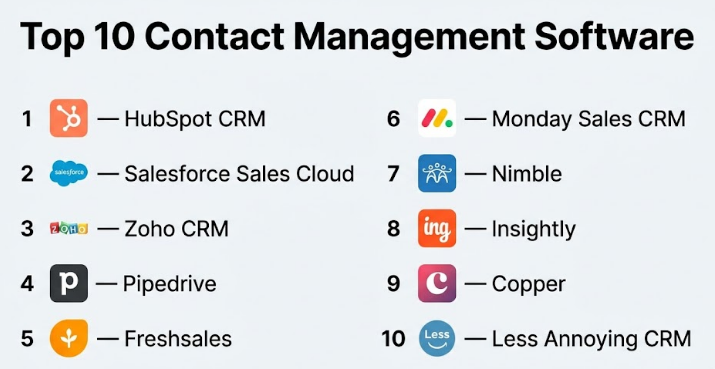
Top 10 Contact Management Software
#1 — HubSpot CRM
Short description :
HubSpot CRM is a widely used customer relationship and contact management platform for startups, SMBs, sales teams, marketing teams, and service teams. It helps users store contacts, track interactions, manage deals, create tasks, and connect marketing and sales activities. It is especially useful for teams that want a clean contact database with CRM features. HubSpot is known for ease of use and a strong ecosystem. It works well for businesses that want contact management with room to grow into sales, marketing, and service workflows.
Key Features
- Centralized contact database
- Contact activity timeline
- Deal and pipeline management
- Email tracking and templates
- Task and follow-up reminders
- Contact segmentation
- Marketing, sales, and service tool connections
Pros
- Easy to start and friendly for growing teams
- Strong contact timeline and activity tracking
- Broad ecosystem for marketing and sales workflows
Cons
- Advanced features can become costly
- Some customization may require higher-tier plans
- Large databases may need careful data management
Platforms / Deployment
Web / iOS / Android
Cloud
Security & Compliance
HubSpot provides common business security features such as MFA, user permissions, encryption, and admin controls. Specific compliance availability depends on plan and configuration.
Integrations & Ecosystem
HubSpot has a strong ecosystem for sales, marketing, service, and operations teams.
- Email tools
- Calendar tools
- Marketing automation
- Forms and landing pages
- Customer support tools
- Sales engagement platforms
Support & Community
HubSpot has strong documentation, training resources, onboarding options, support tiers, and a large user community. Support depth depends on the selected plan.
#2 — Salesforce Sales Cloud
Short description :
Salesforce Sales Cloud is an enterprise-grade CRM platform with powerful contact management capabilities. It is designed for sales teams, large organizations, mid-market companies, and complex revenue operations. It helps teams manage contacts, accounts, leads, opportunities, activities, workflows, and reporting. Salesforce is highly customizable and scalable, making it suitable for businesses with advanced sales processes. It is best for organizations that need deep CRM functionality, not just basic contact storage.
Key Features
- Contact, lead, and account management
- Opportunity and pipeline tracking
- Activity history and task management
- Advanced reporting and dashboards
- Workflow automation
- Custom fields and objects
- Enterprise integrations and app marketplace
Pros
- Highly scalable for large sales teams
- Strong customization and reporting
- Broad enterprise ecosystem
Cons
- Can be complex for small teams
- Implementation may require admin expertise
- Higher cost compared with simpler tools
Platforms / Deployment
Web / iOS / Android
Cloud
Security & Compliance
Salesforce supports enterprise security controls such as MFA, SSO, role-based permissions, encryption options, audit capabilities, and admin governance. Compliance availability depends on edition and configuration.
Integrations & Ecosystem
Salesforce has one of the largest CRM ecosystems for business applications.
- Email and calendar tools
- Marketing automation
- Customer support platforms
- Analytics tools
- ERP systems
- Sales productivity apps
Support & Community
Salesforce provides extensive documentation, training resources, partner support, enterprise support plans, and a large professional community.
#3 — Zoho CRM
Short description :
Zoho CRM is a flexible CRM and contact management platform for SMBs, growing companies, and teams already using Zoho apps. It helps businesses manage leads, contacts, accounts, deals, activities, workflows, and customer communication. Zoho CRM is known for offering broad features at competitive pricing. It is useful for companies that want contact management, sales tracking, automation, and reporting without enterprise-level complexity. It works best when used within the Zoho ecosystem.
Key Features
- Lead and contact management
- Account and deal tracking
- Workflow automation
- Email and telephony integrations
- Custom fields and layouts
- Sales reports and dashboards
- Integration with Zoho business apps
Pros
- Good value for SMBs
- Strong feature set for sales teams
- Works well with Zoho ecosystem
Cons
- Interface may feel busy for new users
- Advanced customization needs setup effort
- Some integrations may require configuration
Platforms / Deployment
Web / iOS / Android
Cloud
Security & Compliance
Zoho provides MFA, role-based access, admin controls, encryption, and business security features. Specific compliance coverage depends on plan and product configuration.
Integrations & Ecosystem
Zoho CRM integrates strongly with Zoho’s business suite and many third-party tools.
- Zoho Mail
- Zoho Campaigns
- Zoho Desk
- Zoho Projects
- Email and calendar tools
- Telephony and automation tools
Support & Community
Zoho provides documentation, support resources, onboarding help, and community forums. Support experience varies by plan and region.
#4 — Pipedrive
Short description :
Pipedrive is a sales-focused CRM built for managing contacts, deals, and sales pipelines. It is popular with SMB sales teams, agencies, consultants, and growing businesses that want a visual and practical system. Pipedrive helps users track contacts, conversations, activities, tasks, deal stages, and follow-ups. Its contact management is closely connected to sales execution. It is best for teams that want simple pipeline visibility and contact tracking without heavy enterprise complexity.
Key Features
- Contact and organization records
- Visual sales pipeline
- Activity and follow-up tracking
- Email sync and templates
- Deal management
- Automation workflows
- Sales reporting
Pros
- Very practical for sales teams
- Easy pipeline visibility
- Good balance of simplicity and sales features
Cons
- Not ideal for non-sales-heavy teams
- Advanced marketing features may require other tools
- Larger enterprises may need deeper customization
Platforms / Deployment
Web / iOS / Android
Cloud
Security & Compliance
Pipedrive provides common business security features such as MFA, permissions, and data protection controls. Specific compliance availability depends on plan and region.
Integrations & Ecosystem
Pipedrive connects with many sales, productivity, and communication tools.
- Email tools
- Calendar tools
- Calling tools
- Marketing automation
- Lead generation tools
- Workflow automation apps
Support & Community
Pipedrive provides help documentation, customer support, onboarding resources, and a practical user community focused on sales workflows.
#5 — Freshsales
Short description :
Freshsales is a CRM and contact management platform from Freshworks. It is designed for sales teams that need contact records, lead management, deal tracking, communication history, automation, and reporting. It is useful for SMBs and mid-market teams that want a clean sales CRM with built-in communication features. Freshsales supports contact management along with sales pipeline workflows. It is a good option for teams already using Freshworks products for support or customer engagement.
Key Features
- Contact and account management
- Lead and deal tracking
- Sales pipeline views
- Email and phone activity tracking
- Workflow automation
- AI-assisted sales insights on selected plans
- Reports and dashboards
Pros
- Good CRM fit for growing sales teams
- Useful communication tracking
- Works well with Freshworks ecosystem
Cons
- Advanced features may require higher plans
- Customization may not match enterprise CRM depth
- Best value is stronger if using Freshworks tools
Platforms / Deployment
Web / iOS / Android
Cloud
Security & Compliance
Freshworks products generally provide business security features such as MFA, role-based controls, encryption, and admin settings. Specific compliance availability depends on product plan and configuration.
Integrations & Ecosystem
Freshsales integrates with Freshworks products and common business tools.
- Freshdesk
- Freshmarketer
- Email tools
- Calendar tools
- Telephony tools
- Workflow automation apps
Support & Community
Freshworks provides documentation, customer support, onboarding resources, and community content. Support level depends on the plan.
#6 — Monday Sales CRM
Short description :
Monday Sales CRM is a flexible CRM built on the Monday.com work management platform. It helps teams manage contacts, leads, deals, accounts, tasks, and sales workflows using customizable boards. It is useful for SMBs, agencies, sales teams, and operations teams that prefer visual workflow management. Monday Sales CRM is not only a contact database; it also supports process tracking, collaboration, automation, and dashboards. It works best for teams that want customizable CRM workflows without heavy technical setup.
Key Features
- Contact and lead boards
- Custom sales pipelines
- Workflow automation
- Collaboration features
- Dashboards and reporting
- Email integration
- Task and activity tracking
Pros
- Highly visual and flexible
- Good for teams that want custom workflows
- Strong collaboration experience
Cons
- May require setup to match CRM best practices
- Advanced CRM depth may be limited compared with Salesforce
- Too much flexibility can create inconsistent data if unmanaged
Platforms / Deployment
Web / iOS / Android
Cloud
Security & Compliance
Monday.com provides business security features such as MFA, SSO on selected plans, permissions, encryption, and admin controls. Compliance availability depends on plan and configuration.
Integrations & Ecosystem
Monday Sales CRM connects with productivity, sales, and collaboration tools.
- Email tools
- Calendar tools
- Slack
- Microsoft Teams
- Forms
- Automation platforms
Support & Community
Monday.com offers documentation, templates, onboarding resources, support options, and an active user community. Support levels depend on subscription plan.
#7 — Nimble
Short description :
Nimble is a relationship-focused contact management and lightweight CRM platform. It is useful for consultants, small businesses, sales professionals, agencies, and relationship-driven teams. Nimble helps users manage contacts, communication history, social context, tasks, and follow-ups. It is designed for people who want more than a basic address book but less complexity than a large CRM. It is especially helpful for professionals who build business through relationships and networking.
Key Features
- Contact and relationship management
- Contact enrichment features
- Communication history tracking
- Task and reminder management
- Email and calendar connections
- Social profile context
- Lightweight sales pipeline support
Pros
- Strong for relationship-based selling
- Easier than large enterprise CRMs
- Useful for consultants and small teams
Cons
- Less suitable for complex enterprise sales processes
- Advanced reporting may be limited
- Best results depend on accurate connected data sources
Platforms / Deployment
Web / iOS / Android
Cloud
Security & Compliance
Nimble provides business account security features. Specific compliance certifications are not publicly stated with enough certainty.
Integrations & Ecosystem
Nimble works with common productivity and communication tools.
- Email tools
- Calendar tools
- Social profile sources
- Contact enrichment workflows
- Sales productivity tools
- Browser extensions
Support & Community
Nimble provides documentation, support resources, onboarding guidance, and practical content for small business relationship management.
#8 — Insightly
Short description :
Insightly is a CRM platform that combines contact management, sales tracking, project-related workflows, and customer relationship history. It is useful for SMBs, service businesses, project-based companies, and teams that want contact records connected to opportunities and delivery work. Insightly helps manage leads, contacts, organizations, emails, tasks, pipelines, and reports. It is a good choice for businesses that need CRM and light project visibility together.
Key Features
- Contact and lead management
- Organization and relationship tracking
- Sales opportunity management
- Task and project workflow support
- Email integration
- Reporting and dashboards
- Workflow automation
Pros
- Good for project-based customer relationships
- Useful contact and opportunity tracking
- Practical for SMB sales and service teams
Cons
- May not be as simple as lightweight contact tools
- Advanced customization may require planning
- Some teams may prefer a dedicated CRM plus separate project tool
Platforms / Deployment
Web / iOS / Android
Cloud
Security & Compliance
Insightly provides standard business security features such as permissions, admin controls, and data protection options. Specific compliance availability depends on plan and configuration.
Integrations & Ecosystem
Insightly connects with productivity, sales, and workflow tools.
- Email tools
- Calendar tools
- Accounting tools
- Marketing tools
- Workflow automation
- Business productivity platforms
Support & Community
Insightly provides documentation, customer support, onboarding resources, and training materials. Support depth depends on plan.
#9 — Copper
Short description :
Copper is a CRM and contact management platform designed strongly around Google Workspace users. It is useful for sales teams, agencies, consultants, and professional service companies that work heavily in Gmail and Google Calendar. Copper helps users manage contacts, companies, leads, opportunities, emails, tasks, and pipeline activity. Its strength is reducing manual CRM work by connecting closely with Google tools. It is best for teams that want CRM functionality inside a Google-centered workflow.
Key Features
- Contact and company management
- Gmail and Google Calendar integration
- Sales pipeline tracking
- Email activity capture
- Task and follow-up reminders
- Reporting and dashboards
- Workflow automation
Pros
- Strong fit for Google Workspace teams
- Reduces manual contact and email tracking
- Simple for sales and relationship teams
Cons
- Less attractive for Microsoft-based teams
- Advanced CRM depth may not match larger enterprise platforms
- Best value depends on Google Workspace usage
Platforms / Deployment
Web / iOS / Android
Cloud
Security & Compliance
Copper provides business security features such as permissions and admin controls. Specific compliance details depend on plan and configuration.
Integrations & Ecosystem
Copper is built around Google Workspace and sales productivity workflows.
- Gmail
- Google Calendar
- Google Drive
- Google Workspace
- Sales tools
- Workflow automation platforms
Support & Community
Copper provides documentation, onboarding resources, and support options. It has a clear user base among Google Workspace-focused sales teams.
#10 — Less Annoying CRM
Short description :
Less Annoying CRM is a simple CRM and contact management tool designed for small businesses. It focuses on clarity, ease of use, contacts, leads, follow-ups, notes, and pipeline tracking without heavy complexity. It is useful for small sales teams, consultants, local businesses, and users moving away from spreadsheets. The tool is built for people who want practical contact management without feeling overwhelmed. It is best for small teams that value simplicity over advanced enterprise features.
Key Features
- Contact and company records
- Lead and pipeline tracking
- Notes and communication history
- Task and follow-up reminders
- Calendar and activity management
- Simple customization
- Easy onboarding for small teams
Pros
- Very simple and beginner-friendly
- Good fit for small businesses
- Clear contact and follow-up tracking
Cons
- Limited advanced enterprise features
- Smaller ecosystem than major CRM platforms
- Not ideal for complex automation-heavy teams
Platforms / Deployment
Web
Cloud
Security & Compliance
Less Annoying CRM provides standard account security and data protection practices. Specific compliance certifications are not publicly stated with enough certainty.
Integrations & Ecosystem
Less Annoying CRM focuses on simple CRM workflows and practical small business needs.
- Email integration options
- Calendar integration options
- Contact import/export
- Basic productivity workflows
- Small business sales processes
- Simple reporting
Support & Community
Less Annoying CRM is known for approachable customer support and simple onboarding. Community size is smaller than larger CRM platforms.
Comparison Table
| Tool Name | Best For | Platform(s) Supported | Deployment | Standout Feature | Public Rating |
|---|---|---|---|---|---|
| HubSpot CRM | SMBs, startups, sales and marketing teams | Web, iOS, Android | Cloud | Contact timeline with sales and marketing ecosystem | N/A |
| Salesforce Sales Cloud | Mid-market and enterprise sales teams | Web, iOS, Android | Cloud | Highly customizable enterprise CRM | N/A |
| Zoho CRM | SMBs and Zoho ecosystem users | Web, iOS, Android | Cloud | Broad CRM features at strong value | N/A |
| Pipedrive | Sales-driven SMBs and agencies | Web, iOS, Android | Cloud | Visual pipeline and activity tracking | N/A |
| Freshsales | Growing sales teams and Freshworks users | Web, iOS, Android | Cloud | Contact management with sales communication tracking | N/A |
| Monday Sales CRM | Visual workflow-focused teams | Web, iOS, Android | Cloud | Customizable CRM boards and automations | N/A |
| Nimble | Relationship-driven professionals | Web, iOS, Android | Cloud | Relationship-focused contact intelligence | N/A |
| Insightly | Project-based SMBs and service teams | Web, iOS, Android | Cloud | CRM with project workflow support | N/A |
| Copper | Google Workspace sales teams | Web, iOS, Android | Cloud | CRM designed around Gmail and Google Calendar | N/A |
| Less Annoying CRM | Small businesses and beginners | Web | Cloud | Simple contact and follow-up management | N/A |
Evaluation & Contact Management Software
| Tool Name | Core (25%) | Ease (15%) | Integrations (15%) | Security (10%) | Performance (10%) | Support (10%) | Value (15%) | Weighted Total (0–10) |
|---|---|---|---|---|---|---|---|---|
| HubSpot CRM | 9 | 9 | 9 | 8 | 9 | 9 | 8 | 8.75 |
| Salesforce Sales Cloud | 10 | 7 | 10 | 9 | 9 | 9 | 7 | 8.80 |
| Zoho CRM | 8 | 8 | 8 | 8 | 8 | 8 | 9 | 8.15 |
| Pipedrive | 8 | 9 | 8 | 8 | 8 | 8 | 8 | 8.15 |
| Freshsales | 8 | 8 | 8 | 8 | 8 | 8 | 8 | 8.00 |
| Monday Sales CRM | 8 | 8 | 8 | 8 | 8 | 8 | 8 | 8.00 |
| Nimble | 7 | 8 | 7 | 7 | 8 | 7 | 8 | 7.45 |
| Insightly | 8 | 7 | 7 | 8 | 8 | 7 | 8 | 7.65 |
| Copper | 8 | 8 | 8 | 8 | 8 | 7 | 7 | 7.75 |
| Less Annoying CRM | 7 | 9 | 6 | 7 | 8 | 8 | 9 | 7.65 |
These scores are comparative and based on practical product fit, not official ratings. A higher score does not mean the tool is best for every business. Salesforce scores high for enterprise depth, while Less Annoying CRM scores well for simplicity and small business value. Buyers should use these scores as a starting point, then validate features, integrations, pricing, and support with real workflows.
Which Contact Management Software
Solo / Freelancer
Solo users usually need a simple way to store contacts, add notes, set reminders, and track follow-ups. Less Annoying CRM, Nimble, HubSpot CRM, and Pipedrive are practical options.
Choose Less Annoying CRM if you want simplicity. Choose Nimble if your work depends heavily on relationships and networking. Choose HubSpot CRM if you want a free or scalable starting point with CRM features. Choose Pipedrive if your contacts are closely connected to sales deals.
SMB
SMBs need contact management, task tracking, email history, basic automation, and sales visibility. HubSpot CRM, Zoho CRM, Pipedrive, Freshsales, and Monday Sales CRM are strong choices.
HubSpot works well for marketing and sales alignment. Zoho CRM is useful for cost-conscious teams that need broad features. Pipedrive is excellent for sales pipeline clarity. Monday Sales CRM is strong for visual workflows and flexible processes.
Mid-Market
Mid-market companies need stronger reporting, user permissions, integrations, automation, and cleaner data governance. Salesforce Sales Cloud, HubSpot CRM, Zoho CRM, Freshsales, and Copper are good options depending on the existing business stack.
If the team uses Google Workspace heavily, Copper may be a strong fit. If the company needs more advanced CRM customization, Salesforce is better. If the company wants easier adoption, HubSpot or Pipedrive may be more practical.
Enterprise
Enterprises usually need advanced permissions, reporting, auditability, integrations, workflow automation, and scalability. Salesforce Sales Cloud is often the strongest enterprise choice. HubSpot CRM can also fit growing enterprises depending on the use case and plan.
Enterprise buyers should focus on security, user provisioning, compliance needs, data migration, API access, governance, and admin control. The best tool is the one that fits both technical requirements and daily user behavior.
Budget vs Premium
Budget-conscious teams can start with HubSpot CRM, Zoho CRM, Less Annoying CRM, or Pipedrive depending on their needs. These tools can support contact management without unnecessary complexity.
Premium buyers may choose Salesforce for enterprise depth, HubSpot for full customer platform growth, or Monday Sales CRM for flexible workflows. Premium value should be measured by time saved, better follow-ups, cleaner data, and improved revenue visibility.
Feature Depth vs Ease of Use
Salesforce offers deep features but needs more setup and administration. HubSpot balances ease and growth. Pipedrive is simple for sales teams. Less Annoying CRM is best for users who want minimal complexity.
If your team avoids complex tools, choose ease of use first. If your business has complex sales processes, approvals, territories, reporting, or integrations, choose feature depth.
Integrations & Scalability-
HubSpot, Salesforce, Zoho CRM, and Pipedrive have strong integration ecosystems. Copper is best for Google Workspace users. Monday Sales CRM works well when CRM needs to connect with broader work management.
For scalability, check APIs, automation limits, user roles, reporting depth, data import/export, and integration with email, calendar, marketing, support, and finance systems.
Security & Compliance Needs
Security-focused teams should evaluate MFA, SSO, role-based access, data encryption, audit logs, admin controls, backup options, and permission settings. Salesforce, HubSpot, Zoho CRM, and Monday Sales CRM are stronger candidates for teams with formal security needs.
Small businesses should still use MFA, clean permissions, and regular data reviews. Contact data is sensitive because it often includes names, emails, phone numbers, company details, notes, and communication history.
Frequently Asked Questions
1. What is contact management software?
Contact management software is a system for storing and organizing contact information. It helps teams manage names, emails, phone numbers, notes, follow-ups, company details, and communication history.
2. Is contact management software the same as CRM?
Not always. Contact management focuses mainly on storing and managing people and company records. CRM usually includes contact management plus sales pipelines, automation, reporting, marketing, and customer service workflows.
3. What is the best contact management software for small businesses?
Small businesses can consider HubSpot CRM, Zoho CRM, Pipedrive, Less Annoying CRM, and Nimble. The best option depends on whether the business needs simple contact tracking or full sales pipeline management.
4. How much does contact management software cost?
Pricing varies widely. Some tools offer free plans, while others charge per user per month. Advanced automation, reporting, permissions, and integrations usually require paid plans.
5. What are the most important features to look for?
Important features include contact records, search, tags, notes, activity history, email integration, calendar sync, task reminders, duplicate detection, reporting, and permission controls.
6. Can contact management software help sales teams?
Yes. Sales teams use it to track leads, manage follow-ups, record conversations, organize accounts, and move deals through pipelines. It reduces missed opportunities and improves visibility.
7. Is contact management software secure?
Most reputable tools provide security features such as MFA, encryption, permissions, and admin controls. However, security depends on the vendor, selected plan, configuration, and user behavior.
8. What are common mistakes when using contact management software?
Common mistakes include poor data cleanup, duplicate records, unclear ownership, missing follow-up rules, weak permissions, and not training users. A tool only works well when the data is maintained properly.
9. Can I migrate contacts from spreadsheets?
Yes, most tools support contact import from spreadsheets or CSV files. Before migration, clean duplicate records, standardize fields, and decide which data should be imported.
10. What integrations should contact management software support?
Useful integrations include email, calendar, marketing automation, forms, calling tools, customer support systems, project management tools, and workflow automation platforms.
11. Is a simple contact app enough for a business?
A simple contact app may be enough for personal use or very small teams. But businesses usually need notes, ownership, follow-ups, shared access, activity history, and reporting.
12. How do I choose between HubSpot, Salesforce, and Zoho CRM?
Choose HubSpot for ease and growth, Salesforce for enterprise customization, and Zoho CRM for broad features with strong value. The right choice depends on team size, budget, complexity, and integrations.
Conclusion
Contact Management Software is a foundation for better customer relationships, cleaner business data, and stronger follow-up discipline. The best tool depends on your team size, workflow, budget, security needs, and growth plan. HubSpot CRM is strong for easy adoption and scaling. Salesforce Sales Cloud is better for complex enterprise CRM needs. Zoho CRM offers strong value for SMBs. Pipedrive is practical for sales-focused teams. Less Annoying CRM is ideal for small teams that want simplicity.
