Introduction
Parental Control Software helps parents manage how children use phones, tablets, laptops, gaming devices, and the internet. In simple words, it gives parents tools to guide screen time, block harmful content, approve apps, track location, and understand online activity.
This matters now because children use digital devices for study, entertainment, gaming, social media, and communication. Parents need balanced tools that protect children without creating fear or over-monitoring.
Common use cases include:
- Setting daily screen time limits
- Blocking adult or harmful websites
- Approving apps before children install them
- Tracking device location
- Managing gaming and entertainment time
- Getting alerts about risky online activity
Buyers should evaluate:
- Device compatibility
- Web filtering quality
- App blocking controls
- Screen time scheduling
- Location tracking
- Social media monitoring
- Ease of setup
- Privacy controls
- Reporting dashboard
- Price and family plan value
Best for: parents, guardians, families, homeschool users, and caregivers who want safer digital habits for children across mobile and desktop devices.
Not ideal for: families that only need basic built-in phone controls, schools needing classroom device management, or enterprises needing employee monitoring tools.
Key Trends in Parental Control Software
- Screen time management is becoming more balanced, focusing on healthy routines instead of only blocking.
- AI-based risk alerts are growing, especially for detecting harmful content, cyberbullying, or risky messages.
- Passcode and uninstall protection are becoming important because older children may try to bypass controls.
- Location safety features are improving, including geofencing, live location, and location history.
- Privacy-first parental controls are gaining attention, as families want safety without excessive surveillance.
- Built-in ecosystem tools are stronger, especially from Google, Apple, and Microsoft.
- Social media monitoring is harder but more important, due to private messages, short videos, and gaming chats.
- Cross-device support is now a key buying factor, especially for families using Android, iOS, Windows, and macOS together.
- Flexible family plans are becoming more valuable, because households often manage many devices.
- Parental guidance features are improving, helping parents discuss safety instead of silently monitoring everything.
How We Selected These Tools
The tools were selected based on:
- Market recognition and consumer mindshare
- Core parental control features
- Device and platform coverage
- Ease of setup for non-technical parents
- Quality of web and app filtering
- Screen time and schedule controls
- Location tracking features
- Reporting and alerting capabilities
- Fit for families with different age groups
- Value across free, budget, and premium plans
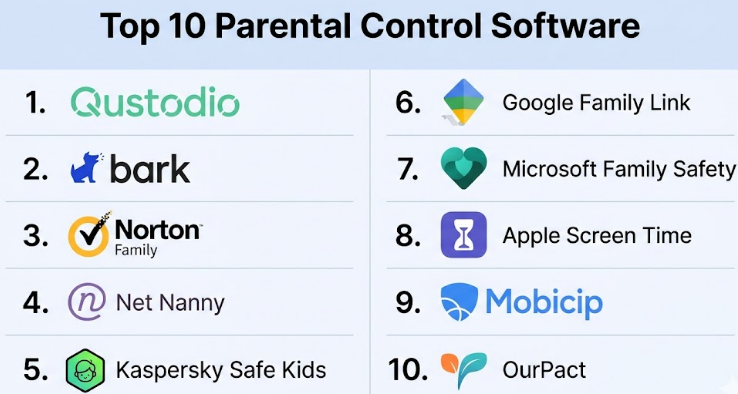
Top 10 Parental Control Software
#1 — Qustodio
Short description :
Qustodio is a widely used parental control software for families that need strong screen time, web filtering, app control, and activity reporting. It is suitable for parents managing children across multiple devices. The platform is known for its detailed dashboard and broad device support. It works well for families who want a structured view of online activity. Qustodio is a strong choice for parents who need more than basic phone settings.
Key Features
- Screen time limits
- Web filtering
- App blocking
- Activity reports
- Location tracking
- YouTube monitoring
- Family dashboard
Pros
- Strong all-round parental control features
- Good for multiple children and devices
- Easy dashboard for parents
Cons
- Premium plans may feel costly for some families
- iOS controls can be more limited than Android
- Advanced setup may take time
Platforms / Deployment
Web / Windows / macOS / Android / iOS / Chromebook / Kindle
Cloud
Security & Compliance
Encryption and account security controls are supported. SOC 2, ISO 27001, GDPR, and HIPAA details are Not publicly stated.
Integrations & Ecosystem
Qustodio works well across common household devices and browsers.
- Mobile apps
- Desktop apps
- Parent dashboard
- Browser activity monitoring
- App usage tracking
- Device-level controls
Support & Community
Qustodio offers help documentation, onboarding guidance, and customer support. Support depth may vary by plan.
#2 — Bark
Short description :
Bark is parental control software focused on online safety alerts, content monitoring, and family protection. It is useful for parents worried about cyberbullying, harmful content, online predators, and risky conversations. Bark is often chosen for its monitoring approach rather than only screen time blocking. It is best for families with tweens and teens who use messaging, email, and social platforms.
Key Features
- Content monitoring alerts
- Screen time management
- Website blocking
- Location alerts
- App and platform monitoring
- Parent notifications
- Family safety dashboard
Pros
- Strong focus on risky content alerts
- Useful for older children and teens
- Helps parents start safety conversations
Cons
- Not ideal for parents who only need simple blocking
- Feature availability varies by platform
- Some families may find monitoring too sensitive
Platforms / Deployment
Web / Android / iOS / Chrome / Windows / macOS
Cloud
Security & Compliance
Encryption and account protection are supported. Formal compliance details for consumer plans are Not publicly stated.
Integrations & Ecosystem
Bark’s ecosystem focuses on digital safety monitoring and alerts.
- Social media monitoring
- Email monitoring
- Text-related alerts
- Location tools
- Parent dashboard
- Mobile device support
Support & Community
Bark offers documentation, parent education content, onboarding help, and customer support. Community awareness is strong among digital safety-focused parents.
#3 — Norton Family
Short description :
Norton Family is parental control software from the Norton security ecosystem. It is designed for parents who want web supervision, time limits, location tools, and activity insights. It fits well for families already using Norton security products. Norton Family is practical for parents who want a trusted security brand with straightforward parental controls. It is best for families that want online safety plus device supervision.
Key Features
- Web supervision
- Time supervision
- Search supervision
- Location supervision
- School time controls
- Activity reports
- Parent alerts
Pros
- Good fit for Norton ecosystem users
- Helpful web and time controls
- Simple parent dashboard
Cons
- May not be as deep as specialist tools in social monitoring
- Platform feature differences may apply
- Less suitable for advanced teen monitoring needs
Platforms / Deployment
Web / Windows / Android / iOS
Cloud
Security & Compliance
Account security and encryption are supported. Consumer compliance details are Not publicly stated.
Integrations & Ecosystem
Norton Family works best inside the broader Norton security environment.
- Norton security ecosystem
- Parent web dashboard
- Mobile apps
- Web supervision tools
- Device activity reports
- Location tools
Support & Community
Norton has strong documentation, customer support channels, and a large product knowledge base.
#4 — Net Nanny
Short description :
Net Nanny is a long-running parental control software known for web filtering and content blocking. It is useful for parents who want to block harmful websites, manage screen time, and monitor online activity. Net Nanny is often selected by families who prioritize content filtering over complex social monitoring. It is a good option for households that want direct internet safety controls.
Key Features
- Web filtering
- Screen time management
- App blocking
- Internet pause
- Family feed
- Location tracking
- Alerts and reports
Pros
- Strong content filtering focus
- Good for internet safety control
- Simple tools for parents
Cons
- Interface may feel less modern than newer tools
- Some features vary by device type
- Social media monitoring may not be as deep as Bark
Platforms / Deployment
Web / Windows / macOS / Android / iOS
Cloud
Security & Compliance
Encryption and account security controls are supported. Compliance details are Not publicly stated.
Integrations & Ecosystem
Net Nanny focuses on household web safety and device control.
- Web dashboard
- Browser filtering
- Mobile apps
- Desktop controls
- Location features
- Family activity feed
Support & Community
Net Nanny provides help resources and support documentation. Community visibility is moderate.
#5 — Kaspersky Safe Kids
Short description :
Kaspersky Safe Kids is parental control software designed for screen time, app management, location tracking, and safe browsing. It is often considered by budget-conscious families. The tool works well for parents who want essential controls without a heavy learning curve. It is useful for families looking for simple protection across devices. It may not be the best fit for parents needing advanced social media monitoring.
Key Features
- Screen time limits
- App management
- Web filtering
- Location tracking
- Battery monitoring
- Safe search support
- Child activity reports
Pros
- Budget-friendly option
- Good basic parental control features
- Simple setup for many families
Cons
- Advanced monitoring is limited
- Regional trust concerns may affect buyer comfort
- Feature availability may vary by platform
Platforms / Deployment
Web / Windows / macOS / Android / iOS
Cloud
Security & Compliance
Encryption and account protection are supported. Compliance details are Not publicly stated.
Integrations & Ecosystem
Kaspersky Safe Kids works within the broader Kaspersky security ecosystem.
- Mobile apps
- Desktop apps
- Web dashboard
- Safe browsing tools
- Location tools
- Family reporting
Support & Community
Kaspersky provides documentation and customer support. Support strength may depend on region and plan.
#6 — Google Family Link
Short description :
Google Family Link is a free parental control tool designed mainly for Android and Google accounts. It helps parents approve apps, set screen time limits, manage device bedtime, view location, and guide child account settings. It is best for families using Android phones, tablets, and Chromebooks. Google Family Link is simple and useful, but it is not a full replacement for premium third-party monitoring tools.
Key Features
- App approval controls
- Screen time limits
- Device bedtime
- Location tracking
- Content restrictions
- Google account supervision
- Chromebook support
Pros
- Free to use
- Strong fit for Android families
- Simple and familiar interface
Cons
- Limited outside Google ecosystem
- Less advanced reporting than premium tools
- Not ideal for mixed Apple-heavy households
Platforms / Deployment
Android / iOS parent app / Chromebook
Cloud
Security & Compliance
Google account security controls are supported. Consumer parental-control compliance details are Not publicly stated.
Integrations & Ecosystem
Google Family Link fits tightly with Google services and Android devices.
- Google accounts
- Android devices
- Chromebooks
- Google Play approvals
- YouTube-related settings
- Location services
Support & Community
Google provides help documentation and support resources. Community help is broad because of the large Android user base.
#7 — Microsoft Family Safety
Short description :
Microsoft Family Safety is a parental control and family safety tool for households using Windows, Xbox, Microsoft accounts, and Microsoft services. It helps parents manage screen time, app usage, content filters, and spending controls. It is a strong choice for families with Windows PCs or Xbox gaming devices. It is less useful for families that mainly use Apple or Android-only environments.
Key Features
- Screen time limits
- App and game limits
- Content filters
- Activity reporting
- Location sharing
- Spending controls
- Microsoft account integration
Pros
- Strong for Windows and Xbox families
- Useful free features
- Works naturally with Microsoft accounts
Cons
- Less complete outside Microsoft ecosystem
- Mobile controls may not match specialist tools
- Advanced safety features may require paid plans
Platforms / Deployment
Windows / Xbox / Android / iOS / Web
Cloud
Security & Compliance
Microsoft account security controls are supported. Consumer parental-control compliance details are Not publicly stated.
Integrations & Ecosystem
Microsoft Family Safety is strongest inside Microsoft’s ecosystem.
- Windows PCs
- Xbox consoles
- Microsoft accounts
- Microsoft Store controls
- Location sharing
- Activity reporting
Support & Community
Microsoft offers extensive help documentation, account support, and a large user community.
#8 — Apple Screen Time
Short description :
Apple Screen Time is Apple’s built-in parental control feature for iPhone, iPad, and Mac users. It allows parents to set app limits, downtime, communication limits, content restrictions, and purchase controls. It is best for Apple-first families that want no extra software. Apple Screen Time is simple and built into the device, but it may not offer the same monitoring depth as dedicated tools.
Key Features
- App limits
- Downtime scheduling
- Content restrictions
- Communication limits
- Purchase approvals
- Family Sharing support
- Device usage reports
Pros
- Built into Apple devices
- No separate subscription required for basic use
- Good for Apple-only families
Cons
- Limited outside Apple ecosystem
- Some children may find workarounds
- Reporting is not as deep as premium tools
Platforms / Deployment
iOS / iPadOS / macOS
Built-in / Cloud account sync
Security & Compliance
Apple account security and device-level privacy controls apply. Compliance details for Screen Time specifically are Not publicly stated.
Integrations & Ecosystem
Apple Screen Time works through Apple Family Sharing and device settings.
- Apple ID
- Family Sharing
- iPhone and iPad settings
- Mac settings
- App Store restrictions
- Communication controls
Support & Community
Apple provides official documentation, device support, and a large user community.
#9 — Mobicip
Short description :
Mobicip is parental control software built for families that want screen time control, app blocking, web filtering, and location tracking. It is useful for parents managing multiple devices and children. Mobicip is known for practical family controls and a clean dashboard. It fits families that want a middle path between built-in controls and heavier monitoring tools.
Key Features
- Screen time scheduling
- App blocking
- Website filtering
- Location tracking
- Activity reports
- Family dashboard
- Device rules
Pros
- Good balance of features and usability
- Useful for multiple children
- Strong everyday screen time controls
Cons
- Social media monitoring may be limited
- Advanced filtering may need careful setup
- Feature experience may vary by platform
Platforms / Deployment
Web / Windows / macOS / Android / iOS / Chromebook
Cloud
Security & Compliance
Encryption and account protection are supported. Formal compliance details are Not publicly stated.
Integrations & Ecosystem
Mobicip is designed for cross-device family management.
- Parent dashboard
- Mobile apps
- Desktop support
- Chromebook support
- Web filtering
- App controls
Support & Community
Mobicip offers help documentation and customer support. Community awareness is moderate but growing among family safety users.
#10 — OurPact
Short description :
OurPact is parental control software focused on screen time, app blocking, scheduling, and location-based controls. It is often considered by Apple-centric families because it offers useful controls for iOS devices. OurPact is a good fit for parents who want visual scheduling and strong app management. It may not be ideal for families needing deep web filtering or social media monitoring.
Key Features
- Screen time scheduling
- App blocking
- Location tracking
- Geofencing
- Family locator
- Usage rules
- Device management dashboard
Pros
- Good option for app blocking and schedules
- Useful for Apple-heavy families
- Clear family management interface
Cons
- Setup may require extra steps
- Web filtering depth may be limited
- Social monitoring is not its strongest area
Platforms / Deployment
Web / Android / iOS
Cloud
Security & Compliance
Encryption and account controls are supported. Compliance details are Not publicly stated.
Integrations & Ecosystem
OurPact focuses on mobile device management for families.
- iOS device controls
- Android device controls
- Parent dashboard
- Location tools
- App rules
- Family schedules
Support & Community
OurPact provides documentation and support resources. Support experience may vary by plan and issue type.
Comparison Table (Top 10)
| Tool Name | Best For | Platform(s) Supported | Deployment | Standout Feature | Public Rating |
|---|---|---|---|---|---|
| Qustodio | All-round parental control | Web, Windows, macOS, Android, iOS, Chromebook, Kindle | Cloud | Detailed family dashboard | N/A |
| Bark | Risk alerts and teen safety | Web, Android, iOS, Chrome, Windows, macOS | Cloud | Content monitoring alerts | N/A |
| Norton Family | Norton ecosystem families | Web, Windows, Android, iOS | Cloud | Web and time supervision | N/A |
| Net Nanny | Web filtering | Web, Windows, macOS, Android, iOS | Cloud | Content filtering | N/A |
| Kaspersky Safe Kids | Budget-conscious families | Web, Windows, macOS, Android, iOS | Cloud | Affordable basic controls | N/A |
| Google Family Link | Android families | Android, iOS parent app, Chromebook | Cloud | Free Google account supervision | N/A |
| Microsoft Family Safety | Windows and Xbox families | Windows, Xbox, Android, iOS, Web | Cloud | Microsoft ecosystem controls | N/A |
| Apple Screen Time | Apple-only families | iOS, iPadOS, macOS | Built-in / Cloud sync | Built-in Apple controls | N/A |
| Mobicip | Multi-device family control | Web, Windows, macOS, Android, iOS, Chromebook | Cloud | Balanced family controls | N/A |
| OurPact | App blocking and schedules | Web, Android, iOS | Cloud | Visual screen time scheduling | N/A |
Evaluation & Parental Control Software
| Tool Name | Core (25%) | Ease (15%) | Integrations (15%) | Security (10%) | Performance (10%) | Support (10%) | Value (15%) | Weighted Total (0–10) |
|---|---|---|---|---|---|---|---|---|
| Qustodio | 9 | 8 | 8 | 8 | 8 | 8 | 8 | 8.25 |
| Bark | 8 | 8 | 9 | 8 | 8 | 8 | 7 | 8.05 |
| Norton Family | 8 | 8 | 7 | 8 | 8 | 8 | 8 | 7.85 |
| Net Nanny | 8 | 7 | 7 | 8 | 8 | 7 | 7 | 7.45 |
| Kaspersky Safe Kids | 7 | 8 | 7 | 7 | 8 | 7 | 9 | 7.55 |
| Google Family Link | 7 | 9 | 8 | 8 | 8 | 8 | 10 | 8.15 |
| Microsoft Family Safety | 7 | 8 | 9 | 8 | 8 | 8 | 9 | 8.05 |
| Apple Screen Time | 7 | 8 | 8 | 8 | 8 | 8 | 10 | 8.05 |
| Mobicip | 8 | 8 | 7 | 8 | 8 | 7 | 8 | 7.75 |
| OurPact | 7 | 7 | 7 | 7 | 7 | 7 | 7 | 7.00 |
These scores are comparative and based on common buyer needs. A high score does not mean the tool is best for every family. Built-in tools like Apple Screen Time, Google Family Link, and Microsoft Family Safety score well on value because they are easy to access. Premium tools may be better when parents need stronger filtering, monitoring, reports, or cross-device control.
Which Parental Control Software
Solo / Freelancer
For a single parent managing one or two devices, built-in tools may be enough. Google Family Link is good for Android families, while Apple Screen Time is practical for iPhone and iPad households. If more control is needed, Qustodio or Mobicip can be better.
SMB
Small businesses usually should not use parental control tools for employees. However, small learning centers, coaching setups, or shared family businesses may use tools like Microsoft Family Safety or device-level controls for basic restrictions. For true business monitoring, use dedicated endpoint or device management software.
Mid-Market
Mid-market organizations should avoid consumer parental control apps for professional device governance. These tools are built for families, not employee compliance. If the need is child safety for school programs, evaluate education-focused device management platforms instead.
Enterprise
Enterprises need security, compliance, audit logs, device policies, and identity integration. Parental control software is not the right category for enterprise device governance. Enterprise buyers should look at MDM, endpoint security, identity management, and web filtering platforms.
Budget vs Premium
Budget users should start with Google Family Link, Apple Screen Time, or Microsoft Family Safety, depending on device ecosystem. Premium users should consider Qustodio, Bark, Net Nanny, or Mobicip for stronger reports, alerts, and filtering.
Feature Depth vs Ease of Use
For ease of use, built-in tools are best. For deeper features, Qustodio and Bark stand out. For content filtering, Net Nanny is strong. For app blocking and scheduling, OurPact can be useful.
Integrations & Scalability-
Families with mixed devices should prioritize tools that support Android, iOS, Windows, macOS, and Chromebook. Qustodio, Mobicip, and Bark are better for mixed-device homes. Apple-only or Android-only families may not need a third-party app.
Security & Compliance Needs
Parents should focus on safe account setup, strong passwords, MFA, child privacy, and transparent monitoring. For schools or businesses, consumer parental control tools are not enough. Compliance-heavy needs require education or enterprise-grade systems.
Frequently Asked Questions (FAQs)
1. What is parental control software?
Parental control software helps parents manage children’s online activity, screen time, apps, websites, and device usage. It is designed to support safer and healthier digital habits.
2. Is parental control software safe to use?
Yes, reputable parental control tools are generally safe when configured properly. Parents should choose trusted tools, use strong passwords, enable MFA where available, and explain rules to children clearly.
3. Can parental control software block adult websites?
Most parental control tools can block adult websites and harmful content categories. The quality of filtering varies, so parents should test filters before fully relying on them.
4. Which parental control software is best for Android?
Google Family Link is a strong free option for Android families. For more advanced control, Qustodio, Bark, Mobicip, and Kaspersky Safe Kids are also practical choices.
5. Which parental control software is best for iPhone?
Apple Screen Time is the easiest built-in option for iPhone and iPad users. OurPact, Qustodio, Bark, and Mobicip can be considered if parents need more features.
6. Can parental control software monitor social media?
Some tools offer social media or content monitoring, but the depth varies by platform and app restrictions. Bark is often considered for alert-based monitoring, while other tools focus more on blocking and screen time.
7. Are free parental control tools enough?
Free tools can be enough for basic screen time and app approvals. Paid tools are better for advanced filtering, location features, reporting, multi-device management, and risk alerts.
8. Can children bypass parental control software?
Yes, some children may try to bypass controls using VPNs, secondary devices, browser tricks, or uninstall attempts. Parents should combine software with open communication and clear family rules.
9. How long does setup take?
Basic setup can take a short time, especially with built-in tools. More advanced tools may take longer because parents need to configure profiles, schedules, filters, devices, and alerts.
10. What is the biggest mistake parents make?
The biggest mistake is using parental control software silently without explaining why. Children respond better when parents set clear rules, discuss safety, and adjust controls as they grow.
Conclusion
Parental Control Software is not about controlling every part of a child’s digital life. It is about creating safer, healthier, and more balanced technology habits. The best tool depends on your child’s age, device type, family rules, budget, and level of risk. Built-in tools like Google Family Link, Apple Screen Time, and Microsoft Family Safety are good starting points. Premium tools like Qustodio, Bark, Net Nanny, and Mobicip provide deeper controls for families that need more visibility.
