Introduction
Smart Thermostat Apps are mobile or web-based applications that allow users to control heating, ventilation, and air conditioning (HVAC) systems remotely. Instead of manually adjusting temperature settings, these apps automate climate control using schedules, sensors, and real-time data. In simple terms, they help you manage your home or building temperature intelligently from anywhere.
In today’s environment, where energy efficiency and cost optimization are becoming critical, these apps play a major role. Rising electricity costs, sustainability goals, and smart home adoption have pushed these tools into mainstream usage. With AI-driven automation and IoT integration, smart thermostat apps now go beyond simple control—they learn behavior, predict usage patterns, and optimize comfort automatically.
Real-world use cases:
- Remote temperature control for homes and offices
- Energy savings through automated scheduling
- Multi-zone climate management in large buildings
- Integration with smart home ecosystems
- Predictive maintenance alerts for HVAC systems
What buyers should evaluate:
- Ease of use and user interface
- Compatibility with HVAC systems
- Automation and AI capabilities
- Mobile and platform support
- Integration with smart home ecosystems
- Security and privacy features
- Cost and subscription model
- Scalability for multiple locations
- Customer support and reliability
Best for: homeowners, property managers, facility managers, and businesses aiming to reduce energy costs and improve comfort through automation.
Not ideal for: users with basic manual thermostats, locations without stable internet, or those who prefer simple non-digital controls.
Key Trends in Smart Thermostat Apps
- AI-powered temperature optimization that learns user habits and adjusts automatically
- Energy analytics dashboards providing insights into usage patterns and cost savings
- Integration with voice assistants like Alexa and Google Assistant
- Geofencing capabilities to adjust temperature based on user location
- Multi-zone control systems for larger homes and commercial spaces
- Cloud-based control with remote monitoring
- Increased focus on data privacy and encryption
- Subscription-based premium features for advanced automation
- Interoperability with IoT ecosystems including lighting and security systems
- Predictive maintenance alerts using sensor data
How We Selected These Tools (Methodology)
- Evaluated tools based on market adoption and brand recognition
- Assessed feature completeness including automation and AI
- Considered performance reliability and uptime
- Reviewed security posture signals such as encryption and authentication
- Analyzed integration capabilities with smart ecosystems
- Checked cross-platform compatibility
- Evaluated ease of use and onboarding experience
- Considered scalability for residential and enterprise users
- Assessed customer support and community strength
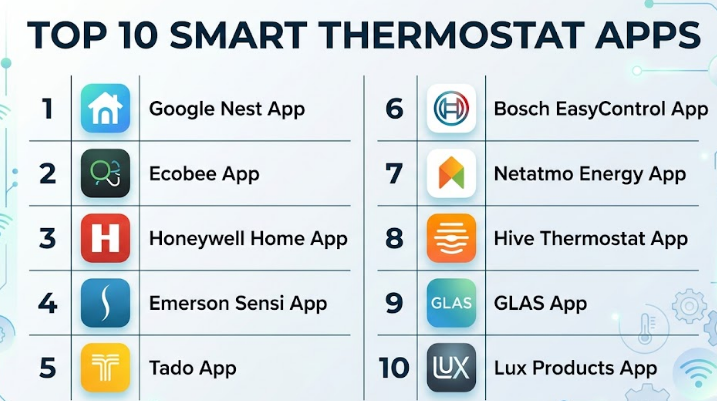
Top 10 Smart Thermostat Apps
#1 — Google Nest App
Short description:
A widely used smart thermostat app designed for seamless home automation. It provides intelligent temperature control, energy insights, and remote access. Best suited for homeowners seeking automation with minimal setup. It integrates well with smart ecosystems and offers AI-driven scheduling.
Key Features
- AI-based learning thermostat
- Remote control via mobile
- Energy usage reports
- Geofencing automation
- Voice assistant integration
- Multi-device support
Pros
- Easy to use interface
- Strong ecosystem integration
Cons
- Limited customization for advanced users
- Dependency on Google ecosystem
Platforms / Deployment
iOS / Android / Web
Cloud
Security & Compliance
Encryption, MFA supported
Other details: Not publicly stated
Integrations & Ecosystem
Works with smart home devices and automation platforms.
- Voice assistants
- Smart lighting systems
- Home security devices
Support & Community
Strong documentation and active community support
#2 — Ecobee App
Short description:
A smart thermostat solution focusing on comfort and energy efficiency. Known for room sensors and detailed analytics, it suits users who need granular control.
Key Features
- Room sensors for occupancy detection
- Energy savings reports
- Smart scheduling
- Voice control
- Remote access
Pros
- Accurate temperature balancing
- Detailed energy insights
Cons
- Slight learning curve
- Hardware dependency
Platforms / Deployment
iOS / Android
Cloud
Security & Compliance
Not publicly stated
Integrations & Ecosystem
Integrates with smart home platforms
- Voice assistants
- Home automation systems
Support & Community
Reliable support and documentation
#3 — Honeywell Home App
Short description:
Designed for residential and light commercial use, offering strong compatibility with HVAC systems. Suitable for users wanting reliability and simplicity.
Key Features
- Flexible scheduling
- Remote monitoring
- Energy reports
- Smart alerts
- Multi-zone control
Pros
- Wide HVAC compatibility
- Stable performance
Cons
- Interface can feel dated
- Limited AI features
Platforms / Deployment
iOS / Android
Cloud
Security & Compliance
Not publicly stated
Integrations & Ecosystem
Supports smart home integration
- Voice assistants
- Automation platforms
Support & Community
Good customer support availability
#4 — Emerson Sensi App
Short description:
A user-friendly thermostat app focused on simplicity and efficiency. Ideal for homeowners who want straightforward control without complex features.
Key Features
- Easy scheduling
- Remote access
- Usage reports
- Smart alerts
- Simple interface
Pros
- Very easy to use
- Reliable performance
Cons
- Limited advanced features
- Basic analytics
Platforms / Deployment
iOS / Android
Cloud
Security & Compliance
Not publicly stated
Integrations & Ecosystem
Supports smart integrations
- Voice assistants
Support & Community
Basic support resources available
#5 — Tado App
Short description:
A Europe-focused smart thermostat solution with strong geofencing and automation capabilities. Best for energy-conscious users.
Key Features
- Geofencing automation
- Smart scheduling
- Energy savings reports
- Multi-room control
- Weather adaptation
Pros
- Excellent energy optimization
- Strong automation
Cons
- Subscription for advanced features
- Regional limitations
Platforms / Deployment
iOS / Android
Cloud
Security & Compliance
Not publicly stated
Integrations & Ecosystem
Supports multiple smart systems
- Voice assistants
- IoT devices
Support & Community
Moderate support quality
#6 — Bosch EasyControl App
Short description:
A premium smart thermostat app designed for advanced heating systems. Ideal for users with Bosch devices.
Key Features
- Smart heating control
- Energy analytics
- Remote access
- Scheduling
- Device integration
Pros
- High-quality performance
- Strong hardware integration
Cons
- Limited compatibility
- Higher cost
Platforms / Deployment
iOS / Android
Cloud
Security & Compliance
Not publicly stated
Integrations & Ecosystem
Primarily Bosch ecosystem
- Smart home integrations
Support & Community
Good support for existing users
#7 — Netatmo Energy App
Short description:
A modern thermostat app with a focus on energy efficiency and smart automation. Suitable for eco-conscious users.
Key Features
- Smart scheduling
- Energy reports
- Weather adaptation
- Remote access
- Automation
Pros
- Good design
- Strong automation
Cons
- Limited global availability
- Moderate complexity
Platforms / Deployment
iOS / Android
Cloud
Security & Compliance
Not publicly stated
Integrations & Ecosystem
Supports smart integrations
- Home automation systems
Support & Community
Average support availability
#8 — Hive Thermostat App
Short description:
A smart thermostat app designed for simplicity and integration with Hive ecosystem. Best for users seeking easy setup.
Key Features
- Remote control
- Scheduling
- Energy tracking
- Alerts
- Integration
Pros
- Simple interface
- Easy installation
Cons
- Limited advanced features
- Ecosystem dependency
Platforms / Deployment
iOS / Android
Cloud
Security & Compliance
Not publicly stated
Integrations & Ecosystem
Hive ecosystem focused
- Smart devices
Support & Community
Good support structure
#9 — GLAS App
Short description:
A modern thermostat app focusing on design and smart features. Suitable for tech-savvy users.
Key Features
- Smart scheduling
- Remote control
- Energy insights
- Air quality monitoring
- Integration
Pros
- Stylish interface
- Advanced features
Cons
- Limited availability
- Compatibility issues
Platforms / Deployment
iOS / Android
Cloud
Security & Compliance
Not publicly stated
Integrations & Ecosystem
Smart home integrations
- IoT devices
Support & Community
Limited community support
#10 — Lux Products App
Short description:
A budget-friendly smart thermostat app offering basic features for residential users. Best for cost-conscious buyers.
Key Features
- Remote control
- Scheduling
- Alerts
- Basic analytics
- Mobile access
Pros
- Affordable
- Simple setup
Cons
- Limited features
- Basic UI
Platforms / Deployment
iOS / Android
Cloud
Security & Compliance
Not publicly stated
Integrations & Ecosystem
Basic integrations
- Limited ecosystem
Support & Community
Basic support resources
Comparison Table (Top 10)
| Tool Name | Best For | Platform(s) Supported | Deployment | Standout Feature | Public Rating |
|---|---|---|---|---|---|
| Google Nest | Smart homes | iOS, Android, Web | Cloud | AI learning | N/A |
| Ecobee | Multi-room control | iOS, Android | Cloud | Room sensors | N/A |
| Honeywell Home | HVAC compatibility | iOS, Android | Cloud | Reliability | N/A |
| Emerson Sensi | Simplicity | iOS, Android | Cloud | Ease of use | N/A |
| Tado | Energy savings | iOS, Android | Cloud | Geofencing | N/A |
| Bosch EasyControl | Premium users | iOS, Android | Cloud | Hardware integration | N/A |
| Netatmo | Eco users | iOS, Android | Cloud | Automation | N/A |
| Hive | Easy setup | iOS, Android | Cloud | Ecosystem integration | N/A |
| GLAS | Tech users | iOS, Android | Cloud | Air quality | N/A |
| Lux Products | Budget users | iOS, Android | Cloud | Affordability | N/A |
Evaluation & Scoring of Smart Thermostat Apps
| Tool Name | Core | Ease | Integrations | Security | Performance | Support | Value | Weighted Total |
|---|---|---|---|---|---|---|---|---|
| Google Nest | 9 | 9 | 9 | 8 | 9 | 8 | 8 | 8.7 |
| Ecobee | 9 | 8 | 8 | 7 | 9 | 8 | 8 | 8.4 |
| Honeywell Home | 8 | 8 | 7 | 7 | 8 | 8 | 8 | 7.9 |
| Emerson Sensi | 7 | 9 | 6 | 7 | 8 | 7 | 8 | 7.6 |
| Tado | 8 | 8 | 8 | 7 | 8 | 7 | 7 | 7.8 |
| Bosch EasyControl | 8 | 7 | 7 | 7 | 9 | 8 | 7 | 7.8 |
| Netatmo | 8 | 7 | 7 | 7 | 8 | 7 | 7 | 7.6 |
| Hive | 7 | 8 | 7 | 7 | 7 | 7 | 7 | 7.2 |
| GLAS | 7 | 7 | 6 | 7 | 7 | 6 | 7 | 6.9 |
| Lux Products | 6 | 8 | 5 | 6 | 7 | 6 | 8 | 6.8 |
How to interpret scores:
These scores are comparative and based on feature depth, usability, and ecosystem strength. A higher score indicates better overall balance, not necessarily the best fit for every user. Always consider specific needs before selecting.
Which Smart Thermostat Apps
Solo / Freelancer
Simple apps like Emerson Sensi or Lux Products are ideal due to affordability and ease of use.
SMB
Ecobee and Honeywell Home provide a balance of features and scalability.
Mid-Market
Google Nest and Tado offer automation and integration capabilities.
Enterprise
Bosch EasyControl and advanced Honeywell setups support large deployments.
Budget vs Premium
Budget users should consider Lux or Sensi, while premium users benefit from Nest or Bosch.
Feature Depth vs Ease of Use
Advanced users should choose Ecobee or Nest; beginners should go with Sensi or Hive.
Integrations & Scalability
Google Nest leads in ecosystem integrations; Tado offers strong automation.
Security & Compliance Needs
Choose platforms with strong authentication and encryption features where available.
Frequently Asked Questions (FAQs)
1. What is a smart thermostat app?
It is a mobile or web app that allows remote control of heating and cooling systems.
2. Do smart thermostat apps save energy?
Yes, they optimize usage through automation and scheduling.
3. Are they difficult to install?
Most apps are easy, but hardware setup may require assistance.
4. Do they work offline?
No, most require internet connectivity.
5. Can I use multiple devices?
Yes, most apps support multiple devices.
6. Are they secure?
Security varies; choose apps with encryption and authentication.
7. Can I switch between apps?
Switching depends on hardware compatibility.
8. Do they support voice control?
Many integrate with voice assistants.
9. What is the cost?
Costs vary from free apps to subscription models.
10. Which is best?
The best app depends on your needs and ecosystem.
Conclusion
Smart thermostat apps have become an essential part of modern living, helping users manage energy consumption, improve comfort, and automate climate control. The right choice depends on your specific requirements—whether you prioritize ease of use, advanced automation, cost savings, or integration with a broader smart home ecosystem. There is no one-size-fits-all solution. Instead, focus on your environment, budget, and technical needs. A practical approach is to shortlist two or three options, test them through pilot usage, and evaluate how well they integrate with your existing setup before making a long-term decision.
