Introduction
Drone Flight Planning Software helps drone teams plan, automate, monitor, and manage drone missions before takeoff. In simple words, these tools help pilots decide where the drone will fly, how high it will fly, what path it will follow, what camera settings it will use, and how the data will be captured safely.
These platforms are used for mapping, surveying, agriculture, construction, mining, inspections, public safety, utilities, real estate, environmental monitoring, and security operations. Instead of flying manually, pilots can create structured flight plans using maps, waypoints, grids, corridors, terrain-following routes, inspection paths, and automated capture settings.
Drone flight planning matters because professional drone work requires accuracy, repeatability, safety, compliance, and reliable data capture. A poorly planned flight can lead to missing images, unsafe routes, weak overlap, poor mapping quality, battery issues, or regulatory problems.
Common use cases include:
- Land surveying and mapping
- Construction progress monitoring
- Solar panel and roof inspection
- Road, railway, and utility corridor inspection
- Agriculture field monitoring
- Mining and stockpile measurement
- Emergency response and public safety
- 3D modeling and photogrammetry
- Asset inspection
- Repeatable site monitoring
Buyers should evaluate:
- Mission planning accuracy
- Supported drone models
- Grid, waypoint, orbit, corridor, and facade mission support
- Terrain following and obstacle awareness
- Camera control and image overlap settings
- Offline map support
- Compliance and airspace awareness
- Fleet and pilot management
- Data export options
- Integration with photogrammetry, GIS, and asset systems
Best for: drone service providers, surveyors, construction teams, agriculture consultants, inspection teams, mining companies, utilities, public safety agencies, enterprise drone programs, and GIS teams.
Not ideal for: hobby users who only fly manually, teams that do not need repeatable missions, or users who only need basic camera control without mapping, inspection, or data capture workflows.
Key Drone Flight Planning Software Trends
- Automated mapping missions are now standard. Grid-based and crosshatch flight plans help teams capture consistent imagery for orthomosaics, 3D models, and survey outputs.
- Corridor mapping is becoming more important. Roads, railways, pipelines, rivers, canals, and power lines need long, narrow mission planning instead of square-area mapping.
- Inspection workflows are getting more advanced. Solar, telecom, wind turbine, roof, bridge, and facade inspections require specialized flight paths and camera angles.
- Terrain-following is becoming a key requirement. Accurate altitude management helps improve image quality in hilly or uneven areas.
- Enterprise drone programs need fleet controls. Larger teams need pilot permissions, mission logs, checklists, compliance records, and operational oversight.
- Cloud-based planning and field apps are commonly used together. Teams often plan missions on the web and execute them through mobile apps in the field.
- Drone data workflows are becoming connected. Flight planning tools increasingly connect with photogrammetry, GIS, asset management, reporting, and inspection platforms.
- Regulatory awareness matters. Professional drone teams need to consider airspace, permissions, checklists, local rules, and safety procedures before flying.
- Repeatable missions are important for monitoring. Construction, agriculture, and inspection teams often need to fly the same route repeatedly for comparison.
- Hardware compatibility is a major buying factor. Drone model support, controller support, camera compatibility, and firmware limitations can strongly affect tool choice.
How We Selected These Tools
The tools below were selected based on:
- Recognition in professional drone flight planning and mission automation
- Suitability for mapping, surveying, inspection, agriculture, construction, public safety, and enterprise use cases
- Support for automated mission types such as grids, waypoints, corridors, orbits, and inspection routes
- Compatibility with widely used drone hardware and mobile devices
- Ease of use for pilots and field teams
- Integration with drone data processing, GIS, photogrammetry, and reporting workflows
- Support for repeatable missions and operational consistency
- Fit for solo operators, SMB drone teams, mid-market organizations, and enterprise drone programs
- Practical value in real-world field conditions
- Balance between beginner-friendly tools, advanced mission planners, and enterprise drone platforms
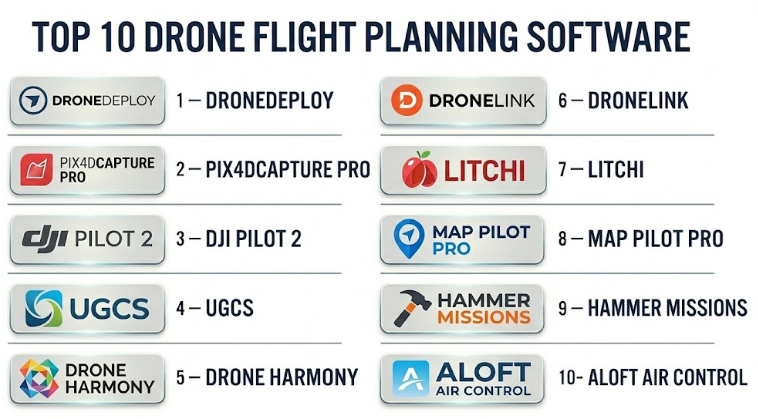
Top 10 Drone Flight Planning Software
#1 — DroneDeploy
Short description :
DroneDeploy is a popular drone mapping and reality capture platform used by construction teams, surveyors, agriculture users, mining companies, energy teams, and enterprise drone programs. It supports automated flight planning, site capture, data processing, maps, 3D models, and project documentation workflows. The platform is especially useful for teams that want an end-to-end workflow from flight planning to data analysis. DroneDeploy is strong for construction progress tracking, mapping, inspection, and repeatable site monitoring. It is best for organizations that want cloud-based drone operations with collaboration and reporting.
Key Features
- Automated mapping flight plans
- Site capture and repeatable missions
- Orthomosaic and 3D model workflows
- Construction and inspection documentation
- Cloud-based project management
- Team collaboration and data sharing
- Integration with reporting and project workflows
Pros
- Strong end-to-end drone data workflow
- Good fit for construction, mining, agriculture, and enterprise teams
- Useful for repeatable site monitoring and collaboration
Cons
- May be more expensive than simple flight-only tools
- Best value comes when using processing and reporting features
- Drone and controller compatibility should be checked before purchase
Platforms / Deployment
Web / iOS / Android
Cloud deployment with mobile flight app support
Security & Compliance
Not publicly stated. Buyers should validate SSO/SAML, MFA, encryption, RBAC, audit logs, data retention, data residency, and enterprise compliance requirements.
Integrations & Ecosystem
DroneDeploy works well where flight planning connects with mapping, reporting, and project documentation.
- Photogrammetry workflows
- Construction project systems
- GIS data exports
- Cloud storage workflows
- Inspection reporting
- Team collaboration tools
Support & Community
DroneDeploy has documentation, onboarding resources, customer support, and enterprise support options. Support depth depends on plan and contract.
#2 — Pix4Dcapture Pro
Short description :
Pix4Dcapture Pro is a drone flight planning tool designed to help users capture imagery for photogrammetry and mapping workflows. It is especially useful for surveyors, mapping teams, agriculture users, engineers, and drone professionals who process data in Pix4D software or other photogrammetry tools. The platform supports automated mission planning for mapping and image capture. It is strongest when used as part of a broader Pix4D workflow for creating orthomosaics, point clouds, 3D models, and measurement outputs. It is a practical choice for users who care about image quality and photogrammetry-ready capture.
Key Features
- Automated drone mapping missions
- Image overlap and flight parameter control
- Support for photogrammetry workflows
- Grid mission planning
- Compatibility with Pix4D processing tools
- Mission repeatability
- Professional mapping data capture
Pros
- Strong fit for Pix4D users
- Good for photogrammetry-focused drone missions
- Useful for survey, mapping, construction, and agriculture workflows
Cons
- Best value comes inside Pix4D ecosystem
- Advanced enterprise operations may need additional tools
- Compatibility should be checked for specific drones and controllers
Platforms / Deployment
Mobile app-based flight planning
Cloud and desktop workflows through related Pix4D products
Specific platform support varies / N/A
Security & Compliance
Not publicly stated. Buyers should validate account security, encryption, access control, data handling, and compliance requirements based on workflow.
Integrations & Ecosystem
Pix4Dcapture Pro fits best with image processing and photogrammetry workflows.
- Pix4D processing tools
- Orthomosaic generation
- 3D modeling workflows
- Survey and mapping exports
- Agriculture and construction analysis
- GIS output workflows
Support & Community
Pix4D has documentation, tutorials, training resources, and professional support options. Support depends on product plan and regional availability.
#3 — DJI Pilot 2
Short description :
DJI Pilot 2 is a professional flight control and mission planning app used with supported DJI enterprise drones. It is designed for enterprise operations such as mapping, inspection, search and rescue, public safety, security, and industrial use cases. The software supports route planning, mapping missions, waypoint missions, live flight control, payload management, and mission execution. It is especially useful for organizations already using DJI enterprise hardware. DJI Pilot 2 is strong for pilots who need direct hardware control, mission planning, and field execution in one app.
Key Features
- Professional drone flight control
- Waypoint and route planning
- Mapping mission support
- Payload and camera control
- Live flight monitoring
- Enterprise drone compatibility
- Field-focused mission execution
Pros
- Strong integration with supported DJI enterprise drones
- Useful for public safety, inspection, and mapping teams
- Good direct control of aircraft and payload settings
Cons
- Limited mainly to supported DJI hardware
- Not a full photogrammetry or analytics platform by itself
- Enterprise teams may need additional data processing tools
Platforms / Deployment
Android-based controller environment / Mobile app ecosystem
Local and cloud-connected workflows may vary
Security & Compliance
Not publicly stated. Buyers should validate user access, data handling, cloud sync settings, encryption, audit requirements, and organizational drone data policies.
Integrations & Ecosystem
DJI Pilot 2 works best inside DJI’s enterprise drone ecosystem.
- DJI enterprise drones
- Camera and payload systems
- Mapping and inspection workflows
- Data export to processing tools
- Field operations
- Public safety and industrial drone workflows
Support & Community
Support depends on DJI enterprise support, local dealers, documentation, and hardware service channels. Buyers should verify regional support and warranty terms.
#4 — UgCS
Short description :
UgCS is an advanced drone mission planning platform used for complex professional drone operations. It supports waypoint planning, corridor mapping, terrain following, LiDAR missions, photogrammetry, inspection planning, and multi-drone workflows depending on configuration. UgCS is especially useful for surveyors, engineers, mining teams, utilities, public safety teams, and organizations that need more control over flight paths than basic apps provide. It is strong for complex terrain, long corridors, and specialized payload missions. UgCS is best suited for experienced drone professionals who need advanced planning flexibility.
Key Features
- Advanced waypoint mission planning
- Terrain-following flight support
- Corridor mapping workflows
- LiDAR and photogrammetry mission planning
- Multi-drone operation support depending on setup
- Offline map and route planning options
- Support for professional drone operations
Pros
- Strong for complex and technical missions
- Useful for terrain, corridor, LiDAR, and inspection workflows
- Good fit for experienced drone service providers
Cons
- Learning curve may be higher than simpler apps
- Best for technical users, not casual pilots
- Compatibility should be reviewed carefully for drone model and payload
Platforms / Deployment
Windows / Mobile companion workflows may vary
Desktop-based planning with field execution support
Cloud / local workflow details vary
Security & Compliance
Not publicly stated. Buyers should validate license management, data handling, encryption, access control, and compliance requirements.
Integrations & Ecosystem
UgCS fits technical drone mapping and inspection workflows.
- Photogrammetry tools
- LiDAR workflows
- GIS data
- Terrain data
- Corridor mapping
- Professional drone platforms
Support & Community
UgCS provides documentation, tutorials, and support options. Community strength is stronger among technical drone operators and professional mapping users.
#5 — Drone Harmony
Short description :
Drone Harmony is a drone mission planning platform focused on automated inspections, mapping, and complex asset capture. It is useful for infrastructure inspection, telecom towers, industrial sites, solar farms, buildings, and enterprise drone operations. The software helps users plan repeatable and structured missions around assets, not just flat mapping areas. Drone Harmony is especially strong for inspection workflows where camera angle, object coverage, and repeatability are important. It is a good fit for teams that need more than simple grid mapping.
Key Features
- Automated inspection mission planning
- Asset-based flight planning
- Mapping and data capture support
- Repeatable mission workflows
- 3D-aware planning capabilities
- Camera angle and coverage control
- Enterprise inspection use cases
Pros
- Strong for inspection-focused missions
- Useful for complex assets and repeatable workflows
- Good fit for industrial, telecom, and infrastructure teams
Cons
- May be more specialized than needed for basic mapping
- Requires planning discipline for complex assets
- Drone compatibility should be validated
Platforms / Deployment
Web / Mobile app workflows
Cloud deployment with field execution support
Specific platform support varies / N/A
Security & Compliance
Not publicly stated. Buyers should validate SSO, MFA, encryption, RBAC, audit logs, data handling, and enterprise compliance requirements.
Integrations & Ecosystem
Drone Harmony works well for inspection and asset capture workflows.
- Drone inspection platforms
- Asset management workflows
- Photogrammetry and modeling tools
- Reporting systems
- Industrial site documentation
- Repeatable inspection programs
Support & Community
Support is vendor-led and may include onboarding, documentation, and enterprise assistance. Buyers should check support tiers and implementation help.
#6 — Dronelink
Short description :
Dronelink is a drone mission planning and automation platform used for mapping, inspections, photography, videography, and advanced waypoint missions. It allows users to plan missions with detailed control over flight paths, camera actions, gimbal movements, altitude, speed, and repeatability. Dronelink is useful for drone service providers, creators, mappers, inspectors, and advanced pilots who want flexible automated flights. It is especially strong for users who need repeatable routes and detailed mission control. It can serve both creative and technical drone workflows.
Key Features
- Advanced waypoint mission planning
- Automated camera and gimbal control
- Mapping and inspection mission support
- Repeatable flight paths
- Cross-device mission planning
- Detailed mission components and reusable templates
- Support for creative and professional drone workflows
Pros
- Flexible automation for many mission types
- Good for repeatable flights and detailed camera control
- Useful for both mapping and creative drone work
Cons
- Advanced features may take time to learn
- Hardware compatibility should be checked carefully
- Not a full enterprise fleet management platform by itself
Platforms / Deployment
Web / iOS / Android
Cloud-based planning with mobile flight execution
Security & Compliance
Not publicly stated. Buyers should validate account security, data handling, access controls, encryption, and organizational requirements.
Integrations & Ecosystem
Dronelink fits flexible mission automation and repeatable drone operations.
- Mapping workflows
- Inspection workflows
- Creative video missions
- Reusable mission templates
- Data export workflows
- Supported drone ecosystems
Support & Community
Dronelink has documentation, learning resources, and a user community. Support level depends on plan and usage type.
#7 — Litchi
Short description :
Litchi is a popular drone flight planning app known for waypoint missions, orbit flights, tracking, panoramas, and automated camera movements. It is often used by advanced drone pilots, creators, real estate users, inspection teams, and small drone service providers who want more autonomous control than basic flight apps. Litchi is especially useful for repeatable camera paths, cinematic flights, and waypoint-based missions. While it is not a complete enterprise mapping or fleet platform, it is practical for users who need reliable automated mission control for supported drones.
Key Features
- Waypoint mission planning
- Orbit and panorama modes
- Automated camera and gimbal control
- Repeatable flight paths
- Mission planning and preview
- Support for creative aerial workflows
- Practical autonomous flight control
Pros
- Good for waypoint and cinematic drone missions
- Useful for repeatable creative and inspection flights
- Easier than many enterprise planning tools
Cons
- Not a full enterprise drone operations platform
- Mapping and analytics features are limited compared with specialist tools
- Drone compatibility depends on hardware and app support
Platforms / Deployment
iOS / Android
Mobile app-based deployment
Mission planning support varies by platform
Security & Compliance
Not publicly stated. Buyers should validate data handling, account security, local storage, and operational policies.
Integrations & Ecosystem
Litchi is useful for pilots needing controlled automated drone flights.
- Waypoint missions
- Creative video workflows
- Inspection route planning
- Panoramic capture
- Repeatable camera paths
- Supported drone ecosystems
Support & Community
Litchi has documentation and a strong user community among advanced drone pilots. Formal enterprise support may be limited compared with larger platforms.
#8 — Map Pilot Pro
Short description :
Map Pilot Pro is a drone mapping flight planning app focused on automated image capture for photogrammetry, mapping, and survey workflows. It helps pilots create grid missions, control overlap, manage altitude, and collect consistent imagery for processing. The tool is especially useful for drone mappers, surveyors, agriculture users, construction teams, and small drone service providers. Map Pilot Pro is practical for users who need mapping-focused flight planning without a large enterprise platform. It is best when the main requirement is reliable image capture for map generation.
Key Features
- Grid-based mapping missions
- Image overlap control
- Altitude and speed configuration
- Terrain-aware mapping options may vary
- Photogrammetry-ready capture workflows
- Mission repeatability
- Field-focused mobile planning
Pros
- Practical for mapping and photogrammetry capture
- Easier than many advanced enterprise tools
- Useful for small teams and drone service providers
Cons
- Less suited for complex inspections or enterprise fleet management
- Analytics and processing require separate tools
- Compatibility depends on supported drones and devices
Platforms / Deployment
iOS / Mobile app-based deployment
Cloud-connected features may vary
Security & Compliance
Not publicly stated. Buyers should validate data handling, account security, local storage, encryption, and compliance needs.
Integrations & Ecosystem
Map Pilot Pro fits mapping and photogrammetry workflows.
- Orthomosaic processing tools
- 3D model workflows
- GIS exports
- Survey data capture
- Construction mapping
- Agriculture mapping
Support & Community
Support is vendor-led with documentation and user resources. Buyers should validate current drone compatibility and support response expectations.
#9 — Hammer Missions
Short description :
Hammer Missions is a drone mission planning platform designed for inspection, mapping, and automated data capture workflows. It supports mission planning for different professional use cases such as solar inspection, roof inspection, facade capture, mapping, and waypoint-based flights. The platform is useful for drone service providers, inspection companies, construction teams, and industrial users who need structured mission templates. Hammer Missions is especially strong for practical inspection workflows where pilots need speed, repeatability, and clear capture patterns. It can help reduce manual planning effort for common drone service jobs.
Key Features
- Automated inspection mission planning
- Mapping and waypoint support
- Solar, roof, and facade mission workflows
- Repeatable capture patterns
- Camera control and flight parameter settings
- Field-focused execution
- Templates for common inspection missions
Pros
- Good for inspection and service-provider workflows
- Useful mission templates for repeatable jobs
- Easier than building complex missions manually
Cons
- May not be as broad as enterprise drone platforms
- Compatibility should be checked before purchase
- Advanced analytics usually require separate software
Platforms / Deployment
Mobile app-based workflows
Cloud-connected planning may vary
Specific platform support varies / N/A
Security & Compliance
Not publicly stated. Buyers should validate user access, data handling, encryption, local storage, and compliance needs.
Integrations & Ecosystem
Hammer Missions fits practical drone inspection and mapping workflows.
- Solar inspection workflows
- Roof and facade capture
- Mapping and photogrammetry tools
- Inspection reporting systems
- Drone service operations
- Repeatable mission templates
Support & Community
Support is vendor-led and may include documentation, tutorials, and user assistance. Buyers should validate support levels and hardware compatibility.
#10 — Aloft Air Control
Short description :
Aloft Air Control is a drone operations and airspace management platform focused on compliance, authorization, fleet oversight, and enterprise drone program management. It is useful for organizations that need to manage drone operations safely and responsibly across pilots, teams, locations, and missions. While it is not only a flight path planning tool, it is highly relevant for drone teams that need operational planning, airspace awareness, checklists, authorization workflows, and compliance records. Aloft Air Control is especially suitable for enterprise drone programs, public agencies, and organizations that need governance around drone flights.
Key Features
- Drone operations management
- Airspace awareness and authorization workflows
- Pilot and fleet management
- Mission planning and operational records
- Compliance checklists
- Flight logging and reporting
- Enterprise drone program oversight
Pros
- Strong for compliance and operational governance
- Useful for enterprise drone teams and public agencies
- Helps standardize drone program management
Cons
- Not focused only on mapping or inspection flight automation
- May need to be paired with specialized capture tools
- Best value comes for teams with structured drone operations
Platforms / Deployment
Web / Mobile
Cloud deployment
Security & Compliance
Not publicly stated. Buyers should validate SSO/SAML, MFA, encryption, audit logs, RBAC, data retention, and enterprise security controls.
Integrations & Ecosystem
Aloft Air Control fits drone operations, compliance, and fleet workflows.
- Flight logging
- Airspace authorization workflows
- Pilot management
- Enterprise operations reporting
- Compliance documentation
- Drone program governance
Support & Community
Support is vendor-led and may include documentation, onboarding, and enterprise support options. Buyers should confirm support tiers and operational training availability.
Comparison Table
| Tool Name | Best For | Platform(s) Supported | Deployment | Standout Feature | Public Rating |
|---|---|---|---|---|---|
| DroneDeploy | End-to-end drone mapping and site capture | Web / iOS / Android | Cloud | Flight planning plus mapping and reporting workflow | N/A |
| Pix4Dcapture Pro | Photogrammetry-ready image capture | Mobile / Pix4D ecosystem | Cloud / Desktop ecosystem varies | Mapping capture aligned with Pix4D processing | N/A |
| DJI Pilot 2 | DJI enterprise drone mission execution | Android controller ecosystem | Local / Cloud-connected varies | Deep DJI enterprise hardware control | N/A |
| UgCS | Advanced technical drone mission planning | Windows / Mobile workflows vary | Desktop / Local / Varies | Terrain, corridor, LiDAR, and complex waypoint planning | N/A |
| Drone Harmony | Automated inspection and asset capture | Web / Mobile | Cloud | Asset-based inspection mission planning | N/A |
| Dronelink | Flexible drone automation and repeatable flights | Web / iOS / Android | Cloud | Detailed waypoint and camera automation | N/A |
| Litchi | Waypoint, orbit, and creative automated flights | iOS / Android | Mobile app | Practical autonomous waypoint and camera missions | N/A |
| Map Pilot Pro | Mapping-focused drone image capture | iOS | Mobile app | Simple grid missions for photogrammetry capture | N/A |
| Hammer Missions | Inspection and mapping mission templates | Mobile / Varies | Cloud-connected varies | Practical templates for inspection workflows | N/A |
| Aloft Air Control | Drone compliance and operations management | Web / Mobile | Cloud | Airspace, compliance, pilot, and fleet governance | N/A |
Evaluation & Drone Flight Planning Software
| Tool Name | Core (25%) | Ease (15%) | Integrations (15%) | Security (10%) | Performance (10%) | Support (10%) | Value (15%) | Weighted Total (0–10) |
|---|---|---|---|---|---|---|---|---|
| DroneDeploy | 9 | 8 | 9 | 7 | 8 | 8 | 7 | 8.15 |
| Pix4Dcapture Pro | 8 | 8 | 8 | 6 | 8 | 8 | 8 | 7.75 |
| DJI Pilot 2 | 8 | 8 | 7 | 6 | 8 | 8 | 8 | 7.65 |
| UgCS | 9 | 6 | 8 | 6 | 8 | 8 | 8 | 7.75 |
| Drone Harmony | 8 | 7 | 8 | 6 | 8 | 7 | 8 | 7.45 |
| Dronelink | 8 | 7 | 7 | 6 | 8 | 7 | 8 | 7.30 |
| Litchi | 7 | 8 | 6 | 6 | 7 | 7 | 9 | 7.15 |
| Map Pilot Pro | 7 | 8 | 7 | 6 | 7 | 7 | 8 | 7.10 |
| Hammer Missions | 7 | 8 | 7 | 6 | 7 | 7 | 8 | 7.10 |
| Aloft Air Control | 8 | 8 | 8 | 7 | 8 | 8 | 8 | 7.90 |
These scores are comparative and should be treated as a practical guide, not a final ranking for every buyer. A mapping team may value DroneDeploy, Pix4Dcapture Pro, Map Pilot Pro, or UgCS more. An inspection company may prefer Drone Harmony or Hammer Missions. A creative pilot may prefer Dronelink or Litchi. An enterprise drone program may place more value on Aloft Air Control because compliance and governance become more important at scale.
Which Drone Flight Planning Software Should You Choose?
Solo / Freelancer
Solo drone pilots and freelancers usually need affordable, reliable, and easy-to-use software. If the work is mainly real estate, creative video, or repeatable camera paths, Litchi or Dronelink can be useful. If the work is mapping-focused, Map Pilot Pro, Pix4Dcapture Pro, or DroneDeploy may be a better fit.
Freelancers should choose based on their main service type. Mapping, inspection, creative video, and compliance workflows require different tools.
Recommended direction: Litchi or Dronelink for creative and waypoint flights, Map Pilot Pro or Pix4Dcapture Pro for mapping, DroneDeploy for end-to-end site capture.
SMB
Small drone businesses often need repeatable missions, easy client reporting, mapping workflows, and practical field operations. They should avoid buying a platform that is too complex unless they have the clients and workload to justify it.
DroneDeploy is useful when reporting and data processing matter. Pix4Dcapture Pro is strong for photogrammetry users. Hammer Missions and Drone Harmony are useful for inspection services. Aloft Air Control may help when compliance and flight records become important.
Recommended direction: Choose a tool that matches revenue-generating services such as mapping, inspection, construction progress, or compliance-heavy operations.
Mid-Market
Mid-market organizations often have multiple pilots, sites, drones, and departments. They need more structure than solo pilots. Mission repeatability, pilot permissions, documentation, safety workflows, and integration with processing tools become important.
Construction firms may prefer DroneDeploy. Survey and engineering teams may prefer UgCS or Pix4D workflows. Inspection teams may prefer Drone Harmony or Hammer Missions. Compliance-heavy teams may need Aloft Air Control.
Recommended direction: Build a small stack: one tool for flight automation, one for data processing, and one for operations governance if needed.
Enterprise
Enterprise drone programs need governance, security, standard operating procedures, pilot management, fleet visibility, airspace awareness, audit trails, data control, and integration with business systems.
A single flight planning app may not be enough. Enterprises often need a combination of tools for compliance, flight execution, inspection, mapping, and reporting.
Recommended direction: Aloft Air Control for program governance, DroneDeploy for reality capture workflows, UgCS for complex technical missions, Drone Harmony for asset inspection, and DJI Pilot 2 for DJI enterprise field execution.
Budget vs Premium
Budget-focused pilots can start with tools like Litchi, Dronelink, Map Pilot Pro, or hardware-native apps depending on their mission needs. These may be enough for basic waypoint, mapping, or creative work.
Premium tools are better when the business needs processing, reporting, collaboration, inspection automation, compliance records, or enterprise oversight.
Budget direction: Litchi, Dronelink, Map Pilot Pro, DJI Pilot 2 for supported DJI enterprise workflows.
Premium direction: DroneDeploy, UgCS, Drone Harmony, Aloft Air Control, Pix4D workflows.
Feature Depth vs Ease of Use
Advanced tools provide more control but require more skill. Simple tools are easier for field teams but may not support complex terrain, corridor mapping, asset inspection, or enterprise governance.
If your team handles complex surveying, LiDAR, or inspection missions, choose depth. If your team needs fast mapping and simple field execution, choose ease of use.
Feature depth: UgCS, Drone Harmony, DroneDeploy, Dronelink.
Ease of use: DJI Pilot 2, Map Pilot Pro, Litchi, Hammer Missions.
Integrations & Scalability
Drone flight planning software should connect with the rest of the drone data workflow. Captured images often need to move into photogrammetry tools, GIS systems, inspection reports, asset platforms, or construction documentation systems.
Scalability means the software can support more pilots, more drones, more projects, repeatable missions, larger datasets, and consistent procedures across teams.
Strong integration candidates: DroneDeploy, Pix4Dcapture Pro, UgCS, Drone Harmony, Aloft Air Control.
Security & Compliance Needs
Drone operations can involve sensitive data such as construction sites, utilities, critical infrastructure, private property, government facilities, energy assets, and public safety locations. Security and compliance should be reviewed carefully.
Buyers should validate:
- User permissions
- Role-based access control
- Flight logs and audit trails
- Data storage location
- Encryption
- Account security
- Airspace authorization workflows
- Pilot certification tracking
- Drone and battery records
- Public versus private project sharing
- Data export and retention policies
Enterprise and public-sector buyers should complete security review before standardizing any drone software.
Frequently Asked Questions
1. What is Drone Flight Planning Software?
Drone Flight Planning Software helps pilots create automated drone missions before takeoff. It controls routes, altitude, speed, camera settings, overlap, waypoints, inspection paths, and mission repeatability.
2. How is drone flight planning software different from a normal drone app?
A normal drone app focuses on manual flying and camera control. Flight planning software adds automated missions, mapping grids, waypoints, inspection routes, repeatable paths, and better data capture planning.
3. Who uses drone flight planning tools?
They are used by drone service providers, surveyors, construction teams, agriculture consultants, mining companies, utilities, public safety teams, inspection firms, GIS teams, and enterprise drone programs.
4. What pricing models are common?
Pricing may be based on mobile app purchase, subscription, number of users, number of drones, cloud processing, enterprise features, data storage, or mission volume. Buyers should compare total cost, not only app price.
5. What is the best drone flight planning software for mapping?
DroneDeploy, Pix4Dcapture Pro, Map Pilot Pro, UgCS, and DJI Pilot 2 can be useful for mapping depending on drone compatibility, processing workflow, and mission complexity.
6. What is the best drone flight planning software for inspection?
Drone Harmony, Hammer Missions, DJI Pilot 2, Dronelink, and DroneDeploy can be useful for inspection workflows. The best option depends on whether the inspection involves roofs, towers, solar panels, buildings, utilities, or industrial assets.
7. Can drone flight planning software improve data quality?
Yes. Good planning helps maintain proper overlap, altitude, speed, camera angle, and route consistency. This improves the quality of maps, 3D models, inspection photos, and repeatable monitoring data.
8. Does drone compatibility matter?
Yes, compatibility is one of the most important factors. Not every software supports every drone, controller, camera, payload, or firmware version. Buyers should verify compatibility before purchasing.
9. Can these tools support repeatable missions?
Many drone flight planning tools support repeatable missions. This is useful for construction progress, crop monitoring, inspections, site comparison, and long-term asset tracking.
10. What are common mistakes in drone mission planning?
Common mistakes include wrong overlap settings, poor altitude planning, ignoring terrain, flying with weak battery planning, missing airspace checks, choosing unsupported drones, and not testing the mission before field deployment.
Conclusion
Drone Flight Planning Software helps drone teams fly safer, capture better data, repeat missions accurately, and manage professional drone operations with more confidence. The best tool depends on the type of work you do. DroneDeploy is strong for end-to-end mapping and site capture. Pix4Dcapture Pro is useful for photogrammetry workflows. DJI Pilot 2 is practical for supported DJI enterprise drones. UgCS is strong for advanced technical missions. Drone Harmony and Hammer Missions are useful for inspections. Dronelink and Litchi are flexible for waypoint and creative flights. Map Pilot Pro is practical for mapping capture, while Aloft Air Control is valuable for compliance and drone program governance.
