Introduction
Disaster Management & Response Platforms are software systems that help organizations prepare for, manage, communicate during, and recover from emergencies. In plain English, these platforms give response teams one place to track incidents, send alerts, coordinate people, document actions, manage resources, and maintain a common operating picture during critical events.
For 2026 and beyond, these platforms matter more because organizations face more complex risks: severe weather, cyber incidents, workplace safety threats, supply chain disruption, public health events, infrastructure failures, and regional emergencies. Modern platforms are moving beyond simple alerting. They now combine risk intelligence, emergency communications, incident workflows, mapping, mobile response, automation, reporting, and post-incident review.
Real-world use cases include emergency operations center coordination, employee safety alerts, natural disaster response, campus safety, public safety communications, business continuity, crisis team activation, evacuation tracking, and after-action reporting.
Buyers should evaluate:
- Ease of use during high-pressure situations
- Multi-channel alerting and two-way communication
- Incident command and workflow management
- Mapping, dashboards, and situational awareness
- Mobile access for field teams
- Integration with HR, GIS, weather, security, and communication systems
- Security controls and compliance posture
- Reliability, uptime, and scalability
- Support quality and implementation help
- Pricing model and long-term value
Best for: emergency managers, public safety agencies, government teams, healthcare systems, universities, schools, utilities, transport operators, enterprises, and organizations with distributed teams or high-risk operations.
Not ideal for: very small teams that only need basic group messaging, organizations with no formal incident response process, or teams that only need a simple SMS tool rather than a full disaster response platform.
Key Disaster Management & Response Platforms
- AI-assisted risk intelligence is becoming more important. Modern platforms increasingly use risk feeds, location intelligence, automation, and analytics to help teams detect threats earlier and prioritize response.
- Mass notification alone is no longer enough. Buyers now expect two-way communication, confirmation tracking, escalation workflows, and real-time reporting.
- Mobile-first response is becoming standard. Field teams, responders, safety officers, and executives need access from phones and tablets, not only from a control room.
- Common operating picture tools are critical. Maps, dashboards, live status boards, logs, and task tracking help teams avoid confusion during fast-moving incidents.
- Interoperability is a major buyer requirement. Disaster response platforms must connect with HR systems, GIS tools, weather data, building systems, security operations, public warning systems, and collaboration tools.
- Low-code and configurable workflows are gaining adoption. Many emergency teams want to digitize existing plans without waiting for custom software development.
- Security expectations are rising. Buyers are paying more attention to SSO, MFA, encryption, audit logs, RBAC, SOC 2, ISO 27001, FedRAMP, GDPR, and sector-specific compliance requirements.
- Hybrid operations are common. Some organizations need cloud access, while others need offline, mobile, or field-resilient workflows for disaster conditions.
- Post-incident review is now a core requirement. Logs, reports, timelines, forms, and analytics help teams improve response plans after every event.
- Pricing is often custom. Many platforms price by users, population covered, modules, alert volume, locations, or enterprise agreement, so buyers should request clear pricing assumptions.
How We Selected These Tools
The tools below were selected using a practical evaluation logic based on:
- Market visibility and recognition in emergency management, crisis response, public safety, or critical event management
- Breadth of features across preparedness, alerting, response, coordination, and recovery
- Suitability for different organization sizes, from schools and SMBs to large enterprises and public agencies
- Strength of incident management, communication, and situational awareness capabilities
- Availability of mobile access and field response features
- Integration potential with communication, GIS, HR, safety, and security systems
- Security and compliance posture where publicly stated
- Fit for real-world emergency operations, not just routine messaging
- Flexibility for both planned drills and unplanned disaster events
- Vendor ecosystem, support model, documentation, and implementation assistance
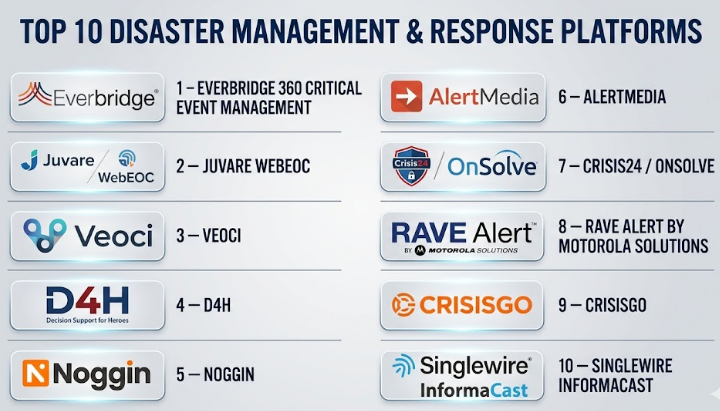
Top 10 Disaster Management & Response Platforms
#1 — Everbridge 360 Critical Event Management
Short description :
Everbridge 360 Critical Event Management is an enterprise-grade platform built for critical event detection, communication, coordination, and response. It is widely used by large organizations that need to protect people, facilities, operations, and supply chains during disruptive events. The platform focuses on connecting risk intelligence, mass notification, incident workflows, and situational awareness in one environment. It is suitable for enterprises, government bodies, healthcare systems, global companies, and organizations with distributed teams. Everbridge is especially strong when buyers need broad critical event management rather than only emergency alerts. Everbridge describes its platform as a critical event management solution for managing a wide range of critical events, and its disaster management use cases include communication, coordination, and operational continuity.
Key Features
- Critical event management across multiple incident types
- Mass notification and emergency communication
- Risk intelligence and event monitoring
- Location-aware alerting and impact assessment
- Mobile app access for users and administrators
- Workflow automation and response coordination
- Dashboards for situational awareness and operational visibility
Pros
- Strong fit for large enterprises and complex organizations
- Broad platform approach covering people, assets, operations, and risk
- Mature emergency communication and critical event management capabilities
Cons
- May be too advanced or costly for smaller teams
- Implementation can require planning, governance, and data cleanup
- Buyers may need multiple modules for full value
Platforms / Deployment
Web / iOS / Android
Cloud-based deployment
Security & Compliance
Everbridge publicly states that it uses encryption and security protocols and references ISO 27001 and SOC 2 for its platform security posture.
Other specific controls such as customer-specific SSO, MFA, audit logs, and RBAC may vary by plan or configuration.
Integrations & Ecosystem
Everbridge is strongest when connected with internal systems, location data, threat feeds, communication tools, security systems, and operational workflows.
- HR and employee directory systems
- Physical security and video systems
- IT alerting and incident tools
- Weather and risk intelligence feeds
- Mobile communication channels
- APIs and enterprise integrations
Support & Community
Everbridge generally serves enterprise and public-sector buyers with onboarding, customer support, documentation, and professional services. Support depth may vary by contract and purchased modules.
#2 — Juvare WebEOC
Short description :
Juvare WebEOC is a well-known emergency management and emergency operations center platform used by public agencies, healthcare systems, enterprises, and response organizations. It helps teams create a common operating picture, manage workflows, collect field data, coordinate resources, and document response activity. WebEOC is particularly relevant for emergency operations centers that need structured boards, forms, dashboards, mapping, and collaboration across agencies. It is suitable for organizations that need formal emergency management processes, not just simple alerts. WebEOC is a strong fit for government, healthcare, public safety, utilities, and large institutions. Juvare describes WebEOC as emergency response software combining planning tools with communication capabilities, and also references cloud-based workflows, mapping, and real-time data visualization.
Key Features
- Emergency operations center management
- Configurable workflows and digital boards
- Real-time data collection and reporting
- Advanced mapping and visualization
- Planning, response, and recovery support
- Mobile and offline capability
- Cross-platform communication and coordination
Pros
- Strong fit for formal emergency management and public-sector response
- Good for common operating picture and multi-agency coordination
- Flexible workflows for routine and critical operations
Cons
- May require configuration and training
- More suitable for structured emergency teams than casual users
- Pricing and implementation scope can vary significantly
Platforms / Deployment
Web / Mobile access
Cloud-based deployment
Some capabilities may vary by configuration
Security & Compliance
Juvare publicly describes WebEOC as GDPR-compliant. Juvare also states broader platform authorization details including FedRAMP Class D / IL5 authorization on its official site.
Other details such as SOC 2, ISO 27001, MFA, SSO, RBAC, and audit logs should be validated during procurement.
Integrations & Ecosystem
WebEOC is designed for emergency management environments where data needs to flow across teams, agencies, maps, forms, and operational systems.
- GIS and mapping tools
- Field data collection
- Emergency operations workflows
- Public-sector reporting systems
- Healthcare and public safety coordination
- APIs and configurable workflow extensions
Support & Community
Juvare has a long-standing emergency management customer base and generally supports enterprise, public-sector, and healthcare implementations. Documentation, onboarding, and support terms may vary by contract.
#3 — Veoci
Short description :
Veoci is a no-code emergency management, business continuity, and daily operations platform. It helps organizations digitize response plans, manage incidents, track tasks, send notifications, and coordinate teams from a virtual emergency operations center. The platform is useful for airports, universities, healthcare, utilities, enterprises, and public-sector teams that want flexible workflows without heavy coding. Veoci is especially strong for organizations that want to modernize paper-based or spreadsheet-based emergency plans. It balances emergency management, operational continuity, and workflow automation. Veoci positions its platform as emergency management software for modern EOCs and highlights real-time information tracking, mapping, and notifications.
Key Features
- Virtual emergency operations center capabilities
- No-code workflow and form configuration
- Real-time information tracking
- Mapping and notifications
- Incident and event management
- Business continuity and resource management
- Dashboards and operational reporting
Pros
- Flexible for many use cases beyond disasters
- No-code approach helps teams digitize processes faster
- Good fit for organizations modernizing manual emergency plans
Cons
- Configuration decisions can become complex without governance
- Buyers should validate advanced security and compliance needs
- May require process redesign to get full value
Platforms / Deployment
Web / Mobile access
Cloud-based deployment
Specific device support varies / N/A
Security & Compliance
Not publicly stated in the provided official product material. Buyers should validate SSO/SAML, MFA, encryption, audit logs, RBAC, SOC 2, ISO 27001, GDPR, and industry-specific compliance during procurement.
Integrations & Ecosystem
Veoci is useful when organizations need to connect emergency plans, notifications, dashboards, and operational forms.
- Mapping and location data
- Notification workflows
- Forms and checklists
- Business continuity processes
- Daily operations systems
- Reporting and analytics exports
Support & Community
Veoci publicly highlights customer support and implementation value. Support packages, onboarding depth, and documentation access should be reviewed during vendor evaluation.
#4 — D4H
Short description :
D4H is an emergency and crisis management platform focused on simple, configurable incident management. It helps teams build a common operating picture using forms, tasks, logs, maps, status boards, and dashboards. D4H is suitable for emergency managers, search and rescue teams, local governments, enterprises, public safety teams, and organizations that need practical response coordination without excessive complexity. Its appeal is ease of use, self-service configuration, and operational clarity during incidents. D4H is a strong option for teams that want fast adoption and practical field response workflows. D4H describes its incident management software as a way to create a common operating picture using forms, tasks, logs, maps, and status boards.
Key Features
- Common operating picture
- Forms, logs, maps, and status boards
- Task management and objective tracking
- Customizable workflows and modules
- Incident dashboards and reporting
- Emergency and crisis management use cases
- Guided implementation support
Pros
- Strong ease-of-use positioning
- Useful for teams that need quick configuration
- Practical for real-time incident tracking and collaboration
Cons
- May not match the depth of larger enterprise CEM platforms
- Advanced enterprise integrations should be validated
- Compliance details are not always clearly stated publicly
Platforms / Deployment
Web / Mobile access
Cloud-based deployment
Specific desktop and mobile platform details vary / N/A
Security & Compliance
Not publicly stated in the reviewed official product material. Buyers should confirm SSO/SAML, MFA, RBAC, audit logs, encryption, SOC 2, ISO 27001, GDPR, and data residency requirements.
Integrations & Ecosystem
D4H is designed around operational response workflows and can support teams that need structured incident data and reports.
- Incident forms and checklists
- Mapping and status dashboards
- Task and objective workflows
- Activity logs and reports
- Team coordination tools
- Configurable modules
Support & Community
D4H publicly describes guided implementation support. It appears well-suited for teams that want hands-on onboarding and practical configuration help, though support tiers should be validated by contract.
#5 — Noggin
Short description :
Noggin is an integrated resilience and critical event management platform covering emergency management, crisis management, business continuity, work safety, and security operations. It is designed for organizations that want one platform for multiple resilience functions rather than separate tools for each process. Noggin can support incident lifecycle management from preparedness to response and recovery. It is a strong fit for enterprises, government agencies, infrastructure operators, universities, and organizations with mature resilience programs. Noggin is especially relevant where emergency management overlaps with business continuity and operational risk. Noggin describes its emergency management software as supporting mitigation, preparedness, response, and recovery with plans, communication, and a shared operating picture.
Key Features
- All-hazards incident management
- Situational awareness and common operating picture
- Emergency operations center management
- Crisis team activation and collaboration
- Response plan activation
- Post-crisis review and reporting
- Integrated resilience workflows
Pros
- Broad resilience platform, not only alerting
- Good fit for mature risk, safety, and continuity programs
- Useful for organizations wanting integrated emergency and business continuity workflows
Cons
- May be more platform than smaller teams need
- Implementation can require process mapping
- Security and compliance details should be verified directly
Platforms / Deployment
Web / Mobile access
Cloud-based deployment
Specific platform details vary / N/A
Security & Compliance
Not publicly stated in the reviewed official product material. Buyers should validate SSO/SAML, MFA, encryption, audit logs, RBAC, SOC 2, ISO 27001, GDPR, and sector-specific requirements.
Integrations & Ecosystem
Noggin fits organizations that want a connected resilience ecosystem across incident, crisis, safety, and continuity teams.
- Crisis management workflows
- Emergency operations dashboards
- Business continuity planning
- Safety and risk management processes
- Notification and collaboration tools
- Post-incident reporting
Support & Community
Noggin generally serves enterprise and resilience-focused organizations. Support, onboarding, training, and configuration services should be evaluated based on deployment scope.
#6 — AlertMedia
Short description :
AlertMedia is a risk intelligence and emergency communication platform focused on helping organizations identify threats, understand employee impact, and communicate quickly during emergencies. It is especially useful for businesses that need reliable employee safety communication, two-way messaging, event monitoring, and response coordination. AlertMedia is a strong fit for distributed workforces, corporate security teams, HR teams, business continuity teams, and operations leaders. Compared with heavy EOC platforms, AlertMedia is often easier to understand for organizations focused mainly on communication and workforce safety. It works well when speed, clarity, and employee reach are top priorities. AlertMedia describes its solution as helping organizations identify threats and communicate with employees faster during emergencies and other critical events.
Key Features
- Emergency communication and mass notification
- Risk intelligence and threat monitoring
- Two-way communication
- Employee safety checks
- Automated notifications and response workflows
- Real-time insights and reporting
- Mobile-friendly communication
Pros
- Strong fit for employee safety and business communication
- Easier to adopt than some complex EOC platforms
- Useful for distributed teams and corporate crisis communication
Cons
- May not replace a full emergency operations center system
- Public-sector or multi-agency workflows may need deeper tools
- Advanced compliance details should be validated
Platforms / Deployment
Web / iOS / Android
Cloud-based deployment
Security & Compliance
Not publicly stated in the reviewed official product material. Buyers should confirm SSO/SAML, MFA, encryption, RBAC, audit logs, SOC 2, ISO 27001, GDPR, and other applicable requirements.
Integrations & Ecosystem
AlertMedia is most valuable when integrated with workforce and communication systems.
- HR and employee directory systems
- Mobile and SMS communication
- Email and voice communication
- Risk intelligence feeds
- Response workflow tools
- Reporting and analytics exports
Support & Community
AlertMedia is typically evaluated as a business-focused emergency communication platform with onboarding and customer support. Specific support tiers and professional services should be confirmed during procurement.
#7 — Crisis24 / OnSolve
Short description :
Crisis24 / OnSolve provides critical event management capabilities that combine alerting, tracking, reporting, risk intelligence, and incident coordination. It is relevant for organizations that need global risk awareness, travel risk management, employee safety, and crisis communication across regions and time zones. The platform is suitable for enterprises, government-related organizations, security teams, travel risk teams, and companies with mobile or international workforces. It is especially useful where critical event management must connect risk intelligence with operational response. Buyers should carefully validate current product scope, migration path, and security posture based on their specific use case. Crisis24 describes its critical event management solution as combining alerting, tracking, and reporting, while its broader critical event management material highlights real-time risk intelligence and threat visibility.
Key Features
- Critical event management
- Alerting, tracking, and reporting
- Risk intelligence and threat monitoring
- Travel risk management support
- Crisis communication workflows
- Location-based awareness
- Incident coordination across teams and time zones
Pros
- Strong fit for global organizations and mobile workforces
- Combines intelligence, communication, and response coordination
- Useful for security, travel risk, and business resilience teams
Cons
- Buyers should validate product packaging and migration details
- Legacy platform considerations may matter for some customers
- Security posture should be reviewed carefully during procurement
Platforms / Deployment
Web / Mobile access
Cloud-based deployment
Specific platform support varies / N/A
Security & Compliance
Not publicly stated in the reviewed official product material. Buyers should validate SSO/SAML, MFA, encryption, audit logs, RBAC, SOC 2, ISO 27001, GDPR, data retention, and incident response history as part of due diligence.
Integrations & Ecosystem
Crisis24 / OnSolve is strongest in environments where risk intelligence, travel risk, communication, and incident response need to work together.
- Risk intelligence feeds
- Employee and traveler location data
- Emergency communication channels
- Reporting and dashboards
- Security operations workflows
- Enterprise notification systems
Support & Community
Support and onboarding are likely contract-based. Buyers should ask about implementation help, customer success coverage, migration support, and incident-response support during high-impact events.
#8 — Rave Alert by Motorola Solutions
Short description :
Rave Alert is a mass notification and emergency communication platform from Motorola Solutions. It is used by public safety agencies, local governments, campuses, enterprises, and organizations that need fast multi-channel alerts. Rave Alert focuses on sending emergency and operational messages through channels such as SMS, email, voice, social media, digital signage, sirens, and related systems. It is especially relevant where community notification, campus safety, public warning, or agency communication is important. Rave Alert is a strong option for organizations that prioritize reliable alerting over broader incident command workflows. Motorola Solutions describes Rave Alert as a cloud-based notification platform for sending emergency and operational messages across multiple channels, and also highlights public safety features such as panic button and 911-related capabilities.
Key Features
- Multi-channel mass notification
- SMS, email, voice, social media, signage, and siren support
- Targeted emergency messaging
- Panic button capabilities
- Public safety and 911-related ecosystem options
- Message tracking and follow-up alerting
- Community and organizational communication
Pros
- Strong fit for public safety, campuses, and local government
- Broad emergency notification channel support
- Backed by Motorola Solutions ecosystem
Cons
- More alert-focused than full disaster operations management
- Advanced incident workflows may require additional tools
- Pricing and feature bundles should be validated
Platforms / Deployment
Web / Mobile access
Cloud-based deployment
Security & Compliance
Not publicly stated in the reviewed official product material. Buyers should validate SSO/SAML, MFA, encryption, audit logs, RBAC, SOC 2, ISO 27001, GDPR, and public-sector compliance needs.
Integrations & Ecosystem
Rave Alert can connect emergency communication with broader public safety and facility notification ecosystems.
- SMS, voice, and email channels
- Social media and digital signage
- Sirens and public warning tools
- Panic button systems
- 911 and public safety workflows
- Motorola Solutions ecosystem
Support & Community
Rave Alert benefits from Motorola Solutions’ public safety presence. Support, onboarding, and service levels should be reviewed based on organization type and contract.
#9 — CrisisGo
Short description :
CrisisGo is a safety and emergency management platform commonly associated with schools, districts, and organizations that need preparedness, alerting, drill management, communication, and recovery workflows. It helps teams manage safety activities through an online console and supports emergency communication across roles and scenarios. CrisisGo is especially useful in K-12, education, campus safety, and organization-wide safety programs where staff need clear emergency procedures. It is not only an alerting tool; it also supports preparedness and incident review. CrisisGo is a practical option for education-focused emergency management. CrisisGo states that its platform covers emergency management phases from preparedness to recovery and provides an online console to monitor, track, and coordinate safety efforts.
Key Features
- Safety communication and emergency alerts
- Online safety management console
- Incident tracking and coordination
- Preparedness, response, and recovery workflows
- Drill management and safety practice support
- Role-based safety applications
- Post-incident review support
Pros
- Strong fit for schools and education environments
- Useful for preparedness, drills, alerts, and recovery
- Practical for role-based safety coordination
Cons
- May be less suitable for large enterprise critical event management
- Public-sector disaster response depth should be validated
- Security and compliance details need direct confirmation
Platforms / Deployment
Web / Mobile access
Cloud-based deployment
Specific platform support varies / N/A
Security & Compliance
Not publicly stated in the reviewed official product material. Buyers should validate SSO/SAML, MFA, encryption, audit logs, RBAC, student data privacy requirements, and other applicable compliance needs.
Integrations & Ecosystem
CrisisGo fits school and organizational safety ecosystems where procedures, roles, drills, and communication need to be connected.
- Safety alerting tools
- Drill management workflows
- Incident reporting
- Online safety dashboards
- Role-based communication
- School safety procedures and review processes
Support & Community
CrisisGo appears focused on education and organizational safety customers. Buyers should review onboarding support, training materials, implementation services, and district-level support options.
#10 — Singlewire InformaCast
Short description :
Singlewire InformaCast is an emergency notification and incident communication platform designed to deliver audio, text, visual, and mobile alerts across facilities and organizations. It is commonly relevant for schools, campuses, healthcare facilities, enterprises, and organizations that need intrusive alerts across existing communication infrastructure. InformaCast is especially strong where alerts must reach people through phones, speakers, desktop notifications, mobile devices, and other facility systems. It is a strong choice when emergency communication must be immediate, visible, and hard to miss. The platform also supports incident management capabilities around emergency communication. Singlewire describes InformaCast as a mass notification system for emergency and daily communications that can deliver audio, text, and visual alerts and support incident management capabilities.
Key Features
- Mass notification for emergency and daily communication
- Audio, text, visual, and mobile alerts
- Manual and automated alert triggers
- Facility-wide alerting through existing systems
- Incident management support
- Mobile panic button and emergency notification options
- Integration with visitor and safety solutions
Pros
- Strong for facility-based emergency notification
- Good fit for schools, campuses, healthcare, and enterprises
- Supports intrusive alerts across multiple technologies
Cons
- More notification-centered than full emergency operations management
- Buyers may need additional tools for complex disaster coordination
- Deployment details depend on existing infrastructure
Platforms / Deployment
Web / Mobile access
Cloud-based and infrastructure-connected deployment options may vary
Specific deployment details: Varies / N/A
Security & Compliance
Not publicly stated in the reviewed official product material. Buyers should validate SSO/SAML, MFA, encryption, audit logs, RBAC, SOC 2, ISO 27001, GDPR, HIPAA, and facility-specific security needs.
Integrations & Ecosystem
InformaCast is valuable when connected with building communication and safety systems.
- IP phones and paging systems
- Speakers and audio systems
- Mobile devices
- Desktop alerts
- Visitor and safety systems
- Sensors and automated triggers
Support & Community
Singlewire provides product documentation, customer resources, and implementation support options. Support depth depends on deployment complexity, infrastructure, and service contract.
Comparison Table
| Tool Name | Best For | Platform(s) Supported | Deployment | Standout Feature | Public Rating |
|---|---|---|---|---|---|
| Everbridge 360 Critical Event Management | Large enterprises and global critical event management | Web / iOS / Android | Cloud | Broad CEM platform with risk intelligence and response workflows | N/A |
| Juvare WebEOC | Emergency operations centers and public-sector response | Web / Mobile access | Cloud | Configurable EOC workflows and common operating picture | N/A |
| Veoci | No-code emergency management and operational continuity | Web / Mobile access | Cloud | Flexible no-code workflows for EOC and daily operations | N/A |
| D4H | Practical incident management and field response coordination | Web / Mobile access | Cloud | Forms, tasks, logs, maps, and status boards | N/A |
| Noggin | Integrated resilience, crisis, and emergency management | Web / Mobile access | Cloud | Unified resilience platform across crisis, safety, and continuity | N/A |
| AlertMedia | Employee safety and emergency communication | Web / iOS / Android | Cloud | Risk intelligence plus fast employee communication | N/A |
| Crisis24 / OnSolve | Global risk, travel risk, and critical event response | Web / Mobile access | Cloud | Risk intelligence with alerting, tracking, and reporting | N/A |
| Rave Alert by Motorola Solutions | Public safety, campus, and community notification | Web / Mobile access | Cloud | Multi-channel public safety mass notification | N/A |
| CrisisGo | School safety and education-focused emergency response | Web / Mobile access | Cloud | Safety workflows from preparedness to recovery | N/A |
| Singlewire InformaCast | Facility-wide emergency notification | Web / Mobile access | Cloud / Varies | Audio, visual, text, and mobile alerting across facilities | N/A |
Evaluation & Disaster Management & Response Platforms
| Tool Name | Core (25%) | Ease (15%) | Integrations (15%) | Security (10%) | Performance (10%) | Support (10%) | Value (15%) | Weighted Total (0–10) |
|---|---|---|---|---|---|---|---|---|
| Everbridge 360 Critical Event Management | 9 | 7 | 9 | 9 | 9 | 8 | 7 | 8.25 |
| Juvare WebEOC | 9 | 7 | 8 | 8 | 9 | 8 | 7 | 8.10 |
| Veoci | 8 | 8 | 8 | 7 | 8 | 8 | 8 | 7.95 |
| D4H | 8 | 9 | 7 | 6 | 8 | 8 | 8 | 7.75 |
| Noggin | 8 | 7 | 8 | 7 | 8 | 8 | 7 | 7.65 |
| AlertMedia | 8 | 9 | 8 | 7 | 8 | 8 | 8 | 8.00 |
| Crisis24 / OnSolve | 8 | 7 | 8 | 6 | 8 | 7 | 7 | 7.35 |
| Rave Alert by Motorola Solutions | 8 | 8 | 8 | 7 | 8 | 8 | 8 | 7.90 |
| CrisisGo | 7 | 8 | 7 | 6 | 7 | 7 | 8 | 7.15 |
| Singlewire InformaCast | 8 | 8 | 8 | 7 | 8 | 8 | 8 | 7.90 |
These scores are comparative, not absolute. A higher score does not mean the tool is best for every organization. The score reflects a balanced view of features, usability, ecosystem, security signals, reliability, support, and value. Buyers should adjust the weights based on their own priorities. For example, a public safety agency may give more weight to reliability and integrations, while a school district may value ease of use and fast communication more heavily.
Which Disaster Management & Response Platforms
Solo / Freelancer
Solo users and freelancers usually do not need a full disaster management platform. If the requirement is only personal safety communication, basic emergency planning, or client notification, lighter tools such as email, SMS, task management, or simple incident checklists may be enough.
However, consultants who support emergency management clients may benefit from learning platforms like D4H, Veoci, WebEOC, or Everbridge because these tools are commonly used in professional response environments.
Best fit: D4H for learning practical incident management, or basic notification tools if only communication is needed.
SMB
Small and midsize businesses usually need a simple way to alert employees, confirm safety, coordinate response, and document what happened. They may not need full emergency operations center complexity.
For SMBs, ease of use matters more than a huge feature list. The platform should be easy to launch, easy to maintain, and simple enough for non-technical users during stressful incidents.
Best fit: AlertMedia, D4H, Konexus-style alternatives, Rave Alert for community-focused needs, or Singlewire InformaCast if facility notification is important.
Mid-Market
Mid-market organizations often need more structured workflows. They may have multiple offices, field employees, warehouses, plants, schools, or regional teams. They need communication, incident tracking, reporting, mapping, and escalation.
At this level, the best tool depends on the operating model. A company focused on employee safety may prefer AlertMedia. A team with a formal emergency operations center may prefer Veoci, D4H, or WebEOC. A campus or facility-heavy organization may prefer InformaCast or Rave Alert.
Best fit: Veoci, D4H, AlertMedia, Rave Alert, or Singlewire InformaCast depending on use case.
Enterprise
Enterprises need scalability, governance, integrations, security, reporting, and global readiness. They often need to connect HR data, facility data, traveler location, threat intelligence, mass notification, security operations, and business continuity workflows.
Large organizations should evaluate whether they need critical event management, emergency operations management, employee communication, or all of them together.
Best fit: Everbridge, Juvare WebEOC, Noggin, Crisis24 / OnSolve, Veoci, or AlertMedia.
Budget vs Premium
Budget-conscious buyers should avoid overbuying. A full CEM platform may look attractive, but it can become expensive if the organization only needs emergency notifications or basic incident tracking.
Premium platforms are usually worth it when the organization has high-risk operations, regulatory responsibilities, large populations, multiple locations, or public safety duties.
Budget-friendly direction: D4H, AlertMedia, or focused notification platforms.
Premium direction: Everbridge, Juvare WebEOC, Noggin, or Crisis24 / OnSolve.
Feature Depth vs Ease of Use
Feature-rich platforms are powerful, but they can require training, governance, and configuration. During emergencies, users need clarity, not complexity.
If your team has a mature emergency management function, choose depth. If emergency roles are shared by business users, choose usability first.
For feature depth: Everbridge, WebEOC, Noggin, Veoci.
For ease of use: AlertMedia, D4H, Rave Alert, CrisisGo, InformaCast.
Integrations & Scalability-
Integrations are essential when emergency response depends on accurate employee data, maps, facility systems, weather feeds, security systems, or public warning tools.
Large organizations should validate APIs, data sync frequency, authentication, role management, and reporting exports before purchase. Scalability should include not only user count, but also message volume, incident volume, geography, and failover behavior.
Best fit for integration-heavy environments: Everbridge, WebEOC, Veoci, Noggin, Crisis24 / OnSolve, and Rave Alert.
Security & Compliance Needs
Security is critical because disaster response platforms may contain employee contact data, location information, facility details, incident logs, and sensitive operational data.
Buyers should ask vendors about:
- SSO/SAML and MFA
- Encryption in transit and at rest
- RBAC and least-privilege access
- Audit logs and administrator controls
- Data retention and deletion
- SOC 2, ISO 27001, GDPR, HIPAA, FedRAMP, or sector-specific compliance
- Incident response history and security documentation
- Data residency and backup policies
Best fit for security-sensitive buyers: Start with vendors that publicly disclose stronger compliance signals, then validate directly through security review.
Frequently Asked Questions
1. What is a Disaster Management & Response Platform?
A Disaster Management & Response Platform is software that helps teams prepare for, respond to, and recover from emergencies. It can include alerting, incident tracking, resource coordination, dashboards, maps, forms, reports, and post-incident review.
2. How is it different from a mass notification system?
A mass notification system mainly sends alerts through channels like SMS, email, voice, mobile app, or speakers. A disaster response platform usually goes further by adding workflows, dashboards, task tracking, situational awareness, resource coordination, and reporting.
3. What pricing models are common for these platforms?
Pricing is often custom and may depend on number of users, population size, modules, locations, message volume, integrations, and support level. Buyers should request a clear quote that includes setup, training, integrations, and renewal terms.
4. How long does implementation usually take?
Implementation can range from a few weeks to several months depending on complexity. A simple notification rollout is faster, while a full emergency operations center platform with workflows, integrations, roles, and reporting needs more planning.
5. What are the most common buying mistakes?
Common mistakes include choosing a tool based only on features, ignoring user training, failing to clean contact data, skipping integration testing, and not running realistic drills. A platform only works well if people and processes are ready.
6. Are these platforms secure enough for sensitive emergency data?
Many vendors provide strong security controls, but buyers should not assume. Always validate SSO, MFA, encryption, RBAC, audit logs, compliance certifications, data residency, retention policies, and breach response procedures before signing a contract.
7. Can these platforms scale for large organizations?
Yes, many enterprise platforms are built for large user bases, multiple locations, and high-volume communication. However, buyers should test message throughput, failover behavior, role permissions, directory sync, and regional coverage before deployment.
8. What integrations should buyers look for?
Important integrations include HR systems, identity providers, GIS platforms, weather feeds, collaboration tools, security systems, building systems, public warning tools, mobile apps, and reporting systems. API access is also important for mature teams.
9. Is switching from one platform to another difficult?
Switching can be difficult if contact data, workflows, maps, templates, reports, and historical logs are locked into the old system. Buyers should plan migration carefully and run both systems in parallel during transition when possible.
10. What are good alternatives for small teams?
Small teams may use basic SMS tools, collaboration platforms, shared checklists, cloud documents, or project management tools if they do not need formal emergency response workflows. However, high-risk teams should still consider purpose-built emergency communication software.
Conclusion
Disaster Management & Response Platforms are no longer optional for organizations that face operational, safety, public, environmental, or continuity risks. The right platform helps teams move from confusion to coordination by connecting alerts, people, plans, workflows, maps, dashboards, and reports. However, there is no single universal winner. Everbridge and WebEOC are strong for enterprise and formal emergency operations. Veoci and D4H are practical for configurable response workflows. AlertMedia is strong for employee safety communication. Rave Alert and InformaCast are valuable for public, campus, and facility-wide notifications. CrisisGo fits education safety needs, while Noggin and Crisis24 / OnSolve are stronger for integrated resilience and critical event management.
