Introduction
Social Services Case Management software helps government agencies, nonprofits, community organizations, healthcare-adjacent programs, and human services teams manage client support from intake to outcome tracking. In simple words, these tools help caseworkers record client information, assess needs, create service plans, manage referrals, track appointments, document progress, coordinate providers, and report outcomes.
This software matters because social service teams often support vulnerable people across housing, food assistance, mental health, child welfare, employment, disability services, domestic violence support, refugee services, senior care, reentry, and community assistance programs. Without a proper case management system, teams may depend on paper files, spreadsheets, emails, and disconnected databases, which can lead to missed follow-ups, duplicate work, poor reporting, and weaker service coordination.
Common use cases include client intake, needs assessment, eligibility screening, case planning, referrals, service delivery tracking, benefits coordination, document management, provider collaboration, grant reporting, and outcome measurement.
Buyers should evaluate usability, privacy controls, configurable workflows, reporting, referral networks, mobile access, integrations, document management, role-based permissions, audit logs, scalability, and support.
Best for: government social service departments, nonprofits, community-based organizations, caseworkers, program managers, human services agencies, housing support teams, child and family service providers, reentry programs, behavioral health support teams, and grant-funded service programs.
Not ideal for: teams that only need a simple contact list, basic appointment calendar, or one-time form collection without ongoing case tracking, privacy controls, service planning, referrals, and outcome reporting.
Key Trends in Social Services Case Management Tools
- Integrated client records are becoming more important because agencies need a complete view of client needs, services, referrals, documents, and outcomes.
- Referral network coordination is growing as social services teams work with housing providers, food banks, healthcare partners, legal aid groups, workforce agencies, and community programs.
- Mobile caseworker access is becoming essential for field visits, outreach programs, home visits, shelter services, and community-based support.
- Outcome tracking is now a major funding requirement because grantors and public agencies want proof of service impact, not only activity counts.
- Privacy and consent management are becoming more important because client records may include health, housing, income, family, legal, immigration, and safety-related information.
- Configurable workflows are replacing rigid systems as agencies need different forms, eligibility rules, assessments, and reporting formats by program type.
- Data dashboards are helping leaders track caseloads, service gaps, follow-ups, referrals, waitlists, and program outcomes.
- Cloud-based platforms are becoming common because agencies want easier access, faster updates, and less internal infrastructure management.
- Interoperability with government, healthcare, and nonprofit systems is becoming valuable where client support requires cross-agency collaboration.
- AI-assisted documentation and insights are emerging carefully to reduce administrative burden, summarize notes, identify service gaps, and support better follow-up planning.
How We Selected These Tools
- We selected tools recognized in social services, nonprofit case management, human services, public sector programs, housing services, child and family services, and community care coordination.
- We included a balanced mix of enterprise human services platforms, nonprofit-focused tools, government case management systems, referral coordination platforms, and specialized social service solutions.
- We considered core case management capabilities such as intake, assessment, service planning, referrals, notes, documents, appointments, eligibility, reporting, and outcome tracking.
- We considered privacy and security needs because social service records often include sensitive personal and family information.
- We evaluated suitability for small nonprofits, mid-sized agencies, large government departments, multi-program organizations, and community service networks.
- We considered integrations with CRM, EHR, benefits systems, finance tools, document storage, grant reporting, referral networks, and public sector systems.
- We avoided guessing public ratings, certifications, or compliance claims.
- We used “Not publicly stated” where security, compliance, pricing, or support information is unclear.
- We considered ease of use because caseworkers need quick workflows while managing demanding caseloads.
- We scored tools comparatively based on social services case management fit, not as a universal ranking for every organization.
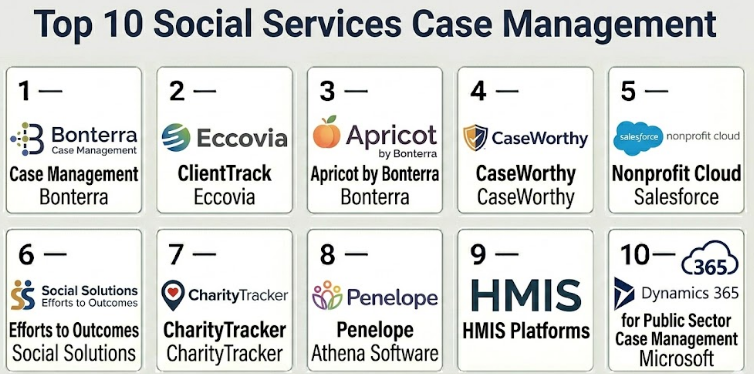
Top 10 Social Services Case Management Tools
#1 — Bonterra Case Management
Short description :
Bonterra Case Management is designed for nonprofits, human services organizations, and public sector programs that need structured client records, service tracking, referrals, and outcome reporting. It helps agencies manage intake, case notes, assessments, service plans, documents, and program reporting. The platform is useful for organizations that support clients across multiple social programs and need better visibility into service delivery. It can support grant reporting and impact measurement when configured properly. It is best for nonprofit and community service organizations that need a strong case management system with reporting capabilities.
Key Features
- Client intake and profile management
- Case notes and service tracking
- Assessment and eligibility workflows
- Referral and provider coordination
- Outcome and impact reporting
- Document and form management
- Program-level dashboards and reporting
Pros
- Strong fit for nonprofit and human services programs.
- Useful for tracking services, outcomes, and grant reporting.
- Supports structured caseworker workflows across programs.
Cons
- Configuration may be needed for complex program models.
- Smaller teams may need time to learn reporting setup.
- Security and compliance claims should be validated directly.
Platforms / Deployment
Web / Mobile-supported workflows
Cloud / Varies / N/A
Security & Compliance
SSO/SAML: Varies / N/A
MFA: Varies / N/A
Encryption: Not publicly stated
Audit logs: Varies / N/A
RBAC: Varies / N/A
HIPAA / SOC 2 / ISO 27001 / GDPR: Not publicly stated
Integrations & Ecosystem
Bonterra Case Management fits agencies that need client service workflows connected with nonprofit operations and reporting.
- Fundraising and donor systems where configured
- Grant reporting workflows
- Referral partner workflows
- Document management
- Program reporting dashboards
- Data export and analytics workflows
Support & Community
Support is generally focused on nonprofit and social impact organizations. Buyers should confirm onboarding, workflow configuration, training, data migration, and reporting assistance.
#2 — Eccovia ClientTrack
Short description :
Eccovia ClientTrack is a human services case management platform used by government agencies, nonprofits, and community programs. It supports client intake, service coordination, referrals, eligibility, care planning, program enrollment, and outcomes tracking. The platform is useful for organizations working across housing, behavioral health, reentry, homelessness services, and community support. It can help teams coordinate services across multiple providers and track client progress over time. It is best for agencies needing strong human services coordination and multi-program case tracking.
Key Features
- Client intake and case records
- Service plans and goal tracking
- Referral and provider coordination
- Eligibility and program enrollment workflows
- Outcome reporting and dashboards
- Document and assessment management
- Multi-program human services support
Pros
- Strong fit for human services and coordinated care programs.
- Useful for agencies managing referrals and service networks.
- Supports complex client journeys across multiple programs.
Cons
- Implementation may require careful program mapping.
- Smaller organizations may need support configuring workflows.
- Integration needs should be validated early.
Platforms / Deployment
Web / Mobile-supported workflows
Cloud / Varies / N/A
Security & Compliance
SSO/SAML: Varies / N/A
MFA: Varies / N/A
Encryption: Not publicly stated
Audit logs: Varies / N/A
RBAC: Varies / N/A
HIPAA: Varies / N/A
SOC 2 / ISO 27001 / GDPR: Not publicly stated
Integrations & Ecosystem
ClientTrack fits social service environments where multiple providers and programs support the same client population.
- Referral networks
- Housing and homelessness workflows
- Behavioral health coordination
- Reentry support programs
- Reporting dashboards
- Public sector and nonprofit data workflows
Support & Community
Support is generally public-sector and human-services focused. Agencies should confirm implementation planning, training, migration support, reporting setup, and data governance guidance.
#3 — Apricot by Bonterra
Short description :
Apricot by Bonterra is a case management and outcomes tracking platform commonly used by nonprofits, social service providers, and community organizations. It helps teams manage client intake, assessments, case notes, service delivery, referrals, forms, documents, and reporting. The platform is useful for organizations that need configurable forms and program tracking without building a custom system from scratch. It can support many program types, including family services, youth programs, housing support, victim services, workforce programs, and community assistance. It is best for nonprofits that need flexible case tracking and strong reporting.
Key Features
- Custom client intake forms
- Case notes and service records
- Assessment and survey workflows
- Referral and follow-up tracking
- Program and outcome reporting
- Document upload and management
- Dashboards and data exports
Pros
- Flexible for many nonprofit program types.
- Useful for tracking outcomes and service delivery.
- Configurable forms support different agency workflows.
Cons
- Advanced reporting may require training.
- Complex configurations can become hard to manage without governance.
- Agencies should validate privacy and compliance needs.
Platforms / Deployment
Web / Browser-based workflows
Cloud
Security & Compliance
SSO/SAML: Varies / N/A
MFA: Varies / N/A
Encryption: Not publicly stated
Audit logs: Varies / N/A
RBAC: Varies / N/A
HIPAA / SOC 2 / ISO 27001 / GDPR: Not publicly stated
Integrations & Ecosystem
Apricot fits social service organizations that need flexible forms, reporting, and case tracking.
- Donor and fundraising systems where configured
- Reporting and dashboard tools
- Form and survey workflows
- Referral tracking
- Document storage
- Program evaluation workflows
Support & Community
Support is generally nonprofit-focused. Organizations should confirm training, form setup assistance, reporting help, migration support, and administrator guidance.
#4 — CaseWorthy
Short description :
CaseWorthy is a human services case management platform designed for nonprofits, government agencies, and community service organizations. It supports intake, assessments, eligibility, service planning, referrals, outcomes tracking, and reporting. The platform is useful for organizations that manage complex social service workflows across multiple programs and locations. It can support needs such as homelessness services, workforce programs, family support, reentry, and community assistance. It is best for agencies that need a configurable and comprehensive case management system.
Key Features
- Client intake and eligibility screening
- Case plans and service tracking
- Assessment and program enrollment workflows
- Referral and provider coordination
- Outcome tracking and reporting
- Document and form management
- Multi-program configuration support
Pros
- Strong fit for complex human services workflows.
- Useful for agencies managing multiple programs and reporting needs.
- Supports configurable client and service tracking.
Cons
- Implementation can require detailed planning.
- Smaller teams may need administrative support to manage configuration.
- Integration and reporting requirements should be reviewed carefully.
Platforms / Deployment
Web / Mobile-supported workflows
Cloud / Varies / N/A
Security & Compliance
SSO/SAML: Varies / N/A
MFA: Not publicly stated
Encryption: Not publicly stated
Audit logs: Varies / N/A
RBAC: Varies / N/A
HIPAA: Varies / N/A
SOC 2 / ISO 27001 / GDPR: Not publicly stated
Integrations & Ecosystem
CaseWorthy fits organizations where social service case management needs to connect with programs, providers, and reporting.
- Referral workflows
- Program reporting
- Government reporting requirements where configured
- Document management
- Community provider networks
- Data exports and analytics
Support & Community
Support is generally human-services focused. Buyers should confirm implementation support, workflow configuration, training, data conversion, and reporting services.
#5 — Salesforce Nonprofit Cloud
Short description :
Salesforce Nonprofit Cloud can support social services case management through configurable client records, program management, referrals, service tracking, engagement history, and reporting. It is useful for organizations that want a flexible platform with strong CRM capabilities and a large ecosystem. The platform can be configured for nonprofits, foundations, public agencies, and social impact teams. It is best for organizations with internal platform skills or implementation partner support. It can be powerful, but it requires proper governance to avoid over-customization.
Key Features
- Client and household records
- Program and service management
- Referral and engagement tracking
- Configurable workflows and automation
- Reporting and dashboards
- Large integration ecosystem
- Donor, volunteer, and program data connectivity
Pros
- Highly flexible platform for complex organizations.
- Strong ecosystem for integrations and customization.
- Useful when social services data must connect with CRM, fundraising, and engagement.
Cons
- Requires careful implementation and administration.
- Can become complex without governance.
- Smaller agencies may find it more than they need.
Platforms / Deployment
Web / Mobile-supported workflows
Cloud
Security & Compliance
SSO/SAML: Varies / N/A
MFA: Varies / N/A
Encryption: Not publicly stated
Audit logs: Varies / N/A
RBAC: Varies / N/A
HIPAA / SOC 2 / ISO 27001 / GDPR: Not publicly stated
Integrations & Ecosystem
Salesforce Nonprofit Cloud fits organizations that want social services case management connected with a wider CRM and nonprofit ecosystem.
- Donor management workflows
- Volunteer systems
- Referral networks
- Communication tools
- Reporting and analytics
- Third-party case management extensions
Support & Community
Support depends on licensing, implementation partner, and internal admin capacity. Organizations should plan for configuration governance, user training, data migration, and long-term platform maintenance.
#6 — Social Solutions Efforts to Outcomes
Short description :
Social Solutions Efforts to Outcomes, often known as ETO, is a case management and outcomes tracking platform used by nonprofits, government programs, and social service providers. It helps agencies document services, track client progress, measure program outcomes, and report impact. The platform is useful for organizations that need strong performance measurement and program evaluation. It can support case notes, assessments, service delivery, referrals, and reports. It is best for agencies focused on outcomes, grant accountability, and data-driven program management.
Key Features
- Client and case record management
- Service tracking and case notes
- Assessment and outcome measurement
- Program performance reporting
- Grant and funder reporting support
- Referral and follow-up workflows
- Dashboards and analytics
Pros
- Strong focus on outcomes and impact measurement.
- Useful for grant-funded social service programs.
- Helps connect casework with performance reporting.
Cons
- Reporting setup may require training.
- Configuration should be managed carefully across programs.
- Agencies should validate current product packaging and support.
Platforms / Deployment
Web / Browser-based workflows
Cloud / Varies / N/A
Security & Compliance
SSO/SAML: Varies / N/A
MFA: Not publicly stated
Encryption: Not publicly stated
Audit logs: Varies / N/A
RBAC: Varies / N/A
HIPAA / SOC 2 / ISO 27001 / GDPR: Not publicly stated
Integrations & Ecosystem
ETO fits agencies that need social service activity data connected with outcomes and reporting.
- Grant reporting workflows
- Program evaluation tools
- Referral tracking
- Client assessment workflows
- Data exports
- Dashboards and analytics
Support & Community
Support is generally nonprofit and social services focused. Buyers should confirm implementation services, report building support, training, migration help, and product roadmap details.
#7 — CharityTracker
Short description :
CharityTracker is a social services coordination platform used by nonprofits, churches, community coalitions, and assistance networks. It helps organizations track client assistance, referrals, notes, needs, and duplicate service usage across community partners. The platform is especially useful where multiple local organizations collaborate to support the same population. It can help reduce duplicate assistance and improve visibility into community needs. It is best for community assistance networks, food banks, faith-based groups, and local nonprofit coalitions.
Key Features
- Client assistance tracking
- Referral and partner coordination
- Community network collaboration
- Case notes and service history
- Duplicate assistance visibility
- Reporting on community needs
- Agency-level user access
Pros
- Strong fit for community assistance networks.
- Useful for reducing duplicate services across partner agencies.
- Practical for nonprofits and faith-based support programs.
Cons
- May not fit complex government case management needs.
- Advanced workflow configuration may be limited compared with enterprise platforms.
- Privacy and data-sharing agreements must be planned carefully.
Platforms / Deployment
Web / Browser-based workflows
Cloud
Security & Compliance
SSO/SAML: Not publicly stated
MFA: Not publicly stated
Encryption: Not publicly stated
Audit logs: Varies / N/A
RBAC: Varies / N/A
HIPAA / SOC 2 / ISO 27001 / GDPR: Not publicly stated
Integrations & Ecosystem
CharityTracker fits local service networks where community partners need shared visibility into client assistance.
- Community nonprofit networks
- Referral workflows
- Food and emergency assistance programs
- Faith-based assistance networks
- Local reporting workflows
- Partner collaboration workflows
Support & Community
Support is generally oriented toward nonprofits and community coalitions. Organizations should confirm onboarding, data-sharing setup, privacy practices, and partner training.
#8 — Penelope by Athena Software
Short description :
Penelope by Athena Software is a case management platform used by social service organizations, behavioral health providers, family service agencies, and community support programs. It supports intake, scheduling, case notes, service plans, documents, billing-related workflows, and reporting. The platform is useful for agencies providing ongoing support services and client care coordination. It can help teams manage client progress, appointments, and provider interactions. It is best for human services organizations that need case management with service delivery and scheduling features.
Key Features
- Client intake and case records
- Appointment and scheduling workflows
- Service planning and progress notes
- Document and form management
- Reporting and dashboards
- Program and provider workflows
- Billing-related support where configured
Pros
- Good fit for service delivery organizations.
- Useful for appointment-based social services programs.
- Supports ongoing client care coordination.
Cons
- Agencies should validate reporting complexity.
- Enterprise government workflows may need deeper configuration.
- Security and compliance requirements should be reviewed directly.
Platforms / Deployment
Web / Browser-based workflows
Cloud / Varies / N/A
Security & Compliance
SSO/SAML: Varies / N/A
MFA: Not publicly stated
Encryption: Not publicly stated
Audit logs: Varies / N/A
RBAC: Varies / N/A
HIPAA: Varies / N/A
SOC 2 / ISO 27001 / GDPR: Not publicly stated
Integrations & Ecosystem
Penelope fits organizations that combine case management, client services, scheduling, and progress documentation.
- Scheduling workflows
- Client service records
- Document management
- Reporting tools
- Referral workflows
- Billing or finance workflows where configured
Support & Community
Support is generally focused on human services and care organizations. Buyers should confirm onboarding, configuration support, staff training, migration help, and reporting setup.
#9 — HMIS Platforms
Short description :
HMIS platforms, or Homeless Management Information Systems, are used by homelessness service providers, housing agencies, shelters, and community coalitions to manage client records, services, shelter stays, referrals, housing placements, and reporting. These systems are important for communities managing homelessness response programs and coordinated entry. They help agencies track client needs, housing status, service history, and outcomes. HMIS tools are usually selected based on local program requirements and reporting rules. They are best for homelessness services and housing-focused social support programs.
Key Features
- Homelessness services case records
- Shelter stay and service tracking
- Coordinated entry support
- Housing placement workflows
- Client assessment and referral tracking
- Program and outcome reporting
- Community-level data coordination
Pros
- Strong fit for homelessness and housing service programs.
- Useful for coordinated entry and community-level reporting.
- Helps track services across shelters and housing providers.
Cons
- Best suited for homelessness programs, not all social services.
- Local reporting requirements can make setup complex.
- Data-sharing and consent workflows must be managed carefully.
Platforms / Deployment
Web / Browser-based workflows
Cloud / Varies / N/A
Security & Compliance
SSO/SAML: Varies / N/A
MFA: Varies / N/A
Encryption: Not publicly stated
Audit logs: Varies / N/A
RBAC: Varies / N/A
HIPAA / SOC 2 / ISO 27001 / GDPR: Not publicly stated
Integrations & Ecosystem
HMIS platforms fit housing and homelessness ecosystems where many providers need shared reporting and service coordination.
- Shelter management workflows
- Housing referral systems
- Coordinated entry processes
- Program reporting
- Community provider networks
- Client assessment tools
Support & Community
Support depends on the specific HMIS vendor, local administrator, and community configuration. Agencies should confirm reporting setup, privacy rules, user training, and data quality support.
#10 — Microsoft Dynamics 365 for Public Sector Case Management
Short description :
Microsoft Dynamics 365 can be configured for public sector and social services case management using CRM, workflow automation, service tracking, documents, communication, and reporting features. It is useful for government agencies and large nonprofits that need a flexible enterprise platform. The platform can support intake, assignments, referrals, service requests, client records, and dashboards when configured properly. It is best for organizations with strong IT capacity or implementation partners. It can be powerful for multi-department case management, but it requires careful design and governance.
Key Features
- Configurable client and case records
- Workflow automation and routing
- Service request and referral tracking
- Document and communication management
- Reporting and dashboards
- Integration with Microsoft ecosystem
- Role-based access workflows
Pros
- Strong enterprise platform flexibility.
- Useful for agencies already using Microsoft tools.
- Can support complex public sector workflows when configured well.
Cons
- Requires implementation expertise.
- Not a ready-made social services tool without configuration.
- Governance is important to avoid complexity and inconsistency.
Platforms / Deployment
Web / Windows / Mobile-supported workflows
Cloud / Hybrid / Varies / N/A
Security & Compliance
SSO/SAML: Varies / N/A
MFA: Varies / N/A
Encryption: Not publicly stated
Audit logs: Varies / N/A
RBAC: Varies / N/A
HIPAA / SOC 2 / ISO 27001 / GDPR: Not publicly stated
Integrations & Ecosystem
Microsoft Dynamics 365 fits agencies that want case management connected with enterprise productivity, identity, analytics, and document workflows.
- Microsoft 365 ecosystem
- Power Platform workflows
- Document management
- Reporting and analytics
- Communication tools
- External public sector systems where configured
Support & Community
Support depends on licensing, internal IT skills, and implementation partner quality. Agencies should plan governance, data model design, training, integration strategy, and long-term administration.
Comparison Table
| Tool Name | Best For | Platform(s) Supported | Deployment | Standout Feature | Public Rating |
|---|---|---|---|---|---|
| Bonterra Case Management | Nonprofits and human services programs | Web, mobile-supported workflows | Cloud / Varies / N/A | Case tracking with outcomes reporting | N/A |
| Eccovia ClientTrack | Government and community human services coordination | Web, mobile-supported workflows | Cloud / Varies / N/A | Multi-program client service coordination | N/A |
| Apricot by Bonterra | Flexible nonprofit case management | Web | Cloud | Configurable forms and program reporting | N/A |
| CaseWorthy | Complex social services workflows | Web, mobile-supported workflows | Cloud / Varies / N/A | Multi-program human services configuration | N/A |
| Salesforce Nonprofit Cloud | Large nonprofits needing CRM-connected case management | Web, mobile-supported workflows | Cloud | Flexible nonprofit platform ecosystem | N/A |
| Social Solutions Efforts to Outcomes | Outcome-focused grant-funded programs | Web | Cloud / Varies / N/A | Impact measurement and performance reporting | N/A |
| CharityTracker | Community assistance networks | Web | Cloud | Shared assistance tracking across agencies | N/A |
| Penelope by Athena Software | Service delivery and appointment-based programs | Web | Cloud / Varies / N/A | Case management with scheduling workflows | N/A |
| HMIS Platforms | Homelessness and housing service providers | Web | Cloud / Varies / N/A | Housing and coordinated entry workflows | N/A |
| Microsoft Dynamics 365 for Public Sector Case Management | Enterprise public sector case workflows | Web, Windows, mobile-supported workflows | Cloud / Hybrid / Varies / N/A | Configurable enterprise case management platform | N/A |
Evaluation & Social Services Case Management Tools
| Tool Name | Core (25%) | Ease (15%) | Integrations (15%) | Security (10%) | Performance (10%) | Support (10%) | Value (15%) | Weighted Total (0–10) |
|---|---|---|---|---|---|---|---|---|
| Bonterra Case Management | 8 | 8 | 7 | 7 | 8 | 8 | 7 | 7.65 |
| Eccovia ClientTrack | 9 | 7 | 8 | 8 | 8 | 8 | 7 | 7.95 |
| Apricot by Bonterra | 8 | 8 | 7 | 7 | 8 | 8 | 7 | 7.65 |
| CaseWorthy | 9 | 7 | 8 | 8 | 8 | 8 | 7 | 7.95 |
| Salesforce Nonprofit Cloud | 8 | 7 | 9 | 8 | 8 | 8 | 6 | 7.80 |
| Social Solutions Efforts to Outcomes | 8 | 7 | 7 | 7 | 8 | 8 | 7 | 7.45 |
| CharityTracker | 7 | 9 | 6 | 6 | 7 | 7 | 8 | 7.15 |
| Penelope by Athena Software | 8 | 8 | 7 | 7 | 7 | 7 | 7 | 7.45 |
| HMIS Platforms | 8 | 7 | 7 | 7 | 8 | 7 | 7 | 7.40 |
| Microsoft Dynamics 365 for Public Sector Case Management | 8 | 6 | 9 | 8 | 8 | 8 | 6 | 7.50 |
These scores are comparative and should be used as a shortlist guide. A homelessness services agency may prioritize HMIS workflows, while a nonprofit may prefer Apricot or Bonterra. A government agency may need ClientTrack, CaseWorthy, or Dynamics 365 depending on integration needs. A community coalition may value CharityTracker because partner coordination matters more than enterprise customization. Buyers should validate privacy controls, reporting needs, integrations, migration, usability, and support before choosing.
Which Social Services Case Management Tool Should You Choose?
Solo / Freelancer
Solo social workers, independent consultants, and small service providers usually do not need a large enterprise case management platform. They may need secure client notes, appointment tracking, document storage, and basic reporting.
However, if the work involves sensitive client data, referrals, consent, funder reporting, or ongoing service plans, a lightweight case management system may be better than spreadsheets. Simplicity, privacy, and ease of use should be the top priorities.
SMB
Small nonprofits, community organizations, shelters, faith-based support teams, and local assistance programs should focus on affordability, quick setup, intake forms, service tracking, referral documentation, and basic outcomes reporting. Apricot by Bonterra, Bonterra Case Management, CharityTracker, and Penelope by Athena Software may be practical options depending on program type.
Small teams should avoid over-customizing early. Start with core workflows such as intake, service records, notes, referrals, follow-ups, and simple reports.
Mid-Market
Mid-sized nonprofits, county social service programs, family service agencies, housing providers, and workforce support programs need stronger reporting, role controls, multi-program workflows, referrals, documents, and dashboards. Eccovia ClientTrack, CaseWorthy, Bonterra Case Management, Apricot, and Social Solutions Efforts to Outcomes may be suitable.
Mid-market buyers should test intake, assessment, case planning, referral tracking, progress notes, supervisor review, and grant reporting before purchase.
Enterprise
Large government departments, statewide programs, multi-location nonprofits, and agencies handling complex human services data need scalability, security, integrations, advanced reporting, configurable workflows, and strong governance. Eccovia ClientTrack, CaseWorthy, Salesforce Nonprofit Cloud, and Microsoft Dynamics 365 for Public Sector Case Management may be stronger candidates.
Enterprise buyers should involve caseworkers, supervisors, IT, legal, privacy officers, program managers, reporting teams, and community partners before final selection.
Budget vs Premium
Budget-focused organizations should first identify the most important problem. If duplicate assistance is the issue, a community coordination tool may help. If funder reporting is the issue, an outcomes-focused system may be better. If cross-program case management is the issue, a broader platform is needed.
Premium systems offer deeper configuration, stronger integrations, better scalability, and richer reporting. However, they also require more implementation planning, training, governance, and ongoing administration.
Feature Depth vs Ease of Use
Social services case management tools must support complex needs, but caseworkers need fast and simple workflows. A system that takes too long to update can reduce adoption and increase administrative stress.
Organizations should test the system with real caseworkers using real scenarios such as intake, consent, referrals, follow-ups, home visits, documents, and outcome reporting.
Integrations & Scalability-
Important integrations include benefits systems, healthcare systems, referral networks, document management, donor systems, finance tools, CRM, reporting dashboards, identity systems, communication tools, and government databases where allowed.
Scalability should include caseload growth, program expansion, multiple offices, partner access, reporting volume, user roles, data retention, and future funding requirements. A system should support both current service delivery and future program growth.
Security & Compliance Needs
Social services systems may store sensitive information about housing, income, health, children, family status, legal issues, immigration, domestic violence, disability, benefits, and personal safety. Security and privacy review should be mandatory.
Organizations should ask about SSO, MFA, RBAC, audit logs, encryption, consent controls, data-sharing rules, retention, backup, disaster recovery, breach response, and HIPAA relevance where applicable. Do not assume compliance without formal documentation.
Frequently Asked Questions
1. What is Social Services Case Management software?
Social Services Case Management software helps organizations manage client intake, assessments, case plans, referrals, notes, services, documents, follow-ups, and outcomes. It gives caseworkers one structured place to manage ongoing client support.
2. How is it different from a normal CRM?
A CRM usually focuses on contacts, communication, and relationships. Social services case management focuses on client needs, services, eligibility, referrals, privacy, case notes, assessments, outcomes, and program reporting.
3. What features matter most for social service agencies?
Important features include intake forms, client profiles, case notes, assessments, service plans, referrals, documents, appointment tracking, reporting, role-based access, audit logs, and outcome measurement.
4. Can these tools support grant reporting?
Yes, many tools support program and outcome reporting that can help with grants. Agencies should validate whether the system can track the specific metrics, demographics, service counts, and outcomes required by funders.
5. Can multiple agencies share client information?
Some platforms support partner collaboration and referrals, but data-sharing must be handled carefully. Agencies should define consent, permissions, privacy rules, access limits, and data-sharing agreements before enabling shared access.
6. Are these tools useful for homelessness services?
Yes, but homelessness programs may need HMIS-specific workflows, coordinated entry, shelter tracking, housing referrals, and community reporting. Agencies should confirm whether the chosen system meets local program requirements.
7. What are common mistakes when choosing these tools?
Common mistakes include choosing a tool without involving caseworkers, ignoring reporting needs, underestimating data migration, skipping privacy review, over-customizing workflows, and not planning user training.
8. Can caseworkers use these systems in the field?
Many systems offer browser or mobile-friendly access, but field usability varies. Agencies should test mobile workflows for home visits, outreach, shelter work, community events, and offline or low-connectivity environments.
9. How should agencies evaluate pricing?
Agencies should review user licenses, modules, implementation, data migration, reporting setup, training, support, storage, partner access, and future program expansion. The lowest starting price may not be the best long-term value.
10. Is HIPAA compliance required?
It depends on the organization, services provided, data stored, and legal obligations. Some social service agencies may handle health-related information, while others may not be covered in the same way. Agencies should review requirements with legal or compliance teams.
Conclusion
Social Services Case Management software helps agencies and nonprofits deliver more organized, accountable, and client-centered support. The right system can improve intake, case planning, referrals, follow-ups, documentation, reporting, and outcome measurement while reducing reliance on paper files and disconnected spreadsheets. However, the best tool depends on program type, organization size, reporting needs, privacy requirements, referral networks, and staff capacity. A small nonprofit may choose Apricot, Bonterra, CharityTracker, or Penelope, while a larger government or multi-program agency may evaluate Eccovia ClientTrack, CaseWorthy, Salesforce Nonprofit Cloud, or Microsoft Dynamics 365.
