Introduction
HR Analytics Platforms help organizations understand workforce data and make better people decisions. In simple words, these tools collect, organize, analyze, and visualize HR data so leaders can see what is happening across hiring, retention, performance, engagement, compensation, diversity, workforce planning, productivity, absenteeism, and employee movement.
Instead of relying only on spreadsheets or manual reports, HR analytics platforms give HR teams and business leaders dashboards, trends, predictions, and insights. They help answer important questions such as: Why are employees leaving? Which teams are growing fast? Where are skill gaps appearing? Which roles are hard to fill? Are promotions fair? How is employee engagement changing?
Common use cases include workforce planning, attrition analysis, diversity reporting, headcount forecasting, compensation analysis, hiring funnel analysis, employee engagement insights, manager dashboards, and executive workforce reporting.
Buyers should evaluate data integration, dashboard flexibility, predictive analytics, data governance, security, ease of use, HRIS compatibility, reporting automation, workforce planning depth, scalability, and support quality.
Best for: HR leaders, people analytics teams, CHROs, HR operations teams, finance teams, workforce planning teams, talent acquisition leaders, enterprise IT teams, and organizations that want data-driven people decisions.
Not ideal for: very small teams with limited HR data, companies that only need basic payroll reports, or organizations that are not ready to act on workforce insights. In those cases, built-in HRIS reports or spreadsheet dashboards may be enough.
Key Trends in HR Analytics Platforms
- People analytics is becoming a leadership function, not just an HR reporting task. Business leaders now expect HR data to support workforce strategy and planning.
- Predictive analytics is becoming more common, especially for attrition risk, hiring demand, workforce gaps, and succession planning.
- AI-assisted insights are improving data interpretation, helping HR teams find patterns, summarize trends, and identify risk areas faster.
- Workforce planning and scenario modeling are growing in importance, especially for companies managing hiring plans, cost controls, skills gaps, and restructuring.
- Employee experience data is being combined with workforce data, giving companies a more complete view of engagement, retention, performance, and culture.
- Data governance is becoming a major buying factor, because HR data includes sensitive employee information, compensation, demographics, and performance records.
- Self-service analytics is becoming expected, allowing HR business partners and managers to access dashboards without asking analytics teams for every report.
- Integration with HRIS, payroll, ATS, LMS, engagement, and performance systems is now essential, because HR analytics depends on clean and connected data.
- Skills intelligence is becoming more important, helping organizations understand current capabilities, future skill needs, and internal mobility opportunities.
- Executive dashboards are becoming more strategic, moving beyond headcount reporting into workforce cost, retention risk, productivity, and organizational health.
How We Selected These Tools
The tools below were selected using practical business-focused evaluation logic.
- Market recognition: Platforms widely known in HR analytics, people analytics, workforce planning, HCM analytics, and employee data intelligence were prioritized.
- Feature completeness: Dashboards, reporting, predictive analytics, workforce planning, data modeling, and insights were considered.
- Integration strength: Tools that connect with HRIS, payroll, ATS, engagement, performance, learning, and finance systems were given stronger consideration.
- Enterprise readiness: Security, governance, role-based access, data privacy, auditability, and scalability were evaluated.
- Ease of use: HR teams and business leaders should be able to understand insights without heavy technical dependency.
- Analytics depth: Platforms with advanced segmentation, forecasting, benchmarks, and workforce modeling were prioritized.
- Customer fit: The list includes enterprise suites, dedicated people analytics platforms, workforce planning tools, and HCM-native analytics solutions.
- Decision support: Tools were evaluated for how well they help leaders move from data to action.
- Support and implementation: Documentation, onboarding, customer success, and professional services were considered important.
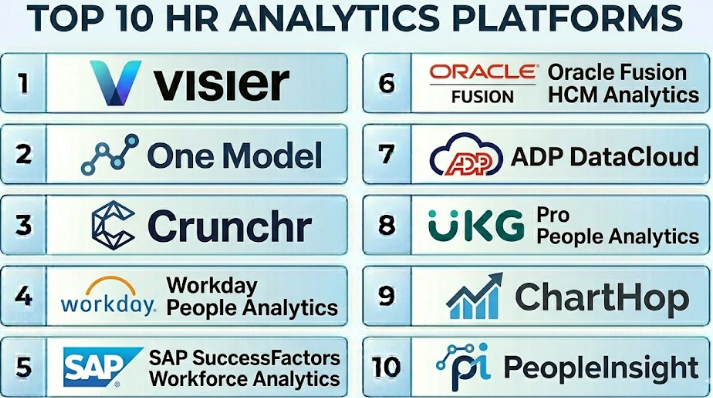
Top 10 HR Analytics Platforms
#1 — Visier
Short description :
Visier is a leading people analytics and workforce intelligence platform designed for organizations that want deep insights into workforce trends, retention, hiring, diversity, performance, and planning. It helps HR leaders and executives understand workforce movement, identify risks, and make better talent decisions. Visier is especially useful for mid-market and enterprise companies that need advanced people analytics beyond basic HR reporting. It supports dashboards, analytics models, workforce planning, and predictive insights. It is best for companies that want a dedicated people analytics platform with strong workforce intelligence capabilities.
Key Features
- Workforce analytics dashboards.
- Attrition and retention insights.
- Workforce planning and scenario modeling.
- Diversity and inclusion analytics.
- Talent acquisition analytics.
- Predictive analytics capabilities.
- Executive reporting and people insights.
Pros
- Strong dedicated people analytics platform.
- Useful for advanced workforce insights and planning.
- Good fit for HR leaders and people analytics teams.
Cons
- May be more advanced than small businesses need.
- Implementation depends on clean data integration.
- Requires internal ownership to turn insights into decisions.
Platforms / Deployment
Web
Cloud
Security & Compliance
Supports enterprise security, access controls, role-based permissions, and data governance features. Specific certifications and compliance details should be validated directly with the vendor.
Integrations & Ecosystem
Visier is designed to connect with multiple HR and business systems so organizations can create a unified workforce data layer.
- HRIS systems.
- Payroll platforms.
- Applicant tracking systems.
- Performance management tools.
- Learning systems.
- Engagement and survey platforms.
Support & Community
Visier provides enterprise onboarding, documentation, customer success support, and people analytics guidance. It is well suited for organizations building a mature people analytics function.
#2 — One Model
Short description :
One Model is a people analytics platform focused on connecting HR data from many systems and turning it into trusted analytics, dashboards, and insights. It is useful for organizations that struggle with fragmented HR data across HRIS, ATS, payroll, engagement, performance, and learning systems. One Model is especially strong for people analytics teams that want flexible data modeling and deeper control over workforce data. It supports reporting, workforce analytics, predictive modeling, and data pipelines. It is best for companies that need a strong HR data foundation with advanced analytics flexibility.
Key Features
- People analytics data modeling.
- Workforce dashboards and reporting.
- Data integration across HR systems.
- Predictive analytics capabilities.
- Custom metrics and data transformation.
- Analytics-ready HR data layer.
- Executive and operational reporting.
Pros
- Strong for complex HR data environments.
- Flexible for people analytics teams.
- Useful when data quality and integration are major challenges.
Cons
- May require analytics and data expertise.
- More technical than simple dashboard tools.
- Best value appears when multiple HR systems must be connected.
Platforms / Deployment
Web
Cloud
Security & Compliance
Supports enterprise data security, access controls, and governance capabilities. Specific compliance certifications should be validated directly with the vendor.
Integrations & Ecosystem
One Model is built to connect HR data from many sources into a usable analytics foundation.
- HRIS platforms.
- ATS systems.
- Payroll tools.
- Engagement platforms.
- Performance systems.
- Data warehouse and BI workflows.
Support & Community
One Model provides implementation support, documentation, and customer success resources. It is best suited for organizations with people analytics or HR data teams.
#3 — Crunchr
Short description :
Crunchr is an HR analytics and strategic workforce planning platform designed to help organizations understand workforce trends, forecast future needs, and improve people decisions. It supports dashboards, workforce planning, diversity analytics, retention insights, and scenario modeling. Crunchr is useful for companies that want to connect HR data with business planning. It is especially relevant for HR leaders, workforce planning teams, and people analytics teams. It is best for organizations that want practical workforce insights and planning in one platform.
Key Features
- HR analytics dashboards.
- Strategic workforce planning.
- Scenario modeling.
- Diversity and inclusion analytics.
- Headcount and workforce movement analysis.
- Retention and attrition insights.
- Executive reporting.
Pros
- Strong workforce planning orientation.
- Useful for HR and finance collaboration.
- Good for strategic workforce decision-making.
Cons
- May require clean data inputs from multiple systems.
- Smaller teams may not need full workforce planning depth.
- Best results require planning discipline and executive involvement.
Platforms / Deployment
Web
Cloud
Security & Compliance
Supports enterprise access control and data governance features. Specific security and compliance details should be validated directly with the vendor.
Integrations & Ecosystem
Crunchr connects with workforce and HR data systems to support planning and analytics.
- HRIS systems.
- Payroll systems.
- Finance planning workflows.
- Talent systems.
- Engagement data sources.
- Business reporting tools.
Support & Community
Crunchr provides onboarding, support resources, and workforce planning guidance. It is useful for organizations building strategic workforce analytics capability.
#4 — Workday People Analytics
Short description :
Workday People Analytics is part of the Workday ecosystem and helps organizations analyze workforce data inside Workday. It is useful for companies already using Workday Human Capital Management and related Workday products. The platform helps HR and business leaders understand workforce trends, talent movement, retention, diversity, hiring, and organizational performance. It is best for Workday-first organizations that want analytics close to their core HR data. It can reduce the need for separate reporting tools when the company’s workforce data already lives in Workday.
Key Features
- Workforce analytics inside Workday.
- People insights and dashboards.
- Talent and workforce trend analysis.
- Retention and movement insights.
- Diversity and workforce composition reporting.
- Manager and executive reporting.
- Integration with Workday HCM data.
Pros
- Strong fit for organizations already using Workday.
- Keeps analytics close to core HR data.
- Useful for HR leaders and managers inside the Workday ecosystem.
Cons
- Best value depends on Workday adoption.
- Less suitable for organizations not using Workday.
- Cross-system analytics may still require additional data integration.
Platforms / Deployment
Web
Cloud
Security & Compliance
Security and compliance depend on Workday configuration and licensing. Supports enterprise access controls, role-based permissions, and HR data governance within the Workday ecosystem.
Integrations & Ecosystem
Workday People Analytics works naturally with Workday HCM and related workforce data.
- Workday HCM.
- Workday talent data.
- Workday payroll workflows.
- Workday reporting.
- Employee lifecycle data.
- Related HR and finance workflows.
Support & Community
Workday provides enterprise documentation, implementation partners, customer support, and a large customer ecosystem. It is best for companies already invested in Workday.
#5 — SAP SuccessFactors Workforce Analytics
Short description :
SAP SuccessFactors Workforce Analytics helps organizations analyze workforce data, understand HR trends, and support strategic workforce planning. It is especially relevant for companies using SAP SuccessFactors as their core HR platform. The tool supports HR reporting, workforce metrics, benchmarking-style insights, and people analytics dashboards. It is suitable for enterprise organizations that need analytics connected to global HR processes. It is best for SAP-focused companies that want workforce analytics within their existing HCM ecosystem.
Key Features
- Workforce analytics and HR reporting.
- Talent and employee lifecycle metrics.
- Workforce planning support.
- Diversity and headcount analytics.
- HR benchmarking-style insights.
- Dashboard and reporting capabilities.
- Integration with SAP SuccessFactors data.
Pros
- Strong fit for SAP SuccessFactors customers.
- Useful for enterprise HR reporting and analytics.
- Good for global workforce data visibility.
Cons
- Best value depends on SAP ecosystem adoption.
- Implementation may require SAP expertise.
- Less ideal for companies outside the SAP environment.
Platforms / Deployment
Web
Cloud
Security & Compliance
Security and compliance capabilities depend on SAP SuccessFactors configuration and licensing. Supports enterprise access controls, governance, and HR data protection features within the SAP ecosystem.
Integrations & Ecosystem
SAP SuccessFactors Workforce Analytics is designed to work with SAP HR and business systems.
- SAP SuccessFactors HCM.
- SAP business systems.
- Talent management workflows.
- Payroll and HR operations data.
- Workforce planning processes.
- Enterprise reporting workflows.
Support & Community
SAP provides documentation, enterprise support, implementation partner resources, and a large global customer ecosystem. It is best suited for companies already using SAP SuccessFactors.
#6 — Oracle Fusion HCM Analytics
Short description :
Oracle Fusion HCM Analytics provides workforce analytics for organizations using Oracle Cloud HCM. It helps HR teams and executives analyze headcount, retention, hiring, performance, diversity, workforce movement, and HR operations. It is suitable for enterprise organizations that want analytics connected to Oracle’s HCM data model. Oracle Fusion HCM Analytics supports dashboards, metrics, and prebuilt insights for HR decision-making. It is best for Oracle-focused companies that want workforce analytics within their existing enterprise cloud environment.
Key Features
- Workforce analytics dashboards.
- Headcount and movement reporting.
- Diversity and workforce composition insights.
- Talent and performance analytics.
- HR operational reporting.
- Prebuilt HCM metrics.
- Integration with Oracle Cloud HCM.
Pros
- Strong fit for Oracle Cloud HCM customers.
- Useful prebuilt analytics for HR teams.
- Good for enterprise reporting and workforce visibility.
Cons
- Best value depends on Oracle ecosystem adoption.
- May require Oracle implementation expertise.
- Less suitable for companies not using Oracle HCM.
Platforms / Deployment
Web
Cloud
Security & Compliance
Security and compliance depend on Oracle Cloud configuration and licensing. Supports enterprise security controls, role-based access, and data governance features within the Oracle ecosystem.
Integrations & Ecosystem
Oracle Fusion HCM Analytics works closely with Oracle Cloud HCM and related enterprise systems.
- Oracle Cloud HCM.
- Oracle analytics environment.
- Talent management data.
- Payroll and workforce data.
- Enterprise reporting workflows.
- Finance and planning connections.
Support & Community
Oracle provides enterprise documentation, customer support, partner implementation resources, and a large enterprise ecosystem. It is best for organizations already using Oracle Cloud HCM.
#7 — ADP DataCloud
Short description :
ADP DataCloud is an analytics and benchmarking platform available for organizations using ADP workforce and payroll solutions. It helps HR and business leaders understand workforce trends, payroll patterns, turnover, compensation, diversity, overtime, and operational metrics. ADP DataCloud is useful for companies that already rely on ADP for payroll or workforce management. It provides dashboards and insights that help leaders make better people and cost decisions. It is best for ADP customers who want analytics connected to payroll and workforce data.
Key Features
- Workforce and payroll analytics.
- Turnover and retention insights.
- Compensation and pay analytics.
- Diversity reporting.
- Benchmarking-style workforce insights.
- Dashboards and data visualization.
- HR and payroll reporting.
Pros
- Strong fit for ADP customers.
- Useful for payroll-linked workforce insights.
- Good for HR and finance collaboration.
Cons
- Best value depends on ADP adoption.
- May not replace a full enterprise people analytics platform.
- Advanced cross-system analytics may require additional tools.
Platforms / Deployment
Web
Cloud
Security & Compliance
Security and compliance depend on ADP platform configuration and selected services. Supports business access controls and workforce data governance features. Specific certifications should be validated directly with the vendor.
Integrations & Ecosystem
ADP DataCloud works best with ADP payroll and workforce data.
- ADP payroll systems.
- ADP workforce management.
- HR reporting workflows.
- Compensation data.
- Workforce planning processes.
- Business analytics workflows.
Support & Community
ADP provides customer support, documentation, account resources, and implementation assistance depending on selected services. It is most useful for organizations already using ADP.
#8 — UKG Pro People Analytics
Short description :
UKG Pro People Analytics helps organizations using UKG Pro analyze workforce, payroll, talent, and employee data. It supports dashboards, reporting, workforce insights, and people analytics for HR leaders and managers. UKG Pro People Analytics is useful for organizations that want reporting and analytics connected to their HR, payroll, and workforce management data. It is especially relevant for companies already using UKG as a core HR platform. It is best for UKG customers who want practical HR analytics inside their existing system.
Key Features
- HR and workforce analytics.
- Payroll and employee data reporting.
- Talent and employee lifecycle insights.
- Dashboards and reporting tools.
- Manager and HR visibility.
- Workforce trend analysis.
- Integration with UKG Pro data.
Pros
- Strong fit for UKG Pro customers.
- Useful for HR and payroll reporting.
- Good for operational workforce visibility.
Cons
- Best value depends on UKG adoption.
- May not meet every advanced people analytics need.
- Cross-system data work may require additional integration.
Platforms / Deployment
Web
Cloud
Security & Compliance
Security and compliance depend on UKG configuration and licensing. Supports access controls, role-based permissions, and workforce data protection features within the UKG ecosystem.
Integrations & Ecosystem
UKG Pro People Analytics works closely with UKG workforce and HR data.
- UKG Pro.
- Payroll data.
- Workforce management data.
- Employee lifecycle records.
- HR reporting workflows.
- Manager dashboards.
Support & Community
UKG provides documentation, customer support, partner resources, and implementation guidance. It is best for organizations already using UKG.
#9 — ChartHop
Short description :
ChartHop is a people operations platform that combines org charts, workforce planning, headcount planning, compensation planning, and people analytics. It helps companies visualize employee data, understand reporting structures, plan teams, and manage organizational changes. ChartHop is especially useful for growing companies that need visibility into headcount, roles, teams, compensation, and planning scenarios. It is best for people operations teams that want visual workforce planning and analytics in one place.
Key Features
- Dynamic org charts.
- People analytics dashboards.
- Headcount planning.
- Compensation planning.
- Scenario modeling.
- Employee profile visibility.
- Workforce planning workflows.
Pros
- Strong visual approach to people data.
- Useful for growing companies and people operations teams.
- Good for headcount and org planning.
Cons
- May not replace deep enterprise analytics platforms.
- Best results depend on accurate HRIS data.
- Advanced reporting needs may require additional BI tools.
Platforms / Deployment
Web
Cloud
Security & Compliance
Supports business access controls, permissions, and data governance features. Specific security certifications should be validated directly with the vendor.
Integrations & Ecosystem
ChartHop connects with HR and business systems to create a visual people data layer.
- HRIS systems.
- ATS platforms.
- Payroll systems.
- Compensation workflows.
- Identity providers.
- Planning and reporting tools.
Support & Community
ChartHop provides onboarding, documentation, and customer support resources. It is practical for people operations teams managing growth, planning, and organizational visibility.
#10 — PeopleInsight
Short description :
PeopleInsight is an HR analytics and workforce reporting platform focused on helping organizations bring people data together and turn it into clear dashboards and insights. It is useful for HR teams that need better visibility across employee lifecycle, workforce trends, engagement, recruitment, retention, and talent metrics. PeopleInsight is suitable for organizations that want HR analytics support without building everything from scratch in a generic BI tool. It is best for HR teams that need practical dashboards, workforce insights, and people analytics guidance.
Key Features
- HR analytics dashboards.
- Workforce reporting.
- Employee lifecycle analytics.
- Recruitment and retention insights.
- People data integration.
- Custom reporting and visualization.
- HR metrics and executive dashboards.
Pros
- Practical HR-focused analytics approach.
- Useful for organizations that need help unifying people data.
- Good for teams that want dashboards without building everything manually.
Cons
- May be less known than larger enterprise platforms.
- Advanced predictive analytics may vary by implementation.
- Best value depends on data quality and reporting goals.
Platforms / Deployment
Web
Cloud
Security & Compliance
Supports business data governance and access control features. Specific security certifications and compliance details should be validated directly with the vendor.
Integrations & Ecosystem
PeopleInsight connects HR data sources to create usable dashboards and insights.
- HRIS systems.
- Recruitment systems.
- Engagement platforms.
- Payroll systems.
- Performance systems.
- Executive reporting workflows.
Support & Community
PeopleInsight provides customer support, implementation guidance, and HR analytics expertise. It is useful for HR teams that want practical analytics support and reporting structure.
Comparison Table
| Tool Name | Best For | Platform(s) Supported | Deployment | Standout Feature | Public Rating |
|---|---|---|---|---|---|
| Visier | Dedicated people analytics and workforce intelligence | Web | Cloud | Advanced workforce insights and planning | N/A |
| One Model | Complex HR data integration and analytics | Web | Cloud | Flexible HR data modeling and analytics layer | N/A |
| Crunchr | Strategic workforce planning | Web | Cloud | Scenario modeling and workforce planning | N/A |
| Workday People Analytics | Workday HCM customers | Web | Cloud | Analytics close to Workday HR data | N/A |
| SAP SuccessFactors Workforce Analytics | SAP SuccessFactors enterprises | Web | Cloud | Workforce analytics inside SAP ecosystem | N/A |
| Oracle Fusion HCM Analytics | Oracle Cloud HCM customers | Web | Cloud | Prebuilt Oracle HCM workforce analytics | N/A |
| ADP DataCloud | ADP payroll and workforce customers | Web | Cloud | Payroll-linked workforce insights | N/A |
| UKG Pro People Analytics | UKG Pro customers | Web | Cloud | HR and payroll analytics inside UKG | N/A |
| ChartHop | Org planning and people operations | Web | Cloud | Visual org charts and headcount planning | N/A |
| PeopleInsight | Practical HR dashboards and workforce reporting | Web | Cloud | HR-focused reporting and people data insights | N/A |
Evaluation & HR Analytics Platforms
| Tool Name | Core (25%) | Ease (15%) | Integrations (15%) | Security (10%) | Performance (10%) | Support (10%) | Value (15%) | Weighted Total (0–10) |
|---|---|---|---|---|---|---|---|---|
| Visier | 10 | 8 | 9 | 9 | 9 | 9 | 8 | 8.90 |
| One Model | 9 | 7 | 10 | 9 | 8 | 8 | 8 | 8.45 |
| Crunchr | 9 | 8 | 8 | 8 | 8 | 8 | 8 | 8.25 |
| Workday People Analytics | 8 | 8 | 9 | 9 | 8 | 9 | 8 | 8.40 |
| SAP SuccessFactors Workforce Analytics | 8 | 7 | 9 | 9 | 8 | 9 | 7 | 8.10 |
| Oracle Fusion HCM Analytics | 8 | 7 | 9 | 9 | 8 | 9 | 7 | 8.10 |
| ADP DataCloud | 8 | 8 | 8 | 8 | 8 | 8 | 8 | 8.00 |
| UKG Pro People Analytics | 8 | 8 | 8 | 8 | 8 | 8 | 8 | 8.00 |
| ChartHop | 8 | 9 | 8 | 8 | 8 | 8 | 8 | 8.15 |
| PeopleInsight | 8 | 8 | 8 | 8 | 8 | 8 | 8 | 8.00 |
These scores are comparative and should be used as a practical guide, not a fixed ranking. Visier, One Model, and Crunchr are strong dedicated people analytics options. Workday, SAP, Oracle, ADP, and UKG analytics tools are strongest when the company already uses those HCM ecosystems. ChartHop is especially useful for visual org planning and headcount planning. The right choice depends on your current HR systems, data maturity, analytics goals, and workforce planning needs.
Which HR Analytics Platforms
Solo / Freelancer
Solo professionals usually do not need a dedicated HR analytics platform. A spreadsheet, simple dashboard, or basic finance and project tracking tool is enough for individual work.
However, HR consultants and people analytics consultants should understand platforms like Visier, One Model, Workday People Analytics, SAP SuccessFactors Workforce Analytics, and ChartHop because larger clients may use these tools for workforce reporting and strategic planning.
SMB
Small and medium businesses should avoid overbuying. If the company only needs basic headcount, turnover, hiring, and payroll reporting, built-in HRIS reports may be enough. For growing SMBs, ChartHop, PeopleInsight, ADP DataCloud, and UKG Pro People Analytics may be practical depending on existing systems.
SMBs should focus on ease of use, clean dashboards, basic workforce metrics, and simple integration with payroll and HRIS data. A highly advanced analytics platform may not deliver value if the company does not yet have clean HR data.
Mid-Market
Mid-market companies usually need stronger analytics because workforce complexity increases across departments, locations, roles, and managers. Visier, One Model, Crunchr, ChartHop, and PeopleInsight are strong options.
At this stage, companies should focus on attrition trends, hiring plans, compensation visibility, employee movement, manager dashboards, diversity reporting, and headcount forecasting. Integration quality becomes very important.
Enterprise
Enterprises should prioritize scalability, governance, predictive analytics, workforce planning, role-based dashboards, data security, and integration with multiple HR and business systems. Visier, One Model, Crunchr, Workday People Analytics, SAP SuccessFactors Workforce Analytics, and Oracle Fusion HCM Analytics are strong candidates depending on the existing technology stack.
Large organizations should involve HR, finance, IT, legal, privacy, and business leaders in the buying process. HR analytics platforms handle sensitive employee data, so governance and access control must be planned carefully.
Budget vs Premium
Budget-conscious organizations should first use the analytics capabilities already available in their HRIS, payroll, or HCM system. ADP, UKG, Workday, Oracle, and SAP customers may already have analytics options available depending on licensing.
Premium dedicated platforms such as Visier, One Model, and Crunchr are better when companies need deeper cross-system analytics, workforce planning, predictive insights, and executive-level workforce intelligence.
Feature Depth vs Ease of Use
If ease of use matters most, ChartHop, ADP DataCloud, UKG Pro People Analytics, and PeopleInsight may be easier for HR teams depending on the environment.
If feature depth matters more, Visier, One Model, Crunchr, Workday People Analytics, SAP SuccessFactors Workforce Analytics, and Oracle Fusion HCM Analytics provide stronger analytics, modeling, governance, and enterprise reporting capabilities.
Integrations & Scalability
For companies with one major HCM system, native analytics may be the simplest path. Workday customers should review Workday People Analytics, SAP customers should review SAP SuccessFactors Workforce Analytics, Oracle customers should review Oracle Fusion HCM Analytics, ADP customers should review ADP DataCloud, and UKG customers should review UKG Pro People Analytics.
For companies with multiple HR systems, dedicated platforms like Visier, One Model, Crunchr, and PeopleInsight may be more flexible because they are designed to bring fragmented people data together.
Security & Compliance Needs
HR analytics platforms process sensitive employee data, including compensation, performance, diversity, location, role, tenure, and sometimes engagement feedback. Security review is essential.
Buyers should validate SSO, MFA, RBAC, row-level permissions, audit logs, data retention, encryption, data residency, privacy controls, and reporting restrictions. Sensitive dashboards should not be available to every manager by default.
Frequently Asked Questions
1. What is an HR Analytics Platform?
An HR Analytics Platform helps organizations collect, analyze, and visualize workforce data. It provides dashboards and insights about employees, hiring, retention, compensation, performance, diversity, and workforce planning. The goal is to help HR and business leaders make better people decisions.
2. How is HR analytics different from HR reporting?
HR reporting usually shows what happened, such as headcount, turnover, or hiring numbers. HR analytics goes deeper by explaining patterns, trends, risks, and possible future outcomes. Good HR analytics helps leaders understand why something is happening and what action may be needed.
3. What pricing models are common for HR Analytics Platforms?
Most platforms use custom pricing, subscription pricing, or pricing based on employee count, modules, data sources, and support level. Native HCM analytics may be bundled or licensed separately depending on the vendor. Buyers should calculate implementation cost along with software cost.
4. What are common mistakes when implementing HR analytics?
Common mistakes include starting with poor data quality, creating too many dashboards, ignoring data governance, and not defining business questions first. Another common mistake is producing reports without helping leaders take action. HR analytics should support decisions, not just display numbers.
5. Which HR Analytics Platform is best for small businesses?
Small businesses may not need advanced platforms at first. Built-in HRIS reporting, ADP DataCloud, UKG Pro People Analytics, ChartHop, or PeopleInsight may be practical depending on the tools already used. The best choice should be simple, affordable, and easy to maintain.
6. Which platform is best for enterprises?
Enterprises often evaluate Visier, One Model, Crunchr, Workday People Analytics, SAP SuccessFactors Workforce Analytics, and Oracle Fusion HCM Analytics. The best choice depends on existing HCM systems, data complexity, workforce planning needs, and analytics maturity.
7. Can HR analytics predict employee attrition?
Many HR analytics platforms can help identify attrition patterns and possible risk factors. However, predictions should be used carefully and ethically. Attrition analytics should support better employee experience and retention planning, not unfair treatment or biased decision-making.
8. What integrations should buyers check?
Buyers should check HRIS, payroll, ATS, performance management, engagement survey, learning management, finance planning, identity provider, and data warehouse integrations. Good integrations reduce manual work and improve trust in dashboards.
9. Is HR analytics secure?
HR analytics can be secure when configured correctly, but the data is sensitive. Organizations should review access controls, permissions, encryption, audit logs, data residency, and privacy policies. Not every manager should see every type of workforce data.
10. What metrics should HR analytics track?
Common metrics include headcount, turnover, retention, hiring funnel, time to fill, cost per hire, compensation, diversity, internal mobility, performance distribution, engagement, absenteeism, promotion rates, and workforce cost. The best metrics depend on business goals.
Conclusion
HR Analytics Platforms help organizations move from basic HR reporting to smarter workforce decision-making. They give HR leaders, managers, finance teams, and executives better visibility into headcount, hiring, retention, engagement, diversity, compensation, and workforce planning. The best platform depends on company size, HR system maturity, data quality, analytics goals, and budget. Visier, One Model, and Crunchr are strong dedicated analytics platforms. Workday, SAP, Oracle, ADP, and UKG analytics tools are practical for companies already using those ecosystems.
