Introduction
CAT tools, or Computer-Assisted Translation tools, are software platforms that help translators, localization teams, and language service providers translate content faster and more consistently. These tools do not replace human translators. Instead, they support translation work through features like translation memory, terminology management, segment matching, quality checks, file handling, collaboration, and project workflow management.
CAT tools are especially important for businesses that publish multilingual content across websites, software products, mobile apps, technical manuals, legal documents, training materials, marketing campaigns, and customer support content. When a company translates the same type of content again and again, CAT tools help reuse previous translations, maintain approved terminology, reduce repeated work, and improve quality.
Real-world use cases include:
- Translating technical documentation with consistent terminology.
- Managing software UI string localization.
- Reusing translation memory for repeated product content.
- Handling multilingual marketing and support content.
- Improving translation quality through QA checks.
- Supporting collaboration between translators, editors, reviewers, and project managers.
Buyers should evaluate:
- Translation memory quality and matching accuracy.
- Terminology management features.
- File format support.
- Collaboration and review workflows.
- Machine translation integration.
- Quality assurance checks.
- Ease of use for translators.
- Project management capabilities.
- Security and access controls.
- Pricing and scalability.
Best for: Freelance translators, translation agencies, localization managers, language service providers, enterprise content teams, technical documentation teams, SaaS companies, e-learning teams, and global businesses.
Not ideal for: Teams that translate very little content, users who only need quick one-time machine translation, or businesses without repeatable multilingual content workflows.
Key Trends in CAT Tools
- AI-assisted translation workflows are becoming more common, helping translators improve speed while keeping human review at the center.
- Translation memory reuse remains a core value because companies want to reduce repeated translation costs and maintain consistency.
- Cloud collaboration is growing as distributed translation teams need shared projects, online review, and real-time updates.
- Machine translation integration is now expected, but professional teams still need human editing, terminology control, and quality checks.
- Terminology management is becoming more important as brands expand into more regions and need consistent product, legal, and technical language.
- Support for software localization is improving, especially for developers working with strings, resource files, and agile release cycles.
- Security and role-based access are increasingly important for enterprise teams handling confidential documents and unreleased product content.
- Automation and APIs are becoming more valuable for companies connecting CAT tools with TMS, CMS, repositories, and project management systems.
- Browser-based CAT tools are gaining adoption because they reduce installation effort and support easier collaboration.
- Hybrid workflows are common, where translators use desktop tools while project managers and reviewers use cloud-based platforms.
How We Selected These Tools
The tools below were selected based on practical relevance in professional translation, localization, and multilingual content production. The evaluation focused on:
- Market adoption and recognition among translators, agencies, and localization teams.
- Strength of core CAT features such as translation memory, terminology, QA, and segmentation.
- Support for common file formats used in business, software, documentation, and publishing.
- Usability for freelance translators, small agencies, mid-market teams, and enterprises.
- Collaboration capabilities for project managers, translators, editors, and reviewers.
- Integration with machine translation, terminology tools, and translation management workflows.
- Flexibility across cloud, desktop, and hybrid working models.
- Fit for different content types, including documents, websites, apps, software strings, and technical manuals.
- Support, documentation, and learning curve.
- Overall value compared with feature depth and workflow maturity.
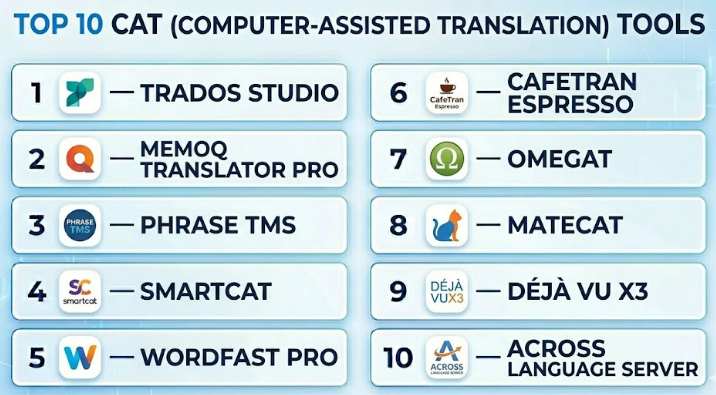
Top 10 CAT (Computer-Assisted Translation) Tools
#1 — Trados Studio
Short description :
Trados Studio is one of the most widely recognized CAT tools used by professional translators, language service providers, and enterprise localization teams. It is known for strong translation memory, terminology management, file compatibility, and mature translation workflows. Trados Studio is often used for technical, legal, medical, enterprise, and software-related translation projects. It is especially useful for translators and agencies that handle large volumes of repeatable content. The tool is feature-rich and powerful, but new users may need time to learn the interface and workflow properly.
Key Features
- Advanced translation memory management.
- Terminology integration through termbase workflows.
- Support for many business and localization file formats.
- Quality assurance checks for translation errors.
- Project package creation and management.
- Compatibility with professional translation workflows.
- Support for machine translation integration.
Pros
- Strong professional reputation in the translation industry.
- Excellent for complex and high-volume translation projects.
- Broad file format support and mature ecosystem.
Cons
- Learning curve can be high for beginners.
- Desktop-heavy workflow may feel complex for simple projects.
- Cost may be high for occasional users.
Platforms / Deployment
Windows
Desktop / Cloud-connected options may vary
Security & Compliance
Not publicly stated
Integrations & Ecosystem
Trados Studio works well in professional translation environments and can connect with terminology, translation memory, project management, and machine translation workflows.
- Translation memory systems
- Terminology management tools
- Machine translation engines
- Review workflows
- Project package workflows
Support & Community
Trados has strong documentation, training resources, professional support options, and a large user community. Many translators, agencies, and localization teams already know the tool, which makes collaboration easier in established translation environments.
#2 — memoQ Translator Pro
Short description :
memoQ Translator Pro is a professional CAT tool designed for translators, reviewers, agencies, and localization teams. It offers strong translation memory, terminology, quality assurance, and project workflow features. memoQ is often appreciated for its practical interface and productivity-focused translation environment. It supports both individual translator workflows and team-based translation projects. The tool is suitable for users who need strong CAT capabilities but want a workflow that can feel more flexible than some traditional enterprise-heavy platforms.
Key Features
- Translation memory creation and reuse.
- Terminology management and glossary support.
- Built-in QA checks for consistency and formatting.
- Support for many document and localization file formats.
- LiveDocs feature for reference-based translation support.
- Collaboration support through memoQ server environments.
- Machine translation integration options.
Pros
- Strong balance between power and usability.
- Good terminology and QA capabilities.
- Useful for freelancers, agencies, and enterprise teams.
Cons
- Advanced collaboration features may require server setup.
- Some workflows require training for best results.
- Pricing may not fit very occasional users.
Platforms / Deployment
Windows
Desktop / Server / Cloud-connected options may vary
Security & Compliance
Not publicly stated
Integrations & Ecosystem
memoQ has a strong translation ecosystem and works well with professional translation memory, terminology, and review processes.
- Translation memory workflows
- Termbase management
- Machine translation engines
- Project management environments
- Server-based team collaboration
Support & Community
memoQ provides documentation, support options, training material, and a strong professional user community. It is commonly used by translators and agencies that need structured but flexible translation workflows.
#3 — Phrase TMS
Short description :
Phrase TMS is a cloud-based translation management and CAT environment designed for localization teams, enterprises, developers, and language service providers. It combines CAT features with project management, automation, machine translation, and collaboration workflows. Phrase TMS is especially useful for teams that want browser-based translation, centralized project control, and integration with localization processes. It is a strong option for software, website, app, and digital product localization. The tool is suitable for teams that need scalable workflows rather than only a standalone desktop CAT tool.
Key Features
- Browser-based CAT editor.
- Translation memory and terminology management.
- Machine translation workflow support.
- Project management and automation features.
- Support for software and content localization.
- Collaboration between translators, reviewers, and managers.
- API and integration support.
Pros
- Strong cloud collaboration.
- Good fit for software and product localization.
- Useful for distributed translation teams.
Cons
- Requires internet access for cloud workflows.
- May feel broader than needed for solo translators.
- Advanced features may depend on plan or configuration.
Platforms / Deployment
Web
Cloud
Security & Compliance
Not publicly stated
Integrations & Ecosystem
Phrase TMS works well in modern localization environments where translation connects with software development, content management, and automation.
- Translation workflows
- Developer tools
- Content systems
- API-based automation
- Machine translation engines
- Terminology and translation memory workflows
Support & Community
Phrase provides documentation, onboarding resources, and customer support options. It has strong visibility among software localization, SaaS, and enterprise localization teams.
#4 — Smartcat
Short description :
Smartcat is a cloud-based CAT and translation platform that supports translators, agencies, enterprises, and multilingual content teams. It combines translation editing, translation memory, terminology, project management, collaboration, and marketplace-style workflows. Smartcat is useful for teams that want an online environment where translators, reviewers, and project managers can work together. It is often selected by organizations that want to reduce tool installation complexity and centralize translation work in the browser. It is suitable for both smaller teams and growing localization operations.
Key Features
- Cloud-based CAT editor.
- Translation memory and glossary support.
- Collaboration for translators, editors, and reviewers.
- Project management features.
- Machine translation integration.
- File format support for business and localization content.
- Workflow automation options.
Pros
- Easy browser-based collaboration.
- Good for teams working with external translators.
- Combines CAT, project management, and marketplace-style workflows.
Cons
- Cloud dependency may not suit every organization.
- Some advanced workflow needs may require configuration.
- Enterprise security details should be verified directly.
Platforms / Deployment
Web
Cloud
Security & Compliance
Not publicly stated
Integrations & Ecosystem
Smartcat supports translation workflows across teams and can be used with different content and business processes.
- Translation memory workflows
- Glossary management
- Machine translation engines
- File-based translation projects
- Team collaboration workflows
Support & Community
Smartcat provides documentation, help resources, and platform support options. Its user base includes freelancers, agencies, and companies managing multilingual content.
#5 — Wordfast Pro
Short description :
Wordfast Pro is a professional CAT tool used by freelance translators, agencies, and language professionals. It provides translation memory, terminology, quality checks, and file handling in a translator-friendly environment. Wordfast is known for being practical and accessible compared with some larger enterprise-heavy CAT tools. It is suitable for translators who need reliable core CAT functionality without unnecessary complexity. Wordfast Pro can be a good choice for document translation, agency projects, and repeatable translation work.
Key Features
- Translation memory creation and reuse.
- Terminology and glossary support.
- Quality assurance checks.
- Support for multiple file formats.
- Project-based translation workflow.
- Machine translation integration options.
- Useful for freelance and agency translation work.
Pros
- Practical and translator-friendly.
- Good core CAT functionality.
- Suitable for freelancers and small teams.
Cons
- May not offer the same enterprise workflow depth as larger platforms.
- Collaboration features may be more limited than cloud-first tools.
- Interface preferences vary by user.
Platforms / Deployment
Windows / macOS / Linux
Desktop
Security & Compliance
Not publicly stated
Integrations & Ecosystem
Wordfast Pro supports professional translation workflows with translation memory, terminology, and file-based translation processes.
- Translation memory workflows
- Glossary management
- Machine translation engines
- File-based translation projects
- Agency handoff workflows
Support & Community
Wordfast has documentation, support options, and a translator community. It is especially known among freelance translators and smaller translation teams.
#6 — CafeTran Espresso
Short description :
CafeTran Espresso is a CAT tool designed for professional translators who want flexibility, translation memory, terminology management, and support for different translation workflows. It is often appreciated by experienced translators who like configurable environments and productivity features. CafeTran can be used for many document-based translation projects and supports integration with translation memories, glossaries, and machine translation. It is especially useful for translators who want a lightweight but capable desktop CAT tool. The tool may require some learning for users who are new to CAT environments.
Key Features
- Translation memory support.
- Glossary and terminology management.
- Machine translation integration options.
- Project-based translation workflow.
- Support for common translation file formats.
- Customizable translator workspace.
- Useful productivity features for individual translators.
Pros
- Flexible and configurable.
- Good fit for experienced freelance translators.
- Lightweight compared with some larger CAT platforms.
Cons
- Interface may require adjustment for new users.
- Less enterprise-focused than larger tools.
- Collaboration workflows are limited compared with cloud platforms.
Platforms / Deployment
Windows / macOS / Linux
Desktop
Security & Compliance
Not publicly stated
Integrations & Ecosystem
CafeTran Espresso supports translation productivity through translation memories, glossaries, and machine translation connections.
- Translation memory files
- Glossary workflows
- Machine translation engines
- Project files
- Translator productivity workflows
Support & Community
CafeTran has documentation and a specialized user community. It is more popular among translators who prefer flexible desktop CAT environments.
#7 — OmegaT
Short description :
OmegaT is an open-source CAT tool used by translators who need translation memory, glossary support, and basic CAT functionality without commercial licensing complexity. It is suitable for freelancers, students, volunteer translation teams, and organizations that prefer open-source tools. OmegaT supports many common translation workflow needs, though it may not offer the advanced enterprise polish of paid platforms. It is a practical option for users who need cost-effective translation memory support. The tool is especially useful when budget is limited but structured translation workflow is still needed.
Key Features
- Open-source CAT tool.
- Translation memory support.
- Glossary support.
- Support for many file formats through filters.
- Project-based translation workflow.
- Basic quality and consistency support.
- Useful for budget-conscious translators.
Pros
- Free and open-source.
- Good for learning CAT workflows.
- Works across major desktop platforms.
Cons
- Interface is less modern than some commercial tools.
- Fewer enterprise collaboration features.
- Support depends heavily on community resources.
Platforms / Deployment
Windows / macOS / Linux
Desktop / Open-source
Security & Compliance
Not publicly stated
Integrations & Ecosystem
OmegaT works well for file-based translation and open-source translation workflows.
- Translation memory files
- Glossary files
- Document translation workflows
- Open-source localization projects
- Community-supported plugins and resources
Support & Community
OmegaT has community documentation, forums, and open-source support channels. It is a strong choice for users comfortable with community-based tools.
#8 — MateCat
Short description :
MateCat is a web-based CAT tool focused on making translation workflows accessible through the browser. It supports translation memory, machine translation, and collaborative translation work. MateCat is often useful for translators and teams that want a simple online translation environment without heavy setup. It can be a good fit for quick projects, educational use, freelance work, and teams that prefer browser-based tools. However, organizations with strict confidentiality or advanced enterprise workflow needs should carefully evaluate security and project control requirements.
Key Features
- Browser-based CAT editor.
- Translation memory support.
- Machine translation assistance.
- Collaborative translation workflows.
- File-based project handling.
- Simple online translation environment.
- Useful for quick setup and remote work.
Pros
- Easy to start using.
- No heavy desktop installation required.
- Useful for browser-based translation workflows.
Cons
- May not fit strict enterprise security requirements without review.
- Advanced project governance may be limited.
- Not as feature-deep as some enterprise CAT platforms.
Platforms / Deployment
Web
Cloud
Security & Compliance
Not publicly stated
Integrations & Ecosystem
MateCat supports web-based translation workflows and can be useful for teams that want quick access to CAT functionality.
- Translation memory workflows
- Machine translation support
- File-based translation
- Collaborative review workflows
- Browser-based editing
Support & Community
MateCat has documentation and a user base among translators and localization learners. Support depth may vary compared with commercial enterprise platforms.
#9 — Déjà Vu X3
Short description :
Déjà Vu X3 is a professional CAT tool used by translators and language service providers who need translation memory, terminology, project management, and productivity features. It is known for its translation memory technology and structured desktop workflow. The tool is suitable for experienced translators handling document-heavy or repeatable translation projects. Déjà Vu X3 can be a strong option for users who prefer desktop CAT environments and detailed project control. It may not be as cloud-collaboration focused as newer web-based platforms, but it remains relevant for professional translation workflows.
Key Features
- Translation memory management.
- Terminology and lexicon support.
- Project-based translation workflow.
- Quality assurance support.
- File format handling for translation projects.
- Productivity features for repeated content.
- Useful for professional freelance and agency work.
Pros
- Strong desktop CAT workflow.
- Good for repeated and structured translation projects.
- Useful for experienced translators.
Cons
- Less cloud-native than modern platforms.
- Learning curve may exist for new users.
- Collaboration features may be limited compared with cloud tools.
Platforms / Deployment
Windows
Desktop
Security & Compliance
Not publicly stated
Integrations & Ecosystem
Déjà Vu X3 supports professional translation workflows centered around translation memory, terminology, and file-based projects.
- Translation memory workflows
- Terminology resources
- Project-based translation
- QA workflows
- Document translation environments
Support & Community
Support resources and user knowledge are available, especially among experienced translators familiar with traditional CAT tools.
#10 — Across Language Server
Short description :
Across Language Server is a translation and localization environment designed for companies, language service providers, and enterprise teams that need structured translation workflows. It includes CAT capabilities, terminology, project management, and collaboration features. Across is especially useful for organizations that want centralized control over translation assets, workflows, and language resources. It is more enterprise-oriented than lightweight CAT tools. The platform is best for teams that need controlled translation processes, security-conscious workflows, and structured collaboration between internal and external language resources.
Key Features
- Translation memory and terminology management.
- Enterprise translation project workflows.
- Centralized language asset management.
- Role-based collaboration for translation teams.
- Quality assurance and review workflows.
- Support for structured localization processes.
- Useful for companies and language service providers.
Pros
- Strong enterprise workflow control.
- Centralized translation resources.
- Good fit for structured language operations.
Cons
- May be too complex for solo translators.
- Setup and administration may require planning.
- Best value comes in structured enterprise workflows.
Platforms / Deployment
Web / Windows components may vary
Self-hosted / Hybrid options may vary
Security & Compliance
Not publicly stated
Integrations & Ecosystem
Across Language Server supports enterprise language workflows where translation memory, terminology, review, and project control need to stay centralized.
- Translation memory workflows
- Terminology management
- Enterprise project management
- Review workflows
- Language service provider collaboration
Support & Community
Across provides vendor support and documentation. Its community is more specialized and enterprise-oriented compared with broader freelance-focused CAT tools.
Comparison Table
| Tool Name | Best For | Platform(s) Supported | Deployment | Standout Feature | Public Rating |
|---|---|---|---|---|---|
| Trados Studio | Professional translators and agencies | Windows | Desktop / Cloud-connected options vary | Mature translation memory and file support | N/A |
| memoQ Translator Pro | Freelancers, agencies, and teams | Windows | Desktop / Server / Cloud-connected options vary | Strong balance of usability and CAT depth | N/A |
| Phrase TMS | Software and enterprise localization teams | Web | Cloud | Cloud CAT editor with automation | N/A |
| Smartcat | Collaborative translation teams | Web | Cloud | Browser-based CAT and project collaboration | N/A |
| Wordfast Pro | Freelancers and small agencies | Windows / macOS / Linux | Desktop | Practical translator-friendly CAT workflow | N/A |
| CafeTran Espresso | Experienced freelance translators | Windows / macOS / Linux | Desktop | Flexible and configurable CAT environment | N/A |
| OmegaT | Budget-conscious and open-source users | Windows / macOS / Linux | Desktop / Open-source | Free open-source translation memory workflow | N/A |
| MateCat | Browser-based translation projects | Web | Cloud | Simple online CAT editor | N/A |
| Déjà Vu X3 | Professional desktop CAT users | Windows | Desktop | Strong translation memory productivity | N/A |
| Across Language Server | Enterprise translation operations | Web / Windows components vary | Self-hosted / Hybrid varies | Centralized enterprise translation workflow | N/A |
Evaluation & CAT Tools
| Tool Name | Core (25%) | Ease (15%) | Integrations (15%) | Security (10%) | Performance (10%) | Support (10%) | Value (15%) | Weighted Total (0–10) |
|---|---|---|---|---|---|---|---|---|
| Trados Studio | 9 | 7 | 8 | 6 | 8 | 8 | 7 | 7.85 |
| memoQ Translator Pro | 9 | 8 | 8 | 6 | 8 | 8 | 8 | 8.10 |
| Phrase TMS | 9 | 8 | 9 | 7 | 8 | 8 | 7 | 8.20 |
| Smartcat | 8 | 8 | 8 | 6 | 8 | 7 | 8 | 7.75 |
| Wordfast Pro | 8 | 8 | 7 | 5 | 8 | 7 | 8 | 7.45 |
| CafeTran Espresso | 7 | 7 | 6 | 5 | 7 | 6 | 8 | 6.75 |
| OmegaT | 6 | 6 | 6 | 5 | 7 | 6 | 9 | 6.50 |
| MateCat | 7 | 8 | 6 | 5 | 7 | 6 | 8 | 6.90 |
| Déjà Vu X3 | 8 | 6 | 6 | 5 | 7 | 6 | 7 | 6.75 |
| Across Language Server | 8 | 6 | 7 | 6 | 8 | 7 | 6 | 7.00 |
The scoring is comparative and should be used as a shortlist guide, not as a universal ranking. A high score usually means broader fit, stronger features, or better scalability. A lower score does not mean the tool is poor; it may simply be better suited for a narrower use case. For example, OmegaT can be excellent for budget-conscious users, while Phrase TMS may be stronger for cloud-based enterprise localization. Always test tools with real files, real workflows, and real reviewers before making a final decision.
Which CAT Tool Should You Choose?
Solo / Freelancer
Freelancers usually need strong translation memory, terminology support, file compatibility, and affordable pricing. Wordfast Pro, CafeTran Espresso, OmegaT, memoQ Translator Pro, and Trados Studio are practical options depending on budget and client requirements.
If clients frequently send Trados packages, Trados Studio may be useful. If budget is limited, OmegaT can help build CAT workflow experience without commercial licensing pressure.
SMB
Small and mid-sized businesses need tools that reduce translation rework and help maintain consistency across product, website, support, and marketing content. Smartcat, Phrase TMS, and memoQ can work well for SMB teams because they support collaboration and structured workflows.
SMBs should avoid choosing a tool only because it has many features. The better choice is the tool that your translators, reviewers, and content managers can actually use consistently.
Mid-Market
Mid-market teams usually need collaboration, translation memory sharing, terminology management, review workflows, and some automation. Phrase TMS, memoQ, Smartcat, and Trados Studio can be strong choices depending on whether the team prefers cloud or desktop workflows.
At this stage, integration becomes more important. Teams should check how the CAT tool connects with CMS platforms, product content workflows, documentation systems, and machine translation engines.
Enterprise
Enterprises should prioritize governance, security, scalability, role-based permissions, workflow control, integration options, and support. Phrase TMS, Across Language Server, Trados Studio, and memoQ are more suitable for complex enterprise environments.
Large organizations should also evaluate vendor support, implementation planning, data control, audit needs, translation memory ownership, and terminology governance before choosing a tool.
Budget vs Premium
Budget-conscious users can start with OmegaT, MateCat, CafeTran Espresso, or Wordfast Pro depending on workflow needs. These tools can support professional translation without forcing teams into large enterprise platforms.
Premium tools like Trados Studio, memoQ, Phrase TMS, and Across Language Server are better suited when teams need deeper project control, collaboration, automation, and enterprise support.
Feature Depth vs Ease of Use
Feature-rich tools provide stronger control but may take longer to learn. Trados Studio, memoQ, and Across Language Server offer deep workflows, but users need training to use them well.
For easier browser-based collaboration, Smartcat, Phrase TMS, and MateCat may feel more accessible. The best choice depends on whether your team values deep control or faster adoption.
Integrations & Scalability
If your business handles websites, apps, documentation, support content, and product strings, integrations matter. Phrase TMS, Smartcat, memoQ, and Trados Studio are stronger choices for teams that need scalable workflows.
For software localization, check API availability, file format support, developer workflow compatibility, and automation options. For document translation, check Microsoft Office, PDF handling, bilingual file support, and translation memory compatibility.
Security & Compliance Needs
Security matters when translating legal, healthcare, finance, government, product roadmap, or internal business content. Buyers should check SSO, MFA, encryption, role-based permissions, audit logs, data storage, and confidentiality controls.
If public security details are not clearly available, mark them as “Not publicly stated” and ask the vendor directly. Do not assume compliance certifications unless the vendor clearly confirms them.
Frequently Asked Questions
1. What is a CAT tool?
A CAT tool is software that helps human translators work faster and more consistently. It divides content into segments, stores previous translations in translation memory, suggests repeated matches, and helps manage terminology and quality checks.
2. Are CAT tools the same as machine translation?
No. Machine translation automatically generates translated text, while CAT tools support human translators. Many CAT tools can connect with machine translation engines, but the translator still reviews, edits, and approves the final output.
3. Why do translators use translation memory?
Translation memory stores previously translated segments and suggests them when similar or identical text appears again. This saves time, improves consistency, and reduces repeated translation effort across similar documents or product content.
4. Which CAT tool is best for beginners?
Beginners may find OmegaT, MateCat, Wordfast Pro, or Smartcat easier to start with depending on budget and workflow. However, if a beginner wants to work with agencies, learning Trados Studio or memoQ can also be useful.
5. Which CAT tool is best for professional agencies?
Agencies often prefer tools like Trados Studio, memoQ, Phrase TMS, Smartcat, or Across Language Server because they support project management, translation memory sharing, terminology, QA, and multi-user collaboration.
6. Do CAT tools support all file formats?
Most professional CAT tools support many common file formats, but support varies by tool. Before choosing, test real files such as Word documents, Excel sheets, HTML, XML, software strings, subtitle files, or design-related export files.
7. Can CAT tools reduce translation cost?
Yes, especially when content contains repeated phrases or previously translated material. Translation memory reuse can reduce repeated work, but cost savings depend on project type, content quality, match rates, and translator agreements.
8. Are cloud CAT tools better than desktop CAT tools?
Cloud tools are better for collaboration, remote review, and centralized projects. Desktop tools may be preferred by translators who want local control, offline work, or compatibility with traditional agency workflows. The better choice depends on your process.
9. What are common mistakes when choosing a CAT tool?
Common mistakes include choosing based only on popularity, ignoring file format needs, not testing real projects, overlooking terminology workflows, assuming all integrations work equally well, and not training translators or reviewers properly.
10. Can CAT tools help with software localization?
Yes. Many CAT tools support software localization files and help translators manage strings, variables, placeholders, and repeated UI text. For agile software teams, cloud-based tools with API and developer workflow support may be more practical.
Conclusion
CAT tools are essential for professional translation and localization because they help teams improve consistency, reduce repeated work, manage terminology, and deliver higher-quality multilingual content. The best CAT tool depends on your workflow, team size, content type, budget, and integration needs. A freelance translator may prefer a desktop tool with strong translation memory and file support, while a software company may need a cloud-based platform that connects with product localization workflows. An enterprise may require deeper governance, role-based collaboration, security controls, and centralized project management.
