Introduction
In-product messaging platforms help SaaS, mobile, and digital product teams communicate with users inside the product experience. Instead of relying only on email or support tickets, teams can show targeted messages, onboarding tips, feature announcements, tooltips, surveys, banners, checklists, and personalized guidance while users are actively using the product.
For modern products, this matters because users expect fast guidance, contextual help, and personalized experiences without leaving the app. In-product messaging is useful for onboarding new users, announcing new features, reducing support tickets, driving product adoption, collecting feedback, and improving trial-to-paid conversion.
Buyers should evaluate tools based on:
- Ease of setup
- No-code message creation
- User segmentation
- Behavioral targeting
- Analytics and reporting
- A/B testing
- Integrations
- Security controls
- Mobile and web support
- Pricing flexibility
Best for: SaaS companies, product managers, customer success teams, growth teams, UX teams, and digital adoption teams that want to guide users directly inside web or mobile applications.
Not ideal for: Very small websites with simple static content, teams that only need email newsletters, or companies without enough product usage data to personalize messages properly.
Key Trends in In-product Messaging Platforms
- AI-assisted personalization is becoming more common, helping teams create better message copy, segment users faster, and recommend next-best actions.
- Behavior-based targeting is now a core expectation, allowing messages to appear based on user actions, roles, plans, lifecycle stages, or product usage.
- Product-led growth workflows are driving more demand for onboarding checklists, upgrade prompts, feature discovery flows, and self-serve education.
- Customer success and product analytics are merging, with more platforms combining usage data, messaging, surveys, and adoption reporting.
- Compliance and data privacy expectations are higher, especially for companies serving enterprise customers or regulated industries.
- No-code builders are improving, allowing non-technical product and growth teams to create messages without depending heavily on engineering.
- Multi-channel engagement is expanding, with many platforms connecting in-app messages to email, push notifications, chat, and customer data platforms.
- Experimentation is becoming standard, with A/B testing and performance tracking used to optimize onboarding, activation, and retention.
- Enterprise buyers expect stronger governance, including RBAC, audit logs, SSO, and permission controls.
- Pricing is moving toward usage-based models, often based on monthly active users, tracked users, seats, or message volume.
How We Selected These Tools
The tools below were selected using practical buyer-focused criteria:
- Market adoption and recognition among SaaS, product, growth, and customer success teams
- Feature completeness for in-app messaging, onboarding, targeting, and engagement
- Strength of analytics, segmentation, and user behavior tracking
- Suitability for different company sizes, from startups to enterprises
- Integration ecosystem with CRM, analytics, support, and data tools
- Ease of use for non-technical product and marketing teams
- Flexibility for web, mobile, and multi-channel engagement
- Security and compliance posture where publicly clear
- Reliability signals based on product maturity and enterprise usage
- Overall fit for real-world product adoption and lifecycle messaging
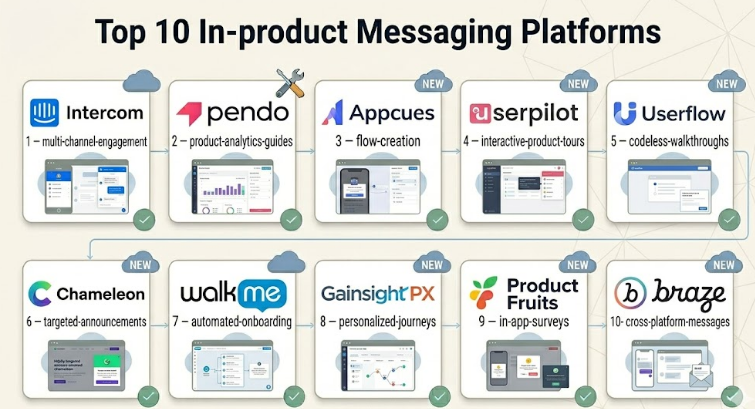
Top 10 In-product Messaging Platforms
#1 — Intercom
Short description :
Intercom is a customer communication platform widely used for in-app messaging, live chat, onboarding, support, and customer engagement.It is best suited for SaaS companies that want messaging, support, automation, and customer communication in one platform.Teams can use it to send targeted product announcements, onboarding prompts, support messages, and lifecycle campaigns.It is especially useful for product-led companies that want to combine human support with automated in-product communication.
Intercom works well for startups, SMBs, and mid-market companies, while larger companies may use it with stronger governance controls.
Key Features
- In-app messages and product announcements
- Live chat and customer support inbox
- User segmentation and targeting
- Automated workflows and bots
- Product tours and onboarding guidance
- Customer data and event-based triggers
- Multi-channel customer communication
Pros
- Strong all-in-one communication experience
- Good fit for product-led SaaS teams
- Combines support, onboarding, and engagement workflows
Cons
- Pricing can become expensive as usage grows
- Some advanced workflows may require setup expertise
- May be more than needed for simple in-app messaging only
Platforms / Deployment
Web / iOS / Android
Cloud
Security & Compliance
SSO, role-based access, encryption, and enterprise controls are available depending on plan.
SOC 2 and GDPR-related controls are commonly associated with Intercom, but buyers should verify current details directly during procurement.
Integrations & Ecosystem
Intercom has a strong ecosystem for sales, support, marketing, analytics, and customer success workflows. It is often used as a central customer communication layer.
- CRM integrations
- Help desk and support tools
- Product analytics tools
- Customer data platforms
- Marketing automation tools
- Webhooks and APIs
Support & Community
Intercom provides documentation, onboarding resources, customer support, and enterprise support options. Community strength is good because the platform is widely used across SaaS and support teams.
#2 — Pendo
Short description :
Pendo is a product experience platform focused on product analytics, in-app guides, user feedback, and product adoption.It is useful for product managers who want to understand user behavior and then guide users with targeted in-app messages.Pendo is often used by mid-market and enterprise SaaS companies that need analytics and adoption tools together.Teams can create walkthroughs, announcements, polls, tooltips, and onboarding flows without heavy engineering involvement.It is especially strong when product teams need data-driven messaging rather than simple popups.
Key Features
- In-app guides and walkthroughs
- Product usage analytics
- User segmentation
- Feedback and polls
- Feature adoption tracking
- Roadmap and product planning support
- No-code guide creation
Pros
- Strong product analytics combined with messaging
- Useful for product adoption and retention programs
- Good for data-driven product teams
Cons
- Can be complex for smaller teams
- Pricing may be high for early-stage startups
- Best value comes when analytics and messaging are both used
Platforms / Deployment
Web / iOS / Android
Cloud
Security & Compliance
Enterprise security controls are available depending on plan. Specific certifications and compliance details should be verified with the vendor. If not confirmed during procurement, treat as “Not publicly stated.”
Integrations & Ecosystem
Pendo integrates with common SaaS, analytics, CRM, and customer success systems. Its ecosystem supports teams that want product data connected to business workflows.
- CRM tools
- Customer success platforms
- Analytics platforms
- Data warehouses
- Feedback tools
- APIs and webhooks
Support & Community
Pendo offers documentation, onboarding support, training resources, and enterprise support options. Its community and educational resources are strong for product management teams.
#3 — Appcues
Short description :
Appcues is an in-app onboarding and product adoption platform built for creating user flows, checklists, announcements, and surveys.It is popular with SaaS product and growth teams that want to improve activation without building everything from scratch.The platform focuses heavily on no-code in-product experiences, making it easier for non-engineering teams to launch campaigns.
Appcues is useful for onboarding new users, highlighting features, collecting feedback, and guiding usersthrough key actions.It is a strong fit for startups, SMBs, and mid-market SaaS teams.
Key Features
- Product tours and onboarding flows
- In-app announcements
- Checklists and tooltips
- Segmentation and targeting
- User surveys and feedback
- A/B testing capabilities
- Analytics for flow performance
Pros
- Easy for product and growth teams to use
- Strong focus on onboarding and activation
- Good no-code experience builder
Cons
- May require technical setup for event tracking
- Advanced analytics may not replace a full product analytics platform
- Costs can increase with user volume
Platforms / Deployment
Web / iOS / Android
Cloud
Security & Compliance
Security features vary by plan. Enterprise buyers should verify SSO, audit logs, compliance, and data handling requirements directly.
Not publicly stated for all compliance details.
Integrations & Ecosystem
Appcues connects well with product analytics, CRM, email, and data tools. It is often used alongside analytics platforms rather than replacing them.
- Segment-style customer data tools
- Product analytics platforms
- CRM systems
- Email marketing tools
- Data warehouses
- Webhooks and APIs
Support & Community
Appcues provides documentation, onboarding guides, support resources, and customer education. Community strength is good among SaaS growth and product adoption teams.
#4 — Userpilot
Short description :
Userpilot is a product growth and onboarding platform designed for SaaS teams that want to improve activation, feature adoption, and retention.It allows teams to create in-app flows, tooltips, modals, banners, checklists, and surveys without heavy engineering work.Userpilot is especially useful for product-led growth teams that want behavior-based messaging and product usage insights.It supports segmentation, analytics, and experimentation, making it practical for teams that want to optimize user journeys.It is commonly used by startups, SMBs, and growing SaaS companies.
Key Features
- In-app messages and onboarding flows
- Feature adoption tracking
- User segmentation
- Checklists and tooltips
- Surveys and feedback collection
- Product analytics
- A/B testing and experimentation
Pros
- Strong balance between usability and feature depth
- Good for SaaS onboarding and activation
- Useful analytics for product-led growth teams
Cons
- May require thoughtful event setup
- Not ideal for teams needing only simple announcements
- Enterprise governance should be reviewed carefully
Platforms / Deployment
Web
Cloud
Security & Compliance
Security features vary by plan. SSO and advanced controls may depend on package level.
Specific compliance certifications should be verified directly. Not publicly stated if not confirmed.
Integrations & Ecosystem
Userpilot supports integrations with analytics, customer data, CRM, and communication tools. It fits well into SaaS growth stacks.
- Product analytics tools
- CRM systems
- Customer data platforms
- Email tools
- Webhooks
- APIs
Support & Community
Userpilot offers documentation, onboarding resources, and customer support. Its educational content is useful for product-led growth and onboarding teams.
#5 — Userflow
Short description :
Userflow is a no-code onboarding and in-app messaging platform focused on building product tours, checklists, surveys, and announcements.
It is designed for SaaS teams that want fast implementation and flexible onboarding experiences.
The platform is known for its clean builder experience and practical flow design capabilities.
Userflow works well for teams that want to launch onboarding journeys quickly without complex development cycles.It is best suited for startups, SMBs, and mid-market SaaS companies.
Key Features
- No-code onboarding flows
- Checklists and launchers
- In-app announcements
- Surveys and NPS-style feedback
- Segmentation and targeting
- Flow analytics
- Event-based triggers
Pros
- Clean and fast user experience
- Good for onboarding and product tours
- Practical for lean product teams
Cons
- May not be as broad as larger enterprise platforms
- Advanced customer success workflows may need other tools
- Mobile support should be verified based on requirements
Platforms / Deployment
Web
Cloud
Security & Compliance
Security controls vary by plan. Buyers should verify SSO, access controls, encryption, and compliance requirements.
Not publicly stated for all compliance details.
Integrations & Ecosystem
Userflow integrates with common SaaS data and communication tools. It is often used as a lightweight onboarding layer connected to analytics or CRM data.
- Customer data tools
- Product analytics tools
- CRM systems
- Help desk tools
- Webhooks
- APIs
Support & Community
Userflow provides documentation, customer support, and onboarding guidance. Community size is smaller than some larger platforms, but product-focused resources are useful.
#6 — Chameleon
Short description :
Chameleon is an in-product engagement platform focused on product tours, tooltips, launchers, surveys, and targeted user messaging.It is designed for product, growth, and customer success teams that need flexible in-app communication.Chameleon is useful for onboarding, feature adoption, self-serve support, and contextual guidance.It works well when teams want more control over how messages appear inside the product experience.It is a good fit for SaaS companies that want targeted product education without building everything internally.
Key Features
- Product tours and walkthroughs
- Tooltips and launchers
- In-app banners and modals
- Microsurveys and feedback
- Segmentation and targeting
- A/B testing
- Analytics and performance tracking
Pros
- Flexible in-app experience design
- Strong for product adoption campaigns
- Useful for contextual education and support
Cons
- Requires planning to avoid over-messaging users
- Some advanced use cases may need technical setup
- May need complementary analytics tools
Platforms / Deployment
Web
Cloud
Security & Compliance
Security features depend on plan and setup. Enterprise buyers should validate SSO, RBAC, audit logs, and compliance requirements directly.
Not publicly stated for all compliance details.
Integrations & Ecosystem
Chameleon integrates with product analytics, CRM, customer data, and support tools. It is often used as a layer on top of existing product data.
- Segment-style tools
- Product analytics platforms
- CRM tools
- Support tools
- Webhooks
- APIs
Support & Community
Chameleon provides documentation, onboarding help, and support options. It has a strong presence among product-led SaaS teams.
#7 — WalkMe
Short description :
WalkMe is a digital adoption platform used to guide users through software workflows with in-app support, walkthroughs, automation, and contextual help.It is especially strong for enterprises that need to train users across complex internal tools, SaaS applications, or business systemsWalkMe is broader than simple in-product messaging because it also focuses on digital adoption, workflow completion, and employee productivity.It is useful for onboarding employees, reducing training costs, improving software usage, and guiding users through complex processes.It is best suited for enterprise organizations with large software environments.
Key Features
- Digital adoption workflows
- In-app guidance and walkthroughs
- Contextual help and task support
- Workflow automation
- Analytics and adoption insights
- Enterprise governance features
- Support for complex application environments
Pros
- Strong enterprise digital adoption capabilities
- Good for complex workflows and employee training
- Useful across multiple business applications
Cons
- Can be more complex than startup-focused tools
- Implementation may require more planning
- May be too heavy for simple SaaS onboarding
Platforms / Deployment
Web / Enterprise applications
Cloud / Hybrid options may vary
Security & Compliance
Enterprise security controls are available depending on configuration. Buyers should verify SSO, RBAC, audit logs, encryption, and compliance requirements directly.
Integrations & Ecosystem
WalkMe integrates with enterprise software, business systems, analytics, and workflow tools. It is built for large organizations with complex digital ecosystems.
- CRM platforms
- HR and employee systems
- Enterprise SaaS tools
- Analytics platforms
- Workflow systems
- APIs and enterprise connectors
Support & Community
WalkMe provides enterprise onboarding, professional services, documentation, training, and support tiers. Community and partner ecosystem are stronger in enterprise digital adoption contexts.
#8 — Gainsight PX
Short description :
Gainsight PX is a product experience platform focused on product analytics, user engagement, and customer success alignment.It helps teams understand product usage and deliver targeted in-app engagements based on user behavior.Gainsight PX is especially useful for B2B SaaS companies that want product adoption data connected with customer success workflows.Teams can use it for onboarding, feature adoption, lifecycle messaging, and user feedback.It is best suited for mid-market and enterprise SaaS companies.
Key Features
- Product usage analytics
- In-app engagements
- User segmentation
- Feature adoption tracking
- Surveys and feedback
- Customer health insights
- Customer success alignment
Pros
- Strong fit for customer success-led SaaS teams
- Useful combination of analytics and engagement
- Good for adoption and retention programs
Cons
- May be complex for small teams
- Best value comes when connected to customer success processes
- Setup requires clear product tracking strategy
Platforms / Deployment
Web
Cloud
Security & Compliance
Enterprise-grade security features may be available depending on plan. Buyers should verify SSO, RBAC, audit logs, and compliance requirements directly.
Integrations & Ecosystem
Gainsight PX fits well in customer success and product analytics ecosystems. It is useful when product usage data needs to support account-level decisions.
- Customer success platforms
- CRM systems
- Analytics tools
- Data warehouses
- Survey tools
- APIs and data connectors
Support & Community
Gainsight provides documentation, customer education, support resources, and enterprise onboarding options. Community strength is high in customer success and product experience spaces.
#9 — Product Fruits
Short description :
Product Fruits is an in-app onboarding and product adoption platform for creating tours, checklists, tooltips, announcements, and feedback widgets.It is designed for SaaS teams that want a practical and accessible way to guide users inside their product.The platform is useful for onboarding new customers, promoting features, collecting feedback, and improving self-service adoption.It is often a good fit for small and mid-sized teams that need core in-product messaging without a very heavy enterprise setup.Product Fruits is also suitable for teams looking for straightforward implementation.
Key Features
- Product tours and walkthroughs
- Onboarding checklists
- Tooltips and hints
- Announcements and newsfeed
- Feedback collection
- Knowledge base widgets
- User segmentation
Pros
- Practical feature set for SaaS onboarding
- Easier to approach for smaller teams
- Good mix of messaging and self-help features
Cons
- May not match larger platforms in enterprise analytics depth
- Advanced experimentation may be limited
- Integration depth should be checked for complex stacks
Platforms / Deployment
Web
Cloud
Security & Compliance
Security and compliance details vary by plan. Buyers should verify SSO, access controls, encryption, and compliance needs directly.
Not publicly stated for all certifications.
Integrations & Ecosystem
Product Fruits supports useful integrations for SaaS onboarding and user support. It can connect with common tools used by product and success teams.
- Analytics tools
- Customer support tools
- Knowledge base tools
- CRM systems
- Webhooks
- APIs
Support & Community
Product Fruits provides documentation, support resources, and onboarding guidance. Community size is smaller than major enterprise tools but suitable for product adoption use cases.
#10 — Braze
Short description :
Braze is a customer engagement platform that supports in-app messages, push notifications, email, SMS, and cross-channel campaigns.It is not only an in-product messaging tool, but it is widely used by mobile-first and consumer-facing businesses for lifecycle communication.Braze is strong for teams that need personalized engagement across web, mobile, and other communication channels.It is useful for onboarding, promotions, retention campaigns, personalized recommendations, and behavior-based messaging.It is best suited for mid-market and enterprise teams with mature marketing, growth, or lifecycle operations.
Key Features
- In-app messages
- Push notifications
- Email and SMS campaigns
- Audience segmentation
- Journey orchestration
- Personalization workflows
- Campaign analytics
Pros
- Strong multi-channel engagement platform
- Good for mobile-first and consumer products
- Useful for lifecycle marketing and retention
Cons
- May be too advanced for simple SaaS onboarding
- Requires strong data and campaign operations
- Pricing and implementation can be complex
Platforms / Deployment
Web / iOS / Android
Cloud
Security & Compliance
Enterprise security controls are available depending on plan and configuration. Buyers should verify SSO, RBAC, encryption, audit logs, and compliance needs directly.
Integrations & Ecosystem
Braze has a broad ecosystem for customer data, marketing, analytics, and mobile engagement. It works best when connected to clean customer data.
- Customer data platforms
- Analytics tools
- Data warehouses
- Marketing automation tools
- Mobile app platforms
- APIs and SDKs
Support & Community
Braze provides documentation, onboarding resources, customer support, and enterprise services. Its ecosystem is strong among lifecycle marketing, growth, and mobile engagement teams.
Comparison Table (Top 10)
| Tool Name | Best For | Platform(s) Supported | Deployment (Cloud/Self-hosted/Hybrid) | Standout Feature | Public Rating |
|---|---|---|---|---|---|
| Intercom | SaaS support, onboarding, and customer messaging | Web / iOS / Android | Cloud | Combines chat, support, bots, and in-app messaging | N/A |
| Pendo | Product analytics and adoption | Web / iOS / Android | Cloud | Analytics-driven in-app guides | N/A |
| Appcues | SaaS onboarding and activation | Web / iOS / Android | Cloud | No-code onboarding flows | N/A |
| Userpilot | Product-led growth teams | Web | Cloud | Behavior-based onboarding and adoption | N/A |
| Userflow | Fast no-code onboarding | Web | Cloud | Clean flow builder and checklists | N/A |
| Chameleon | Flexible product adoption campaigns | Web | Cloud | Tooltips, launchers, surveys, and tours | N/A |
| WalkMe | Enterprise digital adoption | Web / Enterprise applications | Cloud / Hybrid varies | Complex workflow guidance | N/A |
| Gainsight PX | Customer success and product adoption | Web | Cloud | Product analytics tied to customer success | N/A |
| Product Fruits | SMB SaaS onboarding | Web | Cloud | Affordable onboarding and self-help features | N/A |
| Braze | Cross-channel customer engagement | Web / iOS / Android | Cloud | In-app plus push, email, and lifecycle campaigns | N/A |
Evaluation & In-product Messaging Platforms
| Tool Name | Core (25%) | Ease (15%) | Integrations (15%) | Security (10%) | Performance (10%) | Support (10%) | Value (15%) | Weighted Total (0–10) |
|---|---|---|---|---|---|---|---|---|
| Intercom | 9 | 8 | 9 | 8 | 8 | 9 | 7 | 8.30 |
| Pendo | 9 | 7 | 8 | 8 | 8 | 8 | 7 | 8.00 |
| Appcues | 8 | 9 | 8 | 7 | 8 | 8 | 8 | 8.05 |
| Userpilot | 8 | 8 | 8 | 7 | 8 | 7 | 8 | 7.80 |
| Userflow | 8 | 9 | 7 | 7 | 8 | 7 | 8 | 7.80 |
| Chameleon | 8 | 8 | 8 | 7 | 8 | 7 | 7 | 7.70 |
| WalkMe | 9 | 6 | 8 | 9 | 8 | 9 | 6 | 7.90 |
| Gainsight PX | 8 | 7 | 8 | 8 | 8 | 8 | 7 | 7.70 |
| Product Fruits | 7 | 8 | 7 | 6 | 7 | 7 | 9 | 7.35 |
| Braze | 9 | 7 | 9 | 8 | 9 | 8 | 6 | 8.00 |
These scores are comparative and should be treated as a buyer’s starting point, not a final verdict. A higher score does not always mean the tool is best for every company. For example, WalkMe may be excellent for enterprise digital adoption but too heavy for a small SaaS startup. Product Fruits may score lower on enterprise depth but still offer strong value for smaller teams. Always validate pricing, security, integrations, and implementation effort before purchase.
Which In-product Messaging Platforms
Solo / Freelancer
Solo builders and freelancers usually need simple onboarding, announcements, and feedback without complex setup. Userflow, Product Fruits, and Appcues are practical choices because they are easier to understand and can help launch onboarding flows quickly.
For very small products, avoid buying a large enterprise platform too early. Start with a tool that supports basic tours, checklists, and simple targeting.
SMB
SMBs often need stronger onboarding, feature discovery, and activation workflows. Appcues, Userpilot, Userflow, Product Fruits, and Chameleon are good options depending on budget and required depth.
If the company also needs live chat and support, Intercom may be a better fit because it combines customer communication and in-app engagement.
Mid-Market
Mid-market SaaS teams usually need segmentation, analytics, A/B testing, lifecycle messaging, and integration with CRM or customer success tools. Pendo, Intercom, Userpilot, Appcues, Chameleon, and Gainsight PX are strong choices.
The best option depends on whether the team is product-led, support-led, or customer-success-led.
Enterprise
Enterprise teams should prioritize governance, security, scale, integration depth, and administrative controls. WalkMe, Pendo, Gainsight PX, Braze, and Intercom are stronger options for larger organizations.
Enterprises should check SSO, RBAC, audit logs, data residency, privacy controls, support SLAs, and procurement requirements before shortlisting.
Budget vs Premium
Budget-conscious teams should consider Product Fruits, Userflow, Userpilot, or Appcues depending on required functionality. Premium teams with larger requirements may prefer Intercom, Pendo, WalkMe, Braze, or Gainsight PX.
The lowest price is not always the best value. A cheaper tool can become costly if it lacks needed integrations or requires too much manual work.
Feature Depth vs Ease of Use
For ease of use, Userflow, Appcues, and Product Fruits are strong options. For deeper product analytics and enterprise capabilities, Pendo, Gainsight PX, WalkMe, and Braze are more powerful.
Teams should avoid choosing the deepest platform if their internal process is not mature enough to use it properly.
Integrations & Scalability-
If integrations are critical, Intercom, Braze, Pendo, Gainsight PX, and WalkMe are stronger candidates. These platforms fit better into larger stacks involving CRM, analytics, customer success, data warehouses, and marketing tools.
For smaller teams, integrations should still be checked, but simplicity may matter more than ecosystem size.
Security & Compliance Needs
Security-focused buyers should ask vendors about SSO, SAML, MFA, RBAC, encryption, audit logs, data retention, GDPR readiness, SOC 2, ISO 27001, and HIPAA if relevant.
Do not assume compliance based on brand reputation. Always verify the latest security documents, contract terms, and data processing controls before final selection.
Frequently Asked Questions (FAQs)
1. What is an in-product messaging platform?
An in-product messaging platform helps teams communicate with users inside a web or mobile application. It can show messages, tips, tours, banners, surveys, and onboarding flows based on user behavior or profile data.
2. How is in-product messaging different from email marketing?
Email reaches users outside the product, while in-product messaging appears when users are actively using the product. This makes it more contextual and useful for onboarding, feature discovery, and real-time guidance.
3. How do these platforms usually price their products?
Pricing often depends on monthly active users, tracked users, seats, message volume, or selected feature tiers. Some tools also offer enterprise pricing based on custom requirements.
4. How long does implementation usually take?
Basic implementation can be quick if the product only needs simple messages. More advanced setups with event tracking, segmentation, analytics, and integrations may require more planning and engineering support.
5. What are common mistakes teams make with in-product messaging?
The biggest mistake is showing too many messages too often. Other common mistakes include weak segmentation, unclear goals, poor message timing, and not measuring whether messages improve user behavior.
6. Are in-product messaging platforms secure?
Many mature platforms offer security controls, but exact features vary by vendor and plan. Buyers should verify SSO, RBAC, encryption, audit logs, compliance documents, and data handling before purchasing.
7. Can in-product messaging improve user onboarding?
Yes, it can help users understand key features, complete setup steps, and reach value faster. However, messaging works best when paired with a clear onboarding strategy and good product design.
8. Do these tools require developers?
Most platforms offer no-code builders, but developers are often needed for installation, user identification, event tracking, and deeper integrations. After setup, product and growth teams can usually manage campaigns directly.
9. Can these platforms integrate with CRM and analytics tools?
Yes, many platforms integrate with CRM, analytics, customer data, support, and marketing tools. Buyers should verify specific integrations before choosing a platform.
10. What is the best alternative to an in-product messaging platform?
Alternatives include email marketing tools, customer support chat, knowledge bases, custom-built onboarding flows, product analytics tools, and digital adoption platforms. The best alternative depends on whether the main goal is education, support, adoption, or marketing.
Conclusion
In-product messaging platforms are now an important part of modern SaaS and digital product growth. They help teams guide users inside the product, improve onboarding, announce features, collect feedback, reduce confusion, and support long-term adoption. However, there is no single best platform for every company. Intercom may be best for teams that want support and messaging together, Pendo may suit data-driven product teams, Appcues and Userflow may work well for simpler onboarding, WalkMe may fit enterprise digital adoption, and Braze may be stronger for cross-channel lifecycle engagement.
