Introduction
Corporate Performance Management (CPM) refers to software and processes that help organizations plan, budget, forecast, analyze, and report on business performance. In simple terms, CPM tools bring finance, operations, and strategy together into a single system so leaders can make better decisions using real-time data.
In today’s fast-moving business environment, CPM matters more than ever. Organizations are dealing with uncertain markets, distributed teams, and growing data complexity. CPM tools now include automation, predictive analytics, and AI-driven insights, helping companies move from reactive reporting to proactive decision-making.
Real-world use cases:
- Financial planning and budgeting across departments
- Scenario modeling for business decisions
- Real-time KPI tracking and performance dashboards
- Regulatory and compliance reporting
- Strategic alignment across business units
What buyers should evaluate:
- Ease of use and adoption
- Forecasting and planning capabilities
- Integration with ERP, CRM, and BI tools
- Security and compliance readiness
- Scalability for growing businesses
- Reporting and visualization features
- Automation and AI capabilities
- Pricing and total cost of ownership
Best for: Finance teams, CFOs, operations leaders, and mid-to-large organizations that need structured planning and reporting across departments.
Not ideal for: Very small businesses or freelancers who may only need simple accounting or spreadsheet-based planning tools instead of full CPM systems.
Key Trends in Corporate Performance Management (CPM)
- Increased adoption of AI-driven forecasting and predictive analytics
- Shift toward cloud-native CPM platforms for flexibility and scalability
- Integration of real-time data pipelines instead of batch reporting
- Growing demand for self-service analytics for business users
- Expansion of embedded planning within operational workflows
- Stronger focus on data governance and compliance frameworks
- Rise of collaborative planning environments across departments
- Use of low-code/no-code interfaces for customization
- Greater emphasis on API-first architecture and integrations
- Pricing models shifting toward subscription-based SaaS tiers
How We Selected These Tools (Methodology)
- Evaluated market adoption and enterprise usage trends
- Assessed feature completeness across planning, budgeting, and reporting
- Reviewed performance and reliability indicators
- Considered security and compliance capabilities
- Analyzed integration ecosystem and extensibility
- Evaluated ease of use and onboarding experience
- Included tools suitable for different company sizes
- Considered vendor maturity and product roadmap direction
- Balanced enterprise-grade platforms and flexible mid-market tools
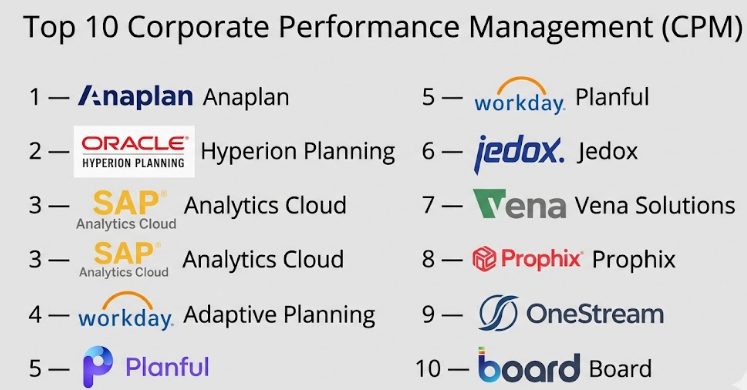
Top 10 Corporate Performance Management (CPM)
#1 — Anaplan
Short description: A cloud-based planning platform designed for enterprise-scale financial planning and operational modeling.
Key Features
- Connected planning across departments
- Real-time scenario modeling
- Workflow automation
- Advanced forecasting tools
- Collaboration and version control
Pros
- Highly scalable for large enterprises
- Strong modeling flexibility
Cons
- Steep learning curve
- Premium pricing
Platforms / Deployment
Web / Cloud
Security & Compliance
SSO, RBAC, encryption; other certifications not publicly stated
Integrations & Ecosystem
Integrates with ERP, CRM, and data warehouses.
- SAP
- Salesforce
- Snowflake
- APIs
Support & Community
Strong enterprise support; extensive documentation and partner ecosystem
#2 — Oracle Hyperion Planning
Short description: A traditional enterprise CPM solution with strong financial planning and consolidation features.
Key Features
- Financial consolidation
- Budgeting and forecasting
- Regulatory reporting
- Audit trails
- Data integration
Pros
- Trusted enterprise solution
- Deep financial capabilities
Cons
- Complex implementation
- Requires specialized expertise
Platforms / Deployment
Web / Cloud / On-premises
Security & Compliance
Enterprise-grade controls; certifications not publicly stated
Integrations & Ecosystem
- Oracle ERP
- Data warehouses
- APIs
Support & Community
Strong enterprise support; requires skilled administrators
#3 — SAP Analytics Cloud
Short description: Combines BI, planning, and predictive analytics in a single platform.
Key Features
- Integrated BI and planning
- Predictive analytics
- Data visualization
- Collaboration tools
- Scenario simulation
Pros
- Unified analytics and planning
- Strong SAP ecosystem integration
Cons
- Best suited for SAP users
- Can be complex for beginners
Platforms / Deployment
Web / Cloud
Security & Compliance
Enterprise security controls; details not publicly stated
Integrations & Ecosystem
- SAP S/4HANA
- Data sources
- APIs
Support & Community
Strong vendor support and enterprise adoption
#4 — Workday Adaptive Planning
Short description: A flexible CPM solution focused on budgeting, forecasting, and workforce planning.
Key Features
- Financial and workforce planning
- Scenario modeling
- Rolling forecasts
- Reporting dashboards
- Collaboration
Pros
- User-friendly interface
- Strong HR and finance integration
Cons
- Limited advanced modeling compared to some tools
- Pricing varies
Platforms / Deployment
Web / Cloud
Security & Compliance
SSO, encryption; details not publicly stated
Integrations & Ecosystem
- Workday
- ERP systems
- APIs
Support & Community
Good documentation and onboarding support
#5 — Planful
Short description: A modern CPM platform for financial planning and continuous forecasting.
Key Features
- Continuous planning
- Financial close automation
- Reporting and dashboards
- Workflow management
- Data consolidation
Pros
- Strong usability
- Good mid-market fit
Cons
- Limited advanced AI features
- Customization can be limited
Platforms / Deployment
Web / Cloud
Security & Compliance
Not publicly stated
Integrations & Ecosystem
- ERP tools
- CRM systems
- APIs
Support & Community
Reliable support; growing community
#6 — Jedox
Short description: A CPM and planning platform with strong Excel integration.
Key Features
- Excel-like interface
- Data integration
- Planning and forecasting
- Workflow automation
- Reporting
Pros
- Familiar interface for finance teams
- Flexible deployment
Cons
- UI can feel dated
- Requires setup effort
Platforms / Deployment
Web / Windows / Cloud / On-premises
Security & Compliance
Not publicly stated
Integrations & Ecosystem
- Excel
- ERP systems
- APIs
Support & Community
Good support; moderate community presence
#7 — Vena Solutions
Short description: Excel-based CPM platform designed for finance teams needing familiar workflows.
Key Features
- Excel integration
- Budgeting and forecasting
- Workflow management
- Data consolidation
- Reporting
Pros
- Easy adoption for Excel users
- Strong finance focus
Cons
- Limited beyond finance use cases
- Less flexible for large enterprises
Platforms / Deployment
Web / Cloud
Security & Compliance
Not publicly stated
Integrations & Ecosystem
- Excel
- ERP systems
- APIs
Support & Community
Strong customer support and onboarding
#8 — Prophix
Short description: CPM solution focused on budgeting, planning, and reporting for mid-sized organizations.
Key Features
- Budgeting and forecasting
- Financial reporting
- Workflow automation
- Data integration
- Dashboards
Pros
- Good value for mid-market
- Easy to use
Cons
- Limited enterprise scalability
- Advanced analytics limited
Platforms / Deployment
Web / Cloud
Security & Compliance
Not publicly stated
Integrations & Ecosystem
- ERP systems
- APIs
Support & Community
Good support; smaller community
#9 — OneStream
Short description: Enterprise CPM platform focused on financial consolidation and performance management.
Key Features
- Financial consolidation
- Planning and forecasting
- Reporting and analytics
- Workflow automation
- Data integration
Pros
- Strong consolidation capabilities
- Enterprise-grade platform
Cons
- Complex implementation
- Higher cost
Platforms / Deployment
Web / Cloud / On-premises
Security & Compliance
Enterprise controls; details not publicly stated
Integrations & Ecosystem
- ERP systems
- Data platforms
- APIs
Support & Community
Strong enterprise support
#10 — Board
Short description: CPM platform combining planning, analytics, and reporting in one system.
Key Features
- Unified planning and analytics
- Data visualization
- Forecasting
- Workflow management
- Scenario analysis
Pros
- All-in-one platform
- Good analytics capabilities
Cons
- Learning curve
- Customization complexity
Platforms / Deployment
Web / Cloud / On-premises
Security & Compliance
Not publicly stated
Integrations & Ecosystem
- ERP systems
- Data sources
- APIs
Support & Community
Reliable support; moderate ecosystem
Comparison Table (Top 10)
| Tool Name | Best For | Platform(s) Supported | Deployment | Standout Feature | Public Rating |
|---|---|---|---|---|---|
| Anaplan | Enterprise planning | Web | Cloud | Connected planning | N/A |
| Oracle Hyperion Planning | Large enterprises | Web | Hybrid | Financial consolidation | N/A |
| SAP Analytics Cloud | SAP users | Web | Cloud | Integrated BI + planning | N/A |
| Workday Adaptive Planning | Mid-large companies | Web | Cloud | Workforce planning | N/A |
| Planful | Mid-market | Web | Cloud | Continuous planning | N/A |
| Jedox | Excel users | Web, Windows | Hybrid | Excel integration | N/A |
| Vena Solutions | Finance teams | Web | Cloud | Excel-based workflows | N/A |
| Prophix | SMB to mid-market | Web | Cloud | Ease of use | N/A |
| OneStream | Enterprises | Web | Hybrid | Financial consolidation | N/A |
| Board | Unified analytics | Web | Hybrid | Planning + analytics | N/A |
Evaluation & Scoring of Corporate Performance Management (CPM)
| Tool Name | Core (25%) | Ease (15%) | Integrations (15%) | Security (10%) | Performance (10%) | Support (10%) | Value (15%) | Weighted Total |
|---|---|---|---|---|---|---|---|---|
| Anaplan | 9 | 6 | 8 | 8 | 9 | 8 | 6 | 7.8 |
| Oracle Hyperion Planning | 9 | 5 | 8 | 8 | 8 | 8 | 6 | 7.6 |
| SAP Analytics Cloud | 8 | 6 | 9 | 8 | 8 | 8 | 7 | 7.7 |
| Workday Adaptive Planning | 8 | 8 | 7 | 7 | 8 | 8 | 7 | 7.6 |
| Planful | 7 | 8 | 7 | 7 | 7 | 7 | 8 | 7.4 |
| Jedox | 7 | 7 | 7 | 7 | 7 | 7 | 7 | 7.0 |
| Vena Solutions | 7 | 8 | 6 | 7 | 7 | 8 | 7 | 7.2 |
| Prophix | 7 | 8 | 6 | 7 | 7 | 7 | 8 | 7.2 |
| OneStream | 9 | 6 | 8 | 8 | 9 | 8 | 6 | 7.9 |
| Board | 8 | 7 | 7 | 7 | 8 | 7 | 7 | 7.5 |
How to interpret the scores:
- Scores are comparative within this category, not absolute
- A higher score reflects stronger balance across weighted criteria
- Enterprise tools often score high on features but lower on ease/value
- Mid-market tools tend to score higher on usability and cost efficiency
- Choose based on your specific needs, not just total score
Which Corporate Performance Management (CPM)
Solo / Freelancer
Most CPM tools are overkill. Basic accounting or spreadsheet tools are sufficient.
SMB
Tools like Planful, Prophix, and Vena Solutions offer a balance of cost and functionality.
Mid-Market
Workday Adaptive Planning and Jedox provide strong capabilities without enterprise complexity.
Enterprise
Anaplan, Oracle Hyperion, OneStream, and SAP Analytics Cloud are better suited for scale and complexity.
Budget vs Premium
- Budget: Prophix, Planful
- Premium: Anaplan, Oracle, OneStream
Feature Depth vs Ease of Use
- Feature-heavy: Oracle, OneStream
- Easy to use: Workday Adaptive Planning, Vena
Integrations & Scalability
- Best integrations: SAP Analytics Cloud, Anaplan
- Moderate: Planful, Prophix
Security & Compliance Needs
- Enterprise-grade: Oracle, SAP, OneStream
- Moderate: Mid-market tools
Frequently Asked Questions (FAQs)
1. What is the typical pricing model for CPM tools?
Most CPM tools follow subscription-based pricing. Costs vary based on users, features, and data volume.
2. How long does implementation take?
Implementation can range from a few weeks for SMB tools to several months for enterprise solutions.
3. Are CPM tools difficult to use?
Some tools have a learning curve, especially enterprise-grade platforms, but modern solutions focus on usability.
4. Can CPM tools integrate with existing systems?
Yes, most CPM tools integrate with ERP, CRM, and BI platforms using APIs and connectors.
5. What are common mistakes when choosing CPM tools?
Choosing based only on price or features without considering scalability and integration needs.
6. Are CPM tools secure?
Most tools include enterprise security features like encryption and access controls, though certifications vary.
7. Can CPM tools scale with business growth?
Yes, especially cloud-based platforms designed for enterprise scalability.
8. Is training required to use CPM tools?
Yes, especially for complex tools. Many vendors provide onboarding and training programs.
9. How do CPM tools differ from BI tools?
CPM focuses on planning and forecasting, while BI tools focus on data analysis and visualization.
10. Can businesses switch CPM tools easily?
Switching can be complex due to data migration and process changes, so careful planning is required.
Conclusion
Corporate Performance Management (CPM) tools have evolved into essential platforms for organizations that want better control over planning, forecasting, and performance tracking. While enterprise tools like Anaplan, Oracle Hyperion, and OneStream offer deep capabilities and scalability, mid-market solutions such as Planful, Prophix, and Vena provide a more accessible entry point with strong usability. The right choice ultimately depends on your company size, budget, integration needs, and complexity of financial processes. Instead of chasing a single “best” tool, focus on aligning the platform with your operational goals. A practical next step is to shortlist two or three tools, run a pilot with real data, and validate integration, usability, and security before making a final decision.
